
All Activity
- Past hour
-
 McFarland2024 joined the community
 -
 Elietthesanchez joined the community
 -
 Realamal joined the community
 -
 ViktorAguilar joined the community
 -
 Lorenaimensa joined the community
 -
 152LEVAN joined the community
 -
 petermanning522 joined the community
 -
 Yahyaalbalool joined the community
 -
 Migueloo joined the community
 -
 01937172070 joined the community
 -
Thanks for the reply. New hardware is going in the existing rack mounted case so want to go with a new mobo and whatnot. Chers and thanks again
- Today
-
Hi. I wouldn’t say it’s the highest priority but I’m sure we’ll get there. Thanks.
-

Pausing for more than 60 seconds kills the play session — cannot resume without exiting the player
Luke replied to brianpooe's topic in Apple TV
Hi there, let's look at an example. Please attach the information requested in how to report a media playback issue. Thanks! -
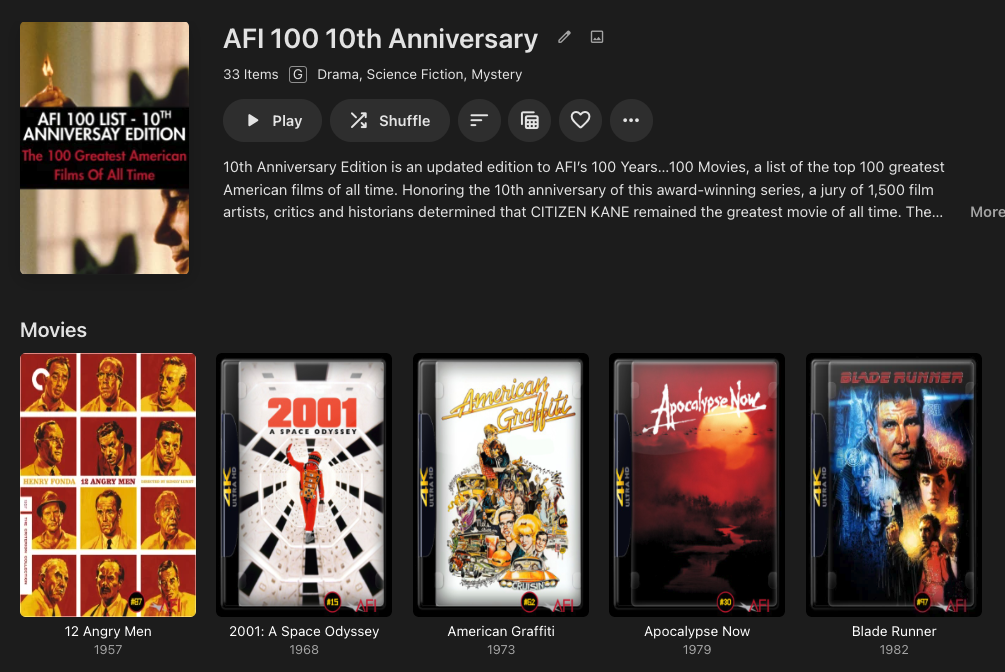
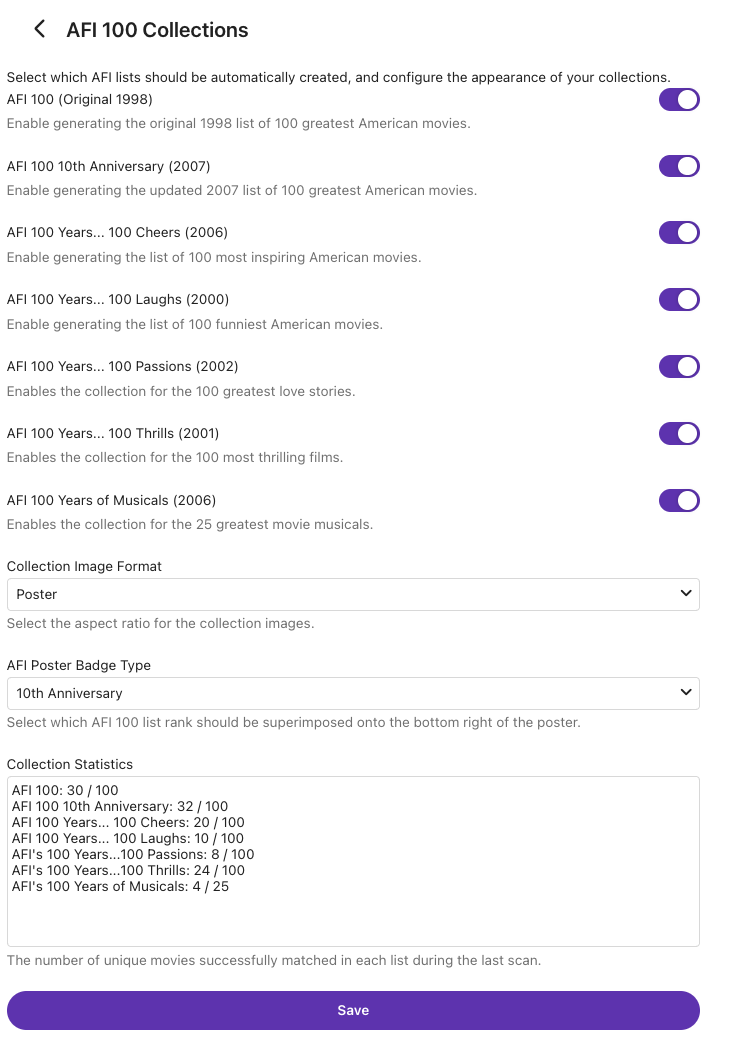
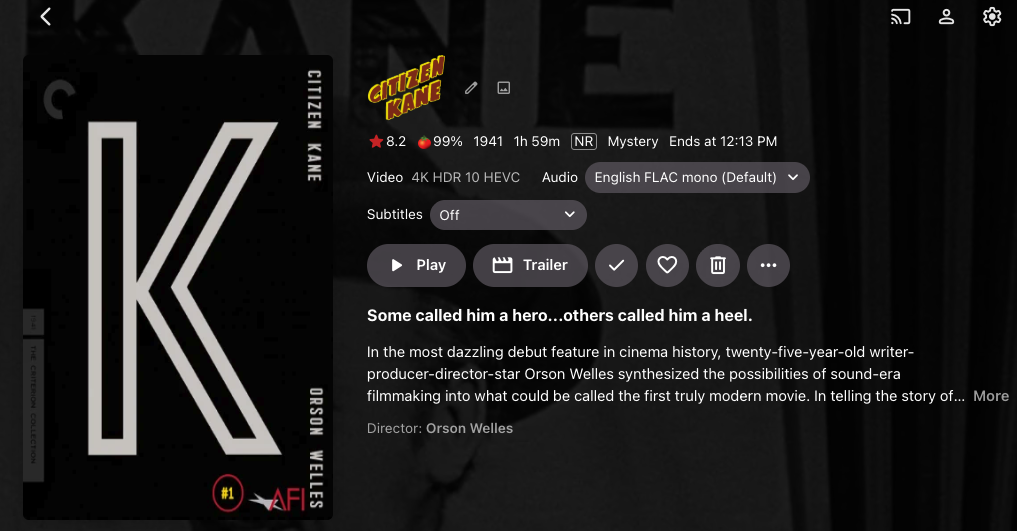
I put together this AFI 100 movies... 100 years plugin. Would there be interest in formally submitting it to the plugin catalogue with no charge? Features: Generates Collections based on the AFI 100 lists Toggles in Plugin Configuration allow you to choose which lists it creates Collections for Superimpose the AFI 100 rank on the Primary Image Self-Contained, no API calls Uses modern Plugin Configuration (no html files) Here are some screenshots:
-

Atrium — a native tvOS app for your Emby server
Grumpy1 replied to vdatanet's topic in Third Party Apps
glad i could help in any little way The app is amazing already -

Pausing for more than 60 seconds kills the play session — cannot resume without exiting the player
brianpooe posted a topic in Apple TV
On Emby for Apple TV, pausing for longer than about 60 seconds permanently breaks resume. Pressing play does nothing. The only recovery is to back out of the player and re-enter the item. Two things appear to combine: 1. On pause, the Apple TV client immediately POSTs /Sessions/Playing/Stopped for the current PlaySessionId, which the server acts on ("Removed playSession"). 2. The client then stops sending progress pings, so 60 seconds later the server's idle reaper fires ("PlaySession ... has gone idle while playing") and removes the session for good. Meanwhile the client loops /Items/<id>/PlaybackInfo with StartTimeTicks=0, not the paused position, and never recovers. This is NOT transcoding- or hardware-related. See the "Things already ruled out" section below: 9 of 10 affected sessions were direct-stream (video copy) with no hardware decoder or encoder involved at all. VERSIONS Emby Server: 4.9.5.0 Client: Emby for Apple TV 2.0.9 (1). Also reproduced on 2.0.8 (4). Device: Apple TV 4K, tvOS 26.6 User-Agent: AppleCoreMedia/1.0.0.23L773 (Apple TV; U; CPU OS 26_6 like Mac OS X; en_us) Server OS: Debian in an unprivileged LXC on Proxmox (Linux 7.0.6-2-pve), official linuxserver/emby Docker image Media: MKV (both h264 and HEVC 10-bit affected). The client cannot Direct Play MKV, so every session is HLS, logged as TranscodeReasons=ContainerNotSupported The server is reached through a reverse proxy on the LAN. See "Things already ruled out" - the client itself sends the Stopped request, so this is not a proxy timeout. STEPS TO REPRODUCE 1. Play any MKV title from Emby for Apple TV (any title that produces an HLS session rather than Direct Play). 2. Pause mid-playback. 3. Wait more than 60 seconds. 4. Press play. Expected: playback resumes from the paused position. Actual: playback does not resume. Backing out of the player and re-entering the item is the only way to continue. Pauses shorter than about 60 seconds resume normally, which is what makes the 60-second boundary so visible. SERVER LOG - FULL SEQUENCE Game of Thrones S3E1, item 30853, PlaySessionId eb4fdfc5... API keys, user IDs and hostname redacted; lines trimmed for width. 17:18:14.762 PlaystateService: POST /emby/Sessions/Playing/Progress 17:18:14.762 SessionManager: Playback progress (Pause) reported by app Emby for Apple TV 2.0.9 (1) on Apple TV playing Game of Thrones - S3, Ep1. Position: 3194000 ms. PlaySessionId: eb4fdfc5... --- client sends Stopped 42 ms after pausing --- 17:18:14.804 PlaystateService: POST /emby/Sessions/Playing/Stopped 17:18:14.804 SessionManager: Playback stopped reported by app Emby for Apple TV 2.0.9 (1) ... Position: 3194076 ms. PlaySessionId: eb4fdfc5... IsPaused: True 17:18:14.804 SessionManager: Removed playSession eb4fdfc5... from session c6f42131... --- progress arrives for the session that was just removed --- 17:18:14.814 PlaystateService: POST /emby/Sessions/Playing/Progress 17:18:14.814 SessionManager: Setting _lastPlaySessionId for session c6f42131... to eb4fdfc5... 17:18:14.815 SessionManager: Playback progress (Pause) ... Position: 3194076 ms 17:18:14.865 MediaInfoService: POST /emby/Items/30853/PlaybackInfo?... &StartTimeTicks=0&IsPlayback... 17:18:18.340 MediaInfoService: POST /emby/Items/30853/PlaybackInfo?... &StartTimeTicks=0&IsPlayback... --- exactly 60 seconds later --- 17:19:14.815 SessionManager: PlaySession eb4fdfc5... has gone idle while playing 17:19:14.815 SessionManager: Playback stopped reported by app ... Position: 3194076 ms. IsPaused: True 17:19:14.815 SessionManager: Removed playSession eb4fdfc5... from session c6f42131... 17:19:18.392 MediaInfoService: POST /emby/Items/30853/PlaybackInfo?... &StartTimeTicks=0&IsPlayback... Two details stand out: - The PlaybackInfo retries carry StartTimeTicks=0, not the paused position (3194076 ms). Even if a new session were established, it would not resume where the user paused. - Between 17:18:14.815 and 17:19:14.815 the client sends no progress pings at all, which is what trips the 60-second idle reaper. THE SAME SESSION REPEATEDLY FAILING TO REATTACH Love Hard, direct-stream session 8fe401b7..., with the position frozen while the reaper fires over and over: 20:46:53.381 PlaySession 8fe401b7... has gone idle while playing Position: 371567 ms 20:48:23.736 PlaySession 8fe401b7... has gone idle while playing Position: 378048 ms 20:50:03.858 PlaySession 8fe401b7... has gone idle while playing Position: 378048 ms 20:54:04.961 Playback stopped reported by app ... Position: 378048 ms 20:55:04.996 PlaySession 8fe401b7... has gone idle while playing Position: 378048 ms THINGS ALREADY RULED OUT Not hardware transcoding. Every play session that hit the 60-second reaper was mapped back to its own ffmpeg log by PlaySessionId: PlaySessionId ffmpeg session type --------------- ------------------- b09fd03a... direct stream 8fe401b7... direct stream 0495c2b9... direct stream c8e0f0f9... direct stream fac7c767... direct stream c710f5fe... direct stream 42bb9945... direct stream ce82d71a... direct stream 9f88e55f... direct stream 3741b140... transcode Nine of ten never touched the GPU. The processing plan for one of the affected direct-stream sessions: >>>>>> Processing Plan Name CanDoInHW WillDoInHW Reason Copy video stream >> False False Software Codec VideoInput >> False False Not a hardware decoder VideoOutput >> False False Not a hardware encoder Copy video stream >> False False Software Codec Not the reverse proxy. The /Sessions/Playing/Stopped request originates from the client and is logged as "reported by app". The server is honouring a request it was sent, not timing out a connection. Not a specific codec or title. Reproduced across h264 direct-stream and HEVC 10-bit NVENC transcode sessions, on multiple titles, and under two different user accounts. Not new in 2.0.9. "has gone idle while playing" appears in logs from client version 2.0.8 (4) as well. Not configurable. There is no exposed setting for the idle timeout in system.xml or encoding.xml. QUESTIONS FOR THE DEVS 1. Why does the Apple TV client POST /Sessions/Playing/Stopped when the user pauses, rather than reporting a paused progress state and continuing to ping? 2. Why do the subsequent PlaybackInfo retries use StartTimeTicks=0 instead of the paused position? 3. Should the server's 60-second "gone idle while playing" reaper apply to a session the client has explicitly reported as paused? A paused session going quiet seems like expected behaviour rather than an abandoned one. Happy to supply full unredacted server logs, ffmpeg session logs, or a fresh capture of a deliberate reproduction if that would help. -

Atrium — a native tvOS app for your Emby server
vdatanet replied to vdatanet's topic in Third Party Apps
This one is almost entirely yours: nearly everything in it came from what was reported in this thread, or from digging into what was reported. Thank you — genuinely. The two focus bugs. Both are fixed, and looking into them turned out to be worth far more than the two screens where they were spotted. The last row of a poster grid: when it isn't full — which is almost always — and you came down on a column sitting above the gap, the remote did nothing and those titles couldn't even be opened. That was in every grid in the app, not just Movies and TV Shows. And the focus now lands where it should rather than wherever is nearest: coming down from the top bar takes you back to the artwork you were on instead of the middle one, on a title's page coming up from a row returns you to the buttons instead of the audio button, and coming down from the bar now reaches the Home feature, which used to be skipped entirely. Music playlists now show up. This one nobody reported, and it's the one item on the list that only ever went wrong on this server: your music playlists simply didn't appear. The app was asking for something the server doesn't send for playlists, so it threw them all away. It now works it out for itself — and it shows only your own, not other users'. Continue Watching shows the episode name, as asked here, in the same form the server shows it. The rest are small and you'll only notice them if they were annoying you: in Favourites no artwork is left off the edge of the screen any more, the progress bar reads over bright thumbnails, and the search field no longer has the bar sitting on top of its text. There's also a switch in Settings > Tools and Information that hands video preparation back to the server. You don't need it if everything plays well — it's there so that, when something doesn't, we can compare both paths instead of guessing. Please keep them coming. Sitting here, a test library has tidy full rows and nothing looks wrong; the things that actually get in the way only show up on a real library with a remote in hand. -
Atrium — a native tvOS app for your Emby server
vdatanet replied to vdatanet's topic in Third Party Apps
Good question, and the number is doing a bad job of answering it. It isn't how many titles the library has — it's how many can be used as the featured item, and the app only ever looks at the 16 most recently added in that library. Of those, it counts the ones that have a backdrop image on the server, because that image is the whole featured area; a title without one can't be shown there. So "16" means all sixteen recent ones qualify, and "10" means six of that library's sixteen have no backdrop. Whatever ends up qualifying, at most five of them go into the rotation. That's why the number stays at 16 or below no matter how large the library is — and reading it back, a bare number next to a library name reads exactly like a library count. That one's on the label, not on you. Two practical consequences, in case they're useful: if a particular title never turns up in the featured area, it's the backdrop that's missing rather than anything about the title; and the featured item is always drawn from what's new in that library, not from the library as a whole. -
Paused transcoded streams keep transcoding forever.
Luke replied to yocker's topic in General/Windows
It’s normal, but the throttle feature will allow it to slow down. -
Hi there, please attach the Emby server log from when the problem occurred: How to Report a Problem Thanks!
-
Hi, you’ll need to ask the owner of the server for assistance on how to login. Thanks.
-
Atrium — a native tvOS app for your Emby server
Grumpy1 replied to vdatanet's topic in Third Party Apps
This is also now working great thanks -
Atrium — a native tvOS app for your Emby server
Grumpy1 replied to vdatanet's topic in Third Party Apps
Another question on the featured item what determines what is in the one library option ? for movies it only show 16 and for tv it only shows 10 which i have way more of both -

Paused transcoded streams keep transcoding forever.
yocker replied to yocker's topic in General/Windows
Didn't post logs because it's not really a problem but more of a question to how it's supposed to work. Throttle is on, never thought about it before now so haven't tried without. The stream never gets closed, it's only paused by the user.. For hours... -
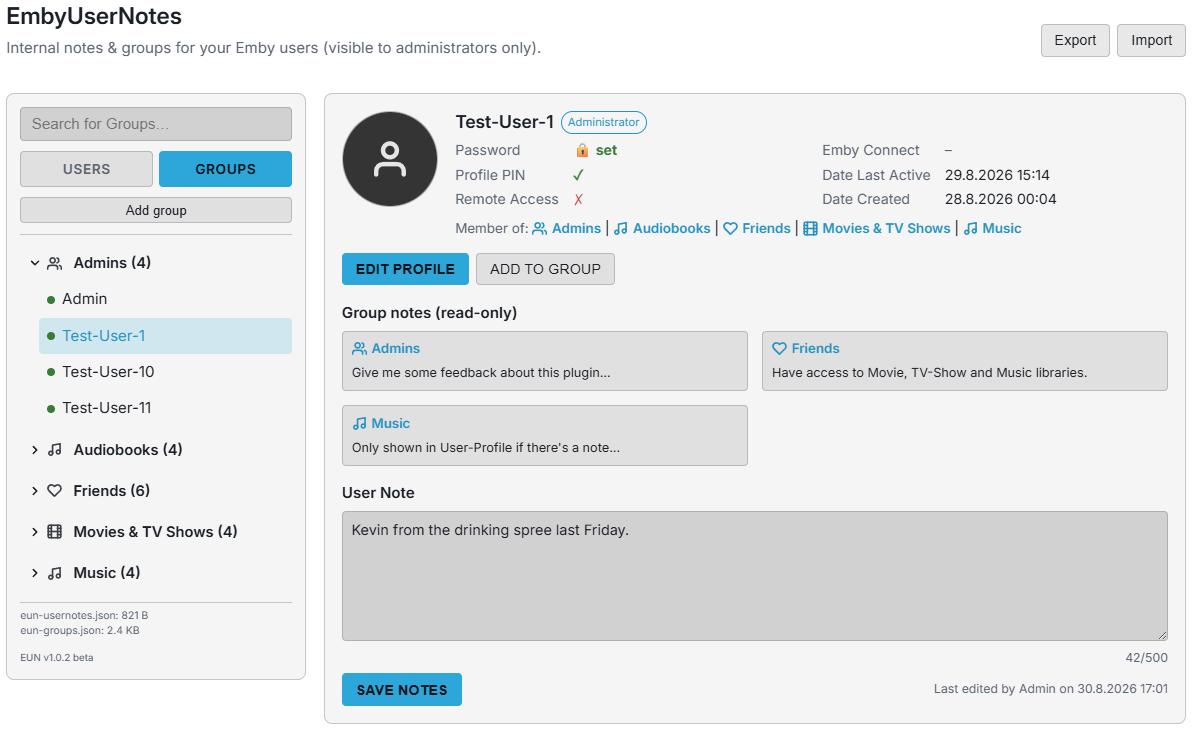
Just tweaked the design a bit and fixed a bug where the Profile PIN couldn't be read. EmbyUserNotes.dll v1.0.2 beta
-
Ich hole diesen Thread nochmal hoch. Ich habe das gleiche Problem und möchte fragen, ob es mittlerweile eine Lösung innerhalb von Emby gibt. Der Weg über das Datenverzeichnis ist meiner Meinung nach nicht optimal.
-

Paused transcoded streams keep transcoding forever.
Neminem replied to yocker's topic in General/Windows
Here is how to report a problem Is transcoding throttle still turned on? Or is it still going after the stream is closed. -
Atrium — a native tvOS app for your Emby server
vdatanet replied to vdatanet's topic in Third Party Apps
Not your end — that one was mine, and you were the first to say it. The featured area was a wide band across the top of the screen, and the picture in it is the item's backdrop, which the server keeps as 16:9. Filling that band edge to edge left about a fifth of the picture above it and the same below. The bottom cut never showed, because that edge fades into the page behind it. The top edge had nothing to fade into — so that's the one you were seeing, and with artwork framed tight, what lands on it is the top of someone's head. It's changed, and not by cropping it better: the artwork now fills the screen behind the rows instead of sitting in a band. A 16:9 image in a 16:9 screen has nothing to cut, so the top of the picture is simply the top of the picture. It's how the detail page has always shown it, which is the other thing I liked about it — the two screens now look like the same app. Measuring yours turned up something else on the same edge: a thin strip of flat background above the featured area, at the very top of the home screen. That's gone too. No date from me. It's written, and now it needs a television: a gradient that dissolves perfectly on a simulator can show as banding on a real panel, and that's the sort of thing that only the sofa decides. Thanks for asking whether it was you. It wasn't — and that question is what got it measured. -
As topic says, paused transcoded streams keep transcoding forever. Is this on purpose? I thought it was only supposed to transcode up to a certain point ahead.
-
4K HEVC shows as 1080p, think I can't find any setup to fix?
yocker replied to PeteGul's topic in Android
Setting the Nvidia Shield to 4K in the settings makes it fixed at that resolution, so 1080p gets shown in 4K. Only way to get it to show 1080p in actual 1080p with it set to 4K is to enable match resolution in Emby or the shield it self, note that this feature in the shield is in beta (though it has been that for years now). -
Direct play animes with heavy subtitle usage dropping frames. (Karaoke)
Neminem replied to Mkilbride's topic in Android
What kind of subs are you using? -

Emby v2.3.17 & RTX 5080: Automatic HDR not triggering (stuck in SDR output)
ALLSTAR1986 posted a topic in Windows & Xbox
Hi everyone, I'm having an issue with automatic HDR activation in Emby for Windows (version 2.3.17.2.0) on an RTX 5080 connected to a 4K HDR TV. Setup & Working Features: GPU: Nvidia GeForce RTX 5080 (10-bit RGB Full) OS: Windows 11 Emby Version: 2.3.17.2.0 Working fine: 24p refresh rate switching and multi-channel audio passthrough work without issues. Issue Details: No Native HDR Trigger: Even with Enable Automatic HDR Mode Activation checked, playing HDR content does not trigger HDR on the TV (output remains in SDR/UHD). Display Control Status: Under Display Control, it statically shows HDR: on. On my previous PC, this showed disabled by default and toggled to enabled only during HDR playback to send the native signal. Rendering Engines Tested: Both Hardware Decoding (DX11 Video Acceleration / RTX 5080) and Software Decoding output in SDR (internal tonemapping occurs instead of sending native HDR10 metadata). Minor UI Bug: The UI defaulted to English on clean install and had to be manually changed under General -> Display Language. I have attached the log file below. Is this a known bug in build 2.3.17.2.0, or is there a specific driver/swapchain setting needed for the RTX 50 series? Thanks for your help! EmbyClient.txt -
Around 30-40 seconds.
-

4K HEVC shows as 1080p, think I can't find any setup to fix?
PeteGul replied to PeteGul's topic in Android
I'll hope this discussion can be kept up in an good way in another thread. Because there are some good points and things to take care of. So to my question. If I have understood this right, I need to have my Shield set to 4K in the GUI. To be certain I can watch 4K in 4K? For most streaming (NRK, HBO, Disney+ etc), I don't need 4K. So I think my Shield generally perform better in 1080p for the GUI. But if I must have it in 4K to be SURE 4K is shown in 4K, so be it. But I don't think it is the right way to solve it. -

TV Show Status — TMDB-powered Returning/Ended/Cancelled badges for series
Blueskies278 replied to Blueskies278's topic in Plugins
I will add this feature in the next update






