All Activity
- Past hour
-
 红豆沙 joined the community
 -
 Hanusse-Becker joined the community
 -
 Aberpas88 joined the community
 -
 小侯爷 joined the community
 -
 nawaf501501 joined the community
 -
 W1832585390 joined the community
 -
Hey, about the Premium/account question: the API key used by the plugin isn’t a YouTube login. It only identifies the Google Cloud project and grants access to the YouTube Data API, so it has no link to your YouTube account or Premium subscription. Using a real YouTube account would require OAuth 2.0, which the plugin doesn’t use. And even with OAuth, YouTube doesn’t provide any API to disable or replace ads. So there’s currently no way to connect a Premium account to the plugin.
-
 Rdd3374 joined the community
 - Today
-
 Src3366 joined the community
 -
 befecat joined the community
 -
 erzwodezwo2026 joined the community
 -

Plugin: Ginjaninja Tools - Consistent Season Images - Help to ensure all images are part of the same set
ginjaninja replied to ginjaninja's topic in Plugins
speed up applying artwork (posters and banners) from the same set across all seasons. Notify Admins (Live and Dashboard) if season images found on providers but not local. -
Same here. Casting to AirPlay devices only works for me with the native player — as soon as I switch to mpv, the audio goes out of sync.
-

Trailers do not work on app but work when using a web browser
80srule posted a topic in Android TV / Fire TV
I am running both the android tv and standard android app and I have noticed for awhile the trailers dont work. You get a watch on YouTube graphic. In the web browser it seems to not even go to YouTube. But I saw an other issue before about comfirming your not a bot. That is not what I get. It just gives an error code and says watch on YouTube. -
'Audio Output' option removed from Android TV 'Playback Settings' menu
80srule replied to SuperCitizenEmb's topic in Android TV / Fire TV
I find the standard app is so slow on an android tv. Im running the ONN 4K pro box but I have also tried it on others. It loads the icons slower the scrolling around is slower. I should do a video I guess. I feel like one app is fine but then have like some apps where you can choose which interface you want. You are correct the standard is slow and not optimized for an android tv box its more set up for a phone or tablet. -

Transcode Failure for MPEG-TS Recordings on Samsung TV — "No compatible streams available"
Luke replied to Ladiesman0217's topic in Live TV
Hi there, let's look at an example. Please attach the information requested in how to report a media playback issue. Thanks!- 1 reply
-
- 1
-

-

HDR→SDR Tone Mapping in Emby Is Technically Inferior and Inconsistent (vs Jellyfin)
RanmaCanada replied to Encho's topic in Hardware
I don't believe so. I think the server still relies on the "versions" options and it is completely unable to pick the correct one and just selects them by name placement (though I could be wrong). I just keep my libraries separate and only give access to users who have the right hardware. Yes it's more work, but it saves so much headache. -

Transcode Failure for MPEG-TS Recordings on Samsung TV — "No compatible streams available"
Ladiesman0217 posted a topic in Live TV
Environment: Emby Server: v4.9.5.0 (Docker container) Client: Emby app on Samsung Smart TV File Format: MPEG-TS (.ts) Server OS: Linux Issue Description: When attempting to play a MPEG-TS live recording on a Samsung Smart TV via the Emby app, users receive the error: "No compatible streams are currently available. Please try again later or contact your system administrator for details" Reproduction Steps: Record a live MPEG-TS stream (.ts file) via Emby Live TV Attempt to play the recording on a Samsung Smart TV using the Emby app Error occurs immediately Expected Behavior: The Emby server should transcode the MPEG-TS file to a format compatible with the Samsung TV client Actual Behavior: Transcode fails with ContainerNotSupported error. Server has no fallback and cannot serve the stream. Logs: Server logs show transcode failures: ContainerNotSupported SubtitleCodecNotSupported Workaround: Playing the same file on Android (Pixel 7 Pro) works perfectly — device has native MPEG-TS codec support. Additional Info: Samsung TV appears to lack native MPEG-TS support and relies on server-side transcoding, which is currently failing. Relevent logs (redacted sensitive info) Successful Android (Pixel) Playback: 2026-08-11 23:09:01.822 Info PlaystateService-0HNNNNQ5LMFTJ:00000001: http/1.1 POST http://[REDACTED_DOMAIN]/emby/Sessions/Playing/Progress?X-Emby-Client=Emby for Android&X-Emby-Device-Name=Living Room TV&X-Emby-Device-Id=[REDACTED_DEVICE_ID]&X-Emby-Client-Version=3.5.36&X-Emby-Token=[REDACTED_TOKEN]&X-Emby-Language=en-us&reqformat=json. Source Ip: [REDACTED_IP], UserAgent: Mozilla/5.0 (Linux; Android 11; Philips 4K A1 Build/RTM8.240401.161; wv) 2026-08-11 23:09:01.823 Info PlaystateService-0HNNNNQ5LMFTJ:00000001: http/1.1 Response 204 to [REDACTED_IP]. Time: 1ms. POST http://[REDACTED_DOMAIN]/emby/Sessions/Playing/Progress Samsung TV Playback Attempt (with TranscodeReasons=ContainerNotSupported): 2026-08-11 23:09:03.681 Info DynamicHlsService-0HNNNNQ5LMFTN:00000001: http/1.1 GET http://[REDACTED_DOMAIN]/emby/videos/6991495/hls1/subs/749.vtt?PlaySessionId=f27d09f507764925afe7d1b42cb6bece&VttTimestampMap=900000&CurrentSubtitleStreamIndex=2. Source Ip: [REDACTED_IP], User-Agent=samsung-agent/1.1 2026-08-11 23:09:03.683 Info DynamicHlsService-0HNNNNQ5LMFTN:00000001: http/1.1 Response 200 to [REDACTED_IP]. Time: 2ms. GET http://[REDACTED_DOMAIN]/emby/videos/6991495/hls1/subs/749.vtt Web Client Transcode Failure (ContainerNotSupported): 2026-08-11 23:09:04.692 Info DynamicHlsService-0HNNNNQ5LMFTQ:00000001: TranscodeReasons=ContainerNotSupported... Source Ip: [REDACTED_IP], User-Agent=Mozilla/5.0 (Windows NT 10.0; Win64; x64)... Chrome/151... Microsoft Edge If you'd rather just have the raw log file let me know how to send it privately. -
thanks, it's fixed on moviedb plugin version 1.9.3.0 @Luke
-

Zufallsliste Ungesehener Filme auf der Startseite
Haisenzwerg replied to Haisenzwerg's topic in German
Die Anzeige Funktioniert nur auf den Unterseiten, auf der Startseite leider nicht. -

HDR→SDR Tone Mapping in Emby Is Technically Inferior and Inconsistent (vs Jellyfin)
Suliamu replied to Encho's topic in Hardware
I agree. Does there exist an option in emby by now to have both SDR and HDR files side by side in the same library and it automatically choses the right one according to available hardware? The last time i tried this it did not work and the workaround was to have a second emby server specific for HDR content. So i completely ignored this topic from then on. -
Unable to delete a user – RemoteServiceUnavailableException
Luke replied to Juanrendon's topic in General/Windows
Hi there, please attach the Emby server log from when the problem occurred: How to Report a Problem Thanks! -

embyforkodi (next-gen) 12.X.X support
quickmic replied to quickmic's topic in Emby For Kodi Next Gen
What do you mean with unreliable? -
Same with "Google Chromecast with Google TV" Any update?
-

Unable to delete a user – RemoteServiceUnavailableException
Juanrendon posted a topic in General/Windows
Hi, I'm having an issue with Emby when trying to delete a user. Whenever I try to delete the user, Emby shows the following error: Exception of type 'MediaBrowser.Common.Extensions.RemoteServiceUnavailableException' was thrown. Because of this error, I'm unable to delete the user. Has anyone experienced this issue before or knows how to fix it? Any help would be greatly appreciated. Thank you! -

A new approach to making IPTV behave more like traditional tuners
PowerCC replied to PowerCC's topic in Third Party Apps
A dedicated GPU isn’t required. If the system has a supported hardware encoder through integrated graphics/APU, that can be used as well. There’s also a direct passthrough mode with no video re-encoding. It’s very lightweight, but it’s best considered a best-effort mode: the application can still maintain the tuner connection, monitor the stream, remux it and recover from outages, but it has less ability to insulate the DVR from damaged GOPs, timestamps or compressed video coming from the source. Hardware transcoding is therefore the recommended mode when available because it gives the application much more control over the outgoing media structure and continuity. Passthrough remains useful for good-quality sources or when preserving the original stream is preferred. -
It will be tomorrow. Thanks.
-
the switch user action is available in the add-on menus under Add-on actions, you can map this to an action in a customizable home screen skin that supports that. there is also a user list in the same addon-actions that list user and if you select one it switches to that user, again map this to a dynamic view on the home page of a skin that supports that sort of thing.

-
To update my last post - I am watching a movie I ripped to MKV tonight and the issue I mentioned is in fact still there. Seems it doesn't do it with MP4 files.
-

About the issue of Emby client's homepage dynamic images on Apple TV
17732 replied to 17732's topic in Apple TV
I want an animation to show on the home page -
The same exact search results in WebUI work, yet word for word in the Android App locks up the server for minutes.
-

ffprobe reading hundreds of MB from remote NZBDav library during scan — can probe size be limited?
gene0915 replied to gene0915's topic in General/Windows
Thanks for the reply! Probably a really crazy question but, would it be possible to have Emby see that a file is a symlink and have a hard-coded limit as to how much of the file it reads to satisfy ffprobe? It seemed that most of the episodes, it flew through them and only needed to read 5-15 megs of data but every now and then, it would encounter a file that it wanted InfiniDysk to download all of it. Do you think this would be a problem if I were using strm files? -
ffprobe reading hundreds of MB from remote NZBDav library during scan — can probe size be limited?
Luke replied to gene0915's topic in General/Windows
HI, the question would also be about the impact on server transcoding, because it relies on this information to be accurate. And to be honest, not just transcoding but all of playback. Even direct playing looks at this information heavily. -
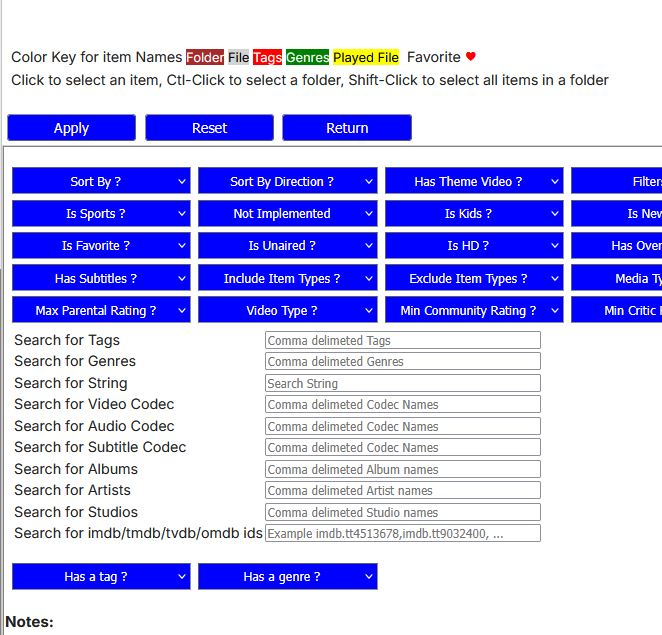
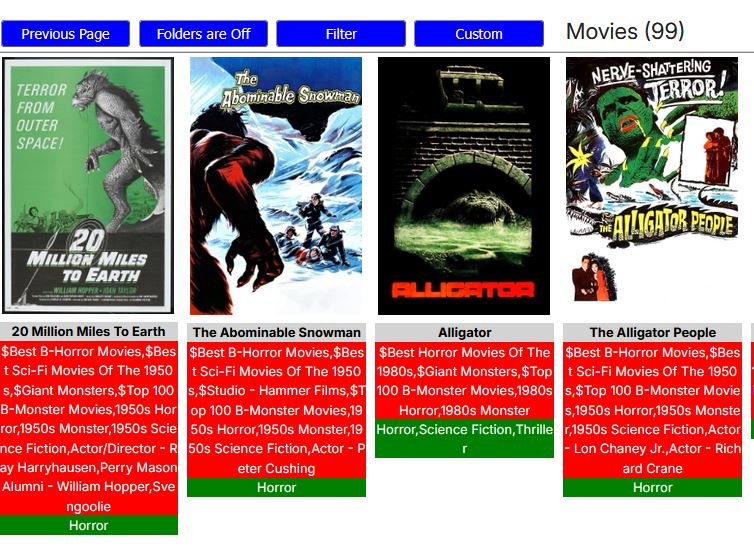
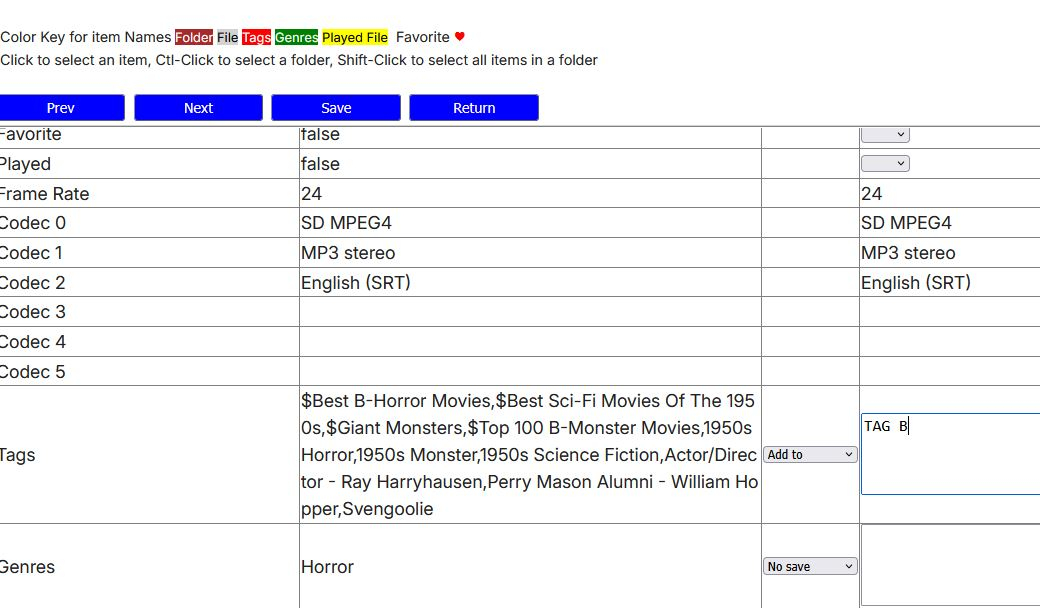
Yes. Select the Library in Bulky Editor. Select Filter. Enter the Tag you want to replace in the Search For Tags box. Must be exact including case (TAG 2). Apply. You should be given a list of the number of items with the tag. Hold Shift+select the first item. Should select all (red boxes around each item). Bulk Edit button. Go down to Tags. Select Add To from the dropdown. Enter TAG B. Save. You should be taken back to the filtered list. Select all and Bulk Edit again. Go to Tags this time select Remove Tags from the dropdown. Enter TAG 2. Save. Should go back to a blank screen because you have removed all items in your filter search.
-
I was messing around with InfiniDysk (a fork of NZBDav) and added a library full of symlinks to Emby through an rclone VFS mount. The library path Emby sees is: /mnt/md0/NZBDav/... rclone is using VFS cache mode full with: --vfs-read-chunk-size=16M --vfs-read-chunk-size-limit=512M --vfs-read-ahead=512M --buffer-size=0M During Emby's initial library scan, the server log shows ffprobe being launched like this: /opt/emby-server/bin/ffprobe -i file:"/mnt/md0/NZBDav/TV Shows/..." -threads 0 -v info -print_format json -show_streams -show_chapters -show_format -show_data I don't see an explicit -probesize or -analyzeduration being passed. Most files probe very quickly, usually around 0.3–0.6 seconds. However, while watching the underlying NZBDav/rclone activity, I found some ffprobe reads going far beyond the initial 16 MB VFS chunk. For example, one approximately 3.0 GB episode had already reached roughly 767 MB read while the Emby library scan was still running. There were also around 25 simultaneous active reads at that point. rclone core/stats during the scan showed multiple 3+ GB media files open at once. Some were only at 688 KB or 8–17 MB, but others continued reading much farther into the files. My concern is that on an NZBDav/Usenet-backed filesystem, a metadata scan that reads hundreds of MB from occasional files is very expensive and can trigger unnecessary article retrieval/cache activity. My questions are: Is there an officially supported way in Emby to set a maximum ffprobe -probesize for library scans? Can this be applied only to regular media-library files, rather than Live TV? Is there also a recommended -analyzeduration limit for this situation? If there is no GUI setting, is there a supported configuration file or command-line option for supplying additional ffprobe arguments? Would limiting probe size to around 10000000 bytes cause any known issues with normal MKV media detection? I would prefer not to replace or modify /opt/emby-server/bin/ffprobe directly because package updates could overwrite it, and I also don't want to unintentionally affect HDHomeRun/Tunarr Live TV probing. Ideally I would like something equivalent to: -probesize 10000000 applied only when probing files under: /mnt/md0/NZBDav/ while leaving Live TV and other ffprobe usage at Emby's defaults. If there is a supported way to accomplish that, I'd appreciate any guidance.