All Activity
- Past hour
-
 Guille9 joined the community
 -
 Douglas1207 joined the community
 -
 arriak joined the community
 -
 631568763 joined the community
 -
 PIKAQIUKU joined the community
 -
Ear Wax is now live in the Amazon Alexa Skill Store! After months of development and beta testing, Ear Wax is officially available. Ear Wax lets you use voice commands to play your own personal music library on Alexa-enabled speakers, with support for Plex and Emby. To get started: Find and enable Ear Wax in the Amazon Alexa Skill Store. Follow the setup guide here: https://ear-wax-config.marvinbrown9999.workers.dev/ Once configured, you’re ready to start using Ear Wax with your Alexa-enabled devices. A big thank-you to everyone who helped test Ear Wax, reported problems, shared ideas, and provided feedback during development. Your help made a real difference. Ear Wax is live. Give it a try, and let me know how it works with your setup. — Marvin
-
 Anir258 joined the community
 -
Again thank you very much for your explanation. Ok, just tried with a mkv (UHD source): Video ID : 1 ID im ursprünglichen Quellmedium : 4113 (0x1011) Format : HEVC Format/Info : High Efficiency Video Coding Format-Profil : Main 10@L5.1@High HDR-Format : Dolby Vision, Version 1.0, Profile 7.6, dvhe.07.06, BL+EL+RPU, no metadata compression, Blu-ray compatible / SMPTE ST 2094 App 4, Version HDR10+ Profile B, HDR10+ Profile B compatible Codec-ID : V_MPEGH/ISO/HEVC Dauer : 2 h 23 min Bitrate : 74,3 Mb/s Breite : 3 840 Pixel Höhe : 2 160 Pixel Bildseitenverhältnis : 16:9 Modus der Bildrate : konstant Bildrate : 23,976 (24000/1001) FPS Farbraum : YUV Farbunterabtastung : 4:2:0 (Type 2) Bittiefe : 10 bits Bits/(Pixel*Frame) : 0.374 This worked on both "old" devices also. But the other .mp4 files (above DV and next HDR10+) don't work (download from source Apple-TV) Format : HEVC Format/Info : High Efficiency Video Coding Format-Profil : Main 10@L5@High HDR-Format : SMPTE ST 2086, HDR10 compatible / SMPTE ST 2094 App 4, Version 1, HDR10+ Profile B compatible Codec-ID : hvc1 Codec-ID/Info : High Efficiency Video Coding Dauer : 55 min 23s Bitrate : 24,4 Mb/s Breite : 3 840 Pixel Höhe : 1 634 Pixel and it's beyond my knowledge, how I could select or change the profile.
-

Micro-stutters with 25 FPS content on Apple TV Emby app
Eisi2005 replied to SultanOfTux's topic in Apple TV
I read in another post that all watched states were lost after the update to 4.9.5. Was that an isolated incident, or is that how this update works? -
 Tenuunmgl joined the community
 -

Emby en FireTv viendo series no se sincroniza el audio
coyotecabreado replied to coyotecabreado's topic in Spanish
Hola @Luke, no sale ningun error durante la reproduccion, en el panel de control no se ve nada que indique un fallo de sincronizacion de audio, por eso me extraña tanto este fallo, por lo que si no hay ningun aviso de error ¿como se podria solucionar esto?. Saludos. -

Emby resume media with multiple version of content in multiple libraries
SFefy posted a topic in Feature Requests
Hi, First of all: I cannot find this setting, but this doesn't mean it didn't exist. My problem is the following: A have two separate libraries. One for Hungarian dubbed content (lib1) and one for Original dubbed with Hungarian sub (lib2). When I start watching some content from lib1, in the "Continue watching" section Emby shows the lib1 and lib2 versions without any lib specific thing: The problem is that the first option is not always from lib1 so I have 50% chance of hitting the "good" one on the first time (on the image that I posted, the first one is from lib2 and the second is from lib1). This behavior is the same in every client app, so I think this is a server thing. Other than: If I started watching something from a specific library then I want to continue watching that specific content/version and I don't care about that other versions are existing on different libraries. So is there an option to change this behaviour? If don't have setting for this than I think this will be a useful thing to have.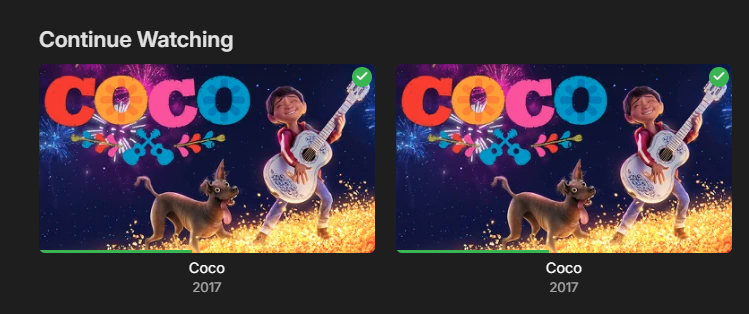
- Today
-

Will Emby for Kodi Next Gen suit my use case
displayname0504 posted a topic in Emby For Kodi Next Gen
TLDR - just want to sync watch state/progress I've used forever and started using Emby (instead of Plex) for my external access needs. I have a SQL instance for the Kodi DB. I only want to sync the play progress and watch status. I'd prefer not to use an external service if I can avoid it. -

Is Android TV no longer being developed?
yocker replied to doggypatch's topic in Android TV / Fire TV
Stil being developed but they will eventually move to the normal app. -
I'm trying to get some information as to whether Emby for PS5 is being developed. However, the information that I am finding here is a few years old, and even that doesn't sound like there are any definite answers if development for the PS5 is occurring or exists. Any info on this topic would be greatly appreciated. Thanks!
-
The only information I can find on this topic appears to be a few years old. Has development on Emby for Android TV stopped? If so, why is it still available for download?
-
fresh log .. lumo (proton ai) named both luke and ebr for excellent support... Im sure GrimReaper gets a special shout out.. but I was unable to make emby connect, connect. hopefully you see somethings glaring...embyserver (3).txt
-
thank you .. i did resolve the back up issue and currently working on the connect issue. Trying various troubleshooting steps. Turned off vpn and still getting same connect error. Will advise
-
From what I've gathered, neither of those devices offer support for any HDR standard. Sure does, both for them and yourself on those two devices, just not DV Profile 5 - as HDR layer (if present) will be transcoded and tonemapped for playback on SDR displays (like DV Profile 8).
-
Thank you for your answer, I fear they don't.... didn't find any infos about them supporting DV profiles. Both devices are quite "older" ones..... TV: Panasonic Plasma TX-P42G15E Beamer: Panasonic PT-AE4000 ### So, offering HDR+ or DV Content obviously doesn't make sense, if any of my "Users" equipment doesn't support HDR+ or DolbyVision
-
You're getting HTTP 500 response, which typically indicates generic back-end issue (likely), but doesn't completely exclude frontend issue (less likely). You could try doing a hard refresh, clear browsing data or just use another browser. Anyway, @ebrwill see the log and recheck/reconfirm everything is in order at Emby's side. As a side note, your log is flooded with Backup & Restore plugin errors due to no write access, you might wanna review your permissions.
-
New patch release - Version 4.1.4.0 Download .dll and full release notes: https://github.com/soderlund91/HomeScreenCompanion/releases/tag/v4.1.4.0 Bugfix release IMPORTANT! Minimum required Emby server v4.10.0.17 Release notes Fixes: Tagging collection: Fix issue where tagging a collection name containing a comma isn't working (Eg. "1,001 Movies to watch") Playlist: Fixed a bug where new items where added to the end of the list, now it correspond with the order of the source. Top-list: Fixed an bug with "resume playing" when switching between different versions of the movie (added ffprobe to the .strm files on creation to get playtime etc.) HomeScreenCompanion.dll
-
You'd need to check your exact TV and/or beamer model and which DV profiles they support (if any); as you're trying to play DV Profile 5 (no fallback HDR layer), transcoding can't solve that, all devices in the chain have to support that profile as it has to be Direct Played only.
-
thank you in advance. I have tried with existing users and new test users to save the email, but get this error every time. embyserver (1).txt
-

Missing guide channels 20.8 thru 20.13 98685
sa2000 replied to gdbrow's topic in Emby Provided Guide Data
@gdbrowI have referred the above 20.8 to 20.13 list to gracenote as i can see the channel names on https://www.tvpassport.com/tv-listings for Portland, OR region -
Missing guide channels 20.8 thru 20.13 98685
sa2000 replied to gdbrow's topic in Emby Provided Guide Data
Tahnks @gdbrow Are these the same channels as what shows on https://www.ontvtonight.com/guide/listings/PortlandNight.html for Portland With regards to 20.8 to 20.13, are you able to tell me what the callsigns are showing on the tuner (screenshot?) and confirming what is being broadcast According to rabbitears, they show as 20.8 Jewelry TV 20.9 Shop LC 20.10 COZI TV 20.11 NBC True CRMZ 20.12 Salem News Channel 20.13 America's Voice Español I need confirmation that this list is accurate before referring it to gracenote Thanks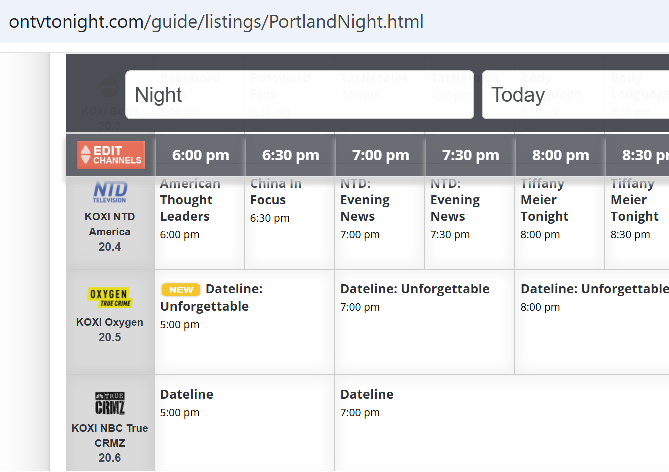
-

LiveTV isn't working good on my TV but working good on my PC (Plugin)
XDavidT replied to XDavidT's topic in Android TV / Fire TV
Hi @Luke& @pünktchen, I'm short on time this days, I'll reply ASAP. -
The latest one. Can you share a picture of how that looks for you, I'm very interested to see that. I mean, I can see a clear difference between my 1080p and 4k screens. On the 1080p is crisp.
-
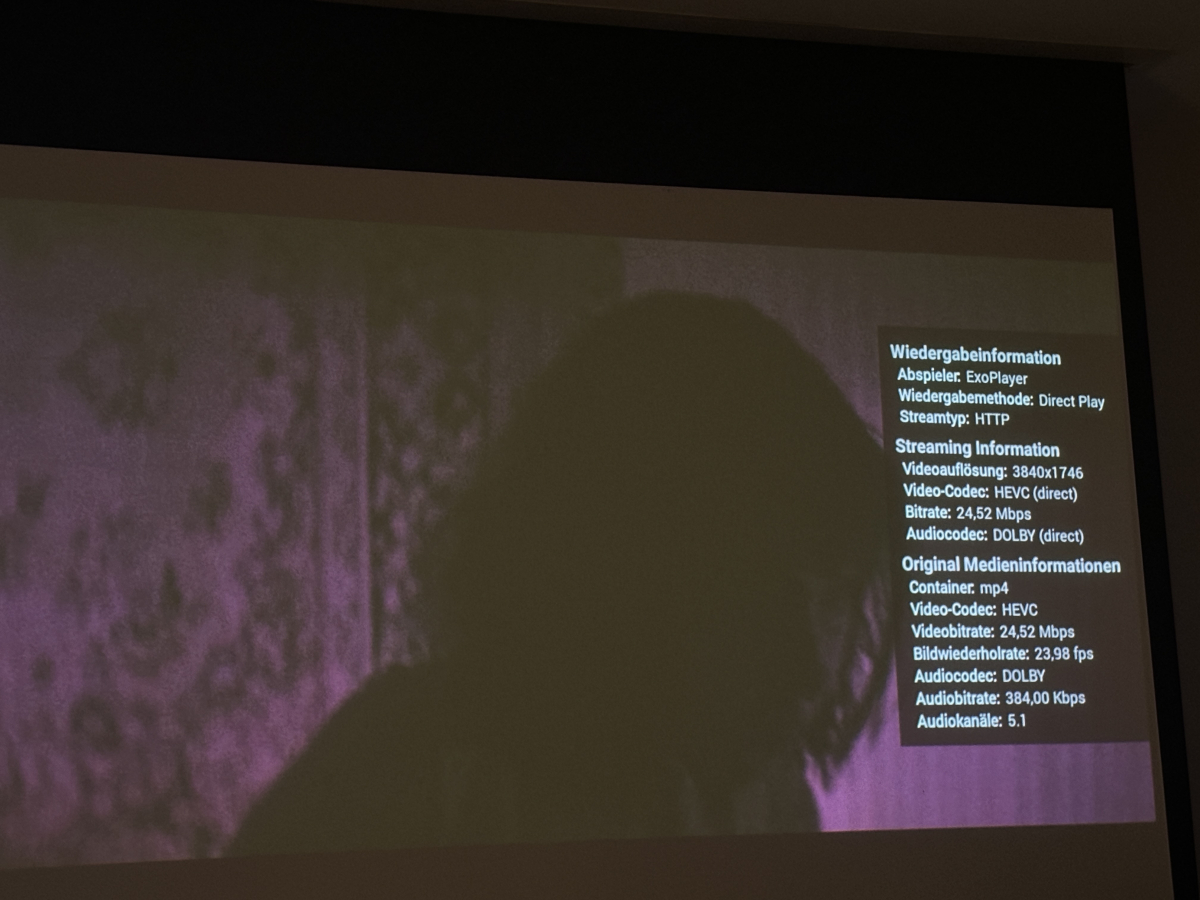
Hi, don't know if there's a way to fix/handle this..... Situation: I got some DolbyVision .mp4 files Format : HEVC Format/Info : High Efficiency Video Coding Format-Profil : Main 10@L5@High HDR-Format : Dolby Vision, Version 1.0, Profile 5, dvhe.05.06, BL+RPU, no metadata compression Codec-ID : dvh1 Dauer : 59 min 52s Bitrate : 24,5 Mb/s Breite : 3 840 Pixel Höhe : 1 746 Pixel Watching them with EmbyApp 2.2.53 (on OSX Sonoma 14.8.7) works with no issues, also on OSX on emby/safari-browser. I also have correct playback on my Panasonic (TV-55Z95AEG with Fire-TV operating system). But: With my other fire-tv hardware and playback on my "only" full-hd tv or beamer, the picture stays "purple" and at the playback-beginning I get the info: "Video not compatible with this Display. DolbyVision not supported on your system." Is there somewhere a setting I can fix this? (Kind of "downscale") I tried turning off HDR dynamics under fire-tv-hardware settings (display), no difference. Using QNAP version 4.9.5.0 / Fire-TV 2.1.29a. Thanks for thoughts.... (please let me know if you additionally need playback log)
-
Will be available on the next update
-
No worries, just go through the above links, download and install server; if you hit a wall at any point during the process, just post again here.
-