Virtual library organization
Virtual library organization builds browsing views from catalogue relationships without requiring the media files to share the same folder layout.
A virtual view organizes what the catalogue knows. It can gather films from several disks, show titles by genre, or place the same movie in two collections. The storage directory does not have to reproduce each of those arrangements.
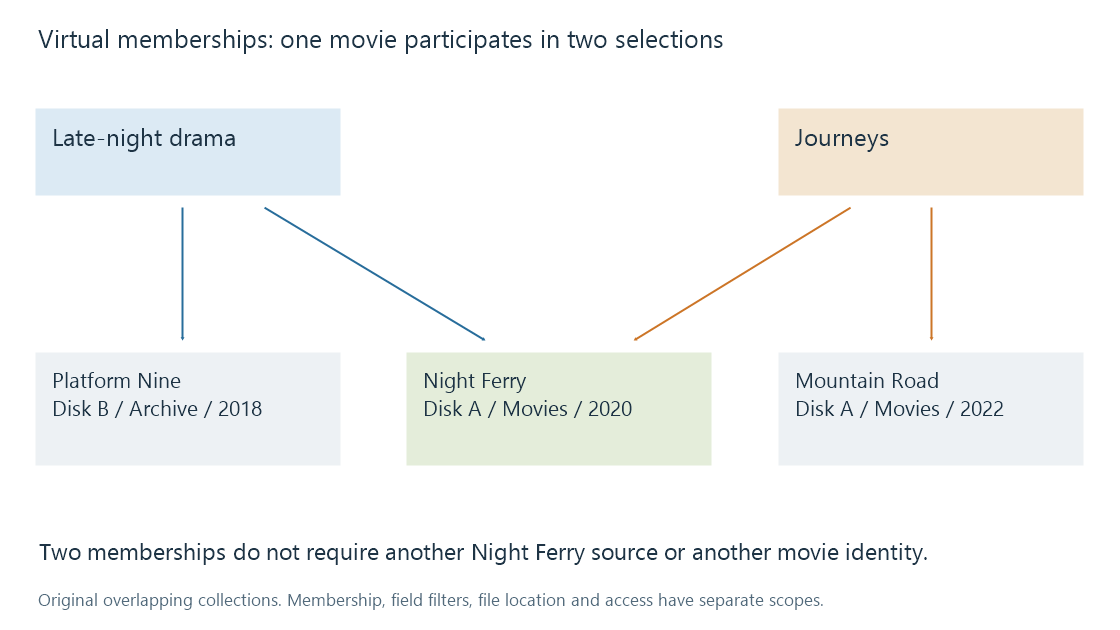
Suppose three fictional movies occupy these locations:
| Movie | Physical source | Relevant description |
|---|---|---|
| Night Ferry | Disk A, Movies/2020 | Drama; a river journey |
| Platform Nine | Disk B, Archive/2018 | Drama; a railway story |
| Mountain Road | Disk A, Movies/2022 | Documentary; a journey |
A Late-night drama collection might contain Night Ferry and Platform Nine. A Journeys collection might contain Night Ferry and Mountain Road. Night Ferry has two memberships and still only one physical source in this example.
Membership, filtering and sorting do different work
A collection records an association: these items belong together. A genre view selects items whose genre field matches a value. A sort changes the order of the selected results.
Changing Night Ferry's genre can therefore change a genre view without changing a manually chosen collection membership. Changing its sort title can move it within a view without changing either membership or location.
This is why virtual organization depends on consistent metadata. If two descriptions use Science Fiction and Sci-Fi as unrelated values, an interface may expose two groups. The physical folders cannot repair that semantic mismatch; the catalogue needs a way to align the labels.
Emby merges the contents of a library's configured paths into a virtual display. Its movie documentation also distinguishes metadata-based browsing from the Folders view, which exposes the physical organization. Both can be useful: the former answers questions about the films, the latter about where the resources are stored.
A display boundary is not automatically an access boundary
| Arrangement | Its main purpose | Separate question |
|---|---|---|
| Physical directory | Locate resources | Can the server read it? |
| Configured library | Define a catalogue area and its content interpretation | Which users can access that library? |
| Collection or genre view | Group or select catalogue items | Are the underlying items accessible to this viewer? |
| Playlist | Specify a sequence of item references | Can each entry be played now? |
An attractive Children's favourites collection describes an editorial choice. The name alone does not establish an access policy. Actual visibility depends on the server's user and content rules.
Virtual organization makes changing perspectives inexpensive: a film can be part of a franchise, a director retrospective and a personal weekend selection at once. Those are relationships to the same item, so editing its description need not require finding and updating three copied files.