Leaderboard




Popular Content
Showing content with the highest reputation on 11/24/24 in all areas
-
Hello again Q-Droid. You have helped me solve the issue! Thank you. I have assumed Quick Sync = VAAPI. I've been using VAAPI in Emby for 1080 files with no issue. But 4K no. I researched the Arch wiki again. It points to VAAPI. You kept mentioning QuickSync. Then I found this reference on Wikipedia: "Quick Sync support on Linux is available by both Intel VAAPI Driver (legacy, pre-Broadwell) and Intel Media Driver (Broadwell and newer) which also uses VA-API, and through the Intel Media SDK." I installed Intel Media SDK. Rebooted. Now in Emby I have the choice of VAAPI or QuickSync. I chose QuickSync for all decoders. Now I can transcode 4k at 40-80 fps.2 points
-
WELCOME TO THE HISTORY OF EMBY! A lot of our users are new to Emby and we thought it would be a good idea to share some of the backstory of how Emby came to be, where we started and where we are headed. We have grown significantly since our inception. Once a humble open-source project, Emby has evolved into a sophisticated platform that allows users to organize, stream, and enjoy their media libraries with ease. In this post, we'll take a look back at the history of Emby, explore its development journey, and highlight the key milestones that have made it what it is today. The Early Days: An Open-Source Beginning Emby started its life as Media Browser, an open-source project focused on creating a simple, user-friendly interface for accessing digital media collections. Originally, Media Browser was a plugin for Windows Media Center, and its primary goal was to offer users a better way to manage and play their media files. Back then, it was a community-driven project, with developers and enthusiasts contributing code, features, and plugins to expand its capabilities. Media Browser gained a loyal following among tech-savvy users who appreciated its customizable nature and flexibility. The Shift to Emby and the Rise of the Media Server In 2014, Media Browser underwent a major rebranding and evolved into what we now know as Emby. This change wasn’t just about a new name—it marked a shift in focus from a media center add-on to a full-fledged media server solution. Emby’s developers wanted to create a standalone server capable of managing large media libraries, transcoding content, and streaming to multiple devices. The introduction of the Emby Server brought a range of new features: Library Management: Users could organize and manage their media files with a sleek web interface. Metadata Scraping: Automatic fetching of metadata like cover art, descriptions, and ratings. Transcoding: On-the-fly transcoding for seamless streaming to any device, regardless of format. Multi-Device Support: Streaming became possible on a variety of devices, including smartphones, smart TVs, web browsers, and gaming consoles. This new direction attracted more users who were looking for a flexible media server that could handle diverse formats and provide a unified experience across different platforms. Open Source to Closed Source: In 2018, Emby made a significant decision: it moved from being an open-source project to a proprietary, closed-source model. The change allowed the development team to maintain greater control over the codebase, improve security, and introduce features more rapidly. Key Milestones in Emby’s Development As Emby transitioned to a proprietary model, the development team pushed forward with a series of updates and improvements: Emby Premier: The introduction of a paid subscription model called Emby Premier brought exclusive features like DVR support, cloud sync, offline media, and hardware-accelerated transcoding. Emby Premier gave the development team a sustainable revenue stream to fund further development. Improved Mobile and TV Apps: Over time, Emby released a series of polished apps for mobile platforms (Android, iOS) and TV devices (Roku, Apple TV, Amazon Fire). These apps received regular updates to improve stability, user experience, and customization options. Live TV and DVR Integration: Emby expanded its offerings to include Live TV and DVR functionality, allowing users to integrate live broadcast channels, schedule recordings, and manage live content alongside their media libraries. Enhanced Transcoding and Streaming: Emby has continuously improved its transcoding capabilities to support modern formats like 4K, HDR, and Dolby Atmos. These improvements allow for a high-quality viewing experience regardless of the device being used. Security and User Management: Emby introduced advanced user management features, including user profiles, parental controls, and access restrictions. This makes it easier for families to share media without compromising on privacy or security. Emby Today: A Comprehensive Media Experience Today, Emby is a mature and feature-rich media server solution that caters to a wide range of users—from casual media consumers to serious home theater enthusiasts. It supports a broad spectrum of devices, offers robust customization options, and remains focused on providing a powerful yet easy-to-use interface. Some of Emby’s standout features today include: Unified User Interface: A sleek, modern interface that makes browsing and streaming media a joy. Customizable Libraries: Tailor your media collections with custom artwork, genres, and metadata. Cross-Platform Syncing: Keep your media in sync across multiple devices and platforms. Comprehensive Live TV Support: Access live TV, manage recordings, and watch DVR content effortlessly. Community Engagement: Emby continues to value its user base, with an active community forum, feature requests, and beta testing for new updates. The Impact of the Community and the Road Ahead Despite its shift to a closed-source model, the Emby community remains strong. Many long-time users contribute by creating plugins, themes, and offering technical support. The Emby team regularly interacts with the community, implementing feedback and adjusting features based on user needs. Looking forward, Emby is set to continue expanding its feature set while focusing on performance enhancements and cross-platform support. Emby’s development is driven by innovation and user feedback, ensuring that it remains a competitive choice in the world of media servers. Conclusion Emby’s journey from a simple open-source plugin to a leading media server solution is a testament to its adaptability and the passion of its developers. While the shift from open-source to closed-source was a turning point, Emby has continued to evolve, delivering a reliable and customizable media experience for millions of users worldwide. The history of Emby is one of growth, change, and a dedication to providing users with a comprehensive and enjoyable way to manage their digital media.2 points
-
WELCOME TO THE HISTORY OF EMBY! A lot of our users are new to Emby and we thought it would be a good idea to share some of the backstory of how Emby came to be, where we started and where we are headed. We have grown significantly since our inception. Once a humble open-source project, Emby has evolved into a sophisticated platform that allows users to organize, stream, and enjoy their media libraries with ease. In this post, we'll take a look back at the history of Emby, explore its development journey, and highlight the key milestones that have made it what it is today. The Early Days: An Open-Source Beginning Emby started its life as Media Browser, an open-source project focused on creating a simple, user-friendly interface for accessing digital media collections. Originally, Media Browser was a plugin for Windows Media Center, and its primary goal was to offer users a better way to manage and play their media files. Back then, it was a community-driven project, with developers and enthusiasts contributing code, features, and plugins to expand its capabilities. Media Browser gained a loyal following among tech-savvy users who appreciated its customizable nature and flexibility. The Shift to Emby and the Rise of the Media Server In 2014, Media Browser underwent a major rebranding and evolved into what we now know as Emby. This change wasn’t just about a new name—it marked a shift in focus from a media center add-on to a full-fledged media server solution. Emby’s developers wanted to create a standalone server capable of managing large media libraries, transcoding content, and streaming to multiple devices. The introduction of the Emby Server brought a range of new features: Library Management: Users could organize and manage their media files with a sleek web interface. Metadata Scraping: Automatic fetching of metadata like cover art, descriptions, and ratings. Transcoding: On-the-fly transcoding for seamless streaming to any device, regardless of format. Multi-Device Support: Streaming became possible on a variety of devices, including smartphones, smart TVs, web browsers, and gaming consoles. This new direction attracted more users who were looking for a flexible media server that could handle diverse formats and provide a unified experience across different platforms. Open Source to Closed Source: In 2018, Emby made a significant decision: it moved from being an open-source project to a proprietary, closed-source model. The change allowed the development team to maintain greater control over the codebase, improve security, and introduce features more rapidly. Key Milestones in Emby’s Development As Emby transitioned to a proprietary model, the development team pushed forward with a series of updates and improvements: Emby Premier: The introduction of a paid subscription model called Emby Premier brought exclusive features like DVR support, cloud sync, offline media, and hardware-accelerated transcoding. Emby Premier gave the development team a sustainable revenue stream to fund further development. Improved Mobile and TV Apps: Over time, Emby released a series of polished apps for mobile platforms (Android, iOS) and TV devices (Roku, Apple TV, Amazon Fire). These apps received regular updates to improve stability, user experience, and customization options. Live TV and DVR Integration: Emby expanded its offerings to include Live TV and DVR functionality, allowing users to integrate live broadcast channels, schedule recordings, and manage live content alongside their media libraries. Enhanced Transcoding and Streaming: Emby has continuously improved its transcoding capabilities to support modern formats like 4K, HDR, and Dolby Atmos. These improvements allow for a high-quality viewing experience regardless of the device being used. Security and User Management: Emby introduced advanced user management features, including user profiles, parental controls, and access restrictions. This makes it easier for families to share media without compromising on privacy or security. Emby Today: A Comprehensive Media Experience Today, Emby is a mature and feature-rich media server solution that caters to a wide range of users—from casual media consumers to serious home theater enthusiasts. It supports a broad spectrum of devices, offers robust customization options, and remains focused on providing a powerful yet easy-to-use interface. Some of Emby’s standout features today include: Unified User Interface: A sleek, modern interface that makes browsing and streaming media a joy. Customizable Libraries: Tailor your media collections with custom artwork, genres, and metadata. Cross-Platform Syncing: Keep your media in sync across multiple devices and platforms. Comprehensive Live TV Support: Access live TV, manage recordings, and watch DVR content effortlessly. Community Engagement: Emby continues to value its user base, with an active community forum, feature requests, and beta testing for new updates. The Impact of the Community and the Road Ahead Despite its shift to a closed-source model, the Emby community remains strong. Many long-time users contribute by creating plugins, themes, and offering technical support. The Emby team regularly interacts with the community, implementing feedback and adjusting features based on user needs. Looking forward, Emby is set to continue expanding its feature set while focusing on performance enhancements and cross-platform support. Emby’s development is driven by innovation and user feedback, ensuring that it remains a competitive choice in the world of media servers. Conclusion Emby’s journey from a simple open-source plugin to a leading media server solution is a testament to its adaptability and the passion of its developers. While the shift from open-source to closed-source was a turning point, Emby has continued to evolve, delivering a reliable and customizable media experience for millions of users worldwide. The history of Emby is one of growth, change, and a dedication to providing users with a comprehensive and enjoyable way to manage their digital media. View the full article2 points
-
Hi! Will there be a discount on Black Friday 2024 for premiere lifetime? Thanks1 point
-
Hello again. Had the local internet go down which was annoying, but then I noticed that I could not stream from a few of my devices from my local emby instance due to "not having premiere", which was tenfold more annoying. It is my understanding that there is a period where the license is cached (for at least 3 weeks? Unclear on this part) and devices should not require additional subscriptions or etc. to use Emby from devices so long as it conforms to the device limit. However, certain devices such as my iPad refused to stream from the server despite only losing internet a few hours prior due to no subscription. What I want to understand: - Does emby cache licenses on a per-device basis? Do all of these separate devices need internet beforehand to 'authenticate'? - Why did my device(s) ask me for a subscription when the server clearly had an active key mere hours ago? (less than 3) Possibly indicating the server does not provision premiere from itself to devices. - Why doesn't Emby Server recognize the loss of internet and cache the license on the server proper, removing the need for each device to ask me if I have a subscription or not? I don't have the option of entering a key on the device(s) so I was stuck on some devices unable to use Emby. - How do these "grace periods" work? It should technically only start counting from the time the server detects an extended loss of connection (maybe 30min) no? Need finer understanding. I already skimmed similar threads and understand Emby needs a semi-periodical check to validate the key, which is fine and not the topic of this question - What I want is to have a hassle-free experience in between those checks when someone sticks a shovel into the fiberbox by accident and I have to go over a day without internet. Thats the biggest appeal of this software for me, being able to keep my media local. Not sure if this is the correct location for this post, please move if needed.1 point
-
Initially I selected the "All" option, however it seems no libraries were added. After manually adding both my Movies & TV Shows library, the widgets do update properly. I think I was misled by the library selection UI! Thank you for your help1 point
-
Settings>Display tab>Preferred TV show display.
 1 point
 -
I totally missed https://wiki.archlinux.org/title/Emby. This is the great thing about forums. Point you to things that should have been obvious! QuickSync is giving me about 9% more fps over VAAPI on 1080 files. Thanks again.1 point
-
Truss, You can find a link on Youtube and add it to Dexter shows .nfo file on your server, below director and above rating lines. You need to have create .nfo files in your directory turned on inside that Admin menu / Libraries / (Single Library Edit ...) / Metadata Savers [X] Choose the file formats to save your metadata to. Original link: https://www.youtube.com/watch?v=M6jJy_FZf3E Add this line in your .nfo file. <trailer>plugin://plugin.video.youtube/play/?video_id=M6jJy_FZf3E</trailer>1 point
-
Well, we don't believe it...1 point
-
Yeah, with 107 it works! Thank you so much. Oh, it is an Intel Arc 310 Card.1 point
-
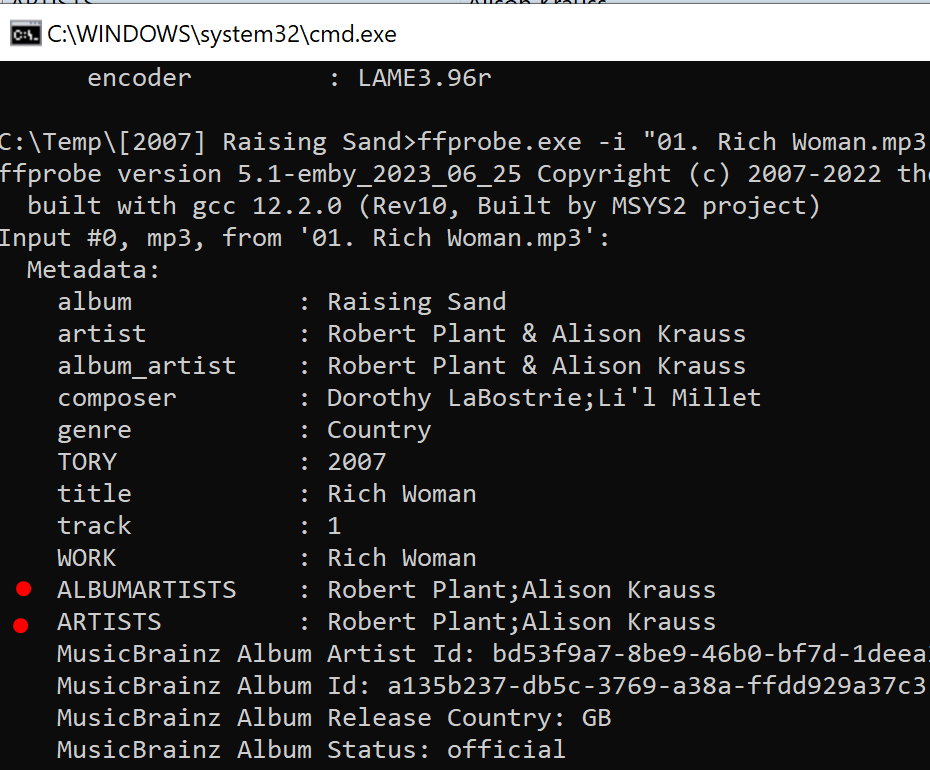
I've tried this on emby (synology) v4.8.8, emby (docker) v4.9.0, and again emby (docker) v4.7.0 9 and v4.9.0.11. The last two were because it was mentioned in another post that this was fixed in v4.7.0.9. However ffprobe in all of those versions yields the same result for me. Only the first artist is reported. I see thay you are using emby (windows). I will give that a try.1 point
-
I tried to delete this post but anyways I got it to work.1 point
-
I updated my image collection with Kometa style ones to fit my specific playlists. Perhaps someone finds it useful.1 point
-
Combined all pictures in a GH Repo and added some Kometa style images + Template to match my mdblists. https://github.com/v1rusnl/Collection_Images/tree/main1 point
-
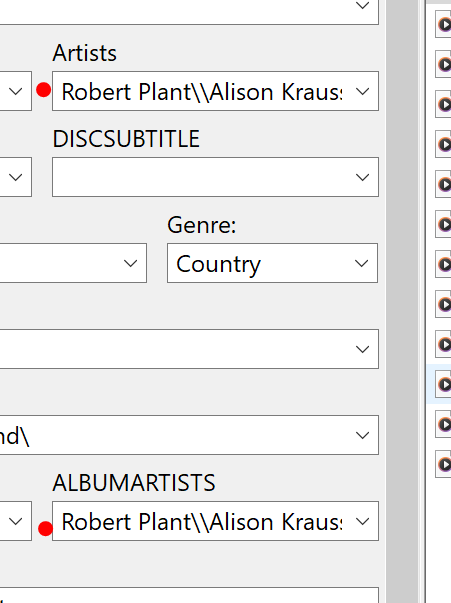
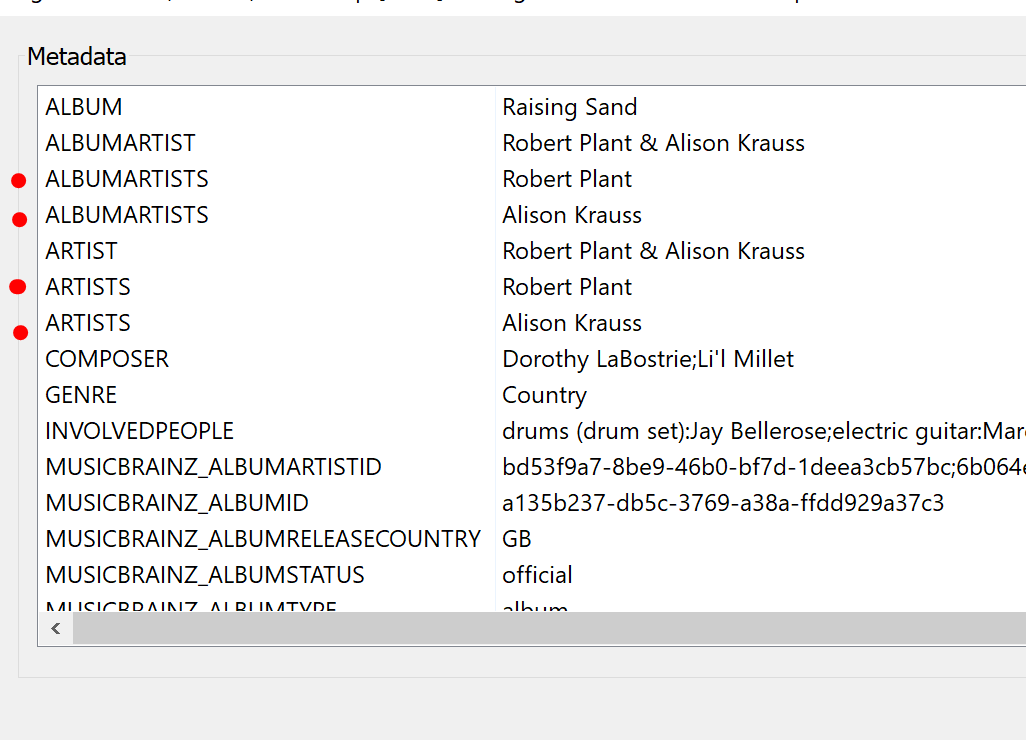
still working for me on 4.9.0.31... (or at least embys ffprobe is seeing the two artists and albumartists, and a refresh metadata still shows the two in the ui...so think thats working normally for me)..maybe send through your test file?
 1 point
 -
No worries, glad it was an easy fix!1 point
-
You sir hit the jackpot. I dont use VPN , but I blocked the TV to go out to the internet (kids secretly want to watch youtube meanwhile parents sleep). I havent known about this Samsun feature. So I enabled internet access for the TV. Switched off and on. Started EMBY and voilá. Thank you for your kind help.1 point
-
Are you using a vpn? Samsung uses the IP address to determine the geo location and sets the timezone for apps based on this location, it ignores any user settings on the TV.1 point
-
Hot Fix 9.1.1+ (33.2.0.295) now available. The third version of the 9.1.1+HotFix will be enabled shortly as version 33.2.0.295 but at this time it is only enabled for the 2015 and 2017 SHIELDs. The update will break Google Home integration for 2019 SHIELDs now. We are waiting for Google to fix an issue uncovered in the release for those devices. Added French parental control Security enhancement for 4K DRM playback Known Issues Google Home will be broken with this hotfix Source: https://www.nvidia.com/en-us/geforce/forums/shield-tv/9/522242/shield-experience-upgrade-911-hotfix-image/3485054/1 point
-
I understand the correct way to fix this is to make the emby user a member of video and render groups. (with thanks to member Q-Droid)1 point
-
The regular android app is not good compared to the android tv version. Its behaviour is also weird because it doesn’t feel like an app meant to be used with a remote. the epg also doesn’t utilize the space. The channel names take up far too much space compared to the rest1 point
-
I fixed it via an antivirus firewall exception.1 point
-
I also had my internet out for over a month due to hurricane Helene, couldn't use my lifetime Emby premiere during this time. Really disappointing. Thinking about switching to Jellyfin so if my internet goes out again I have access to my local media, unless anyone else has any suggestions. It's a shame since I moved from Plex to Emby to support open source software.1 point
-
True and that cheapens the purchases made by users that have made earlier purchases at the full price. I wish companies would simply price their stuff at a fair (to all) reasonable rate not slap the face of those that purchased earlier. Yes i take advantage of discounts when offered but I do not think that lowering prices for a short time is good for either the consumers or the companies involved. There are parts of capitalism that are just examples of "wrong thinking." It seems that throughout capitalism the Ferengi rules of acquisition are used a lot. In particular the rule that states "Greed is eternal."1 point
-
HI, the server needs to update the way it saves user images. We'll make this change on the server beta channel, but for now, if you are restoring to a different platform then you may have to manually re-customize user images.1 point
-
Yes this worked. I didn't want to do a complete reset of all the nodes in case it ruined something. But I manually deleted every single Emby node (about 20 of them) so it should be gone now. Thanks very much1 point
-
Lets wait what is actually delivered. History suggests that 'core' functional replacements while usually better integrated, lack the full functionality that the plugin originally provided... (Introskip erherrrmm..) I hope it matches what Smart Playlists 2.0 can do - but what I'm really waiting for (and have been for years..) is the ability to create virtual libraries from these playlists and display as 'rows' on the main screen. imo Only then do they start to become really useful to present dynamic content as the users themselves can customise what they see. ie the concept of Spotlight/Recommendations/Top Picks etc becomes a reality.1 point
-
No. Only you should see your ratings. Only you care about your ratings. No one else does. My mom doesn't care that I love The Matrix or an MCU movie and I don't care that she has watched Elvis 20 times. My ratings would be for me only so I could filter to MY 5-stars from the 90s, etc. What others on my server like/dislike is of zero concern to me.1 point
-
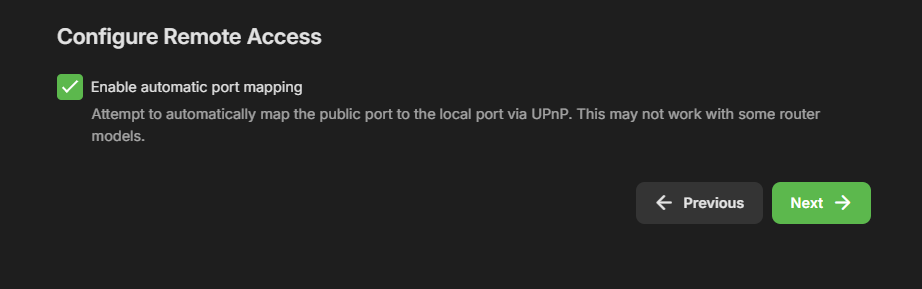
True but still believe Remote access should be an option on the installer and not just enabled by default on installation. As you have Port Mapper but not Remote access option installation.
 1 point
 -
Answer is Yes, The only way to ensure full compatibility without it is to ensure that ALL the metadata that comes from the movie ,tvshow provider (tmdb tvdb tvmaze etc) contains the actors and the identifiers (provider ids), AND that the Actor is available WITH those ids ASWELL., so the movie also has to be there!. Also they need to have all the ids filled in, some of which dont exist of those provider sites. That is not fully practicle. The alternative is to allow you to isolate them from each other so they cannot be pulled from an incorrect record / Provider. This would be the single MOST effective way. This is what I have been asking for. This is what Luke has previously said "was possible for the future - thanks". He knows it is needed, but I dont know whereabouts it is in order of priorities (roadmap of dev), It could be soon, or not ever really..... as you know there are item/features requested that are over 5 years old ... So for example an ADULT movie that has the Actor Chris Evans which I metioned earlier, There are many of them GAY Adult Actor STRAIGHT Adult Actor HOLLYWOOD Actor TV Host Actor Many others If he doesn't have the field for tmdb filled in in the metadata, would fetch the American Actor from the Marvel Franchise, a hollywood Actor not an adult actor. Its the same story with Anime. If the provider id for tmdb is not filled in it will fetch whichever it finds first. So I have tried to create my own provider ids, and even with those filled in, without isolating the Person provider, the tmdb, tvdb, tvmaze plugins will fill in the field with someone elses Provider ids, so there is a mismatch in the ids. If you dont have an image, it will still fetch the wrong person based on the other ids. There is no good option either to ignore tmdb etc. If I put something like "UNKNOWN" in the fields to stop tmdb looking up someone succesfully, that also causes some issues because the actors become linked by the word UNKNOWN because its now a provider id. So in a nutshell this is not really fixable without updates to tmdb, tvdb, tvmaze or allowing you to isolate the provider databases used per library. OR You would have to use a hack with a local reade as explained above. The data can be local (in the media directory) or Remote. This is a hack though so its not ideal.1 point
-
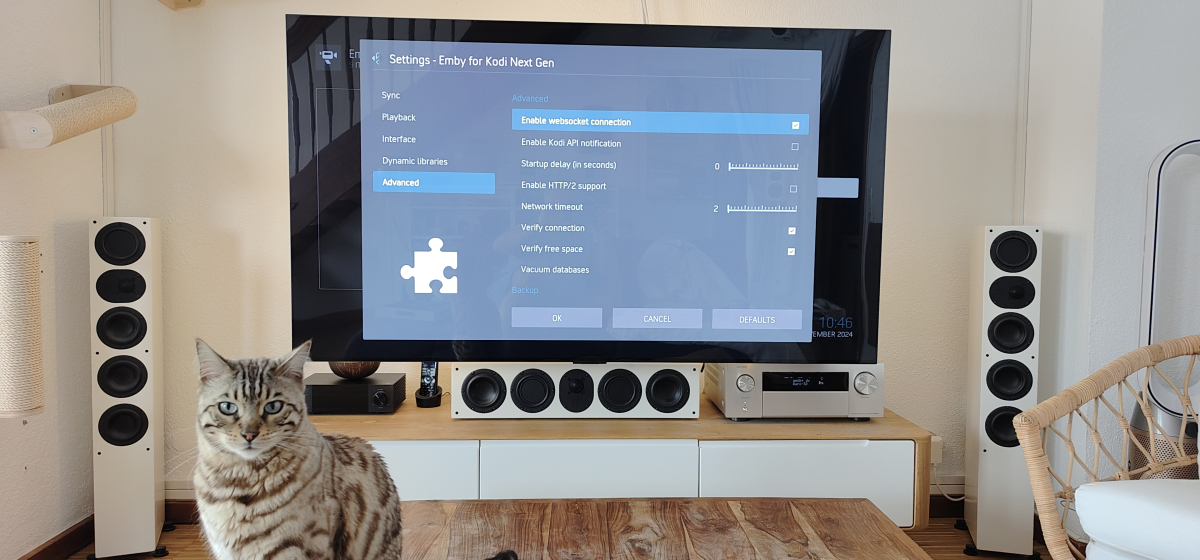
settings seems OK? incremental sync date was 2h ago the time I turned it on. does that mean it was not syncing between? for the log. debugging on or just the standard kodi log txt ok? thanks!
 1 point
 -
Its a TV Tuner, so it adds as a tv source in Live TV settings. Its for building your own TV Channels from your own media. Your own TV Station if you like.. Theres a lot of plugins that are not in Emby's Plugin catalogue.1 point
-
imo, I still think Emby can do a much better job here without setting themselves up for a fail. As you have done, they simply need to say what their immediate goals are that should be included in the next release followed by longer term aspirations. Server 4.9 for example - we've been given 'hints' that it should contain some form of smart playlists - if this is the case, then why not say this in a roadmap as it's been #1 on the FR list for YEARS ...1 point
-
@DragoMagIt's available now in this thread. I probably wouldn't call it done but it's a relief to get it out there.1 point
-
Would it be possible to include local trailers as a category in Trailers channel, in addition to existing 4? I have 10,000+ local trailers attached to media (both Movies and TV shows) spread accross multiple libraries and getting to them is a bit of a chore, having to drill down to each library each item detail view, Trailers tab feels like a natural place to have them all simultaneously exposed to the end user.1 point
-
Yeah, I understand and respect that. I actually am gradually converting everything to MKV, and that is what has prompted this particular issue. As I said above, there is some content that only exists withing a DVD's Menu interface (eg, image galleries, text content about a movie, etc). So, converting a DVD to MKV still leaves me without this content. So the above method is something I came up with where I would convert the movie and all the video-based extras into MKV files, and then just keep the portion of the VIDEO_TS folder data necessary to play the DVD menu (so that I can view the galleries, etc.). But like I also mentioned above, the following feature request would allow me to do away with the VIDEO_TS folder content entirely, because I could view the extracted image data as a gallery slideshow (if the feature request gets implemented): https://emby.media/community/index.php?/topic/55914-emby-server-theater-galleries-movie-extras-folder/1 point
-
you do realize it has been on the server for a long time right? it is in the transcoding section all you have to do is set it up if you wanna use it... see attached screeny for reference
 0 points