Leaderboard




Popular Content
Showing content with the highest reputation on 09/12/23 in all areas
-
From my testing everything is working properly now and this can be closed. Thanks!2 points
-
The ability to restrict this per user will be in Emby Server 4.8. It will require both the updated server and updated apps. Thanks everyone.2 points
-
I've been dying to know if this has garnered enough interest to be worked on. I found Emby (MediaBrowser 3 at the time) and its bookshelf plugin while I was searching for something that was like Plex for comics. Plex doesn't do this (and probably never will), Kodi doesn't have what I'm looking for either, and ComicRack seems to be dead at the moment. Unfortunately the bookshelf plugin doesn't work the way I had hoped. I was dissappointed to see it only offer a download to the file to which I can open it to the program of my choosing. Even browsing through the books I only had the option of going through folder-like directories and couldn't browse by author like the people section in the other media types. I would love for it to be fully integrated into Emby where I can open and read a comic right on my phone and tablet or even my web browser as I could with my movies and tv shows. Also, I hope to god somone is working on the "Games launching in android" feature you mentioned on your up-for-grabs blog post. That would be awesome!1 point
-
Be able to create playlist based on a certain criteria, like genre and or year, in order to create a dynamic playlist that it refreshes automatically when new content is added. This way you can for example, create a tv comedy playlist from the 90's, or a new sci-fi Movies playlist. Some other criteria for rules could be the rating, watched/unwantched, score, tags, language, audio codec, etc The possibilities could be endless1 point
-
As suggested by @ebr I have split my original request to allow better monitoring of interest and progress. The original request is here https://emby.media/c...brary-overhaul/ If you are interested please like the post. I always wanted to have this feature! This is something that was offered by Flickr. It would use the coordinates where the picture was taken stored in the EXIF and display the picture in the world map. I think that this was a bit specific in the past because we needed to have a GPS module tied to the camera but now every smartphone does this out of the box (without even asking your permission). Here is an example from Flickr where each point is a picture that you can display when clicking on the point:1 point
-
HI, yes it certainly makes sense. Thanks for the feedback.1 point
-
Hey there guys and hi Luke! glad to be back on Emby once more. I'd like to revive this discussion. Coming from Plex I really miss the option to have music automatically sorted in different groups. Like they do on musicbrainz themselves, e.g.: Ariana Grande: Albums, Albums + Compilations, Remixes, Live, Singles etc Wouldn't that be a huge gain for any music library? To have this sorted on a metadatabase, coming from Musicbrainz themselves already? Also, the option to let the admin decide if it's turned on or not like they do on Plex would be huuuuuge. Just take "big" bands like AC/DC or Metallica or even Michael Jackson, who've been making music for several decades. Currently I have like 50+ items for each of those in their respective library, making it very hard to find what you're looking for quickly. Having stuff sorted automatically into Albums, Singles, Compilations, Live Albums and what not would be such a huge benefit, don't you agree? I would really love if this would be taken into consideration in the future. Feels good to be back by the way, Cheers1 point
-
I will when I get home Luke, I am nowhere near my server.1 point
-
This fixed the issue, thanks Luke. I'll continue with my collections and report back if I have any issues.1 point
-
Yes it will be fine to upload, but if you restrict their access without the updated app it might just keep retrying relentlessly due to it not being aware of the restriction.1 point
-
Working now, I don't remember changing anything but who knows, thank you.1 point
-
What I actually meant to say is: If your primary objective is collecting and archiving rather than watching, that's a different situation of course and I understand that storage space plays a different role with that vast amounts of content. For the average Emby user (including myself), the gain in disk space would only decide about whether I buy the next HD a few weeks/months later. In your case it sums up quickly, though. When doing the Math, it's clear that a vast amount of your content will never be watched and for those items which will be watched, the drawbacks are probably acceptable, assuming the 75% which are re-encoded are on the unlikely side of being watched (IIUC). The bottom line is: were talking about extreme and advanced cases and nobody reading this should think that he would do anything good to their library by starting to re-encode everything to HEVC. It saves space (especially for high resolutions like 4k) but there are significant drawbacks that need to be weighed against it. The message remains: Don't fiddle around with your videos and let Emby handle all that for you (as long as you don't have some very specific reasons).1 point
-
If you saved 55, your total capacity must be > 250. Even when you'd watch 4 videos in parallel for the rest of your life, it will probably require your children and grandchildren (or more) to continue this in the same way in order to get everything watched1 point
-
With electricity I really meant the power required to keep that many extra harddrives spinning, though you're absolutely right on the difference between remuxing and transcoding. However, since I rarely have more than 4 external streams going at the same time, including Live TV and the rest is LAN traffic on recent devices that don't need transcoding, the old 1660 GTX is more than able to keep up Either way, I did convert about 75% of my downloaded stuff to HVEC and saved over 55TB. Since at the time I was running everything on 4TB disks (pre-covid), that is a substantial amount of disks in a RAID 6 config...1 point
-
Davelee, for your security, you could edit the photo to remove your direct IP address.1 point
-
Thank you, I will try and compare the sideloaded app with the Android TV one in a few days.1 point
-
Storage - yes, but electricity - no. When leaving files as H.264, there are chances that playback can be done by only remuxing the video (almost zero "electricity"). After re-encoding them to HEVC, they will always need to be transcoded - with two exceptions: DirectPlay An experimental and unreliable special playback case on some Apple devices. Which brings us back to what I had written above:1 point
-
I ran into the same issue and was stuck on the orange/black screen. Hopefully this works for you too. Press crtl + alt + f1 to get to the terminal startx This starts emby theater up. After the initial time, it starts up fine from boot.1 point
-
I managed to figure out a solution. When on the Orange/Black screen: Press crtl + alt + f1 to get to the terminal startx This starts emby theater up. After the initial time, it starts up fine from boot.1 point
-
He encontrado la solucion..si me voy a la configuracion y subtitulos .. y le doy a - Borrar selecciones de pistas guardadas. y luego hago el escaneo me las encuentra las pistas bien.. Por lo menos por ahora no me ha dado ninguna error. Saludos1 point
-
@mickle026 You can create an Emby SDK Reference: ICustomMetadataProvider<TItemType> . Those will be run after local and remote providers. Do not implement Emby SDK Reference: IPreRefreshProvider, because this would execute it BEFORE all others. Implement Emby SDK Reference: IHasOrder to set the execution order (within providers of the same type only). Implementing Emby SDK Reference: IForcedProvider will run the provider even when the item is locked.1 point
-
Clarification for partial readers: There is absolutely no need to re-encode your media files for Emby Server (some recent messages might have created a different impression)1 point
-
Will do, thank you and the emby team for all you do.1 point
-
Nope, I was just trying to figure out where I needed to install it from, and I hadn’t read the part that it was in the catalog. I haven’t found any bugs yet, but I’ll let you know.1 point
-
Pre-encoding files for Emby is actually a bad idea in general. It can make sense in special cases, like when you know for sure that your playback situations are always Direct Play, no downscaling, no tone mapping, no deinterlacing, no subtitle burn-in will be required. In other words: when you are sure you never need any transcoding. But those are rare cases. For all other cases, the recommendation is: Do nothing to your media, leave it all as is and let Emby dynamically decide what to do on a case-by-case basis. Nobody can make these case-specific decisions better than Emby (even I for myself couldn't generally do it better than Emby because there's so much experience which has flown into all the decision logic, and client-server interaction that a single person couldn't remember it all at once Very rare cases exist, where a re-encoding can be helpful to work around known issues with a certain format or encoding. Re-Encoding from H.264 to H.265/HEVC is a rather bad idea, because it eliminates the chance of re-muxing (transcoding where just the audio is re-encoded or nothing is re-encoded and the media streams are just filtered and segmented (for HLS streaming) It's also a bad idea, to do it for saving disk space, because when encoding to HEVC with settings to save space, you will end up having a sparse keyframe rate, which is not suitable for streaming and which increases delays when skipping video to specific positions. Also, re-encoding to HEVC doesn't mean that you will get HEVC streaming (with a single specific experimental exception). It only affects DirectPlay situations. I know that some will respond now, saying how well it works for them, but it's in no way comparable to extracting a zip and re-compressing as 7z or similar. We've seen so many playback issues in the past due to incorrect manual re-encoding of videos, that I can only recommend to think twice. Even for myself - as someone who would probably be able to do it right - I would never consider re-encoding my media files for space savings or other reasons - and in neither direction (from/to codec) - in summary, the disadvantages will almost always outweigh the advantages.1 point
-
That's correct. What's also correct is that < 0.1% Emby users have such hardware (at the time of writing). There's no doubt that we will have to move on and leverage newer technologies at some point. I had written all these things earlier in this conversation, but I understand that it's easier to attack Emby or Emby staff instead of taking the time to carefully read through messages and trying to understand the intentions. One of the core points in this context is exactly about "making the right decisions". Emby is still quite small and we cannot afford going into multiple directions in parallel and throwing away the less successful ones later, which companies like Netflix can do with ease. Like also explained earlier, there isn't a clear "winner" strategy visible on the horizon for which we an say "that's it - let's go all-in for this strategy". If that would be the case, then we would have already started working towards it. After the JF fork, we had fundamentally reworked our transcoding implementation and the differences in quality and reliability you are seeing, are a direct result of this - but it has been a tremendous effort over several years and when investing a similar effort again for a newer streaming/encoding technology, we need to be sure that it's "the right decision/target". Also explained above: Delivering some "experimental" implementation with something like HEVC encoding would be a piece of cake. Nobody needs to doubt that we couldn't do the same like JF does, but there's a difference in expectations: When JF offers something which is working in a fraction of cases but failing in all others, then people are applauding and coming to tell "JF can do XY". But they are telling it to us with the expectation that when we would provide the same feature, that it must be "always working" and not just sometimes. Users wouldn't applaud us for providing a feature labeled "experimental" which isn't better than JF's implementation. And right they are: We are Emby and users can expect more from us than a partially working experimental implementation - because "partially working" implies "frequently failing". We aim to provide best-in-class features and implementations for Emby users just like we've been doing over the past years already: We have the most flexible and adaptive transcoding pipeline creation, based on detailed detection of transcoding hardware availability and capabilities, like no other in the competition We had D3D11 based QuickSync transcoding on Windows, two years before it was added to ffmpeg Eventually, Intel had abandoned their own implementation (submitted to ffmpeg) in favor of mine (for which I had given them permission to submit it as 'Intel') We have the fastest software tone mapping implementation for x86 architectures, using SIMD/vectorization We have the fastest OpenCL tone mapping And we are dedicated to continuing on that path. But providing the best possible experience, can sometimes also mean to be hesitant in cases where it's clear that there's nothing to win and possibly even a lot to lose. At least as far as I'm concerned, it's one of the worst things for a personal media server, when you want to enjoy your media and start playback, but it ends up with an error. Who likes to stand up in such situation and even possibly be required to tell others people in the room something like "Wait, I need to tweak some settings first!"1 point
-
Regarding AV1 Encoding AV1 encoding in > realtime speed is going beyond the limits of even the latest CPU models unless there's significant downscaling before encoding. Less than 0.1% of Emby users have hardware available which supports AV1 hw encoding Emby uses HLS for streaming and I'm not aware of any client player which is explicitly supporting AV1 on HLS. Maybe the "eat-anything" MPV player can do it, but even when it would, it would still be < 10% of clients. Doing the Math: 0.1% of servers times 10% of clients makes: 0.01% of cases: If we would spend effort on developing this now, only one out of 10,000 playback situations would benefit from this work. In a few years, the situation will possibly be very different. But for now - AV1 encoding is totally off.1 point
-
I'm the facility manager, unlocking and locking the rooms each mornings and evenings and bringing out the trash.1 point
-
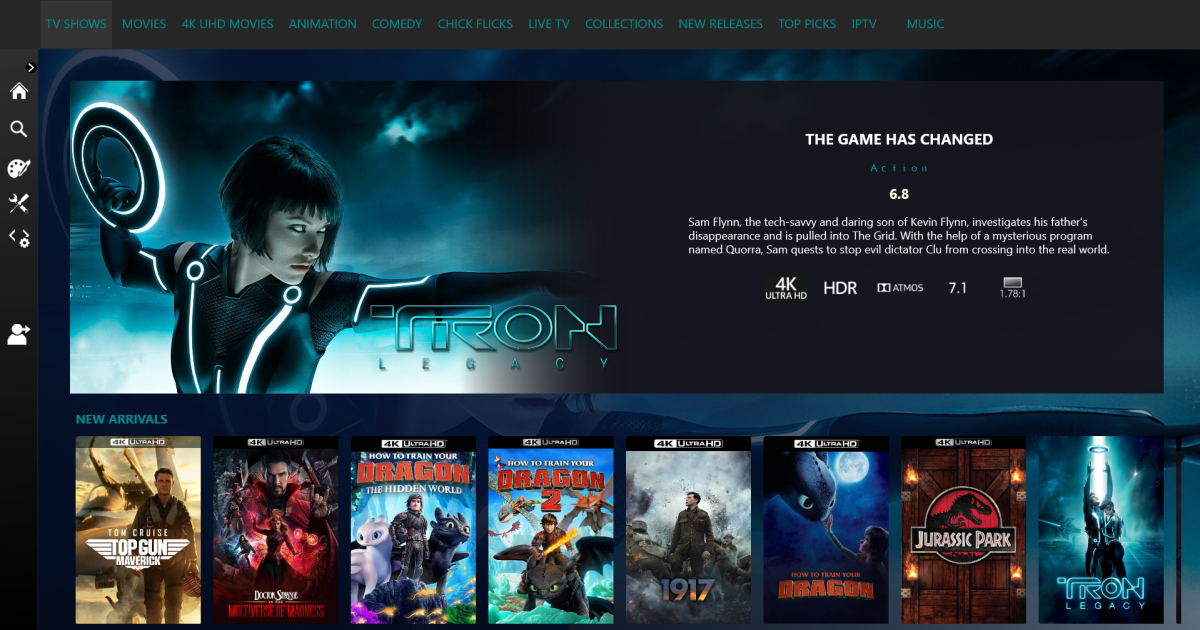
I'm quite loving this look
 1 point
 -
Just to add a bit here and to offer my $0.02 or less , HEVC encoding does use quite a bit more resources and really heavily depends on the CRF/VBR settings used and the encoding preset. I did a lot of research on this and the claim that a CRF of 23 when encoding a Blu-Ray source is visually lossless is just not true. If you have a good display, like a 4k with a larger screen, you can certainly see the difference. I ended up going with CRF 12 to get to visually lossless with my setup when encoding my collection to HEVC. CRF 23 with the Ultra Fast preset does encode pretty quickly, but you can see the difference between source and destination material. This is fine for smaller devices, but any larger device that can handle the output will suffer in quality with transcoding. For those with hardware accelerated HEVC support, there won't be much of an issue until the transcode tries to output at a 4k resolution because the device is 4k. The output resolution would need to match the source. Also, some source material encodes much faster than others, depending on CODEC, picture quality, motion, etc. VC-1 for instance normally went at about 15 FPS (some lower and some higher) on my server with 2x E5-2660 Xeons. The 32 logical cores struggled greatly without hardware encoding support. Those titles take nearly twice as long as the source video length to transcode with output being 1920x1080. Titles with HEVC typically ran at about 28 FPS but still very CPU intensive and it would never be able to encode fast enough to handle 2 encodes at once if it were on-the-fly. HEVC is great for reducing the size of your video library, even though at CRF 12 some few files end up being larger than the source. Even at that CRF, the overall size of my library was reduced by slightly more than 50%. However for on-the-fly transcoding, this would not be a viable option for me without some significant hardware assistance.1 point
-
Because what will happen is users will enable things that their devices don't support, and then they'll assume there is some kind of Emby problem and expect us to fix it.1 point