Leaderboard




Popular Content
Showing content with the highest reputation on 11/14/21 in all areas
-
Hey Everyone, My journey from Plex to Emby has been pretty smooth with the exception of setting up SSL encryption. There are lots of great posts on this forum and elsewhere on how to do this, and I consider myself pretty computer literate. But I'll be honest, this was a bit overwhelming for me as I have no experience at all in hosting web servers, DNS, or encryption certificates. After many hours, I've got it all working, so I thought I'd share what I've learned. I'm going to try to write this for the newbie, so don't be offended if it seems like I'm explaining lots of simple stuff. That's really what I needed a week ago, so maybe it'll help someone else in my shoes. Also, this is for Windows, although most of it applies to any OS. There's lots of text, but it's really very easy. Let me also say, I understand that a reverse proxy gives you lots of benefits and flexibility for securing your server. But that was a step too far for me. If you want a reverse proxy this post is not for you, but there are many posts in this forum to help you. If you want to access your Emby server from outside your home network you will want to require secure connection mode for all remote connections (see "Network" tab in Emby server configuration). To do this you need an SSL certificate. To get an SSL certificate you must have your own registered domain name. Here's a step-by-step. Domain Name Registration A domain name is the readable text part of a web address. So emby.media, or google.com, or media.yourdomain.net. Most home users don't have one, but you need one to get an encryption certificate. While (Edit:)There are many options for purchasing a domain (godaddy.com being very popular), I chose to buy my domain from domains.google. It cost me $12/year, and this is the only cost to getting your Emby server working with encryption. Go to https://domains.google, pick a domain, pay your money, and you're ready to go. For the rest of this discussion let's say you registered the domain name yourdomain.net. Now you need to associate your new domain with your home IP address. Most home users get their IP address assigned to them by their internet provider and it is "dynamic," meaning it can change. So you need to be able to tell your domain provider what your address is and update it when it changes. This can be done automatically, and is called dynamic DNS (DDNS). (Edit:) Before obtaining a domain, ensure the provider supports Dynamic DNS. Google domains supports this easily, here is the help page explaining how to set it up. Fortunately, my ASUS router has this capability built in so it was easy, but it's easy even if your router doesn't (follow google's directions). (Edit:) In case you have a static IP (obtained from your ISP), DDNS support is not mandatory. That's it for domain name registration. Now yourdomain.net points to your home network IP address. SSL Certificate Now you need to get an SSL certificate. This has the encryption keys you need, and must be issued by a recognized certificate authority or it gets blocked by your browser. Lets Encrypt will give you a free SSL certificate but it has to be renewed every 90 days. This was the part I was most confused by, but it's actually really easy. The part to understand is that Lets Encrypt must have some way of proving you own your domain name before they can issue you a certificate. There are two options, 1) they give you a little text file to place on your web server in a certain location. I don't have a web server so this is a no-go. 2) They give you a text string to add to your DNS registration in what is called a "TXT Record." You do this with google domains, it's very easy. To get a certificate you need an ACME client program that knows how to talk to the lets encrypt server. They recommend certbot, but it doesn't work in windows. Dig enough and you'll find ZeroSSL, they have a nice downloadable program that does it all and is really easy. Download here. Make a directory on your computer (I used c:\ZeroSSL). Put the le64 (or 32) exe in this directory. A single command will create your certificate. I think the easiest way to do this is create a text file in the same folder as the program, call it "get_cert.bat" and put the following three lines of text in the file. Edit the second line to have your actual domain name (instead of "yourdomain.net"), and to have your actual password for your PFX file (whatever you want it to be, just replace "yourpasswordhere" in the code below. @[member="Echo"] off le64 --key account.key --csr domain.csr --csr-key domain.key --crt certificate.csr --domains "yourdomain.net" --generate-missing --handle-as dns --export-pfx “yourpasswordhere” --live pause Save the text file as get_cert.BAT and then double click it to run. This runs the le64 program, creates the public/private key pair, asks lets encrypt to generate a certificate, saves that certificate, and converts it to a PFX file format that Emby requires. All in one command! When you run this, a command window will appear and you can see what it's doing. After a few seconds it'll pause and ask you to place the TXT record in your domain. It gives you a name and value, the name will be something like _acme-challenge.yourdomain.net, and the value will be a bunch of random letters and numbers. The program pauses here for you to put this into your domain. So now you just log in to your google domain again, go to "DNS" on the left menu, scroll all the way down and enter a "Custom Resource Record." The type is TXT, the name and value are what le64 gave you. Put them in, wait a few minutes for the change to take effect (took just a couple of minutes for me). Then go back to the command window where le64 is running and press enter to continue. It'll then verify your TXT record is there and issue your certificate. You'll find a file certificate.pfx in the le64 directory, that's it! Emby Setup Now log in to your Emby server setup. Go to "Network," in the field "External Domain" you put your domain name, so yourdomain.net or whatever you chose. For "Custom SSL certificate path," browse to the .pfx file that was created by the le64 program. In the "Certificate Password" field put whatever password you used in the .BAT file above when you created your certificate. Then for "Secure Connection Mode" I recommend you choose "Required for all remote connections." You also have to log in to your home router and forward port 8920 to the computer running your Emby server. I'm not going to give directions on how to do this, it depends on your router, but it's super easy. That's it. You need to restart your Emby Server, and then you're done! You can now access your server remotely and securely at https://yourdomain.net:8920. Certificate Renewal Now, I mentioned before that the Lets Encrypt certificates are only good for 90 days. So every 90 days you have to renew the certificate. Take that "get_cert.bat" file you made earlier and make a copy of it called renew_cert.bat. At the end of the second line, just add the text "--renew 20" (without the double quotes). When you are within 20 days of your expiration date run this file, it'll renew your certificate. I believe it'll ask you to place a new TXT record in your domain, so certificate renewal cannot be made fully automatic. You'll have to run it manually and add this TXT record into your google domain just like when you created the certificate in the first place. But it takes just a few minutes and then your certificate is renewed. You'll have to restart your Emby server for it to take. The file locations all stay the same, so you don't have to update anything in the Emby setup, just restart Emby. That's it! Well, I hope this helps someone. Sorry for the long post. I would have benefited from this level of detail a week ago, so maybe it'll be good for someone. If anyone sees something wrong here, feel free to correct me.1 point
-
But it isn't necessarily obvious that that's what it takes to remove the link and we have had this question come up multiple times.1 point
-
Impossible to delete. I desinstall and install again. It's good now1 point
-
En fait, j'ai fais mon boulet. Mais c'est en lisant vos posts que j'ai compris là ou cela n'allait pas. J'avais enregistré Emby Theater en omettant de mettre https En mettant https://monserveremby.ddns.net sans mettre de numéro de port, tout fonctionne sans problème. Non, Emby ne sait pas le faire naturellement sauf si tu lui rentre un certificat de type PKS #12 (voir configuration réseau d'Emby). Tu peux le faire aussi avec Let's Encrypt mais ceci est un autre débat. Le foward de port est une chose, le reverse proxy en est une autre. Tu fais du foward de port pour t'éviter de rentrer monserveuremby.ddns.net:8096 par exemple. C'est le reverse proxy qui te permet de sécuriser ta connexion. Pour en savoir plus sur reverse proxy, je te renvoie vers cet article : https://www.ionos.fr/digitalguide/serveur/know-how/quest-ce-quun-reverse-proxy-le-serveur-reverse-proxy/ Sinon, oui en effet il faudrait rajouter un WAF pour analyser ce que fait un attaquant et couper automatiquement sa communication en cas de doute. Mais faut pas pousser non plus. N'oublions pas non plus qu'une attaque se fait toujours des ports qui sont ouverts, et jamais par hasard. Si tu fermes le port 80 pour ouvrir le 8096, cela ne changera pas, et de plus tes communications transiteront en clair. Pourquoi mettre un reverse Proxy ? Mon but n'est pas tant de me protéger d'une attaque, mais parce que je veux encrypter les communications et parce certaines SMART TV n'arrivent pas à joindre un serveur Emby sécurisé par un certificat de type PKS #12. C'est d'ailleurs le firewall de mon hébergeur qui se charge d'analyser ce qui transite à travers mes ports 80 et 443. Et en plus, c'est gratuit. De plus, mon hébergeur va faire très attention sur les trames qui passent à travers les ports 80 et 443 car il héberge pleins de serveur web. Par contre, ce qui se passe sur les ports 8096 et 8920, il va s'en moquer... . @Luke It's not a problem with Emby Theater but with my Emby theater configuration. It's solved. Thank You. To registrar an emby client with a reverse proxy you must type https://mon.domain.com and leave port blank1 point
-
Hi, it should be improved soon in upcoming updates. Thanks for the feedback.1 point
-
Not hard if you know this “It's very difficult to find a black cat in a dark room, especially if there is no black cat”1 point
-
Just fyi we are working on a new windows app that will have everything embedded, and once released this will be much improved.1 point
-
no sounds great its gonna be on a local network only1 point
-
Ah I see, there are two possible choices to add favorites. Adding from the emby options menu syncs to emby but than you don't have favorites in Kodi. Adding favorites from the normal menu adds favorites in Kodi but they not get synced to emby... quite confusing FireTV Cube 2nd gen, Kodi 19.3, emby-next-gen 6.1.9, embuary skin1 point
-
Restart is tricky, but I think you want a reconnect option. Might be possible...1 point
-
Resolved for me also using 4.7.0.18, thanks.1 point
-
Almost 4 years since the post got started, when will it take for devs to do this crucial security feature? Another 4 years? 2026?1 point
-
No it was Windows, so I guess in theory this could be a case platform issue. But would think this would be coded the same way on both platforms. Only client that does not show additional parts is Android that has been reported in that section that I have seen.1 point
-
Hi! If I can have a question: is there a way to ignore the playlists (m3u, m3u8, pls etc.) that are found in the library? I have the following situation (which I think it may happen very well to a lot of people): I have a fairly large music collection (several hundreds GBs) and a lot of them have playlists inside, due to the fact that the torrents were generated that way, including playlists. So Emby will import all these playlists (which are mostly per album). I end up with around 1k of playlists. Deleting all the playlist files isn't a viable solution because most of them are live torrents, and removing part of a downloaded torrent which is seeding creates another set of complications. So, is there a way to tell Emby to ignore certain file types when scanning a library folder? I ask this because I would still like to use this feature, create my own libraries. But if those are spread between another 1k libraries, it kind of becomes useless. Thank you for the time to read my post!1 point
-
What exactly happened?1 point
-
Thanks for the feedback.1 point
-
This issue appears resolved in 4.7.0.18 in my tests.1 point
-
Since you're running an older beta server please try updating to the latest. These logs are from several days ago, there should be newer ones by now.1 point
-
1 point
-
I think this is pretty normal for a relatively young fork. Over time, the appearance and code base will evolve. Either Jellyfin will come up with their own design ideas, or Emby will change theirs. I think OpenOffice vs. LibreOffice is a good example of where this has happened. Initially, the LibreOffice fork was essentially a direct copy with minimal change. Almost like they did a search/replace for Open/Libre. Over time however, the design and features have started to diverge. It's just the nature of the open source licenses.1 point
-
They stole nothing - its part of the license emby was distributed under at the time allowed anybody to fork it and use it you need to educate yourself and stop pushing rubbish1 point
-
Hi. You can already do this now from the user screen in the dashboard.
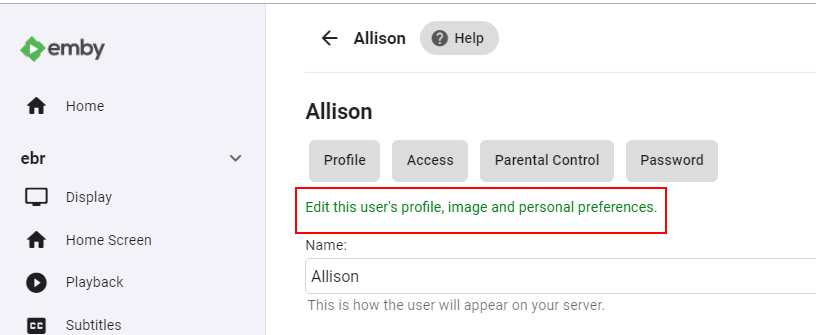 1 point
 -
I agree 100% that there are so many options for this. I for one truly would like a really simple method to make this happen. Honestly I'm shocked that Emby doesn't do this natively like Plex does. I know there's somethings that go in to that, but truly in today's world with security being at the forefront of everyone's mind, I'd think this is something that should happen. I'm curious if this is on the radar at Emby or not. If they could somehow do it so things don't pass through their end I know that would make a lot of people happy.1 point
-
I have add this to our internal tracker so we won't forget about this. Reference: Issue #914: [Photos] Allow slideshow shuffle The issue also brings up the fact we need more presentation choices with photos. Maybe tiled, cascade, carousel.. some options.. like power point allows with photos.1 point
-
Yeah, I've read through their API docs. Should we build this? It would take a day or two to lay it out. Actually I'm just going to make it. If people want it then it'll be available.1 point
-
About favorites. Have you used the emby options to adding content to favorites?0 points