All Activity
- Past hour
-
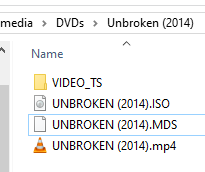
Okay, if I nest the video folder in a title folder in the title folder then everything is shown. Mystery solved.
-
 Pathfinderuk joined the community
 -
 Kh-alhazmi joined the community
 -
I removed the VIDEO_TS folder and then both the ISO and MP4 were recognized. It seems the folder takes precedence unto exclusivity.
-
 ximagt7uij joined the community
 -
 Yuxi567 joined the community
 -
 James567 joined the community
 -
 yetocor677 joined the community
 -
 Jdjdjdjfufheheshjyu joined the community
 -
 salvamjk joined the community
 -
 User LXXXIII joined the community
 -
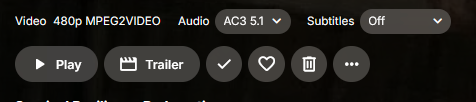
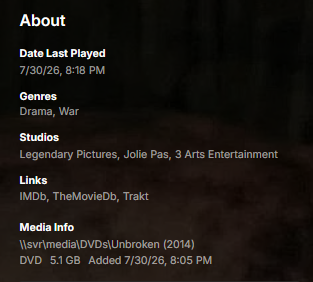
I have a folder with: VIDEO_TS, movie ISO, and movie MP4. But only the "DVD" shows to play in a client app. I have the BD ISO plugin installed, but not sure if it would read the DVD ISO. Why doesn't it at least show the MP4 show as an alternate source?
- Today
-
Yep. Thanks for the explanation.

-
Something is amiss in your setup, either on the Shield itself, or the settings in the ATV app, as the Shield should NOT be doing any transcoding/downmixing, as it can only downmix to PCM 2.0, not anything else. If you have unsupported audio, then the server should be remuxing it to DD. I have a Sonos Playbar and the server remuxes unsupported audio to DD. Edit: I have just played the original AVATAR movie that has TrueHD 7.1 audio and both the ATV app and the Universal Android app both remux the audio to DD 5.1, whilst direct playing the video. Can I suggest that you check your settings again. Thanks.
-

Is Android TV no longer being developed?
jyeomans replied to doggypatch's topic in Android TV / Fire TV
Every few months I try the new Android app but it's just too buggy when using live TV, and in particular, the OSD guide, chapters etc. I want to use the new app, its just not possible for me currently. -
Okay, I think I can duplicate and understand what you are wanting now So, you want the hardware to convert to surround and NOT the server, correct? In the end you get AC3 5.1 either way, but you're saying the quality is better when it's converted by the hardware to surround. I tend to agree. Also, everything I'm seeing online on the nVidia page says the Shield can only convert to 16bit PCM and lacks the encoder to convert to anything else. Are your Android settings like mine above? When I set mine like above, then I'm still getting surround using AndroidTV (and SFN says TrueHD is direct playing as you say) but it's being converted to something because I lthen ose Atmos. I just can't tell the stereo format because my soundbar doesn't display anything but Atmos and DTSX (otherwise that spot is blank) unlike your Sonos which tells you it's AC3 5.1. However, when using the new app and using the above settings then I'm getting stereo unless I select "convert unsupported surround" in the app which then forces the server to convert to AC3 5.1. BTW you can also get AndroidTV to tell the server to transcode to AC3 by lying and changing your Android settings saying it supports TrueHD, DTSHD, and DTS and then unselecting those audio formats within the AndroidTV app playback settings (they aren't there unless you change your Android settings first), but you don't want the server to do the converting. Both apps should sound about the same then.
-
Hey, I really like this plugin and wanted to use it in my setup. Just confirming, the plugin doesn't really handle multiple versions of an item, right? For example, if I have both a 4K and a 1080p version, I would like it show both icons on the movie poster or episode image. Based on my experience, it looks as if it randomly picks one of the versions and renders information for it. If it doesn't, I'm looking into Scripter-X to auto assign tags to items and then define tag based rules (I have another thread looking into that since I am struggling with that).
-

Seenr, a watch tracker that picks up your Emby plays over webhook
sh0rty replied to KevByUs's topic in Third Party Apps
First, hello to my fellow french neighbors Very clean and slick looking site! Second, I get that I need to set the Playback stop event in webhook settings. But what is with the "Mark as played" event? -
Currently, Emby only has ability to play only live IPTV streams. However, it's possible to play previously shown programmes, or even seekback on currently shown IPTV programme using M3U playlist and XMLTV in other apps! Here are few examples where it's explained how to: https://siptv.app/howto/ has instructions on how this tool parses XMLTV in order to replay previously shown programmes https://github.com/kodi-pvr/pvr.iptvsimple this IMO has widest support of catchup/seekback support, all explained in README. Could you guys please implement this functionality into Emby? Especially with all the AI tools, it should be fairly easy to add?
-
Is it more than just denying non-admin logins? If I am doing changes to the contents of the library paths, will Emby still automatically pick them up/perform library scans in maintenance mode and update them? I actually don't want to have it update the library, so I am trying to determine if I need to do a total shutdown or not. Thanks!
-
Thank you, I wasn't sure if I should post it there are not as part of my issue was about the REST API and how the files are organized and retrieved. Is there any insight into the REST API bit?
-

Seenr, a watch tracker that picks up your Emby plays over webhook
KevByUs posted a topic in Third Party Apps
Hi everyone, I build Seenr, a free tracker for TV shows, films and anime. It now picks up what you watch on Emby through the built-in webhooks, so episodes tick themselves off instead of being logged by hand. Setup, in short: 1. Create a Seenr account, open Settings then Auto-tracking, and pick Emby. You get a personal URL. 2. In Emby, paste that URL as a webhook. 3. That is it. Nothing to install on the server, no plugin, no fork. The full walkthrough is here: https://seenr.app/en/integrations/emby What comes across: episodes placed on the right season, films, and the time you watched. What to expect, so nobody is surprised: where the webhook settings live has moved between Emby versions, so the page points at your own documentation rather than guessing for you. If someone can confirm the exact path on current builds, I will happily make that page more precise. A few things that may matter to this crowd: it is free with no ads, it can import an existing history from Trakt, Simkl or Letterboxd, and exports use an open documented format (https://seenr.app/en/wlog) so nothing is locked in. Plex and Jellyfin work the same way. Happy to answer questions or fix whatever breaks. Feedback on the Emby side especially welcome, since that is the part I test least. -

XMLTV seekback/catchup (ability to play previously shown programmes, ability to seekback)
ebr replied to EEEEEEEEEEEEEEE's topic in Feature Requests
Hi, there's already an open request for this or something functionally equivalent. Please join in and contribute to the existing discussion at: -
This would be a good idea. I often find myself hunting in that long list of channels for a specific channel in the dashboard. For example when a channel pops up in my guide out of sequence, I have to hunt for where it is so I can move it to the correct spot in the lineup. A quick search to jump me to the channel would be great. Then there is the grab & slide to put it in the right place which feels a bit rough sometimes, especially if the channel needs to go far up or down on the list. IDK how that could be improved upon though, maybe a brainstorming session would be needed . Anyway, I just thought I would jump in & share my thoughts on the topic as well.
-
Since it's a docker container it's using the docker IP rather than whatever host you're running it on, this is based on the network mode that you're using for the container, so just replace 172.17.0.3:8096 with whatever address you normally use to connect to your server with.
-

Is there a way to disable the Download permission for all users at once?
Lessaj replied to Juanrendon's topic in Linux
I have not verified this and this is just high level approach but you can use the GET /Users/Prefixes endpoint to get a list of users and then you can loop over POST /Users/{Id}/Policy endpoint with a body of {EnableContentDownloading: false}. Again, high level, play with it to get the exact request body you need, test with a dummy user first. -

EmbyVision OCR - CPU Based AI Credits Detector for Emby (Docker)
EncryptedCity posted a topic in Tools and Utilities
EmbyVision OCR is a standalone OCR service designed to improve credits detection for Emby libraries. It runs separately from Emby in Docker and analyzes video frames using OCR to help identify end credits. Note: This is not an Emby plugin. It is a standalone companion service designed to work with Emby Credits Detector integrations. Features Lightweight design with minimal resource requirements, approx. 1.89GB pulled Consuming approx. 345.2MiB - 3.5GB RAM while in use. CPU-only OCR processing No GPU required No NVIDIA drivers required No CUDA setup required AI-powered OCR using PaddleOCR Designed for Emby Credits Detector workflows Docker-based deployment No database required No persistent appdata storage required Self-contained container image Simple Docker Compose installation Optimized for self-hosted media servers Optimized for fast CPU-only OCR processing Container Image The official CPU-only container image is available through GitHub Container Registry. This release is CPU-only and does not include GPU acceleration. GitHub Repository https://github.com/encryptedcity/embyvision-ocr Docker Installation Docker Run docker run -d \ --name embyvision-ocr \ --restart unless-stopped \ -p 8000:8000 \ ghcr.io/encryptedcity/embyvision-ocr:latest Docker Compose Installation Create: docker-compose.yml Add: services: embyvision-ocr: image: ghcr.io/encryptedcity/embyvision-ocr:latest container_name: embyvision-ocr restart: unless-stopped ports: - "8000:8000" Start the container: docker compose up -d This image does not require: NVIDIA Container Toolkit CUDA libraries GPU passthrough GPU device mappings Compatibility Tested with Docker deployments Runs well on Unraid CPU-only operation makes it compatible with systems without dedicated AI hardware Suitable for self-hosted Emby servers
-
Sorry for the confusion. My initial thought was that the new Android version does not passthru high res audio. That was my mistake.
-
Thanks for testing! I appreciate it. This is actually what I have been talking about: Emby server is transcoding the video, not Shield. If you play the same movie in ATV you should notice that Emby server is direct playing with TrueHD Atmos and Shield is converting it to AC3. I can see it in the Sonos app. In my case, if I turned on the convert to dd option, Shield will convert it to DD 2.0. Same Shield settings and same movie, ATV version results in Shield converting it to DD 5.1. I can see this in the Sonos app. It is a huge difference in audio.
-
Hi, I would suggest posting in the dedicated topic for the plugin to ensure that the developer will see this. Thanks.
-

XMLTV seekback/catchup (ability to play previously shown programmes, ability to seekback)
EEEEEEEEEEEEEEE posted a topic in Feature Requests
Hello, Currently, Emby only has ability to play only live IPTV streams. However, it's possible to play previously shown programmes, or even seekback on currently shown IPTV programme using M3U playlist and XMLTV in other apps! Here are few examples where it's explained how to: https://siptv.app/howto/ has instructions on how this tool parses XMLTV in order to replay previously shown programmes https://github.com/kodi-pvr/pvr.iptvsimple this IMO has widest support of catchup/seekback support, all explained in README. Could you guys please implement this functionality into Emby? -

VideoToolbox H.264 Hardware Encoding Fails on Apple Silicon (M1 Ultra) - Invalid Profile Parameter
rockinyp replied to rockinyp's topic in MacOS
@LukeMy Mac Studio server is running Emby Server 4.9.5.0 and I can still reproduce the VideoToolbox H.264 failure. Environment Emby Server: 4.9.5.0 Hardware: Apple Silicon Mac Studio (M1 Ultra, arm64) OS: macOS 26.5.2 Bundled FFmpeg: 5.1-emby_2023_06_25_p4 Reproduction Play a 480i MPEG-2 DVR recording remotely at 1.808 Mbps, which requires H.264 video transcoding/deinterlacing. Emby first launches FFmpeg with -c:v:0 h264_videotoolbox and -profile:v:0 77. That VideoToolbox transcode exits with code 1. Emby immediately retries with -c:v:0 libx264, and playback continues via software encoding. This happened on July 29, 2026 at 07:19:05 EDT. The attached full server log and FFmpeg transcode log are downloaded from Emby’s Logs UI/API endpoint for that playback attempt. Relevant server-log sequence: 07:19:05.149 h264_videotoolbox ... -profile:v:0 77 ... 07:19:05.422 Process exited with code 1 - Failed 07:19:05.430 libx264 ... 07:20:28.694 Process exited with code 0 So yes: H.264 VideoToolbox hardware encoding is still failing in 4.9.5.0 on this M1 Ultra, and Emby is falling back to CPU software encoding (libx264). embyserver-63920966400.txt ffmpeg-transcode-42d2f5f9-55ef-4465-b729-27f5e85c5d80_1.txt -
Hi, we’ll take a look at it. Thanks for reporting.
-
Hi, what exactly do you mean by nothing is at that link?







.thumb.png.1ddf135ad99a72646a26d671a28ffe35.png)