
All Activity
- Past hour
-
Works fine on fire TV but roku isnt displaying any cover art backdrops logos or images.
-
 triplenet23 joined the community
 -
 moises.bjj joined the community
 -
 Qattan joined the community
 -
 Kevnich joined the community
 -
 U2vou joined the community
 -
 Jabah joined the community
 -
 Jefferson6738 joined the community
 -
 maria6362 joined the community
 -
 Giannis_ozr joined the community
 -
 Rafaelh993 joined the community
 -
Try this working for me https://github.com/Fox8284/Microsoft-HEVC-Video-Extension/tree/main
- Today
-
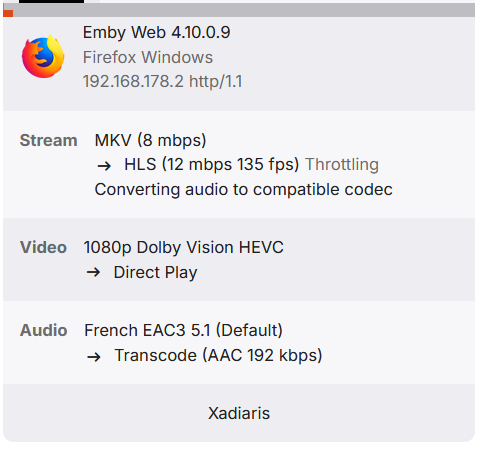
Yep same here. App just crashes, not on the four minute mark though. In the log it shows: Has gone idle while playing see timestamp: 21:33:55:853 embyserver.txt
-

Guide - SSL Qnap certificate and Emby (manual and automatic)
renefw replied to dieffe70's topic in QNAP
Thank you for the detailed reply, Sa2000. So, I know how to log in via SSH and I can also execute certain commands. Lukas wrote that I should run the script in a terminal to debug it. My questions were whether by "terminal" he meant access via SSH or how I can open a terminal on the QNAP NAS? Also, I'm not familiar with the term "debugging." I don't know what I'm supposed to do in that regard. Now, regarding Sa2000: I have SSH enabled and I use it to some extent. Somehow I missed the messages from last Wednesday... I also understand the basics of using PuTTY. Do I absolutely have to rename emby.p12? When I renewed the SSL certificate about two months ago, I manually executed the `openssl pkc12 -export ...` line. The certificate was then updated. That would probably work again now. However, I don't want to do it that way again because my original problem would remain. This means that my script, which is described in the quoted section of my message from March 29th, still isn't working as intended, and I won't be able to continue troubleshooting for another two months, because that's when the SSL certificate will be renewed. The problem is that it runs every hour, but it doesn't recognize that the SSL certificate has been renewed, and therefore the `openssl pkcs12 ...` command apparently isn't being executed. My question is, why is this happening? Is there still a small error in the script? If so, what is it? -
Tested 3.5.32. No DV.
-
Ah, glad you caught it. Must be a regression.
-
 sh0rty changed their profile photo
 -
Incorrect, it's an SRT embedded in the MKV, so it's just text.
-

Webhook Notifications - Test works, but real notifications are never sent
Multitude9588 replied to Multitude9588's topic in Plugins
No it doesn't. Interesting. I mean it show entries like authentication and playback but the last one is from February... -
Hi, yes it is, but it's only used when sorting by song title.
-
Hi, please attach the kodi log as well. T hanks.
-

Poster View issue with spoilers enabled on iOS
Luke replied to forbius95's topic in Apple iOS / macOS
Hi, we'll take a look at it. Thanks.- 1 reply
-
- 1
-

-
yes it's local vs remote playback.... this is the reason of trancoding : TranscodeReasons=ContainerBitrateExceedsLimit
-
Der, Transcoding starts based on the end use's bandwidth. What do you mean watch without transcoding? Are you using a different player. Is this local verus remote? Is it with a different TV or connection? Some end user player app or browser can play video directly and some cannot? Transcoding clicks on when the end user needs it. So, one user can get direct and the another with a different setup cannot and has to have transcoding. Maybe something like that is happening.
-
If I watch the same video without transcoding, with the problematic subtitle enabled, everything works fine.
-
Yep. No transcoding. I will wait for other answers and then test other version. Maybe there is something I should adjust in the settings but so far I did not find anything.
-
Is it direct playing? There's nothing is listed in the release notes about DV, but you could try sideloading 3.5.32.
-
Aha... OK. That subrip graphic does force, a full video transcoding, I believe, in order to burn in the subtitles. So, starting perhaps with no transcoding is needed and then the first subtitle appears and forces a transcoding. that could fit the symptoms. Maybe the orced subrip title is no longer noticed in the media and that fools the test and transcoding is not started at all or at some higher quality setting that just fails when the subs finally show up, three mnutes in, or whatever. Maybe the fix is to make sure Emby notices subrip forced graphic sub in the media metadata. Also an issue would be that some metadata for some media does not have all the data at the beginning of the media file. This is the optimized way to have media for streaming, but who knows where the media was created and by what software. If it is not optimized with the metadata available at th start of the file, then the forced sub info can be missed. This can happen when anyone makes a copy with a 3rd party software encoder. You cannot easily tell from one media to another if the data is optimized. That is an issue that is not the fault of Emby, if that is what's happening.
-
I am in the same boat but no one really cares. I have made a thread with the exact same issue years ago. Just disappointing
-
"...we’ll probably make a go of it.” "...for a theoretical new Shield." It's not a certainty that they will release a newer version but, at least, it's something. Honestly, I don't care about the gaming features, "just" a powerful Android TV box for streaming (including my UHD remuxes using Emby), support for all newer video and audio codecs, without lag. But if Nvidia releases a new one, I'm even afraid to know the price. There's the Homatics R Plus 4K but the issues list of fw updates and overheating, is too long for me to buy it. And, as far as I know, the team behind it is very small. Well, sorry to all for the off-topic.
-
Installed 3.5.28. Now I can filter but it does not play dolby vision properly it does not identify it as dolby vision. In the lg c5 I have it shows a logo when DV is recognized. It does not show it and the picture is "washed out" Btw I am using an nvidia shield pro as client
-
I'm not the only one in this situation... and I don't think my hardware is the problem either... this problem didn't occur with version 4.7 and below of Emby.
-
Here is a guess. Subrip is graphic based subtitles and if there no subtitles in the first few minutes, perhaps estimating the transcoding seems fine and begins, but when the graphic subtitles hit, the hardware cannot handle the transcoding in real time at the current transcoding settings. There is no way for Emby to predict that several minutes into the media, the transcoding settings will take longer than in real time and so the transcoding will buffer and stall. This would fit all the symptoms, I read. Maybe I missed something. Can anyone else recreated the problem? I made a case in an earlier post, that this is a file mangement issue. If an admin wants to transcode, easily without any stuttering, then add hardware or support encoders cards to handle the resolution, even when a subrip graphic subititle starts 3 minutes into a media, or, lower the resolution transcoding settings. Trying to get Emby to analyze an entire media length, prior to transcoding, is not a good solution. If this was setup, it would probably fail to work well, cause delays for any user who leaves it switched on and make people think that Emby is broken. WIth better hardware or transcoding settings, even the tough subrip might work fine. At most, I would suggest just to have an analzye test that goes further into the media and helps a user find the best transcoding settings and not make this feature into anythng automatic. If several people can see this issue then maybe adjust Emby to look a little further into the media to test for transcoding. I don't think there is anything to fix, if it only happens to one setup.
-
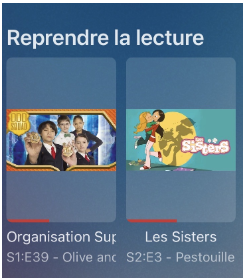
I reported the same issue (which has already been fixed on Android), but I’m posting it here for iOS (iPhone & iPad): On the home screen, when using Poster View, if spoilers are enabled, the thumbnail is displayed in poster format, which doesn’t look very good. Would it be possible to fix this in an upcoming version ? Thanks
-
Well, nVidia's VP of hardware engineering said it's still on the table https://arstechnica.com/gadgets/2026/01/inside-nvidias-10-year-effort-to-make-the-shield-tv-the-most-updated-android-device-ever/
-
This is my Plex folder, not an Emby folder. Why would there be a The Mutant Watch.mkv? It is one of the extras and has "-featurette" after the name. The movie is X-Men.mkv. This naming is just fine in Plex. What I want to know is if there is a way to import these folders without having to go create a folder for each type of Extra. Has someone written a script to do that or is there some 3rd party tool to go through and do this?







