All Activity
- Past hour
-

Roku sees server, but shows no users and I can't log into my user profile
KylerMarkle replied to KylerMarkle's topic in Roku
Windows, yes. My computer is connected via ethernet cable and says it's a private network. -
 Iggr66 joined the community
 -

Roku sees server, but shows no users and I can't log into my user profile
speechles replied to KylerMarkle's topic in Roku
Is this a Windows PC? Is the network type set to Public or Private? You need to make sure the network type is set to Private.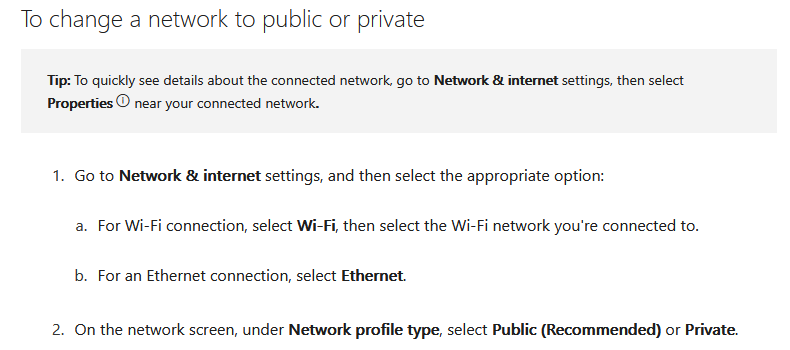
-
 Enrique xhyd joined the community
 -
 Santhia joined the community
 -
 04Slowrado joined the community
 -
 talia728282 joined the community
 -
 inglong joined the community
 -
 Shauntay joined the community
 -
 Javierlp22 joined the community
 -
 floricenco joined the community
 -
The folder structure as described above (multi-version movies) with an "extras/" subfolder does not appear to show the extras. I can only get it to index and show up when I remove all but one movie version. When I add the multiple versions back in, the "Extras" caption disappears. I'm using Emby 4.10.0.1 (beta).
-
Roku sees server, but shows no users and I can't log into my user profile
KylerMarkle replied to KylerMarkle's topic in Roku
Yes, it's inside the LAN, though I'm not sure if the roku is on a subnet or something like that. I've tried to connect manually and it says it can't communicate with the server, using both LAN or WAN IP address listed inside EMBY.
-
I did send the logs.
- Today
-

Migrating from TerraMaster NAS to Ubuntu Server (i5-12500) - best approach for preserving watched status with
TMCsw replied to me@jackbenda.com's topic in Linux
“Backup and Restore” should work just fine to preserve the user-watched status, even if the files are on different paths than before. No need for Trakt. You can actually recreate the paths on Ubuntu “/Volume1/public/Films”, using /mnt/… It's just a suggestion, not a requirement. (SMB or NFS) Just mount them properly in /etc/fstab. Regardless of the paths, "Save artwork to media folders" and "Save metadata to NFO files" will make the scan go much quicker if the paths change. YMMV, so test before punishing your users! Don’t disable your current setup; both can run concurrently (yes, the same Premier key can be used on both). And you can always try again. I don’t use “Emby Connect”, so I can’t help with that. -
Roku sees server, but shows no users and I can't log into my user profile
speechles replied to KylerMarkle's topic in Roku
This is inside your own LAN? If so, you can disregard Emby connect unless you want to connect remotely. If you are connect locally. Which is the case, when both the server and the Roku exist at your house. To avoid disruption during internet outages. I would configure the user manually so that if ever the internet isn't reachable you would still have access to your Emby server using that manually created user over your LAN. Does it show any errors on the Roku (error numbers, error strings, anything?) when trying to connect manually? To recreate an entirely new install on the Roku you would need to delete all the Emby apps from that Roku. Then restart the Roku so it deletes the app cache stored for Emby. Then install Emby on the Roku again and start it. You will be presented as if it was the first time you've ever used the app. You should then choose to skip and connect manually. After that enter everything matching the web dashboard for your LAN IP address and host. Then enter your username and password you assigned to that user in your Emby server settings when you set up that user. When you set a user up manually you set their password. They then must complete this challenge when presented with the password box on the Roku. With Emby Connect the password is the same as you would use on this forum to login to that user. You want to avoid using Emby Connect on a local connection because it requires working internet to log in. You might have times when the internet dips and then you are locked out of Emby on your Roku unless you at that time manually enter the information.
- Yesterday
-
Roku sees server, but shows no users and I can't log into my user profile
KylerMarkle replied to KylerMarkle's topic in Roku
My own server; I used emby connect, I've tried unsuccessfully to connect manually -
I think Google Gemini has the best free options.
-
Roku sees server, but shows no users and I can't log into my user profile
speechles replied to KylerMarkle's topic in Roku
Is this your own Emby server you have control of? Are your users connected manually or using Emby connect? -
After you had the crash happen, Did you immediately restart the app after the crash, and very first thing navigate to your user icon in the top header, click it, and send debug logs? If so, we may have to wait for @ebrto see them. Those logs go to the top men. I am a tier below that.
-

Skip Intro markers not being generated despite scheduled task completing
TheFreeMan replied to UsamaWaheed's topic in Linux
It's in my "TV" library and And... shoulda tested. I just fired up the first unwatched episode and I do get a "Skip Intro" button. I confirmed before trying the above that it did not. Now the question is, why didn't it generate it when it first imported on the 1st or 2nd of March...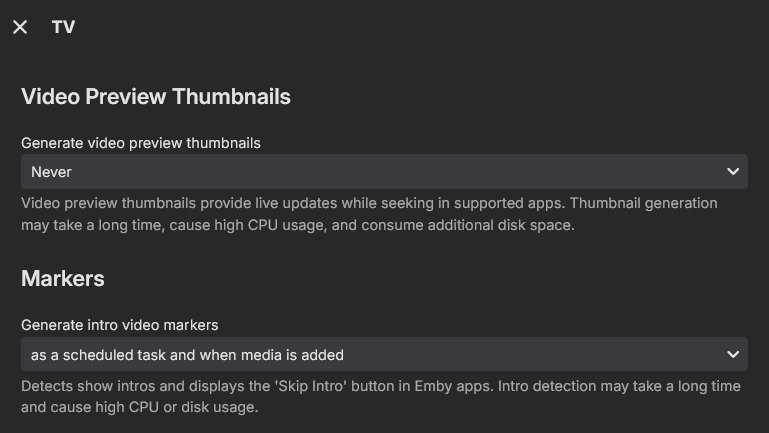
-
 KimPossible78 changed their profile photo
 -

Skip Intro markers not being generated despite scheduled task completing
Lessaj replied to UsamaWaheed's topic in Linux
Do you have it set to run intro detection when media is imported into that library? CreateTitleFingerprint can be seen running against those episodes, which extracts the audio for finger printing. Example: -
Roku sees server, but shows no users and I can't log into my user profile
KylerMarkle posted a topic in Roku
If there's any network information you need to help, just let me know. Thanks -
It seems to be totally random. You're watching something and then suddenly you aren't any longer.
-
Does it happen after a certain interval always after a certain time? Is it just seemingly random? Or does it happen when programs on the channel are transition from one to another?
-

Remote access to Emby Server as admin via VPN issues
Luke replied to jerkrl's topic in General/Windows
It’s on by default so that’s why I’m saying there’s no need to anything with it to make remote access work. -
While watching live TV, the app crashes and you go to the Roku home screen. There is no warning and no error message.
-
Yeah, figured that out, as noted in my next message. Thanks
-
I'm planning to integrate AI into the next release aswell. What do you guys think about that as another option for source? I know some people will argue "F**K NO, I want everything local". This will be 100% optional. My plan is to be able to enter a promt like "give me a list of the 50 best action movies from the 90s". Then the plugin will match the answer towards those movies that are in library, this might mean you get all 50 items with a large library, but maybe 3 hits with a smaller library. I'm also thinking about adding the possibility (100% optional) to send the latest watched movies and shows and then with a promt "Give me a list of other movies you would recommend based of these movies". This will not be built in AI, it will give an AIP call to an external service (ChatGPT for example) and then use the answer to tag or add to collections (all matching happens locally). This will give us the ability to create truly dynamic "Recommended for you" lists for all the users. But again, this function will be most useful when you have a pretty big library.
-

Remote access to Emby Server as admin via VPN issues
justinrh replied to jerkrl's topic in General/Windows
Luke, it works both ways ... right? I don't know what the default is (I'd hope off).
-
Yeah I see your point. I will look into this and I agree this function should be available. I'll get it done! The "Smart Playlist" plugin is freaking awesome! I honestly haven't looked to much into it, mostly because I don't want to copy the work of another, I want to make this project my own. But with that said, I will keep building and improve this plugin and many functions will be the same, but I want to do it with my own take on things. Just keep telling me what you want and I'll try to get it in there! Regarding multiple keywords: it's something I noticed as well when building the function. I kind of forgot about it with all other updates.. This could also be applied to other fields, actor for example. I'll get it in the next release.
-
I completely agree! It's basic functionality like this that has been missing from numerous parts of the server and apps through a decade that just makes you scratch your head.
-
Skip Intro markers not being generated despite scheduled task completing
TheFreeMan replied to UsamaWaheed's topic in Linux
OK figured it out - moved the files out of the directory & did a scan. I was thinking there was something within Emby to remove them from the library - found delete and it was going to delete the files from disk. Realized my mistakes... - Call The Midwife Season 15 removed from the library (with no intro skips) and scanned library - Confirmed episodes missing from library - Imported the files again, ran a full library file scan - No indication that the Detect Episode Intros task was going to run - it is set to run on a schedule and on new episode detection. - Confirmed that the episodes are back in the library (including watched flags - that's a nice bonus) - Manually ran Detect Episode Intros task - it completed in 0 seconds. embyserver.txt Debug logs attached -
move the season folder out of the library path it is now and save somewhere outside the library and do a scan for the library with the season not being there