
All Activity
- Past hour
-
 @renato_tlhe_chef joined the community
 -
 Fhhf joined the community
 -
@Lukeanything else I can provide to get this fixed? it did work on 4.8.x.x versions.
-
 Jaybhatt2003 joined the community
 -

Active Backdrop background and image size globally for all user
Happy2Play replied to kfdlean's topic in Web App CSS
Issue is I believe both these options are actually user per client settings. And are not controlled by css. Not sure if the new copy data to user function in Beta would help here.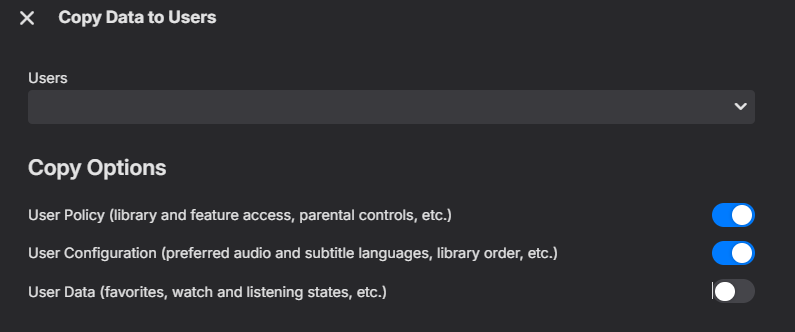
-
 SKBowman joined the community
 -
 hbo15a joined the community
 -
 Barbera2 joined the community
 -
 hy4tvtv joined the community
 -
 1522751613 joined the community
 -
 xg小鬼 joined the community
 -

Problem mixed library, mp3 files, mp4 files, mkv files
mrmixed replied to gsites's topic in General/Windows
I recently had the desire to embed an audio m4a file in a folder along with some other video content (in my case, it's related to live performance/concert-related videos), and couldn't get Emby to catalogue it and make it available to play, even in my mixed content library. So after doing some research and stumbling across this old post, I figured I'd chime in with my findings in case anyone else winds up here with the same question. I was unable to get @GrimReaper's suggestion of VIDEO\ and AUDIO\ subfolders to work; I think this may because I am trying to get this particular content to appear within a TV Show context (my goal was to be able to categorize some of the content in this folder as a "Special" so it doesn't display inline with the main videos, but is available from the same "folder" location in my library). I'm sure it would work if I dropped the TV-style "Season 01/Special" folder conventions but I didn't get to try that configuration, and in any case I wanted the audio track to display alongside the other videos, and not require drilling down into a different sub-folder location. What did work was to simply rename the .m4a file extension as an .mkv. Emby immediately found the file, scraped the internal metadata, and displayed it alongside the other video files in the folder for playback (audio-only, with a black picture)--which is exactly how I wanted it to work. It's a bit of a cheat, but it works. -

Feature Request: Configurable timeout and auto-reconnect settings for Live TV channels
jonzey231 replied to jonzey231's topic in Feature Requests
Thanks! Also PM'd you for a TestFlight invite. - Today
-

Plugin: EmbyCredits, detect end credits and add auto skip.
yocker replied to yocker's topic in Plugins
Thank you for the suggestion. I have been planning on making something like a chapter editor at some point but never got around to finish it because the plugin ChapterAPI already exists. Maybe i should get around to finishing it. -
Plugin: EmbyCredits, detect end credits and add auto skip.
yocker replied to yocker's topic in Plugins
It threw out some needed information too fast so it didn't get to the OCR server. Basically a timing issue. -

Emby Watch Party - Synchronized Viewing for Friends & Family
Oratorian replied to Oratorian's topic in Tools and Utilities
Please DM me. This would be out of scope here, maybe, but I am intrigued. -
That's my point, the Pangolin login is easily bypassed by anyone actually looking to attack; so it adds no actual useful security and serves only as an additional barrier to genuine users trying to login. I'm not sure where you get the idea it's even necessary. I've quite happily had my server exposed publicly for 10 years... There's no need to put additional login pages in front of it; and doing so, particularly with this method, adds no real value/security. In my setup there is a reverse proxy handling wrapping traffic in ssl, and only responding to a very specific subdomain while dropping other traffic (direct IP connections for example); that's plenty sufficient.
-
Just tossing more stuff in here as I update things... would love to get some feedback. Screen recording (3).webm
-
@darkassassin07The Emby login still appears, only the Pangolin login is bypassed. And only admins can control the server. I understand this isn't ideal, but what other options are there if you want to expose publicly?
-

Unwanted fanart.jpg files being saved to Movie folders
tanStaafl replied to tanStaafl's topic in General/Windows
@Happy2PlayI checked a couple that had the fanart added, and at the bottom the the Lock this Item to Prevent Future Changes is not set and the SAVE button is available. -

After install Emby on Synology 7.2.2 72806 update 3 URL gives " forbidden"
Neminem replied to karbo's topic in Synology
@Burghard welcome to the forum, how can we help. -
Unwanted fanart.jpg files being saved to Movie folders
Happy2Play replied to tanStaafl's topic in General/Windows
Is the metadata locked on your content? Pick a problem item and edit metadata and scroll to the bottom. -

Plugin: EmbyCredits, detect end credits and add auto skip.
Jutsch80 replied to yocker's topic in Plugins
This version works, thank you so much. Would you mind explaining what the issue was? -
The individual Emby apps are able to fully command and control Emby server. You need to whitelist all the paths required for this to make these apps function at all; which means all the paths needed to command and control your server are bypassing the additional authentication. An attacker looking to directly command your server would then be bypassing this superfluous authentication, while legitimate users just trying to reach the login page are stuck with additional steps... This does nothing to add actual security, while increasing friction for users. Security theatre at best.
-
Plugin: EmbyCredits, detect end credits and add auto skip.
yocker replied to yocker's topic in Plugins
Might have found the reason it failed. You can try this version to see if it's better. EmbyCredits.dll -
Grüße ich möchte meinen Winows Emby Server nach Ubuntu umziehen samt TinyMediaManager. Alle meine Platten sind aber logischerweise im NTFS Format. Ubuntu kann das ja lesen aber kann Emby es unter Linux verwalten? Der usecase ist lediglich filme / Serien streamen. der Rest sollte ja plug and play mäßig gleich sein zu windows, also easy Danke euch ! lg omron12
-

After install Emby on Synology 7.2.2 72806 update 3 URL gives " forbidden"
Burghard replied to karbo's topic in Synology
Schade, dass ein falscher Klick das Programm unbrauchbar macht. Und dann diese Anleitung zur Reparatur zum "Serverdatenordner löschen" die nur was für Experten ist. Ich bin enttäuscht, dass bei so viel guter Programmierarbeit dieser Fehler passieren kann. Alles hat super funktioniert bis ich mich verklickt habe. Nun muss ich wohl doch wieder zu Plex wechseln. Schade. LG Burghard -
@sh0rtyI have only enabled these two paths and haven't noticed any restrictions so far

-

Pixelated/Blurry/Discolored Playback on Roku when Transcoding
Xalactic replied to Xalactic's topic in General/Windows
I provided logs every time when asked, i don't know what you're talking about there. There hasn't been a response stating that the issue can't be replicated, just that they're unsure what's causing it. Burning in the PGSSUBS on Roku is a feature that Emby offers and the whole point of this thread has been that it isn't working properly for me. I'm aware that I can buy other hardware or stop using PGSSUB but I actually wanted to see if the issue could be resolved. I'm glad that we consider bug reports to be "complaining"... If they can't figure out the problem, fine I guess. The frustrating part has been the process of request logs, I provide them, crickets for months until I bump the post, rinse and repeat. -
Intel QuickSync H.265 Max Bitrate 39Mbit/s -> falls back to software encoding above this threshold
yocker replied to embart0r's topic in Linux
Try "Test to replace: MaxBitrate=39000000" "Replacement Text: MaxBitrate=250000000" Last thing i can think of. -
Not sure why this happens.. As a workaround you can clone your list, wait for it to populate and then enter your new link. Then you could delete the first list. I’ll see if can fix this bug
-
Plugin: EmbyCredits, detect end credits and add auto skip.
yocker replied to yocker's topic in Plugins
I will look into it. -

Pixelated/Blurry/Discolored Playback on Roku when Transcoding
RanmaCanada replied to Xalactic's topic in General/Windows
You appear to be the only person who is experiencing this, which means it is limited to your hardware/software. You were also asked for ffpmeg logs back in 2024, which you did not provide. Luke also asked you for logs constantly, which you did provide. No one else has apparently reported your issues, so this "level of support" is to be expected as the dev team absolutely can not duplicate your problem. PGSSUBS are image based and Roku does not support them. From a user standpoint, if you demand to play pgssubs and your current hardware can't play them back properly, I would just replace the hardware with something that can and stop complaining, or stop using pgssubs altogether. As a server admin myself, I ended up buying Android devices for several family members to shut them up for other playback reasons. Those that refused, got booted. -
Pixelated/Blurry/Discolored Playback on Roku when Transcoding
Xalactic replied to Xalactic's topic in General/Windows
This is the level of support I'd expect for free software but buying a license specifically to use hardware transcoding and getting the runaround for a year is insane. Don't even ask for logs and say you're "looking into it" if the final answer is just going to tell me not to use PGSSUB. I give up but this has been really frustrating.






