All Activity
- Past hour
-

NVidia Shield playback spinning/fails to start
warrencalvert replied to warrencalvert's topic in Android
Hi Luke Yes, I'm on 4.9.5 but the issue is still there. It did it again last when starting to play a recorded movie. Thanks, Warren. -
 Earthcape119 joined the community
 -
 ccuu joined the community
 -
 Jaxnbox1234 joined the community
 -
 Rammona joined the community
 -
 wangyuyan joined the community
 -
 jokerlam joined the community
 -
 mailmantas3000 joined the community
 -
 bobhy7 joined the community
 -
 Gradon0927 joined the community
 -
 xam452@@ joined the community
 - Today
-
Tu es sur que le serveur tourne toujours ? il a pas changé d'ip ? a-t'il une IP fixe dans ton réseau local ou DHCP ?
-

Introducing Traxx, an Android music app built for Emby music libraries
Hauzz replied to Hauzz's topic in Third Party Apps
I’m currently wrapping up the first release version. As soon as it’s ready, I’ll post it here. -
This is an ongoing problem for me, to the point that Emby media player has always failed on the first start attempt but comes right on the second. However it won't complete a full start at all today just the black logo screen. Was there ever a resolution for it? My Emby sever is on a NAS and all devices accesss it by either wifi or cabled LAN. Emby runs perfectly fine on all other devices, including remote streaming, except on this particular Windows 11Pro PC (which is running NVDIA graphics card, which looking over posts seems to be a recurrent thread).
-
@nypauliehas this helped?
-
OK if you can provide screenshots and sample data then I can probably give a better answer. Thanks.
-
Hi. Can you try searching for our standard android app (Just "Emby" on Amazon and "Emby for Android on Google) on the same device's app store and see how that compares? Thanks.
-
@WDPR4100
-
One doesn't need to - but if you (personally, I'm quite anal when it comes to curating my collection, and I suppose I ain't the only one) want infinitely more control, more providers and more granulation in metadata/artwork fetching (to name just a few), TMM is leagues ahead. And that's OK, it is purposely built software for that exact functionality - Emby has a lot more on its plate.
-
Just out of curiosity, why would one need to use TMM in addition to Emby?
-

我在 Emby 服务端中无法从 TMDB(themoviedb.org)获取任何元数据、海报、背景图以及演员信息。
yu666 replied to yu666's topic in Synology
换成了4.9.5.0就好了 -

Option to restrict Users to specific Collections
te5s3rakt replied to user84's topic in Feature Requests
I'd approach this with a hybrid model instead. collections can be server wide, but with a flag to make it private, then a list specify users. two fields in the database required. `private = true/false` `collection_users = [List]` -- i.e. `["user1","user2","user3"]` these can be replicated and pushed down to the local .nfo's as well for permanent storage outside the DB, similar to how <locked> works. making them exactly like playlists (only personnel to each users), hurts the uniqueness of collections, being that that are curated by the server owner. above recommendation lets collections continue to be server admin managed, but allow for user targeting. -
getting the same issues. there really is a simple fix here. just give us download start, stop, pause buttons. for direct transfer, original quality, content, there really should be zero issues with this. transcoded/converted content. do that on the server and cache, when ready, try to push to device. if it fails, wait until user opens app and hits "download NOW", then force start the transfer. easy solve. and most of peoples issues will go away. we don't care about background sync or whatever. we just want to be able to start a download NOW, and be able to monitor it's progress. triage this first. worry about background sync and transcoding later.
-

Need Advice - Stuttering Video using External HDD
PapalPenguin replied to PapalPenguin's topic in Hardware
Serious, its what I was able to afford, i am on ssdi disability -
Radeon RX 9060 XT ?? Are you serious, or just trolling?
-
Need Advice - Stuttering Video using External HDD
PapalPenguin replied to PapalPenguin's topic in Hardware
Some logs from when I was noticing problems as it is playing fine right now, note I have a VPN(ProtonVPN) and I have a tunnel setup to go to emby but it shows the ip for the vpn. When I turn off VPN and stop qbittorrent and then restart emby it plays fine, not sure if its the vpn, downloads, etc embyserver (13).txt ffmpeg-transcode-13195652-ad0b-49fe-b74c-d5aea8a61e49_1.txt -
Need Advice - Stuttering Video using External HDD
PapalPenguin replied to PapalPenguin's topic in Hardware
Here are my latest logs hardware_detection-63916280929.txt ffmpeg-directstream-38ecaa04-7d0f-4d17-b878-516cd6635bf8_1.txt embyserver (14).txt ffmpeg-transcode-1f0050f6-e3b6-4218-9490-1139d15ca793_1.txt -
It could also be that the "F" in your processor name doesn't support HW acceleration. Software transcoding may also be your problem. Before you buy new equipment, please upload your logs...
-

Need Advice - Stuttering Video using External HDD
RanmaCanada replied to PapalPenguin's topic in Hardware
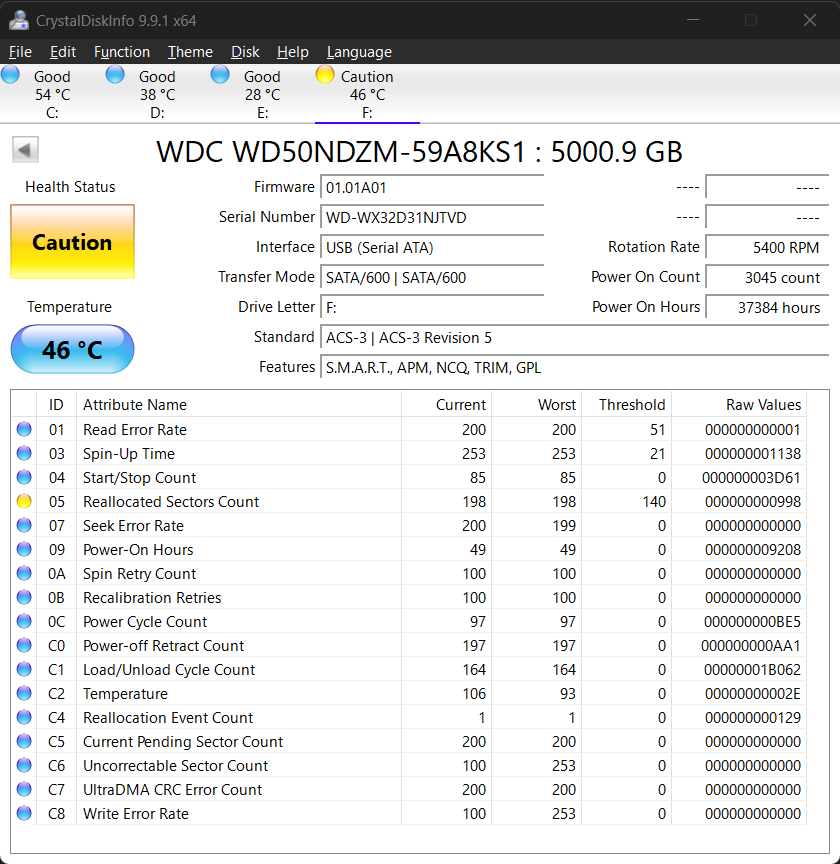
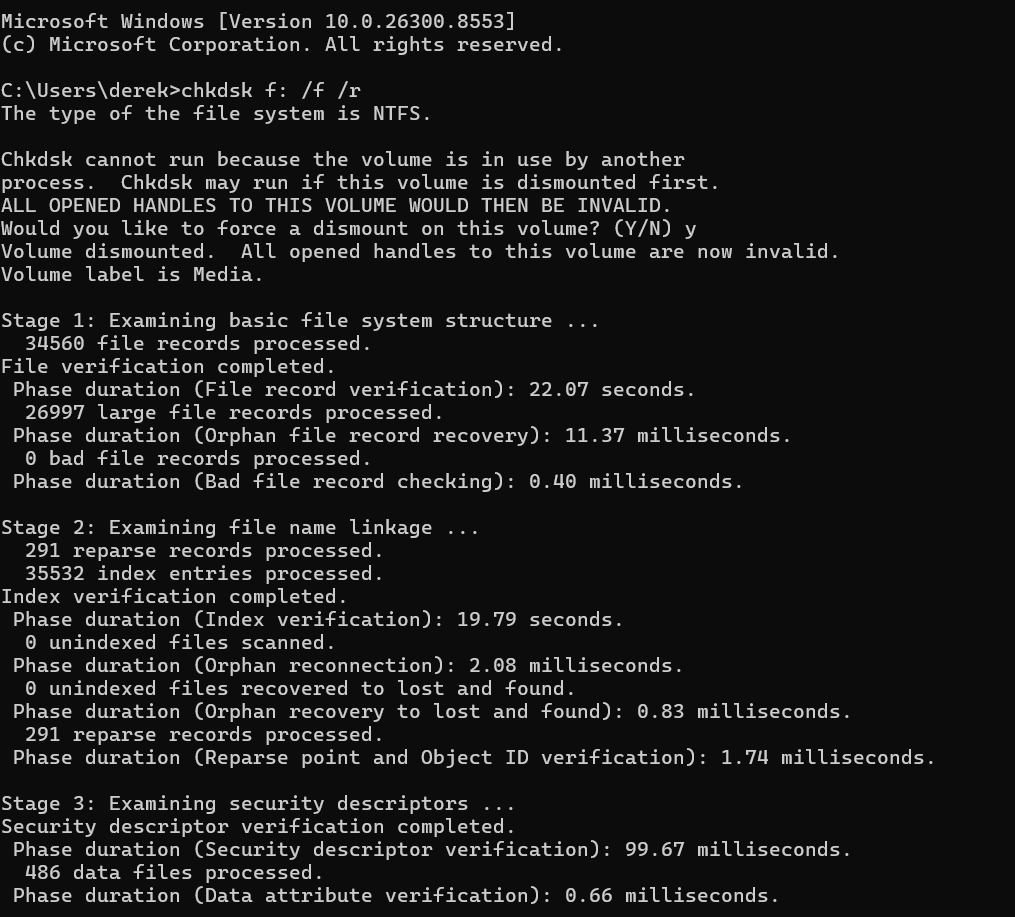
Your drive has bad sectors and is starting to fail. Instead of buying from Amazon I would suggest goharddrive or ServerPartDeals. They both sell refurbished drives with 2-5 year warranties. 12TB with 5 year warranty "only" $320 (they used to be $75 before the AI/Surveillance Centre Apocalypse) 24TB with 5 year warranty for $560 I have personally bought from goharddrive in the past, and lots of users on reddit do as well. If you can come to Canada, you can get drives for cheaper shipped out of the states..24TB external for $660 CDN, or $474 USD.. -
I am dealing with issues with a old USB HDD where some MKV files have been having stuttering when playing on my Google TV 4K box. System Info: in My Gaming PC file Intel i5-13400F with 32 GB DDR4 C Drive 1 TB NVME D Drive 4 TB NVME E Drive 1 TB SSD F Drive(where my media is) USB External WD WD50NDZM 5 TB HDD WD MyPassport 260D USB External 5 TB HDD Model WD50NDZM I am looking to get a new HDD as I feel this one might be having issues due to age and the casing has a crack in it sadly. Looking at these two HDD's and wondering which one would be the better option: https://www.amazon.com/dp/B0DW8ZW47C/?coliid=I1XTYFCNVVVQN3&colid=2LCEWMVHVJCO6&psc=1&ref_=list_c_wl_lv_ov_lig_dp_it or https://www.amazon.com/dp/B084ZTSMWF/?coliid=I3D0ZS2HARWF80&colid=2LCEWMVHVJCO6&psc=1&ref_=list_c_wl_lv_ov_lig_dp_it Or is the problem that I am using a HDD instead of a faster SSD? My Gaming PC.LOG
-
@radeon Feature Request: Separate Theme Video for Trailers (e.g., theme-trailer.mp4) Description Currently, Emby supports a single theme.mp4 (or theme.mkv) file inside a movie or series folder, which plays background music or a backdrop video when viewing the item's details page. I would love to see an official plugin or native support for a dedicated Trailer Theme Video. This would allow us to separate standard background ambient videos from actual movie trailers, playing a specific trailer intro or preview automatically when browsing a movie. Proposed Structure Example Ideally, the system could recognize a specific naming convention or a dedicated subfolder structure like this: Plaintext Avatar (2009)/ ├── Backdrops/ │ └── theme.mp4 <-- Plays as the standard background video ├── Trailers/ │ └── theme.mp4 <-- Plays specifically when highlighting or previewing trailers ├── Avatar.mkv └── poster.jpg
-
That is most likely because you are not following the proper naming conventions: Movies, TV, Music ...
- Yesterday
-

El icono de Emby de la barra para pc no sale en español
coyotecabreado replied to coyotecabreado's topic in Spanish
Aparece en el sitio Emby Server como traducido al 100% (https://translate.emby.media/projects/embyserver/) ¿como explico que faltan cosas?. -
DasErsteHD.txtArteHD.txtFrankenFernsehen.txtZDFhd.txt Hi, I'm experiencing an issue with IPTV streams in Emby. Playlist used: https://raw.githubusercontent.com/jnk22/kodinerds-iptv/master/iptv/clean/clean_tv.m3u I tested the playlist both through the WebStreams plugin and through Emby's built-in Live TV tuner functionality. The behavior is identical in both cases. Environment Emby Server 4.9.5.0 Windows 10 x64 Emby Web client (Brave Browser) Reproduction Import the playlist above and try to play the following channels: Working Arte HD Franken Fernsehen Not working Das Erste HD ZDF HD The non-working channels do not start playback successfully, while the working channels start immediately. This happens with Emby’s built-in Live TV tuner as well, not only with the WebStreams plugin. Additional information The same playlist and the same stream URLs work perfectly in VLC. All tested channels start and play normally there. I attached logs from: Arte HD (working) Franken Fernsehen (working) Das Erste HD (not working) ZDF HD (not working) One thing I noticed is that the failing streams appear to contain multiple audio tracks and WEBVTT subtitle streams, while the working examples are comparatively simple HLS streams. However, VLC handles all of them without issue. This is not limited to the WebStreams plugin. The same behavior occurs when using the streams through Emby's standard Live TV tuner functionality. Could someone please take a look at the attached logs and verify whether this is an HLS parsing/transcoding issue or a limitation in Emby's handling of these streams? Thanks.
-
I just been using safari via web for now till the update.. don’t want another paid 3rd party app