All Activity
- Past hour
-
 Alex_85 joined the community
 -
How and where do I add it?
-
 CyNeo joined the community
 -
 Ismael casa joined the community
 -
 Pengvoss joined the community
 -
 promitb joined the community
 -
 FABB32 joined the community
 -
 ya664255649 joined the community
 -
 hudbud joined the community
 -
 Karlaorteganose joined the community
 -
 JBMCL joined the community
 -
Yes can confirm the blank side menu does happen sometimes along with misc ui bugs. Not often but it does happen.
- Today
-
Yeah so Atmos playback still isn't perfect but it's tolerable. I will probably switch to VLC for longer movies. Not really on topic, but the Windows app is really buggy when it comes to navigation. Last night I was watching a show and at the end I wanted to 'back out' (by pressing the back button) and it refused, instead bringing up the side menu which was completely blank. This happens a lot after watching media (instead of actually navigating to a previous screen, emby wants to open the side menu). During playback on screen commands often vanish (like the full screen button, often just dissapears not long after starting playback).
-
Why is the Date Created setting missing on the Roku TV app? I have a library which is sorted by newest to oldest in the web page for a library but the Date Created setting is missing on the Roku app. The TV app has quite a few less options for settings than the web client. Can we get Date Created added to the Roku Emby client?
-

No art or posters for anything including backdrops on roku app.
speechles replied to Error3972's topic in Roku
Is he using Apple hardware for the server? The Roku being fed HEIC wouldn't work. But I do not think the server does that. But it might because support was recently added for HEIC. @Lukedoes the server ever save images as HEIC? -

No art or posters for anything including backdrops on roku app.
Error3972 replied to Error3972's topic in Roku
It is just a bunch of grey boxes with text. Im only a client of a friends server so I dont have access to the server log unfortunately. It works fine on both pc, web, android,and fire tv. Only having this issue with roku. -
No art or posters for anything including backdrops on roku app.
speechles replied to Error3972's topic in Roku
Can you show a picture? Is it just a bunch of grey boxes with text only where the images should be? Do you have any server logs from that time? Use the "logs" tab of your Emby server to find them. When you download them through your Emby server interface they will be scrubbed of information such as IP addresses, API keys, tokens, etc.. (which could be used to compromise your server). Only share logs obtained through the Emby server interface. Do not find the logs in your OS file system and share them directly that way. Always download them through your Emby server. The logs will show the Roku requesting the images and any possible errors happening when scaling or anything else peculiar would appear in them. -
Remote playback can get restricted streaming from all sorts of network, Wifi, TCP cable and even hardware issues. Sometimes it can be hidden. I've seen TV Ethernet ports only able to do 10 / 100 and the incoming signal from a workstation has a 1GB Ethernet cable and bandwidth. Just that cross connection kills the feed after 20 seconds. If there is a Wifi connection, then even a fireplace iron stoker rod 2 feet away can kill the signal. Then there is the TV App, the browser, the OS that doesn't support direct, kicks it to transcoding and the transcoding is set high that works locally but not for remote with streaming issues. That can kill the stream and start a stutter.
-
OK. I thought subrip is the term used for graphic subs that probably originally came with a blu-ray disc, which I think mostly uses graphic subs. You can often tell just by the size of the embedded file which shows up with MKVTools. Subtitle graphics are usually 15 to 25 MB, while srt files are always just 150 KB or so. https://blog.thescorpius.com/index.php/2017/07/15/presentation-graphic-stream-sup-files-bluray-subtitle-format/ Converter online - useful link: https://subtitletools.com/convert-sub-idx-to-srt-online
-

Hide Playlists from Included In & Group Albums by Release Type + Decade
user24 replied to user24's topic in Web App CSS
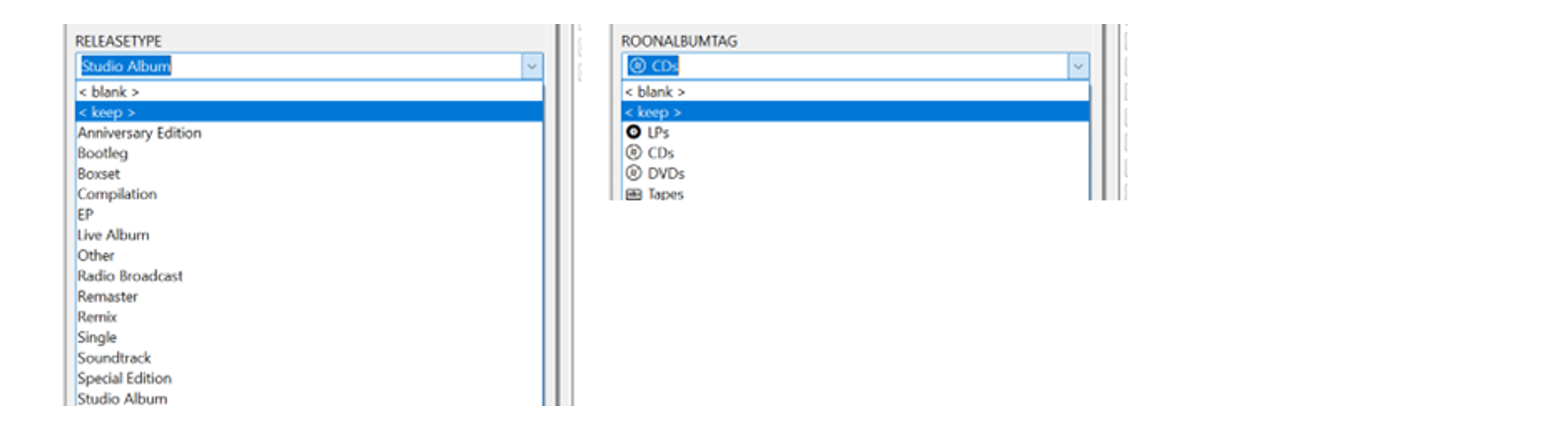
@GrimReaper Just a FYI progress update – and well, the more I use this, the better I am liking it! Still doing a lot of fine-tuning from the music side to streamline the tagging process and get the grouped sections aligned better with my library. I added some custom drop-down menus into Mp3tag – so it’s very quick to add the new tags now: It’s unbelievably super-fast now using the ‘Importer’ to remap the individual tags to the group tags/headings in Emby. There’s no way this would be practical to do with Mp3tag and Emby alone. (I’ll give a separate update on the ‘Importer’ use a bit later on…) I’m also just started experimenting with some new Decade headings to match with the Release Type headings. Will probably scale it down a bit from what I have now: A couple of script changes make it easy to try different scenarios (e.g.) Add: const decadeLabels = { "1950s": "The Rockin' 50s", "1960s": "The Swinging 60s • British Invasion | folk-rock tones | psychedelic color waves", "1970s": "The Classic 70s", "1980s": "The Synthetic 80s", "1990s": "The Indie 90s", "2000s": "The Global 00s", "2010s": "The Trendy 10s", "2020s": "The Emerging 20s", }; (e.g.) Add/change: const label = decadeLabels[decade] ? ` • ${decadeLabels[decade]}` : ""; header.textContent = `${decade}${label} • ${groupAlbums.length}`; I imagine the Custom Release Type sort will be my main ‘go to’ view. It’s already helping me easily see missing Studio Albums from an Artist’s discography. Just compare the new page view directly to the MusicBrainz main Album discography section for well-known popular Artists. Still a lot to tag, organize and experiment with, but so far so good...!!!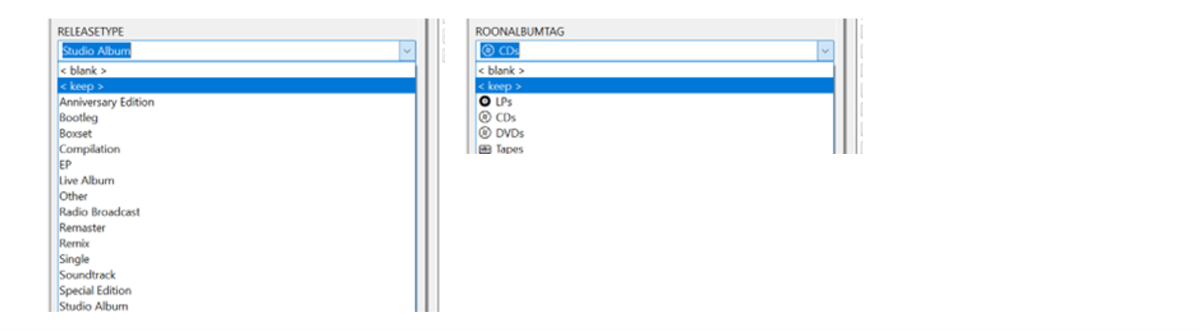



-
Activity and Alerts fall off the Dashboard I believe every seven days if I remember correctly, or x number of entries depending on the section. If you want to see older activity/alerts click the Activity or Alert header button to open entire history.

- Yesterday
-
Yes sorry my bad, it was .28
-
Updates: Return of the header, you can change the frost, disable it, etc. from this area in the variables, I also added in a variable for padding in the media details areas, so it does not sit right up against it. /* EFFECTS (SIDEBAR, HEADER, AND DIALOG POPUPS*/ --sidebar-blur: var(--blur-heavy); /* Frost blur intensity: var(--blur-heavy), var(--blur-light), or none */ --sidebar-bg: var(--navy-base-alpha-75); /* Frost transparency intensity: var(--navy-base-alpha-75), var(--black-alpha-80), var(--black-alpha-95), etc, or var(--retro-navy) to disable */ --header-blur: var(--blur-heavy); /* Set to 'none' for a completely clear header, or var(--blur-heavy) / var(--blur-light) to enable frost */ --header-bg: var(--navy-base-alpha-75); /* Set to 'transparent' for a completely clear header, or use a translucent color to enable frost */ --header-border: var(--standard-border-thickness) solid var(--gold-alpha-15); /* Set to 'none' to disable, or var(--standard-border-thickness) solid var(--gold-alpha-15) to enable */ --header-content-padding: 20px; /* Media details header padding, push the content down from the header */ Fixed more random icons that did not receive the gold color If a filter is applied the filter icon will now have the gold color around it indicating a filter is in use. Backdrop poster animations, and new variables added for that --backdrop-anim-toggle: imgZoomFadeIn; /* Set to 'imgZoomFadeIn' to ENABLE the backdrop animation, or 'none' to DISABLE it */ --anim-backdrop-mask: linear-gradient(to right, transparent 0%, var(--pure-black) 40%), linear-gradient(to top, transparent 0%, var(--pure-black) 40%); --backdrop-image-scale: 80%; /* Percentage of screen to use for backdrop posters (It will always pin to the top right of the screen) */ Bugfix for the list view star hover Media card hover shadow fix Reduced seasonal variable lines to easily enable/disable. Some Live TV fixes And many more bug fixes. I know the variables have been changing a lot lately, I'll try to be better on showing section 1 changes going forward, so you can just update section 2 downwards. Got an idea or found an issue? I'm always listening. Feedback is always welcome. Emby Navy and Gold v4.108.css
-
Show album release year on Now Playing screen
user24 replied to xterminal's topic in Feature Requests
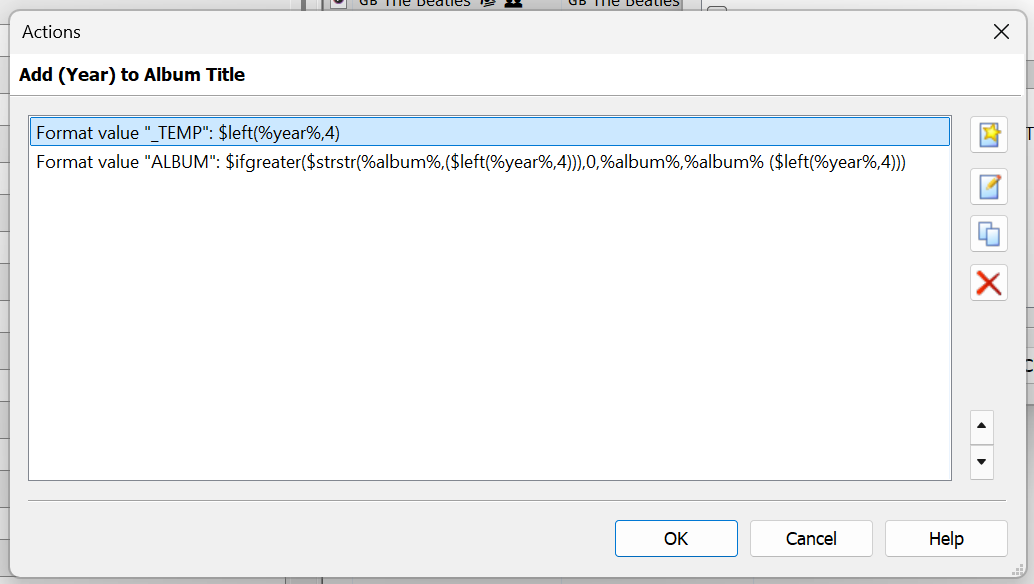
Hi, yes this is a nice idea. AFAIK, this is not currently possible, even if you have all your tagging correct. I wanted it myself, going back a while ago, so added the Year to the Album name (e.g.) "Let It Be (1970)". The end-result is this: As I didn't want to do this manually for all my Albums, I created an Action in Mp3tag to do this automatically. I expect there would be other methods as well? You could run something like this on many Albums at once. If the Year has already been added, it won't add it a second time. Therefore you won't end up with something like "Let It Be (1970) (1970)". While it is a workaround, at least it shows the information. Cheers!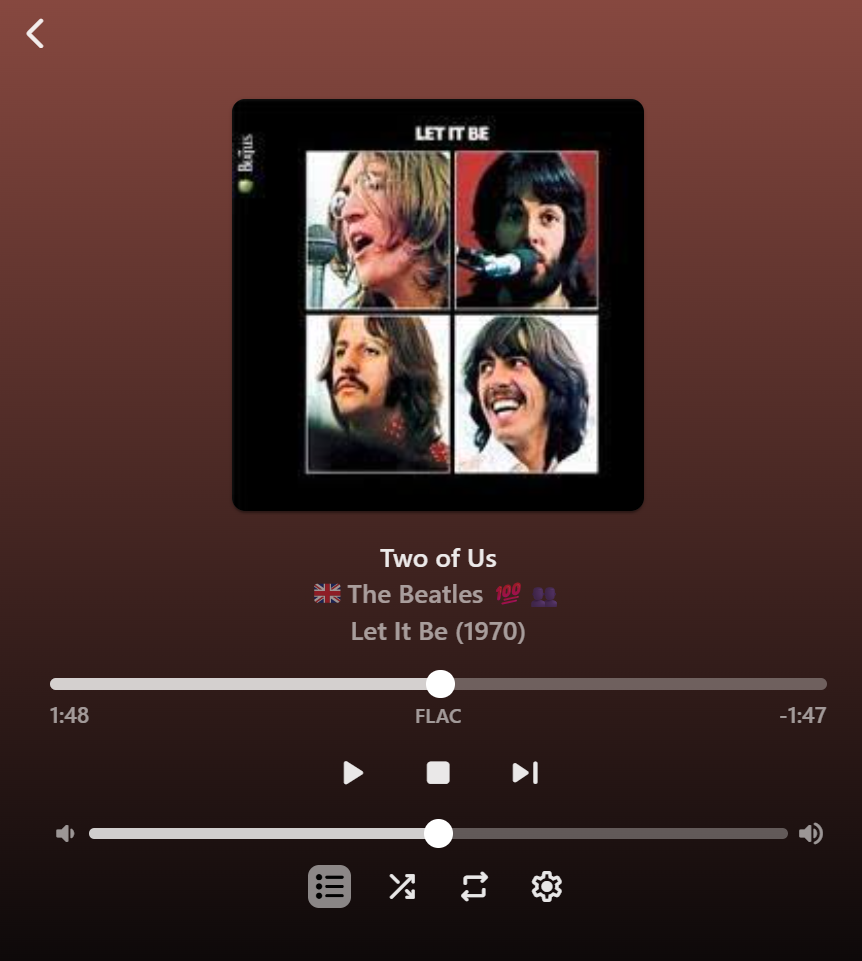
-
 shadypinesma changed their profile photo
 -
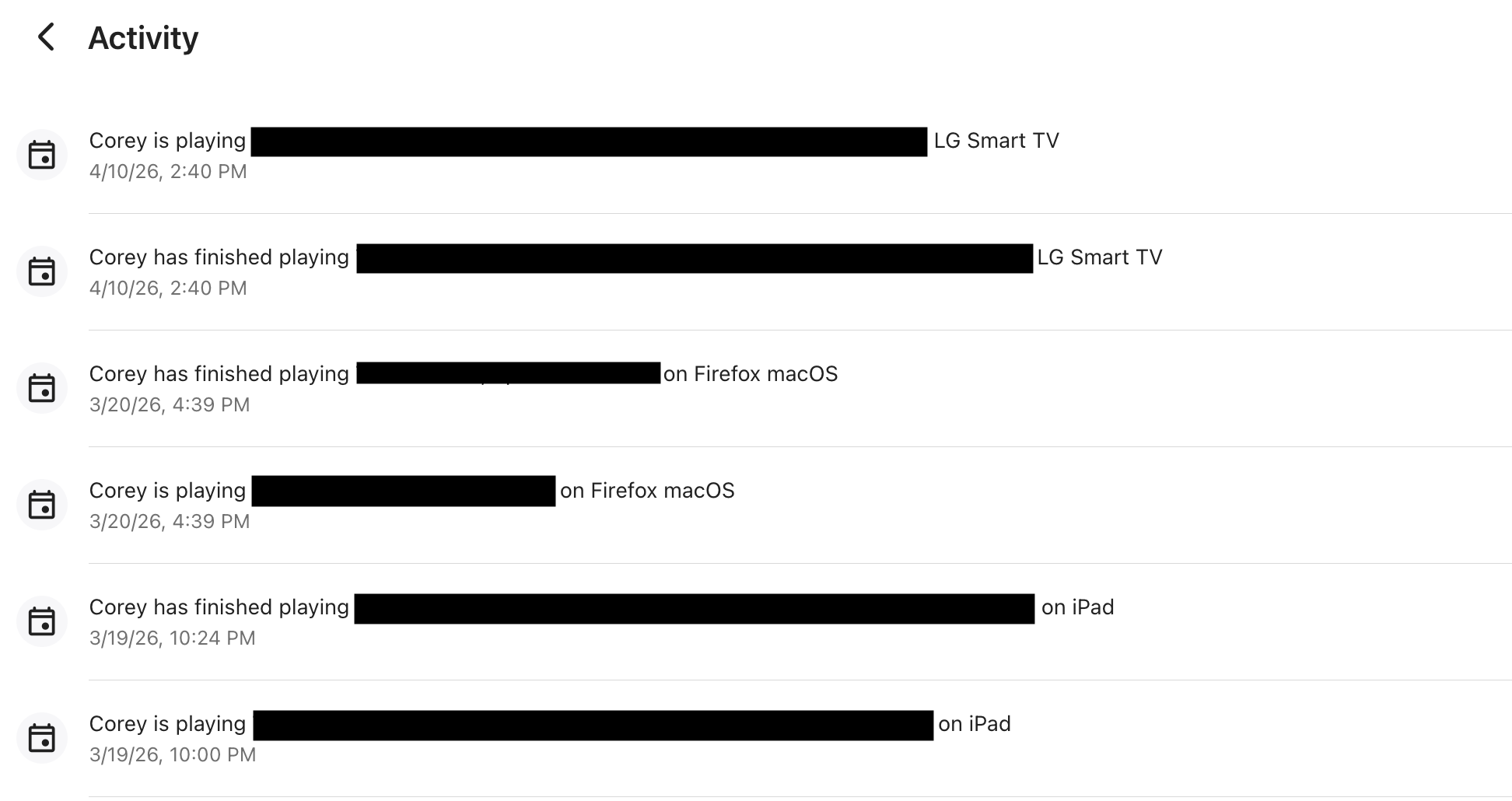
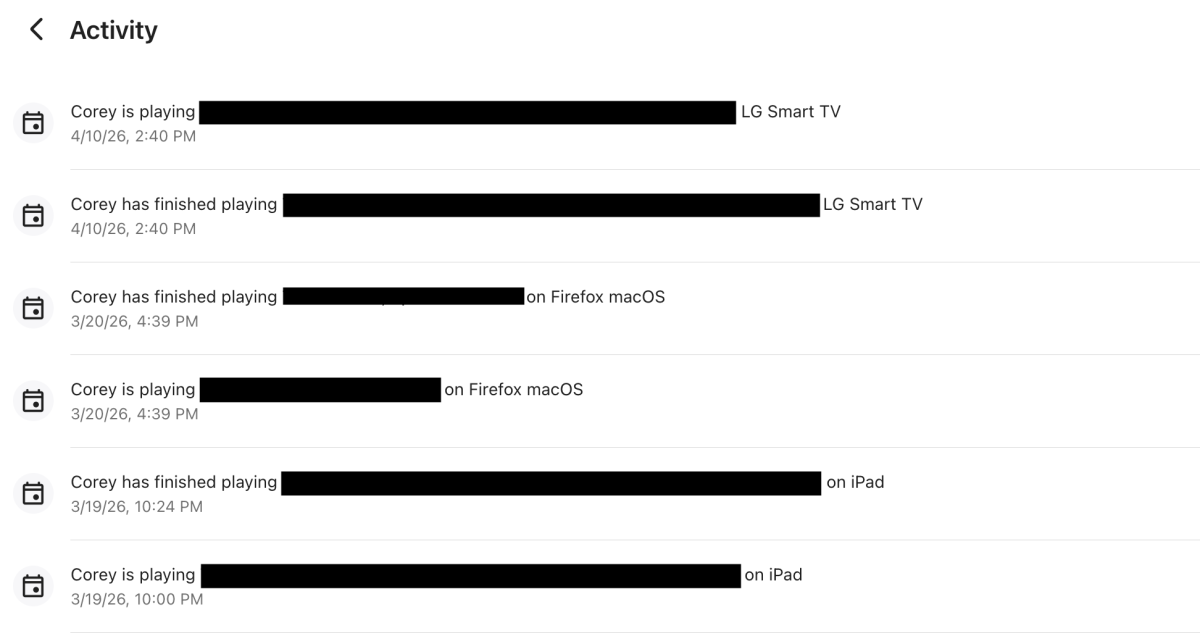
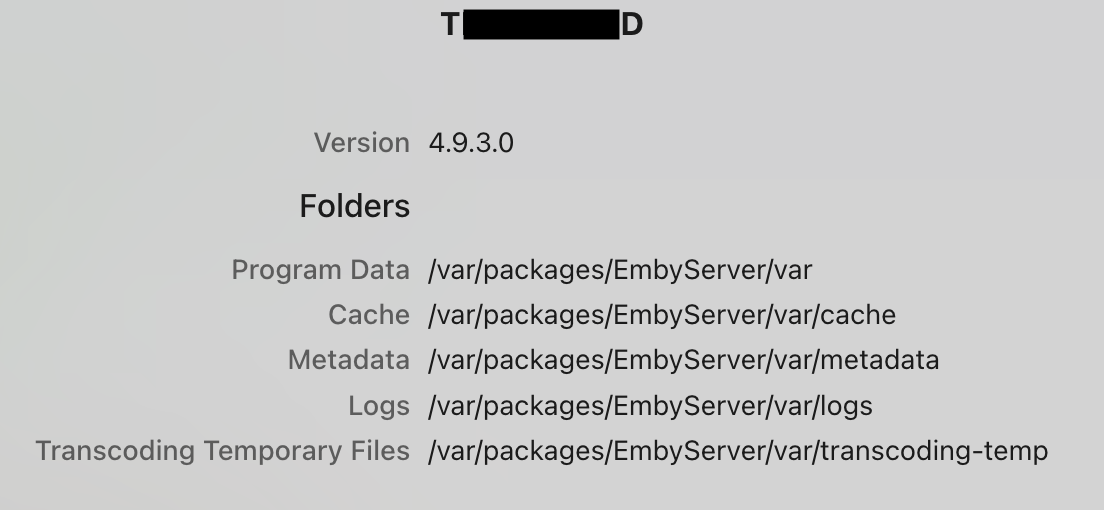
Hello, I’m a new user to the community. I’ve been using Emby since the beginning of the year and have really been enjoying it so far. My technical background is somewhere between beginner and intermediate. I’m reaching out because I’m ran into an issue with my Synology NAS DS725+. In Emby’s dashboard "Activity" (ie: serveractivity) page, the "Activity" dashboard stopped updating any activity after 3/20/2026. Since then, I’ve watched multiple movies and TV shows, but none of that activity is listed. I restarted the Emby Server today 4/10/2026, and now the activity is displaying again. However, I’m trying to understand why the previous ~21 days of activity were not recorded or displayed. Is this expected behavior, or could something have gone wrong with logging during that time? I did update to version 4.9.3.0 during this time, is that related? Also, please let me know what logs, files, or additional information I should provide to help troubleshoot or report this as a potential bug. I access Emby via both Home (LAN) access and Remote (WAN) access on the following: Mac Firefox browser, iPhone and iPad Emby App, and LG's Emby app. Thanks in advance for any help! Version 4.9.3.0 Folders Program Data /var/packages/EmbyServer/var Cache /var/packages/EmbyServer/var/cache Metadata /var/packages/EmbyServer/var/metadata Logs /var/packages/EmbyServer/var/logs Transcoding Temporary Files /var/packages/EmbyServer/var/transcoding-temp
-
I just installed the beta and scheduled some shows. I'll let you know.
-

Guide - SSL Qnap certificate and Emby (manual and automatic)
sa2000 replied to dieffe70's topic in QNAP
well, we wanted to establish when it is run manually, if it fails or renews the emby.p12 cert. my suggestion to rename was to ensure you are looking at the new emby.p12 file and not one that existed before when checking its expiry date Running in terminal is just another name for running it in a linux shell session using tools such as putty Debugging is just looking at what commands return and output when executed breaking it up into indivdual commands in my suggest test was to check the result of each command you could run the script manually as well instead of breaking it up you could also change the openssl line to direct the output to a file e.g. changing the openssl line to something like openssl pkcs12 -export -out emby.p12 -inkey SSLprivatekey.key -in SSLcertificate.crt -passout pass:mykey > opensslout.txt and then after the script runs, you would inspect the opensslout.txt file to see if it has any clues that help work out why the emby.p12 file is wrong -
@hdsuisseThere's a new Dev version 2.1.8.0 in the plugin catalogue. Although it hopefully fixes your problem also with the Export Stream Type "Universal", i suggest you to switch to the new Stream Type "Direct". That one has less overhead. However, read the description of that setting carefully to understand the consequences!
-

Use primary image for continue watching under Apple TV Home Screen
alex77777 replied to AndyXH's topic in Apple TV
@LukeWill we get the ability for theme videos on the Apple TV in the new home screen revamp? -
Unfortunately yes on the store but curious here on web is it a diff manual apk???
-
Yes you do
-
Works fine on fire TV but roku isnt displaying any cover art backdrops logos or images.
-
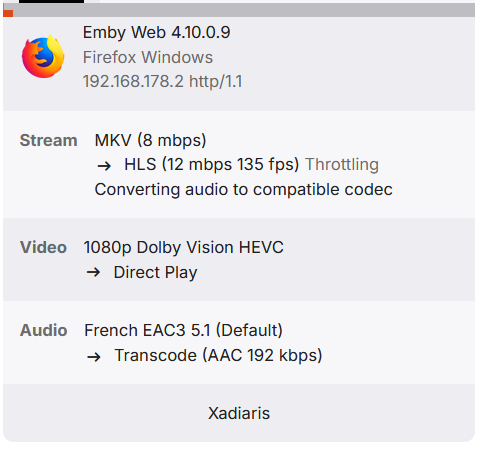
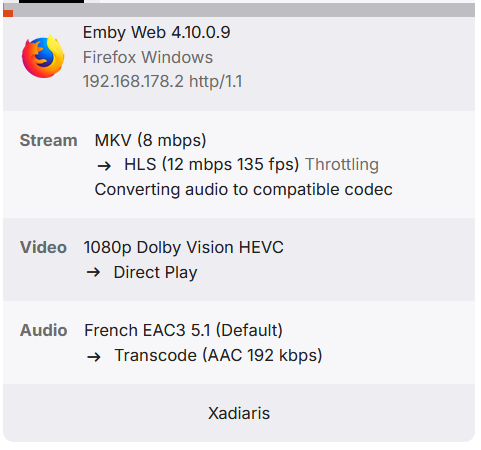
Try this working for me https://github.com/Fox8284/Microsoft-HEVC-Video-Extension/tree/main
-
Yep same here. App just crashes, not on the four minute mark though. In the log it shows: Has gone idle while playing see timestamp: 21:33:55:853 embyserver.txt
-

Guide - SSL Qnap certificate and Emby (manual and automatic)
renefw replied to dieffe70's topic in QNAP
Thank you for the detailed reply, Sa2000. So, I know how to log in via SSH and I can also execute certain commands. Lukas wrote that I should run the script in a terminal to debug it. My questions were whether by "terminal" he meant access via SSH or how I can open a terminal on the QNAP NAS? Also, I'm not familiar with the term "debugging." I don't know what I'm supposed to do in that regard. Now, regarding Sa2000: I have SSH enabled and I use it to some extent. Somehow I missed the messages from last Wednesday... I also understand the basics of using PuTTY. Do I absolutely have to rename emby.p12? When I renewed the SSL certificate about two months ago, I manually executed the `openssl pkc12 -export ...` line. The certificate was then updated. That would probably work again now. However, I don't want to do it that way again because my original problem would remain. This means that my script, which is described in the quoted section of my message from March 29th, still isn't working as intended, and I won't be able to continue troubleshooting for another two months, because that's when the SSL certificate will be renewed. The problem is that it runs every hour, but it doesn't recognize that the SSL certificate has been renewed, and therefore the `openssl pkcs12 ...` command apparently isn't being executed. My question is, why is this happening? Is there still a small error in the script? If so, what is it?