All Activity
- Past hour
-
 uartu7700338 joined the community
 -
 vojad35721 joined the community
 -
@ebrthanks, Eric. That is pretty much how I remembered it. But this is also exactly the part of Emby's approach that I find frustrating. Direct File Access worked perfectly well for me on the Shield. I even downgraded to Experience 8.x specifically to keep using it. It wasn't removed because the feature itself didn't work or because the Shield was incapable of doing it. Android changed, the implementation would have needed to be adapted, and Emby decided that the number of users wasn't worth the effort. I can understand the development-effort argument. What I find much harder to understand is the permission argument. If Direct File Access is an optional feature, then surely the additional permission can also be requested only when a user explicitly enables that feature. Users who don't need it never have to see or grant it. Saying that such a permission might scare users away therefore seems like a rather weak reason to remove a useful advanced feature for the users who actually want it. And there is a broader issue here. If every advanced feature is judged mainly by how many users need it, then power users will almost inevitably lose features over time. Direct File Access was never going to be something the average Emby user needed — but for the people with a proper local media setup, that was precisely the point of it. Ironically, I solved the problem by buying a Ugoos and moving my main playback to Kodi/CoreELEC. There I get Direct File Access and the control over local playback that I wanted in the first place. So yes, I understand why Emby made the decision. I just don't think “only a few users need it” automatically makes it a good decision. Sometimes the features used by relatively few people are exactly the features that distinguish a powerful media platform from just another streaming client.
-
 krivets joined the community
 -
 albertbnu joined the community
 -
 uemma9653173 joined the community
 -
 hokemeg314 joined the community
 -

Why do trailers in the windows app have ads but not the web app?
softworkz replied to Mahinepua's topic in Windows & Xbox
How does the Android app compare in this regard? -
 WOLFGOD5 joined the community
 -

Why do trailers in the windows app have ads but not the web app?
Mahinepua replied to Mahinepua's topic in Windows & Xbox
What about disabling subtitles and the more videos icon -
Why do trailers in the windows app have ads but not the web app?
softworkz replied to Mahinepua's topic in Windows & Xbox
Yup! -
Why do trailers in the windows app have ads but not the web app?
Mahinepua replied to Mahinepua's topic in Windows & Xbox
Not seeing any ads but in the bottom right next to the YouTube logo just to the left there is a more videos icon and trailers still have annoying subtitles. Can they be turned off? -
 Lenoil joined the community
 -
 QueenAE joined the community
 -
 Wsfxyz8403 joined the community
 -
Also please show the complete screenshot of the entire user interface. thanks.
-
Hi there, please attach the Emby server log from when the problem occurred: How to Report a Problem Thanks!
-
Hi there, what makes you think it takes 30 seconds to discover your server?
-
Ever since the recent updates emby takes around 30 seconds to discovery my server on network with phone and tv.. tv is hardwired Ethernet worked better before Emby for Android Anyone else
- Today
-
You also can install https://opnsense.org/ and block entire countries other than yours if you feel like opening up ports you can block the entire world except for a 5 block radius if you wanted You can set this up and only connect your emby server to it and NO ONE is getting in.
-
Why do trailers in the windows app have ads but not the web app?
Mahinepua replied to Mahinepua's topic in Windows & Xbox
Oh that would explain why I haven’t been seeing ads in the last day! There are still subtitles on some trailers though will continue to test. -
Why do trailers in the windows app have ads but not the web app?
softworkz replied to Mahinepua's topic in Windows & Xbox
@Mahinepua Can you try with the latest beta (2.321)? -
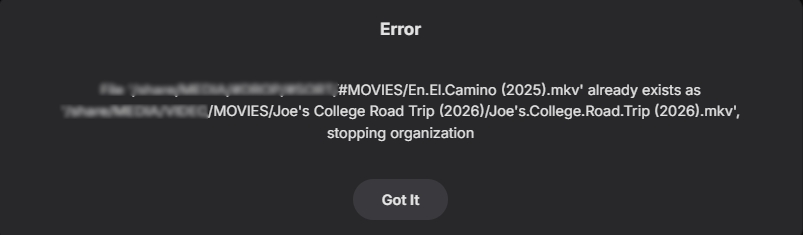
Circling back to this. Issue still exists - And sometimes like this, there is no rhyme or reason. These are very different titles and years and there is no option present to make a correction. Am I missing an menu item that would let me correct this from within the auto organize menu?
-
Oops! My boo boo. No wonder I couldn't find. Must be my 73 year old mind. Thanks!
-
Hi, try searching for Emby. not Emry.
-
When I search for Emry Media on the Apple TV App Store. There is no such app. I have the Apple TV 4K. Has anyone been able to find it on the App Store?
-
Send Tivimate an email asking them to make a plugin for Emby and see how much $ they want since there service is the best in speeds. Maybe they can charge users a monthly sub or a one time payment. Personally I don't even care I don' t use it my family don't complain so meh.. they use Emby & Tivimate if Emby is too slow they can switch if they want right. Tivimate messes up recording also I had recordings on it mess up before so it's not just Emby if you have an m3u that's over loaded it don't matter what app you use for recording even VLC will mess up. If you use HDhomerun the channels never mess up recordings or a free to air satellite box or dreambox running openwebif or an iks server for the keys or anything with a solid connection works. With Emby once you start a channel I find it plays good so 3 or 4 seconds don't bother me and if you can't wait then use Tivimate or see if they can make a plugin or something for Emby I'm sure they would right. I know that everyone wants everything in one app I get it but heh at least we have a place to rant and get help right ? Most apps don't even have a forum for help or criticism so be thankful for what we have right. I'm not one to talk I'm always on here bugging these guys for trailers on the home screen & big banners and bla bla we all do it but still be thankful for what we have. Happy Saturday
-
Don't even bother port forwarding just download nordvpn and setup meshnet it's very easy and completely free. You just ignore the vpn part so you don't need to pay any money as the meshnet costs nothing to use, cheers. Also it stopped working I bet because when you got your new modem they don't allow ports to auto open so they are doing you a favor if anything. You don't want ports open unless it's on a vps.
- Yesterday
-

[Beta] ROMote – play your retro game collection in the browser (NES → PlayStation)
digitalirony replied to digitalirony's topic in Plugins
I have decided to extend the beta another 30 days. Grab the new DLL on this Post ROMote.dll -
@Lukethere was a PR raised for that issue (missing options) which your merged on the 22/8 which I think is the day after 2.4.8 was released. Looks like you need a new USB build (I’m surprised this hasn’t come up sooner) Give me an hour and I’ll do a quick test on the current source to make sure your recent changes are still good.
-
The main issue was that Android now requires a new permission that could scare users away from the app. Given so few users need this and the benefit is very debatable for most users, this is not worth it in my opinion.
-

4K HEVC shows as 1080p, think I can't find any setup to fix?
ebr replied to PeteGul's topic in Android
That is not what this thread is about but you have now completely polluted it. What this thread is actually about has been addressed but you keep making it difficult for anyone to see that. -
If this is the case, how are we going to adjust given this? It looks to me like things are working as they should but to play this audio will now require server conversion.
-

Movies in collections that I made are missing movies
ZamBucca1 replied to ZamBucca1's topic in General/Windows
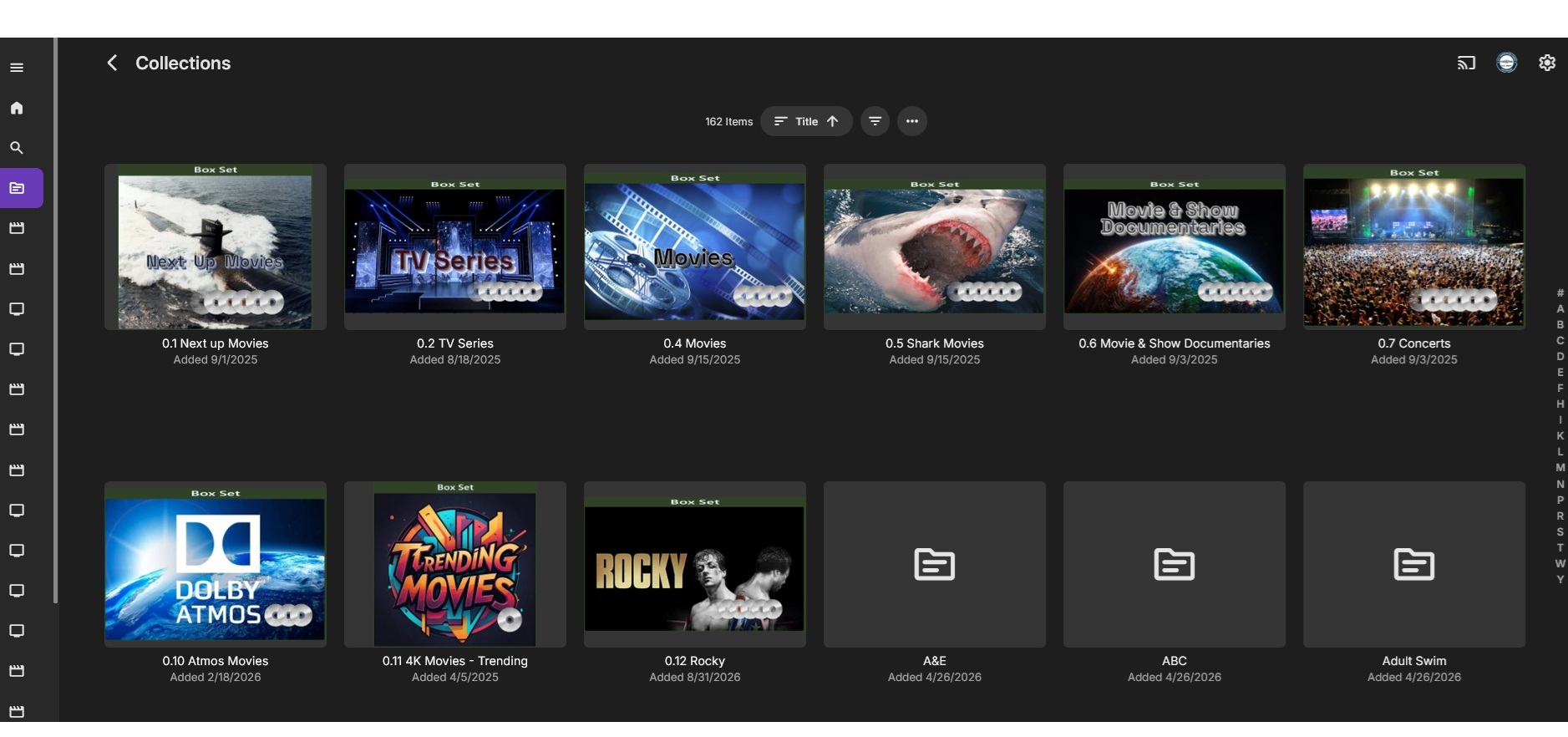
Hi Vis, All of the collections I make have been done on my PC, because its easier. All I have been doing to make a collection of movies or TV shows is click the search icon on the left side my home page and type in the movie or show I am looking for and click on the three dot at the bottom right of the poster and then add to the collection I want to put it in, for example I put the movie Troy in "0.1 Next up movies". This is the same way I have made all 12 collections and this is the only way I have done it since I started Emby early last year. Never had any issues for over a year until recently. The 0.12 Rocky" group was made the same way on 8/31/26.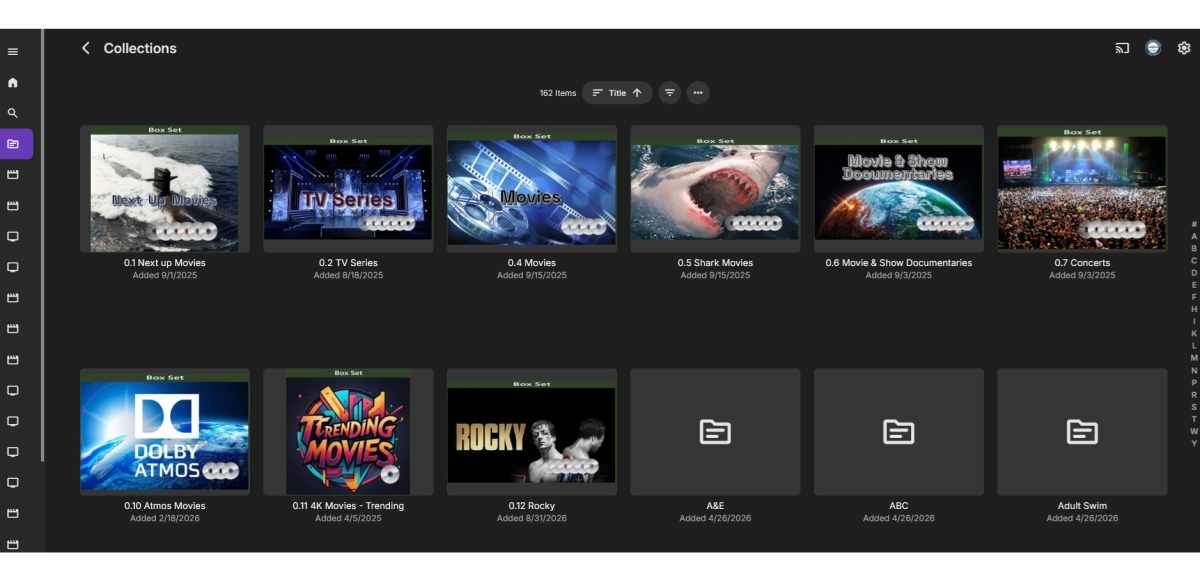
-

JellyWatch for Android TV -- A dedicated Emby & Jellyfin client for the big screen
asgard25 replied to asgard25's topic in Third Party Apps
Hi, there are no pending requests—it must have been processed. Feel free to log back in via the migration link to retrieve your Google Play code.