All Activity
- Past hour
-

Cannot get hardware acceleration to work with .rpm and Arc A310
Lessaj replied to kabsdk's topic in Linux
Diagnostic Options are reverted to default after restarting the server. What do you see when it's set to Advanced? -
 Luguilugui joined the community
 -
 UD_69 joined the community
 -
 Lito023 joined the community
 -
 langfootball24 joined the community
 -
 Velani joined the community
 -
 luis122tv joined the community
 -
 Ambartolo joined the community
 -
 ranch5707 joined the community
 -

Feature request: Allow a strm file to contain a HTTP address
tOLJY replied to tOLJY's topic in General/Windows
Well, no, it won't. Putting the web URL in there does nothing. Is a normal user somehow supposed to find out the stream video url? -

No compatible streams are currently available after update the TV app
SamES replied to Termindiego25's topic in LG Smart TV
From my experience, I'm almost certain it's a proxy/cloudflare issue -

Cannot get hardware acceleration to work with .rpm and Arc A310
kabsdk replied to kabsdk's topic in Linux
@EigeplackterI already double checked all settings - but thanks for trying, it's appreciated. "Enable Hardware Accelerated Tone Mapping" is enabled and "Enable hardware acceleration when available" is set to "Yes" (I also tried setting it to "Advanced" with multiple combinations with no luck). The "Parameter Adjustment" fields in Diagnostics seem to always be empty after a restart; I double checked that I pressed and also got the "Setting saved." message, so I don't know why it's not saving. With that said, it still didn't use hardware accelerated transcoding when the parameters were set (changed tab, changed back to Diagnostics, pressed ctrl + f5 to confirm setting was saved) -

Emby Theater v3.0.20 (Server v4.9.3.0) Homescreen Horiz. navigation broken
scottpro replied to d00zah's topic in Windows & Xbox
That is not actually true. The ET "legacy" version (not the Windows App Store version) is still supported and actively updated through a web content server. The ET "legacy" app is basically a container app that runs on Electron and js. It also contains the MPV lib which supports native movie playback and enables ET to render it's OSD controls on top of the MPV rendered final image which give a seamless playback experience. Updates to the ET "legacy" app only update Electron, local js scripts, mpv-1.dll and any external apps like RefreshRate.exe. All other app functionality is driven by the external web content (html, css, js, json, ...) which is updated to the latest server version. This web content is cached locally when pulled on-demand from the external web server and is version controlled, hence the "data-appversion", which is currently 4.9.3.21, which aligns with server version 4.9.3.0. When the "data-appversion" is bumped it invalidates your local cached files and the new version files are download on-demand. Sometimes this version bump may require restarting ET as it may be still using an old local cached version of the files. In comparison, the Windows App Store version bundles all the assets into a deployment package which has no web content dependency and is written exclusively in C#. Updates to this app are controlled through the Windows App Store. Kudos to @Lukeand his dev team for keeping this legacy version active. This version works best for me because it does not restrict usage and updates to the mpv-1.dll. The Windows App Store version locks down the mpv-1.dll from updates and disables loading external mpv.conf, scripts and plug-ins. - Today
-

Cannot get hardware acceleration to work with .rpm and Arc A310
Eigeplackter replied to kabsdk's topic in Linux
If you have the patience for one more check, look into your settings for transcoding. Mine were unchecked after I installed and maybe give it another reboot after replacing the text and checking the settings. -
Yes that helps but both ways are feeling like a work around. Setting the chinese name is the easy work around, adding the series to the data base would work as well (havent done that but should in theory). I still think it is partially a minor emby bug since if the id itself is provided (and in case of the chinese folder name thats the only id that is set, correctly and automatically), it should just load it from the site and not try to autoset it to something else. If it has the english folder name and I set the same values, the meta data does not update correctly compared to the same id with a chinese folder name. There is also another weird interaction with the identify option that does find the correct series but sets it to something else.
-
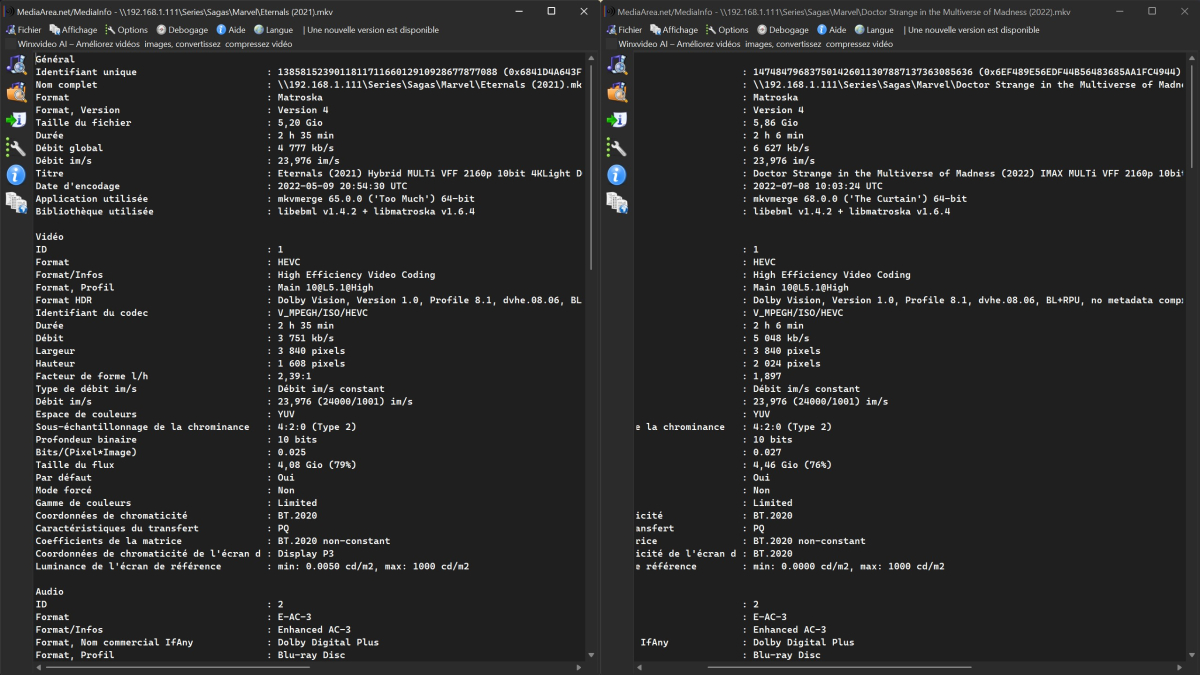
Ici par exemple, le film de gauche ne passe pas bien, et le film de droite nickel. La seule chose que je vois de différent, c'est au niveau de "Coordonnées de chromaticité..", un est P3 et l'autre BT.2020 Est- ce que ça pourrait venir de là ? Sinon je suis preneur pour une explication
-

Suggestions from emby server not loading in Android tv
js28194 replied to buhochileno's topic in Android
Ah, missed that. Still seems local device cache issues. Full on format / reset devices. Never experience anything on the SERVER side that affects local devices, but hard to tell. Again, the answer is no, not happening to everyone. Also, can't be just random permissions issues on the linux side?? Possibly, but why now all of sudden? -

Suggestions from emby server not loading in Android tv
seanbuff replied to buhochileno's topic in Android
OP already stated they are using attached Android devices. -

Auto Organize "Unable to find movie in library matching name"
lorac replied to hifiaudio2's topic in Plugins
It isn't just you -
Subtitles on DVDs (and BDs) are graphical overlays - so what you see is what you get. No font files are involved. Paul
-
Suggestions from emby server not loading in Android tv
js28194 replied to buhochileno's topic in Android
No, not everyone, but most people that are "in the know" don't use TV Apps. We have dedicated Android boxes with decent hardware. Televisions are notorioulsy terrible when it comes to their hardware and eventual support. You could last ditch effort and "reset / format" your TV if you insist on using it. Seems like a local cache issue on the TV itself from my feable brain. -
Are you using your own server or attempting to get access through someone else's? - in which case, check with them. If you have a server, is the problem with live or recorded? If live, then do you have a Premiere subscription installed in your server to enable live TV? If recorded, then more information, like logs etc is required (see Luke's post above for guidance). Paul
-
J'ai trouvé, ça doit être comment sont encodés les fichiers. J'ai téléchargé un autre fichier du même film, et là ça fonctionne. Ca doit être un problème de profil ou je ne sais quoi..
-
1) I would normally expect so, but it depends what the browser reports its capabilities as (for instance, my browser will play AV1 video, as I have installed a codec for it). However, the Emby Windows client is very capable, so I would expect it to play this easily - it might be interesting for you to provide a log from the client after a failed attempt to play (the address of the client log directory is in the About display in the client settings). 2) This is a per-user setting, so check your user settings in the dashboard. 3) I wouldn't expect this to be an ffmpeg issue - after all, direct play isn't even using it. Paul
-
Not sure if you are referencing the latest update or not, if so it did not resolve the issue.
-
Hi, I'm using Emby on my Synology. I was on the latest stable version, and now I manually installed the latest betas. I'm currently on Version 4.10.0.4 beta. With the Emby-app everythings shows up. But with Infuse on iOS, iPadOS and tvOS there is this problem. For example: Random folders don't show up in Infuse. I can't find a pattern there, but surely it's 10-20 % of total folders. Direct mode, no library mode I tried rescanning, rebuilding the index, deleted all metadata and rebuilt it. Also similar actions in Infuse, all what is possible there. But it happens on all Apple-devices.
-
Thanks! Not a problem for me!
-
Using multiple servers
-
Cannot get hardware acceleration to work with .rpm and Arc A310
kabsdk replied to kabsdk's topic in Linux
@EigeplackterUnfortunately, this did not work for me; still no hardware accelerated transcoding. The entire server has been rebooted after install of version 4.10.0.4. As I don't have the patience, nor the interest, in debugging hardware accelerated transcoding for a product that I pay for where it's marketed as a basic feature, I am going to revert to Plex and call it a day. Just to be clear - I don't expect a largely community driven product to solve all questions that could be answered by simply looking at documentation; but I do expect basic product features to work in a paid product and I am sad that I have to revert since Emby looked like a promising and fresh alternative.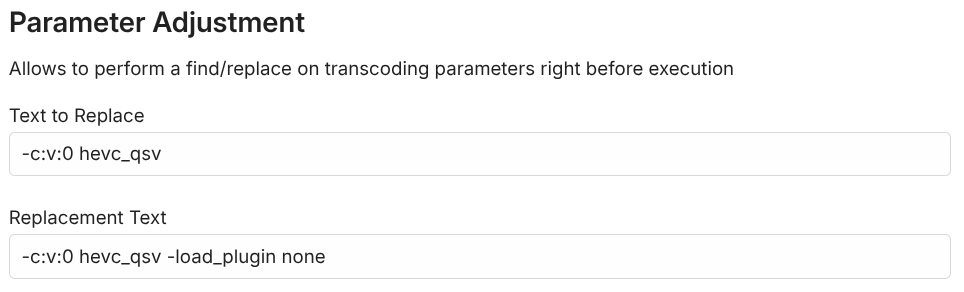
-
All you have to do is edit the metadata for the movies to indicate where within the seasons you want them to show (though frankly I wouldn't do that for the Inuyasha movies, as they are not part of the continuing story of the main series). They will also still show in the Specials section, but you can ignore that. Paul
-
@LukeI'm sorry for not responding sooner, life got it the way... ya know? Anyway, I chose to abandon Emby at this time. It became less about why it happened, and more that it did happen. I'm too far out in backup versions to even restore what I had configured, and I have no interest in manually rebuilding 166 collections.
-
Hi, has this helped?
-

Feature request: Allow a strm file to contain a HTTP address
Luke replied to tOLJY's topic in General/Windows
It won't open the web page, but for Emby apps that support embedded youtube playback, it will play them using the official youtube sdk for the platform.