All Activity
- Past hour
-
 Socitv joined the community
 -
 mesoag joined the community
 -
 waynewickens63 joined the community
 -
 835835 joined the community
 -
 SamghanaAccra joined the community
 -
 Nneeoorraaii1 joined the community
 -
 Neoraiavraham1 joined the community
 -
 Samghana25 joined the community
 -
 teofilotrujillo joined the community
 -
 FARJJ joined the community
 -

Subtitle accent encoding issue (DÉCÉDÉ instead of décédé)
Barbare posted a topic in General/Windows
Hello, For about three months now I have been experiencing an issue with subtitles. I believe this might be related to a recent update. Across all my videos, accented characters in subtitles are now displayed incorrectly. For example: DÉCÉDÉ instead of décédé I also tested videos that I had already watched before and that definitely had no issue at the time, and now the subtitles are affected as well. After doing some research, it appears to be related to a subtitle encoding issue. I managed to fix the problem for one file by manually changing the encoding, but it took several hours. Considering the size of my library, it is unfortunately not realistic to repeat this process manually for every file. So I would like to ask: Is this a known issue? Could it be related to a recent update? Is there any way to fix this globally? For reference: I watch using an LG TV and also the Emby Windows client the issue is identical on both devices I also installed the latest beta version before posting here to check whether the problem had already been fixed, but it still persists. Thank you in advance if anyone can confirm whether a solution exists. Best regards. French version : Bonjour, Depuis environ trois mois, je rencontre un problème avec les sous-titres. Je pense que cela pourrait être lié à une mise à jour récente. Sur toutes mes vidéos, les accents dans les sous-titres sont devenus incorrects. Par exemple : DÉCÉDÉ au lieu de décédé J’ai testé sur des vidéos que j’avais déjà regardées auparavant et dont je suis certain qu’il n’y avait aucun problème à l’époque, et maintenant les sous-titres sont également affectés. Après quelques recherches, il semble que cela soit lié à un problème d’encodage des sous-titres. J’ai réussi à corriger le problème sur un fichier en modifiant l’encodage, mais cela m’a pris plusieurs heures. Vu la taille de ma bibliothèque, il ne m’est malheureusement pas possible de faire cette manipulation manuellement sur chaque fichier. Je voulais donc savoir : Est-ce un problème connu ? Est-ce lié à une mise à jour récente ? Existe-t-il une solution pour corriger cela globalement ? Pour information : je regarde via un téléviseur LG ainsi que via le client Emby sous Windows le problème est identique sur les deux appareils J’ai également installé la dernière version bêta afin de vérifier si le problème était déjà corrigé avant de poster ici, mais le problème est toujours présent. Merci d’avance si quelqu’un peut me dire si une solution existe. Cordialement.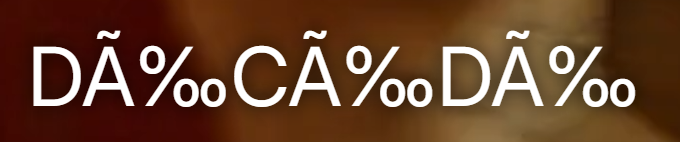
- Today
-

LG 1.0.50 breaks horizontal scrolling on homescreen
Dog_Bronson replied to unisoft's topic in LG Smart TV
Approaching middle of March, and still no fix. Any clue on when this could be addressed in an update? -

Intermittent "No Compatible Streams..." Error (STRM files)
sundevil67 replied to sundevil67's topic in Web App
This is making me mental. Is there any other reason why it wouldn't see the file there one minute, but then see it the next? That is what is happening - the same episode will work, then it won't, & back again. -

Emby + YouTube .strm link not working on Android TV app v2.1.43
FrostByte replied to Boni340's topic in Android TV / Fire TV
Boni340, that's not what ebr asked. He asked if you could try the "standard" Emby app, not the AndroidTV app (beta 2.1.43 or stable 2.1.29). Try searching for "Emb" (without the "y") in the Android store (it should list 2 apps), or download the apk from the link below https://github.com/MediaBrowser/Emby.Releases/tree/master/android Version should be 3.5.30. Both the AndroidTV and the standard Android app can be installed at the same time. So, no need to uninstall the AndroidTV app. When installed the icon should look the one with the arrow below.
- Yesterday
-
I turned my TV off for 5mins then the issue was fixed. Before I made this post I was turning my TV off and on for 10secs at a time. Not sure what triggered it, hopefully doesnt reoccur.
-

Rated R Movie - with a Fan Edit as a PG-13 version
michaeltruncale replied to michaeltruncale's topic in General/Windows
Thanks, found the “split apart” button after scrolling. Didn’t know that was there. Thank you! -

Does Emby support HW transcoding on the Rockchip RK3588S?
Meitelis replied to parmi93's topic in General/Windows
Totally agree with this one. I have Emby Lifetime subscription, but my SBCs are useless with Emby. In contrast to Jellyfin which is free and they support full HW transcoding on my orange pi 5b (rk3588s) and radxa 5b plus (rk3588). Transcoding from 4k to 4k HEVC with HDR enabled at 3-4x speed and CPU is barely used (no more than 25-30%). I mean rk3588 is a total beast compared for example to Intel's n5095 or n100. Pity there's no proper mainline kernel for them. And vendor kernels are Frankenstein'ed :((( -
Make the nfo read-only in the OS after editing it? Paul
-

Emby + YouTube .strm link not working on Android TV app v2.1.43
Boni340 replied to Boni340's topic in Android TV / Fire TV
Hi, I have a KM9 Pro streamer running Android 10. I removed the beta version v2.1.43g and installed the stable version 2.1.29g, but the behavior is the same as I described before. Movie trailers from the Movies category play without any issues on the Android TV app (2.1.29g) using the same setup. However, when I try to play a YouTube STRM file, the video does not start and the app freezes. I then need to force close the app from the Android settings and open it again. -
Same thing. Weird eh?
-

Plugin: EmbyCredits, detect end credits and add auto skip.
yocker replied to yocker's topic in Plugins
@DarWunI forgot to write. You can use the backup feature to hasten the re-detection. -
Any idea why my music stopped playing twice today? I was using the web app in Firefox. ffmpeg-transcode-e50de0df-e5d7-4a9b-9132-a424844b83b1_1.txtffmpeg-transcode-42355d9a-fc5f-4330-9211-72f58bfabbd7_1.txtembyserver.txtembyserver(1).txt
-

Movies don't resume, they start from beginning
ebr replied to Nabukodonosor's topic in Android TV / Fire TV
That's not what I'm trying to discuss. I'm trying to get to the bottom of something that appears to only be happening to you and I cannot explain it. Do you know if maybe this only happens when you have done that exact thing - moved to play and then moved back to resume and quickly clicked? -
I have emby working on a Synology NAS, and usually use a Roku device to play shows and everything works fine. But if I do try to play something in a web browser on my computer, it doesn't really work. It takes several minutes of a spinning "busy" circle before it begins playing, and then playback is extremely choppy. Is this a limitation of how emby works with a NAS? Or a setting I should change? If this is a problem inherent to trying to transmit data from the NAS to a browser, that's OK, I'm just curious to know if I've missed something. Thanks! embyserver.txt
-
Hi. Did you try restarting the app? What version of the app?
-

Plugin: Home Screen Companion (formerly AutoTag)
soderlund91 replied to soderlund91's topic in Plugins
I'm currently working on a play count for all users, so with that you almost get what you are looking for. I might look into adding watchtime aswell. Will be in the next update Working on this right now, will be in the next release. We do still need it if you use external list for example, or local collection. Thank you! And thanks for trying it out! -

Movies don't resume, they start from beginning
Nabukodonosor replied to Nabukodonosor's topic in Android TV / Fire TV
No. -
Please provide some server logs - How to Report a Problem @sa2000
-
Emby + YouTube .strm link not working on Android TV app v2.1.43
ebr replied to Boni340's topic in Android TV / Fire TV
Hi. Okay, but same question... -
Hi. Can you try searching for our standard android app (Just "Emby" on Amazon and "Emby for Android on Google) on the same device's app store and see how that compares? Thanks.
-

playback is often paused, crashes, freezes but for a specific user (its the wife-BIG problem :))
alex77777 replied to Zeltak's topic in MacOS
You can also enable "stats for nerds" on the device it is being played on to see this. -

Rated R Movie - with a Fan Edit as a PG-13 version
Gilgamesh_48 replied to michaeltruncale's topic in General/Windows
There used to be a "split apart" option and that would do at least part of what you want, if it still exists. Also you can edit the metadata of either movie to make them show up as unique. -
In the NFO, or in the Emby GUI? If I lock it in the Emby GUI, I would expect that to prevent it from ingesting the change to the NFO, which is the opposite of what I want—not to mention that the whole reason I'm editing the NFO in the first place is that it's a multi-version film and I can't edit this version in the Emby GUI, so locking anything in the Emby GUI won't have any effect on what I'm doing.
-

Rated R Movie - with a Fan Edit as a PG-13 version
GrimReaper replied to michaeltruncale's topic in General/Windows
Scroll down when on movie detail screen, click "Split Versions apart" button. -
playback is often paused, crashes, freezes but for a specific user (its the wife-BIG problem :))
alex77777 replied to Zeltak's topic in MacOS
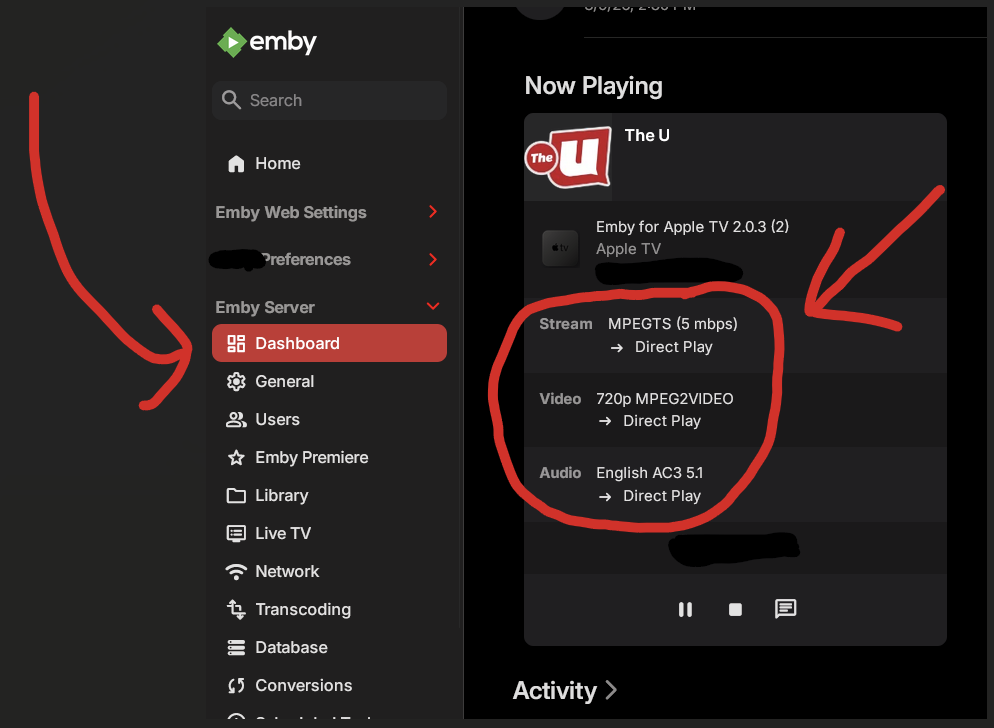
Go to Dashboard on Emby and you can see what is being played and if the stream is being transcoded or direct played. Typically transcoding happens if subtitles are enabled, or if the quality setting is set lower than the source video. There are tricks to get the Apple TV to direct play when it typically would transcode so if that is the issue I can help you with that.