All Activity
- Past hour
-
I keep getting error messages on trying to delete this one folder and nothing works.
-
 Zzze joined the community
 -
ffmpeg added ffmpeg-transcode-2859f6d2-e536-4986-b278-97d553b48411_1.txt
-
I think you tagged me on this one @luke. I already cleared my cache folder out, thats not an issue. (and recent transcodes worked fine). The log I posted was for a folder that didnt even exist in my cache.
-
 WLAEED2282 joined the community
 -
 Sputnik79 joined the community
 -
 Paoogy joined the community
 -
 Ice cube snoop dogg joined the community
 -
 CobraCrypes joined the community
 -
 baysala joined the community
 -
 VikkyRae joined the community
 -
Yea I would make sure the actual folder is deleted.
-
3.5.47 Improve syncing of watch data for downloaded content Core UI Changes from 26.0.12 to 26.0.13 Improve loading dialog Improve detail screen transitions
-
Emby for Android 3.5.47 Released Changes 3.5.47 Improve syncing of watch data for downloaded content Core UI Changes from 26.0.12 to 26.0.13 Improve loading dialog Improve detail screen transitions
-
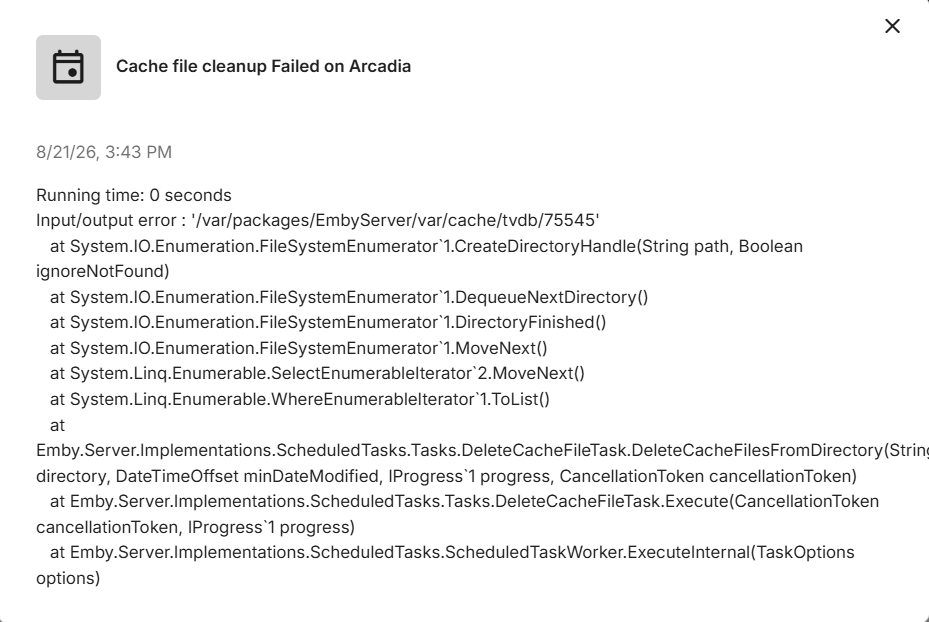
I have deleted every file in the cache except for the tvdb/75545 because it wouldn't let me. I have tried everything it runs fine. I am doing a Data Scrub right now
- Today
-
input/output error could be a lot of things. could be something wrong with the storage device, could just be the server being denied permission to it. permissions could be a good place to start. i'm not sure how the server could have lost permission, but one thing you could try is deleting the cache folder and letting the server recreate it. So that's /var/packages/EmbyServer/var/cache
-
Where is the code?
-
26.0.13 Improve loading dialog Improve detail screen transitions
-
Emby Web App Update: Version 26.0.13 The Emby Web app has been updated to version 26.0.13 Go and try out: https://app.emby.media/ Changes 26.0.13 Improve loading dialog Improve detail screen transitions
-
this is what I see and I have tried to delete it and I can't, I have deleted all the files in the cache but this file
-
I'm about to do some major housekeeping on my drives as I do every 2 years or so. In the past I've had mixed results. I do already have NFO files enabled but seem to get the best results by turning off Real-Time monitoring before doing the move. I think during transfer of multi gB files, the real time scan kicks in before the nfo file is moved/copied and a new one is created with sometimes mixed results. Turning off real-time and letting everything get settled and then either turning real-time back on or manually doing a scan just seems to do better. IMO.
-
I hope I am doing this right embyserver.txt
-

Playback Progress Reporting Stops Immediately
corey replied to corey's topic in Emby For Kodi Next Gen
@quickmicJust to add more clarity I install from zip file marked version 1.0.8. After that the video add-on I see is version 10.1.2 and the service add-on is 11.1.27. I removed all Kodi for Emby add-ons again and installed the video add-on. When going into the versions view for that add-on I only see version 10.x and below. No 11 and no 12. -
I have a plugin in mind, but in order to learn how to develop it, I have been essentially re-creating an existing plugin. Essentially I am re-creating the statistics plugin, and rather than storing everything in a XML configuration file, I am using an sqlite db I am having some weird failures. If anyone is up for a code review, it would be most appreciated. TIA Scott
-
I think the only issue @Sgjumper82had with your initial comment was "uh pretty sure it does this by default" as it doesnt do it out of the box....
-
Use case: For ISO files, emyb is not able to detect the media stream info like audio/video format etc. While played these files in Kodi, kodi has already recoganized the correct media format, but currently there is no way to write back these format info back to emby server. After next sync with server, the local saved kodi media info then be overwritten to empty again. Could you let me know, if there is an API to write back media stream info? (I know server plugin can do this but this isn't my expectation, I just want to use REST API)?
-
All the NSSM service editor is, is a 3rd party app designer before SC was standard on all versions of windows. Its beyond ancient but in the days when the Home edition did NOT have a command line SC command to handle the services you had to use the service manager GUI. which not everyone enjoys Using SC to create the service as says, is perfectly fine and does 100% the same thing. NSSM uses the "same" win32 calls to run (I havent verified this in a while). Honestly I do think the KB should no longer use SC as noone is running a version of windows that doesnt have SC at the command line (keep the old KB around to point people to)
-
Hi, not yet but this is on our to do list for review. Thanks.
-
Great Yes that was the solution thx!
-
any news on this???

-
Playback Progress Reporting Stops Immediately
corey replied to corey's topic in Emby For Kodi Next Gen
@quickmicI am using the https://kodi.emby.tv/ repository and it doesn’t give me the option for 12.x. I’d prefer not to side load so I can get updates more easily. Any guidance on why I might not be seeing it when using that repo? I just tried uninstalling Kodi for Emby, removing the sources, re-adding the repo, reinstalling it all and I only see 11.x still. if it helps (since it’s unclear in the docs) I have been installing the “service” add-on which has an 11.x version. The “video” add-on is 10.x -

embyforkodi (next-gen) 12.X.X support
quickmic replied to quickmic's topic in Emby For Kodi Next Gen
Did you sync the trailers to Kodi? -> Emby for Kodi's service addon config -> Manage libraries -
Playback Progress Reporting Stops Immediately
quickmic replied to corey's topic in Emby For Kodi Next Gen
By instilling it form Emby's Kodi repository https://kodi.emby.tv/ Or sideload it via Kodi addon's install from zip. There is an emby source available.