All Activity
- Past hour
-
 uusr8432979 joined the community
 -
 shakes18 joined the community
 -

Nvidia Shield not available for sale - alternatives?
yocker replied to Mister Steve's topic in Hardware
It is a good device but one thing to note in case it matters, it doesn't support lossless passthrough. At the fear of derailing this thread. All TVs are spying like the LG, look up Samba for Sony as an example. LG are just the ones that got reported on it for now. -

Transcoding options gone 4.10.1.0
CaptainBard0906 replied to CaptainBard0906's topic in General/Windows
It's not creating one when the video attempts to play when set to transcade. Video won't even start if I have it set to transcode. It wasn't an issue before this version. It's an Intel 10 gen chip. I am not home right now I will try when I get home and see if it will create one. -
 Yashlok Singh joined the community
 -
OK can you attach the ffmpeg log from that? Thanks.
-
Plugin: EmbyCredits, detect end credits and add auto skip.
yocker replied to yocker's topic in Plugins
To everyone using the PaddleOCR docker container. I recommend you remove it or at least make sure not to open it up to the internet. @sydlexiushas warned about it having a vulnerability: CVE-2022-30333. Instead go to: PaddlePaddle/PaddleOCR: Turn any PDF or image document into structured data for your AI. A powerful, lightweight OCR toolkit that bridges the gap between images/PDFs and LLMs. Supports 100+ languages. And install per their instructions. The plugin will continue supporting PaddleOCR, just no longer have a ready made docker container for it. -
Transcoding options gone 4.10.1.0
CaptainBard0906 replied to CaptainBard0906's topic in General/Windows
If I set it to yes and force a transcode the video stops playing. -
 Bassam1 joined the community
 -
 papacasa74 joined the community
 -
 Rk27021993@#1 joined the community
 -
OK and if you set it to yes, do you get hardware transcoding?
-
Transcoding options gone 4.10.1.0
CaptainBard0906 replied to CaptainBard0906's topic in General/Windows
Luke here is a transcode log as well as a hardware detection log. ffmpeg-transcode-af10a98d-5ccd-4a8b-879a-4b06af099604_1.txt hardware_detection-63926911591.txt -
 uusr0110828 joined the community
 -
 Rdeaton joined the community
 -
Hi there, please attach the Emby server log from when the problem occurred: How to Report a Problem Thanks!
-
 FREYA0312 joined the community
 -
Hello CaptainBard0906, ** This is an auto reply ** Please wait for someone from staff support or our members to reply to you. It's recommended to provide more info, as it explain in this thread: Thank you. Emby Team
-
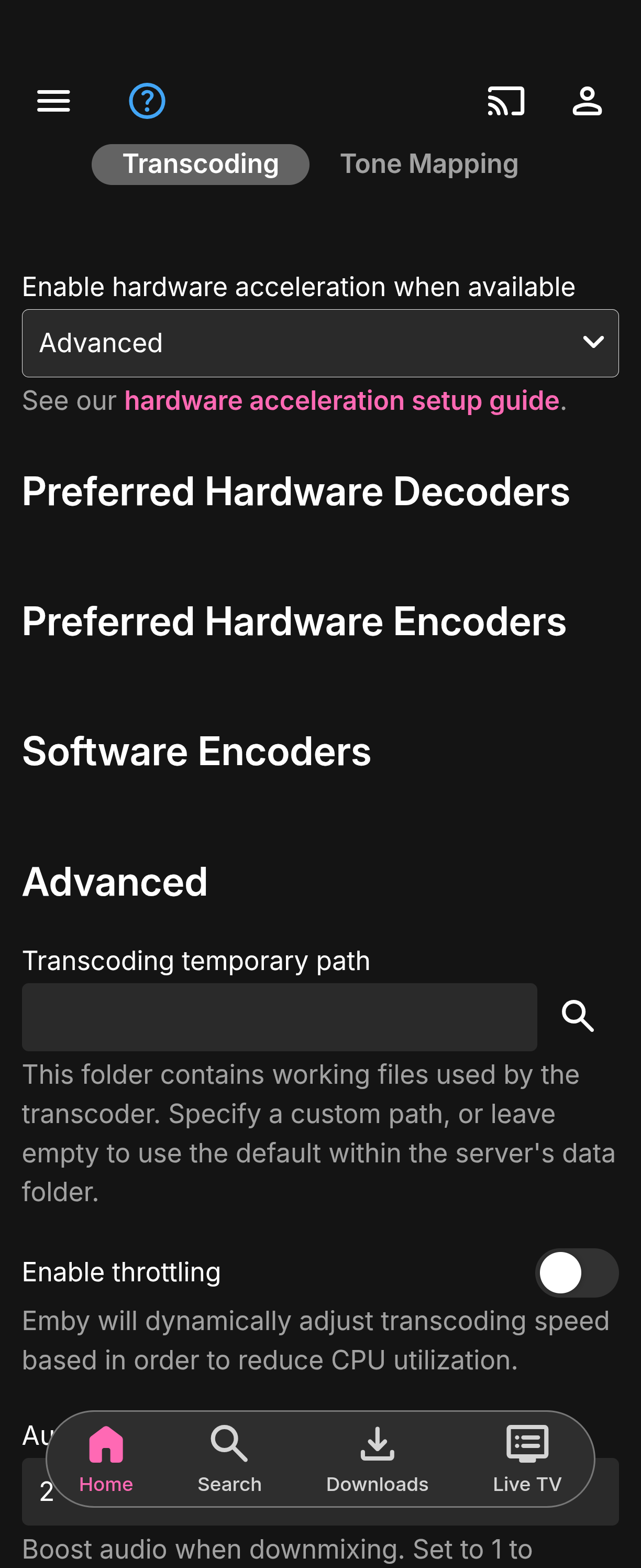
Server updated to 4.10.1.0 on windows and the transcoding options are gone when having it set to advanced. Not sure if this would cause live TV to not work. Every channel is now black.
- Today
-
@sa2000
-
Are you sure they re even on when playback starts? You might be seeing the new auto subtitles on skip back feature.
-
Subtitles keep turning off during playback with this version. It has happened on my Oneplus 13 and my Ugoos SK3
- Yesterday
-
Emby is a pretty fantastic solution. I just wish amazon didn't make it so difficult to use third party apps.
-
@Wonderstufcan you please confirm the app version number on the device?
-
It's KTIVMTX 4.7 out of Sioux City, IA. The content is "Matrix Midwest" which I believe is a repeater for the St. Louis content: https://www.matrixmidwest.com/
-

Unable to connect using Emby on VegaOS
Wonderstuf replied to Wonderstuf's topic in Android TV / Fire TV
Here is the log I mentioned. Cheers embyserver.txt -
 matsushita changed their profile photo
 -

BUG Live TV recording stopped early when a remote viewer stopped watching the same channel
nargg replied to nargg's topic in Live TV
More Info: Encoding only makes the bug more likely to occur because of potential encoded stream quality changes. My prior comment about h.264 vs h.265 is probably inaccurate. When he changed quality, the TV switched to a new play session ID without Emby registering it, and the stop then removed an ID that was never added. That's the same pattern as Oct 4. This time it happened to balance out, because his old session was never separately timed out. On Oct 4 the old session had already been removed for being idle, so the count went down twice. Bug Full Mechanism Changing play session mid-stream (a quality change or transcode restart) without registering the new ID, combined with an idle-timeout removal of the old one, causes a double decrement. -
BUG Live TV recording stopped early when a remote viewer stopped watching the same channel
nargg replied to nargg's topic in Live TV
-
@SamES
-
I just bought a new Firestick and Emby doesn't connect to my server. It does connect via Silk. Forgive the text below but I was running my troubleshooting via ChatGPT and ask it to summarise what we tested and the environment: " I’m having a problem connecting the Emby app on a new Amazon Fire TV Stick HD to my local Emby Server. I’ve done quite a bit of troubleshooting and it now appears that the Fire TV itself can reach the server, but the Emby app cannot. One potentially important detail is that this is a 2026 Fire TV Stick HD, model AFTCL001, running Vega OS 1.1, rather than the older Android-based Fire OS. Amazon’s device specifications confirm AFTCL001 as a Vega OS device. Setup Server Emby Server 4.10.1.0 on Windows Server LAN address: 192.168.1.60 HTTP port: 8096 Windows network profile: Private Fire TV Fire TV Stick HD (2026) Model: AFTCL001 Vega OS 1.1 LAN address when tested: 192.168.1.170 Gateway: 192.168.1.1 Same 192.168.1.x subnet as the Emby server The Emby app reports: “Unable to Reach Server. We’re unable to connect to the selected server right now. Please ensure it is running and try again.” I have tried manually connecting to: http://192.168.1.60:8096 with the same result. Troubleshooting carried out Initially the Fire TV was connected by Ethernet. I disconnected Ethernet and tested it using my normal home Wi-Fi as well. The Emby app fails to connect on both Ethernet and Wi-Fi, so this does not appear to be specific to the wired/powerline connection. I checked the network configuration. The server and Fire TV are on the same subnet and use the same gateway. I changed the Windows network profile from Public to Private. Windows then prompted me to allow Emby through the firewall, which I allowed. I also checked Windows Defender Firewall with Advanced Security. Emby has TCP and UDP inbound rules enabled, and I made sure the TCP rule applies to the Private profile. The Emby Android app on my phone connects successfully over the same home network. The server log shows normal connections and playback from that device, so Emby Server is accepting LAN connections. Fire TV browser test I then opened Amazon Silk on the same Fire TV and entered: http://192.168.1.60:8096 This successfully reached the Emby web interface and presented the server login page. The Emby Server log confirms these requests came from the Fire TV at 192.168.1.170. At 22:50 and 22:52 the server received authentication requests from the Fire TV running Silk. The requests reached Emby normally and returned a 401 because an incorrect password was entered during that particular test. This therefore appears to establish that: Fire TV → LAN → Windows PC → TCP 8096 → Emby Server is working. No incoming request from the Emby app This seems to be the most significant part. At approximately 23:07 on 6 October, I attempted to connect again using the Emby app on the Fire TV and received “Unable to Reach Server”. There is no corresponding incoming request from the Fire TV in the Emby Server log at that time. This is noticeably different from the Silk browser test. When Silk on the same Fire TV accesses exactly the same 192.168.1.60:8096 address, its requests immediately appear in the server log. So it appears that the failure occurs before the Emby app establishes a connection with Emby Server, rather than Emby Server receiving and rejecting the connection. Obviously the server log can only establish that no incoming request reached the server. It cannot tell me whether the Fire TV app attempted an outgoing connection which then failed locally or somewhere before reaching the server. Could Vega OS be significant? Having investigated the device further, I discovered that AFTCL001 is one of Amazon’s newer Vega OS devices rather than an Android/Fire OS device. I also found previous discussions here about Emby on Vega OS, including references to the existing Fire TV/Android app being provided on Vega devices through Amazon’s translation/cloud-stream technology while a Vega-specific Emby app is being developed. Could this therefore be a Vega OS / translated-app local-network-access issue? It would seem consistent with what I’m seeing: Silk running on the Fire TV can access the local Emby server, whereas the Emby app apparently cannot establish the connection at all. Is there a Fire TV/Vega client-side log that would show the app’s attempted outgoing connection and why it is failing? Remote access For completeness, I also tested remote access from my phone with Wi-Fi disabled and the phone using 5G. Remote access currently fails as well. I realise this may be a separate port-forwarding/remote-access issue, because the Fire TV and server are on the same LAN and the Fire TV can demonstrably reach the server through Silk at 192.168.1.60:8096. Where I've got to At this point I believe I've ruled out: Emby Server not running Incorrect LAN server address/port The Fire TV being unable to reach the PC General TCP 8096 connectivity between the Fire TV and server Windows blocking all LAN access to Emby An Ethernet/powerline-specific problem, as the app also fails over Wi-Fi The key distinction is: Silk browser on Fire TV → reaches Emby Server Emby app on Fire TV → no request appears to reach Emby Server I’ve attached the Emby Server log covering these tests. The failed Emby app connection attempt was at approximately 23:07 on 6 October. Any suggestions for what to check next, particularly regarding Vega OS/local network access, or which client-side logs would be useful?" Hope someone can help. J
-

Emby server/client - ReplayGain or R128 volume normalization support for music
Luke replied to Espen JQ's topic in Feature Requests
Oh and Emby for macOS as well ! -
Emby server/client - ReplayGain or R128 volume normalization support for music
Luke replied to Espen JQ's topic in Feature Requests
Hi everyone. This will be in the next updates to Emby for iOS and Emby for Apple TV. They have players embedded that already support replaygain, which means they can do it without anything being added server-side. It will need to be enabled in the settings for the app once released. Thanks. -

Nvidia Shield not available for sale - alternatives?
justinrh replied to Mister Steve's topic in Hardware
Who's UI? Did you have Google TV on it? -
I think this is the model year that Samsung missed the update, so you are still on 2.2.8. You can try with the USB version or wait for the next store version