All Activity
- Past hour
-
 fanwuye joined the community
 -

Emby Theme: Retro Navy & Gold (W/ Seasonal Themes)
MediaEmby1968 replied to Aleas's topic in Web App CSS
I'm referring to the background image that appears on a movie's information page. I've attached a screenshot.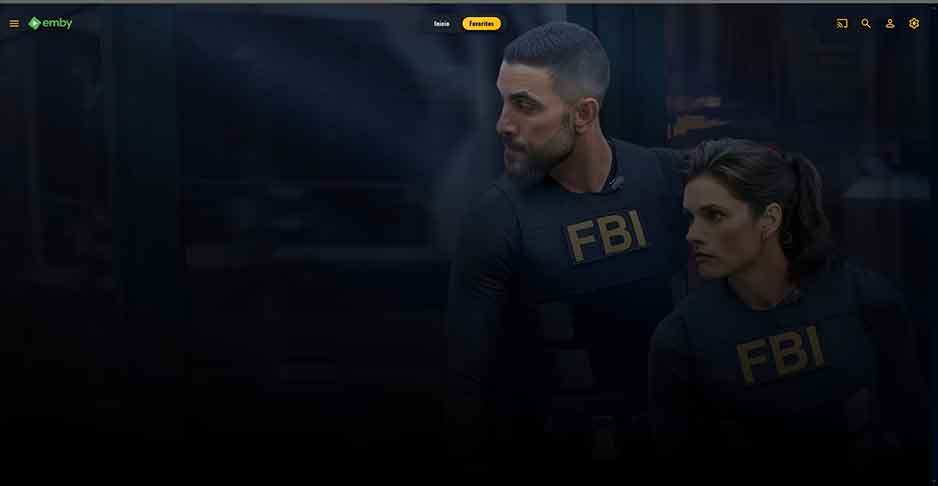
-
 Muhammad1902 joined the community
 -
 收保护费 joined the community
 -
 Venom997 joined the community
 -
 mmkamal joined the community
 -
 Dbandido25 joined the community
 -
Do you mean when a dialog pops up to blur the background behind it?
-
 Zeko506 joined the community
 -
 dxlemby joined the community
 -
 Dekalaitad joined the community
 -
 arosie1755 joined the community
 -
Emby Theme: Retro Navy & Gold (W/ Seasonal Themes)
MediaEmby1968 replied to Aleas's topic in Web App CSS
Thanks, it works. One question: if I wanted the background images of the cards or movies to appear fully blurred, and not partially like this, what would I need to edit? -
I see what you mean, give this a try. I'm sorta debating if those should be gold or white. thoughts? Emby Navy and Gold v4.91.css
-
If he wants the many screenshots I can take of these facts, sure.
-
Screenshots + logs should prove it Luke is a AI Bot that wants facts.
-
Yep, I wanted to avoid that, but I guess it is the only choice right now. Thanks
-
Emby Theme: Retro Navy & Gold (W/ Seasonal Themes)
MediaEmby1968 replied to Aleas's topic in Web App CSS
The browser I use is Brave Browser. What I mean is, in this image, the red text is headings or main text, and the yellow text is the same but not the same color. That's what I mean; it looks odd that some are one color and others are another.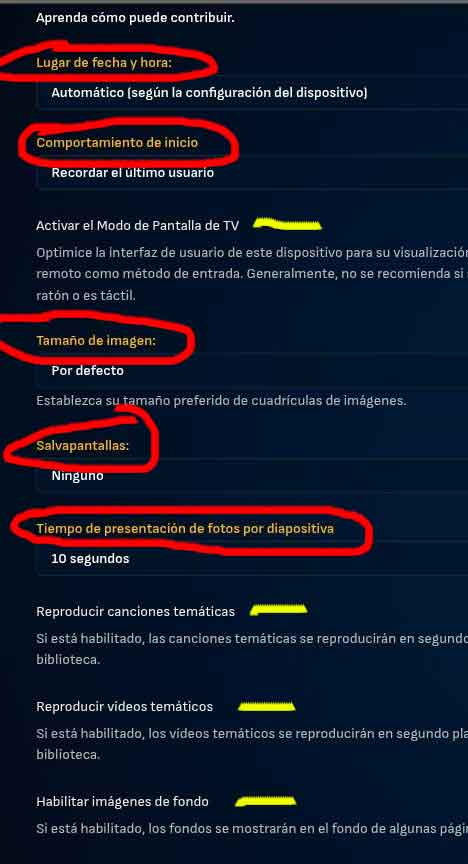
-
Seperate them at the library / folder level: Folder Structure - F:\Media\Movies\4K F:\Media\Movies\SDR F:\Media\Movies\HDR Then you can create 3 different libraries. One called Movies that includes all 3 paths, then 2 additional ones that only include SDR / HDR respectively. If you name the movie folders identical and following the "Multi-Verison" naming structure, your main Movie library should include 3 different versions.
-
Updates: Dialog popups now have the gold for their icons OSD Players now has the gold buttons FIX: Some primary table types did not receive the golden border hover effect. Added a slight gradient to backdrops Updated typography so some areas, pill bars, about sections, etc will no longer be in all uppercase (Open for discussion if you prefer all uppercase) Added variables to control to show or hide Collections or Playlists on the sidebar. (Look under sidebar options) A frosted glass effect added to the sidebar and dialog popups. This can be controlled through the new Frost Effects variables. FIX: Issue where the header would not appear after logging in without a page refresh. Emby Navy and Gold v4.90.css
- Today
-

Add now playing video background to Apple TV app
Lazarus_Long replied to Deihmos's topic in Feature Requests
Just adding another vote to this request. Pretty sure this should be straightforward to implement as the functionality is part of the standard player. Would be especially nice when using the TV guide for channel surfing... -
Delete the files not the filters. The filters prevent redownload.
-

Multi movie naming - hide part of file name from version drop down
RanmaCanada replied to abuthemagician's topic in General/Windows
It's honestly easier to just have a separate library for 4k files, that way you can prevent people with potato internet or potato hardware from playing said files. -
Here is how to reproduce the problem. - Populate some IPTV channels, go to Guide, right-click on a channel in the listing (NOT on a show) and schedule a recording. - Set as a reoccurring recording, set it for whatever days of the week. - Go to Schedule, verify that channel-specific item is present for the days and time specified. - Go to Series, verify the channel-specific title is there. Now delete the IPTV playlist from the Live TV setting screen. Refresh the Guide so the channels are gone. The channel-specific recording is now no longer in the Series screen. That is logically correct. But it is still present in the Schedule, not mapped to a channel and with no way to fix this. You can only cancel for the days scheduled in the Schedule, but you do not have an option to cancel the entire reocurring channel recording. The only apparent way to delete this from the Schedule is to shut down Emby, edit the Seriestimers.json file, delete Timers.json and Refresh the Guide. When the Guide refreshes, the Timers.json file is rebuilt correctly with orphaned scheduled recording gone.
-
@CBersI can confirm that doing a backup on the old Windows server, using the Legacy Backup & Restore plugin from here, then restore it on the new server installation on Linux works. I have created the same username on Linux. Thank you very much to all of you for your help!
-
Pretty much looking for exactly what the title says. On tvOS it would be great if you could be in the guide and quickly switch to another tag. For example, I use tags to group channels like "Home", "Cooking", "Movies", etc. Maybe a long press on the center button could bring up a listing of the tags to select from? Then upon selection the guide switches to those channels.
-
Look at the screenshots above
-
Are you sure there was ever a series recording? Maybe you scheduled it one off?
-
How did you determine that?
-
Hello, Is there a way to filter my movies in the Android app by SD, HDR or Dolby Vision like in the web interface? Or is there a way to create a collection or playlist in the server with all my DV movies? Thank you
-

Movie Theme Songs Plugin Questions and Support Thread
Ockingshay replied to radeon's topic in Plugins
I’ve tried to search for “delete” but couldn’t find my answer, so apologies if this has been answered: The videos are a bit hit and miss, (some low quality, embedded foreign subtitles, wrong movies etc), so I’m going to stick with the theme songs as they seem to be a lot more consistent. What is the best way (and what file am I looking for) to delete them and is it simply through file explorer and manually deleting them? I thought wrongly it seems, deleting the entries in the plugin would remove the actual files. MT -
New Emby Beta server v4.10.0.9.
-
I don't have a login for the hard-drive?
-

Philips Titan OS 8 channel audio playback issues
geomusicmaker replied to geomusicmaker's topic in Other Smart TVs
Can't seem to edit my previous post so for clarity, regardless of audio device, the same file has sound when played back via DLNA and my firestick. It only loses sound when played through the app for Titan OS except when transcoding. Is the only way for an Emby app to exist on the platform through the Opera web engine? The TV's built in video player seemingly has better compatibility. -

Multi movie naming - hide part of file name from version drop down
visproduction replied to abuthemagician's topic in General/Windows
I think everyone already knows that whatever you put before the dash in the file name, gets hidden in the pull down selection list.