
All Activity
- Past hour
-
 Jamespops joined the community
 -
 LuanMaster joined the community
 -
 Neeenis joined the community
 -
 seranus joined the community
 -
 Trak_h joined the community
 -
 Frizyy joined the community
 -
 adrianamontoya joined the community
 -

The ability to create a collection that's not global only Library specific
Fin7645 posted a topic in Feature Requests
So right now if I create a collection and I only want 90s TV shows, I'm able to but it shows both 90s movies and tv show. I would like to not be a Global collection but to be a collection that's library specific. Thank you. -
 jairotorres5 joined the community
 -
 saludlopez.osiris joined the community
 -

Server connects but displays no media files
twofacetoo replied to twofacetoo's topic in General/Windows
Using wi-fi only, just tried to ping it from my desktop and it worked fine. Edit: just checked after doing the ping, still nothing showing on my TV. -
 JD_SG joined the community
 -

Option to force audio downmix/conversions during playback
visproduction replied to Goros's topic in Feature Requests
Ah, yes that's tricky. Would it be nice to bing he audio first into an AV amp and then the Amp sends it to speakers and avoid the TV for any audio? AV amps can often forward the video via HDMI to the TV. The AV amp can also send the center channel to the TV if you don't have a center speaker. There is a HDMI splitter available that can split the audio out onto a second HDMI output as well. New AV amps are pricy but there are many out there open box or used that migh be able to do this. I have seen such amps below $50 in Goodwill shops, which is amazing. I think using an AV Amp or Preamp is a nice solution. The only side effect is after I connect everything, I have an urge go fix some spaghetti and meatballs. -
So do you have the resources to fix these edge cases over time or probably not?
-

Server connects but displays no media files
Neminem replied to twofacetoo's topic in General/Windows
Can you ping the server's ip from the other pc? Are you using both a wired and a wifi connection on your server? -
Tells me I need a password to my own account for my server
Neminem replied to Donovan1's topic in Android Server
Did you install your own server, with your own media, on your own hardware ? -
Server connects but displays no media files
twofacetoo replied to twofacetoo's topic in General/Windows
The problem has been occurring for several weeks on and off. Like I said above, the last time it worked was on 02/09/2026, but it was cropping up before then too. -
This is a really small log. What time did the problem occur? The network mode will have nothing to do with it. You've connected to the server, so you're good from that respect.
- Today
-
It probably remembered a selected track. You could try unchecking that option if you'd rather just have it always play the track marked as default.
-
Hi, yes it would be better if it didn't attempt the transcode at all and just dropped the subtitles. But of course this is an edge case, and you're going to be more likely to run into those with uncommon settings.
-

Tells me I need a password to my own account for my server
Luke replied to Donovan1's topic in Android Server
What is the path to the file that it told you to go to? Where and how did you try searching for it? -

Option to manually hide individual movie, show, or episode per user
AngelSing replied to guynamedbilly's topic in Feature Requests
Hi! Emby currently allows content to be restricted using Tags and Parental Controls. This works, but when different users need different permissions for specific movies, series, documentaries or episodes, managing everything becomes complicated. I would like to suggest a native per-user content restriction system consisting of three related features. 1. Block content directly from a movie, series or documentary As an administrator, when opening the context menu of a movie, series, documentary, episode or other library item, there could be an option such as: “Block for Users” “Manage User Access” or “Content Access” Selecting it would display the list of server users. For example: ☑ Andres ☐ Carlos ☑ Pedro ☐ Juan The administrator would simply select the users for whom the item should be blocked and save the changes. This would eliminate the need to manually create tags such as: Block-Andres Block-Carlos Block-Pedro and then add them individually to media items. The existing Tags system could remain available for other purposes, while this new feature would directly manage the relationship between a user and a library item. 2. Inherit blocked content when creating a new user When creating a new user, it would be very useful if copying or using another user's configuration as a template could also copy that user's blocked-content list. For example: I create a new user called Miguel. During creation I select: “Copy settings from Andres” and there could be an additional option: ☑ Copy blocked content Miguel would automatically inherit all movies, series, documentaries and other items that are currently blocked for Andres. The administrator could then modify individual differences afterwards if necessary. This would solve an important problem with the current tag-based approach. If 50 movies are currently restricted for several users and a new user is created, the administrator currently has to go back and edit those 50 movies to add the new user's blocking tag. 3. New “Blocked Content” section inside each user This feature would complement the previous two. Currently, when opening: Dashboard > Users > Andres Emby displays tabs such as: Profile Access Parental Control Password A new tab could be added: “Blocked Content” or it could be integrated into the existing Parental Control section. This page would visually display every library item currently blocked for that user. For example: Blocked Content for Andres [Movie poster 1] [Movie poster 2] [Series poster 1] [Documentary poster 1] From this page the administrator could: • See all content blocked for that user. • Add additional blocked items. • Remove items from the blocked list. • Select one, several or all items. • Copy the selected blocked items to other users. For example: I select 10 movies currently blocked for Andres. I click: “Copy blocked content to other users” A window opens showing all server users: ☑ Carlos ☑ Pedro ☐ Juan ☐ Miguel I select Carlos and Pedro and confirm. Those same 10 movies would then also become blocked for Carlos and Pedro. It should not be necessary to copy the entire blocked-content list every time. The administrator should be able to select: • One item. • Several items. • All blocked content. and then select one or multiple destination users. Copying should add these restrictions to the destination users without removing restrictions they already have. This would provide three simple ways to manage individual content restrictions: 1. From the media item itself: Movie > Block for Users > select users. 2. When creating a user: Copy settings from another user > also copy blocked content. 3. From the user: Users > Andres > Blocked Content > manage, select and copy restrictions to other users. This would be significantly easier and more scalable than relying exclusively on individual per-user tags, especially on servers with many users and multiple libraries. It would also keep the existing “Access” section, which controls libraries and folders, separate from restrictions applied to specific media items. The current Tags system would not need to be removed or changed. This would simply provide an additional native tool for granular per-user content access control. -
Note this is my opinion and not based on any inside knowledge, but I think that the with the recent frequent releases of beta versions, the Emby crew is working hard on promoting the current beta line to stable. I wouldn't be suprised if it happens in the next 2 - 3 weeks, so on one hand you could wait out upgrading until all are released. On the other hand, if you choose to upgrade now cause you can't wait, I'd suggest upgrading to the latest Emby beta first and get it all running. Make sure to shut down Emby and take a snapshot of your Emby config folder before upgrading. While I doubt you'll have any problems, always plan for them. When you do upgrade to TOS7, make sure that the permissions update completes before you do anything with files or apps on the NAS. edit: My only other comment is that I have not been able to get hardware encoding to work since updating to TOS7. The hardware detection looks fine, but actual transcodes always fall back to software encoding. I'm not sure if that is a me issue, or an Emby on TOS 7 issue, but so far my post has gotten very little traction here on the Emby forum.
-

Tells me I need a password to my own account for my server
Donovan1 replied to Donovan1's topic in Android Server
It doesn't provide me with a file to reset it. I tried manually finding it and searching for it, no where to be found. -
I start with a new database I think it fixed it and of course finally the search engine is working so something was corrupted from my hand.
-
That is a totally loaded question. Are you talking unlimited budget, unlimited power, power limits, what? Are you staying within the regular license terms and not going to the max? For transcoding, any 12th gen i5 class or higher processor will be able to handle the maximum number of users under a normal license if each and every one of them is doing a 4k transcode while using quicksync. The bootleneck becomes your storage and potentially your network if you're using a separate machine as your server than your storage. You would be better served to read a few of the threads in this particular group to get an idea of what is "best", as it all comes down to your usage scenario. Ideally if you want us hardware people to answer you, we need more information, please.
-
Hello If I get this ffmpeg log right, the server transmuxes the video to handle the subtitles, then it sees it can't because of missing transcoding permissions, then it just drops the subtitles. Just dropping the subtitles should be something without touching the video serverside? Shouldn't that be enforced in that case? BR ffmpeg-directstream.txt
-

Plugin: EmbyCredits, detect end credits and add auto skip.
RedNo7 replied to yocker's topic in Plugins
@Neminem @yocker thanks, both! -
What?? OP can't even troubleshoot a simple port forward which according to their post on 8/27 is available in their router. You want them to install meshing with a 3rd party program and/or opensense and block 5 countries. Why not just recommend freebsd and iptables with ufw while your at it? OP needs to respond with some basic network configuration before we can assist at this point. If they are indeed by CGNAT THEN they must move onto other 3rd party solutions such as Meshing or tailscale or cloudfront tunnels etc. Until then unnecessary complexity is not the way to go. There is nothing wrong with port forwarding if you know what you are doing. I take it you are not.
-

Movies in collections that I made are missing movies
ZamBucca1 replied to ZamBucca1's topic in General/Windows
Apologies, not sure where to look to check or start? I assume I've been doing it incorrectly all this time since I have never created any folders or file. To make a collection of movies or TV shows I click the search icon on the left side my home page and type in the movie or show I am looking for and click on the three dot at the bottom right of the poster and then add to the collection I want to put it in, for example I put the movie Troy in "0.1 Next up movies". This is the same way I have made all 12 collections and this is the only way I have done it since I started Emby early last year. Never had any issues for over a year until recently. -

Library Real Time Monitoring needs SAFETY CHECK
js28194 replied to MacGyver27's topic in General/Windows
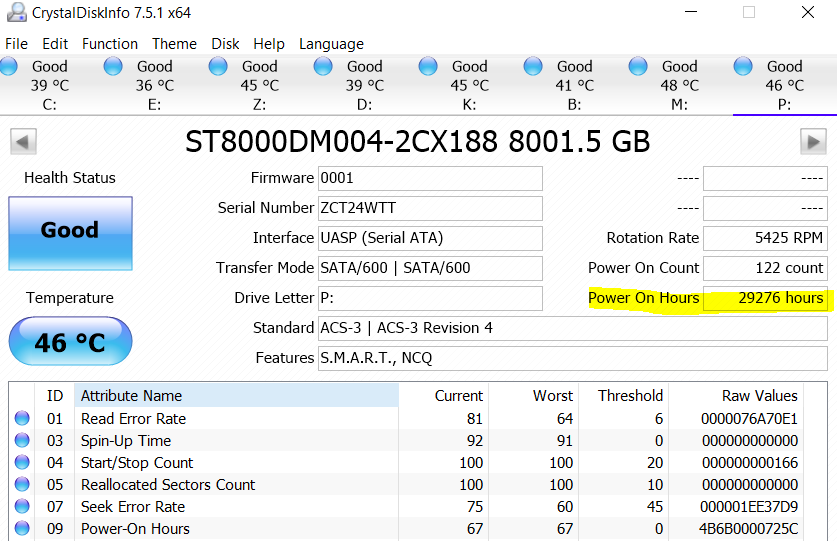
A few more comments to add... I know for a fact that my BIOS has some power saving settings at the USB level also, but I'm not going to reboot and screenshot just for you. To clarify my comment on "Emby wiping Data" What I meant was that in some random occurrences when the drive wasn't online, what I saw in the EMBY web interface is that the title was still there, but a big X on the image, clear indication to me that a drive as off line. In Windows you can create a powershell script that runs in task scheduler every 30 - 60 minutes that checks windows event log for certain event ID's. I'm not going to pollute this thread with all of that. Windows removed the send email alert directly in event viewer many moons ago. Finally, and this is pure opinion and preference. At the home level, I'm not into drive pooling nor RAID as aside from some redundancy, provide no real performance benefit on my Gig LAN. For remote viewing everything has to be transcoded down to 4mbps anyway (directly on NVIDIA Silicon Yay!) even though I have 1Gig Fiber. Why you may ask (or not) well it adds another layer of complexity to deal with. If my media files are scattered as you can see above on multiple drives, the chance of recovering data from 1 drive is much easier and simplier than data pooling / raid recovery. In those cases, your ENTIRE server is down until you fix vs only 1 drive which can be re scanned when fixed or replaced. I am not in a mission critical high performance requirement environment. I have grown up in Dell PowerVault Arrays and been knee deep in RAID 0/1/5/10 environments so I know what I'm doing but my home is NOT a high performance environment. I am also very slowing shucking and migrating these drives to a single non-raid enclosure (https://www.amazon.com/dp/B07MD2LNYX) as I understand the desire to save physical space. Will end up removing the two PCIe cards providing 14 USB 3.0 ports. Drives were cheaper back in the day so I guess I lucked out. 24TB seagate for $180 bucks I think it was. Also, you can run a script every once in a while to determine what's on the drive. Example Dir/w F:\Movies > C:\temp\fmovies.txt You can also schedule this script in task scheduler. Isn't drive pooling just another fancy term for JBOD? I hope those that are doing this have hardware level RAID. Almost, very almost feels like a fancy marketing term for software RAID, but really is file duplication I suppose. I've doing some reading on Stablebit but not convinced. Seems like it takes up twice the space unless webster changed the definition of "file duplication". That is a guess in a way redundancy but anything that is important to me (home videos and photos) are already burnt on multiple 50GB DVD-R discs. Media files unimportant. Finally, I'm going to agree with most others here that is a your problem / hardware / OS, not an Emby problem. I can't call Microsoft and bitch because my mapped drive disconnected and when I try to save a file it defaults to my local my documents directory now and not my server. All these years later and Persistent drive mapping is still a random issue. Sigh. My Net USE commands are just batch files now A double click away. Ok done ranting for now. Live long and prosper and don't take anything I say personally please. -
Whats the best hardware to use for the emby server if I want it to work to its best potential?
-
Library Real Time Monitoring needs SAFETY CHECK
js28194 replied to MacGyver27's topic in General/Windows
I've had drive's on for many many hours w/o seeing this issue. I will say that there have been times when I have rebooted and drive did not come online automatically. I had unplug and plug either the power cord or USB for that drive but did not see EMBY directly wipe any data. YMMV of course.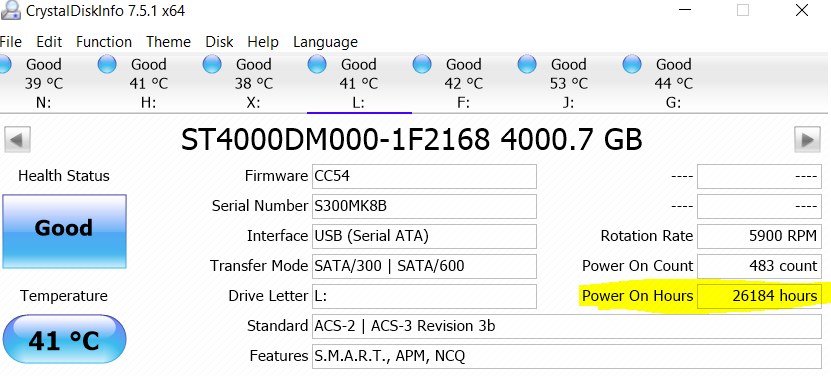
-
Library Real Time Monitoring needs SAFETY CHECK
js28194 replied to MacGyver27's topic in General/Windows
OS Power Settings would step 1. I think some external usb drive have external tools also such as seagate that allow modifications.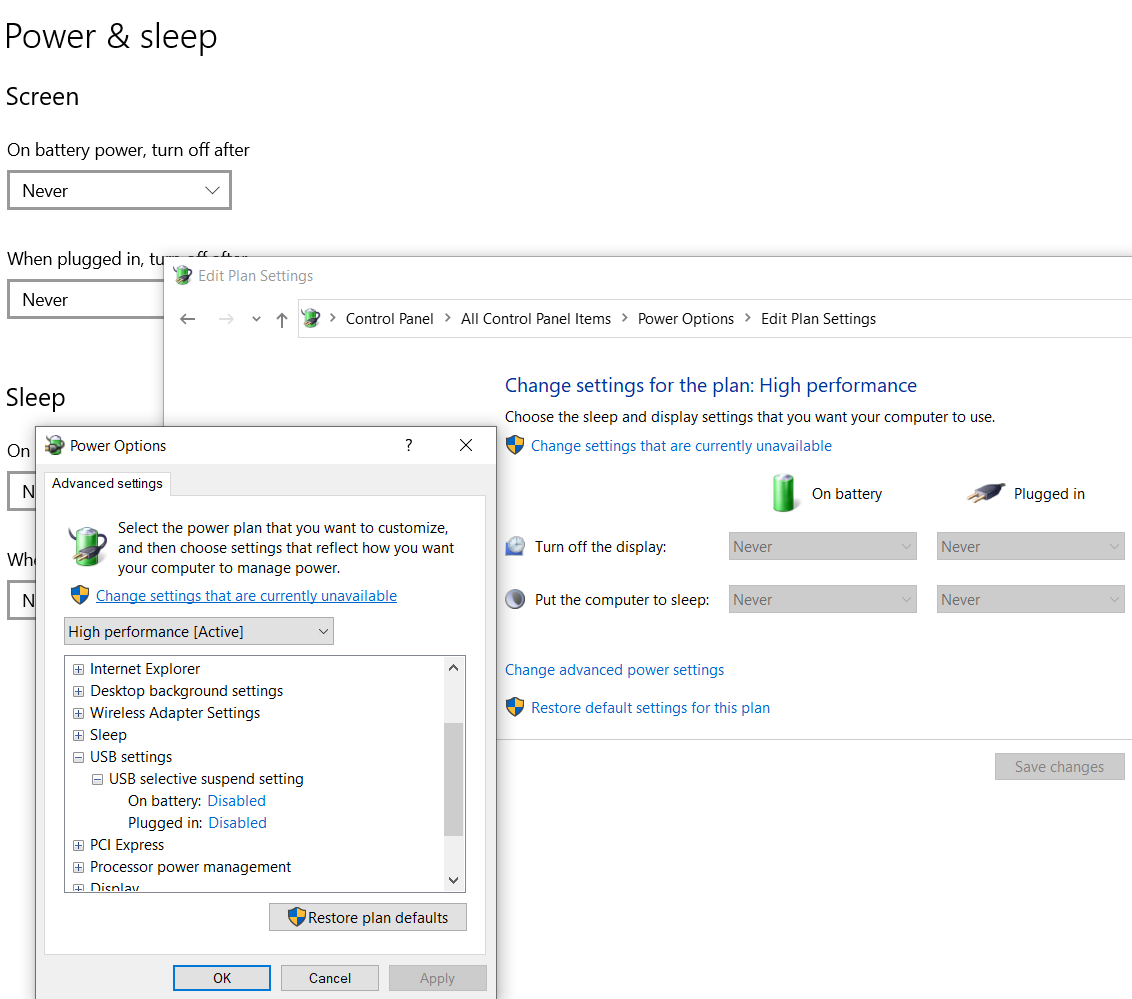
-

Getting Started With PS2 Emulation: BIOS and Compatibility Tips
maxhunter11 posted a topic in Sony PlayStation
Hi everyone, I’ve been getting back into some older PlayStation 2 games recently and noticed that PS2 emulation can sometimes be confusing for people who are just starting out. One thing that seems to cause confusion is the PS2 BIOS. The emulator needs a compatible BIOS to properly initialize the PlayStation 2 system environment, and using an incorrect, incomplete, or corrupted BIOS can lead to compatibility or startup problems. For anyone exploring PS2 emulation, I put together a resource covering PS2 BIOS information, compatibility, regions, and some of the common setup considerations: https://ps2biosonline.com/ It’s especially useful for beginners who are trying to understand how the BIOS fits into the emulator setup rather than simply treating it as another file to configure. What PS2 games have you found to work particularly well with emulation? I’d be interested to hear which games everyone is revisiting.





