All Activity
- Past hour
-
 walterrrrrrrrrr joined the community
 -
 Neelamyadav joined the community
 -
 Al Fahad Hossain joined the community
 -
 Vinicius18 joined the community
 -

Nvidia Shield not available for sale - alternatives?
marriedman replied to Mister Steve's topic in Hardware
My Intel NUC 13 Pro had either Bazzite or CachyOS on it at the time and I used KDE Bigscreen for the UI. Never used Google TV as I don't like Google. I only used Emby for entertainment. If it's not on my instance of Emby, I don't watch it. -
 Ketan_Goyal joined the community
 -
 QBS510 joined the community
 -
 Lkysharma joined the community
 -
 Alexsingh0_0 joined the community
 -
 ironwolf8407 joined the community
 -
 xiaoyaoqiqi joined the community
 -

RTM (inotify) doesn't seem to be working on Diskstation 7.1
Manp82 replied to Manp82's topic in Synology
tried updating to 4.11.0.6 beta and i get exactly the same behaviour. -

Reorganizing my library: here are two things I'd like to see improved
sa2000 replied to Anon42's topic in General/Windows
i have been looking into the issues you encountered. You have had a lot of feedback already which should improve the outcomes for you. But my recommendation would be to go back to separate libraries - one for Anime Movies and one for Anime TV Series and consider using a Collection for each set I looked into the possibility of using tvdbid's as part of the folder as documented in our Naming Standards document - but we cannot do that for Mixed type libraries, because thetvdb have separate set of numbers for series and movies and the same ID could exist for a series and also for a movie. eg tvdb id 252322 is Series: Hunter x Hunter (2011) and is also movie: Follow Us to Walt Disney World Any change to how Mixed type libraries are scanned could impact existing libraries and would carry a very high risk. My advice is to have separate libraries and you can add tvdb or tmdb id's for the series and movies as outlined in the two naming articles: TV Naming and Movie Naming to get exact matches -
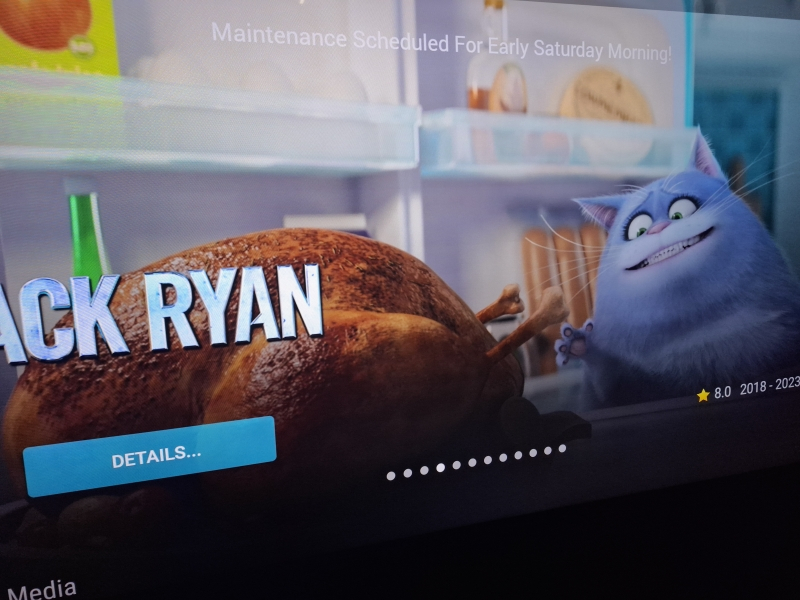
Maybe someone mentioned it somewhere, but is it possible to put background for Home screen banner in apps? When spotlight is enabled, it's hard to see text .
- Today
-
Hi, I'm not really sure if this is the intended behaviour everyone expects, a setting I haven't ticked or if it's something worth considering to change for a future release. I appreciate this is such a minor thing that most won't even notice!! I always configure the scrapers to download multiple backdrops for both Movies and TV Shows because I like the variety and the sense of on-screen 'movement'. Currently, both the web app and Android app appear to cycle backdrops in a fixed, sequential order. The first backdrop is always displayed initially, and if you navigate away from a movie or TV show and then return, the cycle starts again from that same first image. I never really noticed this for movies as it's not that often I browse the same movie in quick succession. But in TV Shows it is more noticeable, and the effect is more pronounced when navigating into a season as the backdrop resets to the first image again. Then when selecting an episode to play, it resets once more. When you're watching a multi-season show on a large projector it gets a bit tiresome to see the same image 95% of the time, despite having multiple images stored and available for the app to use. It would be nice if backdrops could be displayed in a more randomised order, or perhaps the application could remember the last-used backdrop and continue cycling from there rather than always restarting from the beginning. This would help keep the browsing experience feeling fresher and make better use of the additional artwork that has been downloaded. Cheers
-

Reorganizing my library: here are two things I'd like to see improved
Anon42 replied to Anon42's topic in General/Windows
Not sure you are aware, but i'm not asking anyone to reinvent things. The reason i've mentioned anime structure was to make clear, why there was a need for me to keep epsodes and movies in the same folders. And i've made a new library, so that uninterested family members can browse the movies and series library without being overwhelmed by the anime content, but still have access to it if the want. With absolute order (a thing that already exists) you can have the content all in sequential order with movies or bonus episodes put in. All you need to make sure is, that it's just as the source (TheTVDB) has it labeld. My issues were, that A) folders with series were falsely flagged as movie folders and there is no way to manually tell the system to threat it as a series folder. B ) content identification was preferring 70% matches over 100% matches. Thanks to pwhodges i have found out again, that the A) behaviour is to be expected and I needed to restructure my file system and add "Season 1" folders and put all the videos in there. For movie series, where there is no absolute order that can be used for the system, or chaining multiple series (i guess you could make a full MCU chronological playlist with all movies and series) your way to go is beneficial. For me, it is extra work that should benefit me maybe in some edge cases. I thought about it when first adding everything, but found out about the absolute order. So I use that and am happy with it, as long as it works. -

Plugin: Cleanup Candidates, find media nobody watches
fridgefins replied to Arly_'s topic in Plugins
thank you - always wanted a quick and easy way to pull this info -
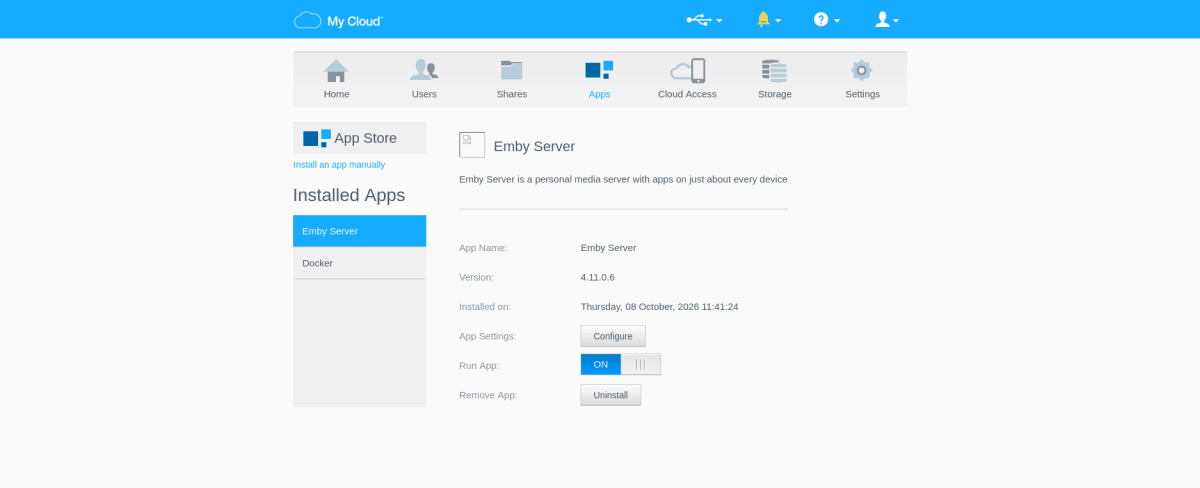
Hello, I'd like to avoid having to format everything and start from scratch just to get EMBY working again. It had been working more or less perfectly for a few years (except starting with a certain beta version, an issue that was later resolved after I posted about it here). But suddenly it stopped working again and was nothing I could do (not even uninstalling and reinstalling EMBY several times, even though that meant losing my configuration). Last time, just like now, as you can see from the image in the WD web interface, the EMBY icon is gone (when it was working, the icon was there). Unlike in the past, nothing changes now even if I remove EMBY to install any old version that used to work! Perhaps the most frustrating thing is that every other feature of the WD works perfectly fine. If I install Plex, everything works, and I can use all the folders and media I had in EMBY without any problems re
-
No update? I've shared the log output with specific example and yet have had no input.
-
Remote Connections not working with Emby 4.10.0.40 Server Update
sa2000 replied to Bradum's topic in General/Windows
update: Unfortunately it is no longer possible to investigate what was wrong as @Bradumhas now changed the configuration and got remote access to work through a cloudflare tunnel to the server. What we know is that the configuration has a ddns domain name configured in Emby Server network settings and a non-default public port configured with automatic uPnP port mapping enabled. Emby Server was detecting 2 local IP addresses - 172.31.48.1 (vpn) and 10.0.0.245 (wifi). Now that the setup has changed, it is not possible to determine what emby connect data was in place at the time. A test on canyouseeme.org for the public port was unsuccessful before the changes to the configuration were made. -

Emby server/client - ReplayGain or R128 volume normalization support for music
ryancey replied to Espen JQ's topic in Feature Requests
Okay but it doesn't answer the question really ; I understand you maybe don't want to commit on doing certain things at a certain date, but it just feels weird to come out the blue with the feature just like that. It's been literally 9 years since the request. Can you explain this choice of communication with your users? Even if the answer is "we just pick random issues every day to work on". It's just rude to ignore everyone like that, and some of us are paying customers too. -
RTM (inotify) doesn't seem to be working on Diskstation 7.1
Manp82 replied to Manp82's topic in Synology
i also tried coping the file to the monitored folder via smb instead of moving files around inside the nas filesystem but same again, Emby doesn't pick up the file via real time monitoring. doing a manual library scan later the file gets added to the library just fine. -

Emby has stop and fails to record programs sellected directly on the "Guide".
Rolando1948 replied to Rolando1948's topic in QNAP
Well the Emby app and the folder for the recordings are both on the QNAP NAS, and I do not understand the reason of being asked if the NAS and/or its shared folders are offline, which they are not, they are 24/7 online, except for power outages, which when power returns, the NAS returns online and Emby continues to correctly respond to its schedule, of recording all the series and placing the them in the assigned NAS folder. The anomaly that I am reporting, is that Ebmy accepts and responds to one's selections on guide of programs to be recorded, that then appears as pending in the "schedule" next to the other series recordings, but then fails to "record" what was directly selected and "Schedule" in its "Guide, while it does continue to record and correctly save all the rest of the series recordings on the NAS. In summary, if one does not select anything directly in the "Guide", the abnormal behavior would not reveal itself, since all the other scheduled recordings are sucessful. -
RTM (inotify) doesn't seem to be working on Diskstation 7.1
Manp82 replied to Manp82's topic in Synology
so... - i downloaded Big Buck Bunny (big_buck_bunny_720p_surround.avi.zip) from the official site using download station to /volume1/downloads, unpacked the zip file inside the download folder and moved it to /volume1/video/film/bd/Big Buck Bunny (2008)/ which is inside the monitored folder /volume1/video/film/. what i expect is Emby should pick up the file and add it to the library as soon as i move it to a monitored folder. instead nothing happens and the logs say nothing until a manual library scan happens (either manual or scheduled). - i also tried downloading the file The_General_512kb.mp4 from here https://archive.org/details/The_General_Buster_Keaton (it's a public domain movie) from download station directly to the monitored folder /volume1/video/film/bd/The General (1927) and again Emby doesn't import the movie inside the library until the scheduled library scan happens. - i also tried adding the file directly to the root of the monitored folder and various other combinations like: /volume1/film/big_buck_bunny_720p_surround.avi /volume1/film/Big Buck Bunny/big_buck_bunny_720p_surround.avi /volume1/film/Big Buck Bunny (2008)/big_buck_bunny_720p_surround.avi /volume1/film/bd/Big Buck Bunny (2008)/big_buck_bunny_720p_surround.avi but same deal. Emby never picked the file up and never added it to the library. i'm yet to do a manual library scan. - in the attached log you can probably see i have a scheduled library scan every 45 minutes. The_General_512kb.mp4 was picked up by a scheduled library scan that happened aroud 10 minutes after the file was completely downloaded. after this i moved scheduled library scans to every 12 hours before doing any of the tests on big_buck_bunny_720p_surround.avi so the scheduled scan wouldn't get in the way. embyserver.txt -

Emby server/client - ReplayGain or R128 volume normalization support for music
nospotify replied to Espen JQ's topic in Feature Requests
Why not just have the max replay gain of all tracks be the max volume peg point (or pick an arbitrary but likely max gain), and use each track's embedded adjustment factor to reduce volume on some tracks as appropriate? Users can rely on the volume settings of whichever device they're using to set the overall volume level wherever the heck they want it, yes? -
This is not installed in the server... The server is having access to internet. It is installed in 2 htpc in 2 kids room where I don't want to mess with parent control and updates. So only EMBY entertainment with specific movies or animations under their account.
-

Emby has stop and fails to record programs sellected directly on the "Guide".
Luke replied to Rolando1948's topic in QNAP
is your smb share offline? 2026-10-07 20:58:05.587 Error LiveTV: Error recording to 7a57034ce0fa4ed0a30c8ce885bf67f7 smb://10.0.0.95/TV_Record/NOVA (1974)/Season 53/NOVA S53E12 Space Wars.ts *** Error Report *** Version: 4.10.1.0 Command line: /share/CACHEDEV1_DATA/.qpkg/EmbyServer/system/EmbyServer.dll -programdata /share/CACHEDEV1_DATA/.qpkg/EmbyServer/programdata -ffdetect /share/CACHEDEV1_DATA/.qpkg/EmbyServer/bin/ffdetect -ffmpeg /share/CACHEDEV1_DATA/.qpkg/EmbyServer/bin/ffmpeg -ffprobe /share/CACHEDEV1_DATA/.qpkg/EmbyServer/bin/ffprobe -pidfile /var/run/emby-server.pid -defaultdirectory /share/CACHEDEV1_DATA/Public -updatepackage emby-server-qnap_{version}_x86_64.qpkg Operating system: Linux version 5.10.60-qnap (root@mini-builder-04) (x86_64-QNAP-linux-gnu-gcc (toolchain config: [gcc-4.9.2 binutils-2.25 glibc-2.21]) 4.9.2, GNU ld (G OS/Process: x64/x64 Framework: .NET 8.0.28 Runtime: share/CACHEDEV1_DATA/.qpkg/EmbyServer/system/System.Private.CoreLib.dll Processor count: 4 Data path: /share/CACHEDEV1_DATA/.qpkg/EmbyServer/programdata Application path: /share/CACHEDEV1_DATA/.qpkg/EmbyServer/system MediaBrowser.Common.Extensions.DirectoryUnavailableException: MediaBrowser.Common.Extensions.DirectoryUnavailableException: Path Not Found: 10.0.0.95\TV_Record\NOVA (1974) -
RTM (inotify) doesn't seem to be working on Diskstation 7.1
Luke replied to Manp82's topic in Synology
OK can you please provide a specific example of your issue? -
Hi, yes shooting for any day now. We're just wrapping up some other things to include in the release.
-
Hi, please check out our quick start guide: Quick Start
-
Thanks for sharing.
-
Cleanup Candidates lists the movies and series nobody has played in a set number of months, and how much space they take. On my library it finds 1,631 folders (8.3 TB) in 10 to 30 seconds. A folder (a movie, or a whole series) is listed when it was added before your cutoff and no user has played any item in it since. Play history comes from Emby's own user data, so every user counts. Report Sort by size, name, last played, plays, or date added. Filter by name or path, library, and never played versus played before the cutoff. Click a row for the folder path and each user's play count and last play date. Download the filtered rows as CSV. Kept folders and excluded libraries never show up. Purge (optional) Tick folders, run a dry run, then type DELETE to remove them from disk. There is no undo and no recycle bin. The server re-checks every folder against the current candidate list and skips symlinks. Each delete is logged to cleanup-candidates-purge.log in the Emby log folder. Install Copy EmbyCleanupCandidates.dll into Emby's plugins folder. Restart the server. Open Dashboard > Plugins > Cleanup Candidates. Hard-refresh the browser if the page looks stale. Limits Checked on Emby Server 4.10.1.0 in Docker. Delete needs write access to your media mount. On my server the mount is read-only, so Purge reports failed and removes nothing. I have only tested dry runs, not a real delete. Links Download: v1.0.0 on GitHub Source: arlytrenck/emby-cleanup-candidates (MIT licensed)
-

Emby Home Screen not showing all sections
Rhondamannuzza@gmail.com replied to sobeitjedi's topic in Samsung Smart TV
What is the port -

Suggestions for Monitor w/Speakers as playback device
RanmaCanada replied to Mister Steve's topic in Hardware
I would honestly say just get a TV. Issues you will run into is brightness, size issues, and refresh rate. The only codecs you need to worry about in regards to TV's is HDR and DV profiles, unless you are using the monitor itself as your playback with no intermediary device like a firestick or PC. If that is the case, abandon all hope as Smart monitors absolutely suck and you're back to the TV option. What size are you looking to get? What content are you playing on it. We would need more information so we can suggest something proper. -
Any update on rolling the SQlite update to the stable? Literally can't use certain searches due to the search issue. Just looking for an update.