All Activity
- Past hour
-

Transcode Failure for MPEG-TS Recordings on Samsung TV — "No compatible streams available"
Luke replied to Ladiesman0217's topic in Live TV
Hi there, let's look at an example. Please attach the information requested in how to report a media playback issue. Thanks! -
 utiust joined the community
 -
 Nadansu joined the community
 -
 Ahmed_San joined the community
 -
 M1994 joined the community
 -
 HAPPYNEYYEAR joined the community
 -
 Kingdomrai joined the community
 -
 anthony0finch joined the community
 -
 vero9419 joined the community
 -
 Mohammad sabbir joined the community
 -
 rayfa joined the community
 - Today
-

HDR→SDR Tone Mapping in Emby Is Technically Inferior and Inconsistent (vs Jellyfin)
RanmaCanada replied to Encho's topic in Hardware
I don't believe so. I think the server still relies on the "versions" options and it is completely unable to pick the correct one and just selects them by name placement (though I could be wrong). I just keep my libraries separate and only give access to users who have the right hardware. Yes it's more work, but it saves so much headache. -

Transcode Failure for MPEG-TS Recordings on Samsung TV — "No compatible streams available"
Ladiesman0217 posted a topic in Live TV
Environment: Emby Server: v4.9.5.0 (Docker container) Client: Emby app on Samsung Smart TV File Format: MPEG-TS (.ts) Server OS: Linux Issue Description: When attempting to play a MPEG-TS live recording on a Samsung Smart TV via the Emby app, users receive the error: "No compatible streams are currently available. Please try again later or contact your system administrator for details" Reproduction Steps: Record a live MPEG-TS stream (.ts file) via Emby Live TV Attempt to play the recording on a Samsung Smart TV using the Emby app Error occurs immediately Expected Behavior: The Emby server should transcode the MPEG-TS file to a format compatible with the Samsung TV client Actual Behavior: Transcode fails with ContainerNotSupported error. Server has no fallback and cannot serve the stream. Logs: Server logs show transcode failures: ContainerNotSupported SubtitleCodecNotSupported Workaround: Playing the same file on Android (Pixel 7 Pro) works perfectly — device has native MPEG-TS codec support. Additional Info: Samsung TV appears to lack native MPEG-TS support and relies on server-side transcoding, which is currently failing. Relevent logs (redacted sensitive info) Successful Android (Pixel) Playback: 2026-08-11 23:09:01.822 Info PlaystateService-0HNNNNQ5LMFTJ:00000001: http/1.1 POST http://[REDACTED_DOMAIN]/emby/Sessions/Playing/Progress?X-Emby-Client=Emby for Android&X-Emby-Device-Name=Living Room TV&X-Emby-Device-Id=[REDACTED_DEVICE_ID]&X-Emby-Client-Version=3.5.36&X-Emby-Token=[REDACTED_TOKEN]&X-Emby-Language=en-us&reqformat=json. Source Ip: [REDACTED_IP], UserAgent: Mozilla/5.0 (Linux; Android 11; Philips 4K A1 Build/RTM8.240401.161; wv) 2026-08-11 23:09:01.823 Info PlaystateService-0HNNNNQ5LMFTJ:00000001: http/1.1 Response 204 to [REDACTED_IP]. Time: 1ms. POST http://[REDACTED_DOMAIN]/emby/Sessions/Playing/Progress Samsung TV Playback Attempt (with TranscodeReasons=ContainerNotSupported): 2026-08-11 23:09:03.681 Info DynamicHlsService-0HNNNNQ5LMFTN:00000001: http/1.1 GET http://[REDACTED_DOMAIN]/emby/videos/6991495/hls1/subs/749.vtt?PlaySessionId=f27d09f507764925afe7d1b42cb6bece&VttTimestampMap=900000&CurrentSubtitleStreamIndex=2. Source Ip: [REDACTED_IP], User-Agent=samsung-agent/1.1 2026-08-11 23:09:03.683 Info DynamicHlsService-0HNNNNQ5LMFTN:00000001: http/1.1 Response 200 to [REDACTED_IP]. Time: 2ms. GET http://[REDACTED_DOMAIN]/emby/videos/6991495/hls1/subs/749.vtt Web Client Transcode Failure (ContainerNotSupported): 2026-08-11 23:09:04.692 Info DynamicHlsService-0HNNNNQ5LMFTQ:00000001: TranscodeReasons=ContainerNotSupported... Source Ip: [REDACTED_IP], User-Agent=Mozilla/5.0 (Windows NT 10.0; Win64; x64)... Chrome/151... Microsoft Edge If you'd rather just have the raw log file let me know how to send it privately. -
thanks, it's fixed on moviedb plugin version 1.9.3.0 @Luke
-

Zufallsliste Ungesehener Filme auf der Startseite
Haisenzwerg replied to Haisenzwerg's topic in German
Die Anzeige Funktioniert nur auf den Unterseiten, auf der Startseite leider nicht. -

HDR→SDR Tone Mapping in Emby Is Technically Inferior and Inconsistent (vs Jellyfin)
Suliamu replied to Encho's topic in Hardware
I agree. Does there exist an option in emby by now to have both SDR and HDR files side by side in the same library and it automatically choses the right one according to available hardware? The last time i tried this it did not work and the workaround was to have a second emby server specific for HDR content. So i completely ignored this topic from then on. -
Unable to delete a user – RemoteServiceUnavailableException
Luke replied to Juanrendon's topic in General/Windows
Hi there, please attach the Emby server log from when the problem occurred: How to Report a Problem Thanks! -

embyforkodi (next-gen) 12.X.X support
quickmic replied to quickmic's topic in Emby For Kodi Next Gen
What do you mean with unreliable? -
Same with "Google Chromecast with Google TV" Any update?
-

Unable to delete a user – RemoteServiceUnavailableException
Juanrendon posted a topic in General/Windows
Hi, I'm having an issue with Emby when trying to delete a user. Whenever I try to delete the user, Emby shows the following error: Exception of type 'MediaBrowser.Common.Extensions.RemoteServiceUnavailableException' was thrown. Because of this error, I'm unable to delete the user. Has anyone experienced this issue before or knows how to fix it? Any help would be greatly appreciated. Thank you! -

A new approach to making IPTV behave more like traditional tuners
PowerCC replied to PowerCC's topic in Third Party Apps
A dedicated GPU isn’t required. If the system has a supported hardware encoder through integrated graphics/APU, that can be used as well. There’s also a direct passthrough mode with no video re-encoding. It’s very lightweight, but it’s best considered a best-effort mode: the application can still maintain the tuner connection, monitor the stream, remux it and recover from outages, but it has less ability to insulate the DVR from damaged GOPs, timestamps or compressed video coming from the source. Hardware transcoding is therefore the recommended mode when available because it gives the application much more control over the outgoing media structure and continuity. Passthrough remains useful for good-quality sources or when preserving the original stream is preferred. -
It will be tomorrow. Thanks.
-
the switch user action is available in the add-on menus under Add-on actions, you can map this to an action in a customizable home screen skin that supports that. there is also a user list in the same addon-actions that list user and if you select one it switches to that user, again map this to a dynamic view on the home page of a skin that supports that sort of thing.

-
To update my last post - I am watching a movie I ripped to MKV tonight and the issue I mentioned is in fact still there. Seems it doesn't do it with MP4 files.
-

About the issue of Emby client's homepage dynamic images on Apple TV
17732 replied to 17732's topic in Apple TV
I want an animation to show on the home page -
The same exact search results in WebUI work, yet word for word in the Android App locks up the server for minutes.
-

ffprobe reading hundreds of MB from remote NZBDav library during scan — can probe size be limited?
gene0915 replied to gene0915's topic in General/Windows
Thanks for the reply! Probably a really crazy question but, would it be possible to have Emby see that a file is a symlink and have a hard-coded limit as to how much of the file it reads to satisfy ffprobe? It seemed that most of the episodes, it flew through them and only needed to read 5-15 megs of data but every now and then, it would encounter a file that it wanted InfiniDysk to download all of it. Do you think this would be a problem if I were using strm files? -
ffprobe reading hundreds of MB from remote NZBDav library during scan — can probe size be limited?
Luke replied to gene0915's topic in General/Windows
HI, the question would also be about the impact on server transcoding, because it relies on this information to be accurate. And to be honest, not just transcoding but all of playback. Even direct playing looks at this information heavily. -
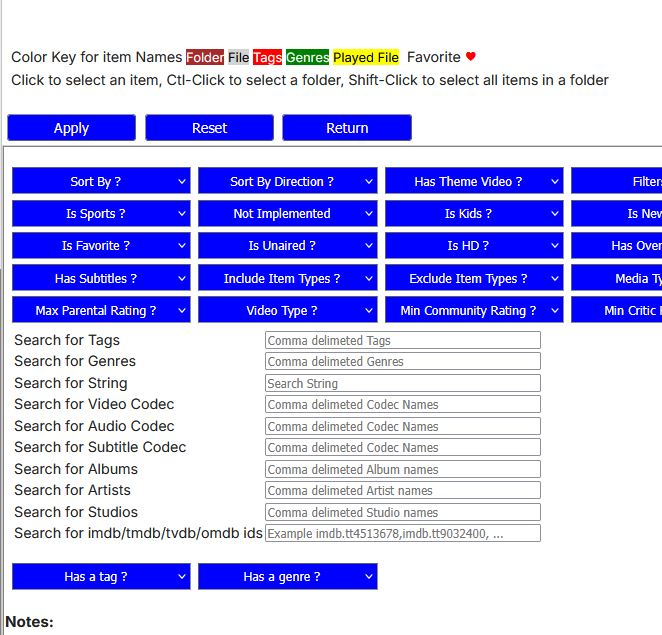
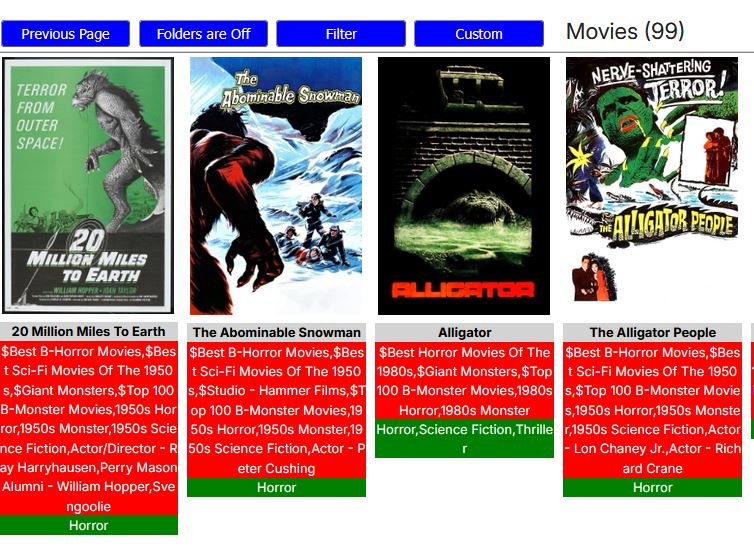
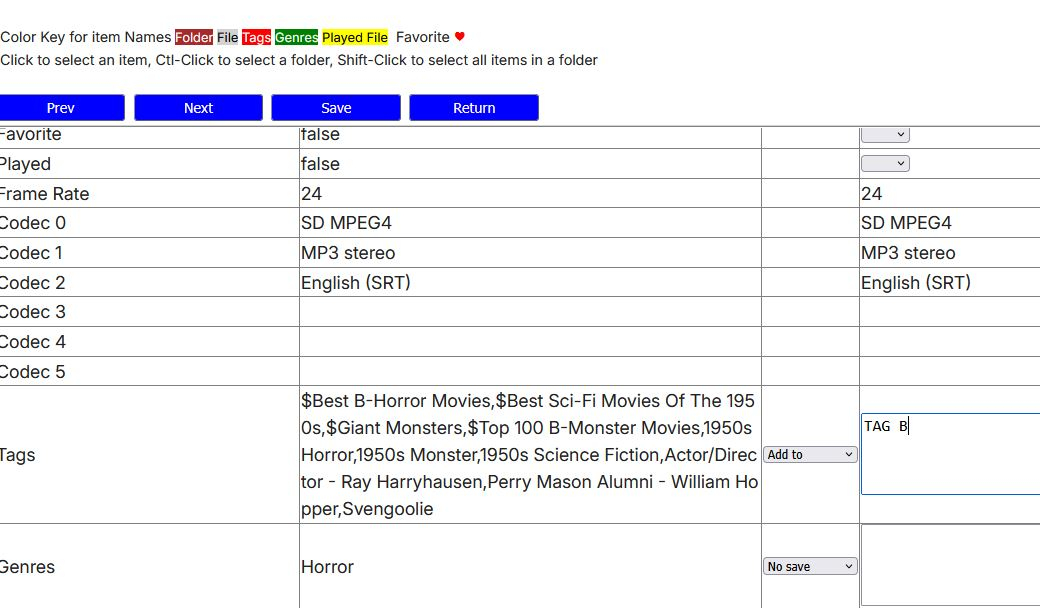
Yes. Select the Library in Bulky Editor. Select Filter. Enter the Tag you want to replace in the Search For Tags box. Must be exact including case (TAG 2). Apply. You should be given a list of the number of items with the tag. Hold Shift+select the first item. Should select all (red boxes around each item). Bulk Edit button. Go down to Tags. Select Add To from the dropdown. Enter TAG B. Save. You should be taken back to the filtered list. Select all and Bulk Edit again. Go to Tags this time select Remove Tags from the dropdown. Enter TAG 2. Save. Should go back to a blank screen because you have removed all items in your filter search.
-
I was messing around with InfiniDysk (a fork of NZBDav) and added a library full of symlinks to Emby through an rclone VFS mount. The library path Emby sees is: /mnt/md0/NZBDav/... rclone is using VFS cache mode full with: --vfs-read-chunk-size=16M --vfs-read-chunk-size-limit=512M --vfs-read-ahead=512M --buffer-size=0M During Emby's initial library scan, the server log shows ffprobe being launched like this: /opt/emby-server/bin/ffprobe -i file:"/mnt/md0/NZBDav/TV Shows/..." -threads 0 -v info -print_format json -show_streams -show_chapters -show_format -show_data I don't see an explicit -probesize or -analyzeduration being passed. Most files probe very quickly, usually around 0.3–0.6 seconds. However, while watching the underlying NZBDav/rclone activity, I found some ffprobe reads going far beyond the initial 16 MB VFS chunk. For example, one approximately 3.0 GB episode had already reached roughly 767 MB read while the Emby library scan was still running. There were also around 25 simultaneous active reads at that point. rclone core/stats during the scan showed multiple 3+ GB media files open at once. Some were only at 688 KB or 8–17 MB, but others continued reading much farther into the files. My concern is that on an NZBDav/Usenet-backed filesystem, a metadata scan that reads hundreds of MB from occasional files is very expensive and can trigger unnecessary article retrieval/cache activity. My questions are: Is there an officially supported way in Emby to set a maximum ffprobe -probesize for library scans? Can this be applied only to regular media-library files, rather than Live TV? Is there also a recommended -analyzeduration limit for this situation? If there is no GUI setting, is there a supported configuration file or command-line option for supplying additional ffprobe arguments? Would limiting probe size to around 10000000 bytes cause any known issues with normal MKV media detection? I would prefer not to replace or modify /opt/emby-server/bin/ffprobe directly because package updates could overwrite it, and I also don't want to unintentionally affect HDHomeRun/Tunarr Live TV probing. Ideally I would like something equivalent to: -probesize 10000000 applied only when probing files under: /mnt/md0/NZBDav/ while leaving Live TV and other ffprobe usage at Emby's defaults. If there is a supported way to accomplish that, I'd appreciate any guidance.
- Yesterday
-
For those subscribed to this, please follow this new thread now: It is created by our automated release process. Thanks everyone.
-
New topic:
-
3.5.43 Core UI Update Only Core UI Changes from 0.0.1 to 26.0.4 Various bug fixes for youtube player Add cancellation support to directory picker Fix multi-select episodes not showing delete option on some screens Fix on now video tab not loading Update header style during video playback Improve new folder view style Update header style during video playback Fix new folder view style on apple devices Improve folder icon in folder views Various fixes related to submitted crash and error reports Support cancellation of initial connection process Add new spotlight home screen section option (requires Emby Server 4.10+) 3.5.42 Fix for some devices showing a gray video background instead of black 3.5.41 Fix initial connection regression 3.5.40 -07/21/2026 Support cancelling server connections while loading Improve data refreshing when leaving the app and returning 3.5.39 -07/18/2026 Fixes for Samsung Dex Support cancelling server connections while waiting 3.5.38 -07/12/2026 Fixes for Samsung Dex 3.5.37 -06/23/2026 Fixes for Samsung Dex 3.5.36 -05/10/2026 Subtitle rendering fixes 3.5.35 -05/05/2026 Add additional options under force transcoding section 3.5.34 -04/10/2026 Fix regression causing ass subtitles to be stretched 3.5.32 -04/10/2026 Support compressed embedded ass/ssa subtitles 3.5.31 -03/24/2026 Fix cases of text subtitles rendering off screen Updates to new home screen features 3.5.30 -02/26/2026 Support new home screen options in 4.10 server 3.5.29 -02/10/2026 Various fixes related to handling of playback stop 3.5.28 -01/21/2026 Various fixes related to handling of playback stop 3.5.27 -01/20/2026 Subtitle sizing fixes 3.5.26 -01/18/2026 Various fixes related to handling of playback stop 3.5.25 -01/18/2026 Resolve sporadic cases of video stuttering 3.5.24 -01/11/2026 Fix sporadic post playback crashes 3.5.23 -01/06/2026 Fixes for SSL certificates with no common name 3.5.21 -12/15/2025 Fixes for picture in picture 3.5.17 -11/21/2025 Fixes for launching books Fixes for live tv guide rendering on older devices 3.5.16 -11/04/2025 flac decoding fixes Update app exit menu 3.5.15 -10/31/2025 Fix youtube playback 3.5.13 -10/25/2025 Change video player up option from Chapters to Chapters / Guide Fix sporadic app crashes with flac playback 3.5.12 -10/07/2025 Fix playback error on older versions of android 3.5.11 -10/04/2025 Fix lyrics display layout in TV mode Fix video remote control layout Update live tv recordings tab layout 3.5.10 -10/01/2025 Restore home screen backdrop 3.5.09 -09/29/2025 Support pinch gesture for fullscreen video 3.5.06 -09/27/2025 Show age of person Fixes for next/previous episode button in video player Add explicit direct stream live tv option 3.5.04 -09/19/2025 Fix new spoiler feature causing movie chapter thumbnails to be hidden 3.5.03 -09/17/2025 Update now playing indicator 3.5.02 -09/11/2025 Fix background video option 3.5.01 -09/09/2025 Updates to new option to hide episode spoilers 3.5.00 -09/07/2025 Add option to hide spoiler information from episodes Support experimental hevc transcoding with 4.9 server 3.4.98 -09/04/2025 Group recordings under live tv recordings tab (with 4.9 server) 3.4.97 -09/04/2025 Allow video playback to extend into the notch Navigation fixes 3.4.94 -09/02/2025 Fixes for horizontal home screen 3.4.92 -08/30/2025 Fixes for horizontal home screen 3.4.91 -08/27/2025 Improve DV to HDR fallback for Zidoo devices 3.4.90 -08/24/2025 Fit detail screen regressions with collections and actors 3.4.89 -08/22/2025 Improve horizontal home screen 3.4.88 -08/20/2025 Improve DV to HDR fallback Fix multi-select list focus color Fix various home screen regressions 3.4.85 -08/18/2025 Fix various home screen regressions Show three items with add to collection/playlist 3.4.84 -08/17/2025 Fix various home screen regressions 3.4.83 -08/14/2025 Updates for server maintenance mode feature 3.4.82 -08/07/2025 Add option to control whether back button exits the app when clicking back on the exit menu 3.4.80 -07/25/2025 Fix metadata editor regression 3.4.79 -07/23/2025 Fixes related to Dolby Vision to HDR fallback General performance improvements 3.4.77 -07/07/2025 Up/down arrow key fixes 3.4.76 -06/26/2025 Up/down arrow key fixes 3.4.75 -06/17/2025 Resolve loss of arrow key input after playing from guide 3.4.74 -06/10/2025 Fix date added missing from list of sort orders 3.4.72 -06/04/2025 Support keyboard input on search screen in tv layouts 3.4.71 -05/28/2025 Various fast-forward/rewind bug fixes 3.4.70 -05/20/2025 Various UI bug fixes 3.4.69 -05/10/2025 Support sleep timer in the audio player 3.4.67 -05/02/2025 Fixes for av1 playback Various download fixes 3.4.66 -05/01/2025 Add folder view option to automatically jump through folders containing a single item Increase timeout length when downloading Various download fixes Various camera upload fixes 3.4.65 -04/29/2025 Fixes for external subtitles over https 3.4.64 -04/25/2025 Fixes related to rapid back button presses 3.4.62 -04/24/2025 Fix regression with light themes in portrait orientation 3.4.60 -04/23/2025 Fix regression with subtitle appearance options 3.4.59 -04/19/2025 Fixes related to video player long press action Add text size setting for TV display mode 3.4.58 -04/17/2025 Fixes related to video player long press action 3.4.57 -04/17/2025 Add option to control video player long press action 3.4.56 -04/11/2025 Update embedded libass for subtitle rendering 3.4.55 -04/07/2025 Fixes related to dialog sizing within the guide 3.4.54 -04/06/2025 Fixes related to superman theme 3.4.53 -04/05/2025 Fixes related to play next option Improve performance 3.4.52 -04/02/2025 Improve performance 3.4.50 -03/27/2025 Add video screen up action option to control up button press behavior 3.4.49 -03/25/2025 Fixes related to autoplay episodes options 3.4.48 -03/19/2025 Fixes for closed caption rendering 3.4.47 -03/12/2025 Add a-z picker to add to collection/playlist 3.4.46 -03/07/2025 Support playback correction 3.4.45 -03/05/2025 Play vtt subtitles directly without conversion from the server 3.4.44 -03/03/2025 Fix some of the quality settings not saving 3.4.43 -02/28/2025 Add convert unsupported audio option 3.4.42 -02/26/2025 Fixes related to login options Fix video rotation on Fire TV devices when direct playing 3.4.40 -02/23/2025 Add option to configure to login as specific user on startup 3.4.39 -02/18/2025 Add playback option to disable direct play of mpegts 3.4.38 -02/11/2025 Fix errant "left" popup 3.4.37 -02/07/2025 Fixes for gamepad input 3.4.36 -01/30/2025 Fixes for playback of downloaded content 3.4.35 -01/27/2025 Fixes for playback of downloaded content 3.4.34 -01/24/2025 Fix crash on older versions of android when returning from PiP 3.4.33 -01/20/2025 Fix theme songs playing in the background after force closing the app 3.4.32 -01/08/2025 Update to exoplayer 1.5.1 3.4.31 -12/30/2024 Fix person content not displaying correctly 3.4.30 -12/19/2024 Fix downloaded books not being displayed 3.4.28 -12/12/2024 Split remote and cellular quality into two values Support passing subtitles to mxplayer 3.4.27 -12/01/2024 Fix regression when clicking manage server 3.4.26 -11/22/2024 Add emby://play/{serverID}/{ItemID} intent 3.4.24 -10/20/2024 Fix tag screen empty for certain media types 3.4.23 -10/07/2024 Updates for newer play store requirements 3.4.21 - 08/26/2024 Fix screen being kept on when video is paused 3.4.19 - 08/07/2024 Shuffle fixes Android Auto fixes 3.4.15 - 07/27/2024 Now playing screen layout fixes 3.4.14 - 07/26/2024 Fixes based on google play crash reports Fix guide category scrolling 3.4.12 - 07/17/2024 Fixes based on google play crash reports 3.4.11 - 07/04/2024 Shuffle play fixes 3.4.10 - 07/02/2024 Fix video osd bottom tabs not refreshing between items 3.4.09 - 06/28/2024 Fix rare PIP crash on Samsung devices Add channel group filters above the live tv guide in mobile and desktop layouts 3.4.08 - 06/24/2024 Fix multi-select regression 3.4.07 - 06/21/2024 Add theme song volume setting Fix downloads failing due to % in file name 3.4.06 - 06/18/2024 Live TV guide scroll fixes 3.4.05 - 06/16/2024 Samsung DEX fixes Improve support for chapters with multi-version videos (with server version 4.9.0.25+). 3.4.04 - 06/12/2024 Fix regression on audio play queue screen 3.4.03 - 06/07/2024 Fixes for horizontal home screen 3.4.01 - 06/05/2024 Improve performance Updates for set shuffle Add a pleasing background to the subtitle preview on the subtitle settings screen 3.4.0 - 06/05/2024 Improve performance Fix repeat handling when holding down ff/rew 3.3.99 - 05/30/2024 Improve performance Add Continue Watching channel to Shield home screen 3.3.97 - 05/25/2024 Support shuffle state in the audio player 3.3.95 - 05/23/2024 Auto-scroll live tv guide based on last played channel Show more guide rows in the video OSD Performance improvements Support launching video from photo slideshow 3.3.94 - 05/18/2024 Prompt user to ask how to play when playing a channel that is actively recording 3.3.93 - 05/16/2024 Adjust base osd seek speed 3.3.92 - 05/16/2024 Support variable fast forward/rewind speed 3.3.91 - 05/13/2024 Mobile layout fixes for video screen 3.3.90 - 05/10/2024 Subtitle offset fixes 3.3.88 - 05/09/2024 Change subtitle offset overlay to use a slider 3.3.87 - 05/04/2024 Add Up Next tab to video OSD to see playback queue 3.3.86 - 04/25/2024 Quicker access to chapters in video osd Support drag and drop library order Support drag and drop order for genres, tags, studios and people in the metadata editor 3.3.83 - 04/22/2024 Fix error message not displayed on user stream limit being reached 3.3.82 - 04/21/2024 Support drag and drop with server transcoding settings Add video OSD tab animation 3.3.80 - 04/09/2024 Add text shadow to clock when focus preview is active 3.3.79- 03/28/2024 Group collection items by media type Support app screensaver for tv devices 3.3.77- 03/19/2024 Android auto fixes 3.3.76- 03/15/2024 Fix add to play queue missing from menu 3.3.74- 03/11/2024 Picture in picture fixes 3.3.73- 03/08/2024 Fix reported album name with camera upload feature 3.3.72- 03/01/2024 Fixes based on google play crash reports 3.3.71- 02/29/2024 Fix screen staying on after video playback Redesign music genre screen 3.3.70- 02/22/2024 Fix reverting refresh rate change after playback 3.3.69- 02/16/2024 Audiobook playback fixes with Android Auto Increase delay after refresh rate display mode change 3.3.68- 02/13/2024 Audio passthrough fixes when refresh rate switching is enabled Add Missing Episodes section to metadata manager 3.3.67- 02/08/2024 Fix layout of program dialog in guide 3.3.66- 02/07/2024 Manifest changes for releasing to the play store on TV devices 3.3.64- 02/01/2024 Resolve back screen on playback on some devices after advancing from one episode to the next 3.3.63- 01/30/2024 Improve home videos display in horizontal home screen 3.3.62- 01/18/2024 Improve live tv seek display Improve display of dialogs from guide 3.3.61- 01/18/2024 Improve live tv seek display 3.3.60- 01/15/2024 Fixes for playback on secondary screens Version 3.3.58- 01/04/2024 Support resume and capturing progress from mx player as an external player, as well as other players that use the same parameters. Version 3.3.57- 12/29/2023 Improvements relating to putting the app in the background with video playing and then returning Version 3.3.56- 12/26/2023 Various user interface bug fixes Version 3.3.54- 12/21/2023 Add in-app access to app log files Support channel up/down to change channels during live tv playback Version 3.3.52- 12/15/2023 Various layout fixes Version 3.3.50- 12/11/2023 Fix camera upload regression on Android 14 Update TV mode select menus Version 3.3.48- 11/29/2023 Update exoplayer to 2.19.1 Version 3.3.46- 11/16/2023 Add series context menu option to view missing episodes Version 3.3.44- 11/09/2023 Fix missing 3D icon Add release date to playlist and collection sort orders Version 3.3.42- 11/01/2023 Show full program details when clicking on a program within the guide Support left and right swipe actions on lists Improve Korean subtitle font Version 3.3.41- 10/24/2023 Add option to control display of posters on detail screens Add option to control the number of genres displayed on detail screens Version 3.3.39- 10/18/2023 Support adaptive launcher icon Version 3.3.38- 10/13/2023 Camera upload compatibility updates for android 14 Fix android chat bubbles showing on top of video playback Version 3.3.37- 10/11/2023 Support subtitle position options Version 3.3.36- 10/06/2023 Fix audio playback regression General performance improvements Version 3.3.35- 10/04/2023 Support multi-user login General performance improvements Version 3.3.34- 10/02/2023 Support new profile pin feature Version 3.3.32- 09/17/2023 Support swipe down to dismiss/cancel any dialog that appeared by sliding up Version 3.3.31- 09/13/2023 Make more fields selectable to display in lists Update to new android requirements regarding notifications Version 3.3.29 - 08/28/2023 Make more fields selectable to display in lists Version 3.3.26 - 08/24/2023 Fix regression with delete function Version 3.3.25 - 08/22/2023 Fix regression with external subtitles Version 3.3.24 - 08/20/2023 Fix regression with add to favorites Version 3.3.21 - 08/17/2023 Right to left fixes Fix directional keys repeating with flirc input Version 3.3.20 - 08/03/2023 Various fixes for settings screens Mobile layout list view fixes Version 3.3.19 - 07/19/2023 Fix startup error on android 6.0 Add display option to control visibility of Media Info section on detail screens Version 3.3.18 - 07/12/2023 Try to fix double back press problem Version 3.3.16 - 07/11/2023 Try to fix double back press problem Version 3.3.15 - 07/07/2023 Android auto search fixes Update exoplayer to 2.18.7 Support dvdsub in mp4 container Version 3.3.14 - 06/29/2023 Downsize downloads section in left nav Various user interface fixes Version 3.3.13 - 06/28/2023 Separate refresh rate and resolution switching into two options Version 3.3.12 - 06/23/2023 Various performance improvements Add option to control screen orientation during video playback Update episode list highlights Ease up on text brightness Make clock larger Show detail screen for extras Version 3.3.11 - 06/16/2023 Various performance improvements Version 3.3.10 - 06/15/2023 Rework app exit menu Support left nav in TV layouts Version 3.3.08 - 05/23/2023 Various fixes related to theme song playback Version 3.3.07 - 05/19/2023 Various fixes related to recording indicators Version 3.3.05 - 05/11/2023 Fix series display regression with older servers Version 3.3.04 - 05/08/2023 Fix hardware back button regression with dialogs on the home screen Version 3.3.02 - 05/02/2023 Support flattening series in TV layouts Version 3.3.01 - 04/28/2023 Various scroll fixes Always show exit menu when clicking back on home screen Version 3.2.99 - 04/26/2023 Various scroll fixes Version 3.2.98 - 04/25/2023 Focus preview fixes Version 3.2.97 - 04/24/2023 Improve orientation handling during video playback Version 3.2.96 - 04/22/2023 Improve cast display during video playback Version 3.2.95 - 04/17/2023 Add series display option Improve user interface performance Version 3.2.94 - 03/30/2023 Fix navigation regression Version 3.2.93 - 03/29/2023 Add View Lyrics context menu option for songs with lyrics Add option to keep playing video in background after pressing back Version 3.2.92 - 01/20/2023 Fix regression with some videos with 2ch eac3 Version 3.2.91 - 01/18/2023 Update ExoPlayer to latest version Various video OSD fixes Version 3.2.90 - 12/15/2022 Various video OSD fixes Version 3.2.89 - 12/072022 Add a guide option to control display of channel numbers Version 3.2.88 - 12/062022 Add a guide option to control display of channel names Version 3.2.87 - 12/2/2022 Version 3.2.86 - 11/18/2022 New: The current chapter is now auto selected during navigation Version 3.2.85 - 11/17/2022 Version 3.2.84 - 11/04/2022 Fixed a display issue with expanded info screens Fixed a navigational issue with My Media Version 3.2.83 - 11/02/2022 Support sorting Playlists and Collections (requires Emby Server 4.8+). Navigational changes in LiveTV Additional items added to queue when shuffling playlist Added the number of items within a collection Version 3.2.82 - 10/18/2022 Update subtitle font Version 3.2.81 - 10/12/2022 Fix scroll regression causing jumpiness Version 3.2.80 - 10/12/2022 Improve seeking of .ts files Support separate image sizes for lists Various user interface bug fixes Version 3.2.79 - 10/06/2022 Fixed an issue when clicking Back while playing music Improved handling of Zidoo devices and TV mode Version 3.2.78 - 10/05/2022 LiveTV changes Version 3.2.77 - 09/28/2022 Added setting to switch between different size posters Added episode details under Next Up legacy posters Version 3.2.76 - 09/23/2022 Add three way toggle nav menu (may require beta server?) Added transparency to buttons and menus Version 3.2.75 - 09/21/2022 Version 3.2.74 - 09/20/2022 Added backdrop to the enhanced My Media ? Version 3.2.72 - 09/15/2022 Added visual to timeline when in focus Added option to turn off rating when video playback begins Updated now playing design for music in the background Version 3.2.71 - 09/14/2022 Version 3.2.70 - 09/07/2022 Fixed some small issues Added brightness control to mobile devices Added a lock screen feature during video playback for mobile devices Version 3.2.69 - 09/03/2022 Version 3.2.68 - 09/01/2022 Added shortcut keys Add filter, sort, settings icons to Live TV Guide and move enhanced image and info to the top Move subtitle timing from cog wheel to the CC menu Add Google voice integration Add more media info to the playback OSD Add more media info to the Info screen Change navigation to OSD so there are less clicks Version 3.2.67 - 08/30/2022 Add view series to 3-dot menu for episodes and seasons Add larger bitrate options Add EHS option for the home screen (it is worded differently to spell out exactly what it does - focus previews) Make play from beginning always visible Update thumbnail bubble animation Update detail screen runtime on version selection Version 3.2.66 - 08/29/2022 Version 3.2.65 - 8/25/2022 Fixed a playback issue with DTS-HD HRA 4.8 kHz sampling rate Version 3.2.64 - 8/20/2022 Version 3.2.63 - 8/17/2022 Version 3.2.62 - 8/5/2022 Various video playback fixes Version 3.2.61 - 7/28/2022 Resolve the issue of certain remotes triggering multiple presses on arrow keys General UI performance improvements Version 3.2.59 - 7/27/2022 Added enhanced details for Suggestions and Favorites within TV Shows and Movies libraries Version 3.2.58 - 7/24/2022 Version 3.2.57 - 7/20/2022 Version 3.2.56 - 7/15/2022 Various video playback fixes Version 3.2.55 - 7/13/2022 Various video playback fixes Initial RTL support Version 3.2.54 - 7/08/2022 Version 3.2.53 - 7/06/2022 Version 3.2.52 - 6/23/2022 Various fixes for new table view Version 3.2.51 - 6/17/2022 Add new field options for display Add new theme options Version 3.2.50 - 6/6/2022 Fixes for wma playback Fix sporadic playback errors when playing downloaded content Updates to audio now playing screen. There's also a new Now Playing tab on the home screen when content is playing Use series backdrop on episode detail screens Version 3.2.48 - 5/4/2022 Updated TV mode detail screen Fix on screen keyboard not showing on some Amazon devices Version 3.2.47 - 4/27/2022 Fix aiff playback Fix now playing item not showing on shield home screen Support play/pause during video playback using OK button (when osd is hidden) Add Cast & Crew to video osd Fix SFN not closing Fix an issue with "On Now" in the video OSD Version 3.2.46 - 4/18/2022 Fixed miscellaneous playback issues Version 3.2.45 - 4/9/2022 New updated video OSD dialogs Version 3.2.44 - 3/22/2022 Fixed an issue where music Artists and Album Artists weren't being displayed Version 3.2.43 - 3/17/2022 Fixed an issue where thumbnails weren't showing while scrolling timeline Version 3.2.42 - 3/17/2022 Fixed issue where DV files wouldn't play correctly Version 3.2.41 - 3/9/2022 Version 3.2.40 - 2/28/2022 Added timeline scrolling to OSD Version 3.2.38 - 2/8/2022 Version 3.2.37 - 1/26/2022 Version 3.2.36 - 1//2022 Version 3.2.35 - 1/13/2022 Various audio playback fixes Version 3.2.34 - 12/30/2021 Now direct plays all audio formats, including DTS-WAV Version 3.2.24 - 10/27/2021 Numerous small TV layout improvements from top tabs to popups to video OSD Support long press context menus with Android TV remotes Version 3.2.17 - 10/6/2021 Various bug fixes and performance improvements Version 3.2.14 - 9/20/2021 Various fixes based on user submitted crash reports Version 3.2.11 - 9/13/2021 Add subtitle background color option Version 3.2.08 - 8/26/2021 Bug Fixes Version 3.2.07 - 8/11/2021 Bug Fixes Version 3.2.06 - 8/9/2021 Add Info, Chapters, On Now and Guide sections to video OSD Minor adjustment of detail screen buttons Improve performance of playlist detail screen Add sort by track number option to folder views Version 3.2.05 - 7/9/2021 Various download fixes Fix aiff music playback Fix direct play/transcoding status display for music playback Version 3.2 - 6/19/2021 Support subtitle offset for downloaded videos Fix camera upload regressions on older versions of android Version 3.1.96 - 5/18/2021 Android auto reconnection fixes Music playback started in android auto is now reported to Emby Server The new live tv channel management UI is now available Version 3.1.94 - 4/30/2021 Fix erroneous error message when playing certain music formats Various subtitle fixes Version 3.1.92 - 4/22/2021 Version 3.1.91 - 4/20/2021 Various fixes for av1 video playback Version 3.1.90 - 4/14/2021 Remember play queue when using Android Auto resume feature Support marking favorites from android auto Fix Chromecast add to play queue Version 3.1.88 - 4/10/2021 Save play queue when using Android Auto resume feature Version 3.1.86 - 4/8/2021 Support marking favorites from android auto now playing screen Support a-z picker with users Add favorites to context menu Add mark played to context menu Version 3.1.85 - 4/1/2021 Improve Android Auto browsing Various av1 video playback improvements Version 3.1.84 - 3/28/2021 Fix crash on Shield TV Version 3.1.83 - 3/26/2021 Support device equalizer with audio file playback Add option to download to public downloads folder Various subtitle fixes Various fixes for playback of anamorphic video Improve single channel program list display Support multi-select in list views Add more field options for display in lists Version 3.1.80 - 3/9/2021 Improve dynamic list refreshing Version 3.1.79 - 3/5/2021 Support sorting by filename Version 3.1.77 - 3/2/2021 Various additional subtitle fixes Various mpegts format improvements Version 3.1.76 - 2/20/2021 Honor Android Auto auto-resume setting Fix media notification duration for remote playback Fix subtitles not displaying on secondary screen Support multi-select filtering Version 3.1.75 - 1/20/2021 Support high-res flac playback Various Dolby Vision improvements and fixes Specific DV/HDR fixes for Sony TV's Fix for direct playback of mpeg4 DX-50 Various fixes for Chromecast volume control Various fixes for downloaded subtitles Display content on Android TV home screen Support clicking individual text items in list items Support add to play queue with drag and drop Support add to playlists and collections with drag and drop Support remove from continue watching and next up (requires Emby Server 4.6+) Add new tabs under libraries (requires Emby Server 4.6+)
-
First time -> server thinks you have an image because it's in your db from your windows install. second time -> server has recovered from this and erased the bad link from your db When you refresh metadata it needs to be after that first time, because it will not replace existing images.
-
Emby Android: A new Release version is available Changes 3.5.43 Core UI Update Only Core UI Changes from 0.0.1 to 26.0.4 Various bug fixes for youtube player Add cancellation support to directory picker Fix multi-select episodes not showing delete option on some screens Fix on now video tab not loading Update header style during video playback Improve new folder view style Update header style during video playback Fix new folder view style on apple devices Improve folder icon in folder views Various fixes related to submitted crash and error reports Support cancellation of initial connection process Add new spotlight home screen section option (requires Emby Server 4.10+)