NV12 Pixel Format
NV12 stores 8-bit 4:2:0 video using a luma plane followed by interleaved Cb and Cr samples.
NV12 is an 8-bit 4:2:0 semiplanar sample layout. One plane stores Y; another stores alternating Cb and Cr bytes. APIs commonly call those chroma components U and V, so the second plane is often called the UV plane.
For a linear, tightly packed 4 × 2 example, all active bytes can be listed:
| Byte offsets | Content |
|---|---|
| 0–3 | Y00, Y01, Y02, Y03 |
| 4–7 | Y10, Y11, Y12, Y13 |
| 8–11 | Cb0, Cr0, Cb1, Cr1 |
There are eight luma samples and two samples of each chroma component. That gives twelve active bytes. The chroma row has half as many sample pairs as a luma row has positions, but each pair occupies two bytes, so their active row byte widths match.
Why NV12 appears during processing
The Y plane is straightforward to access for luma operations, and the two chroma components needed together are adjacent. This layout is used by video-processing and hardware-decoding interfaces; Microsoft documents it for accelerated 4:2:0 video rendering.
An Emby conversion can therefore use an NV12 working surface even when its source file is described by an H.264 codec name and an MKV container. These labels describe different layers of the session.
NV12 specifies sample precision, grouping, and order. The frame still needs range, matrix, transfer, and primaries to establish color meaning. Swapping Cb/Cr order produces the related NV21 organization; increasing component precision to the P010 convention changes storage word size and bit placement. A processing boundary must match the concrete format it receives.
Finding a chroma pair
For even picture dimensions, the chroma array has W/2 columns of pairs and H/2 rows. In a simple contiguous linear allocation with pitch P, height H, and no extra allocated rows, its base follows the Y plane at base + P × H.
The pair indexed for luma column x and row y is located at:
chroma base + floor(y/2) × P + 2 × floor(x/2).
Cb is at that address and Cr at the next byte. In the tightly packed 4 × 2 frame above, luma position (3, 1) is at Y offset 7. Its indexed chroma pair begins at 8 + 0 × 4 + 2 × 1 = 10, with Cb at 10 and Cr at 11.
Color reconstruction still uses the intended sample location and interpolation. The addressing calculation identifies a stored pair; it does not turn that pair into a directly measured full-resolution color at every nearby luma position.
Pitch belongs to the allocation
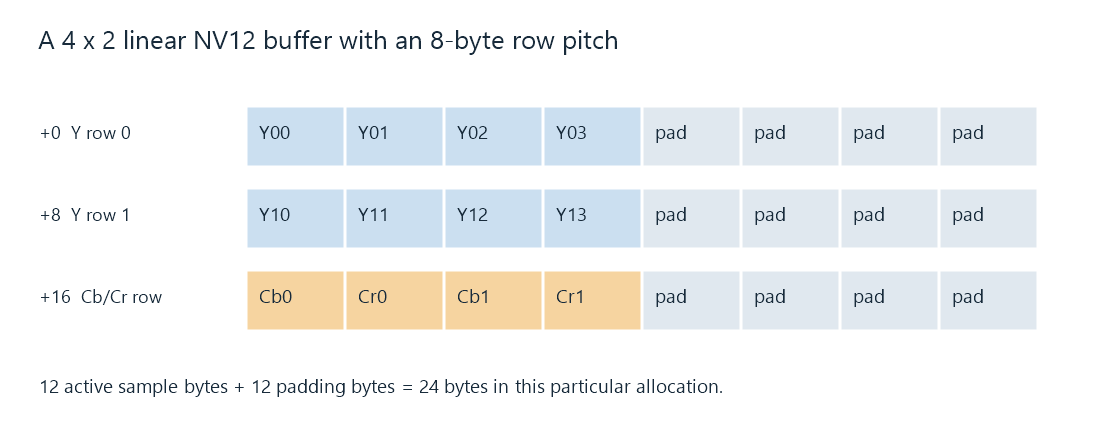
In this 4 × 2 allocation, pitch is 8 rather than 4. The Y rows start at offsets 0 and 8, and the UV row at 16. Its total illustrated storage is 24 bytes. The sample counts are unchanged.
Use the surface's reported plane locations and strides when accessing it. A tightly packed 1.5 × W × H byte calculation counts active samples; it is not a universal allocation-size rule. Related API formats can also provide noncontiguous planes or explicitly tiled storage.