Blu-ray subtitles (PGS)
PGS assembles timed Blu-ray presentation graphics from palette, object, window and composition segments.
PGS, the Presentation Graphics Stream, is the bitmap subtitle representation associated with Blu-ray presentation graphics. An inspection tool can identify it as hdmv_pgs_subtitle; an extracted stream commonly uses a .sup file.
Its displayed image is assembled from several kinds of segment. Reading each segment as if it were an independent subtitle sentence misses that assembly.
Objects, palettes and the composition
| Segment role | Information supplied |
|---|---|
| Palette | Colour and transparency entries |
| Object | Dimensions and run-length-coded pixel data |
| Window | Areas used for presentation |
| Presentation composition | Which objects to use and where to put them |
| End of display set | Completes the set of data for that presentation |
An object refers to palette indices rather than carrying arbitrary full-colour values for every pixel. Composition refers to object identities and positions. A decoder keeps relevant objects and palettes available according to the stream's state rules.
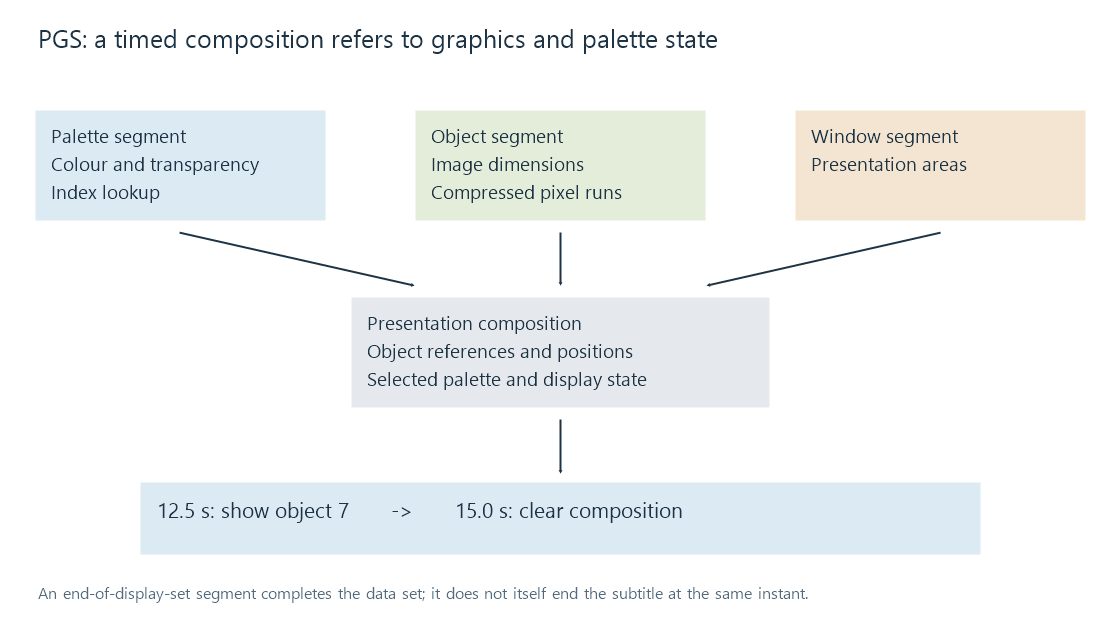
The diagram shows logical dependencies, not a requirement that every display set transmits a fresh copy of every component. A palette or image object can be reused or updated. That reduces delivery work while making decoder state important.
A cropped object such as an 800 × 80 line can be positioned on a larger display plane. The object dimensions and the plane dimensions answer different questions.
A display set can show or clear graphics
Consider a simplified presentation sequence:
| Presentation time | Composition result |
|---|---|
| 12.5 s | Show object 7 using the selected palette at its indicated position |
| 15.0 s | Clear the active subtitle composition |
| 16.2 s | Show the next subtitle object |
The display-set terminator marks the completion of its data. It is not automatically an instruction to remove the caption at that same instant. Clearing belongs to a later presentation state, such as a composition containing no displayed objects.
A consumer or container mapping may derive an interval from the next update or an explicit duration. That produces a conventional cue view for inspection, but the original graphics data still has a stateful composition model.
Seeking directly to a small update can fail if the referenced palette or object was established earlier and has not been reconstructed. Acquisition points and the required preceding data let the decoder rebuild an appropriate state before presentation.
Forced graphics can be identified within a composition
PGS composition objects can carry a forced-display indication. That is distinct from a container's flag on the whole subtitle track. A stream can contain ordinary dialogue plus selected forced objects, or a separately authored track can contain only the necessary selected passages.
Discarding those distinctions while converting or packaging the track can change selection behavior. The label shown in an app's track menu does not by itself reveal the object flags present in the source.
The source graphics and the rendering route
An Emby client that can receive and draw a suitable PGS presentation can keep it separate from the video. Another route can render the graphics upstream and incorporate them into an encoded output. The resulting video then includes those pixels, even if the source was a selectable PGS track.
Changing PGS to another bitmap packaging can preserve image content. Producing SRT additionally needs OCR or transcription.