Intel Quick Sync Video (QSV)
Intel Quick Sync Video is the name for Intel’s dedicated media-acceleration capabilities, reached through supported software and driver paths for decoding, processing and encoding.
Intel Quick Sync Video, often shortened to QSV, names Intel's dedicated media-acceleration capabilities. Applications reach those capabilities through a supported media software and graphics-driver path.
Quick Sync is not an encoded-video format. An H.264 stream remains H.264 when a QSV encoder creates it.
Separate the hardware name from the software interface
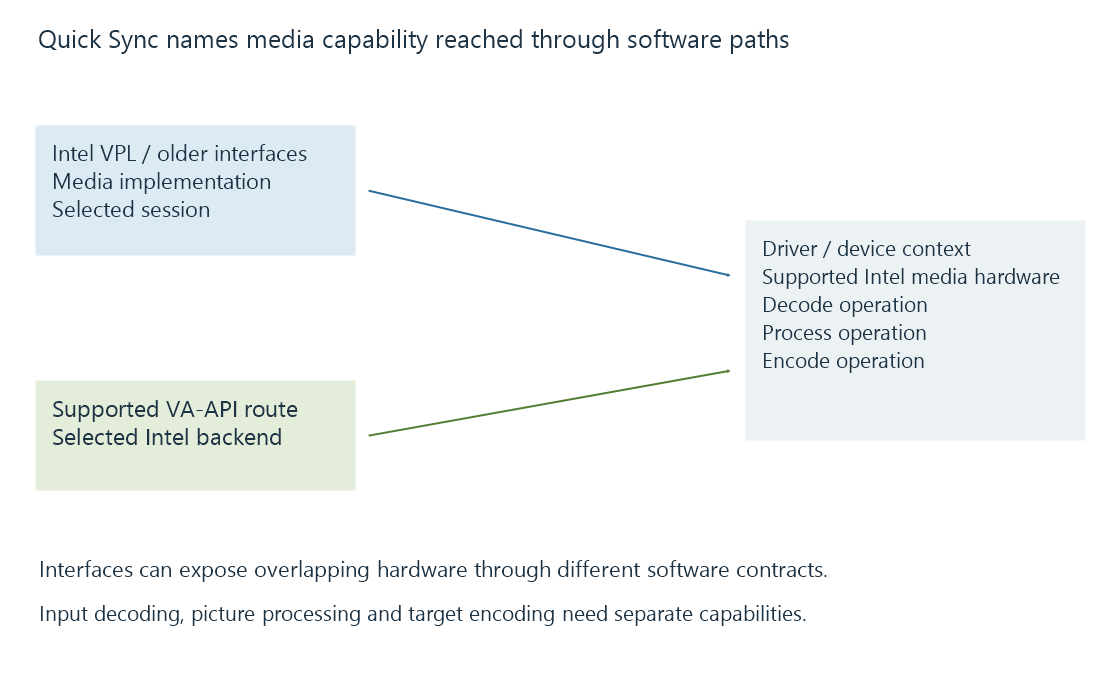
Intel's current Video Processing Library, formerly called oneVPL, is one software route to decode, encode and video processing. Older applications and logs can refer to Intel Media SDK. Linux's Intel Media Driver also exposes supported operations through VA-API.
Those software names identify interfaces and implementations. They should not be read as separate brands of compressed media.
For an Emby session, the selected platform route and runtime matter alongside the physical device. A QSV option does not identify every stage of the conversion by itself.
Input and output use different capabilities
Use an original selected-source example:
| Stage | Requirement |
|---|---|
| Decode | Accept the selected HEVC Main 10 source |
| Process | Prepare the target picture size/colour/subtitle presentation |
| Encode | Create the selected H.264 output |
| Package | Put the encoded output on the intended delivery path |
The decoder and encoder need different supported configurations. Hardware HEVC decoding does not establish hardware HEVC encoding, and an H.264 encoder does not decode the source on its own.
The example is a route to reason about, not a statement that every Quick Sync device supports those source and processing choices. Device generations and exact products expose different media capabilities.
Dedicated media and general CPU resources are different
On an integrated Intel graphics device, the media engine is part of the processor's graphics/media system. CPU cores still run application, operating-system and other media work.
A software-only encoder can make CPU-core resources prominent. A Quick Sync encode instead relies on its suitable media path, with driver, memory and supporting-work requirements of its own.
Adding CPU cores does not proportionally duplicate a particular dedicated media engine. Likewise, general graphics capability is a different resource from its codec engine.
Integrated memory can reduce the need for a discrete-device transfer arrangement, but the application still has surface layout, access and completion responsibilities.
A mixed route is a defined combination
A session can use QSV decoding, a CPU-only filter and QSV encoding. Another can keep its supported picture processing within a compatible device path.
The relevant question is which operation received which frame representation. Intel video processing develops the processor role; the hardware pipeline explains the frame handoffs.
See Also
- Intel VPL and the oneVPL name
- Intel Media SDK (legacy)
- Intel video processing (VPP)
- Fixed-function media engines
- Hardware decoding and software decoding
- Hardware encoding and software encoding