Windows Audio Session API (WASAPI)
WASAPI lets Windows applications negotiate and feed endpoint audio streams using shared or exclusive access and explicit buffer accounting.
WASAPI is a Windows interface for sending audio to, or capturing audio from, an audio endpoint. For playback, the application opens an endpoint stream, establishes its format and buffering, and supplies data at the pace the output consumes it.
It sits after media retrieval and decoding in a typical PCM playback route. An Emby server can deliver an unchanged soundtrack while the Windows client uses WASAPI to send decoded samples to speakers, HDMI or a USB interface. The app's chosen output backend determines whether WASAPI is involved.
Shared and exclusive streams
In shared mode, streams participate in the Windows audio engine's shared route. This permits multiple applications to contribute audio to one output. The engine's mix format is an important boundary; a player's own decoded format can differ from it.
In exclusive mode, the application requests direct use of the endpoint through the driver, bypassing the ordinary shared mixing stage. It must use a format the endpoint supports for that mode.
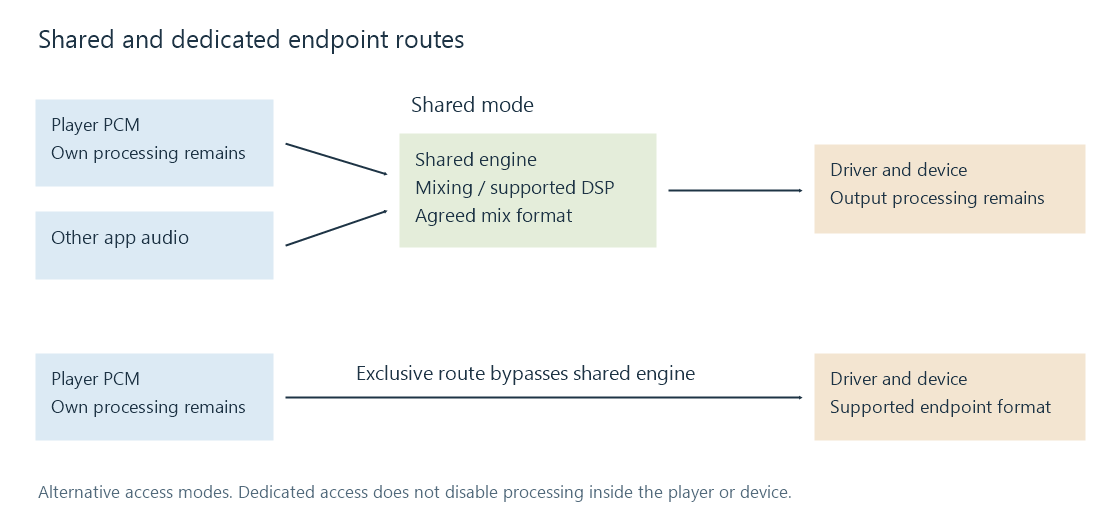
Format support is a property of the endpoint and the sharing mode. A format accepted by the shared engine does not prove that the hardware accepts it in exclusive mode. WASAPI's format-support query and initialization result establish the chosen stream more precisely than the source file's codec label.
A complete PCM format includes sample rate, channels and layout, valid precision and container representation. A 24-bit source can be delivered in a 32-bit container; source depth and output container size are not interchangeable.
A 44.1 kHz file and a 48 kHz output
A source containing 44,100 PCM sample frames for one second cannot simply be submitted as 44,100 frames of a 48 kHz stream and retain its duration. At that output rate, those frames occupy 0.91875 seconds.
Correct conversion instead produces the appropriate 48,000-frame representation of the same second. Depending on the player and stream configuration, conversion can occur before submission or in a supported platform route. The format agreed with the API determines how the submitted frames are interpreted.
This also distinguishes a shared mix format from an encoded transport format. A passthrough request uses a representation for supported coded audio; its carrier fields do not mean that the ordinary PCM mixer can treat the payload as amplitude samples.
A refill cycle in sample frames
The application fills an output buffer, while the engine or device consumes queued frames. WASAPI counts a PCM frame as one simultaneous sample for each channel.
Suppose a shared-mode stream has an allocated buffer of 960 frames at 48 kHz. Its full capacity represents 20 ms. If a query reports 720 frames of padding—frames queued to play—then:
available frames = buffer capacity − queued padding
                 = 960 − 720
                 = 240 frames = 5 ms
For stereo 32-bit float, each frame has eight bytes, so that refill is 1,920 bytes. Writing 960 new frames at this moment would exceed the available space.
The player obtains a writable packet, fills it with prepared samples and releases it into the queue. Repeating that operation before the queue empties maintains continuous sound. The allocated capacity can differ from the requested capacity, so the calculation uses the returned value.
A buffer's full capacity and its current queued amount also differ. Neither alone necessarily describes the entire delay through later driver, transport and device buffers.
Keeping the producer ready
An event-driven stream can notify the application when it should service the output. The real-time task is to deliver prepared data promptly. Waiting for a network fetch or a slow decoder operation inside that refill work risks an underrun.
A separate producer queue lets retrieval and decoding prepare material ahead of the output deadline. Its depth trades responsiveness against tolerance of stalls. Event notification reduces the need for blind polling; it does not make a blocked thread run sooner.
For audio/video synchronization, the player needs the relevant presentation position and timing, not just the number of bytes it has submitted. Data can have been handed to the API while still waiting to become audible.
Controls and changes belong to defined boundaries
Session volume, endpoint volume, player gain and device controls have different scopes. Shared mixing or supported processing can alter samples. Exclusive access removes one mixing stage, while bit-perfect playback requires the rest of the path to be examined too.
Unplugging an output or reconfiguring its resources can invalidate the stream. The application then needs to reopen or select an appropriate endpoint and rebuild the required format and timing state. An HDMI display change, for example, can also change which output capabilities are available.
A useful Windows playback trace records the selected endpoint, sharing mode, actual stream format, returned buffer size and any processing. That separates an unsupported format, a producer underrun and a route change—three events that can all appear to a listener as “the audio stopped.”