Leaderboard




Popular Content
Showing content with the highest reputation on 06/08/26 in all areas
-
I'd like the ability to see what auto thinks should be the bitrate vs what the user selects in the app. Does auto run every time and then just honor the manual override? I ask because I have a user that continuously connects and transcodes at 800k, which is like flip phone bitrate and he's on an iPad. If I knew what auto thought, I could recommend to him that he's getting garbage video because that's what he chose, not what the server is capable of. Thanks edit: yes, i know I can go check netdata and see, but when I'm not at home or there's more than 1 user, the admin page is way more meaningful and accessible.4 points
-
A big 100+ page thread here, which discusses the differences between the Emby for Android TV (ATV) app and the Universal Android (Standard) app. It's probably about 50/50 as to which app people prefer.2 points
-
Edge is the superior choice for watching any video as it supports all the formats and therefor doesn't require any transcoding. Firefox is slowly catching up. Chrome does support a good amount of formats but not as many as Edge. Pure browsing is a whole other discussion.2 points
-
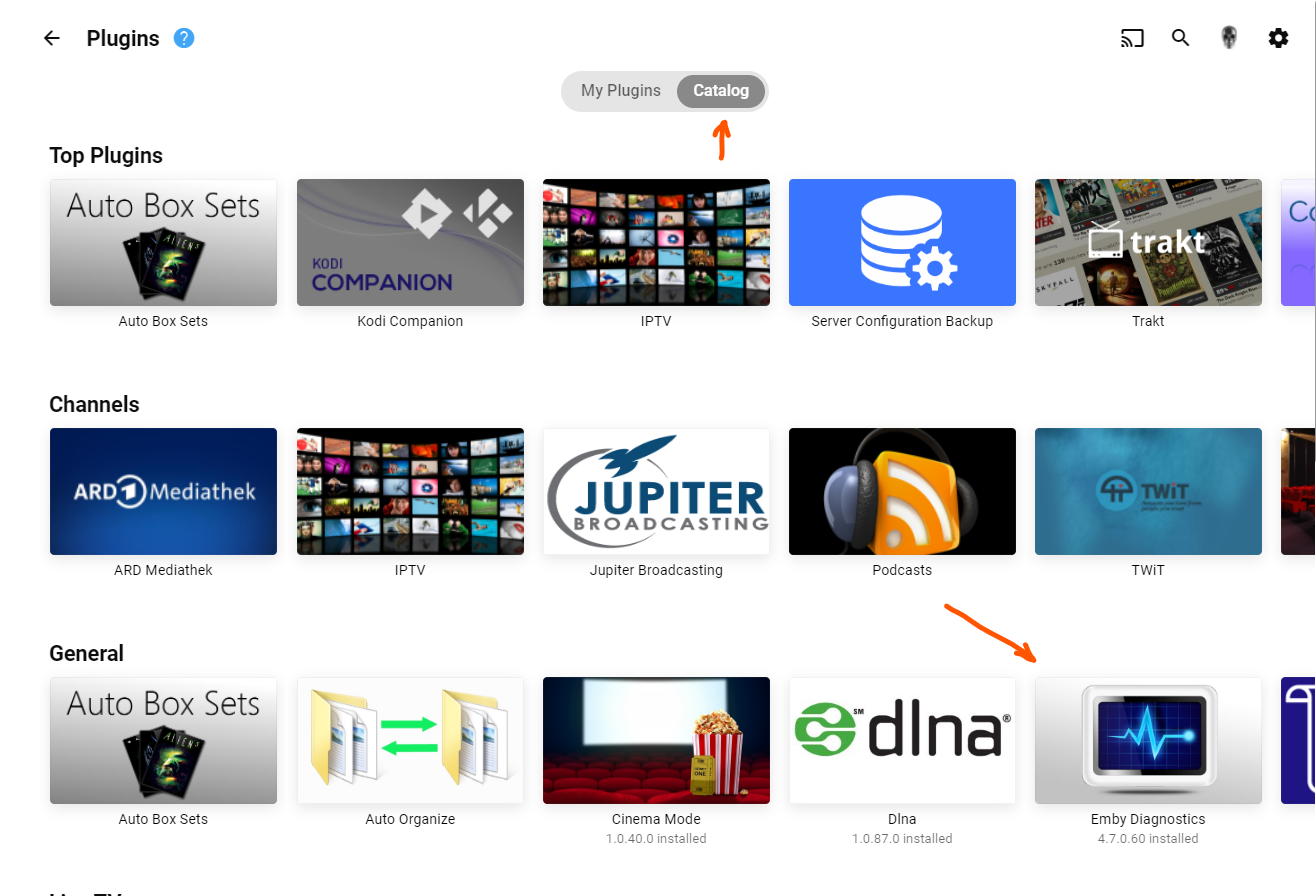
Being not just a lazy person, but also one who prefers keyboards over mouse clicks I sure would love the ability to search the plugin catalog! Horizontally scrolling through each category is needless tedium, IMO. A search box would be heaven-sent! BTW, I wasn't too lazy to search the FR section for prior requests on this subject...if this is a duplicate, it wasn't for want of searching (BTW, this forum software is really crummy at it. Booleans operators like "AND" are ignored as far as I can tell).1 point
-
Hey all! Thanks for all the compliments and kind words! I attached an updated RAR covering a few of the requests above. See below for notes. I'll check in every so often for updates and requests. Added two versions for sports, one for pro wrestling fans, one for everyone else Nice! Wasn't 100% sure what your use case was for these, but I took a guess and redid them in the same style as the rest of the set. Redid for consistency and added to the set. It really is a good idea! EmbyIcons_v6.7.rar

 1 point
 -
This is a Windows Powershell script to update all episodes of a series to match the episode's original air date pulled from Emby's database. You need to create an API code to connect to your Emby server installation. It will create a .json file on first run to save your server settings. The script will ask for your server's IP and API code, Emby's file path, and the Windows file path for the same content. After that, you type in the name of the series, and you will have the option to do a preview scan or a live run. After the preview scan, you can also do the live run. I've run it on several of my shows, and it appears to be working rather well. Use with caution, of course. This is my first-ever PowerShell script. Example of the .json file it creates: { "EmbyPathRoot": "/mnt/TV/", "EmbyUrl": "http://###.###.###.###:8096/", "WindowsPathRoot": "\\\\Tower\\TV\\", "ApiKey": "xxxxxxxxxxxxxxxxxxxxxxxxxxx" } /mnt/TV/ is the Emby path to the TV files, and \\Tower\TV\ is the Windows path. EmbyDateUpdater.zip1 point
-
I'm really sorry but, i don't want to be the cause of trouble for the developers of Emby. I'm running through some ideas in my head for a key system for it, sadly such things are easily hacked. At any rate, the plugin should work for a good while still as i don't think Emby still change much in any way that will impact the plugin. Good idea, I might just do that.1 point
-
I only use the Transcode Notifications and Resolution Blocking features, which would be really nice to be part of the core server, but until that ever happens I hope a minimal version of the plugin can be made available with just what's in the Notifications tab of the plugin.1 point
-
Ah man, this is devastating. This plugin was an aboslute game changer for automatically limiting my kids screen time in exchange for chores. I was wondering why the repo was missing today.1 point
-
Getting your Plugin in the catalog Basically write @ebrand ask politely.1 point
-
So my understanding (how puny my brain maybe) when EMBY first scan's the folder let's say for movies, it connects to the themoviedb.org website and downloads all the metadata into a local .nfo file along side your video file. It then reads or inserts it into the the database permanently. My suggestion was to update your .nfo files and let EMBY just read an update the database locally. My understanding of this process may be wrong, but I have to do this recently and did not see any issue. Was also helpful to lock the the folder(s) from updating metadata. The other part is that from what I have experienced, you updating the metadata in the web application "shoud have" updated the local .nfo file next to the video file. I think there is a solution in here buried for you but I shall wait for smarter men & women to chime in. One last comment... you say "season" and again, somebody should chime in, sports are events, not caterogized as seasons in the traditional terminology Emby uses for TV shows. Event's really fall under the "Movies" categories: Example: Folder Name: UFC 32- Showdown In The Meadowlands (2001) -> FileName: UFC 32- Showdown In The Meadowlands (2001).mkv Side note... don't know why I'm trying to help a Dallas fan (sigh)1 point
-
If you go the script route... those internal backslashes may become an issue.... find /path/to/folder -name "*.nfo" -exec perl -pi -e 's/J:\\TV\\NAS/\\NAS\\Media\\TV\NFL/g' {} + Again, encouraged to use IP Address instead of NAS. Would move a few folders over to a temp location for testing, but it seems the sportsdb.com metadata plugin seems a bit easier.1 point
-
I could have sworn somewhere in the matrix they added the sportsdb.com as a metadata provider. My understanding was if you named the folders accordingly all would be well. I could be wrong. I was wrong once, but then my wife beat me. https://www.thesportsdb.com/browse.php?s=dallas+cowboys Ah, I C now... you have to add the sportsdb.com plugin and name the folders accordingly and life will be good. I'd back up the metadata stuff just in case. Alternatively, you need a custom script to (was SED?) to go through all your .nfo files update them with the new path. I don't imagine that would be too difficult for the linux programmer. For us mere mortals, claude maybe your friend if that is the route you wish to traverse. YMMV, use at your own PERIL!! Bash Script find /path/to/folder -name "*.nfo" -exec sed -i 's/OLD_STRING/NEW_STRING/g' {} + Breakdown: find /path/to/folder — searches recursively through all subdirectories -name "*.nfo" — targets only .nfo files -exec sed -i — runs an in-place edit on each file found 's/OLD_STRING/NEW_STRING/g' — replaces every occurrence of the old string with the new one {} + — passes all found files to the command efficiently Example — replacing "Director: Unknown" with "Director: John Doe": So in your case it "should" be: find /path/to/folder -name "*.nfo" -exec sed -i 's/J:\TV1\NFL\/\\NAS\Media\TV\NFL/g' {} + But again, YMMV. Also, I recommend to use an IP address instead of "NAS" in case you decided to do something different in the future and change again. It's just damn easier to assign a new device the old ip address and retire the old the one, but again, YMMV.1 point
-
Honestly I'm new to this and i don't know how.1 point
-
Hi there, that's a great idea. This will be used as the completion marker for a television series. Could you add it to the Emby catalog. Thanks.1 point
-
Another vote for this, as described here https://emby.media/community/topic/148091-display-reason-for-bitrate-exceeds-directplay-limit/1 point
-
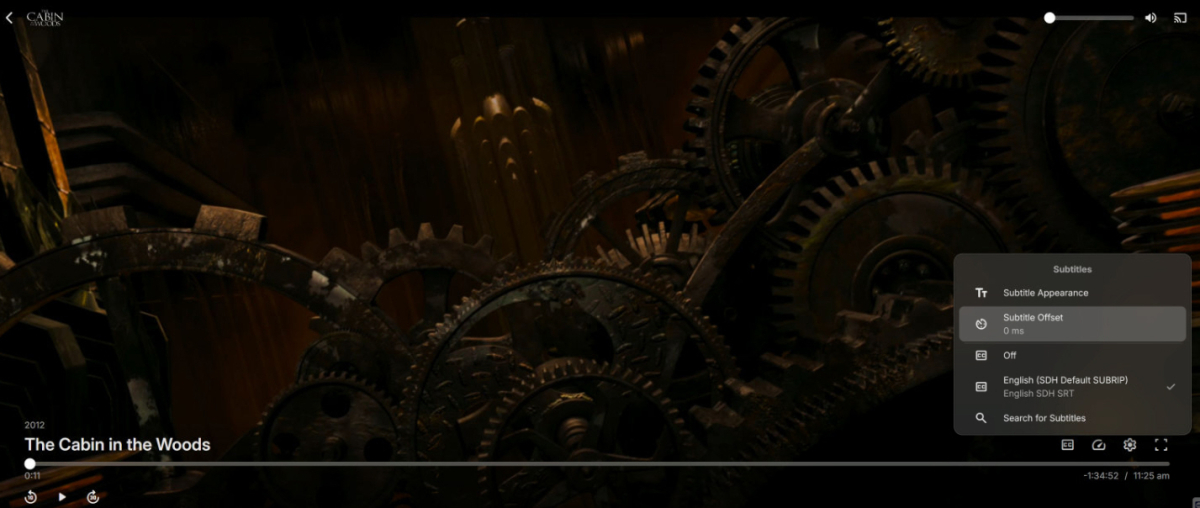
Okay, now I'm getting really confused. When I watch something in my web browser, I have the offset option and inside the "Subtitle Appearance" I found the position settings. I'm attaching a screen shot of Cabin in the Woods in 4K, showing the offset options with embedded SRT subtitles in a MKV container. Another odd thing is that when I play the same movie on my Android phone, I am missing the offset option. It is also missing on my TV. I have Emby for AndroidTV and Emby for Android installed. I know that Emby for my TV used to have it because I've used it and even when searching / downloading subtitles in the past I've had to use the offset option to sync them while playing a movie. None of the Emby versions seem to be consistent with how they manage subtitles or allow users to manipulate them.
 1 point
 -
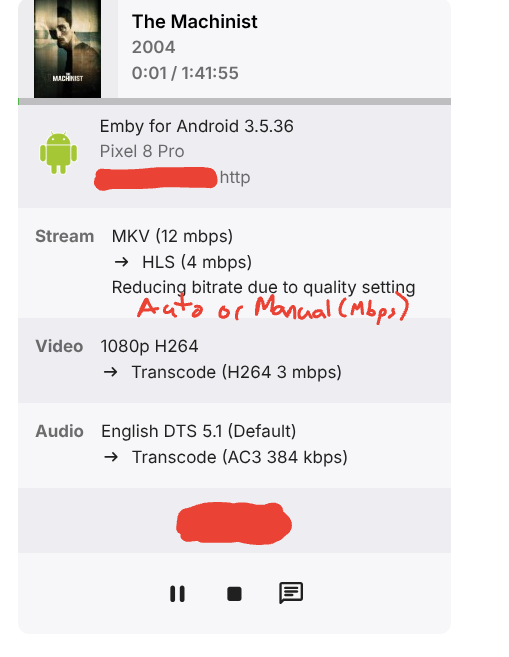
The now playing view should display the reason for the MaxStreamingBitrate= selection. If the client is using Auto it should display "Auto", if the client is using a manual quality selection it should should the quality selection (10 Mbps). With Auto Quality being broken it is helpful for admins to recognize when clients are using Auto and direct them to set a manual quality.
 1 point
 -
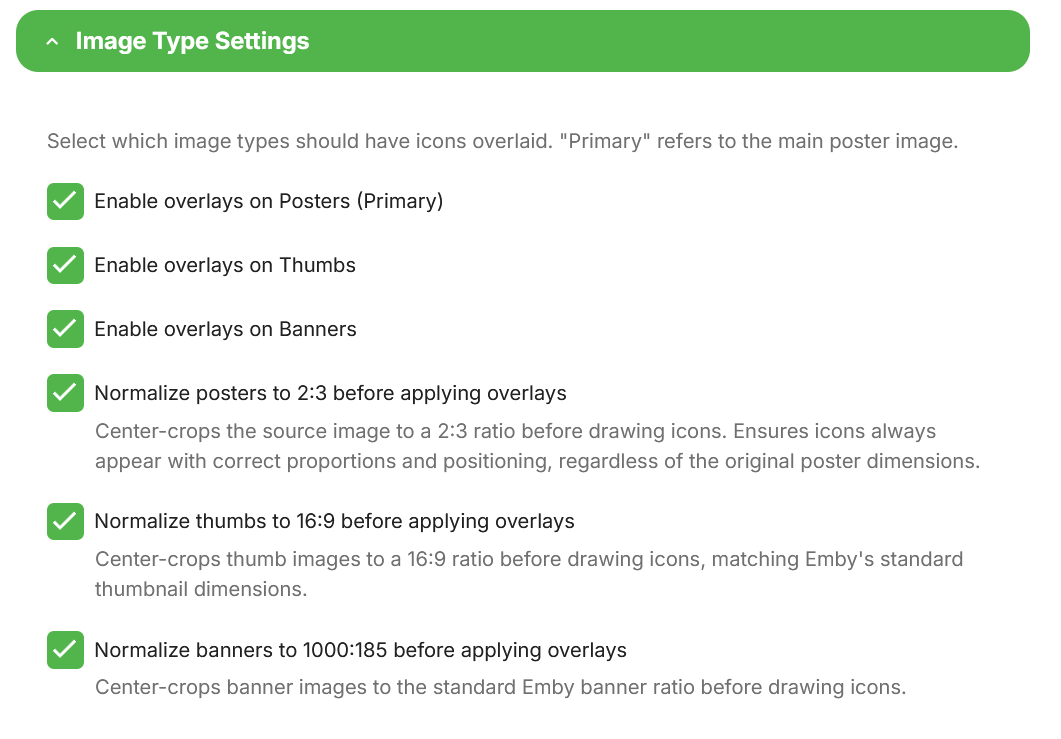
Looks like it works like a charm ! I've tested Posters only as I don't use overlays on thumbs and banners. Cheers @yocker1 point
-
Thank you so much @yocker, you are the best !! And please enjoy your summer break, have a nice cold one for me1 point
-
For Apple TV specifically, though, the mpv route has a few trade-offs that a native HLS + fMP4 (stream-copy) path avoids: It's a third-party engine. Bundling and maintaining mpv instead of the platform's own AVFoundation is a long-term cost, and it tends to lag behind OS changes. It breaks some native integrations. The clearest one for me is audio: routing sound to an AirPlay 2 device such as a HomePod doesn't behave the same as with the system player — with the native pipeline that just works (multichannel included); with a custom renderer it's often limited or lost. It tone-maps rather than passes through. This is the big one. As far as I can tell, the mpv path does its own tone-mapping and then outputs an HDR signal, which makes the TV switch into HDR. It's better than re-encoding on the server, but it's still a tone-map: the TV never receives the original Dolby Vision bitstream, so its own DV engine (with the dynamic, per-scene metadata) never gets to do its job. To my eyes it simply doesn't look identical to native DV passthrough. That last point is why fMP4 remux matters. With HLS in an fMP4 container, the original HEVC/Dolby Vision stream can be stream-copied (no re-encode, no tone-map) and handed straight to AVPlayer, so tvOS does true native HDR/Dolby Vision + Match Content. I've got exactly this running on an Apple TV 4K now — DV Profile 8.1 remuxed losslessly, the TV switching into native Dolby Vision — so it's not theoretical. None of this is mpv-vs-fMP4; ideally both exist. But for Apple TV users chasing reference-quality HDR, native remux is the one that looks right. +1 to finally adding it.1 point
-
And Thorium to rule them all.1 point
-
I’ve identified a persistent race condition in the tuner handshake process. In environments where tuners require a specific negotiation window, Emby’s current aggressive, automated retry logic creates contention, often resulting in avoidable handshake failures. I am proposing that the tuner retry logic be made configurable—specifically, allowing users to toggle these retries on/off or adjust the interval. This change would significantly improve stability for those of us using specific hardware or custom proxy setups without impacting the default behavior for the rest of the community. Is this something the development team would consider implementing? I have logs available to demonstrate the handshake conflict if needed.1 point
-
Buenísimo compa hoy llegando a mi casa llego aprobarlo se agradece mi compa aguante los strm1 point
-
I wanted to share something I've been experimenting with, in case it's useful for this request. It turns out that delivering the video over HLS with fMP4 (fragmented MP4) segments opens up a really nice path for these MKV HEVC HDR files on the Apple TV. Rather than transcoding (and tone-mapping) the video, the server can simply remux the MKV into fMP4 over HLS and stream-copy the HEVC video untouched — it's essentially just a container rewrite, so it's very light on the server and, importantly, it keeps the HDR intact. Here's the result on an Apple TV 4K, playing a 4K HEVC Dolby Vision (Profile 8.1) title: (Jellyfin + Custom Jellyfin Apple TV app -developed by myself-) ffmpeg … -i "….mkv" -map 0:0 -map 0:2 -map -0:s \ -codec:v:0 copy -tag:v:0 hvc1 -bsf:v hevc_mp4toannexb \ -codec:a:0 copy -f hls -hls_segment_type fmp4 … Stream mapping: Stream #0:0 -> #0:0 (copy) Stream #0:2 -> #0:1 (copy) The -codec:v:0 copy is the key part — the HEVC HDR stream is passed through as-is and plays in HDR on the TV, with no tone mapping and negligible CPU. One small thing on the client side, in case it's helpful: with a multi-variant HLS playlist (an HDR remux rendition plus an SDR fallback at the same bandwidth), the native AVPlayer tends to pick the SDR one unless the client specifically selects the VIDEO-RANGE=PQ variant. Once the client targets the HDR rendition, it plays great. So the fMP4/HLS remux route looks like a genuinely useful option here — gentle on the server and it preserves HDR on the Apple TV. Just sharing in case it helps, and happy to go into more detail. FFmpeg.Remux-2026-06-07_17-01-04_32ce8d77902368b0e4edd358b2059492_8848d63c.log1 point
-
@Asdepique777It's done. You can get the new version from the catalog, beta v5.54.2.0. This should give some options to play with. I suggest testing horizontal mode and report back to me, as i might not have hit that correctly. Now unless there are bugs then i WILL get my vacation!! No more plugins until summer is over and i run out of beer!
 1 point
 -
Esas cadenas no aparecen para traducir, posiblemente se hayan olvidado añadir. o en algun momento de mantenimiento del sitio de traducción hayan desaparecidos. pero estar no estan. He hecho una busqueda de "Configure Emby" y de "Browse Lbrary" y no da ningún resultado.1 point
-
Atm. you can just use what ever you prefer, the developers have said that later on the Emby for Android TV will be phased out for Emby Android instead.1 point
-
Moonfin beta just released on tvOS! I really dislike the UI but playback has been perfect! Av1 with no stutter! No HomePod andio issues! It also has full Emby support with live tv! https://github.com/Moonfin-Client/1 point
-
I was bored today and was swapping out a number of actor/actress images that I didn't like and found that many of actor/actress images available were not to my liking. I start tinkering with Google's Gemini (I know AI bad, and for the most part I agree) trying to see if I could get results that I felt look enough like the actress/actors to be usable. I ended up with a prompt that works pretty well. I have to edit the images a bit after sometimes, but so far I am really impressed by results, but I don't what to be subject to my own biases so I thought I would see what others thought. Work flow goes as followed: 1. Find 3-4 images of actor/actress 2. Add image to Gemini 3. Add prompt 4. Download Gemini image 5. Run Eyelign (when I have cast done) (This aligns eye level to be the same on all images) 6. Open images in Photoshop (edit image size, and center images so they match) 7. Export images to folder using Photoshop's File > Export > Layers To Files feature 8. Rename Files as need. 9. Upload to emby I've only done one movie so far I chose Predator Badlands because of it's small cast and because I just watched it a few days ago. Here are the images that I made with Gemini: Here is what they look like in emby: I feel they are pretty good, but would welcome what others think.












 1 point
 -
Thank you!!! This is very helpful. I haven’t tried every relevant ArtistsService query permutation yet but adding “UserId=…” is sufficient for me to now get the correct counts for AlbumArtist, Artist and Composer in 4.9, and easy to implement. Perhaps Emby can answer if this is a new permanent requirement for 4.9 ArtistsService? It doesn’t seem to be necessary for 4.9 ItemsService /Items. Thanks!1 point
-
Hi, yes without hardware support I would expect this to be too slow for most users setups.1 point
-
In my experience Auto is always 800k for all off network devices. I have a 100Mb upload connection to my server. Manually selecting any quality works perfectly. First thing I tell my users is to change the quality from Auto to 8Mbps for home devices and 3Mbps for mobile devices as a starting point. One thing I miss about Plex is that clients could report buffering events back to the server. I used Plexpy, at the time, to track buffering events and if I saw a pattern for a specific device I could tell the user to change the quality.1 point