Leaderboard




Popular Content
Showing content with the highest reputation on 06/01/26 in all areas
-
Weather or not it's worth the work, it would be an awesome feature!2 points
-
These all are great ideas!. I've created issues on GitHub for all of them: https://github.com/TheIntroDB/emby-plugin/issues As for the rate limiting, I can't exactly remove it, however your idea for library or show specific filtering would help. I'll start work on adding these features, but it might take me some time. Currently I'm the only active developer for 6 different TIDB plugins (If anyone has dev experience, PRs welcome!) and the project is only a couple months old, but growing fast!2 points
-
This is the one missing feature that makes me look for alternatives every 6 months. Not enough people are 'liking' the post to get it moved up the list.... but I guarantee everyone would use it if it were avaialble. If it were in place for a couple months... I would bet there would be an outcry if it were ever removed because people would't be able to live without it. We've been told to use tags... but they don't solve the problem. I am tagging in the metadata 'notjason' so i don't have to see reality tv or kids shows on my home screen.... but i have to do it manually, I can't do it at the tv, it isn't intuative, and my users can't do it so they have every awful show that anyone else likes clogging up thier homepage. We have been told to use folders.... Okay, i have User A, B, C, D. 2 of them like reality shows. 2 of them like cooking shows, 1 of them likes Documentaries, 3 of them like Scary movies, etc. With only 4 users, I would need to seperate media into 16 folders to cover all the combinations... and i would need to determine which of the 4 would want to see each series to determine which folder to put something new in.2 points
-
I created a help section library of my own, that my parents can refer to as many times as they need to, when they forget how to do something. Screenshots / photos / short videos that you can create yourself and drop into a 'Help' section on your home screen. Perhaps this would be an option for you.
 2 points
 -
I have created a Home photo & video type library: There is only one folder "2026". Inside, there will be some ordered folders like: 0312-0315_Paris 0501_FunnyDay Inside these folders I'll create one more folder level with the name of the recording device: GalaxyPhone Action4 When I browse the "Action4" folder, this breadcrumb becomes: "Action4": So technically, I loose the information of *which parent folder am I in*. Is there any setting to configure to see at least one more level upper? For example this current case: Instead of "Action4" let's write "0501_FunnyDay/Action4" I know I can set the title manually for "Action4". That's not my goal (because it changes the title also when viewing the 0501_FunnyDay folder).
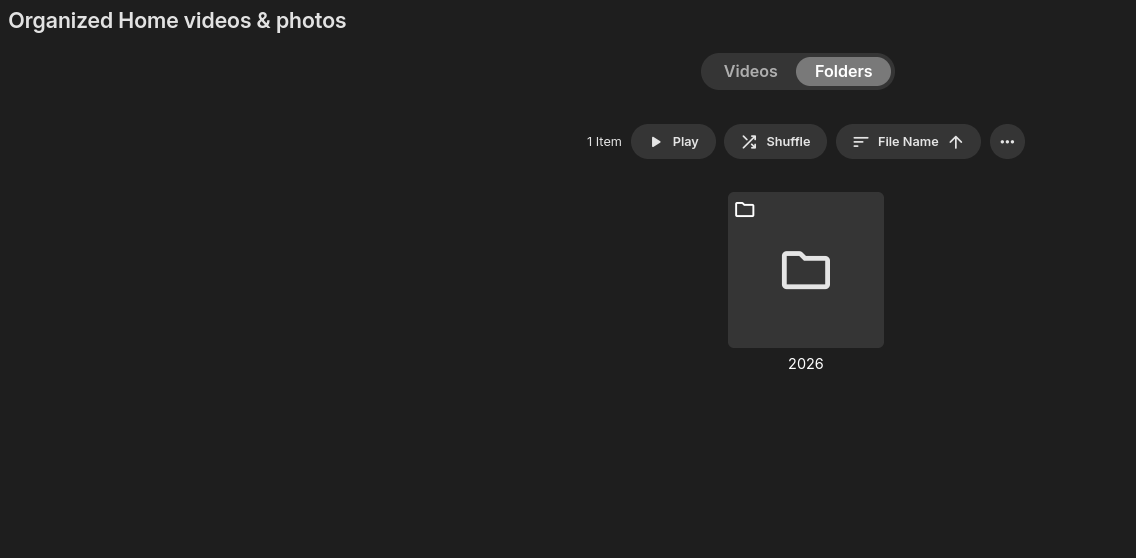
 1 point
 -
If it somehow has to be this way, you need to make the installer force elevation. Just to be sure ...1 point
-
I've added this in v1.0.2.3. https://github.com/TheIntroDB/emby-plugin/releases/tag/v1.0.2.3 Hopefully this is the last "testing" release before I can submit to the official Emby plugin catalog. If people could test and give me more feedback before I do, please do!1 point
-
I can look into this1 point
-
Someone else's bad rip, I guess. That's why I went to download open subtitle and found that wasn't adjustable either. That's why I posted here. Now that SRT sync is adjustable again, at least within the standard Android app, that's as much attention as you devs should put to this, given the many other, more important requests and quirks that are posted here.1 point
-
EmbyNewOverlay.dll V1.1.0.1 What's new Added item type and expiry date for tag rule.1 point
-
Yes.....but....Watch what you get as far as playback. There are some limitations on the Roku when it comes to HD and 4K playback. I have a Roku Ultra as well (had it before the TV) and its good, just limited in 4k playback capabilities.1 point
-
I can say that this happens when you try to resume a movie and it craps out for whatever reason, then it will reset itself to the beginning. (This happens to me quite often because I have one particular array which is slow to restart from hibernation and Emby often times out before it has spun up) Whether this is the same problem or not I cannot say. I never bothered to report it.1 point
-
Been running Emby since 2015, and I also never had an issue with external connections, many ISP's are using CGNAT now, so its not as easy as it used to be with simply opening a port. Basic understanding of Networking is important to make sure you run things securely, otherwise you just open ports and get hacked.1 point
-
Is it possible to link items in your Emby library to other items in the overview section of albums, artists, playlists and collections?1 point
-
Found it, it's not just a "next button", it's an "up next" menu. That doesn't have the same issue.1 point
-
From a user perspective, the beta version seems to be working pretty well, so I don't expect it to take long to reach stable. Let's see what devs say.1 point
-
After 3.5 months? But hats off to you. That’s great!1 point
-
Nope, that one was only referencing embedded subs: external subs offset is working/showing properly throughout both apps. AndroidTV app historically supported only those but IIRC standard Android app exhibited same behaviour as Web app did and still does, allowing for offset of both internal and external subs. But I might as well be remembering it incorrectly, hence it was redirected to Luke for further info.1 point
-
I haven't seen any, but make sure you save everything into media folders before scanning in Linux ie: It will still require a scan because of the path changes, but should go quickly (DON'T ENABLE INTRO DETECTION until later, as this will take a long time) Forgot to mention, you can use Backup & Restore to restore your user played status


 1 point
 -
For anyone else wondering, you have to set the library's folder scanning mode to "legacy". I tried that at first but I didn't realize that I had to wait for all of my libraries to build (several hours) before I could attempt a re-scan using legacy mode, otherwise choosing to scan just does nothing. I stopped the scheduled task and manually scanned the library but I guess it just continued the initial scan using the "default" mode. Thought it was a display issue with folder view but I guess it looks like the new scanning mode just doesn't respect the folder structure that Emby recommends. Side note: I really wish Emby had a default sort order. Every subfolder sorts by alphabetical, and when I change it to sort by release year, it always selects descending order rather than ascending, so I have to hit the drop-down and select it twice, in every folder. Would also be really cool if alphabetical sort had an option to not just have subfolders at the top of the list, but rather, sorted in with the rest of the content in a library.1 point
-
I could see this being very useful. I have to have multiple libraries depending on language and this would be a great start to being able to merge them and limit the number of libraries.1 point
-
Yes, that answered my question.1 point
-
I would vote for that, but much lower priority than all the other Emby fixes and enhancements to music handling that have been posted all over these boards for a long time.1 point
-
If that's how you (and others) are using collections, then perhaps we need to consider reinventing them to be more like playlists where they are personal to each user.1 point
-
Hi. That's because no one in development or testing is able to reproduce it and only a very few users have reported this happening. So, whatever it is, is very specific to some sort of environment. Unfortunately, we cannot fix what we cannot find - but we'll keep trying.1 point
-
Looks like you might be running an old version of Music Assistant.
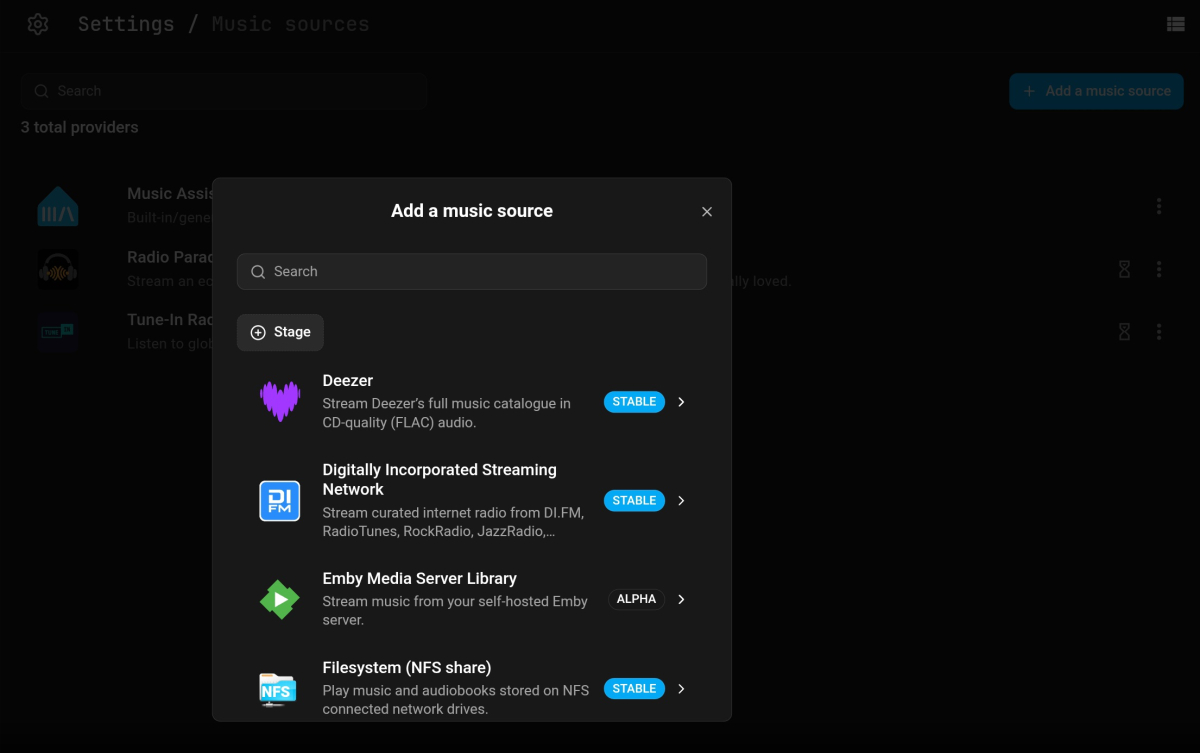 1 point
 -
Nice one guys!1 point
-
Adding another voice to complete the start time offset. The native playback is what works most reliably on my nvidia shield tv pro.1 point
-
In the app settings Display section look for the option for how to display seasons of TV shows: Paul
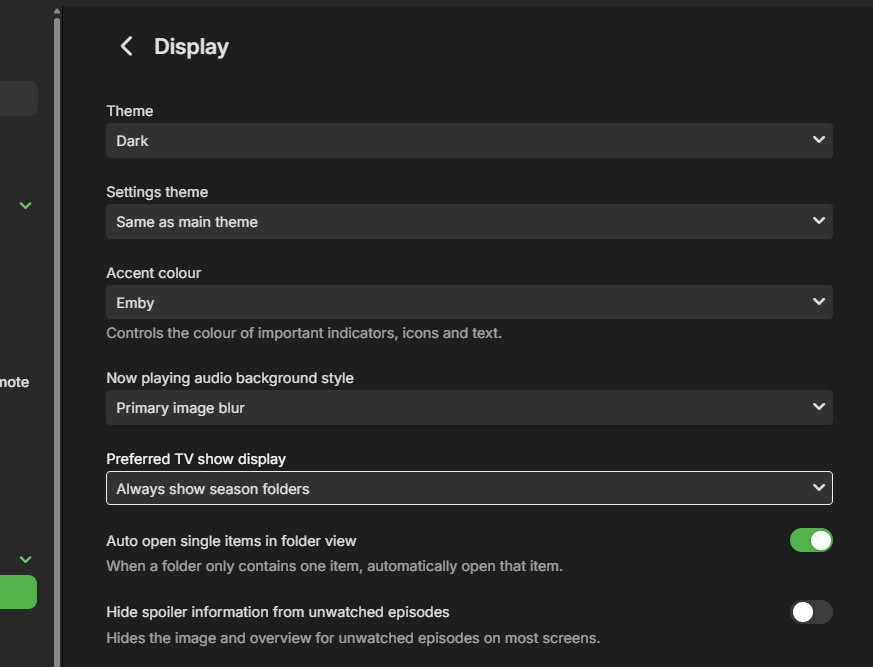 1 point
 -
We recently built music assistant support and submitted it to them, so I would think it should show up there soon.1 point
-
I think there was more than one issue with both server and client side issues. This is why it has taken a few goes to fully resolve, and for some the server fix is enough and others need the client fix1 point
-
It's the client code running on the TV that needs to be updated. Not the server code.1 point
-
Thanks for the update @SamES It's understandable that some people on this thread are grumpy about the time taken to resolve this issue, especially if they are heavily dependent on the subtitles, but I wanted to express my thanks because at least our LG TVs continue to be supported. I am confident the new client release will fix the issue, and if not, there will be plenty of people who will be happy to pile on1 point
-
It takes time to get the release through LG, I have tested it and it should be fine in the next client update.1 point
-
Oh really? They have been saying for 5 months, almost 6, that in the next version of the server, they will release a new one and they continue saying that in the next one. Honestly I feel cheated.1 point
-
Sorry, I forgot to follow up on this one... Some information for everyone, and @Luke... I did try a different cable and it still happened. I forgot to follow up because I had to replace an Apple TV, and once I did that, the issue stopped for me. It hasn't happened on the new ATV since. I did have an original Apple TV 4k, and replaced it with the 3rd Generation found here. https://theapplewiki.com/wiki/List_of_Apple_TVs It still happens on the other initial release Apple TV 4k's I have, but not on the newest 3rd Generation. Hope that helps...1 point
-
Im - however - still waiting...1 point
-
Thanks for taking the time to write all this, but it wouldn't work for me, I would have to have duplicated videos and double the size it all takes on disk, and double the libraries also. 90% of my files have en/fr in them. Some users can only understand french, some prefer french, some prefer english/original. My current dilemma comes from a recent download. I have the bluerays for Battlestar Galactica and the show has been in my library for some years. Some episodes are the extended version, like 5 episodes total, out of 4 seasons. English-only (1 audio track). Now I got the regular version with both english and french tracks. I replaced all the files I could with those (same length), but the 5 extended episodes in english I want to keep, so I removed the english track from the new files, and now I have 2 files, one extended english and one regular-length french, giving 2 versions I can only custom-name with no automation regarding language. So there's really no way I could smartly do what I want, only Emby devs can I think.1 point
-
Hi, we are working on it. Thanks.1 point
-
UPDATE — added VP9 and AV1 hardware decoders. Especially relevant for anyone on an M3 or M4 Mac, since those chips have hardware AV1 decode that the previous version of this plugin didn't expose. What's new in this version: VideoToolbox VP9 decoder with -hwaccel videotoolbox (works on all Apple silicon) VideoToolbox AV1 decoder with -hwaccel videotoolbox (M3 and later) The HEVC encoder and the H.264/H.265 decoders from the previous post are unchanged. The plugin remains a single drop-in DLL — no changes to install instructions; just replace EmbyHwAddon.dll in your <config>/plugins/ folder, restart, and tick the new entries in Server > Transcoding > Advanced. Notes for AV1: AV1 is registered unconditionally. On an M1 or M2 the entry will appear in the codec list but VideoToolbox does not have hardware AV1 decode there, so it will simply fall back to software for AV1 inputs. If that bothers you, leave the AV1 box unchecked. On M3+, you should see "Decoder VideoToolbox AV1 (Decoder)" in your ffmpeg-transcode-*.txt logs and -c:v:0 av1 -hwaccel:v:0 videotoolbox in the actual ffmpeg command. EmbyHwAddon.dll EmbyHwAddon.csproj HevcVideoToolbox.cs1 point
-
Hi! I have something practical for fellow Premiere subscribers on Apple Silicon while we wait for the official build. First — for anyone wondering whether Emby is actually working on this: **yes, they are, and there's strong evidence inside the binary itself.** While building the plugin I had to look at the existing VideoToolbox classes in `Emby.Server.MediaEncoding.dll` and `Emby.Ffmpeg.Lib.dll`, and what I found was that almost the entire HEVC VideoToolbox infrastructure is already in place in the shipped DLLs: A complete `hevc_videotoolbox` ffmpeg encoder wrapper class (with profile/option definitions for `main`, `main10`, `allow_sw`, `realtime`, `prio_speed`, etc.) lives in `Emby.Ffmpeg.Lib.dll`. A `VideoToolboxDeviceInfo` codec device-info type, profile/level lists, and the relevant base classes (`VideoEncoderHevcBase`, `VideoDecoderH264Base`, `VideoDecoderHevcBase`) are all present in `Emby.Server.MediaEncoding.dll`. The H.264 VideoToolbox encoder is fully implemented and registered (Premiere-gated) — it just lacks an HEVC sibling, and there are no VT decoders registered. In other words, the team has clearly built ~90% of the HEVC VT encoder and the decoder hookups already; they just aren't wired into the `ICodecProvider` graph yet. This is also consistent with Luke from the Emby team confirming on the M3/M4 thread (April 2025) that the work is in active development. So this post isn't a workaround for something forgotten; it's a stop-gap until the first-party implementation ships, and it's deliberately written to plug into the *existing* Emby classes so a future official build replaces it cleanly. @PowerCC's architectural notes earlier in this thread also turned out to be exactly right — I hit every one of them. Filter graph limitations and HDR tone-mapping forcing CPU paths are real and unavoidable from a plugin alone. But the basic codec gaps are addressable purely through Emby's standard `ICodecProvider` plugin API, without modifying any Emby DLLs. What I built A single 11 KB plugin DLL that registers the VideoToolbox codecs the official osx-arm64 build doesn't: VideoToolbox **H.265 (HEVC) encoder** — `hevc_videotoolbox` VideoToolbox **H.264 decoder** with `-hwaccel videotoolbox` VideoToolbox **H.265 decoder** with `-hwaccel videotoolbox` The plugin **does not patch any Emby DLLs**, **does not modify the EmbyServer.app bundle**, and **does not bypass any license checks** — it's purely additive, using only public Emby API surfaces (`ICodecProvider`, `VideoEncoderHevcBase`, `VideoDecoderH264Base`, `VideoDecoderHevcBase`). It's intended for Emby Premiere subscribers running 4.10.x on Apple Silicon. The H.264 VT encoder is still gated by Premiere in the official build, and this plugin doesn't change that gate — it just adds the codecs that aren't registered at all (HEVC encoder, decoders). Results — Mac mini M4, Emby 4.10.0.10 Beta 1080p H.264 → 720p HEVC at 3.6 Mbps: **153 fps, ~25% of one core** Three concurrent 1080p VC1 → 1080p HEVC transcodes: **~70% total of one core** `VTEncoderXPCService` and `VTDecoderXPCService` daemons spawned — confirmed real GPU offload via Activity Monitor HEVC encoder selects `-profile:v main`/`main10` based on bit depth, sets `-allow_sw 0` to prevent silent SW fallback Limitations (architectural, can't fix from a plugin) **HDR → SDR transcoding stays on CPU.** The bundled ffmpeg has no `scale_vt` / `tonemap_videotoolbox` filters, so any 4K HDR → 1080p SDR pipeline forces a per-frame GPU↔CPU roundtrip plus software downscale + tone map. Verified via `ffmpeg -filters` — only software `scale`/`tonemap` are compiled in. SDR→SDR transcodes that don't change format dimensions stay fully GPU. **VC1 decode stays software** — Apple silicon has no hardware VC1 decoder. **No HW icon for partial-HW transcodes.** Emby's UI flags HW only when decode + encode + filter graph all stay GPU; software filters (subtitle burn, scale, tone map) correctly result in no badge. **AV1 decode not registered** even though M3+ supports it (could be added; I haven't tested). Install The DLL and the C# source file are both attached to this post — either grab the prebuilt or build from the source yourself. 1. Download `EmbyHwAddon.dll` (attached). 2. Copy it to your Emby plugins directory: `<config>/plugins/` 3. Restart Emby Server (quit from tray, relaunch). 4. Server → Transcoding → set **Hardware acceleration when available** to **Advanced** → tick the new **VideoToolbox H.264 (Decoder)**, **VideoToolbox H.265 (Decoder)**, and **VideoToolbox H.265** boxes. Save. Verification After playing a transcode, your latest `ffmpeg-transcode-*.txt` log should show: >>>>>> Selected Codecs Decoder VideoToolbox H.265 (Decoder) Encoder VideoToolbox H.265 And the actual ffmpeg command line should include: -c:v hevc -hwaccel:v videotoolbox ... -c:v hevc_videotoolbox -profile:v main10 -allow_sw 0 Build from source The plugin is a single 224-line C# file (`HevcVideoToolbox.cs`, also attached to this post). You don't have to trust the binary — build it yourself with .NET 6 SDK. Steps: mkdir lib # copy these DLLs from your EmbyServer.app/Contents/MacOS/ into lib/ cp /Applications/EmbyServer.app/Contents/MacOS/{Emby.Server.MediaEncoding,Emby.Ffmpeg,Emby.Ffmpeg.Lib,Emby.Ffmpeg.Base,Emby.Media.Model,MediaBrowser.Model,MediaBrowser.Controller,MediaBrowser.Common,Emby.Web.GenericEdit}.dll lib/ dotnet build EmbyHwAddon -c Release # Output: EmbyHwAddon/bin/Release/net6.0/EmbyHwAddon.dll A note for the Emby team If anyone on the Emby side wants to use the registration shape from this plugin as a reference for the official implementation, please do — that's the easiest path to "this becomes obsolete because Emby ships it natively," which is the goal. Happy to discuss in this thread. Hopefully this is useful to other Premiere subscribers waiting on the official build. License: MIT. EmbyHwAddon.dll EmbyHwAddon.csproj HevcVideoToolbox.cs1 point
-
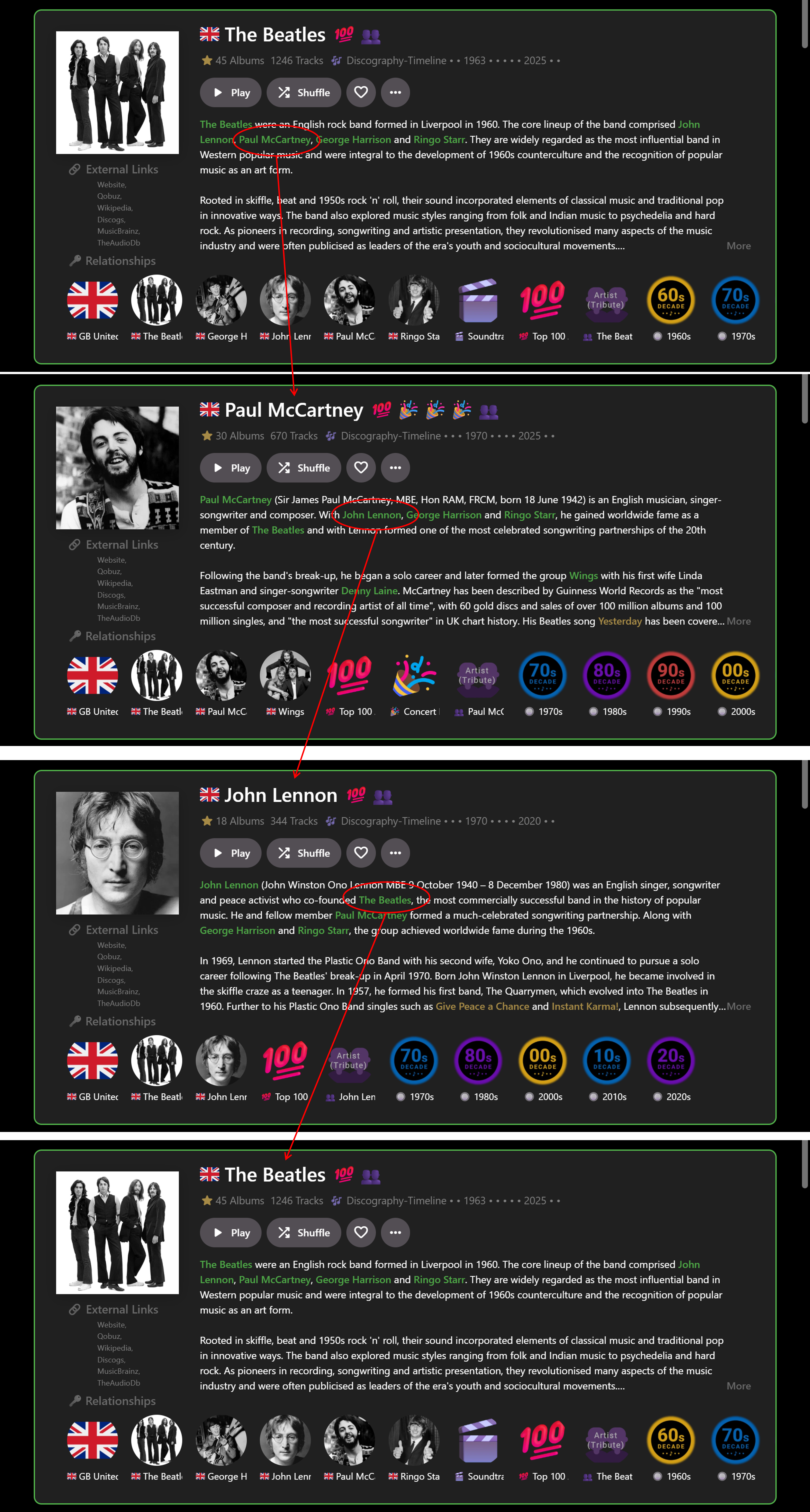
… I’ve recently been experimenting with this a bit more and figured out a way to get it partially working on a limited basis for the web app in Chrome, for my own use: With custom HTML/CSS added within Emby: Use HTML to tag the required entities in the Overview you want to link to (e.g.) <b>Artist</b> (as per my previous post). Use CSS to color highlight the entities (as per my previous post). With custom JavaScript, run from a browser extension: Find the <b>Artist</b> tags. Use a look-up table to map the Artist names to their Artist ID numbers. Create internal links from the Artist ID numbers. All of the above is relatively straightforward BUT the tricky part is that Emby web client is a Single Page Application using Document Object Module processes (I think this is the correct technical terminology). Therefore ‘back’ navigation can easily break the links, so auto page refreshes are needed to rerun the Javascript and restore the links. It really needs a plugin – but that is way beyond what I can figure out myself! Anyway, even with my limited experimenting the result, so far, is a GAME-CHANGER for me. No longer is Emby constrained by (mostly) tree-like branch structure browsing e.g. Genre>Artist>Album>Song>Back>Back>Back. Now I have a Roon-like user experience for music e.g. Artist>Artist>Artist>Artist… in whatever order reading the Overviews takes me. E.g.: When I find more time, I may extend this from just Artists to Albums and Songs? I don't want to post any code that isn't robust and I also don't want to give any detail tips that may help anyone implement dangerous linking. But perhaps the idea has merit for future good features. For a wider proper implementation by Emby it may mean looking at all the Overviews and matching text strings to IDs across the whole range of options. I guess this would be a large task to implement across all the apps…??? Cheers!
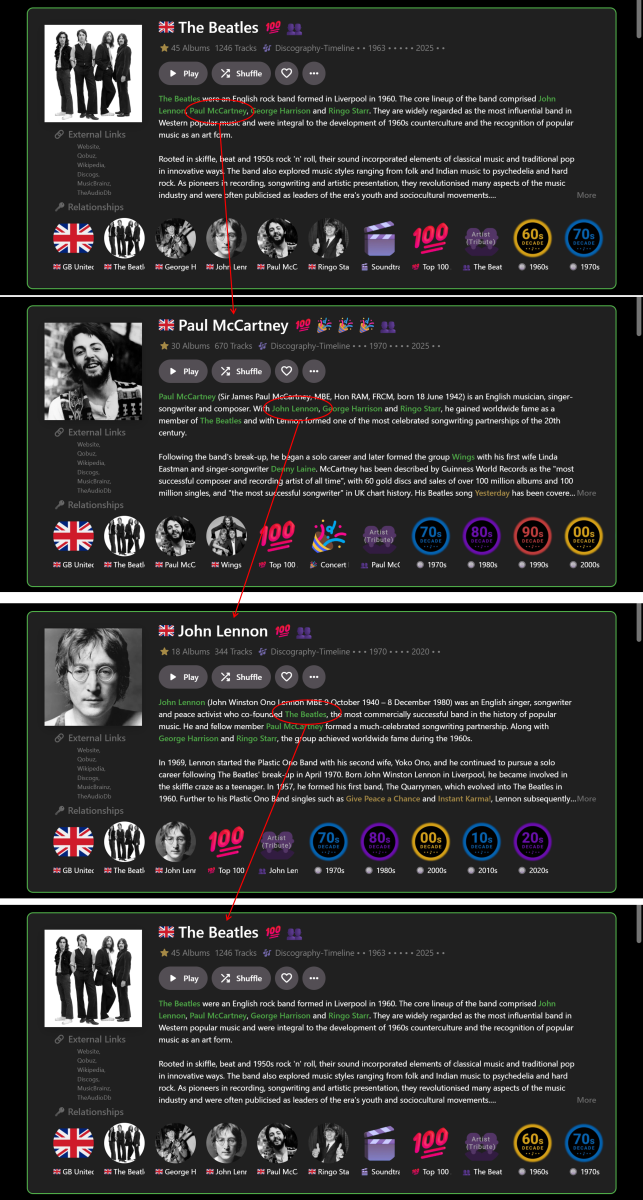 1 point
 -
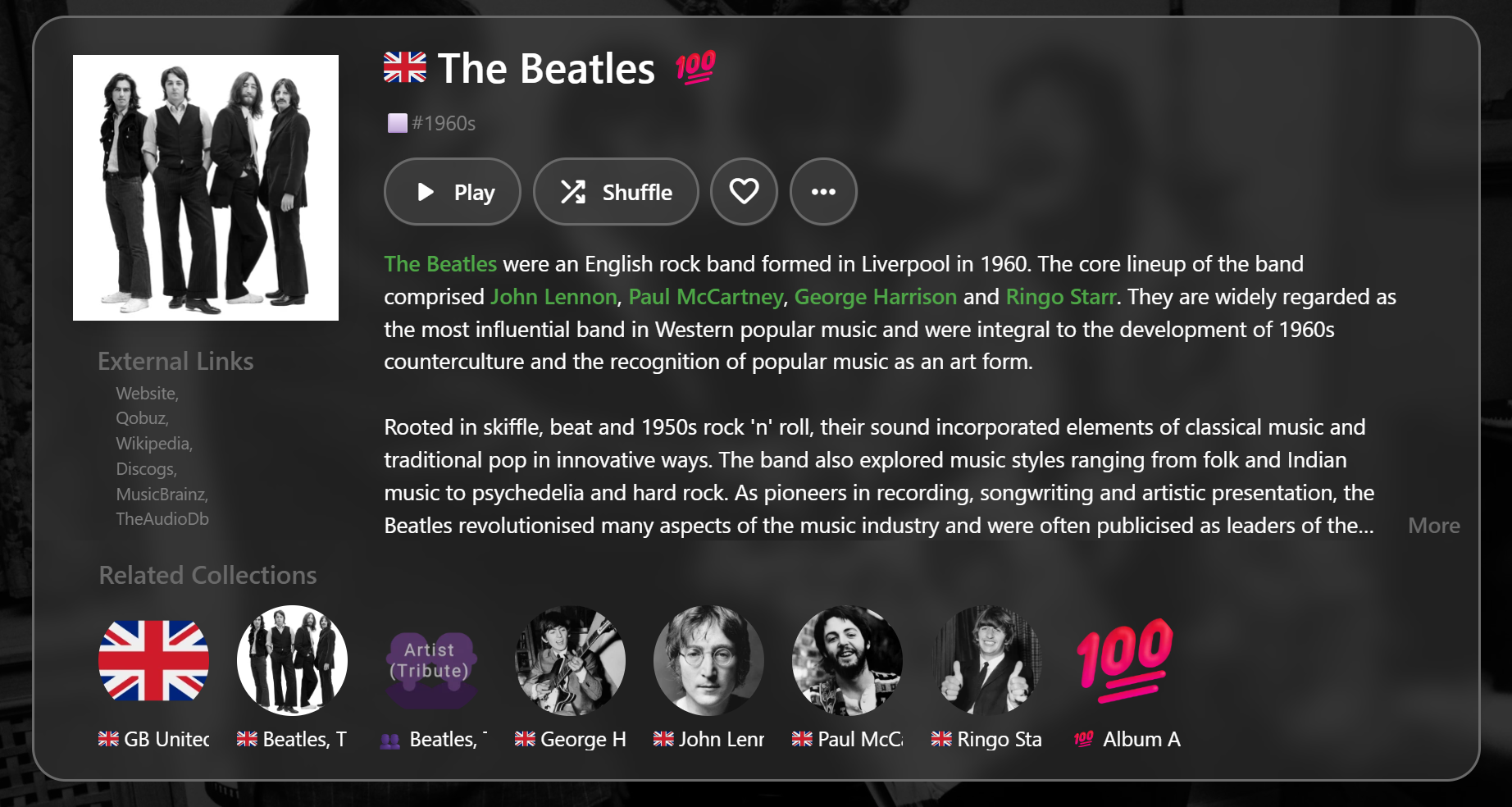
Yeah, this is an excellent idea and would make the Overview section very Roon-like and extremely useful, even if the links had to manually added somehow. I think Roon can be individually customized with both internal and external links - but at least having internal links in Emby would be great! I thought I posted something on this a while back, but couldn't find it, so will mention it here... The Overview section (unofficially???) can be formatted with basic HTML (e.g. bold, italic) but it may or may not appear correctly, depending on which client app is being used. Then, with the web app, it's possible with CSS to automatically color-code the HTML to highlight selected Artists, Albums, Songs, etc. It's not as good as having a link though - just something I was experimenting with: This makes it very easy to highlight what you want, but then you just end up clicking/tapping the links that are not actually there!!!
 1 point
 -
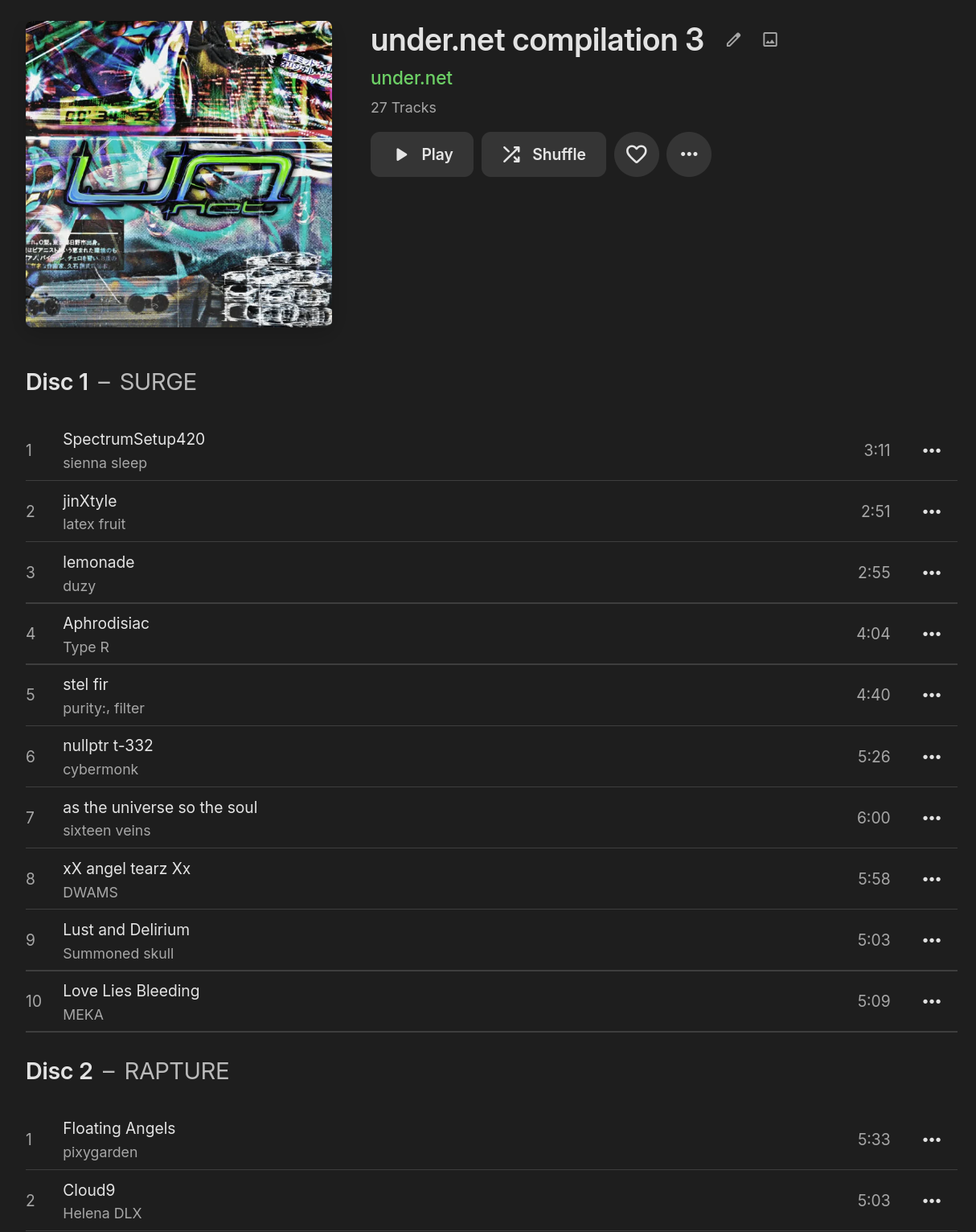
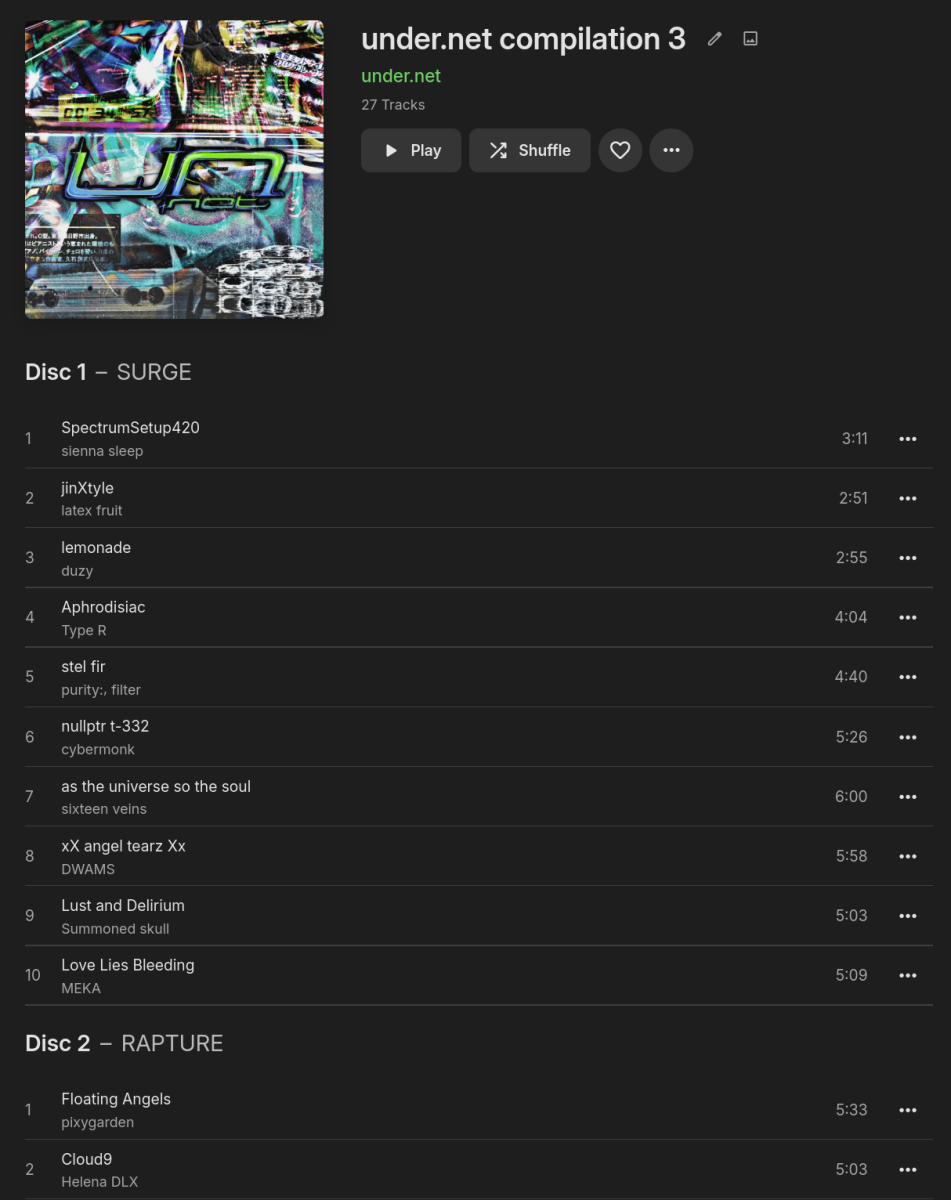
The ID3 specification includes a frame called TSST (Set subtitle), defined as TSST The 'Set subtitle' frame is intended for the subtitle of the part of a set this track belongs to. right below the frame used for disc number, TPOS (Part of a set): TPOS The 'Part of a set' frame is a numeric string that describes which part of a set the audio came from. This frame is used if the source described in the "TALB" frame is divided into several mediums, e.g. a double CD. The value MAY be extended with a "/" character and a numeric string containing the total number of parts in the set. E.g. "1/2". Other tag formats seem so have this kind of field to, quoting https://www.blisshq.com/music-library-management-blog/2018/03/27/lamentable-state-disc-title-support/ I'd propose displaying the disc (sub)titles (in this example: "SURGE", "RAPTURE" and "SHIMMER") something like this: My example is definitely not the most "real-world" one (I added the tags myself as the original album, as downloaded from Bandcamp, consists of multiple albums, each representing a disc), but there's definitely more use cases, as seen in this screenshot of the implementation in Navidrome: https://github.com/navidrome/navidrome/issues/272#issuecomment-627497195
 1 point
 -
Would definitely be nice to have a "clear alerts" link in the upper right of the alerts box.1 point