Leaderboard




Popular Content
Showing content with the highest reputation on 05/31/26 in all areas
-
New patch release - Version 4.1.2.0 Download .dll and full release notes: https://github.com/soderlund91/HomeScreenCompanion/releases/tag/v4.1.2.0 Bugfix and updates release IMPORTANT! Minimum required Emby server v4.10.0.12 Release notes Updates AI-source: Added support for Claude AI-source: Added ability to select model used for all providers (prefilled with current working models). This allows the user to update the model if the current one becomes obsolete, or if the user wants a specific one. UI: UI overhaul of the top-list page to better follow the main theme, and also to clarify/simplify creation and managing of top-lists. UI: General cosmetical updates Fixes: Top-list: Fixed an issue where all users where given access to the top-list library. Now only selected users get library access. HomeScreenCompanion.dll2 points
-
Hi. That's because no one in development or testing is able to reproduce it and only a very few users have reported this happening. So, whatever it is, is very specific to some sort of environment. Unfortunately, we cannot fix what we cannot find - but we'll keep trying.2 points
-
2 points
-
I have recently begun importing my digital comics into Emby just to have all my digital stuff at the same place. Is there a possibility to create a library option named Comics (no ebooks) and have a Comicvine scraper to get the comic metadata directly from Emby instead of having to go through a long process of getting this all done?1 point
-
Hi, we will have a new ffmpeg build on the server beta channel in the near future, so stay tuned for that.1 point
-
Hi agree upper left would be perfect. If your multi selecting does it matter? You can see its a multiple version file before selecting.. Plus when your using emby normally it would be so much better.. please please please haha1 point
-
They are separated in the UI now so it should be more obvious.1 point
-
Hi all, I think I found a navigation bug in the Apple TV client related to autoplay. It’s most noticeable when you fall asleep with Emby running. You wake up, autoplay has gone through several episodes, and now pressing Back makes you step through every single one before you get back to the home screen. Autoplay wasn’t something I chose to navigate to so it shouldn’t be stacking onto the back history the same way a tap would. I haven’t been able to reproduce it on demand but I’ll record it next chance I get. Expected behaviour: wake up, press Back once, land back in the season/series/continue watching context you started from, press Back again and you’re at the Emby home screen. This leads to my other bit of feedback around navigation friction more generally. Jumping to earlier episodes or switching seasons when you need to reorient yourself after falling asleep is harder than it should be, and other clients seem to handle it better. If the Continue Watching screen could work more like a persistent season context, current episode selected (as it does now), previous episodes scrollable to the left, upcoming to the right, and a quick season dropdown, that would make “More…”, “Go To Season”, and “Go To Series” mostly unnecessary for the common cases. The best view you have right now for this is actually the Series screen. It has the current episode, watch history, and season navigation all in one place, it’s just buried in a menu if you enter via Continue Watching, and its never loaded into the back history, I'm always taken back to Continue Watching, which hides previous episodes, seasons, series behind added steps. The hierarchy is the problem. A unified series/season/episode/continue watching screen would be incredible and you’re already 90% of the way there with what exists in the season view. This is how most clients seem to handle this, every episode, season is a tap away rather than an extra menu, then tap. To give a better example, I was binge watching the Top Gear specials last night which are scattered across seasons. The amount of Continue Watching, Go To Series, Season 4, Find The episode, Back, Go To Series, Season 5 back and forth was the definition of UI friction. Really appreciate all the hard work that goes into Emby, just trying to bring up a few pain points I find while using the app. I could be completely alone here and people may like the hidden history and buried navigation, but just thought I bring it up. Thank you, Garrett1 point
-
HI, yes we plan to support this option in future updates to the Emby Apple TV app. Thanks.1 point
-
Yes, just the genre/tag name is enough; there's no need for an image, at least not for me. For now, I'll suggest creating a single image, creating a script here on Linux to replace all genre and tag images with the same one, since that feature doesn't exist yet.1 point
-
What does topic title have to do with your question? And the answer is yes, any device using Premiere feature counts against device limit. Emby Premiere Feature Matrix1 point
-
Ahh, thanks for checking in, Luke Honestly..... I have given up! Now, don't think I have given up on Emby, I can't see that happening any time soon if ever at all. I have given up on Windows. Why? Well because when I started all this I was way more ignorant than I am today. I know, hard to believe but it's true. Forgive this wall of text. Since 2014 when I started using "Media Browser" as a standalone app, I had 2 HDDs in my Windows 7 PC. Since then I have just been adding more HDDs (not raided) and upgrading Windows until I reached the 12 HDD Windows 11 microslop mess I am in today. This has to be the reasons behind my "dual copies" of my on board GPU. You might remember (thought doubt you do as you see thousands of posts a year) that I have had the dual iGPU issue for years. So what did I end up trying? 1. Moved the RTX 5090 to new server box on an ASUS Z790 Prime V-AX with a 14900K, 96GB DDR5 6400 and a Samsung 9100 2. Put the Arc A750 back into the Window 11 messy "server" 3. Took my old Z170 with a 7700K and 16GB of DDR4, Supermicro 16-Port 12Gb/s SAS HBA and a 5Gbps NIC into a new Jonsbo N5 running Unraid 4. [In process] moving one drive at a time over to the NAS. Estimated 5-6 more days of copying (This allows me to keep 90% of my Emby media accessible at any given time) 5. [Up next] Backup/export as much of the Emby data that I can. 6. [After that] Wipe the 12900K/64GB DDR5 Windows 11, install my dockers back and then import my Emby data This should fix any all issues and make everything just "better" in every sense/ The only "unknown" at this point is what I can export during step 5 Sorry for the info dump but again, thanks for checking in1 point
-
I tested a bit and so far it seems better on the beta client, still testing it though1 point
-
Hi Thanks. Yes this is the answer should have thought about it straight away. Thanks for the reply John1 point
-
Hello @Luke I'd like to hear from you regarding the 4 points I mentioned. The way I see it, the A-Z search and a clock should be basic functions not needing a feature request. Regarding the chapter selection and a dedicated button for the next episode, those already exist in the android TV app. I could open a feature request for these, if necessary. What do you think of these? Please let me know.1 point
-
Guys i am no longer getting these major buffering problems. My windows search is still off. I am still getting these minor pauses when playing videos, even old top gear episodes which are SD. The screen sometimes pause for a split second up to a few seconds. There is no spinning circle when this happens. I recorded this happening this morning at 1am, it happens 57 seconds into the video. No virus scans and all my pc resources are low, cpu temp low too. I have attached the log too and the film is Platoon. Like i said its doing it with SD content too with a stereo track. This is using the Samsung app, my pc is connected using network cables. 20260531_010122.mp41 point
-
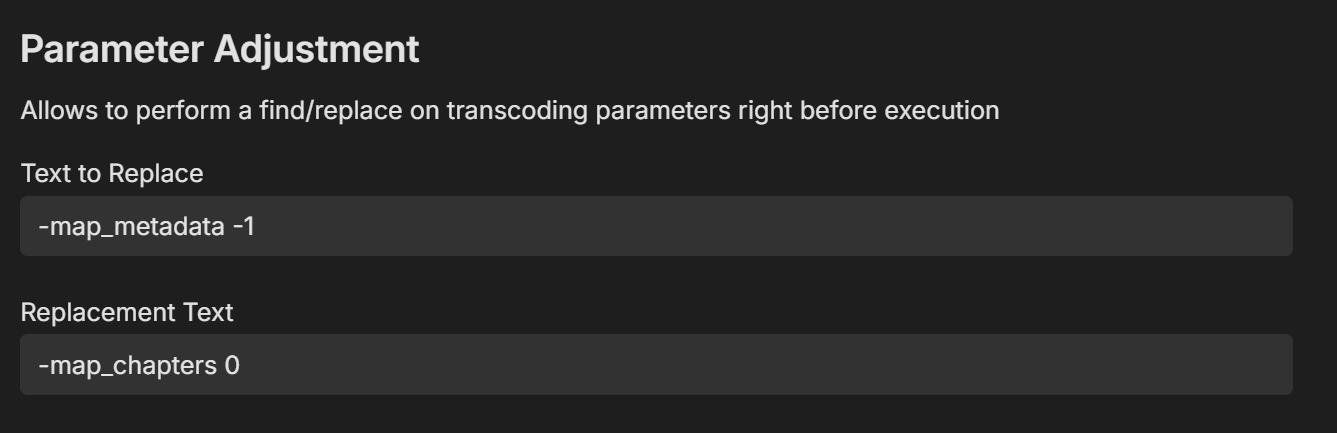
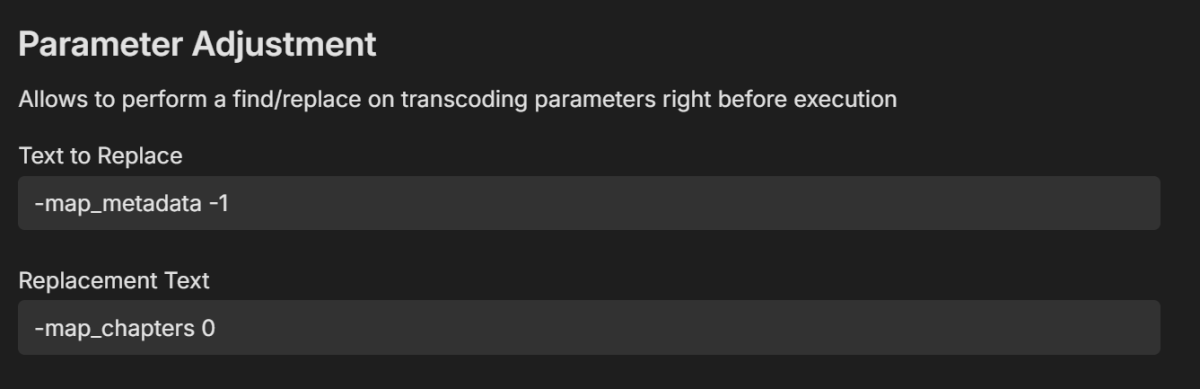
Try and install the diagnostic plugin from the catalog and add this: -map_metadata -1 -map_chapters 0
 1 point
 -
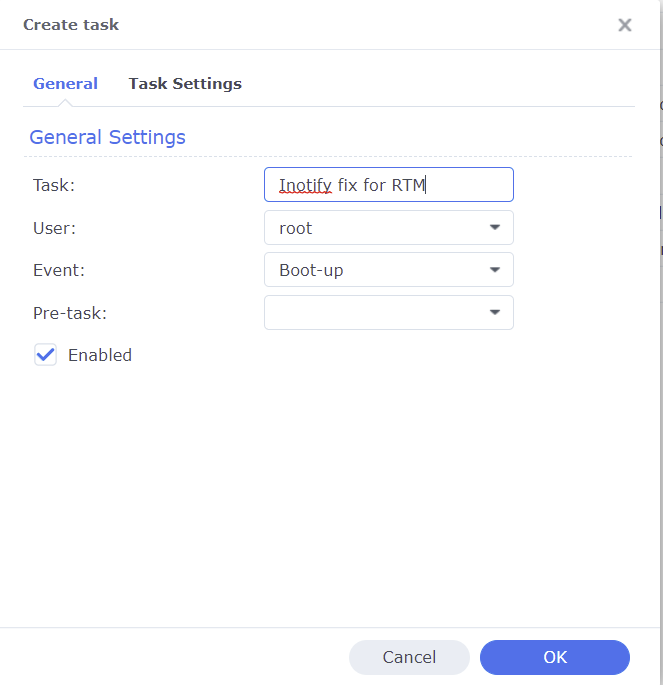
I was referring to what you input on the task settings tab. That's the General tab in the pick. However, if you are no longer getting inotify errors in the Emby server log then the script is working. Correct, as mentioned this only affects RTM. Has nothing to do with movie playback.1 point
-
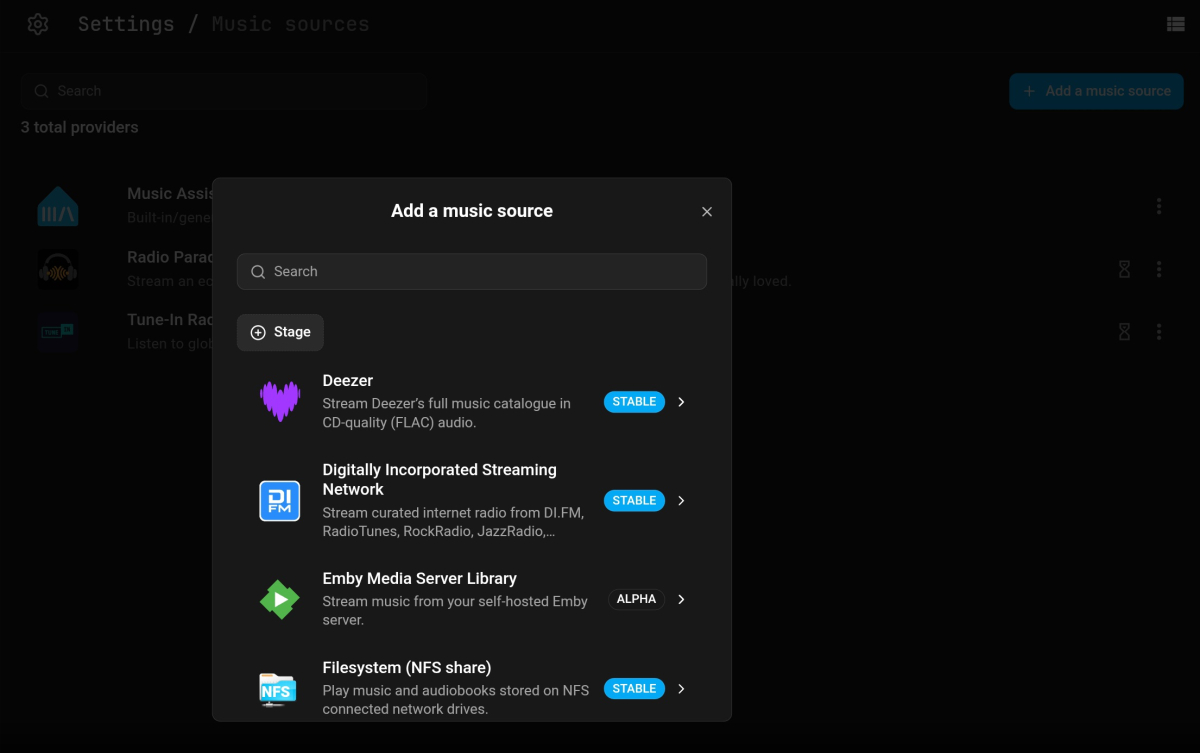
Looks like you might be running an old version of Music Assistant.
 1 point
 -
Whilst I agree with what you write, Emby is not without frustration: Changes in GA releases not documented in release notes release notes not available for weeks Bugs like composers appearing in Artist lists where artists should appear Mistakes on GA release like current LG App where basics like home screen doesn't scroll horizontal properly on webos24 (B4) and vertical scrolling issue with Music Video library on webos25 (G5) (both TV mode in Emby) The long drawn development of Apple TV client that is still in Beta after years Changes to folder structures and ignore files etc not documented in release notes Changes to size of cover art or aspect ratio changed (i.e. no longer resized to fit) not documented in release notes Bugs in XML parser that originally couldn't handle dates properly Network detection speed for REMOTE does not work properly and you have to set a static value to get streaming to direct play properly without transcoding Live TV - slow, still doesn't like some UK MPEG2 DVB-T channels (tested on clean install even). These were just some off the top of my head over past few years, so Emby is very not frustration free. You have it working and a release comes along and that's the end of that, at the moment this is the biggest issue especially with LG app right now, bug since January and still not resolved.1 point
-
Oh i see what you mean now...I don't think it is possible. I don t think a collection metadata has a production year and premiere date. So the plugin cant apply the badge on the collection set poster. I will see if it is possible to apply a badge if one of the content contains New movie badge.1 point
-
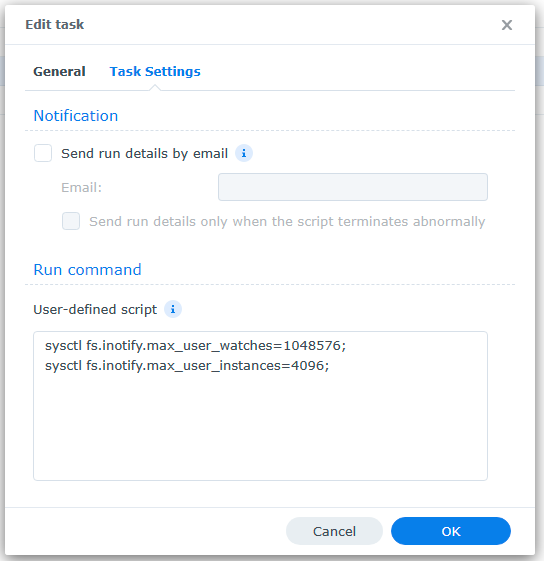
Could you post what the task settings are? Are you still getting inotify errors in your log? Were you logged on as an admin when doing the cat statements? You wouldn't be getting inotify errors if it didn't exist The instructions work so I'm trying to figure out what went wrong. BTW the inotify errors really only affect RTM. It isn't going to fix playback of movies.1 point
-
Hi, I also have Expedition and it will be great to have native app for Android Automotive. Regards.1 point
-
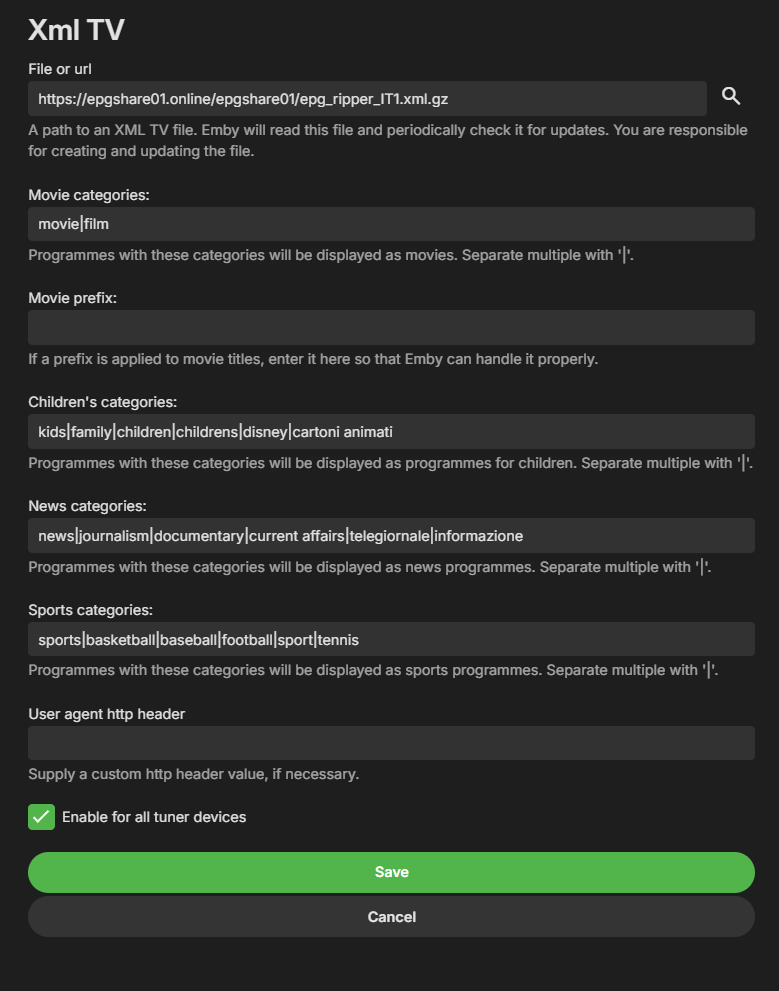
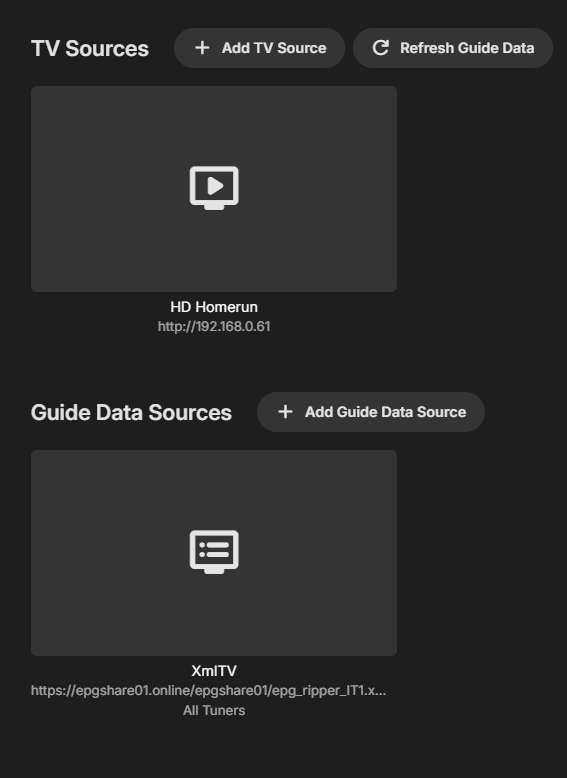
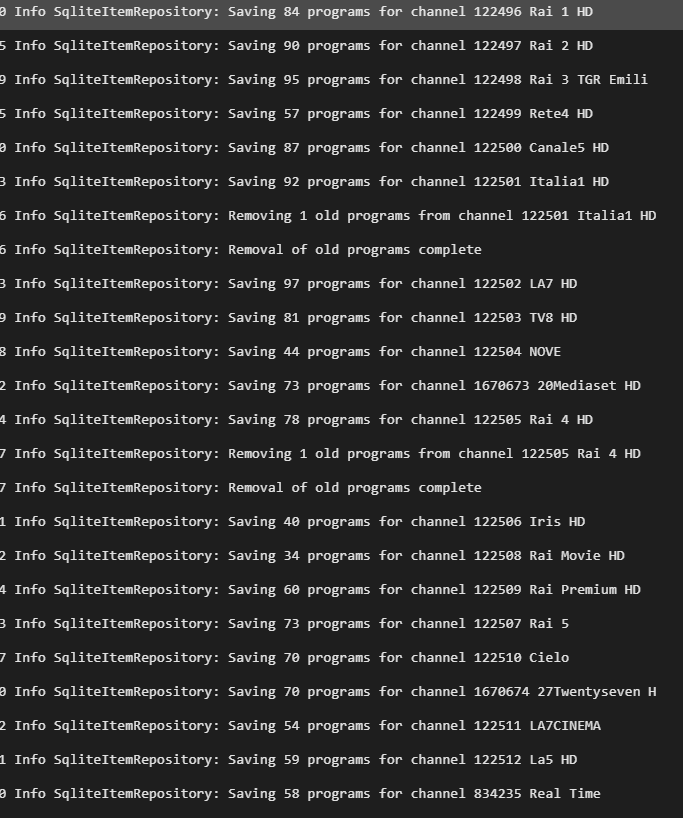
Ciao, sinceramente non credo ci siano passaggi particolari, io ho semplicemente inserito queste impostazioni. Prova a controllare che sia impostato così poi premi il tasto Refresh Guide data e controlla il file log embyserver, dovresti vedere una lunga serie di righe relative ai canali trovati etc etc
 1 point
 -
Update, i did find it within admin and it was enabled. I disabled it. Thank you for your help.1 point
-
@zhianjo I see this error in your logs. System.IO.IOException: System.IO.IOException: The configured user limit (8192) on the number of inotify watches has been reached, or the operating system failed to allocate a required resource. This should help you with your error.1 point
-
Hi, what exactly happens when you try?1 point
-
Adding another voice to complete the start time offset. The native playback is what works most reliably on my nvidia shield tv pro.1 point
-
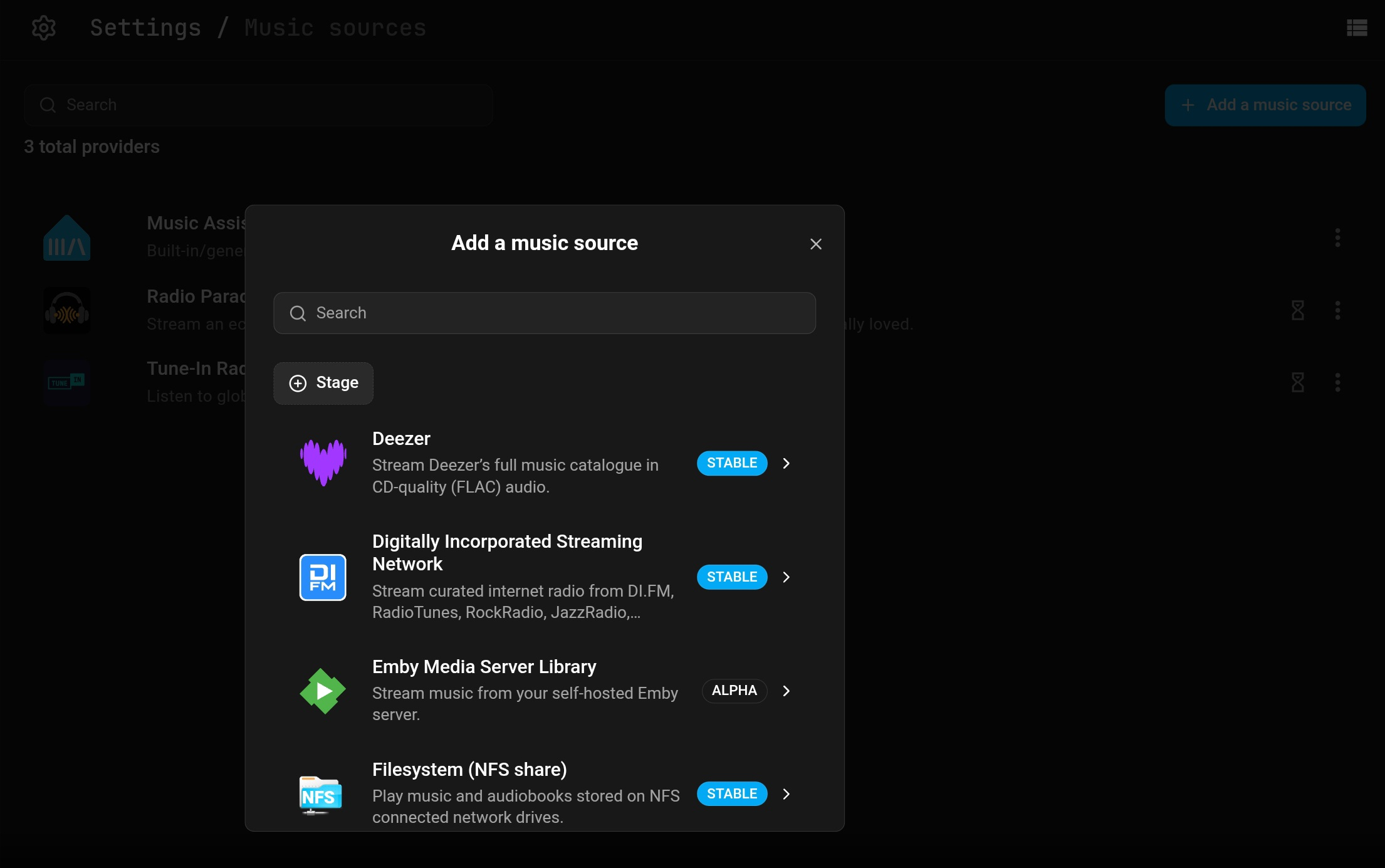
We recently built music assistant support and submitted it to them, so I would think it should show up there soon.1 point
-
Phenomenally well. I have been using the Android TV app on a Bravia KD55x85K for a couple years and it works very well. The added bonus is you can manage your server from the TV. I use Roku, browser and Android TV with Emby and by far prefer the android TV app.1 point
-
I just started /w a clean install. A nightmare the amount of work but the backup was no better than the previous issue. Thus, backups appear to be of no value.1 point
-
I don't want to merge the files. If I want to watch a movie or episode like that, I will use the normal app.1 point
-
Of course it's going to be half baked when you have 1400+ contributors..It's a case of too many cooks spoils the broth. Luke alone has 13424 commits in their git, which is almost 50% of all commits. They are still riding on his coat tails almost a decade later.1 point
-
i would like to ask you guys if there is a chance to do in new update possibility to force pdf, cbr, cbz files to display first page as a cover. this would be such a great feature. any chances?1 point
-
I doubt it. They way its being built is like having a classroom full of kids make a clay sculpture. No one has a plan for what the end product will look like, and it ends up a misshapen lump. It is being directed but at some point it begins to be pulled in too many directions. As it is it uses a ton of system resources vs. Emby. That will not likely change for the good, but instead will continue to become more and more bloated and require more computing power to run.1 point
-
Yeah I never managed to fix it so I'm just slowly rebuilding meta data for hundreds and hundreds of file as my own pace. It's annoying, but restoring from backup didn't fix it so...1 point
-
Hi, the USB build has been updated. Thanks.1 point
-
@Smitty018210I have noticed that if it is not an HEVC x265, just a good ol' x264 or .avi it rarely has this problem. I think it has to do with the way the browsers handle the codecs since disabling Transcoding doesn't help.1 point
-
Here's a reminder.1 point
-
@LukeSorry, it turned out to be a Windows side bug. After the Windows update, everything is working fine, so I'm closing the issue.1 point
-
I thought that at first, but all my e-books are in EPUB format. Some of them will "play" and some won't (?!?). The same with my articles: All are in PDF format, and some "play" and some won't. I just don't understand why some get the play icon & some don't when they are all in the same format. I purposely chose EPUB & PDF because they are mostly universally accessible formats. I agree that E-books in Emby need more work, and would very much appreciate it if the Emby Engineers could step up the support.1 point
-
@Luke Any update on this. I know it's not something major, but just a nagging thing I deal with every day. I would much still rather have clickable headers make there return, but I will take what I can get.1 point
-
Ok thanks, I was still on these versions but will update and report back after some usage at the versions you mention. Android: 3.5.32 Server: 4.9.3.01 point
-
Looks like the root cause was an issue at TMDB itself, but it did not affect all of their data, only some. It's slowing coming back online. API returning corrupted data instead of JSON - Talk — The Movie Database (TMDB)1 point
-
Thanks @speechlesI was able to split them into their own shows and they now show properly.1 point
-
HI, I don't have an ETA but we are working hard on it. Thanks.1 point
-
Will it be in the very next update? I don't think so, but it's definitely something that I agree we should look at.1 point
-
That is fascinating, I didn't know that was an option. I like that better than the phone mirror setup. However, that also lets the manufacturer decide what they will allow to be installed. Then there is all of the data aggregation from the automobile itself, which is creepy in the extreme. And of course the data sharing that the manufacture probably agreed to with Google. To get Emby on there, you might be able to enable developer options and allow sideloading, but it's been so long since I have used a version of android that wasn't a 3rd party ROM.1 point
-
A common reason Emby's Real Time Monitoring (RTM) stops working on Synology NAS is because the Unix set user limit on inotify instances and/or watches has been reached as a result of a large number of changes for instances to process and/or the total amount of folders, files, etc that need to be monitored by watches. When RTM stops working you may start to see errors in your server logs like the following where the default number of user watches (8192) has been reached. A similar error will show up when the default inotify instances (128) is reached. System.IO.IOException: System.IO.IOException: The configured user limit (8192) on the number of inotify watches has been reached, or the operating system failed to allocate a required resource. To increase the number of inotify instances and/or watches create the following task in DSM control panel Task Scheduler logged on with admin privileges. 1. Create a Triggered Task...User-defined script to run at Boot-up 2. Paste the following commands under the Task Settings tab sysctl fs.inotify.max_user_watches=1048576; sysctl fs.inotify.max_user_instances=4096; 3. Click Run to execute the new task (if not logged on as admin then a restart may be necessary) The task will then rerun during every boot to prevent the changes from being reverted back to default from a DSM update. To check that your changes took affect you can optionally run the following commands in Terminal cat /proc/sys/fs/inotify/max_user_instances cat /proc/sys/fs/inotify/max_user_watches If your library gets really big and the limit of user watches is again reached, then just increase the number again. The maximum number of watches allowed in Unix is 524,288 and each used watch takes about 1kb of memory on a 32-bit system (double on 64-bit). However, it will only use what is needed based on the number of items being watched.
 1 point
 -
It's a possibility for the future, thanks.1 point