Leaderboard




Popular Content
Showing content with the highest reputation on 05/18/26 in all areas
-
HI, we've pushed an update to the Emby lastfm plugin to resolve this. Thanks guys.3 points
-
Thank you @TMCsw(and everyone else). The missing extensions was the problem. I have been staring at this for a few days and cannot believe I didn't see it earlier...3 points
-
I uninstalled the extension, restarted emby, reinstalled, restarted again, and now it's working! Thanks.2 points
-
@NeverExists Just a heads up, you might want to edit those screenshots to block out your external IP address. It's a problem waiting to happen. @GrimReaperMaybe you can help him out with that in case you are faster.2 points
-
Emby Server: A new Stable version is available Changes 4.9.5.0 Fix sporadic cases of wrong subtitle encoding Fix sporadic cases of subtitles not showing Fix strm files containing youtbue urls Add additional Estonian language codes Fix realtime monitor ignoring folders with a dot in the name Add new spotlight home screen section option (requires Emby Server 4.10+)1 point
-
Thanks for the css. Will see what Luke's 'slightly larger' means first though...1 point
-
off-topic -- TL;DR Yes it is but that is because I have set to do so (5.1 → 7.1).It is receiving a PCM 5.1 stream and using DSP to enhance it. (There was a time when DSP sucked (comb filters etc.) ) I really don’t know how it works but there must somehow be a channel ID (l,r,c,sr...) embedded in each PCM channel. As I said I normally use my Fire Cube as it does pass-through.. The only time(s) I use the TCL is because it handles ATSC 3.0 c./w DRM and one of the channels broadcasts FHD with DV(HDR)1 point
-
Hi, Emby Server 4.9.5 is going out today, and yes, 4.10 will come after that.1 point
-
You can play with this CSS to further customize spotlight :root { /* --- SPOTLIGHT VARIABLES --- */ --spotlight-width: 100%; /* OVERALL WIDTH: 100% (Full screen), 95% (Small edge gap), 1200px (Max size lock) */ --spotlight-height: auto; /* OVERALL HEIGHT: auto (Uses Aspect Ratio), 50vh (Half screen), 400px (Fixed height) */ --spotlight-aspect-ratio: 21 / 9; /* SHAPE & SCALE: 16/9 (Default), 21/9 (Ultra-Wide), 3/1 (Extreme Banner), none (Disables ratio if using fixed height) */ --spotlight-fit: cover; /* CROP BEHAVIOR: cover (Fills box, no bars), contain (Uncropped, has bars), 100% (Stretches) */ --spotlight-position: center top; /* ANCHOR POINT: right top (Protects logos/faces), center top, center (Default), left top */ --spotlight-overlay: linear-gradient(to top, rgba(0, 0, 0, 0.95) 0%, rgba(0, 0, 0, 0.4) 60%, transparent 100%); /* TEXT SCRIM: Change the dark fade behind text. (Use 'transparent' to remove) */ /* --- Some example options to try out: --- */ /* --- The Cinematic Ribbon --- */ /* --spotlight-width: 100%; --spotlight-height: auto; --spotlight-aspect-ratio: 32 / 9; --spotlight-fit: cover; --spotlight-position: center 20%; --spotlight-overlay: linear-gradient(to top, rgba(0, 0, 0, 0.95) 0%, rgba(0, 0, 0, 0.4) 70%, transparent 100%); */ /* --- Extreme Letterbox --- */ /* --spotlight-width: 100%; --spotlight-height: auto; --spotlight-aspect-ratio: 4 / 1; --spotlight-fit: cover; --spotlight-position: center 25%; --spotlight-overlay: linear-gradient(to top, rgba(0, 0, 0, 0.95) 0%, transparent 90%); */ /* --- Framed Billboard --- */ /* --spotlight-width: 1400px; --spotlight-height: auto; --spotlight-aspect-ratio: 24 / 9; --spotlight-fit: cover; --spotlight-position: center 15%; --spotlight-overlay: linear-gradient(to top, rgba(0, 8, 20, 1) 0%, transparent 100%); */ /* --- Uncut Showcase --- */ /* --spotlight-width: 98%; --spotlight-height: 40vh; --spotlight-aspect-ratio: none; --spotlight-fit: contain; --spotlight-position: center; --spotlight-overlay: linear-gradient(to top, rgba(0, 0, 0, 0.85) 0%, rgba(0, 0, 0, 0.4) 40%, transparent 100%); */ /* --- Thin Letterbox Showcase --- */ /* --spotlight-width: 100%; --spotlight-height: 30vh; --spotlight-aspect-ratio: none; --spotlight-fit: contain; --spotlight-position: center; --spotlight-overlay: linear-gradient(to top, rgba(0, 0, 0, 0.95) 0%, transparent 100%); */ /* --- Extreme Slit --- */ /* --spotlight-width: 100%; --spotlight-height: auto; --spotlight-aspect-ratio: 5 / 1; --spotlight-fit: cover; --spotlight-position: center 20%; --spotlight-overlay: linear-gradient(to top, rgba(0, 0, 0, 0.9) 0%, transparent 100%); */ } html[class*="theme-"] body .spotlightCard { width: var(--spotlight-width) !important; margin: 0 auto !important; } html[class*="theme-"] body .spotlightCard .cardImageContainer { padding-bottom: 0 !important; aspect-ratio: var(--spotlight-aspect-ratio) !important; height: var(--spotlight-height) !important; background-size: var(--spotlight-fit) !important; background-position: var(--spotlight-position) !important; background-repeat: no-repeat !important; background-color: transparent !important; } html[class*="theme-"] body .spotlightCard .cardImageContainer img, html[class*="theme-"] body .spotlightCard .coveredImage { object-fit: var(--spotlight-fit) !important; object-position: var(--spotlight-position) !important; } html[class*="theme-"] .spotlightCardFooter { background: var(--spotlight-overlay) !important; display: flex !important; flex-direction: column !important; justify-content: flex-end !important; } html[class*="theme-"] div.spotlightCardText:not(.mediaInfoItems):not(.spotlightCardText-first) { text-shadow: 0px 2px 10px rgba(0, 0, 0, 0.9) !important; color: #ffffff !important; -webkit-text-fill-color: #ffffff !important; font-weight: 500 !important; }1 point
-
You got a 502. An HTTP 502 (Bad Gateway) error means an intermediary server (like a proxy, load balancer, or CDN) received an invalid response from the origin/upstream server. Your request reached the gateway, but the gateway couldn't connect to the actual website server.1 point
-
Thank you. It's not made for queuing videos atm. but i can look into adding it when the summer is over. I'm taking a summer break from the plugins and am in maintaining mode only.1 point
-
No I don't have that switched on, but it is possible that I clicked the button to manually install a preview version of Windows1 point
-
@Lukeany timeframe for this fix? thxx1 point
-
Thank you for taking t6he time to respond. And thanks for your assistance. I have moved back to windows 11 for the time being. CHEERS, John1 point
-
You know, I'll bet that's it... I didn't even notice that. Going to add the extension now, will report back here if that was successful.1 point
-
@Lukehello sir. Yes I finally got it worked out. Was a bit of a challenge but was determined to get it working, even if it meant wiping the entire PVE install and starting again from scratch. Basically what I did for starters was after removing the GPU from the Windows VM, I wiped out everything GPU and Nvidia by using purge commands in the CLI 'apt-purge -y'. Afterward verified that everything was removed by using the 'dkms status' command to ensure that everything was gone and nothing remained. This is all for the host side. Then, I went ahead and downloaded the most recent drivers from Nvidia's website (I have two Quadro cards in my system) and downloaded the correct version I needed which was 580.xx. Once that was done in the host I did the 'nvidia-smi' which then picked up both cards in the host, so that verifies the drivers were installed on the host. Now on the Emby side with the container-- I reinstalled the Emby container using the helper script as unprivileged, though I did the advanced install as I wanted to modify a few parameters, but after that the install went fine. This time the script found and was able to setup the GPU pass-through for the cards, which it wasn't able to prior. However after the install was done, another error message came up saying that the nvidia-smi failed because of a library version mismatch with the host. And with that error, the GPU will not appear in the hardware acceleration section in Emby's server configuration. So after doing a little more investigation, it was determined that the helper script installed an older version of the drivers for the container as the ones on the host were newer. So I had to download the new driver again, this time inside the Emby container but I used an option on the install command, '--no-kernel-module' which instructs the installer to only install the libraries and not the second kernel driver. After all this and rebooted the container, Emby now finally picks up both GPUs and can see them when I go to Advanced for hardware acceleration, although I just selected only one GPU as I don't need both. Quite a bit of work just to get GPU pass-through to work in an container, and had to lookup different sources to get the right info I needed, seeing as how alot of it was either outdated or was for an older version of PVE which didn't apply for what I was doing, especially when it involved certain linux commands. I can see why many would just use a Windows VM for it all but containers I have read are alot lighter in resources. All that's left now is to work on mounting and binding the media shares on my Unraid server so Emby can see those and can add them to the library.1 point
-
That would be my guess but, again, I don't know what the other app is doing so you'd have to confirm with them. The behavior is subject to change in the future if we find it is used as a way to abuse the license for illicit purposes.1 point
-
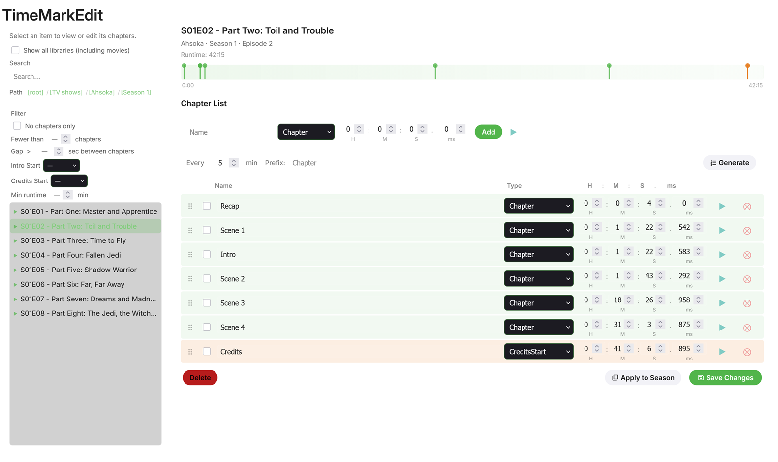
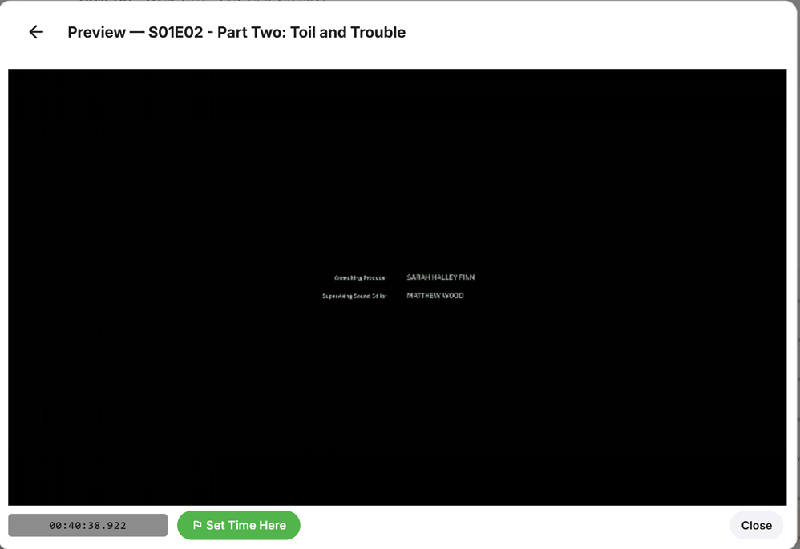
About time this plugin gets it's own page instead just being mentioned in the EmbyCredits thread. This is a plugin for editing time marks metadata in Emby heavily inspired by ChapterAPI (with permission) and with idea from @GrimReaper While similar to ChapterAPI this plugin has some extra filters, a video preview with fint tuning option and other things to help editing time marks in videos. Download at: Releases · yocksers/TimeMarkEdit Please report any bugs you may find. As always, while i have tested and use the plugin my self it is USE AT YOUR OWN RISK!
 1 point
 -
It is the windows config app, you can get it off their site under Support/Downloads. I have 2 different ones, don't recall which is which, but one is HDHomeRun Config GUI and the other is HDHomeRun Setup. Bruce1 point
-
Yeah unifiied Android TV build just needs to use the system keyboard and it will be the superior app. it's the last feature I need before I make the switch from ATV app1 point
-
Currently not. But I updated the Readme on GH to load the script with defer attribute which impoved the page loading a lot on my side. Don't know why I did not do that from the beginning Also If you do not enable a CORS proxy, the script does not fetch websites and relies solely on API requests. After Ratings are fetched, they are stored for 1 week locally. <script src="Spotlight.js" defer></script> Not possible just via CSS, for changing settings via UI a plugin would be needed, but the js file would need to be copied to web folder manually anyways since it seems all plugin solutions on Github to inject code into Emby seem not to work (anymore, at least on my side). Line 2843, change type "Backdrop" to "Banner". But then you would need set the .spotlight .banner-logo in the embedded CSS to display: none. And you need to adjust the whole container classes heights. But I'm sure you are able to do that since you're already brave enough to mess around with the code.1 point