Leaderboard




Popular Content
Showing content with the highest reputation on 05/01/26 in all areas
-
Calling out to all unRaiders. When you update to unRaid 7.2.5 you might have issues with Nvidia support in your docker containers. Read this https://forums.unraid.net/topic/198521-unraid-os-version-725-available/#findComment-1620492 to fix it. I'm still not sure if this fix will persist a shutdown or reboot of unRaid. Here is a quick how to. unRaid 7.2.5 Nvidia Bug Might needs to be done after Reboot and after shutdown. I really like my UPS right now Stop Docker Open terminal copy / paste the following lines into terminal. 1 line at a time. nvidia-ctk cdi generate --output=/etc/cdi/nvidia.yaml nvidia-ctk runtime configure --runtime=docker --cdi.enabled Start Docker2 points
-
This is a TV show but your library is configured as movies? Why?2 points
-
Local. You are right. I set up Jellyfin with the same media and I had the same problem. It seems like after two years, the TV has decided to prefer 2.4 GHz even though it seems it has trouble with it. No other networks around. I try forcing it to use 5 GHz using Usteer now and it seems to be working.2 points
-
If you are noticing no audio on Emby after updating to TVos 26.4, turning off the newly introduced feature called "Continuous Audio Connection" in the settings of the Apple TV will resolve the issue. Some people have suggested to change the preferred player from "Auto" to "Native" in the Emby App itself but this is not a solution to the issue and may cause more issues with playback. Keep your preferred player set to "Auto".1 point
-
Sorry, you’re right—I mixed up the folders “Religious Movies” and “Religious Series.” It’s been fixed now. My mistake—sorry, and thank you!1 point
-
yes, this worked for me too, thanks a lot for the workaround. my server is running on Ubuntu 22.04.5 LTS, server version 4.9.3.0.1 point
-
My test was without having a recording in progress - I will do some more tests next week with recording in progress to see if it is exactly the same behaviour1 point
-
Oh, great! Thank you very much! I really appreciate how quick you folks are to respond to and address concerns. I've rarely seen customer support this good.1 point
-
This will be fixed in 2.0.6, but for now keep continuous audio connection off.1 point
-
Okay, thought it was just the problem that happened last time the nvidia plugin updated. Thanks for the information!1 point
-
That's why I have 2.4GHz and 5GHz network separated1 point
-
If you haven't tried it yet, I'd highly recommend Wholphin for a Google TV client. It was just released last year but it's my favorite client app currently. Compared to Emby, the UI is much better and it fixes almost every issue I've had with Emby lately that the devs here refuse to address. Plus the fact that it's open source is a huge bonus for me since I was able to easily add the couple of changes I wanted myself.1 point
-
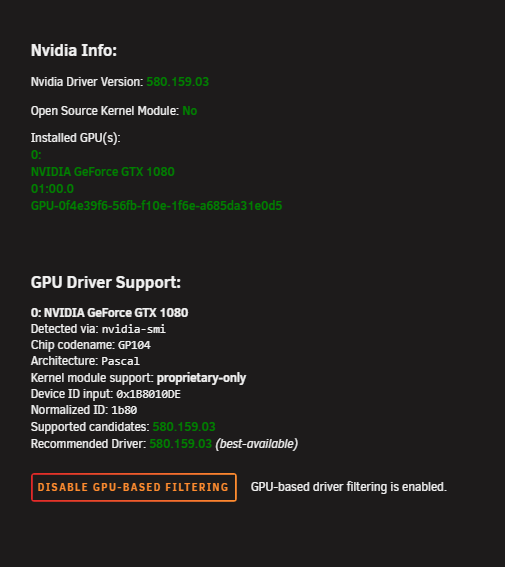
No it was not that simple. I was on the last driver version that was supportet / recommended. Hence the quick fix, was to do the following, and that would not be persistent. What the updated plugin did was to automatic do the above and persistently apply on reboot / shutdown and reapply after driver update. The funny thing is that it only afflicted docker containers, and docker was updated to 29.
 1 point
 -
Not sure I got that right: you'd rather opt for sub-optimal solution than use PayPal? I must be missing something here...1 point
-
Just to update this. It has been fixed Follow these instructions https://forums.unraid.net/topic/98978-plugin-nvidia-driver/page/232/#findComment-16205571 point
-
Yes No1 point
-
I don't know what changes I made, but it now works1 point
-
Yes that's what I mean.1 point
-
So i just saw this thread: The suggested solution did work for me.1 point
-
@LukeThanks for adding TMDb for thumbnails. By adding it, there's so much choice now! The only outstanding bug is 'Auto Next Episode' not working on the Android and Apple TV apps. There are no issues with the Emby web version. As I have already highlighted in this post, I permanently locked the 'Disable HLS Subtitles' toggle to get 'Auto Next Episode' working; it now stays active even after a reboot via a Docker custom fix Unfortunately, I know the 'upcoming' cache issue can't be fixed. It’s not an issue for me, though, because I created a custom Docker fix that works 100% in my setup.1 point
-
New beta up in the catalog version 2.5.6.1. Replaced the blackframe detection with a much faster blackframe detection method. If choosing to install please go through your settings and rules as a few settings have changed. (had to, sorry).1 point
-
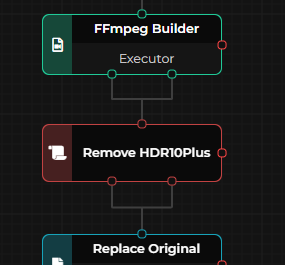
I quickly want to chime in since my son has a 4K TV now (Hisense with DV/HDR/HDR10+ support) connected to the existing FireTV Cube 2nd Gen. With the latest Emby Universal app from Amazon Store I could nail down the problem to the specific combination of DV7/HDR10+. It seems Emby app or the FireTV itself gets really fucked up by this combination due to the FEL/MEL layer in DV7 + HDR10+, since it was meant to be a UHDBD format and not in combination with concurrent Video Range Data streams in the file like HDR10+. DV8/HDR10+ works like a charm though. Got 8 Files with this DV7/HDR10+ misconstruction in my library and I use a script in Fileflows to scan new files for DV7 with ffprobe. If yes, HDR10+ presence gets checked and stripped out of the file with hdr10plus_tools and mkvmerge. So for anyone using Fileflows, here's my script since sharing is caring (you need variables for hdr10plus_tool and mkvmerge additional to the already present ffmpeg/ffprobe in Fileflows settings). If someone needs other combinations for his specific equipment, the script can be modified. Just put the script after the FFmpeg builder. /** * @description Removes HDR10+ metadata ONLY from files with Dolby Vision Profile 7 + HDR10+. DV8 + HDR10+ is left untouched. * @author sh0rty * @revision 2 * @param {string} FileName Optional full filename of the video, if not passed the current working file will be used * @output HDR10+ metadata removed (DV7 case) * @output Nothing to do (DV8, no HDR10+, no DV, or not HEVC) */ function Script(FileName) { // ---------- VideoInfo ---------- let vi = null; if(('' + FileName)) { vi = PluginMethod("VideoNodes", "GetVideoInfo", [FileName]); } else { FileName = Variables.file.FullName; vi = Variables.vi?.VideoInfo; } if(!vi || !vi.VideoStreams?.length) { Logger.WLog("No video information / no video stream"); return 2; } let vs = vi.VideoStreams[0]; let codec = (vs.Codec || '').toLowerCase(); if(!/hevc|h\.?265/.test(codec)) { Logger.ILog("Not HEVC (" + vs.Codec + ") – skipping"); return 2; } // ---------- Tools ---------- let ffmpeg = Flow.GetToolPath('ffmpeg'); let ffprobe = Flow.GetToolPath('ffprobe'); let hdr10plus_tool = Flow.GetToolPath('hdr10plus_tool'); let mkvmerge = Flow.GetToolPath('mkvmerge'); if(!ffmpeg || !ffprobe || !hdr10plus_tool || !mkvmerge) { Logger.ELog("Required tool missing (ffmpeg/ffprobe/hdr10plus_tool/mkvmerge)"); return -1; } // ---------- DV-Profil via ffprobe ---------- Logger.ILog("Probing Dolby Vision profile ..."); let pProbe = Flow.Execute({ command: ffprobe, argumentList: [ '-v', 'quiet', '-print_format', 'json', '-show_streams', '-select_streams', 'v:0', FileName ] }); if(pProbe.exitCode !== 0) { Logger.WLog("ffprobe failed: " + pProbe.output); return 2; } let dvProfile = -1; try { let data = JSON.parse(pProbe.standardOutput || pProbe.output); let streams = data.streams || []; for(let s of streams) { let sdl = s.side_data_list || []; for(let sd of sdl) { let type = (sd.side_data_type || '').toLowerCase(); if(type.indexOf('dovi') >= 0 || type.indexOf('dolby vision') >= 0) { if(sd.dv_profile !== undefined && sd.dv_profile !== null) { dvProfile = parseInt(sd.dv_profile, 10); } } } } } catch(e) { Logger.WLog("Could not parse ffprobe JSON: " + e); } if(dvProfile < 0) { Logger.ILog("No Dolby Vision detected – leaving file untouched"); return 2; } Logger.ILog("Detected Dolby Vision Profile: " + dvProfile); if(dvProfile !== 7) { Logger.ILog("DV Profile " + dvProfile + " is not affected by the DV7+HDR10+ bug – keeping HDR10+ intact"); return 2; } // ---------- DV7 present, remove HDR10+ ---------- let tempDir = null; try { tempDir = Flow.TempPath; } catch(e) {} if(!tempDir) tempDir = new System.IO.FileInfo(FileName).Directory.FullName; let baseName = System.IO.Path.GetFileNameWithoutExtension(FileName); let hevcRaw = System.IO.Path.Combine(tempDir, baseName + '.raw.hevc'); let hevcClean = System.IO.Path.Combine(tempDir, baseName + '.clean.hevc'); let metaCheck = System.IO.Path.Combine(tempDir, baseName + '.hdr10plus.json'); let outputMkv = System.IO.Path.Combine(tempDir, baseName + '.nohdr10plus.mkv'); [hevcRaw, hevcClean, metaCheck, outputMkv].forEach(f => { try { if(System.IO.File.Exists(f)) System.IO.File.Delete(f); } catch(e) {} }); // 1) Extract HEVC Logger.ILog("Step 1/4: Extracting HEVC stream ..."); let p1 = Flow.Execute({ command: ffmpeg, argumentList: [ '-y', '-hide_banner', '-i', FileName, '-map', '0:v:0', '-c', 'copy', '-bsf:v', 'hevc_mp4toannexb', '-f', 'hevc', hevcRaw ] }); if(p1.exitCode !== 0) { Logger.ELog("ffmpeg extraction failed: " + p1.output); return -1; } // 2) HDR10+ present? Logger.ILog("Step 2/4: Checking for HDR10+ metadata ..."); let pCheck = Flow.Execute({ command: hdr10plus_tool, argumentList: ['extract', hevcRaw, '-o', metaCheck] }); let hasHdr10Plus = false; try { hasHdr10Plus = (pCheck.exitCode === 0) && System.IO.File.Exists(metaCheck) && new System.IO.FileInfo(metaCheck).Length > 50; } catch(e) { hasHdr10Plus = false; } try { if(System.IO.File.Exists(metaCheck)) System.IO.File.Delete(metaCheck); } catch(e){} if(!hasHdr10Plus) { Logger.ILog("DV7 file without HDR10+ – nothing to remove"); try { System.IO.File.Delete(hevcRaw); } catch(e){} return 2; } Logger.ILog("DV7 + HDR10+ confirmed – removing HDR10+ metadata"); // 3) Remove HDR10+ Logger.ILog("Step 3/4: Removing HDR10+ ..."); let p2 = Flow.Execute({ command: hdr10plus_tool, argumentList: ['remove', hevcRaw, '-o', hevcClean] }); try { System.IO.File.Delete(hevcRaw); } catch(e){} if(p2.exitCode !== 0 || !System.IO.File.Exists(hevcClean)) { Logger.ELog("hdr10plus_tool remove failed: " + p2.output); return -1; } // 4) Remux Logger.ILog("Step 4/4: Remuxing ..."); let fps = vs.FrameRate || vs.FramesPerSecond || vs.Fps || 0; let mergeArgs = ['-o', outputMkv]; if(fps && fps > 0) { mergeArgs.push('--default-duration'); mergeArgs.push('0:' + fps + 'fps'); } mergeArgs.push(hevcClean); mergeArgs.push('--no-video'); mergeArgs.push(FileName); let p3 = Flow.Execute({ command: mkvmerge, argumentList: mergeArgs }); try { System.IO.File.Delete(hevcClean); } catch(e){} if(p3.exitCode > 1) { Logger.ELog("mkvmerge failed: " + p3.output); try { if(System.IO.File.Exists(outputMkv)) System.IO.File.Delete(outputMkv); } catch(e){} return -1; } if(p3.exitCode === 1) { Logger.WLog("mkvmerge warnings: " + p3.output); } Flow.SetWorkingFile(outputMkv); Logger.ILog("HDR10+ removed from DV7 file. New working file: " + outputMkv); return 1; }
 1 point
 -
Bonjour, oui en installant "emby for android" et non "emby pour android TV", ca semble fonctionné. Merci1 point
-
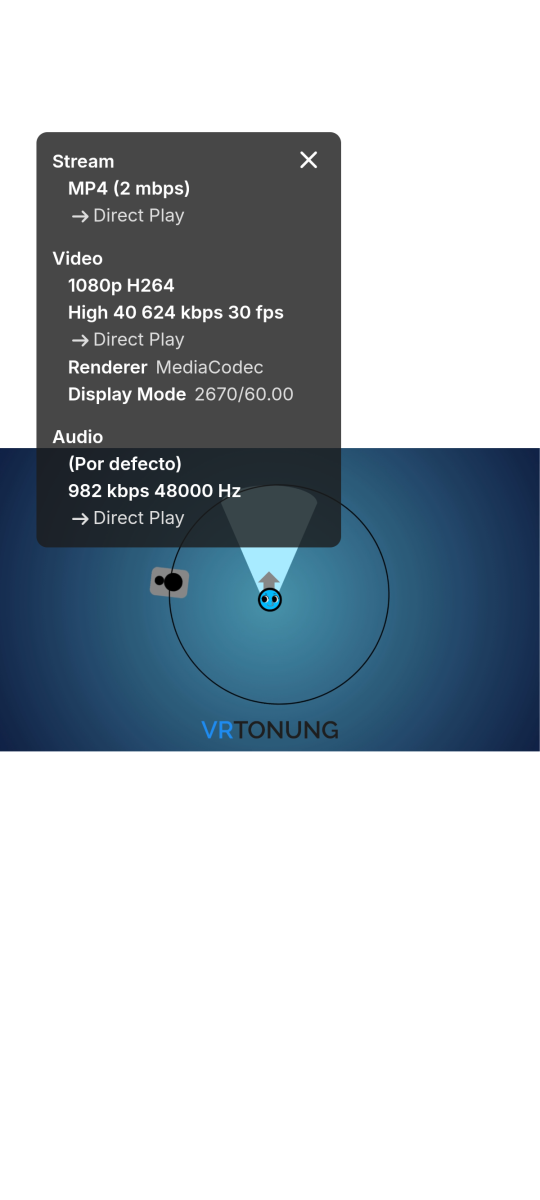
My Moto Edge 50 Neo recently received the Android 16 update which includes Eclipsa Audio support and the above videos now play directly with the Emby app, I imagine that you haven't implemented anything yet though the audio codec is being decoded directly as I see "MediaCodec" in the stats for nerds, the only thing missing is the name of the audio codec:
 1 point
 -
https://emby.media/support/articles/misc/downloads/Emby-Pkg-Installer.html : work1 point
-
Hello, I buy new Google TV stick. Connect to my network and install Emby for Android from Play store. I cannot login with my credentials as local connection and also cannot login with emby connect. I try on browser on that new device and I can login and use my emby. I use the same method to copy/paste credentials. Where I can download working APK file to sideload? Edit. Sorry, I noticed Google Home app add 2x[space] after password when I paste trough that app. Everything is OK now. Regards.1 point
-
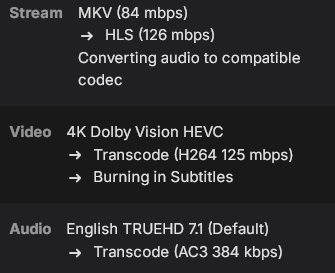
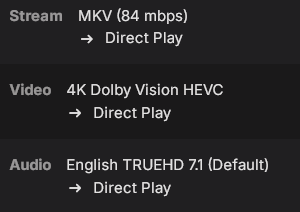
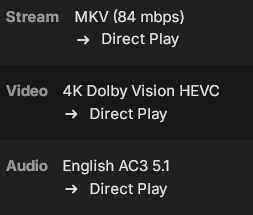
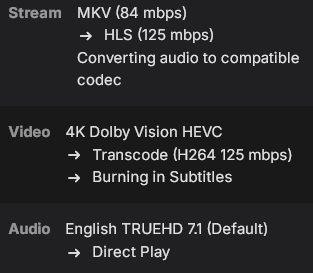
@LukeUpon further testing I've found what causes it to transcode, its the audio format.When the user has full transcoding permissions and it converts the audio, the video also gets converted which causes the burn in. Also I wanted to mention I do have the player on the App configured to auto. Here are the tests Iran: TrueHD audio selected, PGS Subtitles enabled and Transcoding permissions enabled fully, including container changing: Also the PGS subtitles are displayed incorrectly when they are burned in (They are very large and will go off the screen at times) TrueHD audio selected, PGS Subtitles enabled and all Trancoding permissions disabled, including container changing: This displays the PGS subtitles correctly and has proper Dolby Vision colors AC3 audio selected, PGS Subtitles enabled and Transcoding permissions enabled fully, including container changing: TrueHD audio selected, PGS Subtitles enabled and Transcoding permissions for audio and container changing disabled. Only video transcoding is Enabled: It says converting audio although it is disabled and still causes a video transcode, also if I enabled AC3 audio it will direct play fine but the Dolby Vision colors will be improper (green tint) TrueHD audio selected, PGS Subtitles enabled and Transcoding permissions for audio and container changing enabled. Only video transcoding is disabled: The subtitles don't even show up when using these settings and the Dolby Vision colors improper (green tint). Enabling AC3 will show the subtitles but the Dolby Vision colors are still wrong When the audio conversions are being done on the Apple TV itself it allows for PGS subtitles to be displayed properly and as an added benefit doesn't affect the Dolby Vision colors. Seems like the solution would be to have the Emby server pass Truehd Audio along to the Apple TV instead of transcoding it server side. Also when TrueHD audio is converted by the apps embedded ffmpeg build on the Apple TV isn't it converted to PCM rather than AC3? if that's the case that would actually be a higher quality format since PCM is lossless.
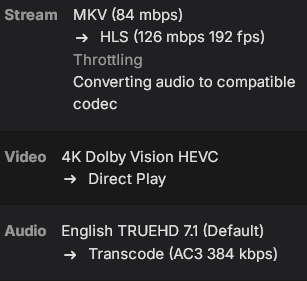 1 point
 -
You're right! I just tested specifically this, and SRT subtitles next to the MKV do show correctly It's only the embedded subtitles in the MKVs themselves. Thanks for the correction!1 point
-
Re your comment about SRT files lying next to the main MKV... I always have SRT files in the same folder/location as the MKV, and never had an issue with subtitles appearing top left. Only when subtitles are embedded within the MKV (as others have said on this thread) is there a problem. I wanted to call this out in case you are indeed seeing this alongside problem? If so, I speculate maybe you have the SRT AND embedded subtitles within the MKV, and Emby is defaulting to embedded and hence the top left issue?1 point
-
It is every single subtitle for me, except PGS ones (image based). I'm told it's any subtitle embedded in an MKV file, but I'm pretty sure it's also affecting e.g. SRT subtitle files lying next to the main MKV file. For testing, though, use any MKV release with SRT subtitles. EDIT: Sorry, didn't see the last page where everyone else wrote the same1 point
-
It should be fixed in the next client release1 point
-
I was initially supportive of this switch until I realized that they got rid of the one time payment for extended devices in favour of a monthly payment only. I have never reached the device limit with my usage so far but if I ever do I will likely move things over to Jellyfin. Knowing that there was the option to do a one-time payment for more devices was the reassurance I was banking on if I ever needed to grow my setup. A monthly payment doesn't appeal to me and would be a significant deterrent to me. The value is so poor imo that I would rather buy multiple life time licenses and run multiple servers rather than pay monthly for additional devices. The only way that option makes sense is of you are going against the terms of service and charging users for access. For personal use it doesn't make sense. We are in an age now where every person in a house has their own smart tv, phone, and sometimes tablet. Not to mention smart TVs in the common areas. 30 unique devices in a 1 week windows isn't out of the question for an extended family.1 point
-
Same for me, the users on my server can no longer unlock features individually; they're only given the option to subscribe to the premium plan. I love EMBY, but if the policy shifts in this direction, I'll move everyone to JELLYFIN, It's unfortunate......1 point
-
Hi. Please always provide the actual version number as "latest" changes constantly and sometimes you may think you are on the latest when you are not. Thanks.0 points
-
That response related to this topic which you linked to I would suggest you post in that topic and give feedback on the current state with the latest versions of the Emby for Android app and Emby Server0 points