Leaderboard




Popular Content
Showing content with the highest reputation on 04/23/26 in all areas
-
Sorry for offtopic. That sucks, hope nothing was lost.2 points
-
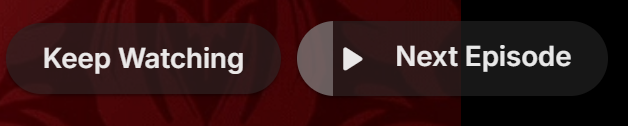
Tired of seeing end credits before Emby loads the next episode of your favorite TV show? Now you can remove that iritation! EmbyCredits detects those end credits and add a marker for Emby to use so end credits can be skipped. In the catalog under Metadata or at: https://github.com/yocksers/EmbyCredits This is either by done chroma fingerprinting and comparing the episodes or by the plugin extracting png/jpg images of the TV show, sending them to a tesseract docker container, the tesseract finds a match and reports that back to the plugin that then adds the skip to Embys database. Emby then shows a "Keep Watching | Next Episode" when it sees the marker. NOTE: Requirements: yock1/embycreditocr installed if OCR detection is wanted (recommended and most precise method). In the plugin you add the Tesseract server IP: IMPORTANT!!!!! As the plugin extracts a lot of images it needs a custom folder to do this as to not fill up Emby docker disk images so set this setting: Then add some keywords to search for (i have added a few but for more precise detection you should add some more that are fitting to your library). Choose a library or a single episode and press process. The plugin can also be set to run as a scheduled task or auto detection for when new shows or episodes have been added to Emby. Speciel thanks to friends who helped developing and @Neminemfor help with testing! If you like this plugin then please consider donating at https://buymeacoffee.com/yockser so i can sit back and relax once in a while with a nice coffee. Disclaimer: Use at your own risk! The plugin has been tested and re-tested but bugs are devious little things that can creep in unnoticed. Do with the plugin what ever you want, change the code, call it your own creation or even take money for it.. I don't care. The original will be here for free!
 1 point
 -
I wanted to share a novel way—for me, at least—to enjoy music on Emby. I recently picked up several "Bach Guild" classical albums from Amazon for just 99 cents each. These are massive collections with 6 to 10 hours of music performed by real musicians, not AI. Because they are so long, I found myself constantly listening to the same opening tracks and never reaching the end. Random play wasn't an option since the order of movements is essential in classical music. My solution? Treating them as audiobooks. I used a tool on GitHub called m4bBookmaker to convert the albums. It’s a free program, though I paid $5 for the compiled Windows version to save time. Now that they are in audiobook format, Emby tracks my progress and lets me resume exactly where I left off. I’ve set up a dedicated directory and library in Emby specifically for these, and it works perfectly.1 point
-
Anyone having the same issues? We would have to log off and then sign back in with a different user.1 point
-
Why not have a setting to reorder? Or toggle them on/off, or list them in the about section? Or put them after the actors? Why prioritize them first? Movie posters and advertising don't include images of the writers/directors (except maybe a few Hitchcock titles). Half the time, there aren't even images available for them, especially writers. For me, it makes the page look half-ass with generic icons listed first.1 point
-
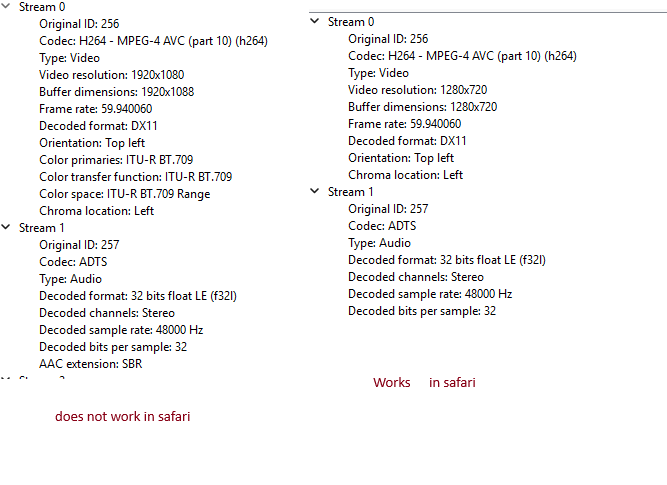
My workaround is switching apps or I go to my backup provider. The codec on the left does not work in Safari but works in Chrome. The codec on the right works in Safari. Something similar was happening in the Roku app but they have fixed in the beta. Maybe whatever they did to fix it in Roku would work across different apps. @ebr edit: our "problem streams" have identical footprint. Possibly we use the same source content.
 1 point
 -
Yes, I updated. Still have the issue though. I think I will just re-encode these episodes when I come across them. It only happens occasionally but I just wanted to see if it might be a problem with my system, but apparently it's the files.1 point
-
Hello, I wanted to post a final update in case this helps someone with a similar issue. After more testing, the problem turned out not to be the Apple TV app itself, and it was also not caused by the DNS setting on the devices. Changing DNS to 1.1.1.1 had no effect. The actual cause was the internet connection on the client side, more specifically the provider setup. After correcting the MPDN/APN settings, the Emby server became reachable normally, including from Apple TV. So in my case, the issue was not: - the Apple TV app itself - Emby itself - DDNS itself - DNS resolver settings on the devices Thanks for the help!1 point
-
I get this on some IPTV livetv channels too where it wont play in Safari or the Emby windows app but will play in Chrome. Sounds like your issue it wont play in Chrome. I'm not sure , I think it has something to do with the video or audio codec that is being streamed some emby apps dont like. I hope it gets resolved at some point but for now I have a work around.1 point
-
Yes, Just drop the .dll file into your programdata/plugins folder and give your Emby server a restart.1 point
-
YouTube Plugin v1.17.1 Hey everyone New release is up — mostly Trending/Categories fixes, faster refresh for big channels, and a few quality-of-life tweaks. Fixes: - Empty Categories are now correctly hidden. New: - Auto-refresh after setup — no need to manually trigger a refresh anymore. Once you've entered your API key and saved your channels, the plugin kicks off the first refresh on its own. Just wait a few seconds and reload the page. - Persistent MetaCache — descriptions, durations, premiere dates and thumbs now survive a restart. No more re-enrichment cost after a reboot. - Configurable rate limit — new *"API Rate Limit (requests/min)"* setting (60–1200, default 240) for anyone with raised API quota. - Channel folder shortcut — with *Hide Shorts* on and *Live Folders* off, clicking a channel jumps straight into Videos instead of a one-item submenu. Quota: - More efficient overall, lower daily usage About the thumbnail bug: Not 100 % sure yet if the bug where thumbnails disappear is really gone. With the persistent MetaCache it should be fixed, but I haven't been able to test it over several days. If you try this version, please report back whether your thumbnails stay permanently or break again after some time. Would really help me figure out if I still need to dig into this. Download: Emby.YouTubePlugin.dll Have fun, and let me know how it runs for you1 point
-
Thank you for reporting it.1 point
-
Works fine now thanks @yocker1 point
-
I've got the same problem. Just on every Windows Device... I try to start the Windows Viewer app, and it hangs on a White Screen forever.. Android, and Web works like a champ. Windows App is totally boned right now....5 Windows devices(2 desktops, 2 Laptops and 1 Surface Tablet) that have to use the web browser right now. All happened at the same time.. Apparently after an update. Not sure if it is App side or Server side. The server is run Locally, and No internal Firewall rules to block any ports. It seriously worked one day flawlessly, and the next we're stuck with the web interface.. Any Idea???1 point
-
I have never played with that, don't need it I want media to be direct playing on all clients.1 point
-
Still working on it, I think I'll release a new version in the next days.1 point
-
Resolved with Version 4.10.0.10 beta and clearing the 'cache/subtitles' folder
 1 point
 -
Right now Channel Up/Down takes me to the next/previous chapter of the current video. Before this update it was acting as play next/previous video in the queue. I did not test it on TV shows (episodes), I only have library of music videos (type set for the library is Home Videos and Photos).1 point
-
I’m intentionally only converting my 1080p SDR stuff for now, hopefully someone else has come across the issue with HDR content.1 point
-
Hi, there's already an open request for this or something functionally equivalent. Please join in and contribute to the existing discussion at:1 point
-
Sorry i have not been around, but my health keeps failing me every time i get going again. I think they finally fixed the problem. They found a 80% blocked Aortic Artery in my neck, and immediately did surgery to repair it. So as i write this, i am steal healing from the 6 in opening they cut to fix artery. So when it heals i will be back, which will be soon. Its been a fabulous journey here, i think maybe 10 or 12 years now. And I am not ready for it to End.1 point
-
Guess this is a FR and should be posted here. Feature Requests - Emby Community1 point
-
Could the way User Settings are handled be changed so that: 1 - Every setting that is changed via the Admin/Server - Users settings page becomes the new default for that particular user (instead of the Emby supplied default). 2 - Any setting that is changed appropriate for an end user to change from within that particular user account being signed in is saved at the local device level, and would be used instead of Server specified defaults. This wouild: A - Allow us to adjust the default behavior when NO local settings exist. B - Still have local device specific settings override what have been set as Server defaults. (Allowing the same User to have different settings per Device - as it is now.) It doesn't seem like the logic would be that much different than it is now. Assuming if no local settings already exist today, the Server has to pass along what it has them as for a starting point. The change wouild just be allowing us to alter what any of those base default settings are.1 point
-
All I want to do is move all directors to the end of the 'cast and crew' list. I'm not bothered about the order of the actors. How do I do that?1 point