Leaderboard




Popular Content
Showing content with the highest reputation on 04/19/26 in all areas
-
OMG, so the answer is absolutely that I’ve done something! I have no idea how or when I managed to turn off those tags! @Lukethanks for your patience in politely pointing out what should have been obvious to me. I appreciate the nudge in the right direction.2 points
-
I mentioned it in another thread, but thought I'd put it here since this looks like a new section--just for posterity. Would like to have a bulk meta data editor function. For example, if I have 750 videos whose producing studio is the same, I want to select those videos and apply the name of the studio to those videos. Similarly, if there is a custom tag I want to apply to a subset of those movies, I want to be able to select them in bulk and apply the tag to those videos (instead of selecting them one by one).1 point
-
If you are noticing no audio on Emby after updating to TVos 26.4, turning off the newly introduced feature called "Continuous Audio Connection" in the settings of the Apple TV will resolve the issue. Some people have suggested to change the preferred player from "Auto" to "Native" in the Emby App itself but this is not a solution to the issue and may cause more issues with playback. Keep your preferred player set to "Auto".1 point
-
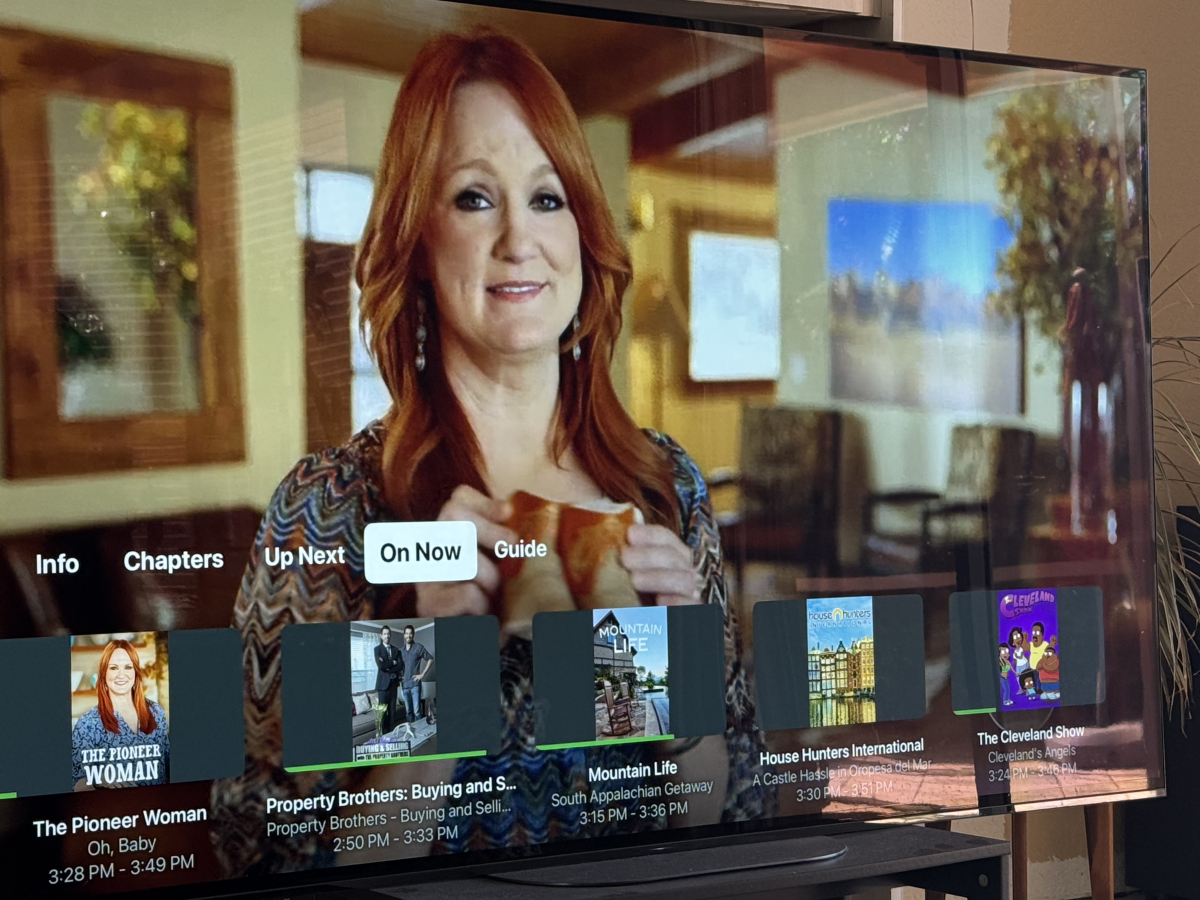
Getting back into Apple TV/Emby combo and notice that the Live TV “On Now” section is showing show posters instead of landscape images like the placeholder seems to indicate it should be? Note that I am using the VirtualTV plugin as my TV source. Anyway to fix this? Note that the menu item to the left, “Up Next” is correct having landscape thumbnails. *wasn’t sure where to put this question? Here, Live TV or Plugin topic areas?
 1 point
 -
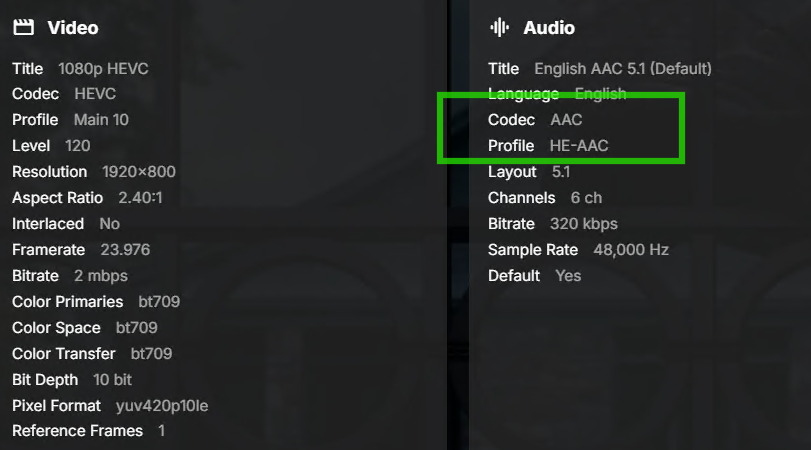
In the past few weeks I have gotten this error trying to play a few TV episode. They play fine on the web client but I get the "Playback error no compatible streams" in the Emby MS Store app. The first couple of times it happened I thought it might be a bad file so I replaced it with a new file and it worked fine. But this time I wanted to see if there was anything different that may be causing it. I will attach the relevant portion of the log file, but the only thing I notice right away is that the audio in this particular file has a profile listed as "Codec AAC - Profile HE-AAC" where most other ones just say "Codec AAC" and don't show any profile. I am wondering if it's just a matter of not having the appropriate codecs installed, so I thought I'd ask before randomly installing codec packs. 2026-04-14 094802.198 Debug TvShows.txt
 1 point
 -
Is this still coming soon or not?1 point
-
Are you using QSV or VAAPI for your transcoding? I had issues with using QSV on the official emby docker and switching to VAAPi helped. I have since switched to Linuxserver.io image and can use QSV. If you're using subtitles turn off subtitle extraction on the fly. Install the Diagnostic plugin and then go to subtitle options and turn on Burn in subtitles so it acts like how Plex uses subtitles. I guess these are more just anecdotal tips then something that fixes your issues since it's direct play. Infuse is great cause it direct plays everything.1 point
-
Okay did that it has loaded on the app on the phone now.1 point
-
Would it be simple or possible to add in more User accent color options? I've been working on a CSS theme that can heavily utilize the user accent colors and would love to see more options. And a special request of gold at Hex: #FFB900, RGBA(255, 185, 0, 1). I know super low hanging fruit here, but it should be an easy win... Also, you have "Emby" and "Green" options they both seem to be the same. Thanks!1 point
-
Yeah, totally custom colors would be utilized by very few and allow people to make a complete mess of their display - even possibly to the point of not being able to correct it.1 point
-
Many color combinations are not easy to read. Bad color combinations on a public site can damage SEO ratings and visitors can react by choosing not to return. Professional color themes stick to limited number of colors. Page designers can easily take several days to create color theme collections. This work is often underestimated. Color compatibility test: Link, active, hover and visited colors can be set. Often, some combination of active color on a background, fails the color contrast test. This type of error would be reported as a broken color contrast and a bug to fix in online production work. Bad color choices can make pages look like the designer is an amateur. All color contrasts should have >3.0 values. https://www.siegemedia.com/contrast-ratio#%23202897-on-%233E7639 Professional looking color themes: https://duckduckgo.com/?q=color+theme+examples+balanced+Web+design&ia=web1 point
-
I'm thinking you have an all-black backdrop somewhere in one of your media files. Also, I don't think this is your issue but sometimes if you click around too fast before the backdrops loads Emby runs into a race condition issue. nothing on the fault of the CSS, just Emby's JavaScript. IE: When you click a movie, Emby requests the high-res backdrop from your server. If you click "Home" before the download finishes, Emby changes the page. A split-second later, the image finishes downloading, and Emby's script blindly says, "Great! The image is here, put it on the screen!" completely ignoring that you already left the details page.1 point
-
Yes I can confirm, after an update of my Fire Stick select, I was able to download the Emby app and access my server. Thank you very much emby team!1 point
-
@Lukehave you any timeline / project or something to know how many times will we wait for it ? Please keep us in touch1 point
-
Thanks a lot for your incredible efficiency @yocker! Have a nice day1 point
-
Not a solution to your nginx issue. But perhaps try caddy? My caddy config file just contains this and works with everything: leno.mydomain.uk { reverse_proxy localhost:8096 }1 point
-
Hi yocker ! First of all thank you so much for your amazing life-changing plugin ! Since v.5.52.2, I don't have popcorn rating icons displayed on my poster. I reverted to 5.51.8, but since the plugin is now available trough the catalog, it updates automatically to 5.52.3 (stays 5.51.8 until server restart). Have you an idea of why the popcorn rating fails ? Thanks again1 point
-
Thanks! I found out that I only used path substitution for the thumbnail folder but forgot to re-set the app settings (in Android) to use only internal storage. Thanks for the help.1 point
-
Thank you both very much1 point
-
Version 2.0.5 (3) is now released and has resolved this issue. Thank you.1 point
-
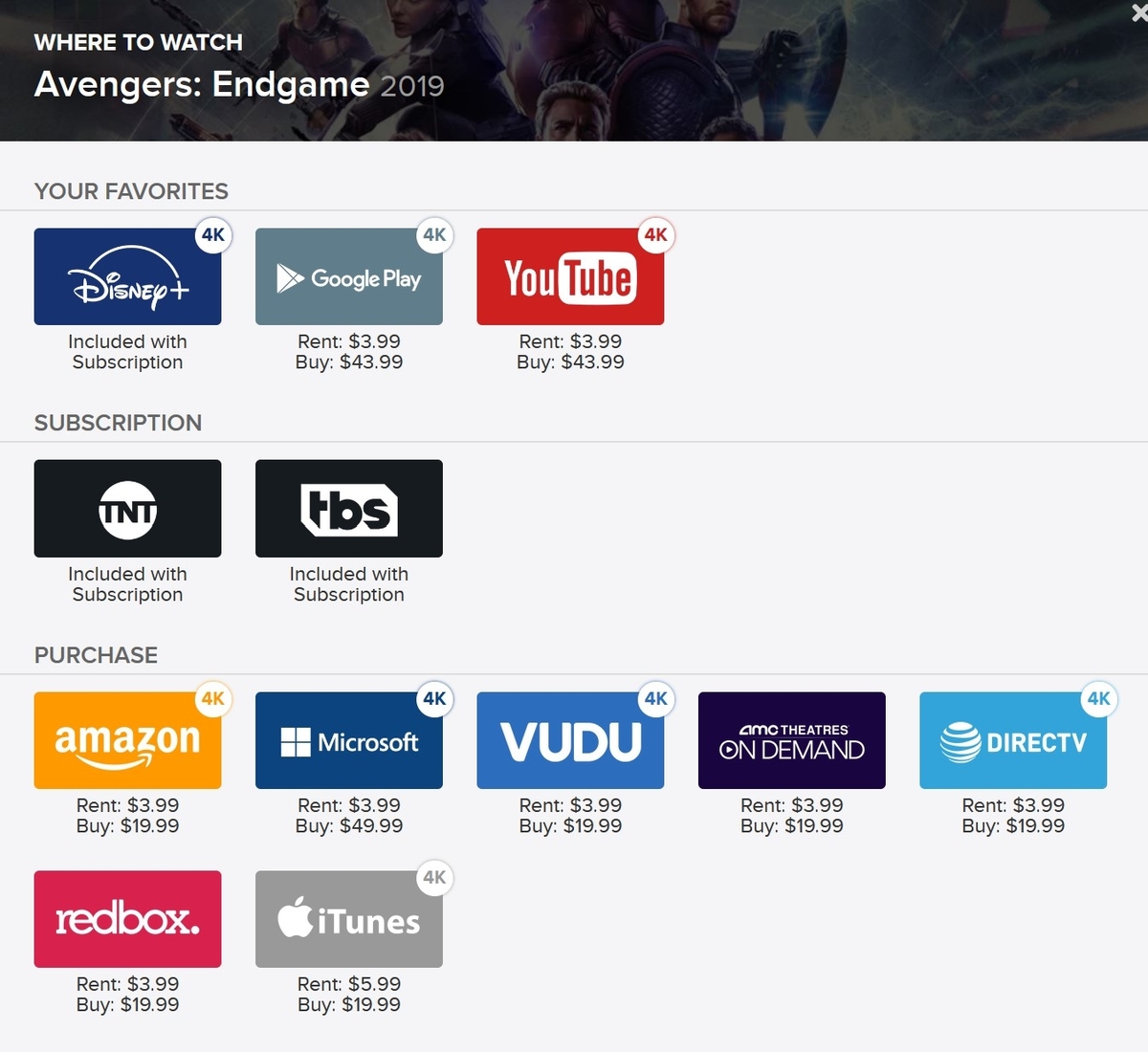
Hi, I suggest you add additional information to the movie and tv series where to watch (netflix, HBO, Disney etc..)....
 1 point
 -
Your response here seems to indicate that you have the impression that I'm being impatient.... It's now been nearly half a year since the original report and still nothing has been done. So... When might we expect this basic DVR functionality to be implemented?1 point
-
I think it's a good idea1 point
-
I had to disable that in order to get subtitles to work reliably on some devices. But that was years ago. Maybe it performs better now? Well, enabling it does seem to make the videos work through the strm file without needing the extracted subtitles! But I might want to prefer the extracted ones if it's less likely to have device issues with the setting off.1 point
-
@quickmicYour doing Awesome work & your doing one Hell of a Job answering Everyon Questions...Bravo...so im going to ask away..lol..I'm using Kodi 22 as my player, I would like to use Emby as a Client, I Don't have a Server as I pay for someone Service which Version of Kodi Emby Next Gen addon woukd u Recommend me using? Also I love Testing New stuff & will Provide Feed with All Logs if Needed.... Cheers & Have a great day1 point
-
Hi, we are looking into it. Thanks.1 point
-
This is the key. It is how the store identifies the plugin.1 point
-
Hi, there's already an open request for this or something functionally equivalent. Please join in and contribute to the existing discussion at:1 point
-
If you're running Linux to Linux then NFS might be more reliable.1 point
-
Forgotten about the problems you had, very sorry about that. Not sure precisely what Emby goes after when catalog is used but i would guess changing the version number to some high number would be enough, to be 100% safe the "[assembly: Guid("b8d0f5a4-3e96-4c0f-a6e2-9f0c2ecb5c5f")]" in Assemblyinfo.cs can be changed too to something else.1 point
-
Thanks to the Emby team EmbyIcons can now be found in the catalog. Enjoy!1 point
-
Emby should be available for this device as of this morning.1 point
-
Error happens 10 times - Example: line 33983 Error getting CultureInfo for English and ParseConfiguredCulture errors - 96 times Example: line 37182 Just guessing that HEVC copy has metadata errors. ffprobe also found issues. h.265 HEVC video codec is more demanding to open for playback because of it's compression. I think it's likely that the playback fails, due to some file errors. Testing playback with a 3rd party player is not a good test. It only prove the 3rd party player can handle playback. There can still be file errors. Look at playback stats or run ffprobe to see errors. Remuxing the video may fix this (typically 2 minutes for 2 hour media). Reencoding would also help to h.264 (larger file and typically takes 1 to 6 hours for quality transcoding depending on hardware.) If you want h.265 HEVC to work all the time, try remuxing and have fast enough hardware support for your largest resolution. Test with online demo files instead of random content to confirm if the problem is with the content. Specific playback errors for some particular media happens all the time and I think it's mostly media file errors or hardware limitations and browsers or TV apps are not as forgiving for playback. Someone who knows the errors better may have more exact info. These are guesses.1 point
-
Which subscriptions would those be? Have you installed your own server or someone shared access to their server with you? Quick Start1 point
-
I created a temp folder on the boot drive of the media server and put some of the files recovered from the RAID array in the folder and they played fine. No buffering whatsoever. The problem was definitely with the drives. Working on building a new media server with 2 3TB drives configured normally. No RAID arrays or external drive boxes this time. - Techowl -1 point
-
Emby Server should alert users when they schedule more recordings than their available M3U streams. For instance, if a user sets the simultaneous stream limit to 5 and attempts to schedule 6 recordings, Emby should notify them of the conflict and provide options to resolve it, such as canceling, rescheduling, or prioritizing.1 point
-
?? Email, sms, discord or phone call. This is a server software for personal use. You should have 1 of the above contact points, right ?1 point
-
That response related to this topic which you linked to I would suggest you post in that topic and give feedback on the current state with the latest versions of the Emby for Android app and Emby Server0 points
-
Plex claims to support Apple Silicon hardware acceleration, but it's still a work-in-progress. While the feature isn’t smoke and mirrors, it’s not fully reliable yet. The checkbox may give the impression of working support, but the reality is that it’s still in beta, with mixed results depending on your setup. If stability is a priority, it might be best to wait for more mature support or stick with Intel-based solutions for now.0 points
-
After a discussion with @ElwoodBluesI would like to summarize where we are with this thread so that it is clear what the remaining issues are The topic was raised for: - getting feedback from other users about the HD Homerun Flex 4K device and its suitability - An issue with Audio / Video sync on recorded programs with the drift getting worse after multiple seeks The Emby App being used for playback was the Emby for Android TV app running on NVIDIA SHIELD For the first there was no input from users. For the second, advice was given to try out the "Emby for Android" app and see how that compares with the Emby for Android TV which was having the Audio/Video sync problem. This remains as the advice for this issue and if the Emby for Android app does have sync issues then it was suggested that a sample recording file that can reproduce the problem is provided. Following this, on 27th November @ElwoodBlues reported that when using the Emby for Android app playback of a single 4K movie is fine but as othr 4K movies get played, stuttering starts and the issues remain until rebooting the NVIDIA SHIELD. Before splitting this into a separate forum topic as it is not related to DVR recordings audio/video sync issue which was what this topic/forum thread was about, I would like to know if this issue with the 4K movies playback arose also for the Emby for Android TV app or is only arising now after switching to the Emby for Android app to see if the recordings video/audio sync issue is resolved?0 points