Leaderboard




Popular Content
Showing content with the highest reputation on 04/08/26 in all areas
-
As far as what you see in the store, this is correct. However, the app will not auto update unless you install from the store.2 points
-
So for anyone playing along at home ... After some testing by @SamES, he surmised it had to be a network issue. After some head scratching, router reboots, mesh router firmware updates etc... I noticed the router DNS was set to the ISP DNS, thinking it couldn't possibly be the cause of the playback issues, I tested manually changing the DNS on one of the TV's to 1.1.1.1 and boom .. we have playback. So after manually setting the DNS on the router, all the Samsung TV's now playback including via SSL connection again. I don't think it was blocking as such, but delaying the connection enough to cause issues with the client app on the Samsung TVs. Something must have changed at the ISP end as this used to work fine, but noticeably since manually setting the DNS, all the apps in the TV's seem noticeably snappier to load and play content. Hope this helps someone else and thanks a heap to @SamES for all of his help and his suggestions.2 points
-
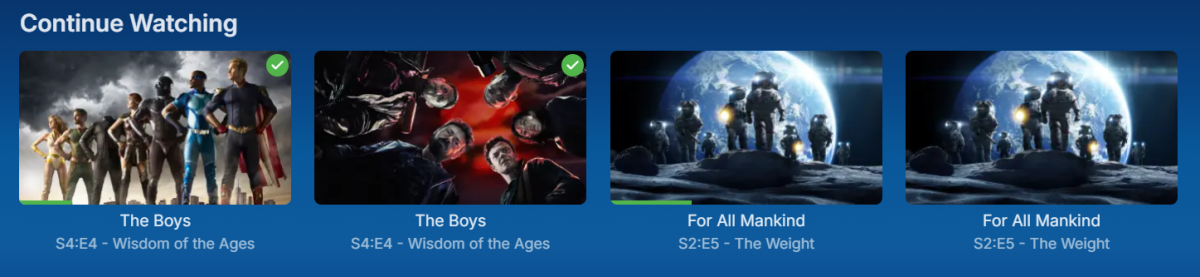
With different sources like local, webstreams, .strm, etc it creates duplicate entries of the same videos. It would be nice if Emby could recognize they are the same based on metadata and group them together and handle them like it does right now with different resolutions of local files.. Continue watching will show the different libraries even though it knows they are the same content and even knows which ones are watched.
 2 points
 -
Here is the latest list of versions for Emby software across the server and clients. Emby Server Stable: v4.9.5.0 (2026/05/18) Release Notes Beta: v4.10.0.14 (2026/06/04) Release Notes For other platforms, please refer to the download page. Emby for Android TV Google Devices Stable: v2.1.23 (2025/12/27) Beta: v2.1.46 (2026/04/15) Amazon Devices Stable: v2.1.23 (2025/12/27) Beta: v2.1.46 (2026/04/15) Stable Release Notes Beta Release Notes Universal Android app Stable: v3.5.16 (2026/01/26) Beta: v3.5.36 (2026/05/10) Release Notes Download the latest Beta here. Emby for Kodi See here for the latest information. Emby for Roku Stable: v4.1.63 (2026/05/04) Release Notes Beta: v4.1.64 (2026/05/13) Release Notes Emby for Windows (Windows Store for PC & Xbox One) Stable Release Notes Beta release notes Emby for Linux Beta Release Notes Emby for Samsung Smart TV (Orsay) E-series to H-series TVs only Release Notes Emby Theatre for Samsung Smart TV (Tizen) Release Notes Emby Theatre for LG Smart TV Stable: 1.0.50 (2026/01/19) Emby for iOS Stable: v2.2.53 (2026/05/16) Stable Release Notes Beta: v2.2.52 (2025/04/11) Beta Release Notes Emby for Apple TV Stable: v2.0.3 (2025/12/26) Announcement Beta: v2.0.6 (2026/04/11) Release Notes Emby for tvOS (Apple TV) Stable: 2.1.6 (2022/12/23) Release Notes - TBA Beta: 1.5.1 (10) (2021/03/02) Beta Release Notes Emby For MacOS Stable: 2.1.6 (2022/05/09) Details here. I will keep this post up-to-date as much as possible, but please send me a PM about anything I haven't updated, or is missing. Special thanks to @Borskfor supplying a lot of the updated information. Thanks.1 point
-
I’m encountering a crash in the Emby app when using the “Go to next episode” popup at the end of an episode. This only happened in one case but it was repeatable for that episode. Details: Running Emby for Android on Nvidia Sheild TV Pro 2019 Media: Hell Mode (Anime) Issue occurs at the end of Episode 2 When the popup appears asking to go to the next episode, selecting Next Episode causes the Emby app to crash. Initially, I thought this was a one-off. To confirm, I enabled logging in the app and reproduced the issue again: Played Episode 2 to completion “Next Episode” popup appeared Clicked Next Episode Emby app crashed again Additional observations: If I manually start Episode 3 directly (without using the popup), it plays perfectly with no issues. Playback of Episode 2 itself is also fine; the crash only happens when using the automatic “Next Episode” prompt. Logs: App logs are attached for reference. (only one log file has the crash sorry wasn't sure which one). Let me know if you need any additional logs, device details, or steps to help troubleshoot further. Thanks for looking into this. emby_android_1769600599795.txt emby_android_1769600674571.txt1 point
-
Hi, I find myself constantly using a fanart/backdrop as the thumbnail because there is no Thumb image from the metadata providers yet. There is often a fanart/background that works as thumb. When I'm in the Edit Images mode of an Item, I would like to have a button that makes a backdrop the thumbnail image is then removed from backdrops. Since drag and drop was intruduced recently that could also be a way to handle it. I just want a quick way to handle this without having to manualy rename files. Cheers.1 point
-
Just an FYI the guy who originally wrote the Orsay community app for Emby (ChessDragon136) also brought his code over to JF about the same time. Don't know if he is still there though as I don't follow them.1 point
-
Em resumo, para selecionar pastas especificas, além de detalhar as pastas que vão ficar dentro, deve-se selecionar também as subpastas que vão ficar de fora, para que a lógica funcione.1 point
-
I can see how it would help with multiple versions of the same quality. I'll have to figure something out1 point
-
Always love options! Thanks for looking at this.1 point
-
@Jerrenall TrueNas applications got updated about a week ago due to library changes. You can see the "App Version" before updating. Last stable Emby server version is 4.9.3.0 release on January: https://github.com/MediaBrowser/Emby.Releases/releases1 point
-
I'm not really seeing what you are talking about there. All the text is there, what exactly is blank? All my users have icons, so I did not notice that. the version below should have that addressed. Try the version below I made a slight change w/ multi select dropdowns, also what web browser are you using? I didn't see that issue, even when I selected Spanish for my language. Updates: Fixed transcoding bar color from now playing in the admin dashboard, and other Now playing fixes Navigation bar icons are now gold User profile icon is now gold (If the user has no profile picture) Toggle switch effect Adjustment to media progress bar on media cards. Changed the loading spinner to have a new look. Multi-select dropdown text color fix (was gold when it should have been white) Fixed where editing a library part of the dialog would have the incorrect text colors. Hid collections from the side navigation bar Emby Navy and Gold v4.82.css EDIT: Found the dropdown glitch you pointed to. It's odd this only affects the 4.9-Stable version, When I tested this, I was using my dev server that's the 4.10-Beta and it does not have the issue. Give me a few and I'll have that fixed.1 point
-
Sure. To clarify, it was defaulted to auto when I initially encountered the issue. While trying to troubleshoot the issue, I switched it to mpv which did not resolve the issue. But yeah, I'll swap it back.1 point
-
Hi, yes I think the likely outcome is that at some point there will be an all-new rpi image.1 point
-
It helps most users as they transition from local to remote and also if the server ip address changes. Maybe an option in the client connection process to never do this.1 point
-
OK we'll take a look at it. Thanks.1 point
-
Obrigado pela ajuda, mas eu já tinha resolvido, o código estava especificando quais pastas queria que fossem permitidas, mas não estava especificando as Sub-Pastas que ficariam excluídas, por esse motivo dava aquele erro, de forma que não importa quais pastas eu informasse para o servidor que estava permitido, ele entendia apenas que todos estavam permitidos, ou que todos não estavam permitidos.1 point
-
the problem was that i was unable to select any bitrate above 4mbps for home network. despite having emby installed just today for the first time, i still removed and reinstalled it and now it is working. not sure what bugged the app out the first time.1 point
-
I thought I had clicked everything, but have mainly been trying to beat the "Recordings" library views into submission with no success. Looks like LiveTV -> Recordings (not the library of the same name!) has "Latest Recordings" up front and center Thanks for the pointer.1 point
-
Very Nice. Thank you.1 point
-
I did a clean install, deleted everything and installed beta via Docker. The issue is still there.1 point
-
I sideloaded the beta v2.1.44g registered It’s on my nvidia shield I think I’ll leave the beta then come back?1 point
-
So what version do you currently have installed? And which device are you running the ATV app on? Just download the the latest APK from the link above and install for now. It might kickstart updates going forward.1 point
-
The version I have installed is 3.5.281 point
-
I'm also confused on which app to use for Android TV. Is the beta still live?1 point
-
Trying to force non-direct (1080p 4mbps for example) briefly loads the player interface more completely but then gets stuck in a playback error loop (popup/screen takeover). A few fixes and this ought to be a great improvement I hope though! @softworkz1 point
-
No I didn't, ended up getting lazy and just running it with docker1 point
-
I think the only way would be Jaws (1975) (BluRay x265 10bit HDR) - 1080p1 point
-
For this no, just the Emby app, which you've already tried. We'll take another look at it. Thanks.1 point
-
Yeah, @nt-it-team posted a few workarounds back in 2024: But honestly, it's frustrating. Every time I do this, I ask myself why not just keep using Jellyfin. Everything I miss in Emby, Jellyfin already has. Take a look around the forum, many important feature requests just get brushed off with “Planned for future”. It's basically a running joke already^^ As a developer I can say no, it isn't. And it doesn't seem to be for the Jellyfin developers either, who rely solely on donations. But apparently, it is for the developers of a mostly paid product like Emby1 point
-
Good Luck @sergiovassarithis weekend we reached the amazing number of 6 years waiting for this feature ... 6 YEARS !!!!!!1 point
-
And it should not be, as JellyFin forked from Emby long ago. As said, if you have any issues with Emby, server or client apps, the community would gladly try to assist. Else: JF forums.1 point
-
I actually found a solution that works based on another post I found. I did force transcoding on the client like the user above and it can successfully seek while a show is recording. I can confirm the same issue they are having the the CC not working, but it is not a huge deal for me because we mostly use the live recordings for sports.1 point
-
Hi, yes coming soon, so stay tuned.1 point
-
I have 3 main reasons why I'm looking to moving off Emby, and exploring Jellyfin. This is one of them. I'd like to hear from developers why such a basic search function is not given more priority. I find this a basic function, and getting cookie cutter responses on fixing basic functionality seems to a be a brush off; it's why initially move away from Plex - focusing on anything else but fixing basic functionality.1 point
-
Hi, library specific search is something that we plan to add. Thanks.1 point
-
OK, I guess I answered my own question, and this may be of note for other people encountering this behaviour: I play Emby wirelessly to a Bluetooth stereo amplifier. This issue only happens on Bluetooth and with this particular stereo. After much experimentation, I determined that the BT chip in the stereo is an older one, and probably not compatible with my newer T90 tablet. So if Emby has issues playing out to Bluetooth, it just skips over all the songs in a folder and stops. Emby just rocks. I'm very impressed. I bought the Emby Premiere and uninstalled all my JRiver software. No looking back!1 point
-
Hahaha, I see. So that’s how it is—that’s really interesting. Also, I’ve already changed all the subtitles from .chi to .zh, so let’s just leave it as is for now. Thanks, developers! By the way, could you please show me that post about “many Chinese users complaining about .chi”? I’d really like to see what they’re saying.1 point
-
Hi Luke... I am sorry to be a pain for you guys.. Yesterday after thinking about @visproductioncomments, i decided to take a look at MY settings as well as the EMBY settings and I found the answer that I needed.>!! Subttiles were not not set correctly.. so I changed the setting to "Always Play subtitles" and "Remember subtitle track selections". After that, whenever we played an episode and stopped and came back all was goodness..!!! Cheers1 point
-
Nevermind it worked, I updated the wrong field in Emby which is what caused the issue. Port 80 worked thanks!1 point
-
It would be a great feature to allow an option for how many days back for the tv guide to go for providers that offer catchup services. You can then go back in he guide and play whatever you want like a PVR always.1 point
-
Hi Quickmic, I'm not sure exactly when this started, but after selecting a live TV show (IPTV addon), Kodi will not release the tuner when I stop the TV show it in the GUI. When selecting Live TV to record using the Kodi context menu, It will record and stop properly with no issues. If I reboot the Emby server, The tuner is released. I'm currently running Kodi Piers Alpha2 Ver 22.0 Compiled 2026-02-27 and E4K Ver 12.4.5 HDHomerun 2 tuner box. Please let me know if you need further info. Thanks!1 point
-
GEE after getting fed up once again with Emby's BS over permissions I gave Jellyfin another look. Sure enough as usual Jellyfin don't and doesn't have any issues with the default permissions. Jelly fin has a per library search. Jellyfin logs cover everything, no having a issue and having to switch to trace or debug and wait and see if the issue happens again so you can post the logs. The only issues I see with Jellyfion are no folder view under movies, episode view for TV on the server app but no in the app for the TV, linking to themes and theme components instead of end-user editable code. There may be some features Emby has that would be nice to have in Jellyfin but overall Jellyfin seems to fit my needs just fine.1 point
-
Most of the time one uses the search to just search for Movie Titles or a quick way to access a TV Series. But some search terms flood one with actors, trailers, or even episodes of a TV serial. Not that they are wrong and sometimes you want to see them, and i fact I want to keep actors, trailers and episodes; just not in the default search (but maybe having the option to search for that too) Best Regards1 point
-
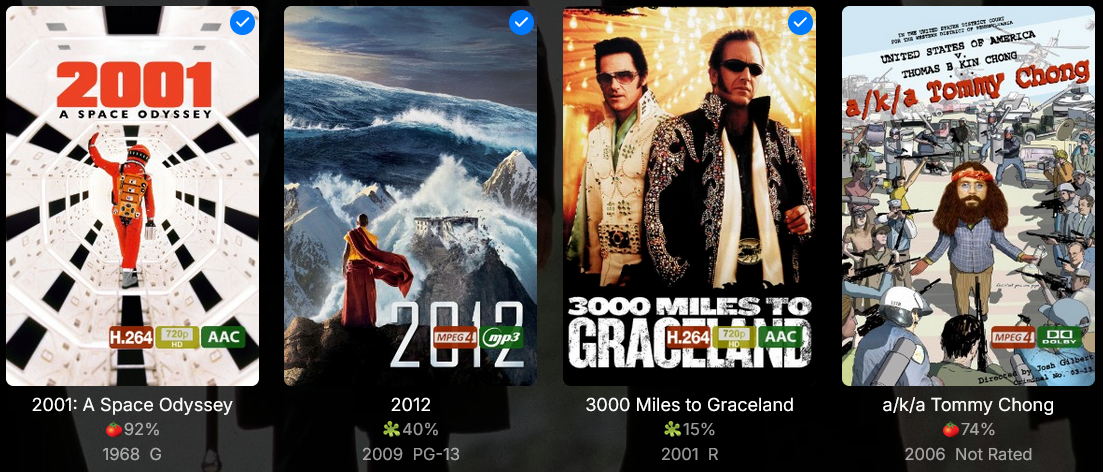
And here's a smaller variant Preview Download Overlays-smaller-smokex.zip
 1 point
 -
7 votes is actually pretty good. That's a decent amount of interest especially for the amount of time that it's been open. I like this suggestion. I usually prefer searching everywhere and with search being so quick I'd rather search, get the results and then filter from there.1 point
-
1 & 2 and then at this point the linux specific work will more or less be done.1 point
-
bro i would have to fix one piece by hand 0_o. thats over 1000 episodes. im just tired of logging into my server and wanting to watch one piece only for it too play the damn thing out of order due to the metadata that the server is getting to be wrong lol.0 points