Leaderboard




Popular Content
Showing content with the highest reputation on 03/31/26 in all areas
-
Hello, this Information is already being recieved from TVDB according to this Thread: I understand this is very niche, but i think this could still be useful to have.3 points
-
Is it time to explore this either in Emby core or as a plug-in if possible? https://letsencrypt.org/2026/01/15/6day-and-ip-general-availability2 points
-
Pretty niche yes, but could be nice to signify episodes that are finales and make their apperance slightly different, i.e. [ finale ] tag. I support this.2 points
-
Or just use TMM and create custom export template to your liking.2 points
-
That the anime community has collectively decided to ignore the standard does not mean the standard is wrong. If the content from the “forced” subtitle is also included in the “default” subtitle, all your problems go away.2 points
-
1 point
-
hosts are generally masked remote addresses - you can also see them unmasked if you look at the log directly in the Web UI or toggle-off log anonymization before downloading it so you can easily compare raw vs. sanitized log and find out all the addresses.1 point
-
Thanks to you!1 point
-
New stable release - Version 3.3.0.0 Download .dll and full release notes: https://github.com/soderlund91/HomeScreenCompanion/releases/tag/v3.3.0.0 This updates focus on bug fixes and improvements to fully work with the home screen settings. Also introducing a Cleanup menu/function. This release is not that significant by itself, but it's a milestone for the plugin as a whole. With Emby Server v4.10.0.8, all bugs seem to have been fixed for filters in the home screen sections setting, and this allows this build of the plugin to fully take advantage of this. My ambition with this plugin has been to manage all sections and settings for the home screen in the plugin itself, which now is possible. In other words - this plugin is the only tool you need to have a fully managed and curated home screen! IMPORTANT! Minimum required Emby server v4.10.0.8 Note Make sure to back up your settings before updating, just in case. Note Included a .NET V6 release, this is for MacOS or legacy support. This version is NOT tested. New features Created a "Cleanup" menu. This allows to quickly remove tags and collections (also those that are not created by the plugin). Removing a tag or collection that is managed by the plugin will ask if you want to disable that group (to prevent repopulate). Added an option in settings menu how empty sources should be handled (keep latest or empty the tag/collection). Default is set to preserve latest. Updates & Improvements Updated plugin to fully operate with Emby server 4.10.0.8. Embys native menu and the plugin menu for home screen section now mirrors each other, meaning you can do all managing for sections in the plugin. Improved performance Remade comma separated lists into line separation. One value per line/row If a "schedule priority override" returns zero, now treat it as the schedule is inactive Fixes Fixed an issue where episodes got tagged even tough "Series" was selected as tag. Fixed a bug where collection wasn't able to get tagged when the collection name contained a comma. HomeScreenCompanion.dll HomeScreenCompanion_NET6_MacOS.dll1 point
-
That is what I'm working on.1 point
-
I think I'll just ditch all the ARTISTSORT/ALBUMARTISTSORT stuff and just focus on release types, which were the subject of this topic to begin with. Gimme few hours and I should have something workable.1 point
-
OK, i finally figured out how to update emby without updating it at all i forced it to update to the latest version with this method for anyone else wanting to update emby on truenas scale. Follow these instructions to a t and it will update to the latest emby. go into the truenas scale dashboard go to apps Click on emby move over to the right side where it says emby and has edit and 3 dots click those 3 dots you will see convert to custom app and let it convert emby into a custom app and wait for the emby server to reload and start again.. Then click edit you will see the hyml for your emby app pop up scroll down to the line that says image you will see on this like the version of emby. change this version of emby to the new emby version available and scroll all the way to the bottom of this page when done and click save let it do it's thing and once done it will have updated your emby server to the latest version because it pulled the update that you forced and updated it. That is all you need to do and now you can do it every single time there's an update showing that you can't get because the one's in charge don't send updates out to us,1 point
-
Hi - I had it happen again once the other day, but I can't replicate it. I turned on debugging until reboot, so hopefully it will catch something. I was pretty confident of the time.1 point
-
Hello, I figured it out by editing the default ports in the config/system.xml file and restarting server. Thought I had tried that already but was unsuccessful, hence the post. Maybe I didn't do it right the first time, dunno. Thanks tho1 point
-
Tiny Media Manager https://www.tinymediamanager.org1 point
-
Alright thanks, i'll try it with a feature request.1 point
-
To my knowledge Emby currently does no record this info that TVDB api is returning so Emby would have to record the info in the db before it could be utilized. It currently only exists in cached data in the /cache/tvdb/seriesid folders.1 point
-
Noted. I'll aim to send you the minimum amount of info for testing purposes! Generally, it's significantly faster to carry out bulk tag editing in Mp3tag (manual or auto) and then import into Emby, if possible. Emby will import most standard tags into the relevant fields (e.g. ARTIST). Emby will not import some standard tags into the relevant fields (e.g. ARTISTSORT). Emby is currently able to import unsupported tags into the Song/Track "Tags" field via ROONTRACKTAG. Emby is currently not able to import unsupported tags into the Album "Tags" field via ROONALBUMTAG. As far as this topic goes there are several potential usability scenarios: Best case: Emby is able to import RELEASETYPE tags into an Album "Release Type" field and then Group by Release Type, as a native function!!! Emby is able to import actual RELEASETYPE tags directly into the Album "Tags" field (faster tag editing in Mp3tag) and these tags can then be used for custom projects! Emby is able to import defacto Release Type tags into the Album "Tags" field, via ROONALBUMTAG (faster tag editing in Mp3tag) and these tags can then be used for custom projects? Worst Case: Emby is not able to import any Album-only tags (significantly slower non-bulk tag editing in Emby only) and custom projects become less fun and more like a huge chore - then the end-result may not be worth the overall time & effort for many people??? There are likely many other combinations of options - but any method of importing Album tags into Emby would be most useful. Cheers!1 point
-
Aleas, There are a lot of divs to get all the text inside admin dashboard to look better with some text color like Ivory #fffff0. Maybe there is higher div to change a lot of the texts, all at once. I ran into this problem, as well, in my theme. If you go into my theme code and look for text color changing to #fffff0 you can find many instances where I forced text to go Ivory white, because all of my background theme choices are darker. I've also added a lot of font size and other small style changes on these text styles. You can just remove those if you don't want those style changes. Hopefully, this list of dev classes will help you pinpoint the texts that need to be lighter. They should be all the same divs. h1 { border: #d1bb64 1px dashed; color: #FFFFF0; font-size: 30px !important; letter-spacing: 0.08em; line-height: 32px; padding: 8px 14px; text-shadow: 2px 2px 1px #244759; width:fit-content; word-spacing: 0.2em; } h2, h3 { border-radius: 0.5em; color:#FFFFF0; font-size: 16px !important; letter-spacing: 0.12em; overflow-wrap: break-word; padding: 4px 24px !important; text-shadow: 2px 1px 3px #333; width: fit-content; } .listItemBodyText { color: #FFFFF0; font-size:13px; } /* Startup background color 1 second before the custom colors start and force text to remain Ivory color */ .mainDrawerScrollSlider-autofont { background-color: #0d193b; color: #FFFFF0; padding: 0 4px; } /* Force text color Ivory, and font size to match the custom style theme */ .listItemBodyText { color: #FFFFF0; font-size:13px; } .listItemIcon { color: #FFFFF0; max-width:220px; } .syncJobListContent { color: #FFFFF0; font-size: 22px; } /* Text colors */ .txtCacheSize, .fldAnalysisLimit { color: #fffff0; } /***** Media Page Buttons *****/ /* Media Page Button: Play & resume light green - start, hover, active */ .btnResume.raised.detailButton.emby-button.detailButton-primary.detailButton-stacked, .btnPlay.btnMainPlay.raised.detailButton.emby-button.detailButton-primary.detailButton-stacked, .btnPlay.btnMainPlay.raised.detailButton.emby-button.detailButton-primary, .btnResume.raised.detailButton.emby-button.detailButton-primary { background-color:#1b9929; color: #FFFFF0; font-size:15px; margin-bottom: 12px; max-width:126px; opacity:0.6; text-shadow: 2px 2px 1px #244759; z-index:9; } .btnMoreCommands.fab.detailButton.detailButton-autotext.emby-button:active { background-color:#0066ff; color: #FFFFF0 !important; opacity:0.92; } /* Media Page - Pop-up: 3 dots control media title */ .actionsheetItemPreviewText:not(.secondaryText) { font-size: 20px; color: #FFFFF0; } /* Admin Pages: Webhooks page and Users / Edit / [link] Edit this user's profile, image and personal preferences. */ .readOnlyContent { color: #FFFFF0; margin-top:28px !important; text-shadow: 2px 2px 1px #244759; } /* Admin Pages: Conversions / Settings */ .view.flex.flex-direction-column.withTabs.page.page-withFullDrawer.page-withDockedDrawer.focuscontainer-x.view-server-sync-sync > div.tabContent.tabContent-positioned.flex.flex-grow.is-active.focuscontainer-x > div > div > form > div.inputContainer > div.flex.align-items-center > div > label { margin-top: 55px; color: #FFFFF0; } /* Admin Pages: Profile / Pin text */ form.profilePinForm.userProfileSettingsForm.auto-center.padded-top.fieldsets > fieldset > div.fieldset-fields > p { color: #fffff0; text-shadow: 1px 1px 2px #000; } /* Music Artist page: Edit and image icons, Actors as character name line, TV series details color */ .fieldDescription, .listItemBodyText-secondary, .secondaryText { color: #fffFF0 !important; padding: 0 4px; } /* TV Pages: Multi Select many pages and media posters - text labels dashboard - Camera, API Keys, DLNA and Media page */ .emby-checkbox-label { font-size: 18px; color: #FFFFF0; padding-top:3px;1 point
-
Thank you for that, I missed the response above. For others looking, here's a link to the beta program. I was unaware of this. https://emby.media/join-the-emby-open-beta-programs.html1 point
-
I have a emby license. I was playing with the bitrate on the app from troubleshooting but the rate I was playing with was way more than was needed. I think I was on like 4K 200 MBPS. I dont have problems on my Shield Device. I only have problems with the Fire Tv.1 point
-
I will never not want this. been asking for this for a long time lol. I've been manually editing the .nfo file for years but even that is iffy. once i save the new file the only way to refresh on the emby side is the refresh metadata option, which is only replace all or search for missing, and both options ignore my changes to the trailer line.1 point
-
Very sorry, I messed up the unwatched play count indicators on the base theme, this should fix that. Emby Navy and Gold v3.19.css1 point
-
Hello again, so I managed to fix my issue . I knew it was something really stupid. I had to turn off battery optimization for the server app on the host so that it can run in the background. Anyways thanks anyway for everyone helping and have a nice Easter1 point
-
Updates: Some cleanup, organizing stuff better, and added in more comments in the code Added Northern lights in Christmas seasonal. Better snowflakes for Christmas Some firework changes for the 4th of July Other seasons got some background art added in too. Submit button fixes Progress bar fixes And more. Emby Navy and Gold v3.17.css1 point
-
Finally i can use my Emby music content in HA's Music Assitant. thx1 point
-
I still like the smart playlist approach for this. But playlists need a little more polish to really work well. Playlists need the ability to “subscribe” to new episodes from one or more shows. So when new episodes air, they are auto added. Playlists also need better filtering so watched episodes can be hidden. This helps for very long running crossovers or multi-show universes to help get to the next unplayed. Playlists can already sort by air date, so this can be kind of achieved with a manual playlist. Then when playing an episode directly from the playlist, whatever crossover-possible episode aired next will play next.1 point
-
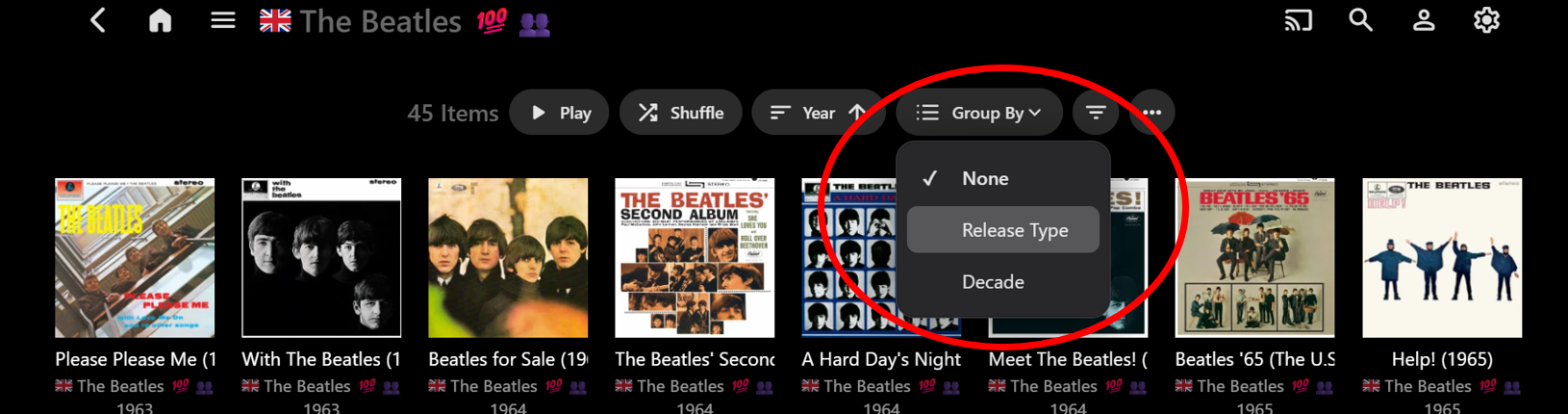
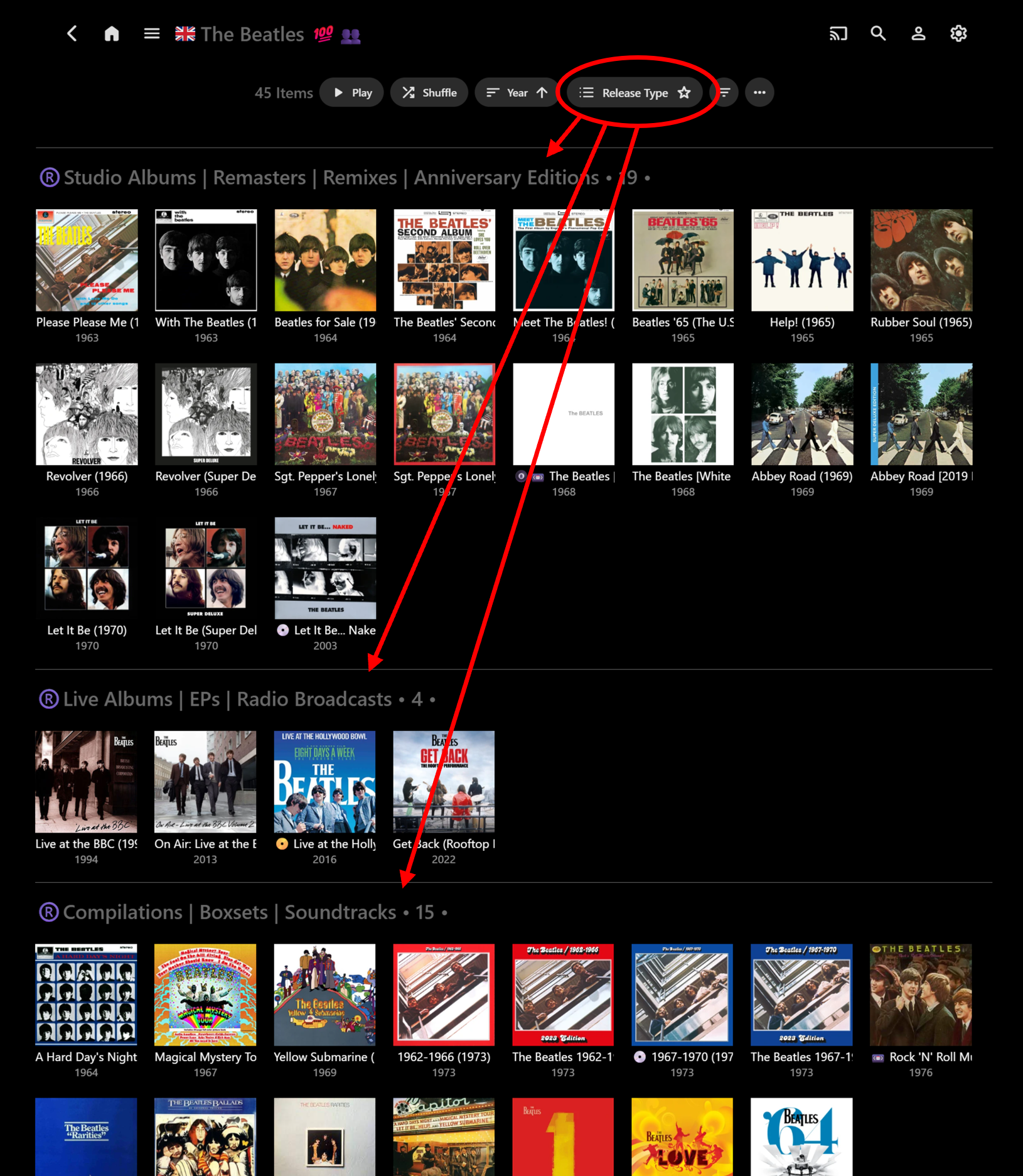
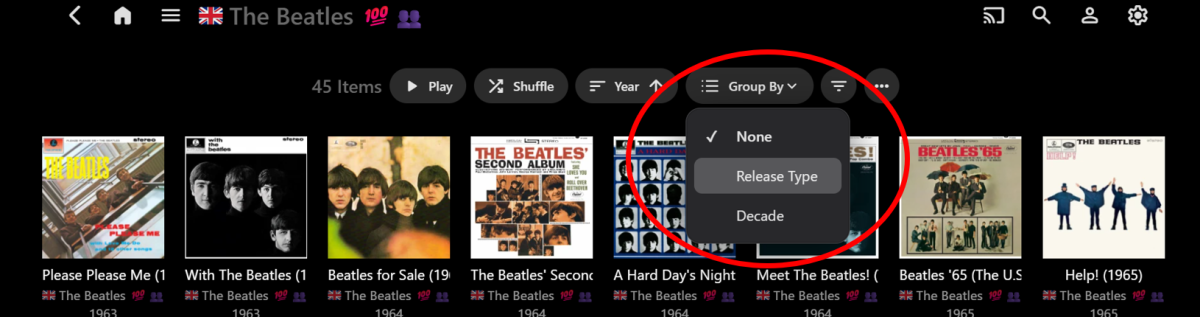
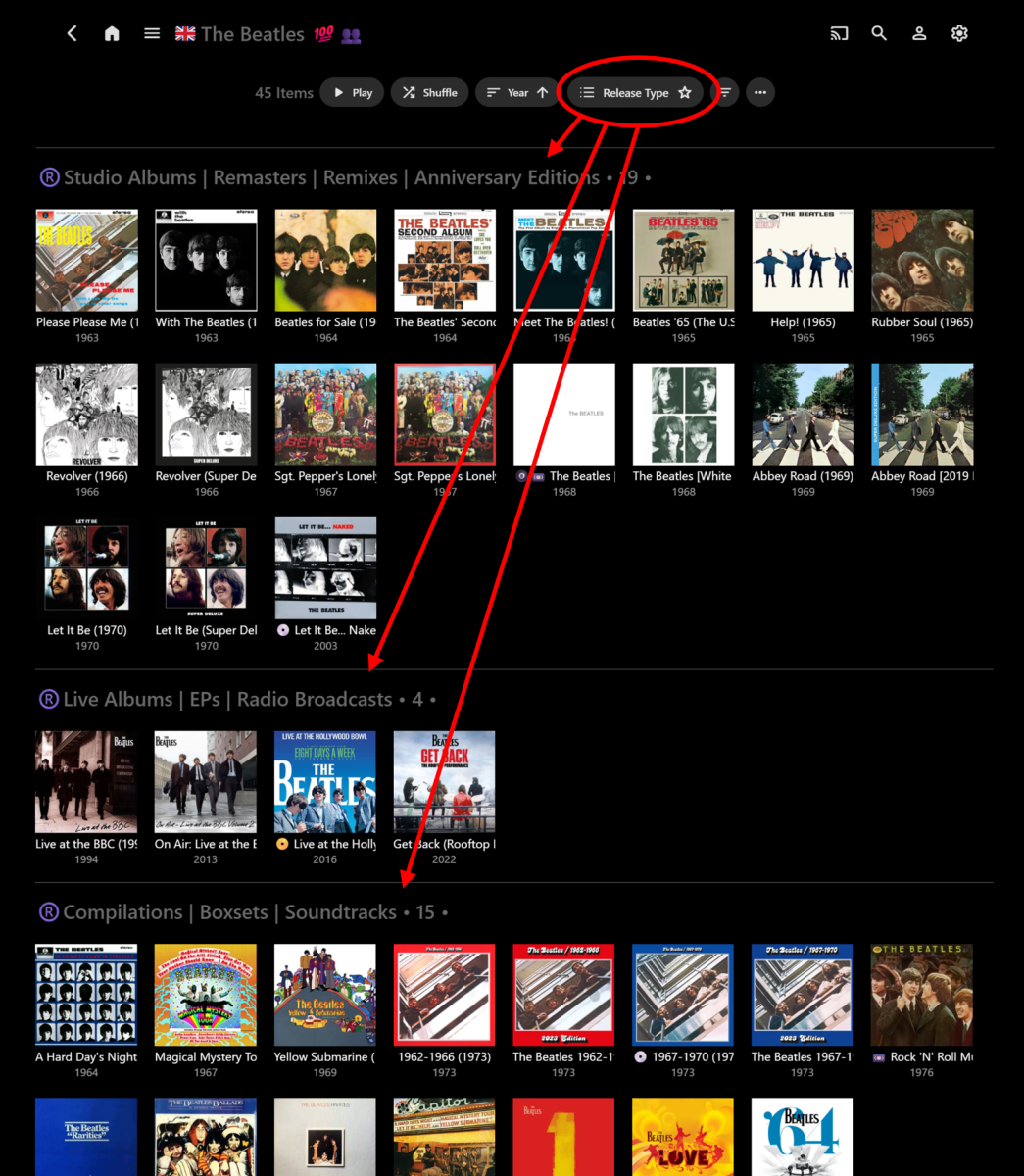
Well, thanks to some great help from @GrimReaper I've managed to use JavaScript to turn the Artist Albums pages into more of a Discography page, where you can Group and Sort Albums by either Release Type (from custom album tags) or Decade (from standard year tags). Does this automatically fetch Release Types from MusicBrainz? - No Does this automatically import embedded metadata from RELEASETYPE tags? - No Does this automatically Group and Sort by Album Release Types from your Emby Album tags? - Yes Does this automatically Group and Sort by Decades from your Album years? - Yes Here's a couple of screenshots: While this only works with the Web Client, it does give a good feel for what a potential native Emby implementation could be. It takes a bit of Album tagging work to set up for your preferred Release Types page view, but the Decades page view doesn't need any set up at all! For anyone wanting to experiment with it for themselves the detailed technical information is here: While it's not the magic automatic solution, perhaps we just need ROONALBUMTAG importation from Emby (as a faster first step) to make something like this easy to use. I'll be most interested to know if this is similar to what other people are wanting? Cheers!
 1 point
 -
please see also my (dutch) topic: https://emby.media/community/topic/147091-strange-behaviour/ - I will first try to recreate the 'thuis' user, because the problems almost always occur under this user.1 point
-
I suspect that my database is corrupt and would like to download the statistics manually. But first, I would like to know if I can add the statistics myself when I reinstall Emby from scratch? -such as which content has been viewed Additionally, I am curious what other data I can manually download/add to the new database --- I know that your advice is to download the backup plugin and run it as described, but then the error in the database is backed up immediately as well.1 point
-
Looks like this was quietly fixed. Thanks!1 point
-
The DVD folder playback issue is resolved now.1 point
-
Following up on this topic, the ability to search within a specific library remains an essential and unresolved need. In practice, the current all-library search continues to slow down workflows, surface irrelevant results, and make it unnecessarily difficult to locate known items in large, organized collections. For users managing multiple libraries by type or quality, this is not a minor convenience but a fundamental usability gap. Adding library-specific search would materially improve precision, speed, and overall efficiency, and still feels like a missing core feature. I hope I have not missed any recent developments on this. Cheers.1 point
-
So for this one. I played s01e02 fast forwarded to the end till the next screen popup. Did it three times before it failed and crashed emby to main TV screen. So the crash should be within a minute of this time. 2026-03-28 13:20:21Hell Mode - S01 E021 point
-
It is info already received from TVDB in the shows cache data ("finaleType") so it would have to be added to the database and the UI. Series "id": 8829884, "seriesId": 396564, "name": "Present Is Prologue", "aired": "2022-02-14", "runtime": 42, "overview": "Tensions rise as an attack is made on the Bois Blanc, putting everyone’s life in danger. Shanice and Logan do their best to keep Hayden safe, while Claudette and Jharrell try to reason with Manny. Meanwhile, Mildred still believes her sister can be saved and LaDonna takes to the streets in an effort to end the threat against the 4400.", "image": "/banners/v4/episode/8829884/screencap/625bf3202ca3e.jpg", "imageType": 11, "isMovie": 0, "number": 13, "seasonNumber": 1, "lastUpdated": "2022-08-16 13:19:32", "finaleType": "series", "characters": [] } Season { "id": 3891841, "seriesId": 196921, "name": "A Funny Thing Happened on the Way to Me Killing You", "aired": "2011-04-11", "runtime": 45, "overview": "Nora finds out the truth about Josh; Sally misses her \"door\", but gains new powers; Aidan has a final showdown with Bishop, with surprising results. We also see how Aidan and Josh first met.", "image": "/banners/episodes/196921/3891841.jpg", "imageType": 11, "isMovie": 0, "number": 13, "seasonNumber": 1, "lastUpdated": "2025-10-20 19:08:56", "finaleType": "season", "characters": [] }1 point
-
I don't believe it does - but I can see it would be a sensible idea. Paul1 point
-
Had a similar request to be able to configure a separate library which has no defined folder structure. Regex patterns can be used to locate files in the folders and attach to a TV series. For my scenario, each of these series have no associated metadata to be looked up, and each series is manually added with relevant metadata. Content of request pasted below. ------------------------------------------------------------------------------------------ I have live racing replay media which is not available in the normal "SXXEXX" or similar format, but is named "YYYY Round XX". Currently, I duplicate the content for tracking in emby which is renamed and spread across multiple folders for different series. I then keep another clean copy of the content for seeding. If we could provide a custom regex string for specific folders, series, or libraries for custom name handling of content, I could easily provide emby with the information on handling the content. Similarly, the regex string could also allow a single folder to have multiple separate TV Shows. For example Pre-Race show, Race and Post-Race show. For example, the content might be available in the following folder format: - 2026 AMA Supercross Rd 11 Detroit 1080p60 x265.mkv - 2026 AMA Supercross Rd 11 Detroit Post Show 1080p60 x265.mkv For the main race content, I could just a regex pattern below which provides season and episode as named groups, and would only get the race. 20(?'season'\d\d) AMA Supercross Rd (?'episode'[\d]+)( [a-zA-Z]+){1,2}(?:Post Show(*FAIL)|) [0-9p]+ x26[45] For post race content, a separate regex pattern for the series could be done which forces pattern matching for the post show. 20(?'season'\d\d) AMA Supercross Rd (?'episode'[\d]+)( [a-zA-Z]+){1,2} (Post Show) [0-9p]+ x26[45] This is one example, but other content might be 4-6 different races throughout the event with unique naming and tags. I was thinking each pattern could be added similar to adding "Folders" but each Regex pattern creates a separate TV series with all of the matches. Each regex pattern would scan all of the content in the indicated folders to build up the series database. Thanks,1 point
-
+1 vote for the Alternate/Joined order option1 point
-
Updates: Each season was significantly updated, new effects, better animations, and changed visuals all around. Every season has some big changes! Seasons are special 1 time a year events, so let's make them special as they are rarely seen. Fix for seasonal background animations happening when backdrops or video backdrops were present. Seasonal submit button fixes. Added variables background controls to control background animations for the seasonal areas, I know the background animations are not for everybody. Look for this block: /* ============================================================ THE "SEASONAL BACKGROUND" TOGGLES (DEFAULT: ON) Controls the heavy background layers (snow, petals, fireworks). Uncomment ONE of the blocks below to change the behavior. ============================================================ */ /* OPTION 1: FULLY ENABLED (Default) */ --seasonal-bg-visibility: visible; --seasonal-bg-anim-state: running; /* OPTION 2: PAUSE ANIMATIONS (Keeps the art, stops the motion) */ /* --seasonal-bg-anim-state: paused !important; */ /* OPTION 3: HIDE COMPLETELY (Removes the art and animations entirely) */ /* --seasonal-bg-visibility: hidden !important; --seasonal-bg-anim-state: paused !important; */ A lot of variable and hardcoded cleanups. And a lot of other fixes that I can't remember., and fixes to those fixes. This is still very much a work in progress, so there might be many updates. As this has now turned from 1 theme into 9 themes in 1. Be sure to follow this thread so you can know when updates occur . Also, what would you like to see, changed, added or modified; what do you like or dislike. feedback is golden. Also be sure to activate that Easter theme, it's that time of year... Enjoy! Emby Navy and Gold v3.15.css1 point
-
Nice idea really, but a more natural approach would be to integrate it directly into this section where you can already filter by title, year, date added, critic rating, runtime, etc. That’s the only solution that really makes sense. Current workarounds - like creating playlists or adding the country as a tag - are acceptable, but they’re still just workarounds. They don't follow the workflow. The country information is already available when tagging a film, so requiring users to add it again creates unnecessary extra work.1 point
-
Updates: Spinner Fix: Resolved issues with multicolored loading spinners. Media Badges: Refined the styling of media pop-out badges; the pop-out style is now set as the default. Visual Cleanup: Removed glow effects from seasonal media card hover effects to improve UI consistency. Code Refactoring: Successfully migrated all hard-coded colors to CSS variables for easier customization. SVG Rendering: Resolved image encoding issues to ensure SVG assets display correctly in Firefox. Firefox Compatibility: Added a critical notice regarding Firefox compatibility above the seasonal toggles. To maintain a pure-CSS approach and avoid JavaScript or index file edits, certain container statements must be commented out until a native CSS workaround is identified. BROWSER COMPATIBILITY NOTE: Firefox does not currently support CSS Style Container Queries (@container style). To enable seasonal themes for Firefox, you must manually comment out the @container wrapper line and its corresponding closing bracket within the seasonal CSS section. So, unless there's some big issue I find, or request; I'm pretty happy with the state of the theme. the @container() compatibility issue I think will resolve itself in time. It is sort of a bleeding edge feature. Some seasons will be improved; I'm going to use easter and Halloween as my benchmarks. I'll post updates to those in time. or follow the GitHub link inside the CSS. Enjoy! Emby Navy and Gold v3.5.css1 point
-
Darn. I was hoping I wouldn't have to do any monkeying around with the files. I think Emby could improve the default logic and help the user out. If there is no " - " then just use the extension or something useful.1 point
-
Hi, I tried KODI with the "emby for kodi" plugin. Frankly, it's complicated and ugly. There are multimedia players that natively read ISO files (Zidoo or Dune, for example). Wouldn't it be possible for Emby to use the native functions of these devices?1 point
-
Hi, yes this is what I think we should do.1 point
-
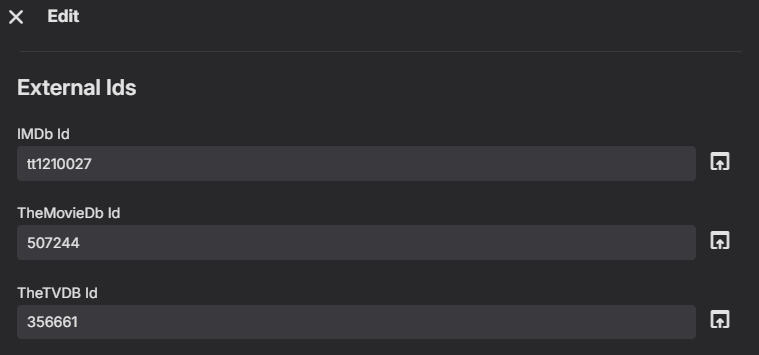
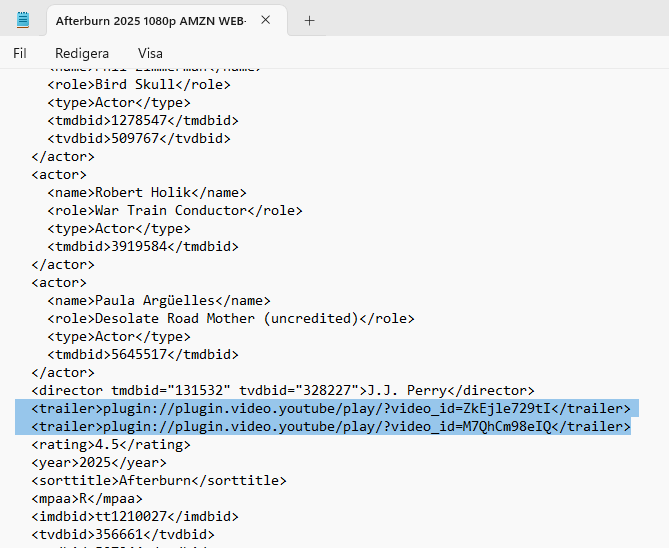
Just my opinion - but I think this problem can be easily solved. If you save .nfo files in your library settings, you can see in them that there is one or more lines for trailers. <trailer>plugin://plugin.video.youtube/play/?video_id=ZkEjle729tI</trailer> <trailer>plugin://plugin.video.youtube/play/?video_id=M7QhCm98eIQ</trailer> It works the same way as example the ID:s from TMDB/TVDB/IMDB: <imdbid>tt1210027</imdbid> <tvdbid>356661</tvdbid> <tmdbid>507244</tmdbid> When it comes to ID:s those can already be modified in the EMBY interface: I believe it would be pretty easy to make a similar options to put Youtube ID numbers for trailers into the interface? Maybe our clever developers can look into it? Myself, I sometimes edit the .nfo files when a trailer is "dead", has a strange language, is not relevant or has a very low quality. Only in very few cases I need to download a file and add it next to the movie file. (Downloading from Youtube with good quality can be very tricky, even if it is possible). Here is how it looks in the .nfo file:
 1 point