Leaderboard




Popular Content
Showing content with the highest reputation on 03/18/26 in all areas
-
Samsung TVs do not passthrough audio formats such as TrueHD or DTS. Look for the table similar to the one in the link below in your user manual. https://developer.samsung.com/smarttv/develop/specifications/media-specifications/2022-tv-video-specifications.html Any audio codec not in that list has to be transcoded by Emby or the file will not play. You can test this out by turning off allow audio transcoding in your user playback settings on Emby server. Turning that off will force Emby to passthrough all audio formats. The solutions are: allow the server to transcode any unsupported audio select a supported audio format before clicking play. Most UHD discs come with an alternate AC3 track at 640kbps hook up an external box such as nVidia Shield which supports TrueHD, DTS, etc to the input port of your soundbar and use the Emby client app for that device instead.3 points
-
Just to update the community, all went very smoothly with the user data. My VirtualTV plug-in config was completely screwed up, so I just reconfigured from scratch. Everything else is perfect with a bit of tweaking (had to set up some new permissions for backups to work; a bit of faffing to get HTTPS working, but nothing I couldn't work out). If anyone else is doing a migration like this, just drop me an email or a line on this forum (my email is annoyingly my display name, and I can't change it ), and I can help you if there are any steps you get stuck on!2 points
-
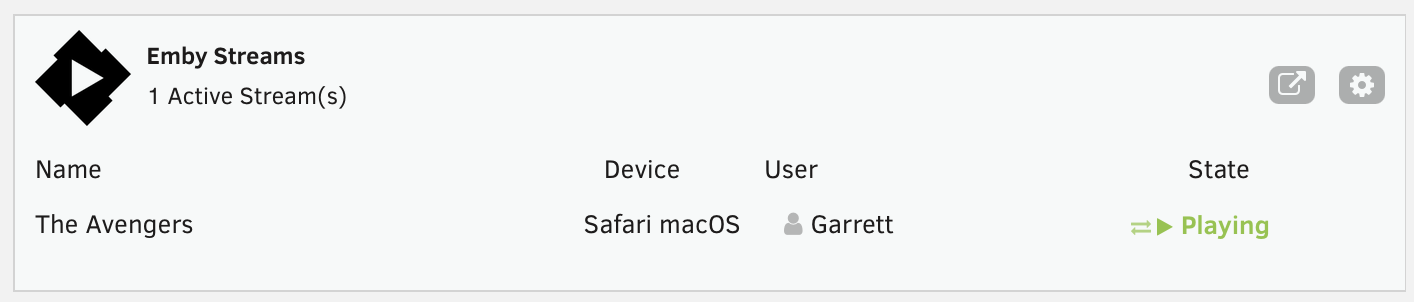
This is a simple Unraid plugin that adds a widget to the Unraid dashboard. The widget will show: All active streams The user streaming The device it is streaming on And the current state with icons indicating normal playback or transcoding. I don't have plans to really expand the feature set, except to maybe change the current state to the current streams timestamp or progress. Otherwise the current state really meets my needs but I'm open to feedback and suggestions. If I get enough feedback, I'll work on packaging it correctly and submitting to the Unraid Community Apps store. As of now, you manually install the plugin by going to Plugins > Install Plugin > and pasting the url for the plg file. You can click on the cog on the widget or in the installed plugins list, click the emby icon to go to the settings page. You'll need to enter the server ip, port, api key and choose a refresh rate. It currently defaults to 5 seconds. https://github.com/gthrift/unraid-embystreams/tree/main
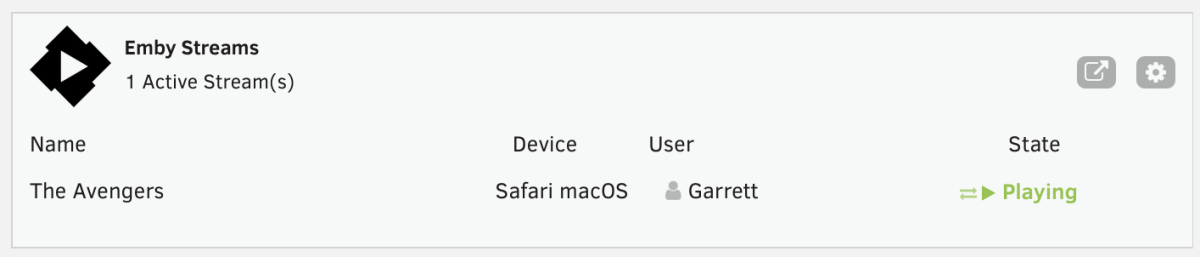 1 point
 -
Genre by genre, I refreshed md with option to replace existing images, and that repopulated the pics.1 point
-
Un fallo en la redireccion de puertos. Gracias a todos1 point
-
credits_detector_backup+scan.sh: #!/bin/bash API_KEY="XXXXXXXXXXXXXXXXXX" EMBY_URL="http://localhost:8096" BACKUP_FILE="/home/pi/emby_backup/credits_detector_backup.json" LIBRARY_ID="242" echo "=== RESTAURANT BACKUP ===" if [ ! -f "$BACKUP_FILE" ]; then echo "No hi ha backup, en creo un inicial..." curl -s -X POST "$EMBY_URL/emby/CreditsDetector/ExportCreditsBackup?api_key=$API_KEY" \ -o "$BACKUP_FILE" echo "Backup inicial creat" else jq -Rs '{JsonData: ., OverwriteExisting: false}' "$BACKUP_FILE" > "${BACKUP_FILE}.ready" curl -s -X POST "$EMBY_URL/emby/CreditsDetector/ImportCreditsBackup?api_key=$API_KEY" \ -H "Content-Type: application/json" \ --data @"${BACKUP_FILE}.ready" rm -f "${BACKUP_FILE}.ready" echo "Restauració feta" fi echo echo "=== INICIANT ESCANEIG ===" curl -s -X POST "$EMBY_URL/emby/CreditsDetector/StartDetection?api_key=$API_KEY" \ -H "Content-Type: application/json" \ -d "{\"LibraryId\":\"$LIBRARY_ID\",\"SkipExistingMarkers\":true}" echo URL="$EMBY_URL/emby/CreditsDetector/GetProgress?api_key=$API_KEY" while true; do STATUS=$(curl -s "$URL") RUNNING=$(echo "$STATUS" | jq -r '.IsRunning') DONE=$(echo "$STATUS" | jq '.ProcessedItems') SKIPPED=$(echo "$STATUS" | jq '.SkippedItems') TOTAL=$(echo "$STATUS" | jq '.TotalItems') CURRENT=$(echo "$STATUS" | jq -r '.CurrentItem') echo "Processats: $DONE | Saltats: $SKIPPED | Total: $TOTAL" echo "Actual: $CURRENT" [ "$RUNNING" = "false" ] && break sleep 10 done echo echo "=== ESCANEIG ACABAT ===" echo echo "=== CREANT BACKUP FINAL ===" curl -s -X POST "$EMBY_URL/emby/CreditsDetector/ExportCreditsBackup?api_key=$API_KEY" \ -o "$BACKUP_FILE" echo "Backup guardat a: $BACKUP_FILE"1 point
-
That's what I did, I'm using for now version 2.2.8 that comes with Samsung1 point
-
Same problem on a Samsung UE55KS8002. The app installs, but when started a popup shows up with "wait one moment and try again". But the app never starts. There are no server logs as we do not get to the connection setup screen.1 point
-
Thank you, Luke!1 point
-
Hi, the next update to the Emby windows app should make it more like what you see in the web app. Thanks.1 point
-
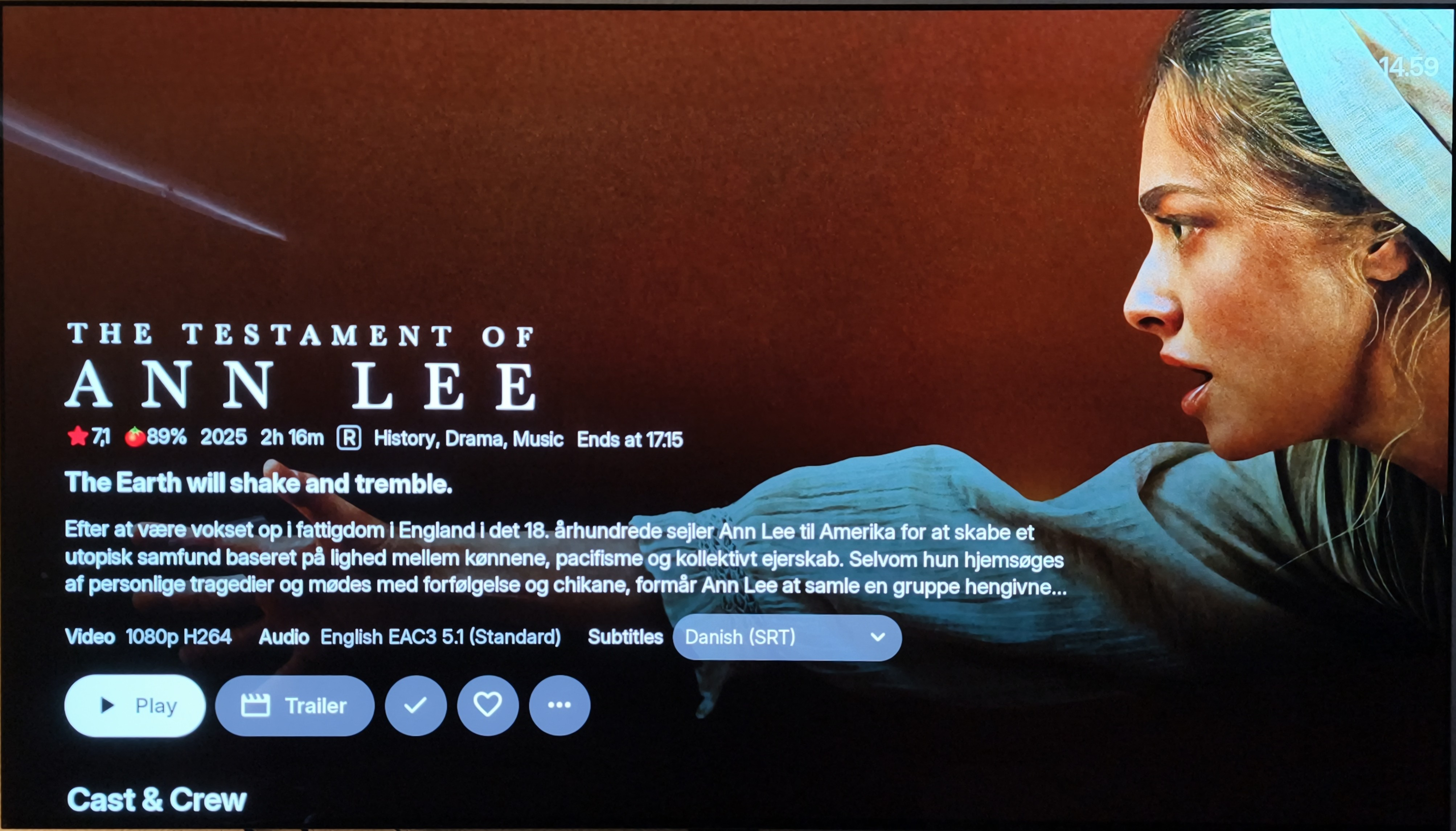
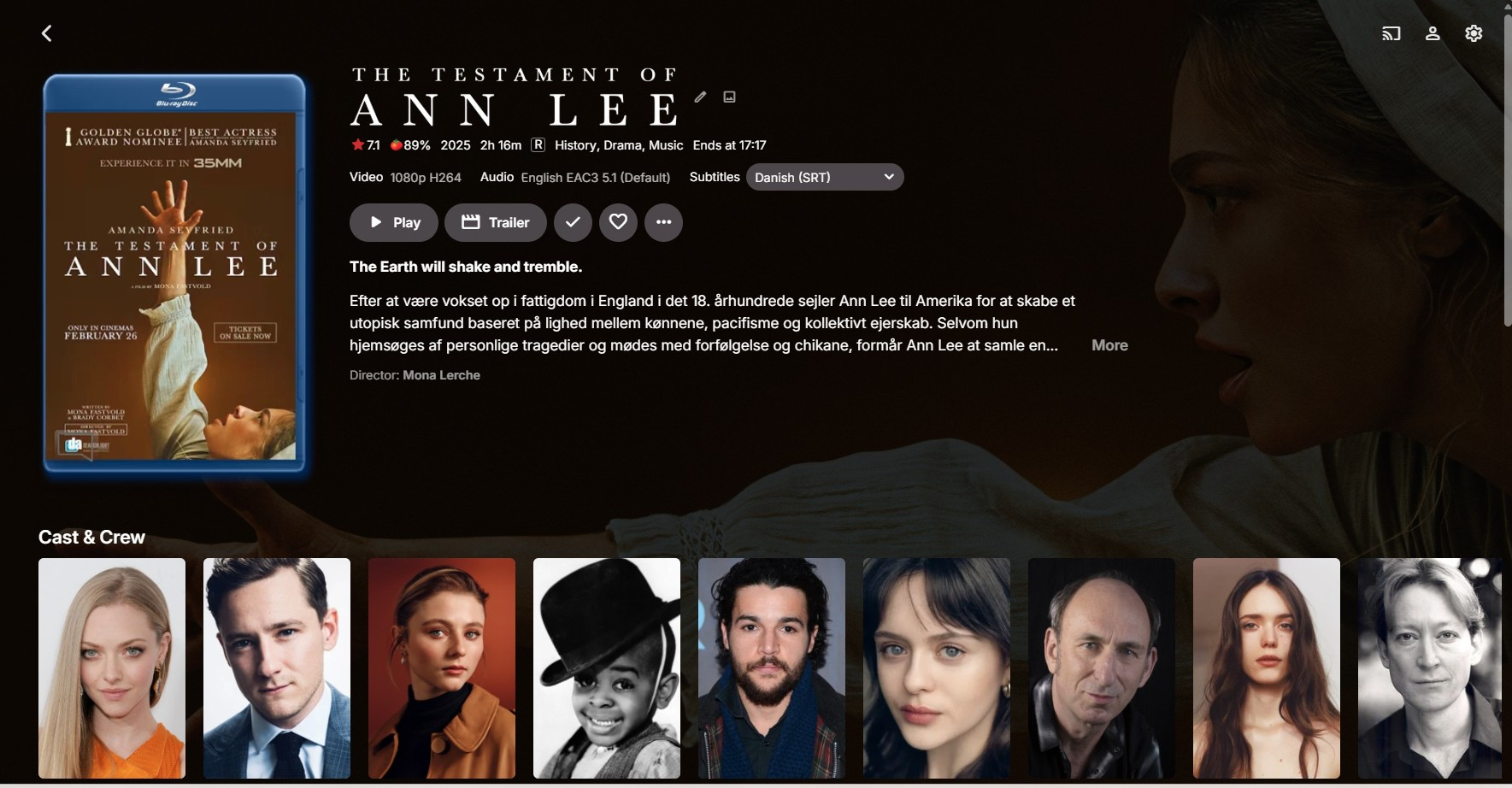
Hi, I don't know how long the director has been missing from the movie details screen, but I'm sure, that the director has been there in the past. I don't believe that's a deliberate choice. Director is the most important thing about a movie, and if you in Cast & Crew have f.ex. 50 actors, you have to scroll and scroll and scroll to find the most important thing. That's why it is displayed in the Emby web app in the first place. As you know most of us are watching movies on our televisions. If this isn't displayed in any TV layouts, it's about time, because it has been there once upon a time. Attached is a screenshot from LG TV app and from the same page from Edge browser in Windows 11, where you can see the Director just below Overview field.
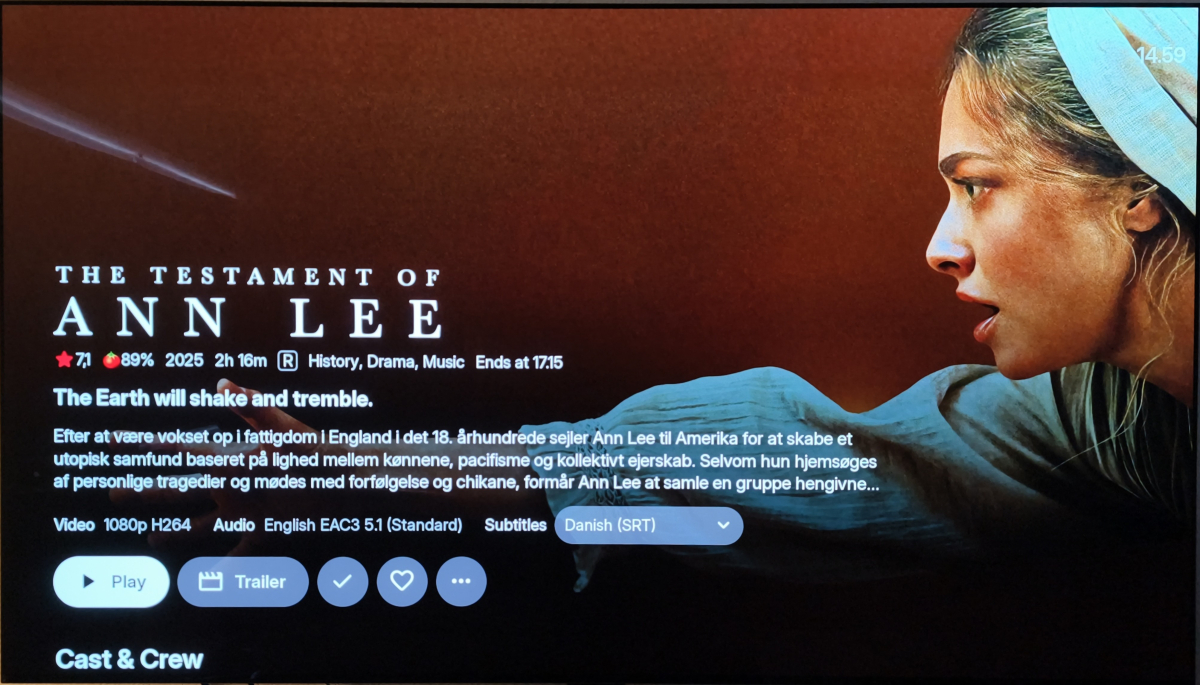
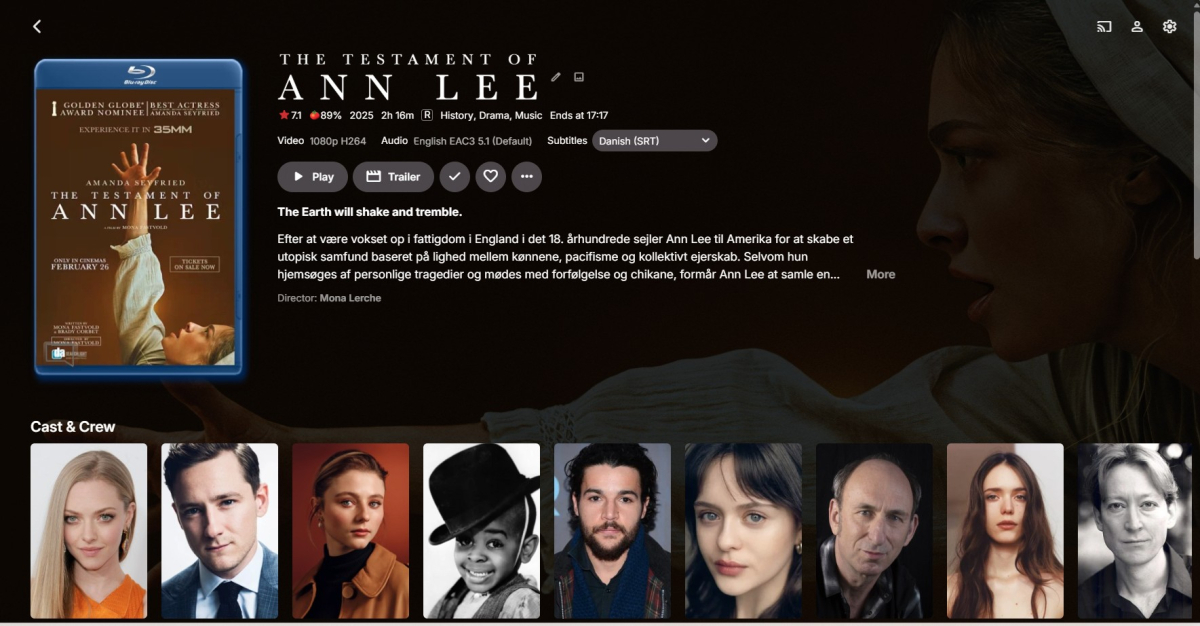 1 point
 -
And a minor api endpoint modification request: pass user id on /api/assistant/chat When calling /api/assistant/chat, there is no way to specify which user the request is on behalf of. All calls made with a single service API key are attributed to the key owner, making it impossible to maintain per-user context (recommendations, history, preferences). I believe is due to const user = request.user as SessionUser (API key owner) and const { messages } = request.body (no userId accepted). On a high level, it would be something like this on src/routes/assistant/handlers/chat.ts // NOW: interface ChatBody { messages: UIMessage[] system?: string } // AFTER Add userId? to the body interface: interface ChatBody { messages: UIMessage[] system?: string userId?: string // optional override from external system } // NOW: const user = request.user as SessionUser const { messages } = request.body // AFTER Resolve the effective user right after const user = ...: const user = request.user as SessionUser const { messages, userId: requestedUserId } = request.body const effectiveUserId = requestedUserId ?? user.id // ?? means: use requestedUserId if provided, otherwise fall back to user.id // NOW: const systemPrompt = await buildSystemPrompt(user.id, user.isAdmin) const toolContext = { userId: user.id, ... } // AFTER Replace the two occurrences of user.id downstream: const systemPrompt = await buildSystemPrompt(effectiveUserId, user.isAdmin) const toolContext = { userId: effectiveUserId, // ← this is what scopes recommendations/history to the right user ... }1 point
-
Nice idea I’ll put this down on my to-do list for next release. Shouldn’t be too hard to fix.1 point
-
does it not show in webos24 emulator? it looks like a style sheet error as seems to affect home screen in horizontal view only (TV). TV affected still hasn't received the webOS25 update from LG yet as they are taking so long - so no idea if webos25 affected on the "B6" 48" OLEDS1 point
-
We are not designed to be file browser but, if you set your library type to "Home Videos" then you may get what you want.1 point
-
Hola @Trufa2011, revise usted la ip externa y el puerto, no hay muchos mas. Un saludo.1 point
-
I've been testing the new version since the day you posted it and I still have the same problem, the CreditsStart mark disappears when I click the "Next Episode" button. It's not a problem for me because I restore backups with Cron, but if you need any proof or logs just ask me.1 point
-
1 point
-
@LukeI just discovered the new poster view update on the home screen. Emby has reached a whole new level of perfection. No need Plex anymore. THANK YOU! Do you think it would also be possible to choose the image (poster view or thumbnail) when the spoiler option is enabled? Because in poster view, it’s the thumbnail that’s displayed on the home screen.1 point
-
Ah, Ok, that was my mistake, I haven't realized that you could combine custom text and placeholders - no need to add anything, thanks. No worries, I'll just CSS it.1 point
-
Hi and Thanks again. I apologize if it seemed I was not acknowledging the main issue resolution. I appreciate the work and can validate that turning it of makes all the difference while this secondary issue exists. I am happy that you can see the weirdness in the General Title field. If you need me to test anything, let me know. We all appreciate the continued support of this plugin.1 point
-
I didn't add those on purpose so people can customize it them self and/or for multi languages. I could ofc. add some placeholders as you suggest that people can remove if they want. I don't think it is possible to center the banner text.1 point
-
Happens to everyone, I also have my "moments" every now and then, literal .1 point
-
1 point
-
Looks like this is fixed1 point
-
Bugger, was hoping for an easier way to duplicate stuff.1 point
-
I'm of gonna have to agree with rbjtech on this. Try to name your groups very specific so you know what they are supposed to do. Use the native/built in home screen section manager to add multiple tags. Then you can have a home screen row with both "spotlight", "christmas_spotlight", "halloween_spotlight" for the same row. That might be easier to administer with scheduler, and not using the override setting for all. I don't really see what more visual things to add. I don't want to clutter the UI. To be honest this sound like trap you have set up for yourself... But give me a good example and it would be easier what type of flags/visuals you want. A picture in Paint is very helpful! The plugin would not load if running 4.9.3.0. From plugin version 3.0 it's built with assets from the beta server that's not available for server v4.9.3. You could give it a try, but my guess is that the plugin wont load in. From my experience the Emby devs are releasing very stable betas. I have always used the beta for my live/production server, with very few issues. Th latest beta gives huge improvements to Emby, so i kind of suggest to try it out! Releasing it as stable is probably not too far away either.1 point
-
Not sure what do you mean by that?1 point
-
Yeah, check it out, it's really slick how it will match a movie's rating and then play a stinger that matches that rating. I'll report back if I find out how to do it again.1 point
-
Hi, you can use an animated gif as the main poster of a movie or series.1 point
-
For some reason you have to disable all transcoding for the user that is using the Apple TV for proper Dolby Vision playback (this can cause issues with other devices this user uses so I would recommend making a separate user just for the Apple TV). The Emby Server for some reason wants to convert the stream server side when the Emby App is capable of doing it on the Apple TV itself which causes the issue with Dolby Vision. By changing these settings it also allows for direct streaming of other things such as PGS subtitles which puts less load on the server and makes the Apple TV a smoother experience. Hopefully they change this in the future but for now this is the only way to get proper playback for the Apple TV with the Emby App. Let me know if you need more information or help.
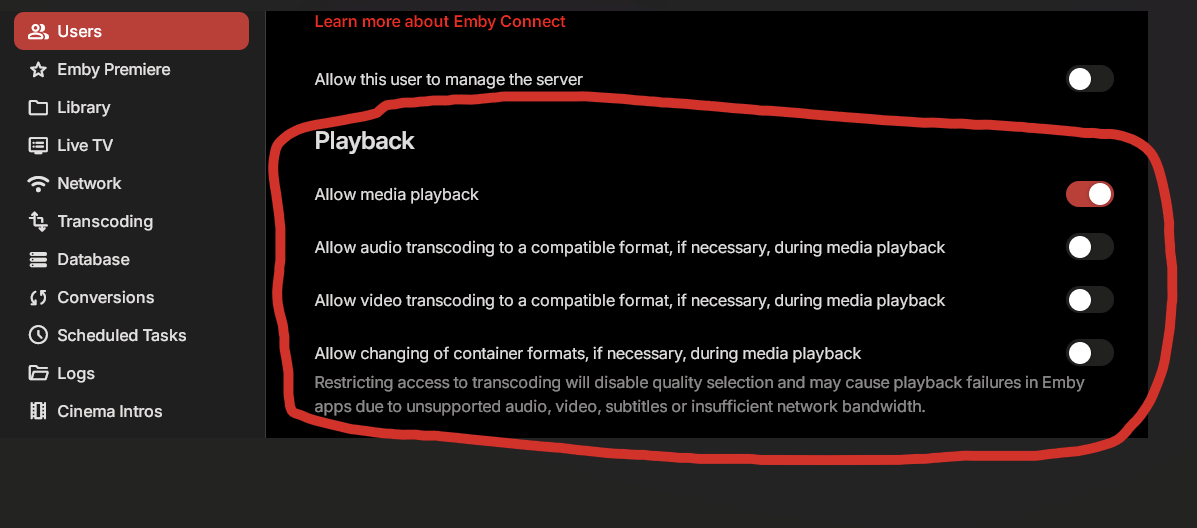 1 point
 -
Nevermind... Resolved. I changed the Metadata to match, refreshed / rescanned metadata, cancelled the series recording and re-scheduled a few moments later.... all resolved, existing episodes are now correctly accounted for.1 point
-
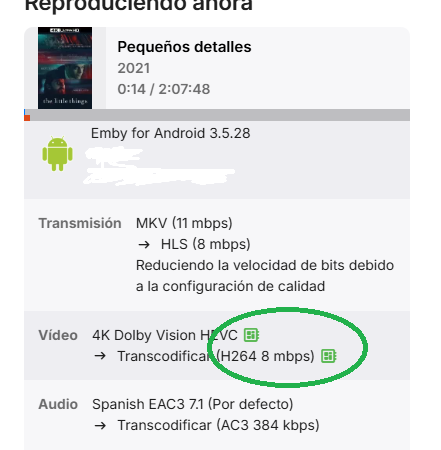
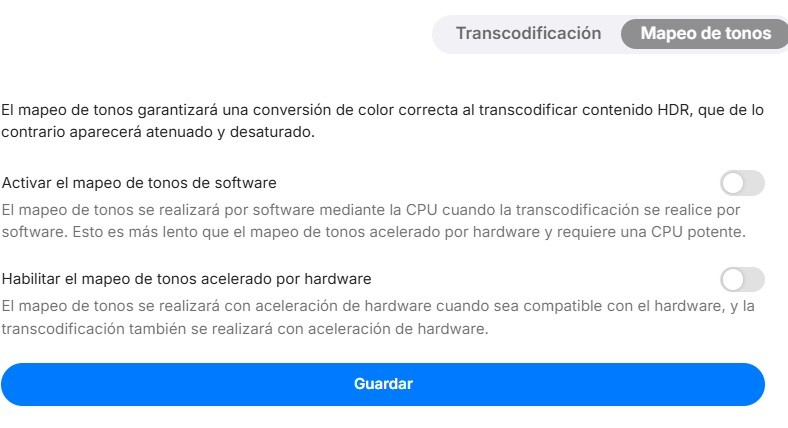
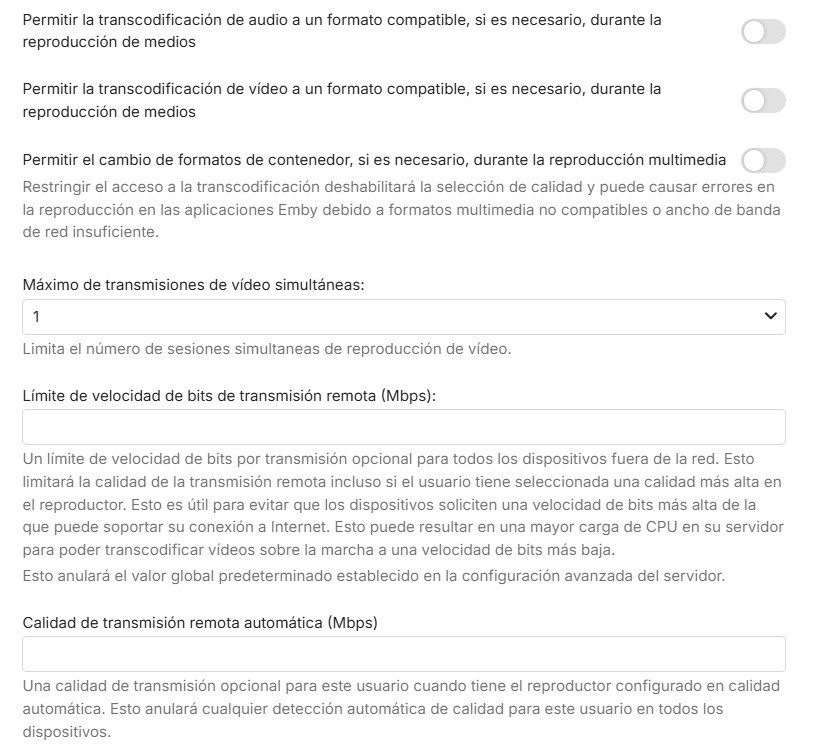
Hola Victor. seguro que @Luke te ayuda mas que yo. Pero por curiosidad, en que equipo tienes el servidor montado? cuales son sus recursos? Por otra lado veo que todas las emisiones te haces transcodificación, si ves que los clientes (las tv´s) pueden con los medios, yo quitaría eso de la configuración del servidor ya que leí que tenias configurado 4k-200mb, a mi pensar imagino que se te pausan por estar transcodificando a todos los clientes y puede que el servidor no de más de sí. Yo probaría a quitar esas opciones y configurar a los clientes a 4k-200mb o lo máximo que te permita configurarlos y hacer que el servidor haga todo en transmisión directa. Por otro lado si haces transcodificación por hardware fíjate que salgan los iconos verdes , eso te dice si la GPU ayuda en la tarea, las que pones hacen referencia al audio, las tv Samsung no aceptan DTS y algunos codecs de audio, mira según tu modelo tanto en uno como en la LG o cualquiera que usen. Sobre el HDR en emisiones en directo pasan el contenido pero en la transcodificación tienes que ver si en los ajustes del servidor, transcodificación, mapeo de tonos lo tienes activado. Yo no lo tengo activado por que tengo todo en transmisión directa, así no saturo el servidor y todo va mas suave.
 1 point
 -
Hola, disculpa no he podido contestar antes, al parecer algunos archivos de metadatos quedaron en las carpetas de medios y al escanear quedaron con esa información, ahora parece ir todo bien. Esta es la estructura que tengo en la carpeta de documentales, La tierra (2026) sería documental, El espacio (2026) sería serie documental. Muchas gracias a todos por la ayuda. Documentales La tierra (2026) La Tierra (2026).mkv El Espacio (2026) El Espacio S01E01.mkv El Espacio S01E02.mkv El Espacio S01E03.mkv1 point
-
Prueba con contenido mixto.1 point
-
Currently no, but maybe in the future, the reason its a no for now is that its too complicated right now. My old website is zst tarballed at the moment on a rdp client which I don't have access to at present. Its also 657GB, which is huge when it comes to decompressing , sorting, torrent-ing etc. I know there are over a million files in the directory you want alone. When i am sorted as linux is brand new to me, I will look at it again.1 point
-
If anyone is interested, I've just released an unraid plugin for displaying active streams on your unraid dashboard. I'd love some feedback.1 point
-
Hi there, please check out our quick start guide: Quick Start1 point
-
Hi, as soon as we submit 2.2.9, and then as soon as it gets through the Samsung review process. We currently have 2.2.8 in Samsung review.1 point
-
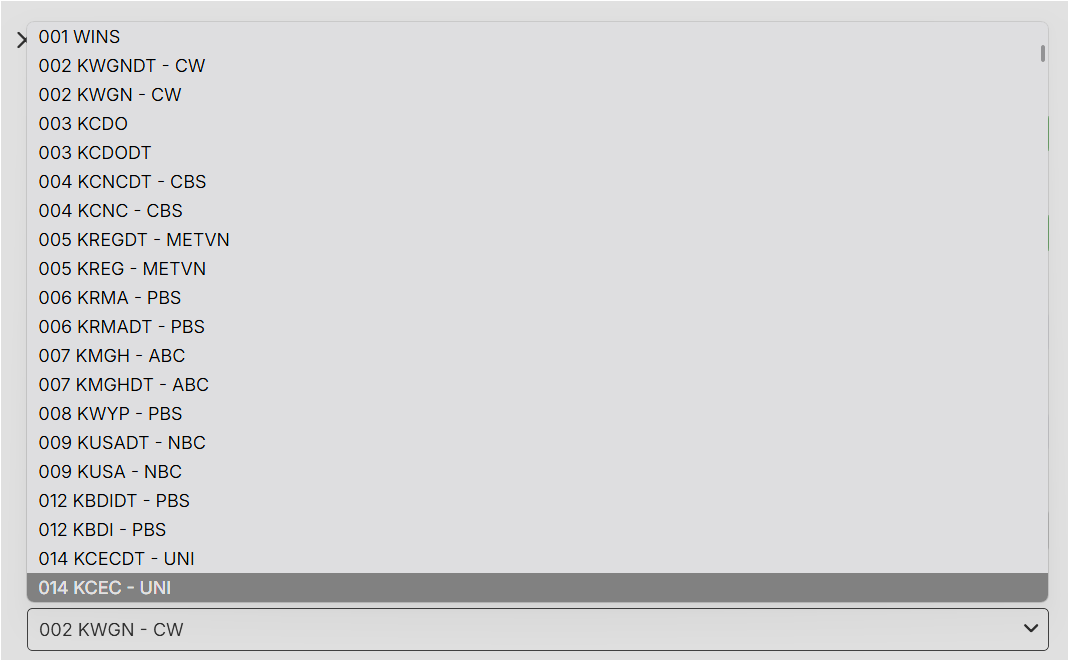
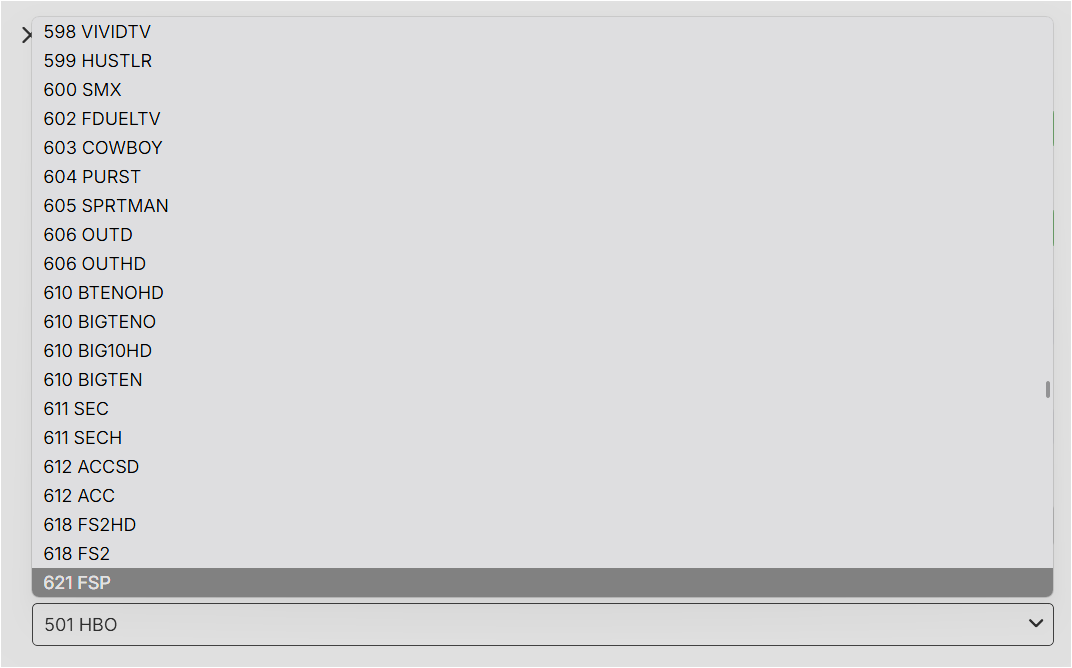
I want to bring this back up! Trying to match channels to their respective guide data entries can be pretty painful - most of the time I know the channel code or something close to it, but I can't search that on the selection dropdown because key entries in this field just search left to right via numbers. Ultimately, I end up needing to go hunt down the original guide data (like the local version of the DirecTV guide I have selected here via Emby Guide Data) to find the matching channel number, or risk spending an awful amount of time scrolling and rescrolling past 800+ channels on this dropdown to find the needle in the haystack. Thanks for consideration
 1 point
 -
This is not strictly correct as, I strongly suspect the reason you are seeing this is due to the audio format (probably TrueHD or DTSHD).0 points