Leaderboard




Popular Content
Showing content with the highest reputation on 03/13/26 in all areas
-
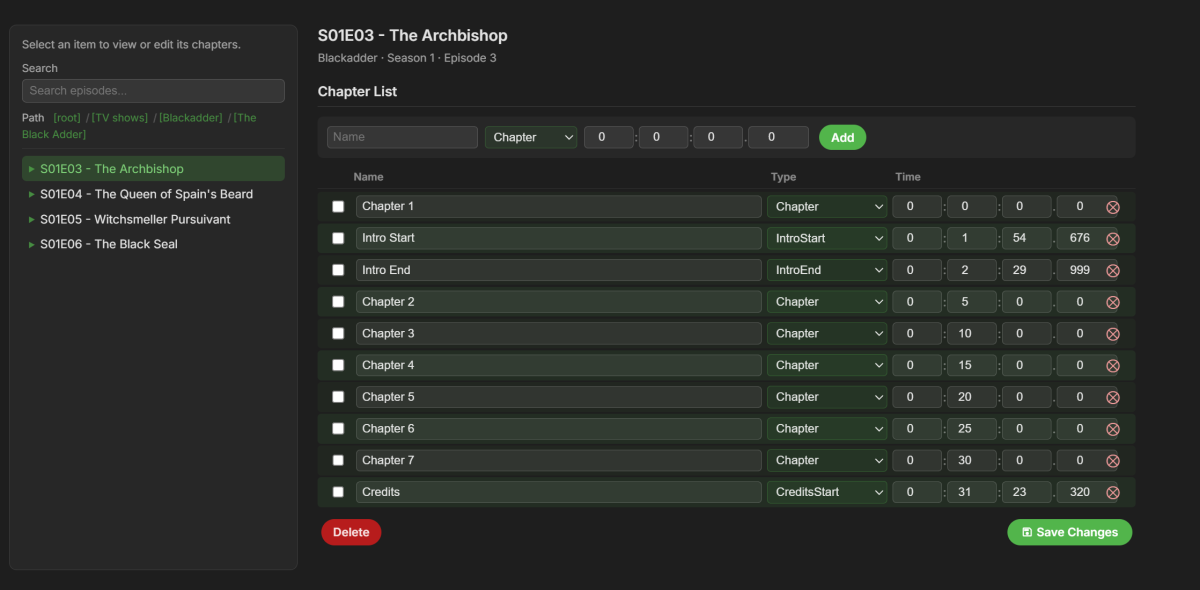
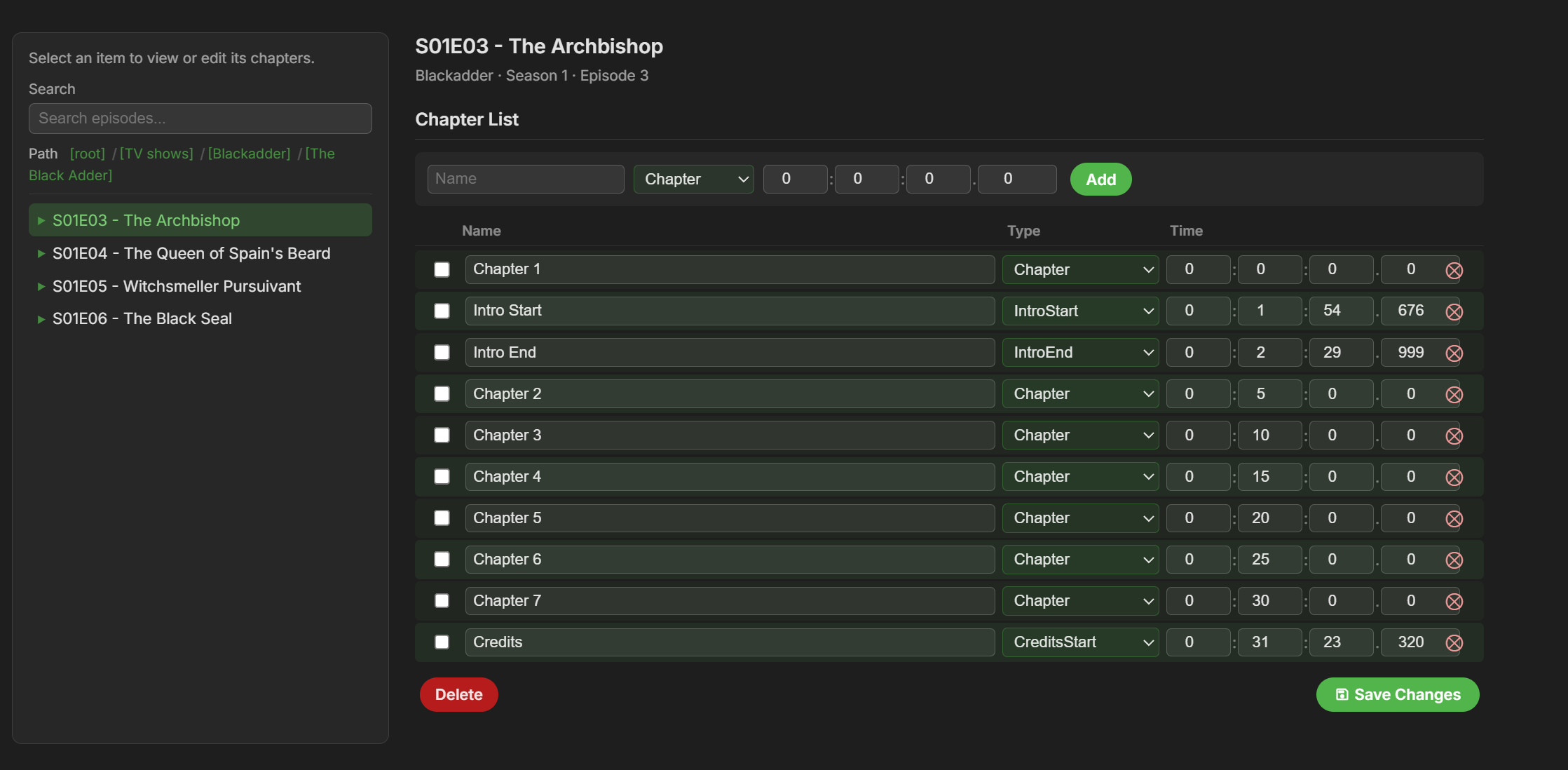
There is a new bug fix out for this version!!! ----- New version out (v2.3.4) at yocksers/EmbyCredits Github. Added: Plugin now checks when a video has changed and sees if the time stamps are still there and if not restore them if they are present in the backup files. This feature can be turned on and off. This has been made to fix the problem of Emby sometimes deleting time stamps. Added a Chapter edit function, this can be found in the Chaper Edit tab. This was heavily inspired by Teams B Chapter API so a special thanks to him! Added an automatic skip intro blocker. When activated for a series it will stop intros from being automatically skipped if configured in Emby. This is for is people want to automatically skip some intros but not others. Changed: Backup system has been changed to save files per TV show instead of one big backup file. This was done for user friendliness but also to make the auto restore system work better. Fixed: Minor bug fixes that should not be noticeable to users. Special thanks as always to @Neminemfor help with the plugin. @spk2010@DarWunI finished and added the "fix" to Emby deleting the time stamps. Hopefully this will fix all the problems with Emby doing that until the devs look into the problem.4 points
-
I agree that for immediacy and non-technical users something is better than nothing. But we also have to be careful and not give those same users a false sense of security. Don't want them to think that changing their port range is a one-and-done fix and now they're secure...all good! As @rbjtech and many of us have posted before there are basic security hygiene steps the non-technical admins can apply on their servers. This is because out of the box Emby has horrible defaults and very little if any guidance and warnings in the application itself. The devs could do a much better job of initializing Emby with better defaults and opt-in settings in the name of security. And if someone decides to change their external port they should pick a value that services like Shodan don't scan, which is difficult. Shodan says they scan for 250+ ports which is vague and the API has a much longer list. For example: https://api.shodan.io/shodan/ports3 points
-
Sadly, the Default security configuration for Emby it is imo extremly lacking - it simply does not change when people tick the 'Allow remote Connections to this Emby Server'. Below are just some examples of what COULD be done when the above option is selected : Remote Access is automatically removed for any Admins - you can overwrite this, but it should default to no. This renders any system API useless, as the Admin account has no remote access. If Admin is your only account, then you get asked if you would like to clone it (+ all it's play history etc) and this new non admin account has the remote access. Enforce a decent password for any Admin Account & any account that has remote access. It doesn't need to stupid entropy - nobody is going to be personally brute forcing your emby build (good brute force protection is built into emby) - but it needs to be enough to keep out bots and previously breached passwords. Set 'Hide this user' when remote Set 'Hide this user on devices they've never signed into'3 points
-
Global search?2 points
-
The ATV app has received a lot of recent updates, but you'll need to either side-load or sign up for the beta. See here:2 points
-
Server name indication. Simple: The reverse proxy just reacts when the specified hostname, e.g. emby.yourdomain.com is called by the client. Many simple bots, vulnerability scanners and automated scripts try to connect directly to your public IP address.2 points
-
Automating the scanning and attempts to breach reduce the level of effort to nothing. There's no inherent security in port values and trying to obfuscate the port doesn't add security. Once the server responds to a request then the application will be known immediately. You'd be better off adding Emby to the background noise by using a well known port (443) than trying to isolate it to a range that may confuse users, if you have any. If someone wants to secure their server then proven methods are better than obscurity. TLS is the most basic and facilitates others. A reverse proxy has become a must have. Enable SNI (many do by default) so that IP based requests are rejected. Enable IP geo-blocking. You can continue up the chain with IDS/IPS and more complex and robust measures. It all depends on the level of effort you want to invest and of course knowledge. A reverse proxy with SNI may be a good stopping point for most.2 points
-
Ah, that simplifies the content of .embyignore. Thanks, Luke. Unfortunately, this still means I have to put the .embyignore files up one level from the folder I want to hide… but of course, not any higher than the library root folders. It seems rather a shortcoming of this new system that it no longer supports any way for a folder to designate itself as ignored. Consider it a feature request, I guess.2 points
-
A little sneak preview of next version. This is !!!HEAVILY!!! inspired by Chapter API (a great plugin that i use a lot and can recommend). @rbjtechYou were involved in making Chapter API correct? Is it okay i release this? If not then i will change it instantly and apologize. The layout and functionality of Chapter API is pretty much perfect and people have been asking me to include something like it in this plugin.
 2 points
 -
I'd really like to have 2 Factor Authentication added to the login screen. It's just this (optional) extra layer of security to help secure the server (which, especially if people use camera uploads) contains pretty private data. There are for every type of programming language quite a few libraries available, so implementation on a server shouldn't be too hard to realise1 point
-
CSS custom style sheet for Emby by James - Visproduction on Emby Forum Theme: State Street Theater (ver 1) for Desktop / Notebook and some mobile Changeable Home Page background image Adjustable home page menus thumbnail sizes Backdrop changeable multi-color blended themes Colorful styling Clear background images with no shaded masks Interactive mouse hover effects for desktops and notebooks Hover slightly enlarge header icons Back button Delete button removed – Still available in Metadata pop-up menu Media Page file location removed Color coded buttons Soft focus behind media names and director Admin settings – Form positions and overlaps fixed TV shows and episodes boxes adjusted for desktop with alternating dark blue / green Adjusted for some mobile views Search area suggested links styled Buttons styled and fit for desktop, browser window sizes and some mobile. Metadata Save button moved up to stay in view (sometimes overlaps and made partially transparent) Home page background demo picture is from https://imgur.com/ . Please find your own background image. imgur.com site has extended image features and services. Notes: Getting all mobile types to work is complex and I am unable to test all screen sizes. Users can easily make use of the standard Emby mobile app, instead. The clear background without dark masks can make some texts more difficult to read. Desktops and notebooks have mouse over hover areas that change to a solid background color. Mobile users have some color changes to also help. Using less complex background can also make it easier to view the text. I like a lot of color and full, bright background images. The theme also includes extra space at the bottom of pages to view the entire background, without thumbnails in the way. Just scroll all the way down if you want to see the background. The custom.css file has a guide at the top with options to change: Home Page Background, from either online or a local image on your server. Adjust Home page menu thumbnail sizes. Change background blended colors for all pages without images; Libraries, Admin and user settings with various color blended themes. Examples are listed inside custom.css as comments. Be aware that this type of theme can possibly break with future emby updates. Enjoy and comments are welcome. Emby Web custom CSS theme - State Street Theater ver 1.0 - visproduction - emby forum.css
-Homepage.jpg.55da1adb5d86e91a1377709f18e7f3f7.jpg)
-Homepagelower.jpg.c0415b893774c9f2e2ac9db7a61d3004.jpg)
-Library.jpg.cd3dc21825a75a2b492c21cfcf0e24a0.jpg)
-MediaPage.jpg.e1aa88186e3bfcb7e31606eef887a46b.jpg)
-Playlistnormalbrowserwidth.jpg.81599af91e448334e8e7158fa794c4bc.jpg)
-Playlistwithsidescreenbrowser.thumb.jpg.7c0185d03e63df636204df676e0af90f.jpg)
-TVShowEpisodes.jpg.b35e5a75757e395790370b952e2cc364.jpg)
-Collection.jpg.5ec99152b1f4edce6d01323fbf5098d3.jpg)
-LargeMobileMediaPage.jpg.39ede6565146c53d830ba8d495aa854f.jpg)
-SmallMobileArtistpage.jpg.ad9b027df51f5c943c755c19b2a6d797.jpg)
-Settings.jpg.18fab3be37f98cabd052fb71f5bde7c7.jpg) 1 point
1 point -
I'm a plex life time member, but I have been using Emby for over six years continuously, but there is a feature which I have always thought is missing in Emby which I would like and encourage the developer to consider including especially in this dispensation where families can social or commingle due to COVID 19. Today, I received a notification from Plex about it new feature titled Watch together you can read about it here https://support.plex.tv/articles/watch-together/ The feature allows friends and families at distance to watch same movies together instantly, you simply invite all your buddy, once they signed to the system which can be seeing in the server then play and pause as needed, this I think is cool feature should be added to emby. Let's here your though if Emby developer should consider adding this feature to our beloved Emby Media https://www.bing.com/news/search?q=Plex+Watch+Together&qpvt=plex+watch+together&FORM=EWRE1 point
-
Hi, yes we are working on a new ffmpeg build for the server that should be on the beta channel soon.1 point
-
Yeah, just to show support adding the feature is fine, but breaking the old one means people will need to" go find all the folders where the .ignore files used to be navigate one level up, and then create a new file, and copy the path of the old ignore file repeat for every folder where they have ignore files. this is tedious. all with no real heads up about the change, and most of us probably already tried to replace our .ignores with .embyignores with a * in the file. kind of a bad UX decision, IMO1 point
-
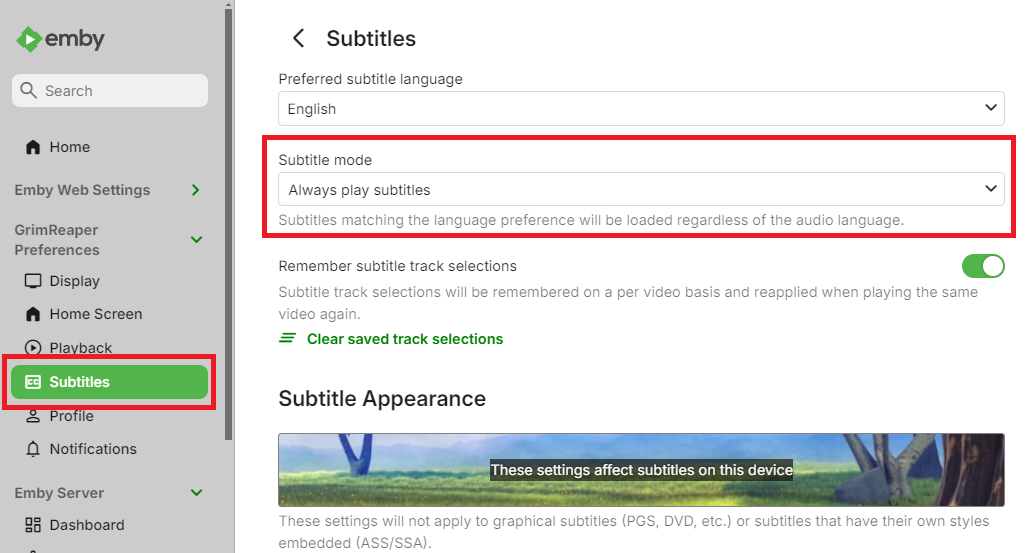
It appears system is selecting audio/subtitle tracks as configured, based on your previously played episode. You might want to disable/toggle off "Remember saved track selections" here so it doesn't carry over:
 1 point
 -
Yeah, it shouldn't... there's always been random issues with each platform, with the web browser being the most successful. For a while it was the FireTV, now it's the Samsung app that is the sketchiest.I'm not sure why the provider would be blocking me, but their service has gone way downhill since they sold the business. I am going to take out some time to hammer on my local video content & see if I have better results. I should have taken that step earlier, but somehow I didn't think of it. Thanks for the help.1 point
-
No, it will auto-detect your remote ip if left blank.1 point
-
Grim, that's the ticket, enabled and refreshed a couple and they now have thumbnails for the episodes - thanks. Since that's last in the order I'm assuming that it'll go to the other sources, tvbd etc. first and generate one as a last resort. Luke, attached is a mediainfo on that file, at the bottom it has a thumbnail of that episode as an attachment in the MKV. What/when/if anything are those attachments used in Emby? With a file explorer (windows) add on they show up in a folder view instead of generic icons. mediainfo.txt1 point
-
Bei welchem Anbieter bist du? Tippe mal Telekom oder Vodafone? Je nach Anbieter wird die IPv4 mehr oder weniger häufig getauscht. Wenn du nun DynDNS nutzt, ist es wichtig dass du dich über die bei NoIP vergebene DynDNS-Adresse von ausserhalb mit deinem Server verbindest (also z.B. NCAA1701AsServer.ddns.net:8096), damit du auch nach IP-Wechsel weiterhin Zugriff auf den Server hast. Unabhängig davon kann ich dir nur dringend davon abraten, deinen Server über Port 8096/8086 public zu exposen (ist 8086 aus deinem ersten Post korrekt?). Falls du z.B. ne Fritzbox nutzt, richte lieber Wireguard VPN ein.1 point
-
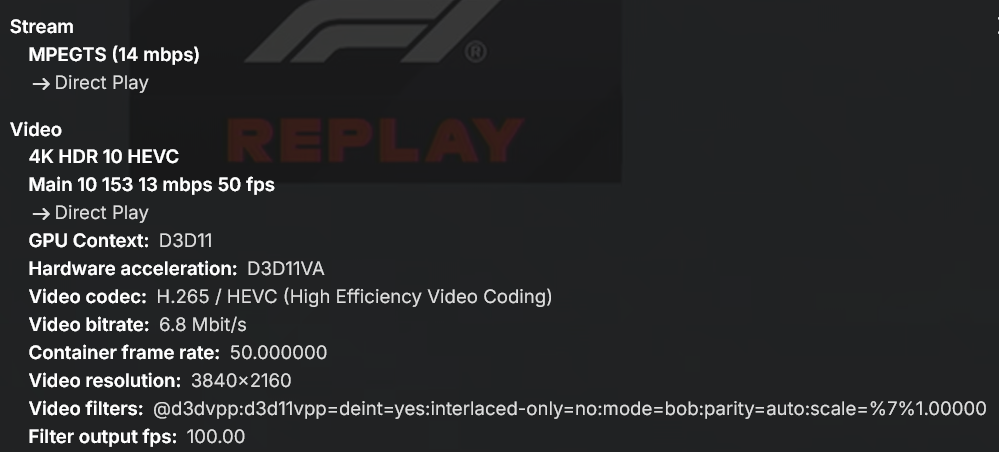
Thanks so much Lessaj it was set to HQ
 1 point
 -
I was testing this on my end and found a strange error, where it updates the General Title field to say the "Folder name - se - title", where before it did not touch this field and only updated the Video Track and Audio Track title fields, in my setup. Was this intended? I tried updating the MediaInfo and even used a current version of mkpropedit (vs the v70 i have been using), but it still changes that Title field. I swapped back for now and after correcting that field, it is not updating it after setting it for reprocessing.1 point
-
Alright thank you very much! I believe this should generally be classified as Bug and possibly be accounted for in automated tests (if possible of course) since this was not a thing for like the first year or more of me using Emby, then all of a sudden became a thing after an update, then disappeared again, and now is happening again. I believe it should be consistent and I think most users would expect the display of their Device to turn off at some point after playback stops entirely, especially on a mobile device where it'll drain the battery if it doesn't happen. You most likely did take some sort of action, the only reason why I'm trying to force this topic is because I really really love Emby and I'm basically using it on a daily basis and I have my battery drained constantly because of this little issue. So sorry for applying additional pressure or whatever, I just really like the product1 point
-
@Luke The "salute" emoji-thingy was my way of saying thank you for clearing that up1 point
-
Hi, this is good, right?1 point
-
What are your library enabled image fetchers and in what order? Neither TVDB nor TMDB have images for episodes after S03E06, so no thumbs could be downloaded, wild guess would be you have Screen Grabber disabled?1 point
-
thx @alex77777 will try that during the weekend and report back!1 point
-
its open source, as long as you follow the license its all good.1 point
-
To be honest I did not find it yet, It seem random too like some movies start after 2s and some take over 5s so yeah....1 point
-
All of this is circumspect, but I think he means a user on these forums. Not a user of his Emby server he created. A "fake user" on these forums. A user created with no good intent in mind. Only with the sole intent to steal another users server/credentials and possibly personal information/photos so they can be possibly blackmailed/extorted at some later time depending on what that information discloses. Some of the users of this forum create an account strictly so they can download logs of others, make a few random posts, and try to blend in. Wolves in sheeps clothing. These "fake users" then browse these forums looking for logs posted. Hoping the person who posted these logs has directly accessed the logs with the file system without using the Emby download method to obtain them which would have scrubbed out that sensitive information. These "fake users" hope to see unredacted API keys exposed and their external ports are open. If the logs show the API key it will likely also show the IP address of the server. It would be rather trivial after that to use those to access the server, which would show as the user who created that API key. He gave the IP address above in his first post which does resolve to: 88-177-86-82.subs.proxad.net If this same user was registered on this forum with this same IP address it would potentially point to a suspect. But it might also be a revolving door VPN address that could be potentially anybody. But it could be the very attacker who used these forums to patrol for logs and then sneak onto his server. He gave you the smoking gun. https://redmondmag.com/articles/2026/03/10/hackers-dont-break-in-anymore.aspx1 point
-
A fresh install shows the same issue. Interestingly the navigation buttons work properly if I access the affected pc via rdp from a different pc on my network. This might point towards a solution? I've also just tried installing on a different Windows 11 pc, and the problem doesn't show up. But that's no help for my Emby HTPC. The affected pc is Windows 10, UHD 605 graphics, latest drivers.1 point
-
Okay, I understand what you want to accomplish. Lets break it down and see if we can get down to the point, my answers in bold. First lets clarify what "Last played" is. A movie gets a played status when a user has seen 2-100% of that movie (default Emby setting). In other words, the user has to have seen part of that movie, or completed it for the flag to be set. When we add last played, we sort these played status into a list based of time. Last Played, All Users, > 1095 This will give you: All movies EVERYONE have started to play for more than 3 years ago. If you have a lot of users, this is very unlikely, or you will only get a handful of hits. I believe the issue is in the "All Users". When you are using "All user" it means that every user need to have set that played status for that specific movie. For example lets use Batman. The watch status of the users is like this: John: 99% Maria: 45% Donald: 8% Then you will have a hit and Batman should end up in your list. If it's like this: John: 99% Maria: 45% Donald: 0% Then Donald will break the rule, as it has not been played by all users, and you will have zero hits. Unwatched, All Users AND Date Added > 1095 This will give you: All movies that NO ONE has completed, and where added to the library more than 3 years ago. If it's like this: John: 99% Maria: 45% Donald: 8% Then John will break the rule, and Batman will not get added. If it's like this: John: 0% Maria: 45% Donald: 8% Then you will get a hit because no one has finished that movie. I think i understand what you want to accomplish, here are a few examples Last played, Any User, >1095 AND NOT Last played, any user, <1095 This will give you a move that at least one user watched 3, 5 or 15 years ago, but no one have seen it in the past 3 years. Could be good for "there has been interest in this movie, but that was a long time ago. Lets resurface" NOT Last played, any user, <1095 This will give you all movies that no one has seen in the latest 3 years. Does this answer your questions?1 point
-
I know this has been brought up many times but the last forum I see on it is from 2024, so 2 years ago. But the Apple TV 4K app for Emby is still missing the A-Z quick scroll option on the side. It's been said its being worked but we've had an app release in December of 2025 and its still missing. How close are we to getting this? It would be extremely helpful because I have thousands of movies to scroll through. I only use Apple TV in my house and really don't want to switch just for this feature.1 point
-
I'm waiting for help from the Emby devs.1 point
-
Did this ever materialize? In early 2026 with Emby Premiere, I see that I can download a playlist, but that only downloads the albums and songs. The Playlist itself is not available offline, nor is the critical (for me) sort by Artist. That is lost when offline on Android. Without playlists or artists, I effectively can't use Emby to play music when driving. Also, especially important when driving in Android Auto: a "jump to letter" option. So, for example, if I want to play ZZ Top, I can press Z to jump to those artists, rather than having to scroll through dozens or hundreds of pages to get there. When driving, that's both difficult and dangerous. I had really assumed that Premiere, promoted as supporting offline playback, would include this. I can see how it may not be needed for movies -- you take a few with you on a trip, you don't really need all the sorting and metadata features -- but for audio/music, it isn't really usable at all without playlists and artist grouping. It should work just like when it's online to the Emby server at my house. I can select Playlists, hit the one I want, and play those songs. It's also important that there be some mechanism to SYNC (not just a onetime download) music for offline play. I'm always adding new songs and albums to Emby, so need a way to efficiently sync them to the offline/downloaded files on my phone.1 point
-
Version 14.0.0 Notes: This is a major version update. Please be sure to read the full changelog. Please remember to leave an updated written review on the Play Store. Your feedback is essential for improving the app’s ranking and helping secure Symfonium’s future. Added: Added many new now playing settings: Added new waveform bar type. (5 modes with precise settings over bars and reflection) Added icon color, overlay transparency and size settings for string buttons. Added precise size control and transparency level to control buttons. Added configurable protection for lyrics over cover. Added new spacer type for buttons, allowing more asymmetric designs. Added 5 toggleable booleans to custom strings, allowing more dynamic screens. Added more precise control of background blur level. Added text formatting controls for custom strings (Bold, Italic, Uppercase, Underline and Strike). Added share file as a possible button and string action. Added horizontal text position setting for the top bar. Added vertical text alignment setting for multiline fixed-size strings. Added control over transparency levels for most overlays and protections. Added new background overlay types and cleaned up the current implementation. Added 3 new customizable strings over cover. Added option to invert overlay and protection colors. Added option to force black overlays. Added new animated glow expanded background style. (Apple Music style, Android 13+). Added new fill size setting for cover in landscape to have it use as much space as possible in its side position. You can now customize the back and forward amount for expanded and compact player buttons. Added option to keep wave bar slider mode even if the data is missing or loading. Added option to swap buttons and collapse button in top bar. Added “album.type”, “output.current”, “renderer.current”, “renderer.type”, “sleep.timer”, “sleep.timer.seconds”, “sleep.timer.eos”, “player.repeat.mode”, “player.shuffle.mode”, “player.paused”, “filepath”, “filename”, “bool1” to “bool5” as possible custom string values. Added many new “string.*” as translatable custom string values to help making custom styles multi languages. Added a few new default now playing styles. Added fixed tertiary container as possible compact player background color. Added many new page settings: Added different background overlay types and transparency levels. Added precise header and image size controls. Added title and version bold and scale factor. Added subtitle and artists as text scale factor. Added option to show Favorite, Composer filter and More buttons in the button row, with option to split them from the playback actions. Added precise blur level control. Added center text, spacing and size control to albums in album and artist pages. Added option to space evenly buttons. Added option for album page to only show distinct artists in song list. Added custom string support as subtitle for Album and Artist page. Added random sorts to albums in Album and Artist pages. Added option to hide track numbers in Album page. Added many new media lists settings: Minimum columns for grids is now 1. Added nearly all display modes to all item types. Added Single line list, Text only list, Round card grid, Overlay grid, Vertical overlay, Landscape background overlay and Landscape overlay display modes. Landscape grid modes now have round and square versions everywhere. You can now hide unwanted buttons from the top button row. Added new settings to enable offline status and/or favorite status as overlay icons in lists for all media types. Added new setting to enable text centering on square grid display mode. Added new setting to control if Text only display mode is single line or not. Added many new home settings: Added precise size control for the top icon. Added 2 more possible shortcuts rows. Added Sync all as possible shortcut. Added tertiary container color as a possible header color. Added custom text as home row header title. Added precise control of header text font size, vertical padding, number of lines and center text option. Refactored overview style selection to split display modes and styles. Enabled many styles for overview items. Added setting to control visibility of the More button for overview lists. Sizes, spacing and padding can now be configured precisely. Added new Overlay grid, Vertical overlay, Landscape background overlay and Landscape overlay styles. Added new Multiline row and Carousel display modes. Added per-row controls to display Favorite, Offline status and Playlist type overlay icons. Added setting to hide subtitles in overview items. Added button to easily copy settings from another home row. Added option to change playlist affected to pinned playlist row. Added new row Recently added album artist. Added back Polish translation, thanks Medo for the work. Added support for MusicBee Love rating tags. (Loved to Favorite, Banned to Excluded from mixes). Added support for channel selection for PEQ filters (All, left or right) and lowered the minimum frequency to 5Hz. Added new setting to disable background and surface color changes when using dynamic colors. Added Stereo to Mono converter to the DSP. Added new Crossfade Setting: “Mix only” allows for seamless track overlaps without fading the volume. Added option to disable lyrics translations colors and word sync. Added option to disable lyric voice color indicator. Added new option to invert sort arrows. Added support for mixed “&&” and “||” operators with parenthesis support to the template system. Added support for mka, webm tag extraction to custom tag parser. Added new main navigation styles: Bottom docked toolbar, Bottom floating toolbar and Bottom floating toolbar with FAB. Added new “originaldate.year” and “releasedate.year” custom strings to only extract year from those values. Added new API calls to toggle the hide status bar and ignore camera hole settings. Changed: There is major changes in many interface settings, most settings should be properly migrated, but it’s possible some special cases requires you to configure again some details. Many default application and now playing styles have been updated. You can still easily modify them to fit your needs. If you never tweaked your interface now if the perfect time to try the new styles. Player keep paused state option is also applied to now playing cover swipes. Now playing queue properly updates favorites, ratings, … on external changes. Application styles export and import now also contain any custom home icon you have configured allowing to share full interface. Song mood and language smart filters now support all range of text filters. Updated the template engine to support combined && and ||, negative integers, double values and many more tweaks. If your custom strings relied on previous engine quirks, it is highly possible that you need to update your templates. Now playing top bar standard subtitle text now displays their associated icon if present. Use custom strings to remove them if necessary. Hopefully small performance gain in the custom tag parser without regression. Please open issue with tag extraction. Fixed: Fixed selection menu sometimes not visible. Fixed unwanted skip count increments in rare cases. Fixed Jellyfin quick connect sometimes not working. Fixed PEQ/GEG pre amp sometimes not applied after a track change. Fixed Plex offline caching (transcoding) sometimes generating bad mp3 instead of opus. Added a workaround to allow playback of invalid mp3 generated by Plex transcoding. Fixed some mp3 tag and images extraction issues on some cloud providers. Starting a radio mix or instant mix from current song in now playing no more restart the current song. Fixed possible Google Drive authentication issue with some accounts. https://support.symfonium.app/t/version-14-0-0-released/127871 point
-
It's not possible to run more than one license on a single server. Since the one-time payment option for additional users was removed, the only way to extend the number of users without monthly payments is to run multiple server instances with multiple lifetime licenses. I really wish Emby would bring back the one-time payment for more users. I wish I would have purchased that option when it was available even thought I didn't need it.1 point







-Playlistwithsidescreenbrowser.jpg.4a4fa396aa53599e825fa0af26217336.jpg)