Leaderboard




Popular Content
Showing content with the highest reputation on 02/26/26 in all areas
-
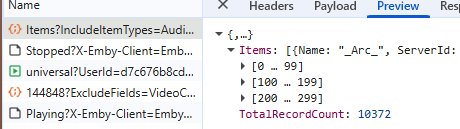
This one's a little difficult to explain. I have a library of 10k+ songs and when shuffling, only a portion of the items (given it's sorting) are played. My goal is to press shuffle, and have my complete library be shuffled, without the shuffled playlist being restricted by the current sorting. Reproduction is easy: 1. Go to Songs tab 2. Set sorting to title (arrow up) 3. Press shuffle Expected result Items are shuffled regardless of their title. Actual result Only items that have a higher sorting results (starting with numbers, special characters, etc) will be played. This can also be reproduced by sorting by year. 1. Go to Songs tab 2. Set sorting to year (most recent first) 3. Press shuffle Expected result Items are shuffled regardless of their year. Actual result Only items that have a "higher" year are played, older entries are completely skipped. --- Update Looking at the request, it seems like Emby filters the first 300 items when shuffling: XXXXX/emby/Users/XXXXX/Items?IncludeItemTypes=Audio&Fields=BasicSyncInfo%2CCanDelete%2CCanDownload%2CPrimaryImageAspectRatio%2CProductionYear%2CStatus%2CEndDate%2CCommunityRating%2COfficialRating%2CCriticRating&StartIndex=0&SortBy=SortName&SortOrder=Ascending&ParentId=109144&EnableImageTypes=Primary%2CBackdrop%2CThumb&ImageTypeLimit=1&Recursive=true&Limit=300&X-Emby-Client=Emby+Web&X-Emby-Device-Name=Google+Chrome+Windows&X-Emby-Device-Id=60ceb367-6fcb-4be3-bbea-025a12a39fc6&X-Emby-Client-Version=4.9.3.18&X-Emby-Token=XXXXX&X-Emby-Language=en Where "&SortBy=SortName&SortOrder=Ascending" seems to be the culprit. Replacing it with SortBy with "SortBy=Random&SortOrder=Ascending" or just simply selecting the Random sort, seems to resolve the issue. Conclusion Why has been decided to use the current sorting when pressing the Shuffle button. Shouldn't this ALWAYS SortBy=Random? What's the point of sorting at all when shuffling?
 3 points
 -
It works perfectly on Emby 4.9.1.80; the problem isn't with our LG TVs, but with Emby itself—it's the server version or the LG app. Luke said a month ago that they were preparing a new server version that would fix this, so they're already implying that it's not a problem with LG TVs but with the Emby server. And no, we're not going to use third-party software to extract subtitles or change the format. That's why we're using Emby, so it can automatically manage all of that. I don't know about the others, but some of us have more than 5,000 files (mostly in original version with subtitles), and we're not going to do that one by one. This problem has been going on for two months now, and if a solution isn't offered, LG users will have to consider migrating to another platform, because this is a significant issue, and LG users keep experiencing playback problems.3 points
-
Tracearr is even better and has Emby support. https://tracearr.com/3 points
-
You can buy a server on Amazon. Get a good one. Get Plenty of Space. Turn it on your network, install the Emby Server application on it. Rip your existing content from DVD's, BluRay's or VHS and add those to your Emby Server Library, then connect the app that you installed on your phone / tv / media box to your Emby Server. Easy. Well, in a nutshell that is.2 points
-
@brothom Yeah, the usual expectation (from everyone who has raised this) is that "Shuffle" will automatically shuffle the whole selection and then play it, even if it is then limited to the first 300 from the whole shuffled list. It should be an intuitive one-step process, not the current two-step process. It's easy enough to work around the current limitation, once you know how, but likely most people wouldn't get far enough to figure it out. Hopefully we'll get a fix at some stage...???2 points
-
Exactly - the same as what I discovered several weeks ago...2 points
-
Which bit was unclear to you?2 points
-
You need to have access to someone else's server who has their own collection of Movies, TV Series etc on their computer and they are willing to let you access them otherwise You need your own Emby server on your own computer which has your own collection of Movies, TV Series etc on your computers hard drive(s).2 points
-
You were as said not really wrong.. Resolutions do my head in tbh., so many different kinds and even TV manufactures cheating with them, for example calling 3840 x 1080 for 4K, I got scammed by Sony once with a TV like that, the X800H i think it was called, it was a big scandal at the time but no one ever got their money back from Sony. Sony, if you are reading this... F*** YOU! I WANT MY MONEY BACK STILL!2 points
-
The new version is up on yocksers/EmbyIcons github. Added: Icon overlays for if series has ended or still running. Filename rules now support movies, TV shows, seasons and/or episodes. The resolution fix is also there but didn't feel it was worth mentioning.2 points
-
The wait is over! We are excited to announce public availability of the new Emby Linux app beta program. Why a Native Linux App? While Emby’s web app works well across platforms, there are limits to what a browser-based player can achieve, especially when it comes to modern video and audio playback. The Linux app was created to go beyond those limits. At the core of this decision is one simple goal: BEST IN CLASS VIDEO PLAYBACK. Browsers continue to improve, but they inevitably lag behind native applications when it comes to advanced video technologies, hardware acceleration, and reliable fullscreen playback. Emby users expect smooth, high-quality playback — and delivering that consistently requires a native application. Benefits Over the Web Player The new Linux app provides several advantages over watching through a browser: More reliable video playback with fewer browser-related limitations Better performance and lower system overhead Improved full screen behavior across Linux desktop environments Direct integration with native video playback technologies A cleaner, distraction free viewing experience By separating video playback from the browser entirely, the app is able to take full advantage of the system and deliver a smoother experience. Designed for Linux Desktops The Emby Linux app is built to feel at home on Linux. It works across major Linux environments . The result is a modern Emby experience that’s faster, more consistent, and purpose built for Linux users. Available Now The new Emby Linux Beta app is now available and we are waiting for your feedback! Want to get started right away? Head on over to the beta instructions page for more! Please provide feedback in this forum: Linux Beta1 point
-
It'd be great if server admins could generate a QR code for a user to scan with their app to connect to a server, without using EmbyConnect.1 point
-
It would be a great feature to allow an option for how many days back for the tv guide to go for providers that offer catchup services. You can then go back in he guide and play whatever you want like a PVR always.1 point
-
Can you tell me what could be the reason that when you try to upload a poster for a movie in the .webp format is the download icon spinning endlessly through image editing in the browser? With the format .jpg does not have such a problem, it downloads files of any size immediately.1 point
-
Honestly its pretty cheap in my opinion. 1 or 2 euros/month and you get a lot of possibilities! https://docs.mdblist.com/docs/supporter Yeah, i see your point. Maybe you can look into the smart playlist plugin? That will create a collection using a lot of the available metadata. For the next release of AutoTag i have created an option to use already excisting collection as a source, so you can then easily tag the items from a collection. Already ready for the next release. Expect to release/comple it by tomorrow.1 point
-
This appears to have worked.1 point
-
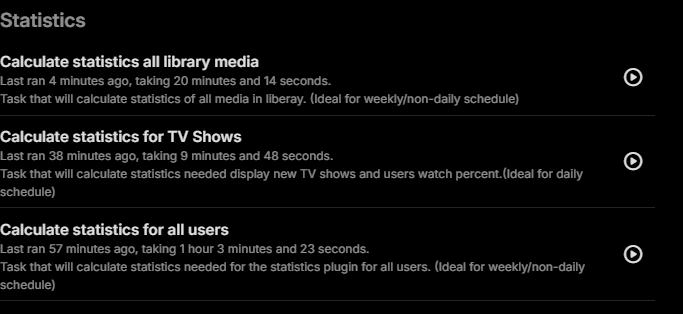
well, good news... so i restarted emby to let it do the update on the statistics plugin and then i ran all 3 scheduled tasks for statistics and everything went good and finished. i also checked the user statistics and everything loads up and is upto date. So i have no freaking clue what went wrong but all is good now. thanks for the replies and the help @hackthis02and this is now on the latest 3.4.2.0 build of statistics
 1 point
 -
Hi, we are looking into this. Thanks.1 point
-
Yesterday I updated to 4.9.3.0, and the translation images I posted in previous posts for version 4.9.1.90 are still untranslated, even though the text has been translated for a long time. Is there a problem, or is it just happening to me?1 point
-
Hi, I manage to set to remux the .ts to .MKV it takes 46s for a 1hr show, and adds the EDL and chapters to the video, total time 2:30 minutes per video, if I disable generating chapters it takes 1minute and few seconds. Thank you. the container is awesome, it was a bit tricky to set just to remux.1 point
-
Thank you - list becomes 402 - SSPOPL - Sky Sports Premiere League (schedule references 502) 404 - SSPOCR - Sky Sports Cricket (schedule references 505) 406 - SSPOF1 - Sky Sports F1 (schedule references 507) 408 - SSPOAC - Sky Sports Action/NFL (schedule references 510) 417 - TNTSP3VM - BT Sports 3 (schedule references 529) The channel numbers issue I think is less important as users can match them manually. So I will refer the issue with the schedules for these first1 point
-
Yes, you could try that. I would see how the change in spin down time helps first. 5 minute spin down sounds a bit aggressive and more likely to contribute to high wear.1 point
-
I really appreciate it, thank you1 point
-
Hi, have you setup your own Emby server? Quick Start1 point
-
Hi, yes you are right.1 point
-
I interpreted the post to mean the Emby server host was put in the DMZ.1 point
-
Wouldn't bother asking if it weren't? But seriously, if it's causing havoc or giving you too much of a headache - forget it, work on something that'd benefit the majority, I'll manage.1 point
-
Excellent for me (one of the previously closed beta testers) Are you using the latest drivers for your GPU/iGPU? I had dropped frames with high-bitrate playback because the client relies on YOUR installed drivers (they aren't updated/included with the Emby client). After updating drivers, all is fine. The Web player may be working fine because: It's forcing the server to transcode it down to something your client can play back smoothly. The bitrate can be lowered in the beta, too. The web browser is using its own HW accelerators. other? So @chesterseenes316please give it a try, the only thing you have to lose is your time. (Report back any problems!)1 point
-
Working good, well done. Thanks.1 point
-
I have uploaded the right one, if that doesn't fix it then there is something wrong deep down i need to fix.1 point
-
Nah, many thanks to you for all these wonderful plugins.1 point
-
Ahh yes, me being an idiot (as always). Uploaded the wrong version. Nice find and many thanks!1 point
-
Guess I really should have said it's neither 720p nor 1080p (like a few others), it really should just be called "HD", with an aspect ratio?1 point
-
If setting the router as the DMZ, then the router is responsible for the firewall, so that should be okay, but wasn't clear to me which device exactly was set. I wouldn't recommend leaving UPnP enabled either.1 point
-
Okay I removed the DMZ and port forwarded my emby devices LAN IP port 8096 on my router and it seems to be holding. So I guess that was the true fix.1 point
-
You don't want to do this as it opens all ports for that LAN IP. All unsolicited requests from the internet will be forwarded to your Emby host. Find docs or online guides for your router and setup forwarding for the Emby ports you want to allow. And disable UPnP as well.1 point
-
Okay problem solved thanks to Lessaj!!! In case anyone else has this issue, after setting my gateway as a passthrough, I was still not able to access my WAN server. I went back into my router settings, removed all port forwarding and inbound filters. Then I made sure my UPnP was enabled. Finally I set the devices LAN IP as a DMZ. I'm not sure if this was the best way of doing everything but I finally have access back to my emby outside of my LAN. Thank you all for your input but thank you especially to Lessaj. You sent me down the right path.1 point
-
Have you looked to see whether the browser is reporting an error somewhere? Because the server log simply shows the web client shutting down. Also, is the problem specific to this one file? Have you played it in Emby before? In any case, a worthwhile step for a problem MKV file is simply to remux it using MKVToolNix - this is a quick process, and doesn't involve any changes to the actual video or audio, but has often been known to fix puzzling issues. Paul1 point
-
Incorrect, @yockerhas it correct, Emby has it wrong! Many sources confirm this. Here is one: https://www.lifewire.com/what-is-1080p-resolution-87575741 point
-
New WMC UI Beta is available: 2.296.0.0 https://github.com/EmbySupport/Emby.WMC.UI/releases/tag/2.296.0.0-Beta. Changes 2.296.0 Update to WinAppSDK 1.8 Change WebView2 environment creation [WMC] Fix missing app settings views Enable YouTube playback Fix Trailers Add more startup logging DISCLAIMER Beta versions have Sentry telemetry included enabled. If you do not agree to that, please do not use them. Release versions are always free from any kind of telemetry.1 point
-
Update: There hasn't been any problem since. I also replicated the steps taken when bringing the miniPC with me (unplugged the media storage HDD and switching to Wifi). For now, everything is working top-notch. I'm leaving debug log on and 7 days retention just in case. I also enabled the backup/restore plugin and regularly backup the database, just in case. I'm happy to consider it sorted for now1 point
-
i still use emby live tv, but the only thing it gives me over jellyfin is the guide data for antenna tv. would be nice if emby improved its live tv features and tune times.1 point
-
Forgot to add: I did restarted emby first, then changed the trakt pin, then did a library sync. Trully, I don't know what fixed it. I have zero idea.1 point
-
Check the settings in Settings -> LiveTv -> Advanced. Of I understand what you are asking, that says where to put dvr recordings.1 point
-
Similar to this old post, I'm suggesting a tab that would be titled Watchlist and could be placed in between Suggestions and Favorites. The functionality would pretty much be a copy of Favorites, just with a + symbol added next to the heart and other symbols that let you favorite a movie etc. The previous post had mentioned extra functionality such as automatically removing a movie from Watchlist after it has been watched. This would be nice, but is unnecessary because after watching a movie you can simply click the + symbol a second time to remove it from Watchlist. I would imagine this would be very easy to implement as a rebranded copy of Favorites. Adding other features could come later. Edit: added link to old post1 point
-
I know this was brought up years ago, but I can't find any recent posts about it. I love to show photos using Emby on Roku, but having the photo date displayed at bottom right is distracting and makes me want to look for a different app. Please enable functionality to 1) select if I want any info displayed and, if yes, what (title, etc.) Give me the option to have no label. and 2) allow me to set the amount of time each photo will display. Thanks for considering!1 point
-
Thanks for following up. We plan to add a screen to the web interface to make it easier to manually install plugin dll files.1 point
-
Tat, Your transcode log shows media with 25 graphic subtitles. I would guess that can cause problems. Try removing the subtitles from the content using mkvtools or getting a similar size demo test videos from online and see if either of these new media files play the audio correctly I am guessing that Emby might be looking at the default embedded subtitle and then try to convert it. Perhaps the other 24 graphic subtitles might need to be scanned for default status and just doing that for so many subs might cause a problem. This situation is typical with content pulled from a blu-ray. All those subtitles work fine with a blu-ray player, but are not nice with streaming playback.0 points
-
Hi there, let's look at an example. Please attach the information requested in how to report a media playback issue. Thanks!0 points