Leaderboard




Popular Content
Showing content with the highest reputation on 02/14/26 in all areas
-
The OS on the Ugreen lives on the internal storage so you can't install anything there anyway. I do install any app on the SSD for speed and power savings, I also have my user folders there. Quick access, low power consumption. The HDD on the other hand I only use for large media files I won't access all the time, that combined with active sleep mode option for the HDD makes it possible that the HDD in my Ugreen NAS are asleep 70-80% of the times, on some days even more. I'm running UGOS Pro and so far I have not seen a reason to switch to a third party OS. If anyone knows any benefit to that, I'd love to read it2 points
-
I started my Plex server with almost no storage, so I heavily compressed everything just to make it fit. As my setup grew, the quality of my encodes improved, but the library I ended up with was a mix of old low‑bitrate files and newer high‑quality ones. I wanted a way to quickly spot which items still needed a proper upgrade. That turned into Totality, a desktop app I originally built for myself (with help from Claude). It now supports Plex, Jellyfin, Emby, Kodi, and local folders. Totality uses the metadata your servers have already collected. Then uses FFprobe, TMDB, and MusicBrainz to fill in the blanks. Multi‑server support Connects to Plex, Jellyfin, Emby, Kodi, and local folders, using existing server metadata whenever possible. Video quality analysis Resolution, HDR format, bitrate, codec efficiency, audio format, and quality scoring. Music quality analysis Four‑tier system from low‑bitrate lossy to hi‑res lossless. Collection completeness Movies: TMDB collection grouping, owned vs missing TV: Missing episodes, season breakdowns Music: MusicBrainz discographies, missing albums/tracks Local folder scanning FFprobe analysis, filename parsing, embedded metadata, and TMDB lookups only when needed. Wishlist Track movies, shows, and albums you want to add. Live monitoring & task queue Detects library changes and manages long‑running scans. Customizable UI Grid/list views, quality badges, themes, and real‑time search. If you’ve built your library over years of changing hardware, storage, and encoding habits, Totality might help you make sense of it again. Repo: https://github.com/bbidwell85/totality Please stress test, break, criticize, and critique. Happy to answer questions or hear what features would help others.1 point
-
Thank you so much, the issue has been solved already. 100% my fault because I overlooked that I had to set a custom IP path.1 point
-
Yes agree, scrolling back to the top is still an issue with the client app - the standard Android app at least. It happens every single time you make an edit on an item, change metadata or image. Click 'Save' and you're taken right back to the top of that long list.1 point
-
ok thanks I also tested it via web browsers, and it seems to be working fine. So the impact seems to be limited to the macOS application.
 1 point
 -
Thank you very much for providing the new Flatpak. So far, everything is running smoothly.1 point
-
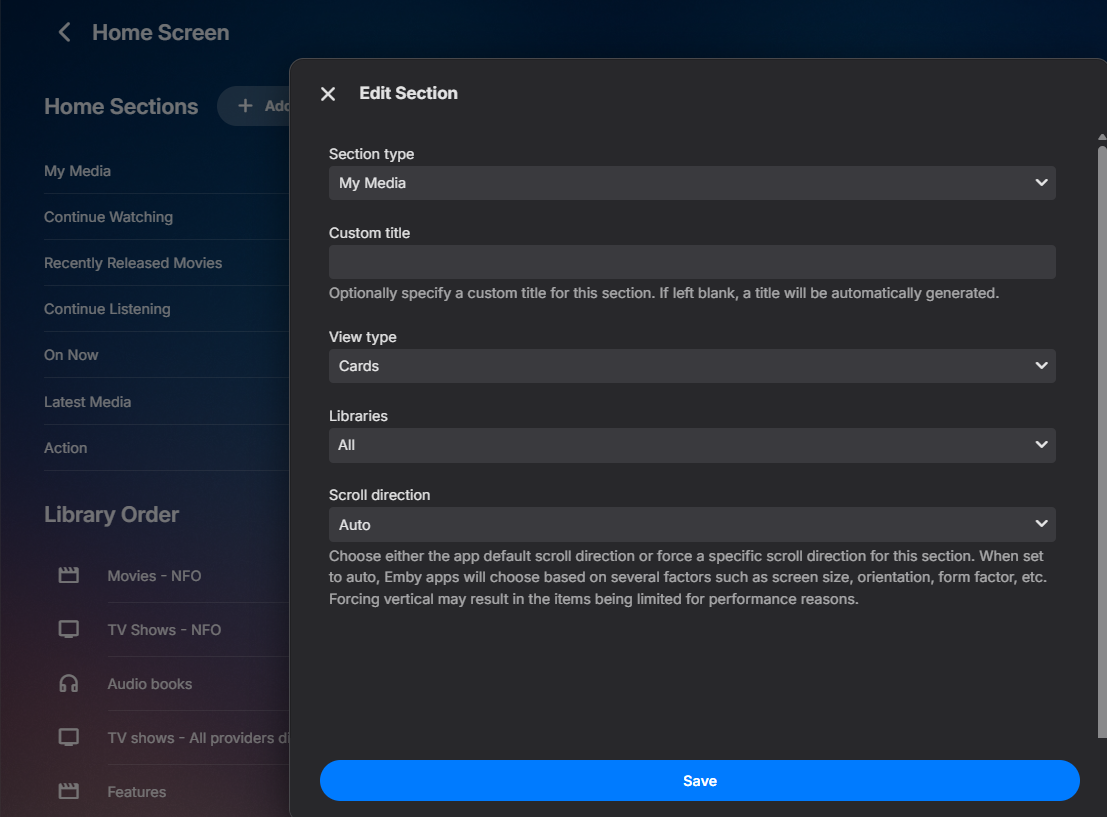
Pretty sure it is still conditional as the note says in the option, but you have more control in 4.10.x.x on Home Sections settings per row edit options as the linked topic shows also.
 1 point
 -
Español aquí también. ¡Muchas gracias por tu aportación! A mi personalmente me va bien con el SSD caché, pero quien quiera sacarle ese puntito más de rendimiento, meter Emby a funcionar desde el SSD es una muy buena idea. Eso sí, el rendimiento del transcoding y del streaming no se verán afectados; sólo mejorarán menús, etc.1 point
-
I'll tell you the same thing i told the Truenas staff member Neminem. I”m not a dev. I’m someone who uses the Truenas Emby app. So whether their bot can differentiate or not? I don't know. Which repository? I don't know. (my guess would be linux since truenas scale is based on Linux but i don't know for sure) I don't work on either side's code/program/bot/(insert whatever you prefer to read there), i'm a person that's forced into playing telephone to get out of this annoying situation. If you feel like you do know more though, please, i invite you to go the thread i linked in my previous post and talk to the people who work on this. Although going by my experience with this for the past however many months it's been now, i'll probably end up playing telephone once more and asking those questions as nobody else seems to want to put in the effort.1 point
-
Absolutely, I’m totally fine with that. Please feel free to move it and pin it wherever you think it fits best. I created it purely out of passion and to help the community, so I’d be happy if it reaches as many people as possible.1 point
-
Fixed in the next version! Thanks a lot for reporting1 point
-
I'm planning to release the new version of Embycredits tonight if you want to include the API1 point
-
OK, have you validated that your noip domain has updated to use your current WAN IP? Sometimes there can be a delay, or a problem keeping that updated. I know you said nothing was changed, but other troubleshooting steps to try: Validate your port forwarding rules, checked via CanYouSeeMe: https://emby.media/support/articles/Connectivity.html#verify-your-external-ip-address Check for cgNAT: https://emby.media/support/articles/Connectivity.html#cgnat-double-nat Checked for Multiple routers double NAT: https://emby.media/support/articles/Connectivity.html#multiple-routers-double-nat Checked that your ISP is not blocking external connections: https://emby.media/support/articles/Connectivity.html#isp-blocking1 point
-
New release is up with some housekeeping, re-theming, and some normalization around the "actions" button/submenu. https://github.com/sydlexius/Segment_Reporting/releases/tag/v1.3.0.0 Release notes: Improved Theme-aware chart palettes (#77) - All five built-in color palettes now adapt to your Emby theme automatically. Light themes get darker, high-contrast colors while dark themes get vibrant ones. The old palettes (Ocean Breeze, Sunshine Blue Dream, etc.) are replaced by five new palettes named after their accent color: Green (Default), Blue, Red, Pink, and Purple. Each palette was designed to pass WCAG AA contrast requirements on both light and dark backgrounds. Actions dropdown menus everywhere (#63, #69, #78) - Series rows, movie rows, and season headers throughout the Library and Series pages now use a single "Actions" dropdown that consolidates Edit, Delete (Intros/Credits/Both), Set Credits to End, Apply Source, and EmbyCredits detection into one tidy menu. Menu items are greyed out when the item has no markers of that type. The previous standalone bulk buttons on the season header have been replaced by the dropdown. Separate Intro % and Credits % on the Dashboard (#61) - The library table now shows independent percentage columns for intro and credits coverage instead of a single combined value, making it clear at a glance which segment type needs attention. Shared inline editor (#67) - All three editing pages (Series, Library, Custom Query) now use a single inline editing component from the shared helpers, removing about 360 lines of duplicated code while ensuring consistent save/cancel behavior everywhere. Shared bulk operation helpers (#68) - Bulk delete, set-credits-to-end, and detect-credits logic extracted into reusable server-side helpers with shared ID parsing, count validation, and error handling. Auto-reload on plugin update (#64) - The web UI now detects when the plugin DLL has been updated and prompts to reload, preventing stale cached JavaScript from running against a newer backend. Fixed Action buttons no longer fire twice (#70) - All action buttons across every page are now guarded against double-submission during async operations. Database deadlock prevention (#66) - Reorganized internal lock ordering in SegmentRepository so Dispose(), RemoveOrphanedRows(), and DeleteAllData() can no longer deadlock under concurrent access. Hardened custom query endpoint (#64) - Added defense-in-depth keyword rejection (semicolons, ATTACH, load_extension) and a PRAGMA whitelist limiting queries to safe read-only pragmas. Marker type whitelist validation (#65) - Column name lookups now reject unexpected marker type strings, preventing arbitrary values from reaching SQL queries. Movie delete menu now theme-aware (#69) - Replaced hardcoded dark-theme colors with the shared menu helper infrastructure so the dropdown adapts to light Emby themes. HTML escaping for season labels (#71) - Season names are now escaped before innerHTML insertion. Memory leak in CSV export (#75) - Blob URLs are now revoked after CSV download completes. Database filename centralized (#72) - Removed duplicate filename constants across API and task files. First-run guard for cleanup task (#73) - The weekly cleanup task no longer errors if the database file hasn't been created yet. Dead code removal (#74) - Removed unused navigation function and fixed copyright year.1 point
-
This is allready in the latest beta...1 point
-
It worked! Little tricky, which would be nice to have a simple reset button. But if the current version doesn't double count anymore, I should be good. Mega thank you, that took some effort to get those screen captures!1 point
-
Oh, thank you . I was not aware of this. Thank you . I learned something new and probably important1 point
-
And the directory structure? (Note: Emby is happiest using the containing directory name for movie and TV series identification.) Paul1 point
-
Maybe we can move this to the Synology board and put a pin on it or something?1 point
-
It's appalling that you could release a new iOS app that won't launch on iOS. Kudos to those who perform the pre-release checks, from one of your loyal paying users. Perhaps, at the level you've reached, a little more professionalism wouldn't hurt. At least hurry up and fix the problems you create.1 point
-
It was designed this way by me years before i've created the better sort option "Random Series, Ordered Episodes Playback". Without the option "Cache program data...", every guide refresh will reset the order for "Random Series, Ordered Episodes". With that option enabled, it will happen by default after seven days. I plan to change this behavior, but as probably everyone has noticed, I don't have the time to develop new features. Only bug fixing when necessary...1 point
-
I figured it out, I had to do a factory reset on the add on, and then it immediately starting scanning my libraries.1 point
-
Oh? The last I heard when he saw the logs he saw what the issue was. If that isn't the case then I'm glad I re-upped the issue. Please let me know what you need from me. Thanks!1 point
-
I have updated to 4.9.3.0 and this issue is still there for me. Any single word searches are fine but as soon as I have two or more words it takes 45 seconds to 1 minute to run a search. It's extremely frustrating. I preferred the older search. And I would still request an advanced search option based on IMDB # . Any guidance of time frame to get this fixed would be appreciated.1 point
-
I finally got around to finishing this. Worked perfectly.1 point
-
Just sharing what emby should be working on. HomeAssistant supports it. Opnsense supports it. Many other apps support as well. It also does not need to be mandatory. TOTP Auth https://www.loginradius.com/blog/engineering/what-is-totp-authentication ---------------------- https://www.home-assistant.io/docs/authentication/multi-factor-auth/ https://docs.opnsense.org/manual/how-tos/two_factor.html1 point
-
Thanks for asking, no i was assuming/hoping using the rest api like bulky wasnt the 'optimum' way* and was hoping someone might be able to point me in the direction of what the building block constructors, interfaces, methods** in the core c# sdk were for "read in baseitems from the library (eg shows and episodes), enumerate and manipulate the properties of items (eg parental rating, customrating,network) and write them back." I think i can work out from the templates and previous plugins how to add c# config pages and add code to schduled tasks. *Seeing the new UI method which doesnt rely on html/js to present UI i thought i could avoid having to learn another language and just concentrate on c#. ** 'guessing' on the right terminology. I am having fun with using copilot in browser and in VS to see how much help it can be...spoiler not very much. Whereas copilot can write fully functional powershell using the rest api in a couple of prompts.1 point
-
*squeak squeak* Any findings on this? Thanks!1 point
-
EmbyWatch - A brilliant app built by a community user! One of the best things about the Emby community is the creativity that comes from it. Every so often, one of our users takes their love for media servers to the next level and builds something that makes life easier for the rest of us. Today, we’re excited to share EmbyWatch, a brand-new Android app developed by community member @asgard25It is an an incredible example of what happens when passion and innovation meet. A User-Built Tool, Made for Admins What makes this story special is that EmbyWatch wasn’t created by a company or a professional app studio. It was created by one of YOU! — just someone who wanted to make managing a server more intuitive and accessible from anywhere. Want to be even more impressed? This is only the second Android app that asgard25 has developed! EmbyWatch is designed to help server admins and advanced users keep track of what’s happening on their Emby setup in real time. It’s not about playback or browsing media, it’s about giving you the tools to monitor, manage, and control your server, all from your phone. Powerful Features at a Glance EmbyWatch brings a surprising amount of functionality for such a young app. Here’s what it can do: Real-time monitoring: See who’s watching what, where they’re streaming from, and how much bandwidth they’re using — all live. User management: View your users, check activity history, and even send messages directly to connected users. Device overview: Identify every connected client, from smart TVs to mobile apps, with connection times and device info. Library insights: Quickly review all your media libraries with detailed counts and metadata. Task control: Run or schedule maintenance tasks like library scans and metadata updates remotely. Plugin visibility: See your installed plugins and available updates. Logs and server details: Access logs, CPU load, uptime, and more — wherever you are. Notifications and widgets: Stay informed with live alerts and optional Android widgets for quick monitoring. For anyone managing a shared server, EmbyWatch feels like having a live dashboard in your pocket. A True Example of Community Ingenuity We love seeing users like asgard25 take their experience with Emby and turn it into something that benefits everyone. EmbyWatch really is a reflection of how open and flexible the Emby ecosystem can be when people put their ideas into action. This project shows exactly what makes our community special, a shared passion for improving and creating! So whether you’re managing your own home setup or running a multi-user server, EmbyWatch offers a simple, powerful way to stay connected to your system. Huge thanks to asgard25 for sharing EmbyWatch with the community and for showing what’s possible when creativity meets passion. We’re proud to see our users building tools like this that make Emby not just a media server, but a thriving ecosystem shaped by its fans. If you’re an admin or an advanced user, check out EmbyWatch on Google Play and see how it can make managing your server easier than ever. We can’t wait to see what asgard25 — and others in our amazing community — build next. View the full article1 point
-
When 4.9 get released. Word is supposedly soon.1 point
-
I could have built 3 desktop computers in the time it has taken to get nowhere!0 points
-
If you mean log in with the same creds, do you mean the cred I use to log in into my emby server or somewhere else. If emby server no I can't login to opensubtitles.com0 points