Leaderboard




Popular Content
Showing content with the highest reputation on 02/08/26 in all areas
-
@sh0rtyHas been bitten by the bug!2 points
-
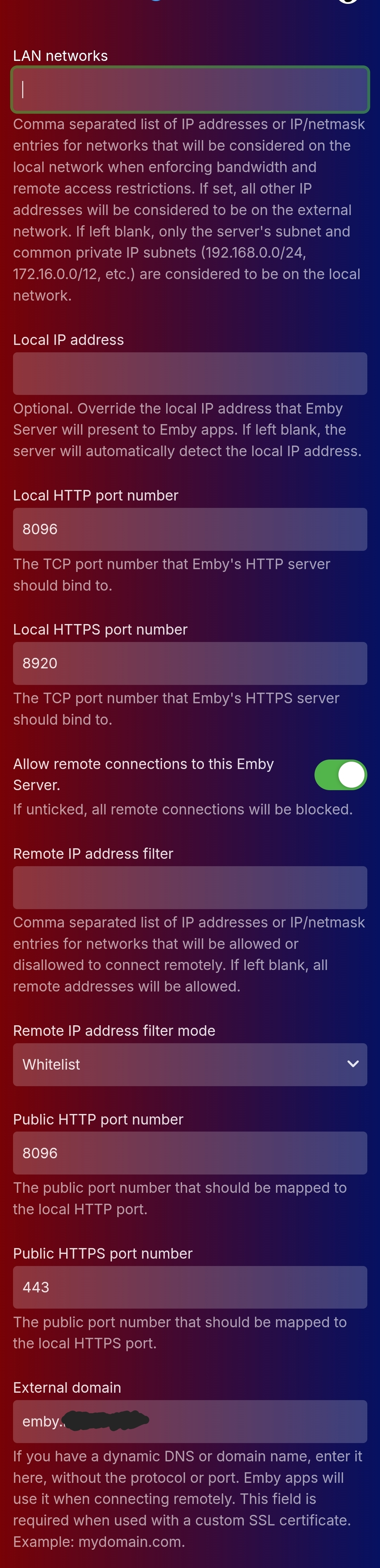
Right now when adding an Emby server to a client you have to type out the full address including http:// or https://, and if you are using a proxy you have to manually change the port to 80/443. That can cause confusion when you're trying to get family set up on the server. Meanwhile on jellyfin if you enter myserver.com it'll automatically check all four configurations and use the one that gets a response. Would it be possible to set it up that when adding a server you can just enter mysite.com and it'll automatically check http://mysite.com:8096, https://mysite.com:8920, http://mysite.com:80, and http://mysite.com:443 and then pick the one that works?2 points
-
Is there plans on the roadmap for OpenID. I have searched but not found any indication this is in development. With many admins taking up SSO through Authelia or Authentik to enhance security it would be great for Emby to support it. One of the easier open standards is OpenID which the aforementioned support. Users could continue to use LDAP if they wish while others can use the arguably better SSO experience.1 point
-
In Jellyfin there is that option for m3u tuners. As me and probably most people will use Dispatcharr now or soon, this is being done twice at the moment - by Dispatcharr and by Emby. So if we can disable that in Emby we will hopefully get a slightly faster stream start. BR1 point
-
I hit "play all" on a collection and it doesn't show the next film in "Next Up" after I quit out of it. This is apparently intended behaviour, and the same applies to playlists. This is absurd. Why even have the "play all" option? Who's sitting down to watch a full collection's worth of films, or a full playlist? I have playlists for The Prisoner for its various episode orders, and there's no way I'm getting through them in one sitting. I was going to make that my next show to watch but if I'm going to have to keep track manually of my progress through the playlist it makes the playlist fairly pointless TBH. There's no reason playlists or collections shouldn't show up in Next Up.1 point
-
@sh0rtyyour reaction reminds me that I owe you an apology. The popcorn o meter rating was an idea from your script. Didn't know mdblist had a free API for that. So better late than ever, many thanks! For those curious, he has made a brilliant spotlight widget that can be found at:1 point
-
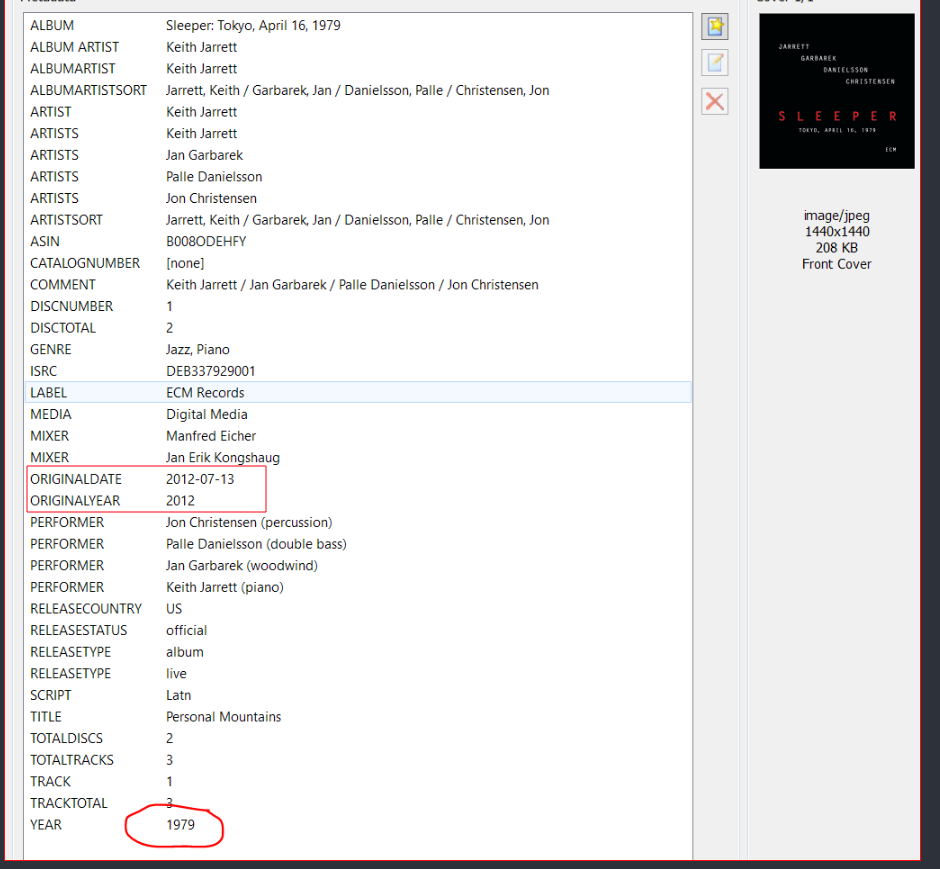
I wonder if this factors in.
 1 point
 -
@sydlexiusI believe i have fixed the issues plus put in protection against hanging processes. It will sadly be a little while before it's released as i'm also working on some "rules" options so people can set different detections for different tags and studios. Sadly still can't think of a way to do the "already detected" thing, no way i can think of will work right in my head.1 point
-
Media that is previously converted from an original and then copied, might have damaged timeline data or not have the timeline optimized for streaming. Optimization, brings the timeline startup to the beginning of the file. The timeline counts off where you are in the media. For other media types, the timeline can be differently embedded to optmize for blu-ray or DVD playback. Some content has copyright protection and sometimes a version of this process actually includes setting up jumps in the timeline and then the content producer puts the file to map to these jumps in an end area of the blu-ray disc, that nomally cannot even be copied. I don't know how often this is done, but it use to happen. This makes playing back the media very difficult, when it is not on the original disk. Encoders and ripper software have various counter software to help create a media copy that should play back correctly, but it's possible that some combination of encoding, copying, encryption creates media that has a non-optimized timeline data for playback. You can sometimes see this when opening a media and there is no duration info or the duration is far too long. Other symptoms are clicking on the timeline is delayed or does nothing. Some 3rd party players, like VLC I believe, has a correction feature, that helps playback media with a problem timeline. You often remux a video to a streaming container and codec .mkv or .mp4 and repair the timeline. ffmpeg also has a command that can remux. This is a very fast process, typically under a minute for a two hour media. If the media plays on VLC or other 3rd party player, fine. That does not mean the media is perfect. TV apps, mobile, browser are not so sophisticated with fixing issues. They can easily be hung up by some problem with the media. Of course, it could be Emby. It could also be a lot of videos that you think are fine, but they are not. The symptom could be that sometimes they play and sometimes not. Have you already remuxed all your videos? Test with a proper quality demo video to eliminate the possibility that your videos have issues. Otherwise, you could be barking up the wrong tree, so to speak. Remux and encoding software I prefer: AVIDemux1 point
-
But, not in that order, right? I think we would want to try the two https options first... Related:1 point
-
This is a good approach in general. There's always a chance that turnkey products like Synology can have services running on well known ports like 80, 443, etc. that would cause a conflict or unexpected results. The other reason is that going to a higher port range above 1024 doesn't need elevated privileges (root) and a standard or service account can be used to run the process. This reduces exposure if a vulnerability were exploited.1 point
-
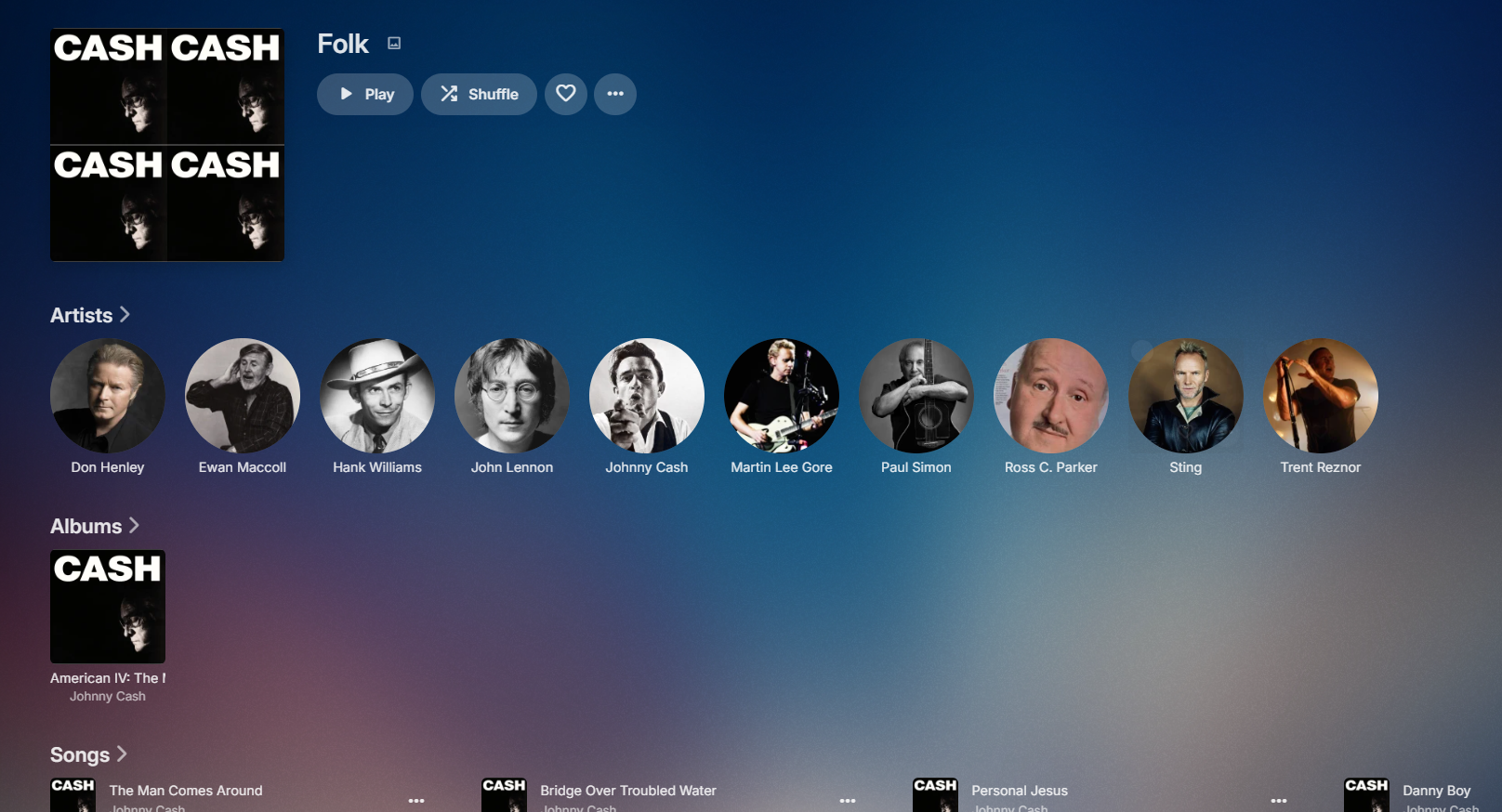
When reorganizing my music library, I decided to recreate all the music genre images using some AI scripts. I'm sharing the package with you in case you find it useful. For each genre, there's a square folder version and a thumb version with the genre text imprinted on it. Alternatively, there's also the original version without the text. Samples: musicgenres.rar
 1 point
 -
I also added Allociné and local Rating Cache to minimize API-Calls/WebFetches. Please read the release notes for that.1 point
-
Thanks. I can reproduce this on older models. You will have to run with the store app for now until we can get out a fix for this1 point
-
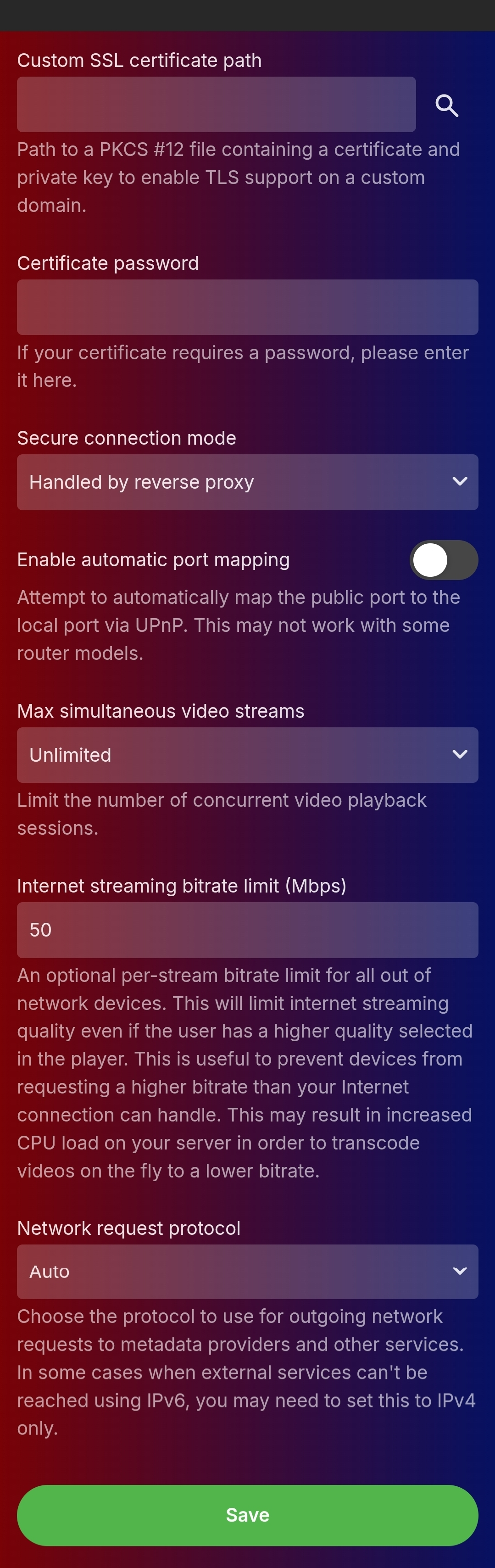
This is now fixed, I don't know if there needed to be some propagation in Emby Connect somewhere but both the apps and the web access are now working. Two changes made: Remove the URL redirect in Name cheap DNS settings which was redirecting "emby"(.mydomain.net) to "https://emby.mydomain.net" Changed the port that the NAS is listening for inbound calls on from 443 to something else (in my case 44333) - so that the router port forwards from 443 inbound through to 44333 on the NAS, and the NAS's reverse proxy takes anything incoming from 44333 and routes it through to 8096 on the Emby server. I'm guessing that maybe something was contending for 443 on the NAS? It's worked that way before though, but meh not bothered now it's ok. @Luke just FYI yes these were correct and haven't changed throughout, attached are the settings (not on the laptop atm so mobile screenshots sorry)
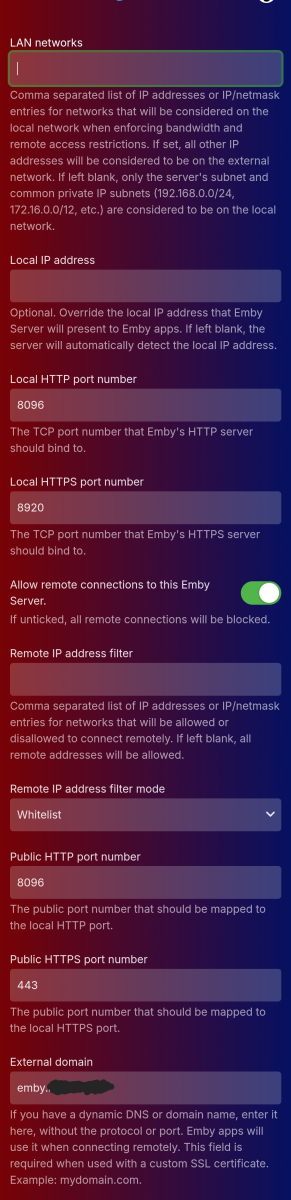
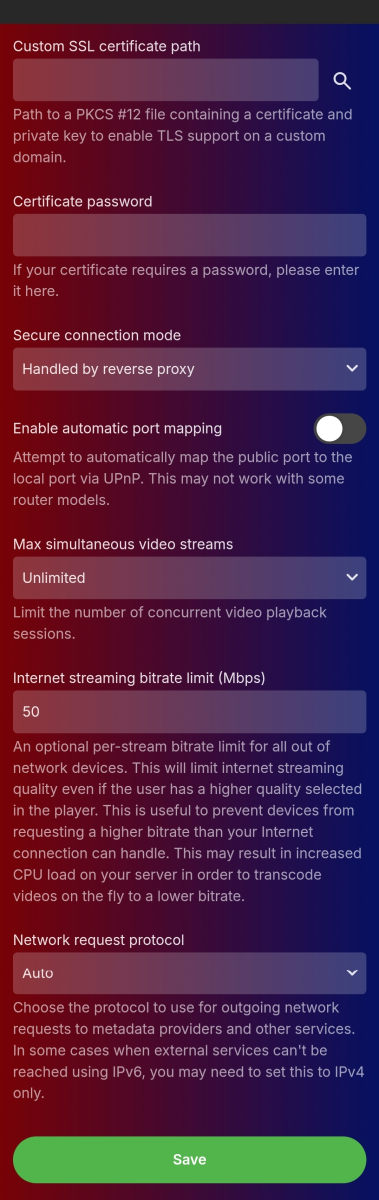 1 point
 -
Yes for example, click "Acoustic" and post a screenshot as that will show an example of what you are expecting to see for dynamic images. Only ones I have without images are ones with a single album or no album image. But at the same time there has to be another condition as this single album created an image.
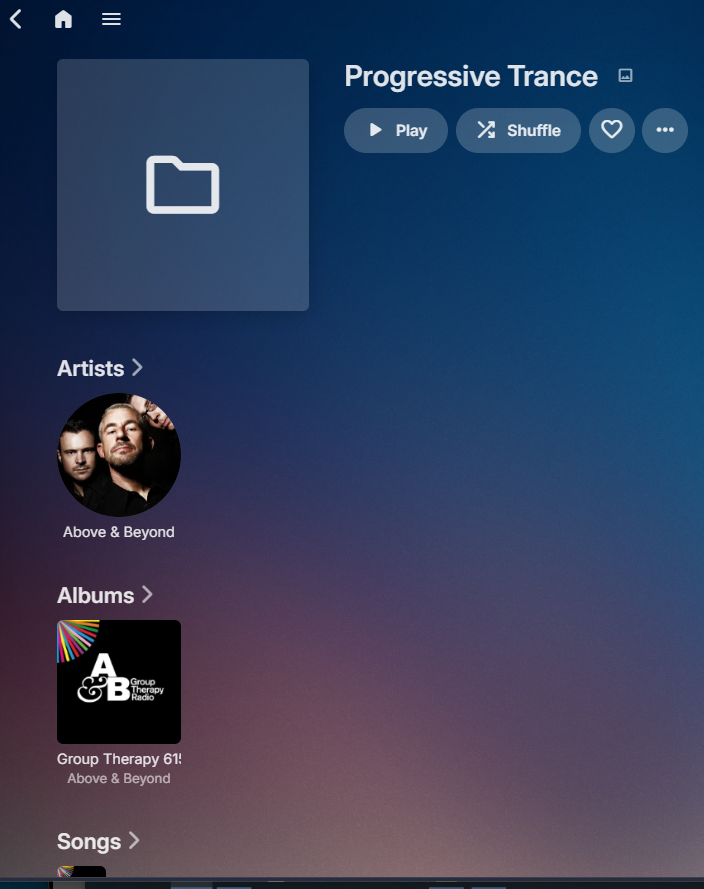
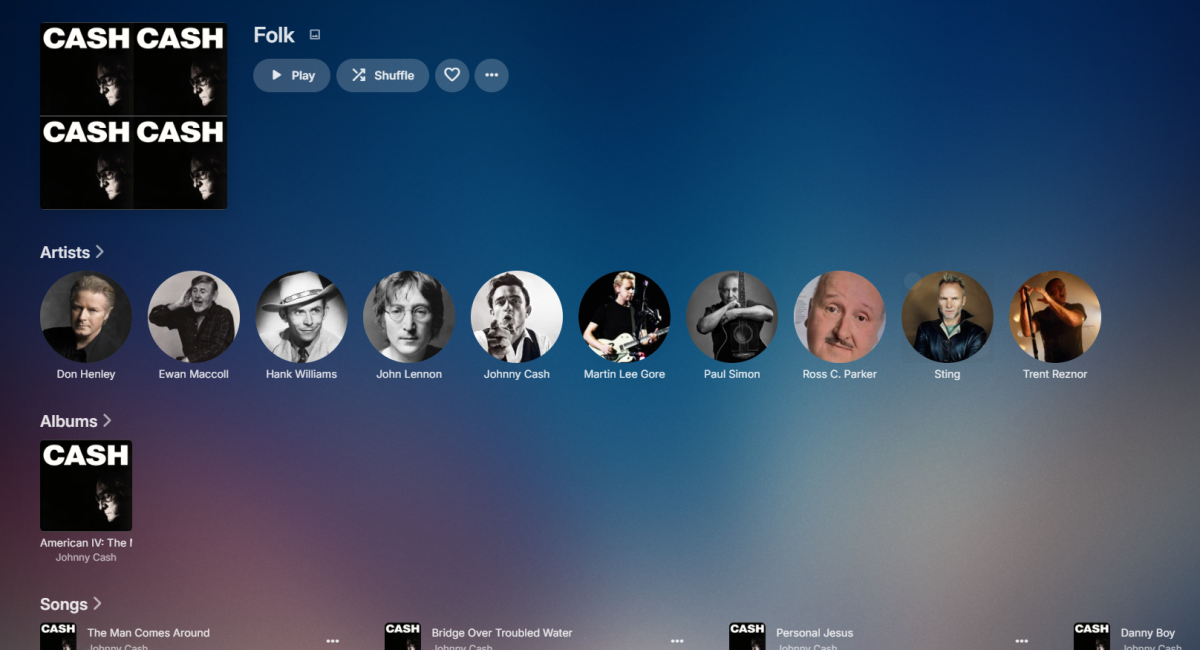 1 point
 -
Nice one, dude!1 point
-
Hi, it's right underneath the multi-part item option. It is the multi-version option.1 point
-
New version up (5.50.0) on yocksers/EmbyIcons Github. Added: Support for popcorn-o-meter. Note: requires mdblist API. Changed: Rating scores now update when being updated in Emby.
 1 point
 -
So if you’ve enabled saving images to media folders, then it will be saved right next to the file.1 point
-
I think I figured it out. I am using a newer Fire TV stick with the remote from my old Fire TV stick. So I think it’s coming down to the programming where the key mapping for the select button with the new device and the old remote behave differently. I tried the old remote on the other working fireTV device and it did the exact same thing with the blank return line, but then with the correct new remote with the newer fireTV device that works just fine and the OSK opens. this tracks with it working then not as it worked when I had the new device and new remote until the new remote broke then it stopped working again. Unsure why it didn’t work previously with the old fireTV and the old remote combo. the model number of the remote it doesn’t like (printed behind the batteries) is R-NZ 201-180360.1 point
-
Any choices for recommendations based upon what you watched? This is looking good!1 point
-
VID_20260207_193636424.mp4 Thanks @Luke @ebr And to anyone else who might suffer from this issue in the future. I've solved this. Obviously I had already uninstalled Emby Server before already. To no avail This time I decided to do the only thing left that I could think of before a device reset. I have solved this by connecting over ADB to my NSTV and Xiaomi Stick 4K and from there I wiped all possible remaining config files from their respective file systems. Reinstalled Emby Server on my NSTV and Emby Clients. I had some hiccups. But they were all due (I think) to the very latest Emby Server Beta 4.10.0.2 and the latest beta of Emby Client for Android TV 2.1.3g I feel confident to say now that everything is good again. If anyone else ends up here with the same issue, this is what I did: Enabled developer options on my NSTV Enable USB debugging Turn on Wifi Debugging Find your Shield's IP address: Settings → Network & Internet → (your network) → look for IP address. Install ADB on your computer: Download the official platform-tools from Google (search "Android SDK Platform-Tools"). It works using Termux on Android. Don't forget to use the F-Droid version. Connect to your Emby Server adb connect YOUR_SHIELD_IP_ADDRESS:5555 See the packages installed: adb shell pm list packages | grep emby package:tv.emby.embyatv package:com.emby.embyserver Force-stop the app (if it's running): adb shell am force-stop com.emby.embyserver adb shell am force-stop com.embyatv To completely uninstall and remove all remaining possible files: adb shell pm clear com.emby.embyserver adb shell pm clear com.emby.embyatv I went beyond and also did that: adb shell rm -rf /storage/emulated/0/Android/data/com.emby.embyserver adb shell rm -rf /storage/emulated/0/Emby To finalize it: adb reboot Hope that helps1 point
-
Hey @Sibasiach Appending "&c=location" to the LatLon field fails: <status>400</status> <fault>Invalid root category</fault> I think you will want to append &id=r0 AFTER your LatLon value in the LatLon field of the plugin to get the "By Location" as the root/seed folder of the enumeration (+ Favorites runs in a separate query from the enumeration loop so Favorites should populate also): C:\Users\REDACTED>curl -s -X GET "https://opml.radiotime.com/browse.ashx" <?xml version="1.0" encoding="UTF-8"?> <opml version="1"> <head> <title>Browse</title> <status>200</status> </head> <body> <outline type="link" text="Local Radio" URL="http://opml.radiotime.com/Browse.ashx?c=local" key="local"/> <outline type="link" text="Music" URL="http://opml.radiotime.com/Browse.ashx?c=music" key="music"/> <outline type="link" text="Talk" URL="http://opml.radiotime.com/Browse.ashx?c=talk" key="talk"/> <outline type="link" text="Sports" URL="http://opml.radiotime.com/Browse.ashx?c=sports" key="sports"/> <outline type="link" text="By Location" URL="http://opml.radiotime.com/Browse.ashx?id=r0" key="location"/> <outline type="link" text="By Language" URL="http://opml.radiotime.com/Browse.ashx?c=lang" key="language"/> <outline type="link" text="Podcasts" URL="http://opml.radiotime.com/Browse.ashx?c=podcast" key="podcast"/> </body> </opml> It isn't really a proper filter, it was just dumb luck that I found adding the &c=local to the LatLon field of the plugin returned only the "Local Channels" folder in the initial root/seed query, so only it was enumerated, then the "My Favorites" sync's separately from the enumeration part of the script. Note that using &c= or &r= values in the plugin LatLon field does not work on or affect queries within the enumerations, as many of those enumeration queries already have a c= or r= value in them, so anything we enter (which is appended to the end of the query string) is ignored and the other value is used. It only seemed to affect that initial query where it finds all the folders to enumerate, with appending &c=local returning only "Local Channels" folder. I tried with appending &id=r101218 (for North America) after my LatLon value, it seeded the North America countries as the root of the enumeration and created folders in the root of the TuneIn plugin folder for each country in North America and synced them (as well as my Favorites after). No folders for Music, Talk, Sports, By Location, etc. Below are some seed values for &id=rXXXXXX if you want to try it. Note you can drill down farther into other continents/countries/states/provinces/etc with additional curl queries. Example below is how I found North America id=r101218. C:\Users\REDACTED>curl -s -X GET "http://opml.radiotime.com/Browse.ashx?id=r0" <?xml version="1.0" encoding="UTF-8"?> <opml version="1"> <head> <title>By Location</title> <status>200</status> </head> <body> <outline type="link" text="Africa" URL="http://opml.radiotime.com/Browse.ashx?id=r101215" guide_id="r101215"/> <outline type="link" text="Asia" URL="http://opml.radiotime.com/Browse.ashx?id=r101216" guide_id="r101216"/> <outline type="link" text="Australasia" URL="http://opml.radiotime.com/Browse.ashx?id=r100297" guide_id="r100297"/> <outline type="link" text="Central America" URL="http://opml.radiotime.com/Browse.ashx?id=r101320" guide_id="r101320"/> <outline type="link" text="Europe" URL="http://opml.radiotime.com/Browse.ashx?id=r101217" guide_id="r101217"/> <outline type="link" text="North America" URL="http://opml.radiotime.com/Browse.ashx?id=r101218" guide_id="r101218"/> <outline type="link" text="South America" URL="http://opml.radiotime.com/Browse.ashx?id=r101219" guide_id="r101219"/> </body> </opml> ------------------- C:\Users\REDACTED>curl -s -X GET "http://opml.radiotime.com/Browse.ashx?id=r101218" <?xml version="1.0" encoding="UTF-8"?> <opml version="1"> <head> <title>North America</title> <status>200</status> </head> <body> <outline type="link" text="Bermuda" URL="http://opml.radiotime.com/Browse.ashx?id=r100306" guide_id="r100306"/> <outline type="link" text="Canada" URL="http://opml.radiotime.com/Browse.ashx?id=r101227" guide_id="r101227"/> <outline type="link" text="Caribbean Islands" URL="http://opml.radiotime.com/Browse.ashx?id=r101162" guide_id="r101162"/> <outline type="link" text="Greenland" URL="http://opml.radiotime.com/Browse.ashx?id=r100348" guide_id="r100348"/> <outline type="link" text="Mexico" URL="http://opml.radiotime.com/Browse.ashx?id=r101271" guide_id="r101271"/> <outline type="link" text="St. Pierre-Miquelon" URL="http://opml.radiotime.com/Browse.ashx?id=r100419" guide_id="r100419"/> <outline type="link" text="United States" URL="http://opml.radiotime.com/Browse.ashx?id=r100436" guide_id="r100436"/> </body> </opml> Sorry...I understand how it all works in theory, but I don't possess the coding skills to customize the plugin interface to add additional functionality to filter/customize the plugin to more specific queries. I was thinking something like check boxes in the interface for which containers or continents that the script would individually enumerate, instead of the enumeration just starting at the root of the containers and syncing everything. A competent programmer might be able to do it easily, but that is beyond my skillset, I'll just have to stick to my "appending to LatLon field workaround" for now I guess! And in all fairness to the plugin author, it likely wasn't an issue to sync everything until the TuneIn servers started limiting the queries to 1 every 3 seconds. I think I seen the plugin was initially doing 50 queries per second, so we are syncing 150x slower than it used to sync at (now 3 days for a full sync vs 30 minutes previously).1 point
-
Just to follow up - I used Tailscale and everything is working well. Thanks Phil1 point
-
@Lukeif it happens again, i will get a log.1 point
-
Thank you @luke. Now it is clear for me.1 point
-
And what about the other automatic grouping options?1 point
-
OK so in the next beta you will have to start requesting the field Collections.1 point
-
How have you configured automatic grouping in your library options?1 point
-
The recently released Firefox MKV support doesn't allow for partial retrieval of the video content it seems. You can disable it by going to about:config and changing media.mkv.enabled to false.1 point
-
We would like to make a quick announcement that Emby Server 4.8.9 has been released. This is an incremental update over 4.8.8 that had various improvements and fixes. For those that are curious on how to find the release notes, it is as simple as clicking on the server version on your Emby dashboard. This will bring you to the the release notes and you can scroll through the various versions to see the continual work by the Emby team on each subsequent release.1 point
-
@Happy2Play@Luke The Emby player is 1 to 3 words behind in most lines. I notice this delay in the desktop web browser as well as the Android app. As you can see in the LRCGET app, the line changes are either perfect or nearly perfect. Emby LRC Delay.mkv1 point
-
Is there any way to revert to the previous behavior of missing episodes being listed among all the present episodes in the Season view? Or allowing use to choose the behavior we want. Having to go to the 3 dot menu is really counterintuitive. This really is only useful if you already know there are missing episodes. If someone is watching a series they have no way of knowing if an episode is missing and just continue on with the "Next Episode"1 point
-
Hi, it was a great job, that lyrics was shown in musicfiles. Many thanks for that. One small feature was nice to have: How is about to adjust the offset of synced lyrics in milliseconds like it in foobar2000 is working? 99999 ms earlier an later. THX bkh1 point