Leaderboard




Popular Content
Showing content with the highest reputation on 02/03/26 in all areas
-
Home Screen Companion Plugin https://github.com/soderlund91/HomeScreenCompanion Below is a summary for this plugin, visit GitHub for latest release and full documentation. Home Screen Companion is a plugin for Emby Server that automatically manages home screen sections using tags and collections for your Movies and TV Shows — and keeps your home screen sections in sync across multiple users. It works by connecting one or more sources to a tag and/or collection in your Emby library. Sources can be external lists from Trakt, MDBList or TMDb, rules-based filters on your own library, AI-generated recommendations, or your existing local collections and playlists. Each source runs on a schedule, and the plugin makes sure your tags and collections always reflects the current state — adding and removing movies and series automatically. The plugin can then use the tags or collections to create a home section and give you a living and curated home screen experience. With Home screen companion you can also manage the home screen sections for all users - copy, manage and create home sections directly from selected source. No need to set it up for every individual user, just copy it from one user and you can have a server wide home screen! Important Requires minimum Emby server 4.10.0.10 Key Features Different source types — External List, Smart Playlist, AI List, Local Collection, Local Playlist Automatic tagging and collections — items are added and removed as lists change Advanced scheduling — annual, weekly, or specific date windows Per-entry home screen sections — automatically managed sections for any tag or collection Home screen sync — mirror one user's home screen layout to any number of other users Top-List — Create a "Top 10 movies of today", and the plugin will create a new home section for selected users with numbered posters Home screen sync — mirror one user's home screen layout to any number of other users Source Types External List Connect to curated lists on Trakt or MDBList. The plugin fetches the list on a schedule, matches items to your library by IMDB ID, and keeps tags and collections in sync automatically. Smart Playlist Build dynamic lists directly from your library using a flexible rule builder. No external service needed — the plugin scans your library and tags items that match your criteria. AI List Generate recommendations using AI. Write a natural language prompt and the plugin calls an AI model to produce a list of movies and shows, then matches them against your library. Local Collection and Local Playlist Tag items based on an existing Emby Collection. Combine with scheduling to create time-limited promotions of curated content — no external API needed. Tags The plugin take the source type you have and put a tag on Movies and Series. You can choose at what level to put the tag, either the Series, Seasons, or the episode. Collections Any source type can automatically maintain an Emby Collection alongside its tag. Playlist Any source type can automatically maintain an Emby Playlist for all or selected users. Scheduling Set up advanced rules when the tag or collection should be active. For example you only want to tag a Christmas list during December, or you only want your collection be available during Halloween. With the scheduler, tags and collections get added and removed automatically. Home screen Add a dedicated home screen section to any tag/collection entry. The plugin creates, updates, and removes the section automatically on each sync, no manual Emby configuration needed. Just select your source and enable the home screen option - and you will have this source as a row on your home screen for all selected users. Home Screen Sync - server wide home screen With this function you can easily copy a users full home screen sections to all other users. No need to set this up for every user now! Just configure the home screen sections and library order for one user, and you can have a server wide home screen that looks the same for all selected users in the blink of an eye. Top-List The plugin can create a "Top 10" style of home section for selected users. This can be done by either manually select what movies you want, or use existing tags to have a list that is auto-updated. Installation Download the latest .dll from the Releases page (GitHub). Place the .dll file in your Emby plugins folder. Restart Emby Server. Screenshots More screenshots in below spoiler2 points
-
I can't tell from the release notes if this is in 4.10.0.2? Please tell me security is more important than being able to edit the home page?2 points
-
2 points
-
is there a way to have saved podcasts to basically have a continue listening and to show which ones i have listened to. like on tv shows it has continue and next up.2 points
-
Yes vertical is a workaround, but whole family prefer horizontal on TV, and vertical on mobile and tablets. Just hoping a release can get through LG quickly that fixes just this and anything else breaking rather than new stuff added in as that delays a release.2 points
-
On Android (I'm assuming iOS also), there is no way to change which section the "My Downloads" list will appear in. I think this should be treated like every other list where we can choose which section we want it displayed. Sent from my SM-G950U using Tapatalk1 point
-
New version up (v2.0.2.0) at yocksers/EmbyCredits Github. Added: OCR detection now supports much better Japanese detection. (Requires latest EmbyCredit tesseract docker). Episode comparison. The first episode time stamps (user configurable will now be compared and the search window will be narrowed to fit that to save detection time. With comparison enabled if a video fails detection the plugin will try the file again and widen the search window. Added Time Stamp button has been added to Dry Runs. OCR detection with hash fallback and hash detection with OCR fallback has been added. Audio fingerpint detection. Changed: Minor ui changes. Small improvements to detections to improve accuracy. Fixed: Some memory leaks have been identified and fixed. Known bugs: Intel QSV doesn't work, this will require Emby to update FFmpeg. FOR JAPANESE TO WORK YOU WILL HAVE TO UPDATE THE TESSERACT DOCKER!! Because of the way many anime shows stylize the text it might fail on some shows, i have added various methods to negate it but sadly not much i can do beyond what has already been done. I recommend using hash detection for anime. If any one has any ideas to how to improve end credits detection, specially in anime, please report them to me and i will look into it! Same with just general ideas for the plugin. As always a special thanks to @Neminemfor the help with testing and bug hunting!!1 point
-
I guess you can’t call it a security vulnerability because it’s an open door and there is no security around it. There’s no authentication around this so there’s technically no breach that is actually occurring. While your point maybe valid depending on how you look at it, Emby pushes the app photo sync feature as a premier feature meaning they are encouraging its use (while giving the idea authentication exists around the access within the app) while leaving a backdoor open to get those photos. Think of it this way… I can control the access of an authenticated user to see the photos that have been uploaded. However, anyone that can access the URL of the server can get them unauthenticated if they just try hard enough. Insert bot here. Most companies would call this a security flaw. I also don’t think that the users in this thread are frustrated that the issue is occurring (although it was reported years ago). It’s that we were promised a fix several beta versions ago and it still hasn’t been resolved. New features (non-premier) have been added.1 point
-
v1.2.0 • Real-Time Tagging: New movies/series added to the library are now instantly checked against a cached lists and tagged immediately. No need to wait for the schedule or make manual runs when adding new movies or series. Download .dll https://github.com/soderlund91/AutoTag/releases/tag/v1.2.0.0 On my to do list: Blacklist filter - if there is one or multiple titles in the list you don't want tagged Option to also create collections I welcome feedback and any ideas if there are some missing feature1 point
-
https://github.com/v1rusnl/EmbyReviews In case anyone has a usage scenario for it. "Ported" from Jellyfin Enhanced. It just works on the Web Client. If someone wants to modify it, feel free. CSS options like bg blur are embedded in the JS file.1 point
-
Yeah lol, technically NVIDIA shield pro is better than Apple TV in almost every way when it comes to video and audio support. NVIDIA did say they don't plan on ending support for it, so that is good news for anyone wanting to purchase one today.1 point
-
I would not buy one today, on that we agree - but trying to convince anybody that an AppleTV is more compatible than a Shield Pro for use with HDR and modern HD Audio passthrough for AVR's coupled with Emby, is not something I'm going to debate in the 'AppleTV' section..1 point
-
Some feedback after test: Whatever the name of the serie, put [tmdb-id] in the file name is enough to identify the serie. Another way is to place a file name: tvshow.nfo under serie's folder. tvshow.nfo: <?xml version="1.0" encoding="UTF-8" standalone="yes"?> <tvshow> <tmdbid>58956</tmdbid> </tvshow>1 point
-
After getting permissions correct to the link /config in docker, the save doesn't store there, so I don't know where it's saving in the docker-Emby tree to get at it. The object is to restore from my current backup from Synology Emby. As to the why I'm doing this. I have my Synology on Tailscale. It works for SMB shares and so on. But I can't get to Synology Emby with that IP address. For the docker version of Emby it just works. If there is a way I can get Synology Emby to work through Tailscale, I would forget using docker at all.1 point
-
Can't seem to recreate intentionally.. Gremlins?1 point
-
Ah, yes, that's the key and should be addressed.1 point
-
I am not talking about integrated into emby, but a separate tool, and if you don't like it, don't use it.1 point
-
Several similar formats for episode numbers are accepted - my example used the ones I happen to standardise on myself. They are all documented here: https://emby.media/support/articles/TV-Naming.html I guess we should also check whether your library is a TV shows, Movies, or Mixed type. In Mixed libraries, it is more important to keep strictly to the recommended folder structures. Also, the default database (the first in the list) for TV series is TVDB - have you deliberately changed it to TMDB as your example suggests (obviously the id is different in TVDB)? Paul1 point
-
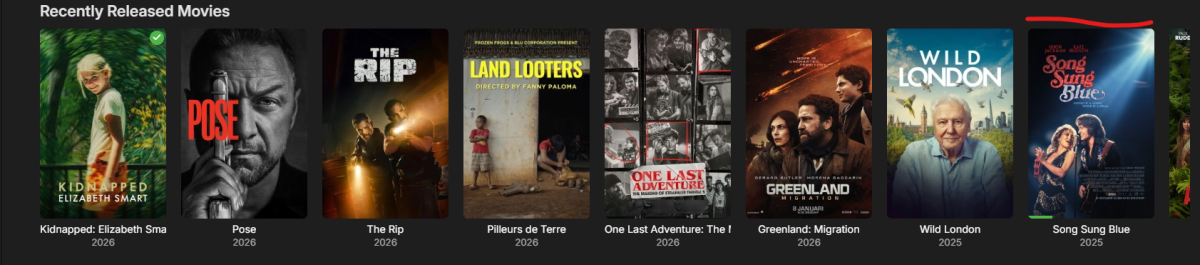
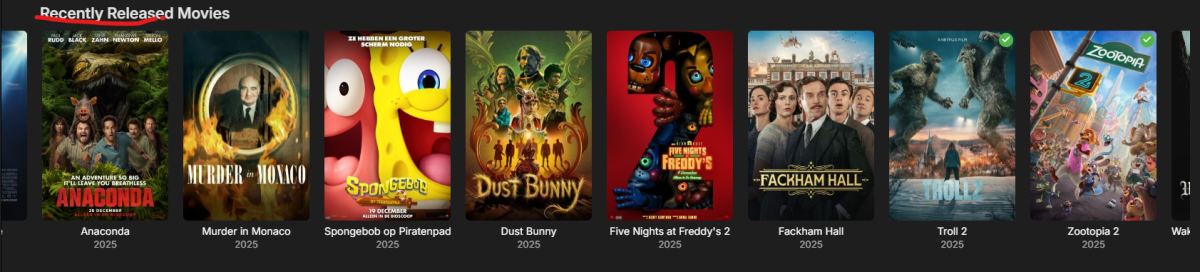
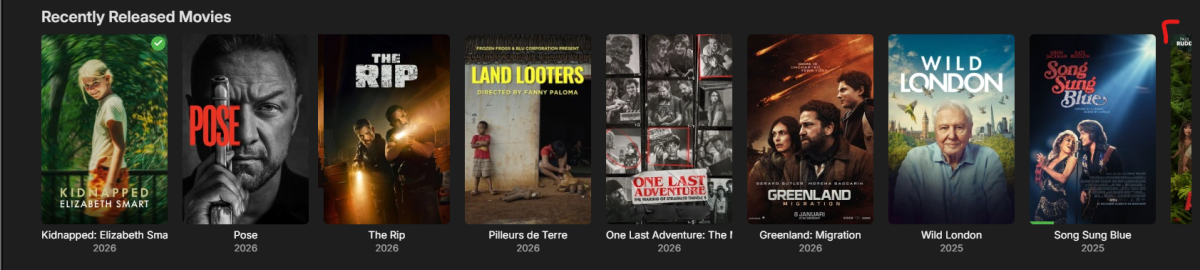
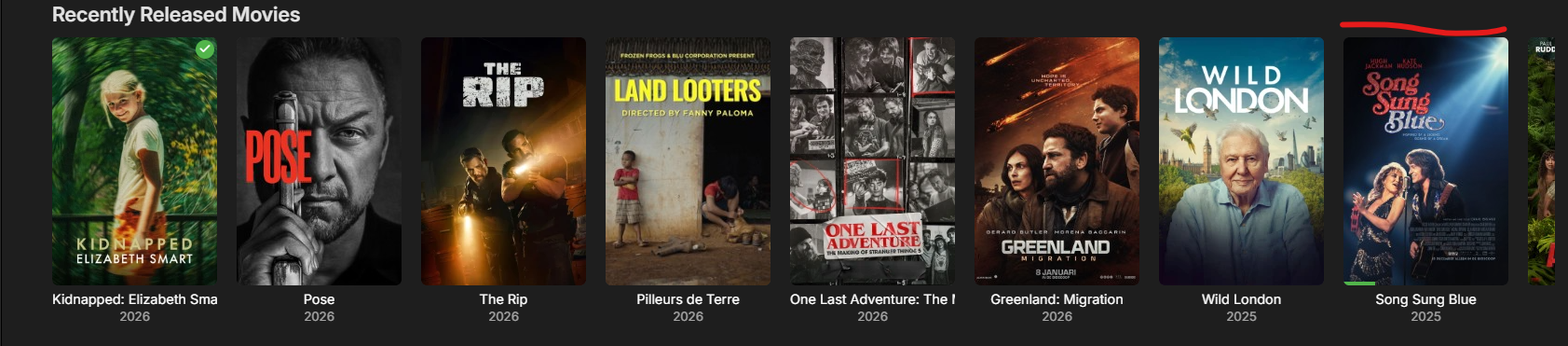
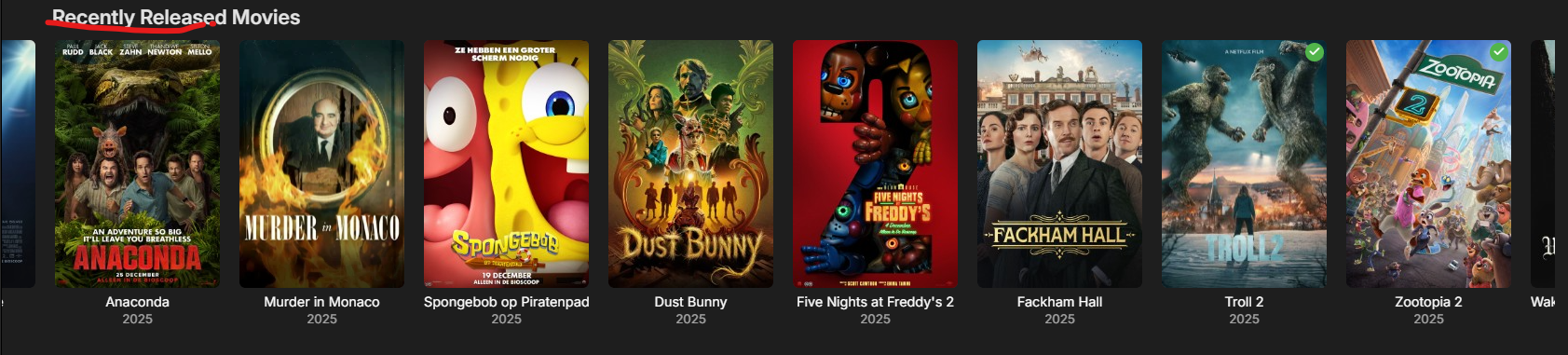
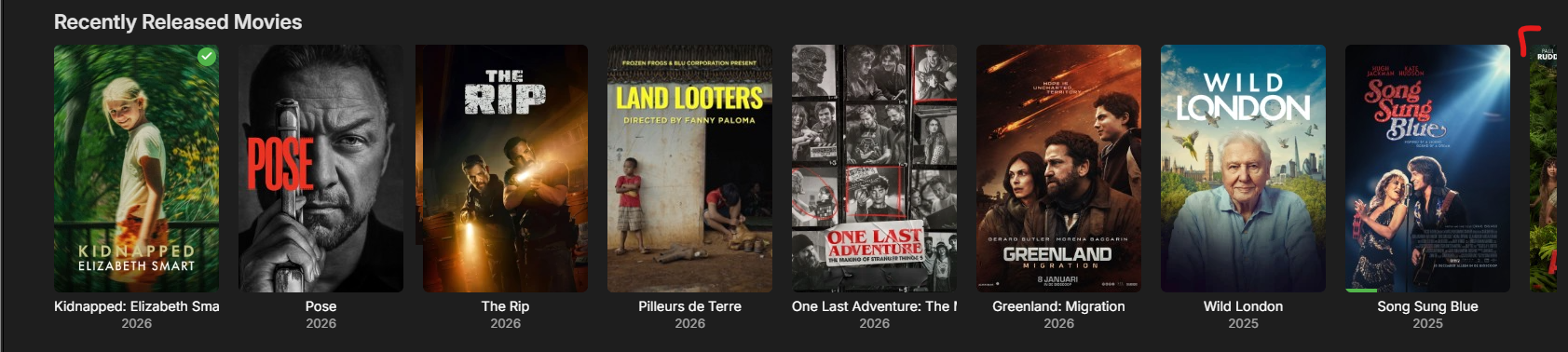
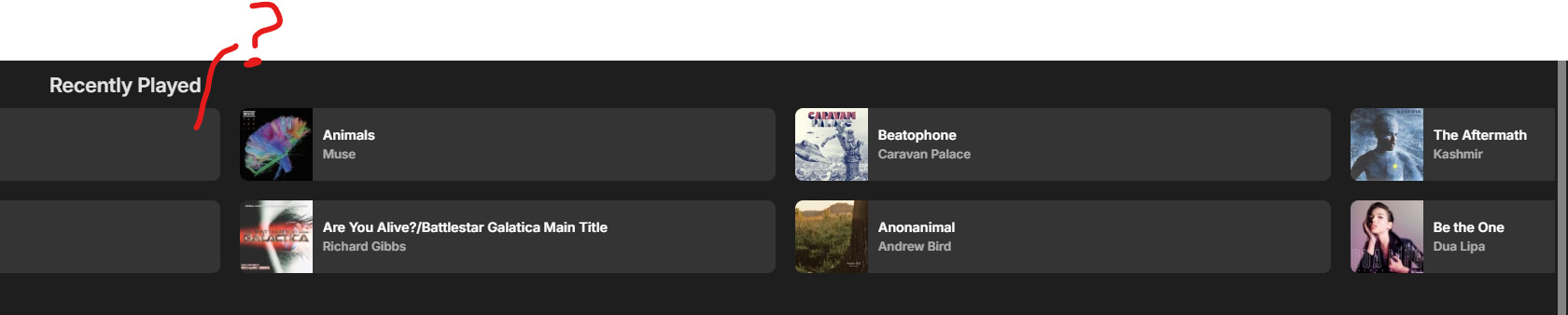
That's great and all and should be adhere to and in this case it's not. Now the item's actions are visually seperated from the items themselves making this part of the UI pretty hard to use, especially if you're trying to look at an item in every third column. You'll have to scroll to the next page to do your action and probably back to the previous page to continue viewing (left to right, top to bottom). Alternatively it would be better to look at the "Recently Released X" slider. Here the "last item" (after Song Sung Blue) is only slightly visible, preventing user interaction. The "last" visual item (Song Sung Blue) is easily editable here. Going to the next page the last item from before (Song Sung Blue) isn't within this "page" anymore. It's not (significantly) visible anymore so the new first item, becomes the first of this "page", which is Anaconda. On the first page the last item, Song Sung Blue, is fully visible, this is the last item of the first page. On the second page Anaconda is fully visible, this is the first item of the second page. Zootopia 2 is the last item of page two. So to summarize: within the Frequently Played / Recently Played every third item is NEVER fully visible: "Where the end of this _Arc_ item" "Ah yes, it's on the next page" But what's the item underneath it now? Who knows. I want to edit "The Aftermath", an item from page 3, but I'll have to scroll to page 4 to do so.



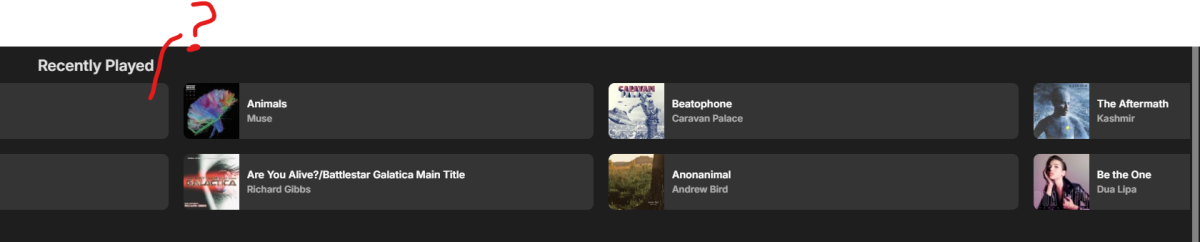


 1 point
 -
So I have 2 of the Onn 4k Max devices, and I upgraded the 2nd one today, and it works perfectly. I am going to do some more troubleshooting on my side. might even just wipe it and start from scratch on it. At this point, I don't think it is a code problem, I think it must be something with my install.1 point
-
Thanks Luke. I just wanted to confirm. Patiently waiting to know what you think on my other issue. Thanks for all your hard work.1 point
-
Hi, yes we are still looking at it. Thanks.1 point
-
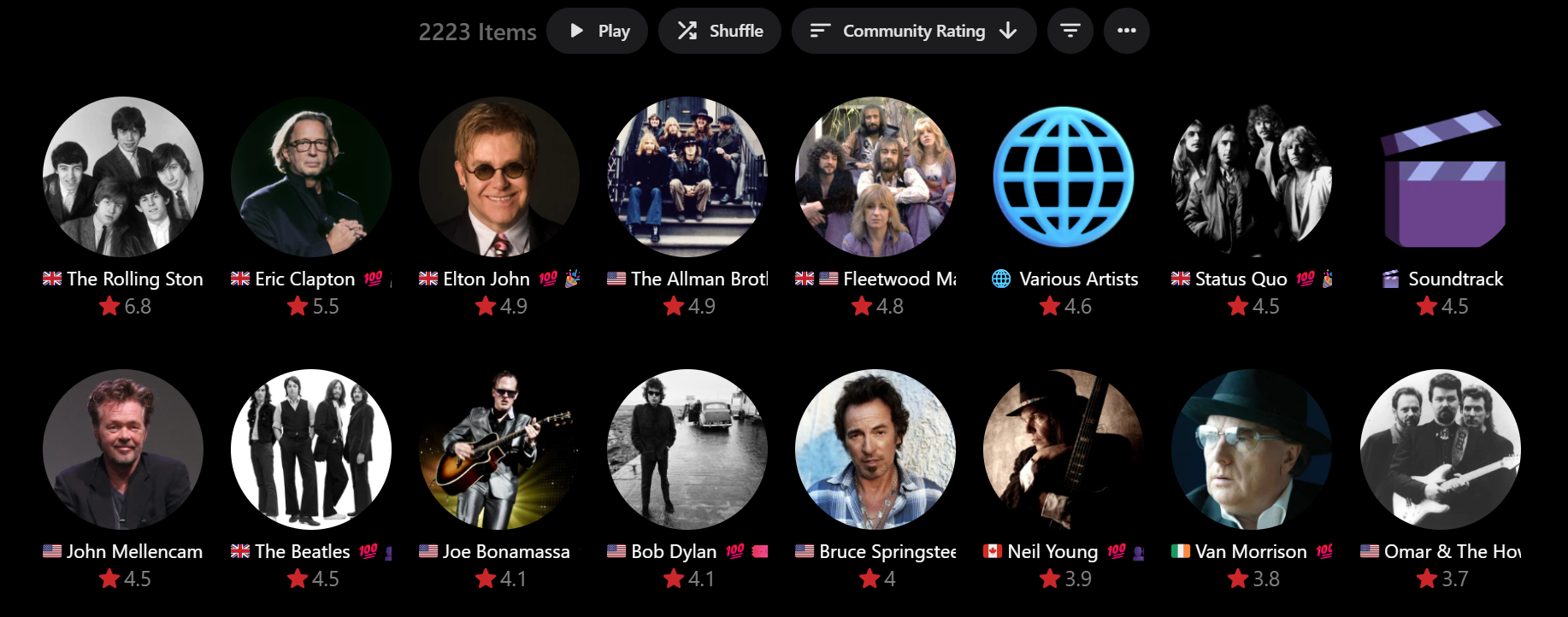
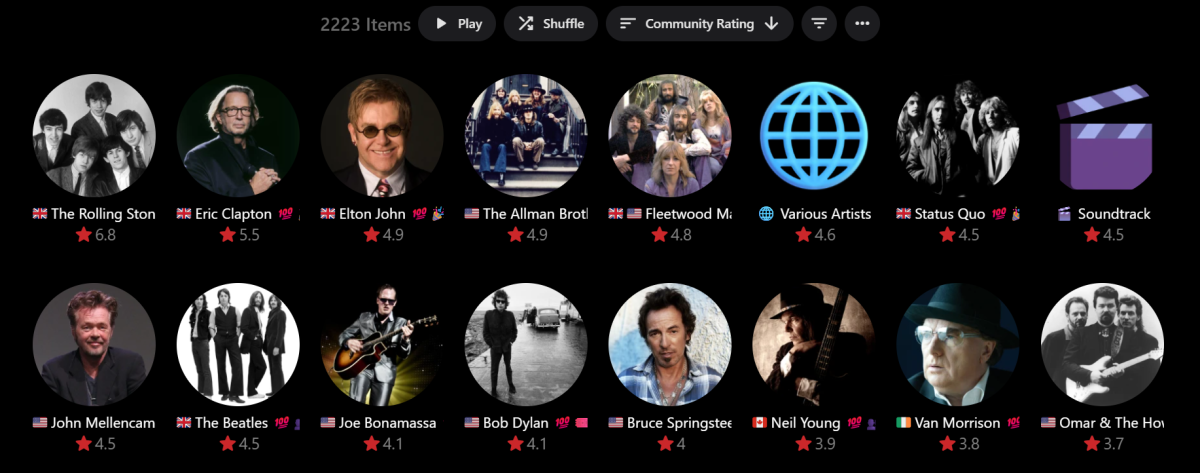
Hi, I just finished rating (or more so ranking) all of my 2000+ AlbumArtists by AlbumCount/10 and thought I'd check out the latest beta... found that you have implemented the asked for Community Rating views and sorting already!!! Thank you - much appreciated! it seems to be working really well from what I can see so far... With a Descending Sort, this is the result: This Primary Sort is exactly what I wanted. The only very minor issue is that the Secondary Sort is by descending Sort Title, E.g. the 4.5 star rating: Status Quo Soundtrack John Mellencamp Beatles My thought is that irrespective of ascending or descending Primary Sort, it would be nice if the Secondary Sort was always ascending Sort Title, E.g.: Beatles John Mellencamp Soundtrack Status Quo But no matter if you agree or not, the Primary Sort is really excellent. Thanks again!!!
 1 point
 -
Where the heck is the link to use it? Don't see it anywhere in the post.1 point
-
I am using Path substitution. My Emby server is Linux, and libraries are mapped to a path on that server, and those folders are shared via SMB. I suppose I could try to map the SMB on the server. I assume that would work (mapping drives back to the actual SMB server - seems weird, but should work). Which logs would be best to see? I Assume Kodi logs? Or are the Emby logs that would help?1 point
-
Just a @quickmicnote to say THANKS! Fantastic work rate and response rate, especially over the last few weeks!! Really appreciate your efforts on this - I know how easy it is to get frustrated with all the little bugs that you thought you tested for but missed, and especially answering the same questions over & over again from yet another new user...1 point
-
@sh0rtyAwesome as always!1 point
-
A lot has changed in the last week, new version up in GH https://github.com/v1rusnl/EmbySpotlight1 point
-
Happy to help, look forward to this issue being resolved.1 point
-
thanx for the info1 point
-
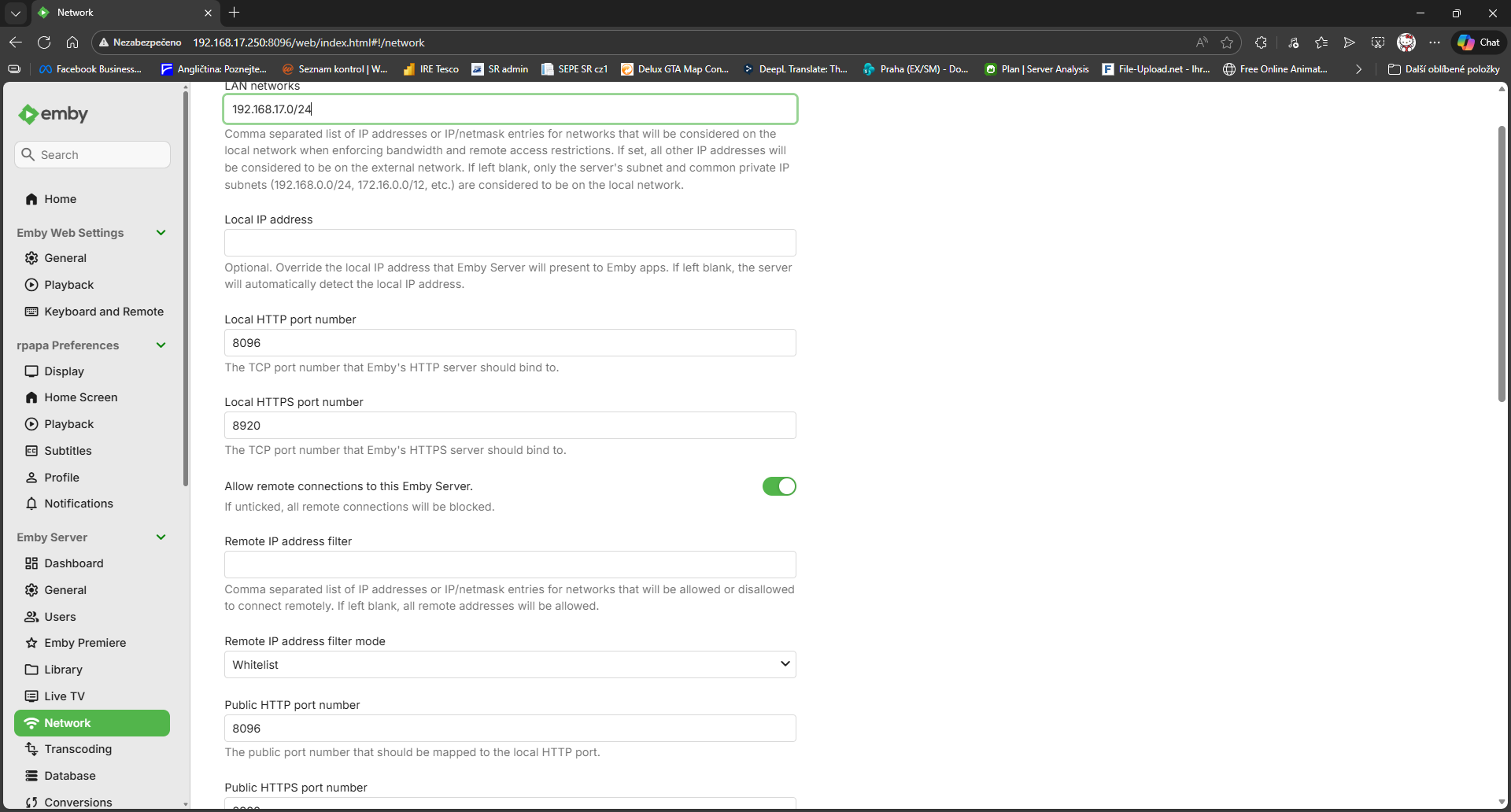
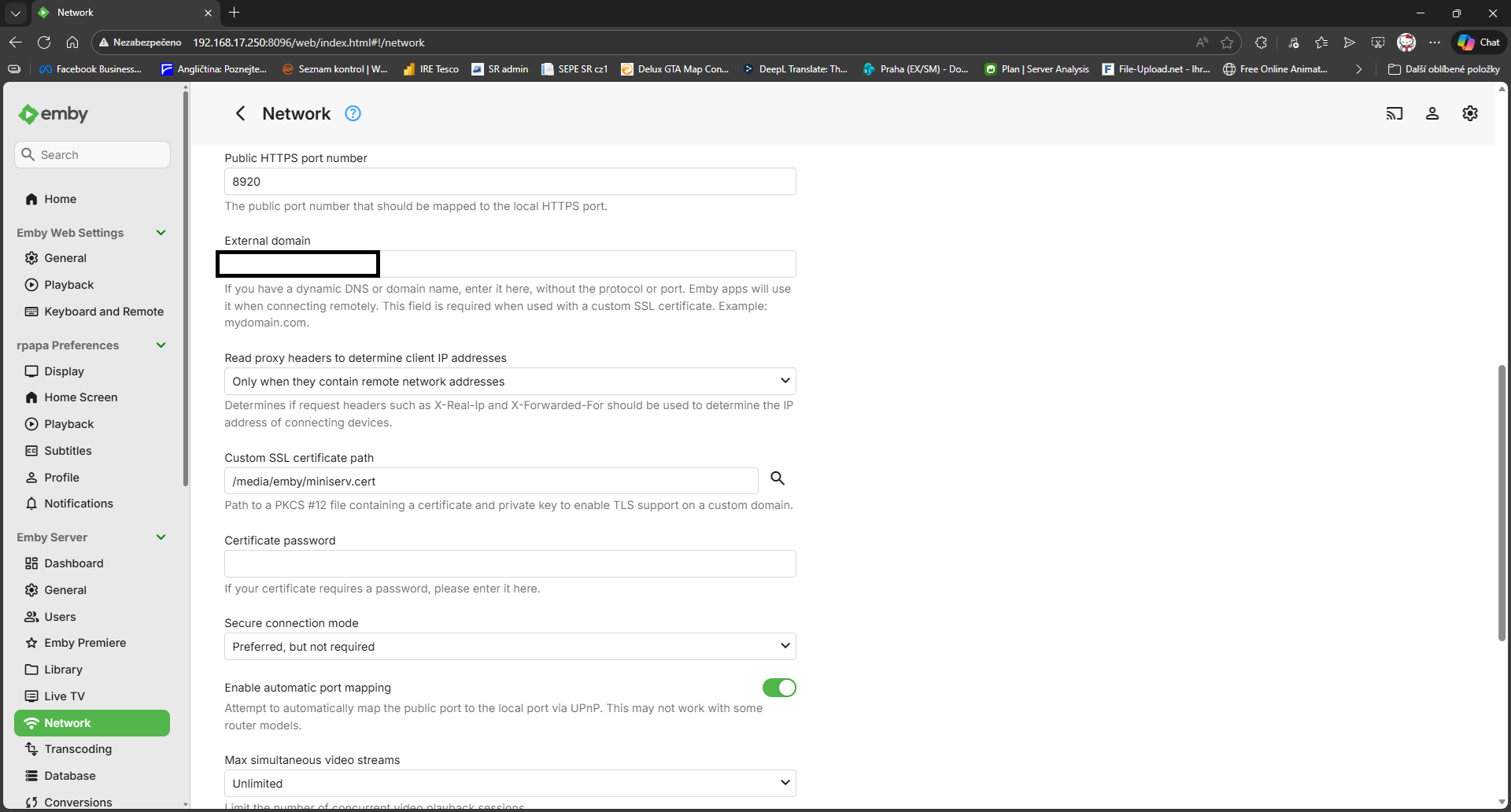
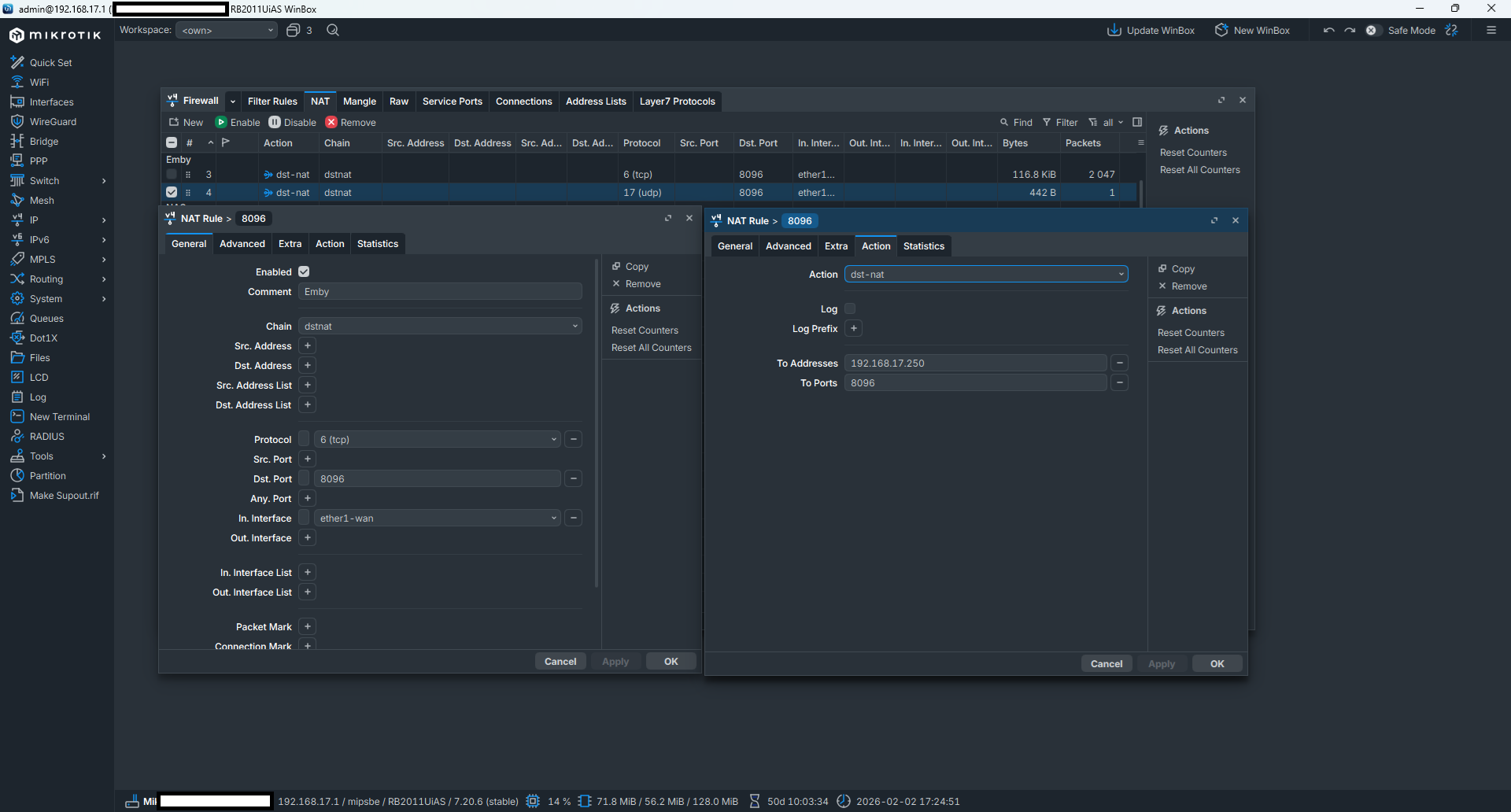
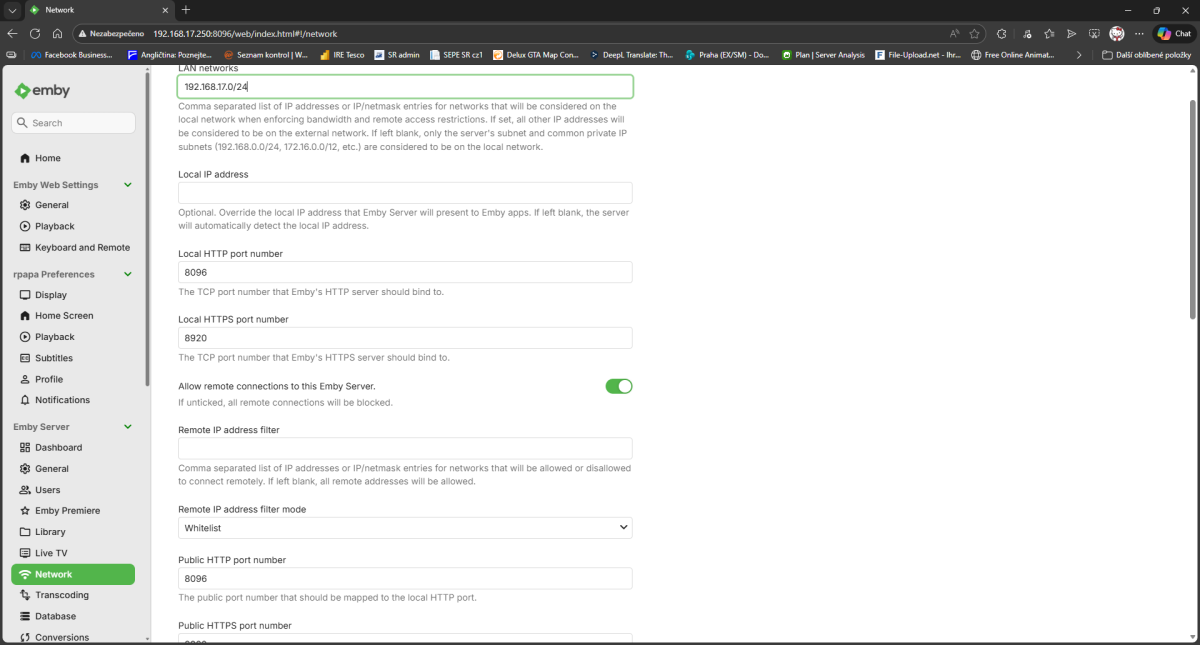
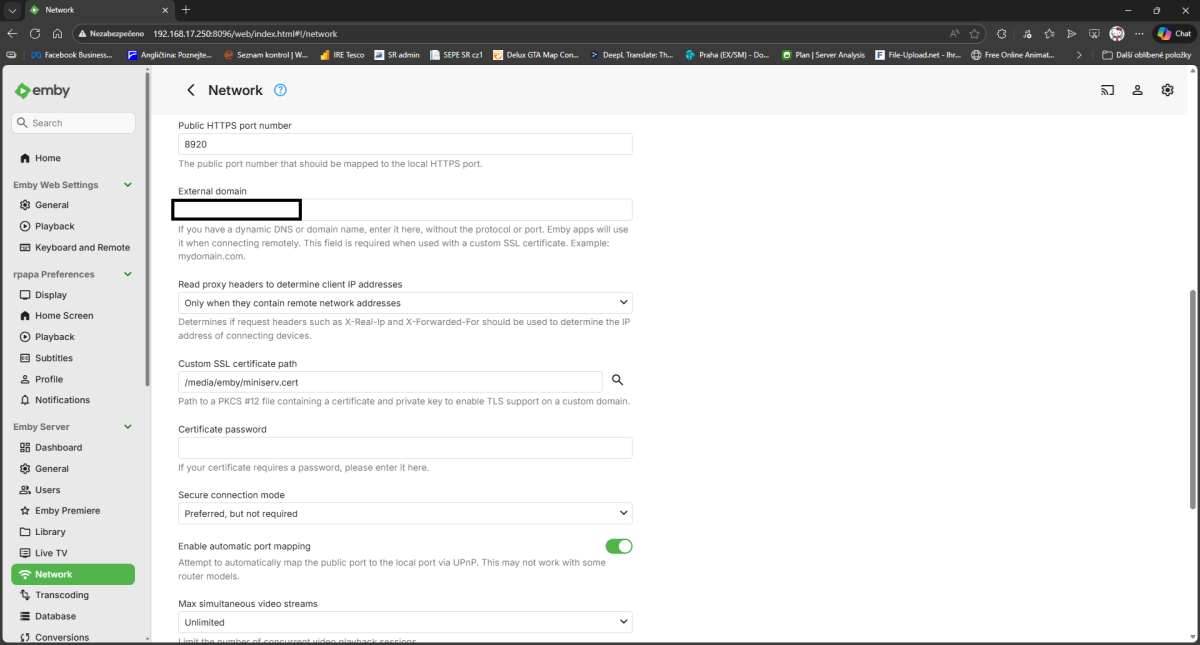
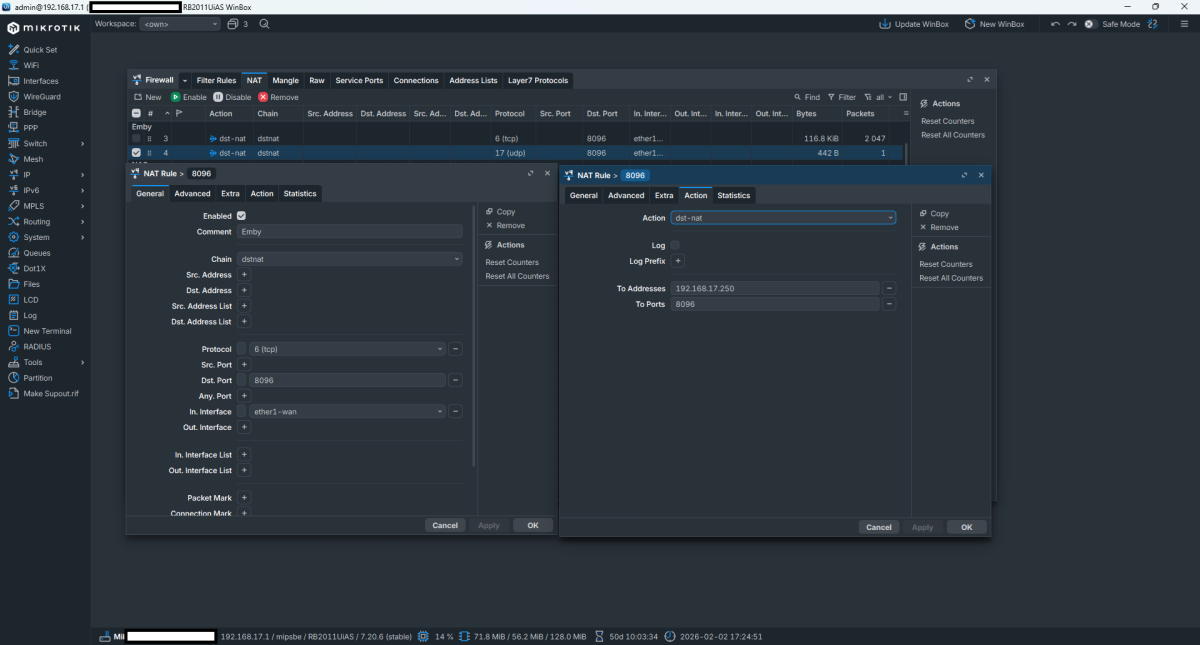
Hi, my settings look like this, which works and may help someone else too. I signed the SSL certificate myself on my webmin server - but here the primary reason is because of LDAP. (My ISP allows me to use my public IP address even within my LAN network, so i can also use my public IP to access services inside my local network.) I log in to my TitanOS TV using my public IP address (not ddns) and use the standard port 8096 (not SSL port 8920), and the login and access work. My settings:
 1 point
 -
I've got emby theater running on an Allwinner h618 tv box with Armbian installed. I've managed to get video acceleration enabled in MPV and it plays great with that player. To get it working involved installing specific ffmpeg and mpv versions. The issue I have is Emby is still a choppy mess. I have video output set to libmpv and the acceleration set to unset (for mvp.conf). I've set MPV to save a log and after playing the same file in each player and comparing the log, it seems Emby is using it's own version of mvp and ffmpeg mpv emby MPV 0.35.1 0.38.0-dirty ffmpeg 5.1.8-0+deb12u1 n6.0.1-180-gf4af3f1cbb libavutil 57.28.100 58.2.100 libavcodec 59.37.100 60.3.100 libavformat 59.27.100 60.3.100 libswscale 6.7.100 7.1.100 libavfilter 8.44.100 9.3.100 libswresample 4.7.100 4.10.100 The emby ffmpeg version fails with the following errors and and reverts to software rendering. [ 0.028][v][libmpv_render/drmprime] drmprime hwdec requires at least one dmabuf interop backend. [ 0.028][v][libmpv_render] Loading failed. [ 1.422][v][ffmpeg] Unable to open any dma_heap device [ 1.422][e][ffmpeg/video] hevc: Failed to set destination format: S265 1920x1080 [ 1.422][e][ffmpeg/video] hevc: Failed setup for format drm_prime: hwaccel initialisation returned error. I've searched the system and can only find one copy of ffmpeg but I don't really know what I'm doing. If I run ffmpeg --version in the terminal it reports the versions MPV is using. Is there any way to make emby use the versions in the mpv column above or is it baked into the emby-theater exe? Alternatively does anyone have a solution for the dma issues in the newer ffmpeg version? The mpv.conf file uses hwdec=drm. In regards to dma and drm the MPV ffmpeg has the following features enabled and the emby version only has dmabuf-interop-gl, drm. egl-drm dmabuf-interop-gl dmabuf-interop-pl dmabuf-wayland drm egl-drm drm-is-kms vaapi-drm I've spent so much time getting this box functional and this is the last hurdle I need to clear. Someone here is my only hope!1 point
-
Hello! Currently, when editing an item's metadata, genres must be added one by one. This process becomes tedious and slow when adding multiple genres or subgenres. I suggest allowing users to input multiple genres in a single line, separated by commas (e.g., Action, Adventure, Sci-Fi), so they are automatically recognized and added as individual tags upon saving. Thanks!"1 point
-
<description lang="zh">欢迎使用 Emby for Kodi,这是一种管理和浏览媒体库的全新方式。Kodi 的 Emby 插件融合了 Kodi 的优势——超流畅的导航、精美的用户界面和几乎支持所有格式的文件播放,以及 Emby——功能最强大的完全开源多客户端媒体元数据索引器和服务器。 Emby for Kodi 是体验卓越的 Kodi 播放引擎与 Emby 集中式数据库强大功能相结合的最佳选择。主要特性:与 Kodi 媒体库直接集成,带来原生 Kodi 速度;与 Emby 服务器即时同步;全面支持电影、电视和音乐收藏;Emby 服务器提供直接流媒体和转码支持——即使出门在外也能使用 Kodi!</description> addon.xml1 point
-
Update to v1.1.0. UI and layout update: Better handling of multiple tags, Added - Dry-run toggle. Run the code without writing to database. See the results in Emby-log Test-button: Test your link and API keys directly from UI (no writing to Emby database). Download .dll https://github.com/soderlund91/AutoTag/releases/tag/v1.1.0.01 point
-
I found out that it might be the external player I am using on my media box. Sorry for the trouble. Both emby and my media player had an update at the same time.1 point
-
I'd like to also express interest in this feature. I really like having the cinema intros feature for full length movies, to give it that cinema experience, but if I am going to watch a few 5 minute shorts I don't want to watch 2 2-minute trailers before each. I have Movies and Shorts separated into different libraries for just this purpose, and I don't want to lose the feature for full length movies just because it ruins the experience for watching some shorts.1 point
-
Thanks... I will add this, and the real emby devs can correct me if I'm wrong, all HTTP MPEGTS streams will take AT LEAST 3.5 seconds to tune. That's where you start from. In the real world you can at a second or 2 for it to show up on a client best case scenario (I average about 8 total). There almost certainly seems to be a hardcoded 3.5 second buffer in there. And, oddly, from my testing, seems like HLS channel streams can be worse. This is because it *appears* emby will buffer X segments. If segments are 2 seconds long and it buffers 3 of them etc... it takes even longer. What I've learned (which I could be wrong), is that HLS segments split on i-frames and the intervals of those vary by broadcasters. So it's certainly going to be 3-6 seconds from a 'cold tune' to get legit HLS segments from OTA channels. Bottom line is, ANY media server that is "proxying" a stream from TVH, must buffer it so it can figure out what the stream is (video/audio codec etc) to send it to clients. And ffmpeg needs a solid 1-2 seconds at a minimum (IMO). If you want super fast tuning, you have to go after the mpegts stream directly via direct http connection to tvheadend... i.e. the "VLC player" way. The trade off there is you lose all the cool features of emby :-). The only other alternative I can think of is predictive or "cached" tuning. Keep multiple streams constantly connected/tuned to tvheadend - dumping the video data if no user is requesting the channel. Maintain an LRU buffer of channel streams and hand them out if a user requests it and you have it..... otherwise make TVH tune it and spin up a new stream (easier said than done ).The tvheadend plugin for Kodi seems to do something like this, I'm currently exploring that option. I'm also exploring if I could extend/create a tvh plugin based upon the old TVH plugin Luke has out there on github to try to do this stream cache/predictive tuning thing - but I would guess no matter what is done inside the plug in, the http stream would go through sharedhttppipelinesource - making the effort moot. All in all, it's a challenging technical problem and given the breadth of hardware&platforms emby supports - it can be daunting. I'll also say Emby's live tv implementation is the #1 reason I moved to it from plex and bought a lifetime pass. So I hope the devs that live and breathe this stuff have alot of great ideas in the dev pipeline to make quantum leap improvements :-).1 point
-
Added ratings. Latest version in GH. Read the Readme carefully. You need TMDB and MDBList API keys. No fallback.
 1 point
 -
I need to show the most recent season series from newest>oldest. I have one show that has 385 episodes and 195 seasons. So browsing to the latest season is untennable. Is there a setting to reverse the array of seasons to newest>oldest?1 point
-
+1. None of my users actually use the links because their intention / design isn't very clear. If the items would be self-contained sliders or whatever and would link to a specific filter containing those items (like how Netflix and Amazon handle this and how the homescreen does this as well) that would make much more sense. Now we just have a grid (which is where users look first) and they just starts scrolling (hiding the nav items) become confused and stop searching. Even I do that because I constantly forget there's a "suggestions/genres" link or whatever and just immediately sort or filter my items even if there's a button design to do exactly that.. I also think this ties into the "home screen" quite a bit where the current design is usable, practical, but not for people who have grown accustomed to larger streaming platforms. Those people get lost in the maze of buttons and dropdowns and filter and basically just give up.1 point
-
This is a matter of privacy rather than security - your whole machine isn't compromised by an image being downloadable. Sure, it matters - but it's not always the most important thing. Also, I believe that there is more than one Emby developer, so the fact that one person may be actively working on the images issue doesn't mean that the work of another cannot be presented in a beta. Paul0 points
-
And you get to decide that for the whole world?0 points






















(1)(1)(1)(1).thumb.jpg.b48588c08b9d9a9c78b081d5b100545e.jpg)