Leaderboard




Popular Content
Showing content with the highest reputation on 01/26/26 in all areas
-
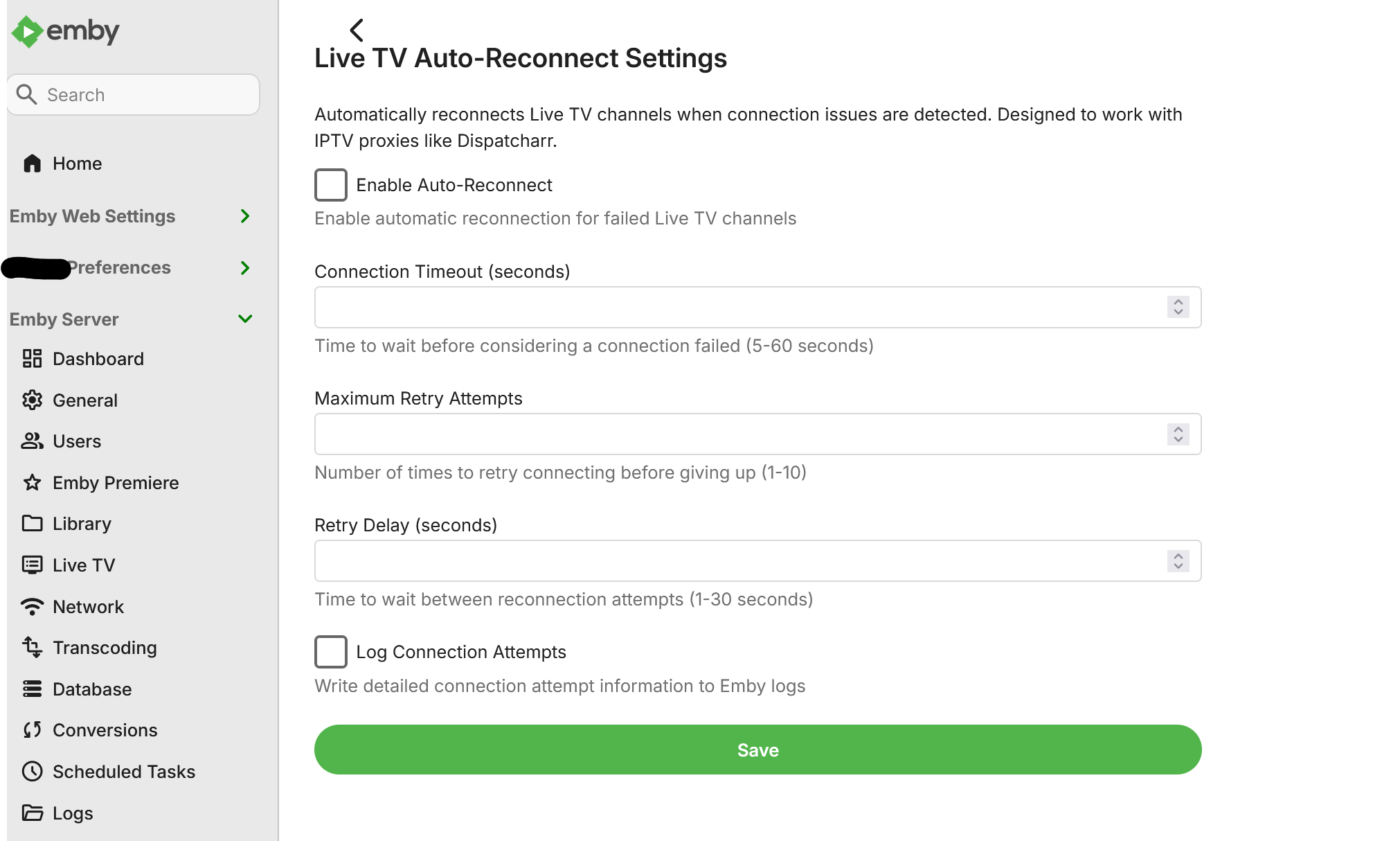
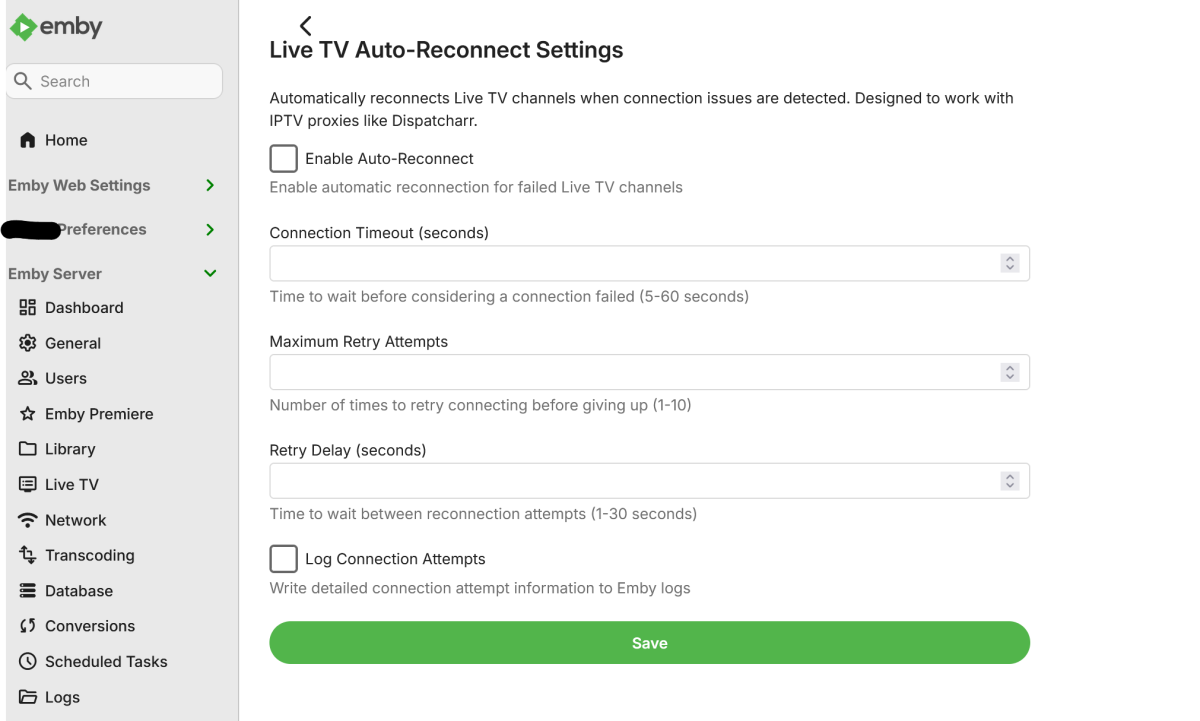
I use Dispatcharr as an IPTV proxy that assigns multiple backup streams to each channel. When a stream experiences issues (buffering, stuttering, or complete failure), Dispatcharr automatically fails over to the next available stream in the sequence. Current Issue: When Emby encounters a problem connecting to a Live TV channel, it tends stops the connection attempt entirely after a few seconds. Even though Dispatcharr switches to a backup stream on the backend, Emby has already stopped trying to connect and does not automatically retry. Requested Solution: Add configurable settings for Live TV channels: Connection timeout duration (time to wait before considering a stream failed) Auto-reconnect behavior (automatically retry connection after timeout) Number of retry attempts This would allow Emby to detect when a stream has failed and automatically reconnect, which would then pick up the backup stream that Dispatcharr has switched to. Also, as a bonus, adding native Xtream Codes (XC) functionality would be greatly appreciated.6 points
-
In Jellyfin there is that option for m3u tuners. As me and probably most people will use Dispatcharr now or soon, this is being done twice at the moment - by Dispatcharr and by Emby. So if we can disable that in Emby we will hopefully get a slightly faster stream start. BR6 points
-
Example configuration page.
 5 points
 -
I just ran into an issue with this last night. I was watching a football game in 4K on my Apple TV. My son tuned into the same game on the same channel on his Apple TV, we are both on the local network, and his stream was very glitchy and somewhat slow motion. The two fixes I found were pausing his stream for 10 seconds and then hitting play, or going to the gear icon and selecting Playback Correction. This doesn’t happen with a 1080p channel. I agree, though, it would be nice to have the ability to disable this.2 points
-
What we need is the ability to lock the chapters after editing to prevent them from being changed in Emby following a metadata refresh.2 points
-
Sure - and each time this is delayed, more changes happen, and more previously usable work has to be thrown out or modified when it is put in place. Each delay makes the job more difficult and wastes more of what already existed, which is an argument for getting on with it. Paul2 points
-
no, I am aware that this is a must for other reasons. I just want to reduce the playback start time.2 points
-
@softworkz maybe this could be considered for tvnext?2 points
-
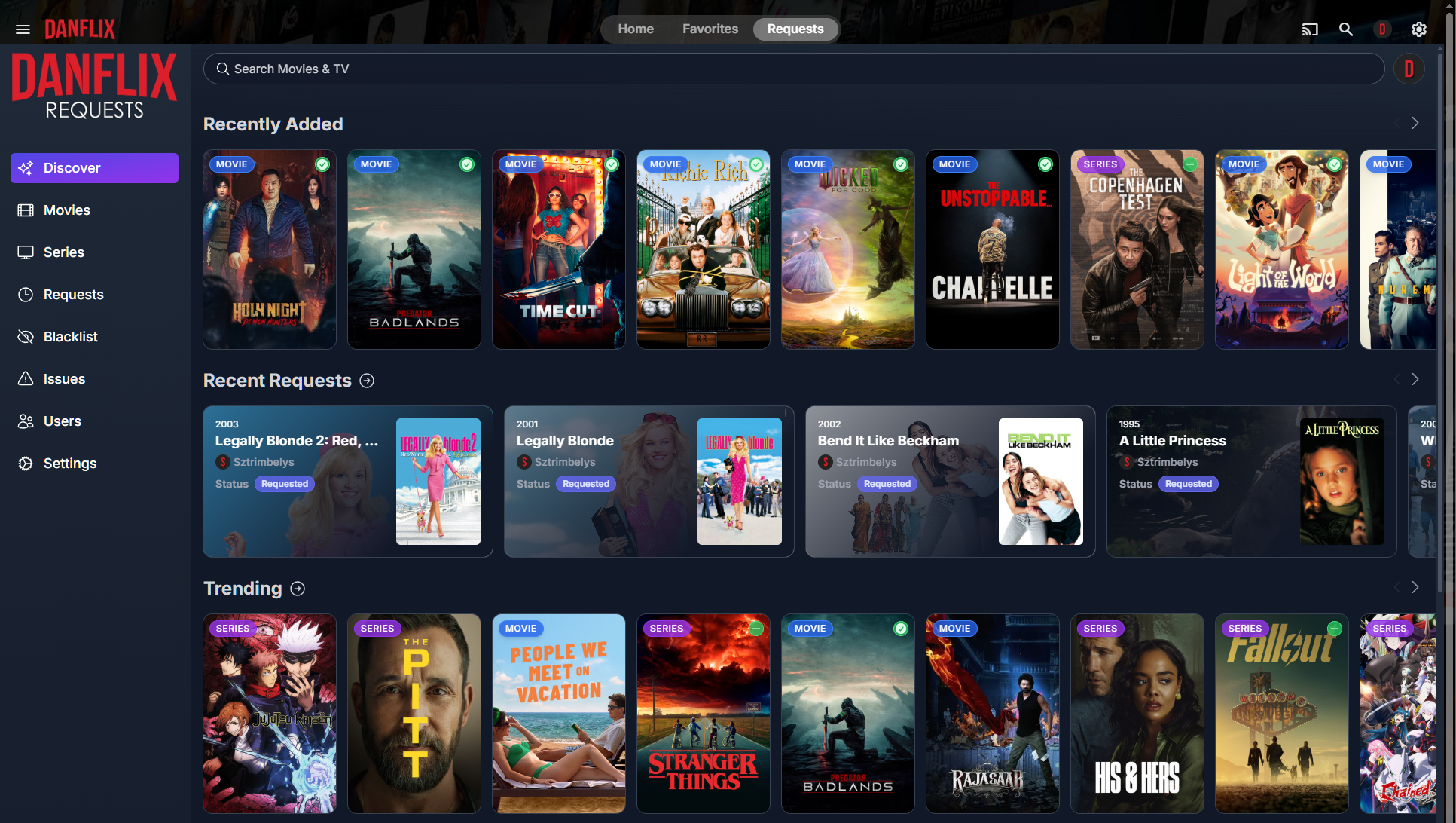
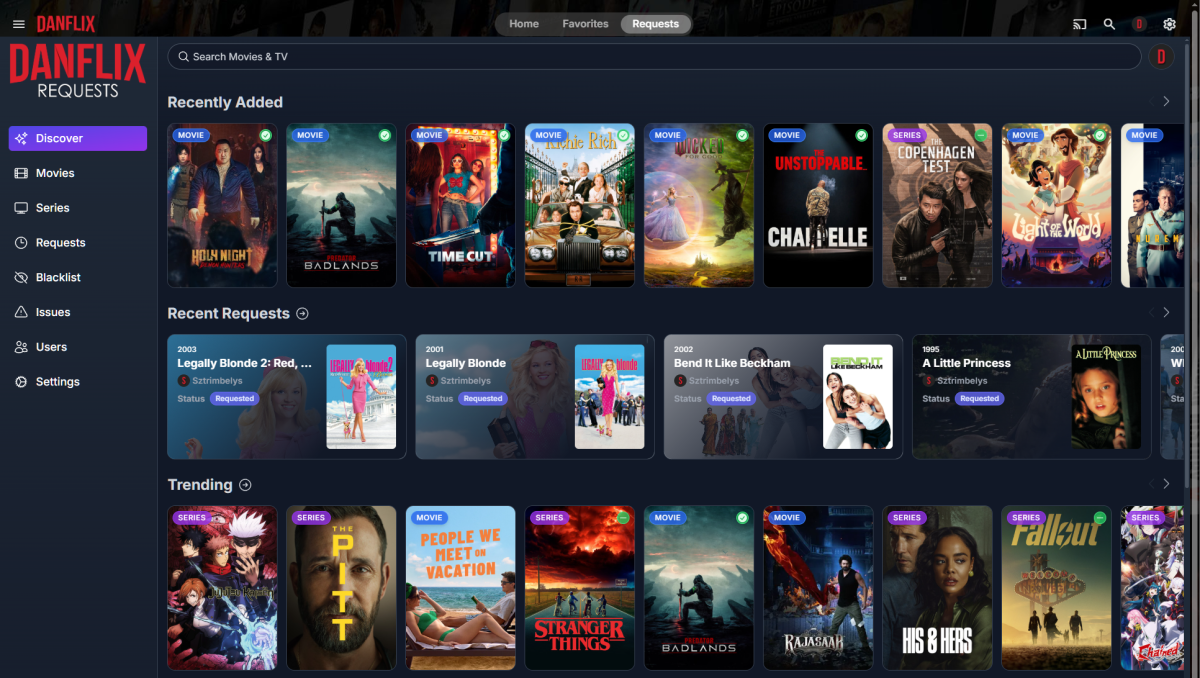
I was checking out Jellyfin and noticed they have a Custom Tabs plugin that can add new tabs to the Home/Favorites menu. So I added a "Requests" tab which launches Jellyseerr in an iframe and it was awesome. Unfortunately there's no such plugin for Emby that I could find. So I resorted to modifying web files and wrote a script I can run whenever the container needs to be re-built. Here's what it looks like un-selected: Selected: The only thing I have left to do is implement SSO so users don't have to login to Jellyseerr manually. Instructions in next post...

 1 point
 -
I was wondering if you could add some improvements to the subtitle feature, especially when both embedded subtitles and external subtitles exist. 1. As you can see in the picture above, all of the embedded subtitles are contain (SUBRIP) while my external subtitles names contain (SRT). Can you add an icon or some text to make it obvious between embedded and external? For example, add [External] prefix to external subtitle files. Where "English (SRT)" would be displayed as "[External] English (SRT)". 2. Add a setting to 1) prefer embedded subtitles or 2. prefer external subtitle files when the apps choose to automatically load subtitles 3. Add a display setting to display external subtitle files above embedded subtitles. As you can see in the image above, there's a lot of embedded subtitles that i don't care about and always have external subtitles for all of my movies. I would rather see my local subtitle listed on top instead of scrolling all the way to the bottom to find the external subtitle" 4. For external subtitle files, they don't appear to support nested tags, for example, "RED.2.2013.720p.eng.default.forced.srt". I know that hearing impaired and SDH isn't supported quite yet but some subtitles would have names such as "RED.2.2013.720p.eng.sdh.default.forced.srt" or "RED.2.2013.720p.eng.hi.default.forced.srt"
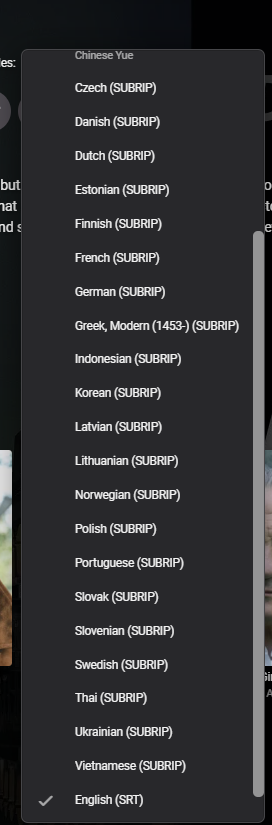 1 point
 -
@Lukename your favorite cofee or beer and I'll literally doordash it to you for looking into this.1 point
-
I definitely have this issue. Dispatcharr --> Emby takes around 5-7 seconds to start playing, meanwhile Dispatcharr --> nearly any other IPTV app or VLC is an instant start-up.1 point
-
With College Football and NFL seasons starting up in the States, a multi-screen option for Live TV would be a nice addition to the Emby feature set. I am thinking of what the WatchESPN app offers thru their Web Browser access. The ability to open a multi-screen window that breaks into four (4) screens that allows you to select streams (Live or Replay) for each and then go full screen. Audio is from whichever of the four screens you have as active. I can accomplish the same right now with the HDHomeRun Quick View TV app. I open multiple instances of the Windows app and then snap them to each corner on my 110" projector screen. Equivalent of four (4) 55" screens. Would be nice if this were a remote friendly option from within Emby Theater and the WebUI clients. I have only seen it in Web Browsers at the moment and not any of the Win10 UWP apps (FS GO, NBCSn, WatchESPN). But, Fox Sports Go just released a multi-screen solution for their Apple TV app. https://techcrunch.com/2016/08/26/fox-sports-go-hits-apple-tv-allows-viewing-of-four-games-at-once/1 point
-
New version out (1.6.9.0) on yocksers/EmbyCredits github Added: Image Preprocessing Contrast enhancement (adjustable 0.5-3.0) Brightness adjustment (adjustable -0.5 to 0.5) Sharpening filter with configurable strength Region of Interest (ROI) Detection Focus OCR analysis on specific screen regions Options: Full Frame, Bottom Third, Bottom Half, Center, Top Third Reduces processing time and improves accuracy for specific layouts Note: Not recommended unless uses for re-detecting videos that otherwise failed. Fuzzy Keyword Matching Levenshtein distance algorithm for detecting misspelled/partial keywords Configurable maximum edit distance (default: 2) Catches OCR errors like "Director" → "Dlrector" Scrolling Credits Detection Detects text position changes across consecutive frames Identifies scrolling credits by tracking vertical movement Configurable window size and position threshold Adaptive Frame Rate Dynamically adjusts frame sampling based on text density Automatically speeds up/slows down analysis Credit Structure Detection Identifies role-name patterns (e.g., "Director: John Doe") Recognizes structured credit layouts Configurable role patterns and minimum role count Quick Preset Buttons Best Quality: Optimized for accuracy Best Speed: Optimized for performance Fixed: Some hardware acceleration bugs. Confidence score now actually work, yay! Known bugs: Intel QSV hardware acceleration not working, this will requires an updated to the ffmpeg built into Emby. Please use VAAPI for now. Please note: Turning on all settings at once require a large computer to have detections done within a reasonable time so set the settings you need for best results for you and leave the rest. All the options have only been given for users to customize the plugin to work as best as possible with their libraries. Improvements to user-friendliness is next on the todo list. Thank you to @Neminemfor help with testing and bug chasing.1 point
-
Ice Storm thwarted. I installed 4.10.0.1 beta on my Synology NAS and am happy to report that the Legacy Scan is functioning as expected. This brings me tremendous joy. I will be happier still when a stable release comes along where I can get out of beta mode. Thank you for the turn-around on this.1 point
-
Definitely not. That was a pre existing problem this just happened to expose1 point
-
Hi , definitely i understand where this is coming from. I am just putting it out here so by any chance any volunteer is sulking on this thread. They might help . @rbjtech the disappointment is mutual.1 point
-
I suggest an improvement to the continue watching / play next episode logic. If the episode that is to be played next (whether selected manually, or automatically queued) is NOT the next reported episode, provide a spoiler warning. This would apply to: Selecting an episode from Continue Watching Provide a warning/confirmation that you are skipping ahead Automatic playing of Next Episode Either provide warning/confirmation or kick the app back out to the menu When starting a new season and the previous season's last reported (TVDB, etc) episode was not watched When starting a new show NOT at the first episode (e.g. Ep1 is missing and attempted to begin watching at Ep2) Thanks1 point
-
Yes. Some media has completely useless chapter markers (thus thumbnails). I would like to have more interval options, as well. For example, I don't need to clog my server with tons of thumbnails, and would prefer just having every few (5) minutes (every couple of scenes). I only use the thumbnails to do quick validation of file quality/correctness without having to play and skip through the video.1 point
-
I'm also still waiting for a feature like this and made a suggestion to implement the following: The issue regarding integrated / image-based subtitles does seem to be coming back every time.1 point
-
I think its rather telling that it needs community volunteers to maintain an emby plugin previously written by a community member to fill the void for a fundamental feature request raised over 10 years ago. The FR is STILL the #1 item on the list by reaction. I really have no idea what is taking them so long to produce these Smart Playlists/Views. Even if a minimal viable product/framework is released in Beta - then the volunteers can build on that - rather than waste their time keeping a 'stop gap' operational.1 point
-
Emby Server Settings -> Library -> Advanced tab1 point
-
HI, have you tried marking your external subtitles as default? Subtitles Naming1 point
-
We’ll add it to the bottom of detail screens. Thanks.1 point
-
21:55:25.995 Stream #0:0 (h264_qsv) -> hwdownload:default (graph 0) 21:55:25.996 Stream #0:3 (pgssub) -> scale:default (graph 0) 21:55:25.996 hwupload:default (graph 0) -> Stream #0:0 (h264_qsv) 21:55:25.996 Stream #0:1 -> #0:1 (dts (dca) -> ac3 (native)) If you disable burning in the pgssub and instead used external srt that would make the video stream able to be copied and direct played. Since it isn't copying the video stream this means it will use HLS. The audio stream is DTS is not supported in HLS. But if you weren't using those graphical pgssub, either no subtitles or external srt, it would've been direct playing and it could've then direct played the DTS audio too. The entire container would've been used with no HLS used at all. You notice it in your example when the entire scene changes. The initial keyframe looks blocky/muddy. Cannot be easily fixed without a huge initial delay in transcoding. The method Emby is using for HLS has a much faster start time. Then it sorts itself out. This isn't unique to the Roku. Rather the Roku makes it noticeable this is happening. Any device that cannot burn in pgssub subtitles and needs to burn them into the video would cause the same thing. The video would get transcoded and the DTS audio would need to be converted since DTS isn't supported with HLS.1 point
-
Not that I could easily solve for relative to the jellyseer api. It doesn’t support oAuth.1 point
-
Yes, I would like to see it there as well!1 point
-
Yeah, I initially usually used WMA files with Windows for a while, which wasn't that great for compatibility with other systems. By the time Windows had FLAC, I had already moved on to other options such as Media Monkey and MusicBee. Emby is quite good for customizing (better than Plex, I think), but does lack some music functions, compared to dedicated music apps/programs. If you didn't know already - Emby is reportedly going to have Smart Playlists very very soon, so that should also help with anything you are wanting to set up automatically with ratings and playlists outside of having it fully built in as a core function. Cheers!1 point
-
1 point
-
The port is showing as open and now the server can be accessed from my neighbor's Roku TV. Port forwarding was the issue. Thank you!1 point
-
@Luke has something changed in emby? I have noticed a few posts like this now, I know originally if you did a full meta reload for an item the chapters would be reset but has that been changed to reset chapters on any meta reload? short answer is no. longer answer is possible but probably not going to happen, because emby has no chapter search functions you would need to load ALL media file chapter info on the server into a new DB for all chapter info, add a way to keep this updated and in sync and then add search capabilities so you could look up the chapters that fit your requirements...see short answer. This is probably doable, a little risky but doable. You would need to walk through ALL the files that fit your criteria and apply the create chapters. It also might be possible to add a trigger to process newly added items. There is an example in the code for this already for the existing intro scan action. there are probably options for saving and restoring chapter data. I looked into a few options but stopped, read more below. History and Future: This plugin was meant to me a stop gap fix for a missing feature in Emby. Years ago we had a group of users working on ways to detect intro segments in episodes, this work tried a bunch of different approaches and eventually found a reasonable solution of using Audio finger prints of intro music to detect intros. This works well enough and a few plugs and variations of the approach were produced, this plugin being one. At the time there was no way of viewing or editing the chapter data that was being to to hold this new intro skip data that was being detected so I added a feature to my intro detection plugin to allow users to view and edit chapters manually. As time went by the core Emby system added one of the more automated approaches for intro detection into its core feature set. And one of the plugins that was using that approach was removed from the plugins and effectively disappeared. We were also told as this time that Emby was adding this core intro detect feature and also a bunch of chapter editing features and that ALL the intro and chapter plugins would no longer be needed. And it is true the core Emby now has a intro detection system, but Emby never added any chapter editing or viewing features into its core feature set. I kept this plugin going as I believe my approach to intro detection was a valid alternative (uses a library of into audio fingerprints instead of having to actively scan for similar audio segments). And also this meant the Chapter view/edit features was still available in this plugin. I was assured by the Emby team that the core Emby chapter editing and viewing tools were coming soon and any work I did on them in this plugin would be redundant in short time so I never added or enhanced the plugin. Now years later and with no sign of any chapter editing or viewing in the core emby system this plugin is still the only solution most users have or viewing and editing chapters. I have no idea what happened to the core emby team, not sure if they are still there, I see comments from some of them from time to time but it is really quiet on the dev side. And I guess if any of them see this they will respond with what about X Y Z feature we just added and it is true some stuff is changing and being added but fundamental core features that are obviously need like a chapter editor and better chapter management is just ignored and I don't have any idea why. Anyway this has turned into more of a rant than anything, sorry about that. Short answer is this plugin was meant to be temporary until Emby actual had this functionality, I have no idea when that is going to happen though.1 point
-
Nothing unusual. I do have delete after watching for tv shows turned on, but that doesn't seem to affect it. I was able to immediately hit stop on something I was watching and this is the message in the background that causes this "Emby Server busy: Sync in progress" I don't want to turn off syncing in the background while still playing.1 point
-
Also what is your date added behavior set to?
 1 point
 -
personally I don't watch lots of live tv and my users only complain if it is really bad. If I see that again and can confirm that the problem disappears when watching from dispatcharr or source directly I will inform you and send you logs. BR1 point
-
The thing is, there will always be something more widely impactful, for the rest of time1 point
-
Hi, this is resolved for the next set of server and app releases. Thanks.1 point
-
Sorry i forgot to download the logs1 point
-
Generally no. Most video players have a developer api to track dropped frames, but not the reason for it.1 point
-
It’s probably getting backed up due to already being there. Deleting is probably ok but I would never suggest tampering with the data folder or backup folder.1 point
-
So why does a stream stock/hang via Emby sometimes while it works well when watching via Dispatcharr directly at the same time?1 point
-
I have a new WebCam Mic coming and I’m gonna do a whole video set up on how to add the AVD upgrade and skins1 point
-
As long as it's running through Emby Server, then disabling stream sharing will not reduce playback start time or eliminate a source of errors. The only difference would be in what happens when you try to open a second stream of the same channel.1 point
-
Furthermore, this would eliminate a source of error/stream issues.1 point
-
In developing and testing stage but there if you want to try.1 point
-
Honest answer, I have done nothing on this, clean forgotten about it. My bad! This is a plugin I want to rewrite (when I get to it) I want to improve it, I have many ideas. Just not got to it yet. I have dozens of unfinished plugins to complete1 point
-
FOLLOW-UP: I got additional "extras" for a movie I already had, so I created its own folder (with an /extras sub-folder) & moved it there. Though it was not recognized as a "new addition" (did not show up in the recents section), it had to be added back into all the collections again manually. When I went to the existing collection & tried to play the film, it said there was no media along that path. Apparently, Collections also depend on path & moving the content messes with the connection. This will be a hamper on moving a group of films, as they will all need to be "re-collectioned" individually. Life goes on... FEATURE REQUEST: Please create a system within Emby that would facilitate movement of content between folders that would automatically "recalculate" the file path after the move for all the Playlists & Collections it is included in (and whatever else requires it).1 point
-
I think this is an important "small" feature request that will have big impact as "new" users got exposed to it... it basically makes Emby as your memory assistant.. So, you are browsing for your next movie, you see a movie that is already played.. you ask yourself, "when did I see that", and you open the item, and see the date, and that will jog your memory not only to the movie, but part of your life when you actually viewed that movie... powerful tool to have. Sadly, the sort by "played date", or getting a report from your server plug in does not address the same topic. this two very useful features is for when you are seeking answer, and not when you are just casually browsing.. i.e., it is good for detective work, and not for browsing and social activities.1 point
-
You asked about metadata, my app DOES NOT modify Emby metadata, it merely downloads images from TMDb, IMDb, TVDb and TVMaze. When Emby scans it picks up the images and modifies the metadata, not my app. And yes, I know Emby pulls images, I just never turned this off and it gives me a bit of control.0 points