Leaderboard




Popular Content
Showing content with the highest reputation on 01/18/26 in all areas
-
Now I understand what you mean. Yes I agree. If this was something they would build out, I’d be more than happy to adapt Aperture to it!2 points
-
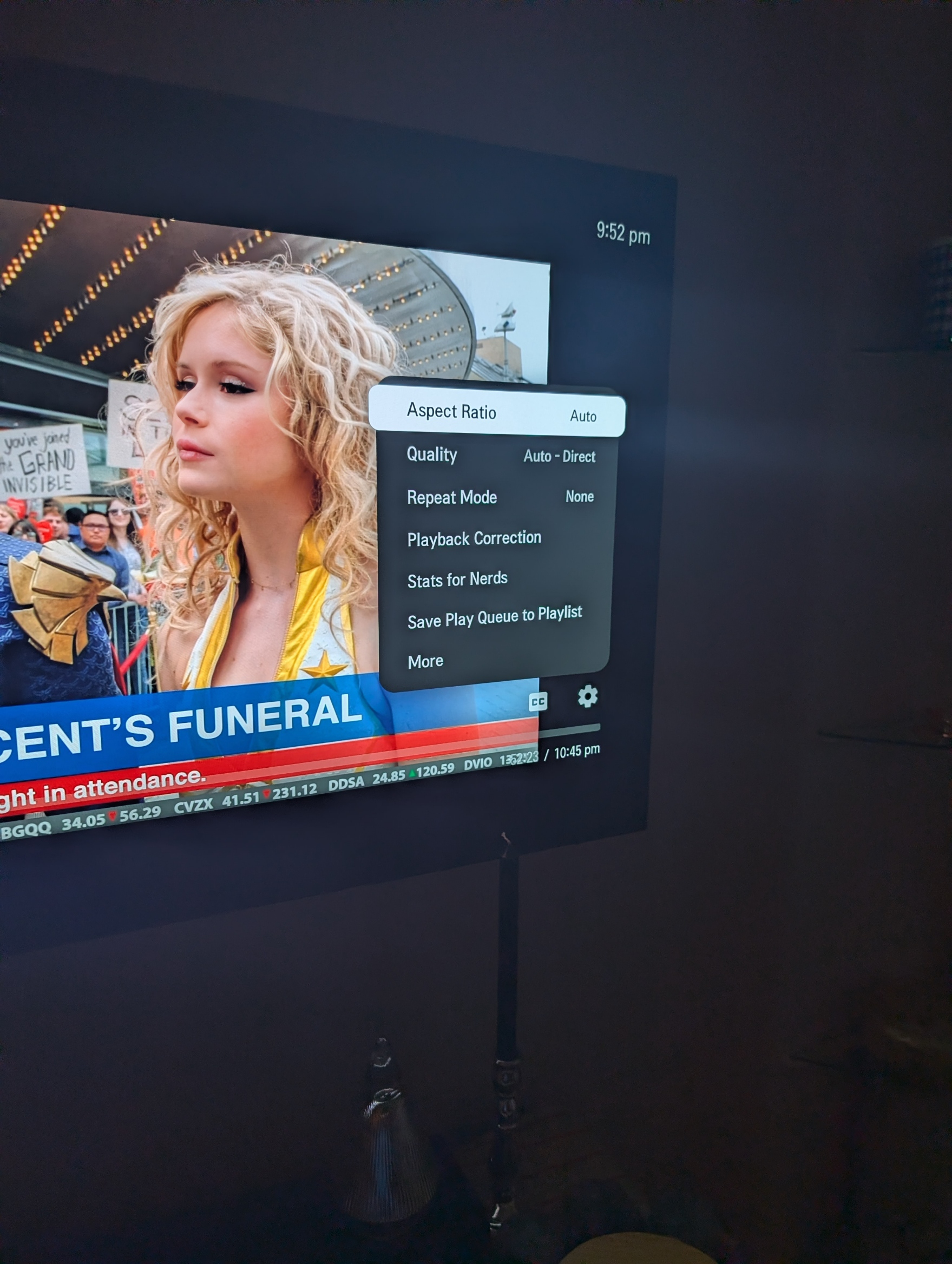
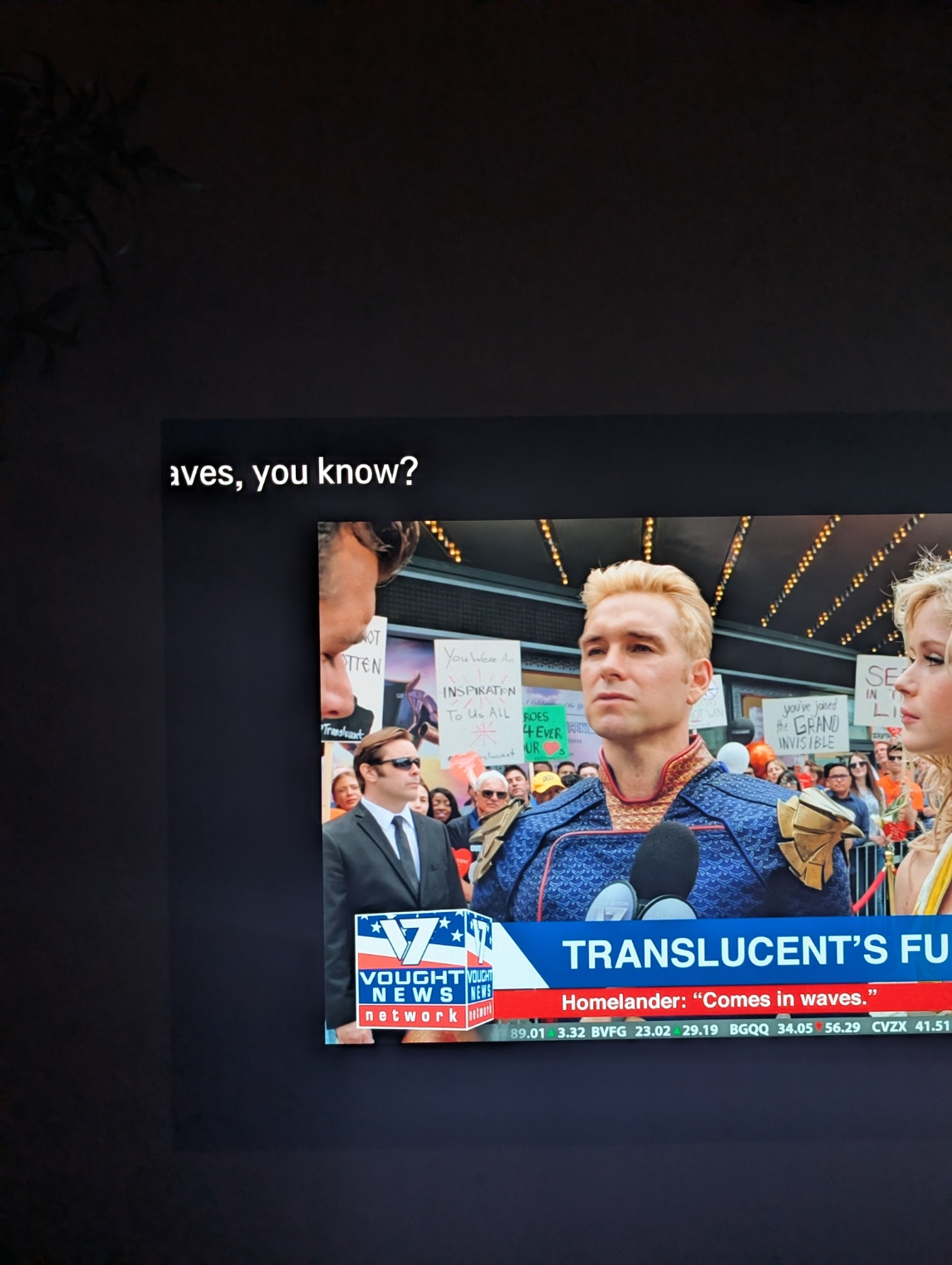
My issue is somewhat different on 1.0.49 than the others. I have an older LG C17 model. My playback is working fine but the subtitles started going to the upper left corner after the update so I've had to turn off subtitles. I can't see the entire subtitle, just the last few words of sentences, etc. Hope that makes sense.1 point
-
System info: OTA antenna connected to HD Homerun Flex Duo 2, connected to network via ethernet. emby server on 2018 macbook pro running OS 15.7.3. The media library and transcoding-temp directory are on a connected external drive. Computer connected to local network via ethernet. playback on TCL Roku TV I recently installed an emby server on my computer and have used it primarily to record NFL football the last two weekends. Last weekend, I started watching the recording while the game was still in process, got to the end of the recording, went to live TV but realized the recording had stopped early. I looked for the logs on my emby server dashboard but there were none from that date. Frustrated that I missed part of the game, I looked at posts in the forum and tried a number of recommendations, including restarting the server, restarting Roku, ensuring that the computer's hard drives wouldn't sleep, and moving the transcoding directory to my external drive. I tested the system mid-week on two occasions and the recordings played back pretty much as expected (other than FF only works in ~ 1minute chunks, which is time consuming and annoying). I could watch the in-progress recording, catch up to live, leave the recording and go to live TV, come back to the recording and everything seemed to be working fine. Buoyed by these experiments, I scheduled a recording of the playoff games yesterday. The first game started at 4:30pm ET, I started watching the in-progress recording at about 5:30pm. I watched for maybe 5 minutes, being able to FF through commercials but then playback would just stop, returning me to the media start screen showing the program info, play button, etc. I would start watching again but it would return me to the very beginning, not where I left off. I then would FF, which again would only work in chunks where it would FF for a minute or so and then a spinning wheel would appear and the program would play at regular speed (but without me instructing the system to do this). I could catch up to where I left off eventually, watch for a few minutes more and then the same thing would happen, being returned to the media start screen and starting over from the beginning. I tried this a few times, with the same results. I gave up and watched the live feed from the antenna. Here are the logs from yesterday. Your help is appreciated, grappling with the system and missing almost the entire first half of the game was frustrating. ffmpeg-transcode-52c7f8c9-239a-464d-872f-9914f5176cca_1.txt ffmpeg-transcode-589bfa71-3c32-4596-aca9-5f37b3e6dc9a_1.txt ffmpeg-transcode-c325f3b1-e8cb-426d-a877-9950fcd3ca60_1.txt ffmpeg-transcode-d08eafb0-b41f-4395-8d1f-e1a37a633344_1.txt ffmpeg-transcode-f741d3f0-2cec-4dad-8f46-da1f9de4a213_1.txt1 point
-
Hello, I currently have Emby running on a Windows 10 server. (I know, I was building a test bed and ended up being stuck with it because of Media file structure). Anyway, I have the external IP address open so my family can have access to my limited library of music and movies. I just recently noticed that there have been login attempts on a handful of my user accounts. Are there any tools or plugins available in Emby that would ban the IP address after a handful of attempted logins? If not, does anyone out there have any recommendations on how to set this up? I'm currently using strong passwords, but I just don't like the idea of people/scripts banging on my front door.1 point
-
I didn't say what week... did I?1 point
-
Aperture v0.5.8 Release Notes This release brings powerful new filtering capabilities to Discovery and fixes a critical bug that affected users switching between embedding models. New Feature: Advanced Discovery Filters - Thanks @Jdieselfor the inspiration The Discovery page now includes a comprehensive filtering panel that gives you fine-grained control over what content appears in your recommendations: Filter Options Language Filter — Filter by original language (English, Korean, Japanese, Spanish, etc.) using ISO 639-1 language codes Genre Filter — Select specific genres to focus your discovery Year Range Slider — Set minimum and maximum release year to narrow down results Minimum Similarity Score — Adjust the similarity threshold (0-1) to control how closely matches align with your taste Real-Time Library Exclusion Discovery now intelligently excludes: Content already in your media server library Movies/series you've already watched This means you'll only see genuinely new content to discover — no more "I already have this!" moments. Technical Details Added original_language column to discovery candidates with indexing Original language is now extracted from TMDb API during enrichment Filtering happens at query time using efficient LEFT JOINs New Feature: Full Reset Jobs Two new manual-only jobs for completely rebuilding recommendations from scratch: Job Description full-reset-movie-recommendations Delete ALL movie recommendations, then rebuild full-reset-series-recommendations Delete ALL series recommendations, then rebuild When to Use These destructive jobs are useful after: Major algorithm changes Switching embedding models Recommendations appearing corrupted Significant library changes Manual-Only UI Manual-only jobs now display a warning banner in the Jobs configuration dialog explaining their destructive nature. Scheduling controls are disabled — these jobs can only be triggered manually. Warning: These jobs delete ALL existing recommendations before rebuilding. Users will have no recommendations until the job completes. Fixed: Embedding Model Dimension Mismatch - Thank you @GoldSpacer The Problem When switching between embedding models with different dimensions (e.g., from a 4096-dimension model to a 1024-dimension model), users would encounter this error when generating recommendations: different halfvec dimensions 4096 and 1024 This occurred because the stored taste profile had embeddings from the old model, but the system was trying to compare them against the new model's embedding table. The Fix The system now automatically detects when the embedding model has changed and rebuilds the taste profile with the correct dimensions: getUserTasteProfile validates that the stored profile's model matches the active model Profiles missing model info (older profiles) are automatically rebuilt Both movie and series recommendation pipelines now store the embedding model ID This fix applies to both Movies and Series recommendations. Update Instructions For Docker Users # Pull the latest image docker compose pull # Restart with new version docker compose up -d The new database migration for original_language will be applied automatically on startup. Migration Notes If you've previously switched embedding models and encountered dimension mismatch errors, your taste profiles will automatically rebuild on the next recommendation generation. No manual action required!1 point
-
@dadthetvisbroke 1) I run two unraid servers for redundancy. I'm looking at jumping to emby, but I would like to know if I can manage/run multiple emby servers from a single subscription/lifetime license. You can use the same licens on all servers. But with the same client restrictions. server 1, 20 clients. server 2, 10 clients. Max 30 clients in all. AFAIK its like this. 2) I also see something about replication, can I replicate content from one server to another? I don't know what you mean? Sure you can share media between both server if that is what you want, just share it. But not database.1 point
-
Aperture v0.5.6 Release Notes This is a bug fix release that resolves an issue with custom embedding models failing to run embedding jobs. Custom Embedding Model Dimensions Fix Fixed an issue where custom embedding models (like Ollama's qwen3-embedding:8b) would fail with: Job failed: No embedding model configured or dimensions unknown What Was Happening When you add a custom embedding model, the embedding dimensions are stored in the database's custom_ai_models table. However, when running embedding jobs, the system only checked the hardcoded model registry for known models — it never looked up custom models from the database. This meant custom embedding models would: Pass the connection test Show as configured in settings Fail when actually running any embedding job The Fix The getCurrentEmbeddingDimensions() function now: First checks built-in models from the hardcoded registry If not found, queries the custom_ai_models table Returns the embedding dimensions you specified when adding the model What's Now Working All embedding-related functionality now works with custom models: Generate Movie Embeddings Generate Series Embeddings Generate Episode Embeddings Semantic Search Similarity Graphs Recommendations Taste Profiles AI Assistant queries Update Instructions For Docker Users # Pull the latest image docker compose pull # Restart with new version docker compose up -d No database migrations in this release. Full Changelog Bug Fixes: fix: custom embedding models now correctly resolve dimensions from database If you were affected by this issue, your custom embedding model should now work. Thanks @GoldSpacerfor testing all of this — just update and re-run your embedding jobs!1 point
-
Lol, i forgot to connect the embedding functions to the custom DB values, it was only looking at the hardcoded options...1 point
-
can you check the aperture log in the docker container? i added the model and am testing this locally, i hit the error so I can debug this, standby1 point
-
Aperture v0.5.4 Release Notes So with all the duplicate distractions out of the way for now I have added Hugging Face as a new AI provider and introduced configurable embedding dimensions for custom models. Hugging Face Provider Support You can now use Hugging Face Inference API as your AI provider! Access thousands of models from Meta, DeepSeek, Qwen, and more. How to Use Go to Admin → Settings → AI / LLM Select Hugging Face from the provider dropdown Enter your API key from huggingface.co/settings/tokens Click Add Custom Model... to enter any model name Test the connection and save Custom Models Only Like OpenRouter, Hugging Face uses custom model IDs — you enter the exact model path: meta-llama/Llama-3.3-70B-Instruct deepseek-ai/DeepSeek-V3-0324 Qwen/Qwen3-235B-A22B-Instruct-2507 google/gemma-3-27b-it moonshotai/Kimi-K2-Instruct Find available models at huggingface.co/models or browse inference models at huggingface.co/inference/models. Configurable Embedding Dimensions Custom embedding models now require you to specify the vector dimension size. This ensures embeddings are stored correctly and similarity searches work properly. Why This Matters Different embedding models output different dimension sizes. If the dimension doesn't match what the model outputs, embedding generation will fail or produce incorrect results. How to Use When adding a custom embedding model: Select your provider (Ollama, OpenRouter, HuggingFace, or OpenAI-Compatible) Choose Embeddings as the function Click Add Custom Model... Enter the model name Select the correct dimension from the dropdown - You will need to do your own research here. Test and save Supported Dimensions Dimensions Example Models 384 granite-embedding-30m-english, all-MiniLM-L6-v2 768 nomic-embed-text, snowflake-arctic-embed-m, e5-base-v2 1024 mxbai-embed-large, snowflake-arctic-embed-l, voyage-multilingual-2 1536 OpenAI text-embedding-3-small, text-embedding-ada-002 3072 OpenAI text-embedding-3-large 4096 nv-embed-v2, larger custom models 4096 Dimension Support Added support for 4096-dimension embeddings using binary quantized HNSW indexes (pgvector's standard indexes have a 4000-dimension limit). Update Instructions For Docker Users # Pull the latest image docker compose pull # Restart with new version docker compose up -d Database Migrations This update includes two migrations that run automatically on startup: 0091_embedding_dimensions_4096.sql — Adds embedding dimension support and 4096-dim tables 0092_huggingface_provider.sql — Adds HuggingFace to provider constraint Post-Update Steps Clear browser cache — Or hard refresh (Cmd+Shift+R / Ctrl+Shift+R) Re-add custom embedding models — Existing custom embedding models may need to be re-added with the correct dimension selected Enjoy Hugging Face support and better embedding control!1 point
-
I think that is prudent. I think it is more likely that future features will make it unnecessary for integrations like Aperture to create duplicates. IOW - use proper constructs like playlists once we have the ability to show these on the home screen.1 point
-
@GoldSpacer @ebr @TeamB @JdieselI've decided to stop worrying about trying to manage deduplication. The juice just isn't worth the squeeze and tech debt I pick up trying to solve for it is not something I want to deal with long term. I am hopeful that the Emby devs may decide to decouple continue watching from latest on the home screen in a near term beta release which solves not just this but other related configurations that create duplicates in continue watching. Please switch back to :latest tagged builds as nothing new will be added to :continuewatching. Thank you1 point
-
Considering it's in Direct Play, no transcoding is taking place. If the file lags, try playing the file on another (newer) device to see if there isn't something going on with the file itself. If the other device can play the file just fine, it's probably the old laptop struggling due to either the bitrate or frames as @pwhodgesnoted.1 point
-
I can confirm that I've been unable to reproduce this issue on either Windows 10 or Windows 11 running Emby as a service, without restarting for three days straight. My best bet is that something else is going, either someone connecting to the server continuously (spamming) or an unoptimized plugin or something along those lines.1 point
-
Hi. The waring appears when you are within 5 devices of the limit - whatever it is.1 point
-
I'd like to put in a request for a server-side Equalizer. It would incredible useful if it were applied on a User basis - Ex. I could set up multiple User profiles, point them at their corresponding libraries, and switch between users for the EQ I wanted to apply to the output. I prefer a Parametric EQ if possible. The reason being is, that many people use EQ correct frequency response errors for both Room and Speakers and the precision of a Parametric is essential for proper tuning. I'm aware that this will probably require transcoding on the server in order to apply it. However, that particular task isn't CPU intensive and Emby already does transcoding on occasion anyway. Kind regards, Bill1 point
-
Vielen Dank, das hat funktioniert. Gruß Eddie1 point
-
It's not just the format, but the bit rate that you have to be concerned with. Paul1 point
-
I disagree, I don't think you should ever have to add a duplicate item to the system just so you can have it appear in a location or in a list you want. the correct way would be to allow smart playlists, dynamic playlists or collections that can be added to home pages of client app to allow you to build a very dynamic customizable client platforms. this has been talked about for literally years.1 point
-
Ok thanks @Luke There should be an easier way to avoid the sideloading issue and the need to repeat every month to get updates. Kind of frustrating but I get that’s a Samsung issue.1 point
-
Hi, we will be revamping our home screen options so stay tuned for that. Thanks.1 point
-
The answer is for the Emby devs to do the same thing they did to exclude libraries from global search, exclude from continue watching.1 point
-
Hi, we’ll take another look at it. Thanks.1 point
-
Hi yes it’s just how long the LG review process takes unfortunately.1 point
-
IMO this is an excellent opportunity for Emby devs to demonstrate that they are 3rd party Dev friendly. We all know this won't be an issue on Jellyfin and it will be yet another reason to switch over to Jellyfin.1 point
-
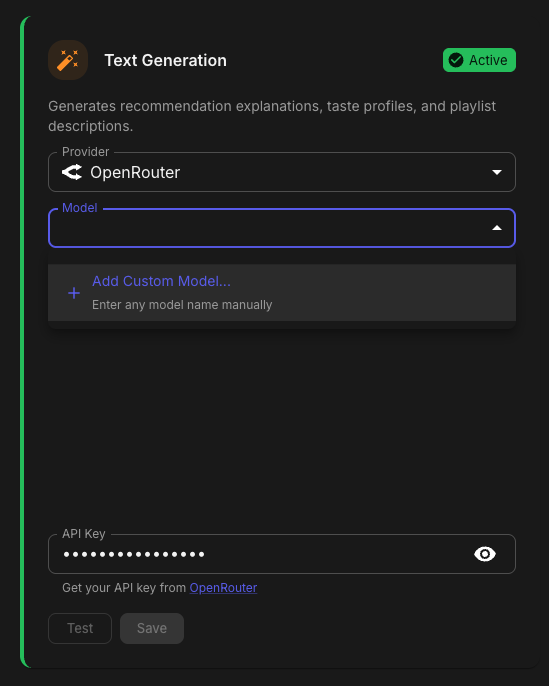
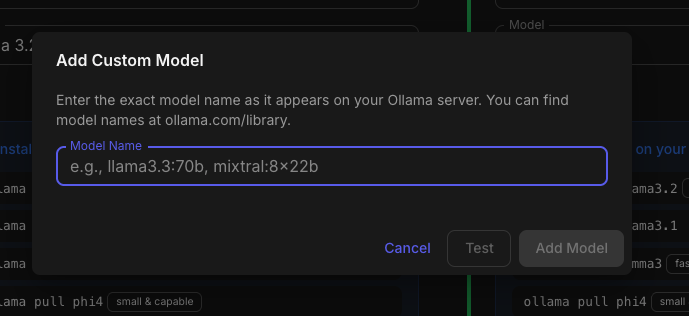
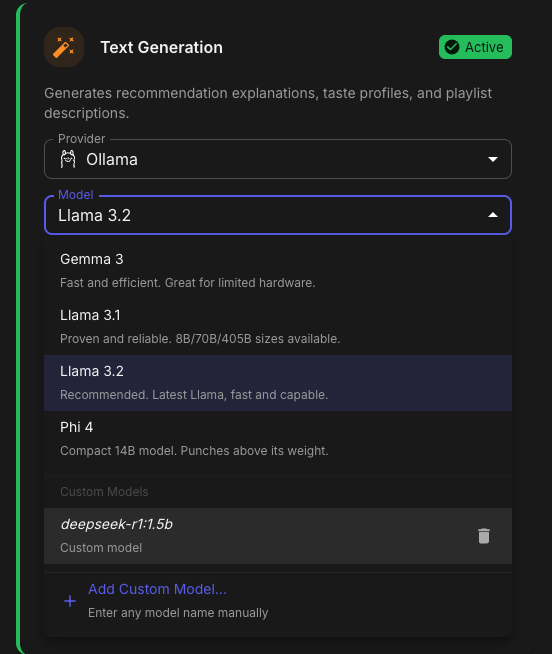
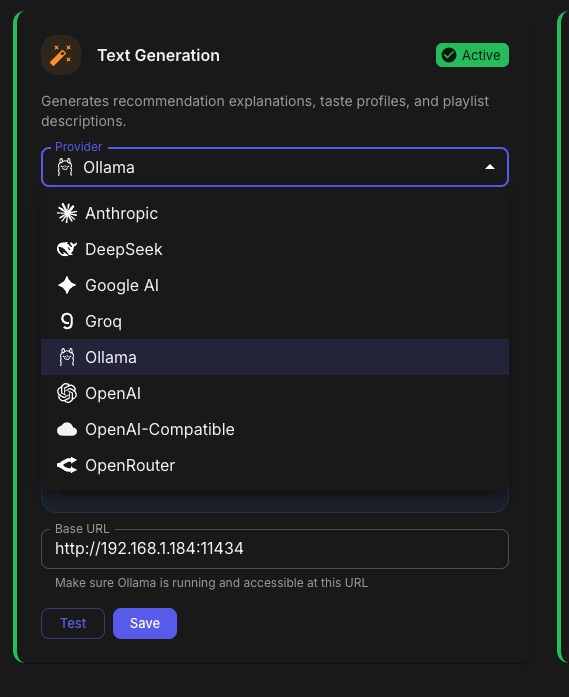
Aperture v0.5.3 Release Notes Hey everyone! This release adds OpenRouter support as a new AI provider, along with custom model persistence and provider logo improvements. OpenRouter Provider Support - @akacharosI didn't forget about you! You can now use OpenRouter as your AI provider! OpenRouter gives you access to hundreds of models from different providers through a single API. How to Use Go to Admin → Settings → AI / LLM Select OpenRouter from the provider dropdown Enter your API key from openrouter.ai/keys Click Add Custom Model... to enter any model name Test the connection and save I HAVE NOT TESTED THIS AS I DO NOT HAVE AN OPENROUTER ACCOUNT. PLEASE PROVIDE FEEDBACK! Custom Models Only OpenRouter doesn't have a prebuilt model list — you enter the exact model ID you want to use: anthropic/claude-3.5-sonnet openai/gpt-4o google/gemini-2.0-flash meta-llama/llama-3.3-70b-instruct Find available models at openrouter.ai/models. Be advised, it is entirely possible that your model selection will be problematic with Aperture. Please understand I will not be providing support for every LLM permutation in the world. If you get it to work well feel free to PM me with your Provider and Model selection settings and I will put together a Google Sheet of what does and does not work. Custom Model Persistence - Thanks @GoldSpacer for reporting the issue. Custom models for Ollama, OpenAI-Compatible, and OpenRouter providers are now saved to the database. What This Means Before — Custom models were lost when you refreshed the page After — Custom models persist across sessions and server restarts Test Before Save Custom models now require a successful connection test before they can be added. This prevents typos and ensures the model actually works. Provider Logos The AI provider dropdown now shows actual provider logos instead of generic cloud icons. Provider Logo OpenAI ✓ Anthropic ✓ Ollama ✓ OpenRouter ✓ Groq ✓ DeepSeek ✓ Google AI ✓ Anthropic Model Updates Added all current Claude models: Model Description Claude Opus 4.5 Most capable. Extended thinking, web search, tool search, wildly expensive Claude Sonnet 4.5 Best balance of speed and intelligence Claude Haiku 4.5 Fast and efficient for high-volume tasks Claude Opus 4.1 Previous generation flagship Claude Sonnet 4 Balanced performance with tool use Claude 3.7 Sonnet Extended thinking support Claude 3.5 Sonnet Excellent for coding and analysis Claude 3.5 Haiku Fast and cost-effective Docker SESSION_SECRET Fix Fixed potential YAML parsing issues with SESSION_SECRET in docker-compose files by properly quoting the value. Update Instructions For Docker Users # Pull the latest image docker compose pull # Restart with new version docker compose up -d Database Migration The update includes a database migration (0090_openrouter_provider.sql) that runs automatically on startup. Post-Update Steps Clear browser cache — Or hard refresh (Cmd+Shift+R / Ctrl+Shift+R) Enjoy OpenRouter support!
 1 point
 -
The same problem persists after the latest update; the translation is now located in the top left corner of the screen. It's worth noting that this issue was not present before the update.
 1 point
 -
@yockerI really like this plugin! Thanks for all of your work! I have a couple of suggestions to make. The first is that you might want to consider configuring your plugin so that it shows up on the "Manage Server" side menu. The other is to allow for values higher than "10" for number of concurrent threads. If you're concerned about someone potentially nuking their server, you could always check for the number of logical CPUs and give a warning (or block) if the value entered exceeds that threshold.1 point
-
I fell asleep for a few hours, woke up, restarted emby and everything is great. Problem resolved. Replacing a backup library file and deleteting the other 2 library files, taking a nap is the cure. Thank you all1 point
-
LG, COME ON! Millions, if not bilions people are waiting!1 point
-
Hello, its the same with my LG too, i think it happened after the last update in january 8 version 4.9.3, before that it worked fine. The quick fix was i have installed the emby diagnostics plugin which gives you the option to force subtitles to burn-in and after this the subtitles will be displayed at the right position.1 point
-
Based on that recent testing by @cp41, Legacy folder scanning in 4.9.3 appears to behave differently depending on platform. Using the same media layout and the same settings (Mixed Content library, Folder scanning mode = Legacy macOS (ARM64) Single-item folders are collapsed into media items, multi-item folders remain folders (expected / pre-4.9 behavior). Synology NAS (DSM 7.2+) Single-item folders continue to be treated as folders; Legacy scanning appears to have no effect. This was reproduced both on existing libraries (upgraded from 4.9.1.80) and on newly created Movies and Mixed Content libraries with Legacy enabled from the start. Can it be confirmed whether Legacy folder scanning is fully implemented and supported on Synology DSM builds in 4.9.3, or if this is a known platform-specific limitation or bug?1 point
-
Summary: Emby does not remember where you stopped reading. Reopening an eBook always starts at the beginning. Please persist a per-user last read position and resume from it on all clients. Steps to reproduce: Open any eBook Go to a later page or chapter Close and reopen the book Expected: The book opens at the last read page. Actual: The book opens at page 1. Request: Save and sync last read position per user for all supported formats. Update on page change and on exit. Resume automatically across devices. Optional API endpoint to read and update progress.1 point
-
@coolspotplease also provide server logs as per link provided. Also detail the media info including subtitle format (eg. external or embedded? SRT or ASS, etc.)1 point
-
1 point
-
I've just been having a look at this and have found the following (taking this step-by-step): In the Songs menu tab the Songs can be sorted by any preferred order (I have 120k+), e.g by Title, Year, Album Artist, Random, etc... ascending, descending... Selecting Play will create a playlist of the first 300 sorted Songs and play them in order. Selecting Shuffle will create a playlist of these same first 300 sorted Songs and play them randomly. An example is sorting my Songs Z-A by Album Artist. All the 120k+ can still be scrolled through, but now firstly showing my 360 "ZZ Top" Songs (e.g. all of my ZZ Top Album Artist Songs) Selecting Play gives an ordered playlist of 300 "ZZ Top" Songs (as expected) Selecting Shuffle gives a random playlist of only 300 "ZZ Top" songs (instead of 300 random songs from the whole 120k+). Therefore this seems that Emby is first loading in 300 Songs from the sorted order and then performing Play or Shuffle on that 300. So everyone who experiences this, will get difference results depending upon the sort order chosen and how many Songs are in their library. Either way Shuffle is no longer Random for all Songs. To further demonstrate - I saved a test "Play" playlist and a corresponding test "Shuffle" playlist after randomly sorting my Songs. Both of these test playlists have the exact same run time of 20hr51min.... hmmm.... When both saved playlists are sorted by title the Songs in each playlist are identical!!! Therefore Emby is likely first shuffling the selected sort, rather than the expected 'shuffle all' and then playing these first 300 songs when the Shuffle button is pressed. The way now get a good random selection (as far as I can figure out) is to first sort all songs by random and then either play or shuffle as a second step. Shuffle from any other sort order will not be a truly random selection from a whole library (though this will still be the first 300 sorted songs). Hopefully this is not too confusing to follow and I have explained clearly enough? and will help resolve the problem?1 point
-
Hi, yes these are on our to do list for the Emby Apple TV app. Thanks.1 point
-
No, I'd never use a genre specific EQ. If I own speakers with the proper tonality curve, why would I? Besides, there are other more advanced audio specific packages with that capability, Ex. Roon and JRiver. I'm after a basic EQ capability for Room and Speaker Correction pure and simple. Now, I do have ways of applying it currently with JRiver. However, I find the remote control and library presentation of Emby to be more to my liking, hence my request. Also, JRiver's CEO is a bit of an ass to deal with on their support forum - it's well known and many say that about him - and I'd rather not give someone like him my money. I can apply EQ to Emby output now via a workaround: a combination of Emby Web, AutoEq with the Peace GUI, and Desktop Audio Streamer to route output to Chromecast Audio, which is then remote controlled by Emby Android on my smartphone/tablet. However, that's three additional applications (Emby Web, AutoEq and Desktop Audio Streamer) to run when it would be more efficient to have Emby Server handle it. Fortunately for me I'm a software engineer and can handle such a complicated process, but others might not be so willing to.1 point
-
Yes, that's right it is dependent upon environment. However, by attaching a EQ profile to a User the devolpers won't have to go through a process of coding for individual Zones/Rooms as it were. If they add a Zone/Room feature then people are going to start asking for things like Zone Switching on the fly, Zone Linking, etc., etc.. Simply create a User, an EQ profile for that user, and then add the libraries that User can access and the EQ is applied to all content that User accesses. I'm thinking of the simplest way to accomplish this without tons of further software engineering.1 point
-
Hi. I agree - which makes a user-based option kind of curious here. The necessary EQ is dependent on the playback environment, not the user.0 points