Leaderboard




Popular Content
Showing content with the highest reputation on 01/17/26 in all areas
-
Hi, perhaps read this, if you haven't already: https://emby.media/support/articles/Quick-Start.html Generally, if you are setting up Emby for yourself, you need to set up your own server and populate it with your own media content. You can then access this via the client apps (e.g. Roku). If you want to access a server belonging to a friend or family member, you should contact them directly for assistance. Note: Emby does not provide any media content itself and it is against Emby terms and conditions to use paid services provided by others.4 points
-
Unless there are huge issues, I am probably going to be taking a break from working on this for a week or so. This was a marathon, and while fun the amount of money I have burned on Anthropic Claude Opus 4.5 inside of Cursor to accomplish this in a week has been quite significant. So if you find Aperture useful or you just want to support cool projects feel free to buy me a beer or make a donation!3 points
-
Emby Server 4.9.3 has been released. Here are the highlights: Update Intel drivers on Linux platforms Add user option to set user's auto remote quality Add library option to use legacy folder scanning method Music transcoding fixes Add landing tab option for book libraries Support volume control with youtube trailer player Update mixed content tabs to combine Movies & Shows Fix maintenance mode blocking some settings screens Fix embedded audio fields not getting rescanned on file changes Fix loss of genre and collection images after deleting a movie2 points
-
My request is to be able to chose to add items to the home screen. Specifically in my case, I am thinking of playlists and collections. Here's some reasons I'd like to see this: The home screen is the first piece of the user interface a person will see when they pull up Emby. I often places movies in bulk into my media library. This sometimes means people never see the new movie I've made available. Happens a lot, actually. While all movies are searchable or can be found by sorting, I believe the interface would benefit from having the customization option. I have created a "Justin Recommends" collection and would LOVE to be able to put that on the home screen. By keeping this optional, no one is forced to use it. If you don't have a use-case, then it's just a feature. If you look at things like Netflix, many movies and shows get "featured" and by doing that, a lot of people end up watching that wouldn't otherwise (imagine if The Tiger King was just another buried documentary you had to hunt for, no one would have heard of it). I appreciate your time. If you've considered this before and decided against for reasons other than difficulty implementing the feature, I'd ask you to reconsider. I believe that being able to customize our servers helps us personalize and tailor them to our audience and our needs, and that helps promote a feeling of ownership. I also truly believe that this small change could lead to some powerful results. In my case, I know that it would be of huge benefit to accomplishing what I would like to do with my Emby server. Thank you.2 points
-
Hi, Thank you for the great product. It is a pleasure to use it. I have seen some posts but they are years ago regarding my request. Is there a plan to have notification (when adding movies, shows, live tv etc.) from the emby app ? This means to get a push message on my android phone, iphone, windows app, etc. With 3rd party software its not so cool. Thank you.2 points
-
@somywhat @Neminemis also a common resource hog and a very good point! If you have/like subtitles, try to always extract them into simpler formats like .srt.2 points
-
Also avoid picture subtitles such as these they will hurt you old CPU when they need to be burned in. VobSub (idx/sub) PGS (Presentation Graphic Stream Subtitle) SUP (Subtitle bitmap image of DVD and Blu-ray)2 points
-
Tested with Edge, Chromium and Firefox, seeing no issue with posting, quoting, linking, tagging. @Abobadermight still have a look. Try rebooting the machine you're browsing from.2 points
-
Thank you @ZanderKeen@GuyIncognito5 and everyone in this community. I was able to get all the Emby ones up again. Some Jellyfin and Plex as well. Will have to create and add more slowly. You can check them out and download at https://prerolls.me/2 points
-
Aperture v0.5.1 Release Notes Well I lied... but now I am done for a bit!!! This is a mobile-focused release with significant improvements to the mobile browsing experience across all list views. Mobile UI Improvements Compact Horizontal List Items All list view items have been redesigned for mobile with a compact horizontal layout inspired by Spotify and Netflix: Before After Stacked vertical cards Horizontal poster + content layout Large posters taking full width Compact 100px posters maintaining aspect ratio Hidden or truncated content 2-line synopsis, inline metadata Actions in separate panel Inline action buttons Pages updated: Browse (Movies & Series) My Recommendations Top Picks Discover Watch History Shows You Watch Consistent Header Layout The grid/list toggle is now always in the upper right of the header on mobile: [Icon] Page Title [⊞][☰] [Action buttons if any] [Tabs/Filters] This provides a consistent, predictable location for view switching across all pages. Decluttered Mobile Headers Mobile headers are now cleaner and more focused: Subtitles hidden — Page descriptions hidden on mobile to save space Icon-only action buttons — Refresh, Sync, Add buttons show icons with tooltips Reduced visual noise — Focus on content, not chrome Shows You Watch Simplification The Shows You Watch page received special attention: Stats merged into tabs — "All (70) | Airing (67) | Upcoming (23)" instead of separate chips Icon-only Sync/Add buttons — Compact with tooltips Full-width filter tabs — Easier to tap on mobile Purple & Pink Tab Styling Consistent tab styling now applied across all tabbed pages: Movies tab — Purple (#6366f1) with matching count chips Series tab — Pink (#ec4899) with matching count chips Applied to — Discover, Recommendations, Watch History, Top Picks Watch History Sort Icons Sort buttons on Watch History now show icons on mobile: Recent Most Played A-Z Full labels still shown on desktop. . . . Bug Fixes View Mode Persistence Fixed Fixed a bug where view mode preferences weren't loading from the database: Root cause — Frontend was looking for data.preferences.viewModes but API returns data.viewModes Result — Your grid/list preferences now correctly load on page refresh No More View Mode Flash Eliminated the brief flash of default grid view when your preference is list: Solution — View modes now cache in localStorage for instant loading Sync — Server remains source of truth, localStorage is just a fast cache Result — Page renders immediately with your saved preference My Recommendations View Persistence Fixed the My Recommendations page to use the shared view mode system: Before — Used local state, preference wasn't saved After — Uses useViewMode('recommendations') hook Result — Your grid/list preference persists across sessions Update Instructions For Docker Users # Pull the latest image docker compose pull # Restart with new version docker compose up -d Post-Update Steps Clear browser cache — Or hard refresh (Cmd+Shift+R / Ctrl+Shift+R) Clear localStorage (optional) — If you want a fresh start on view preferences Enjoy the mobile improvements!
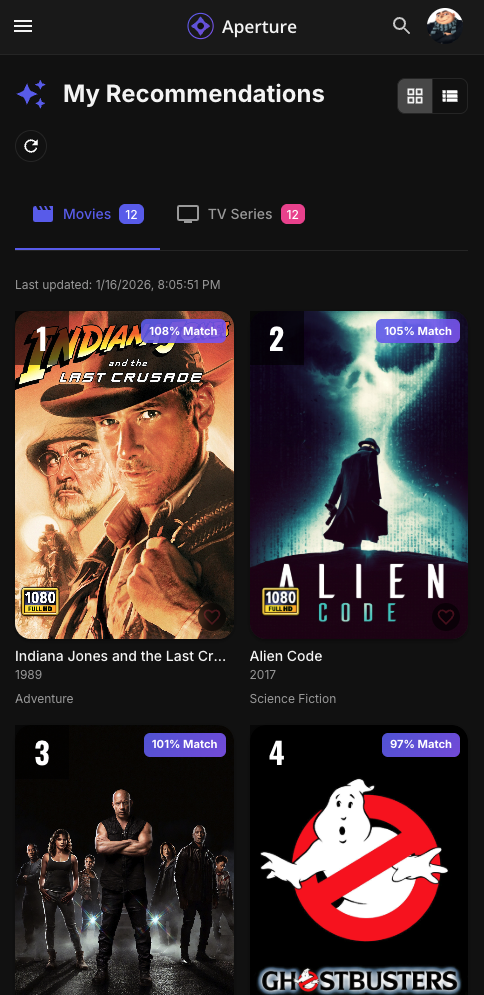
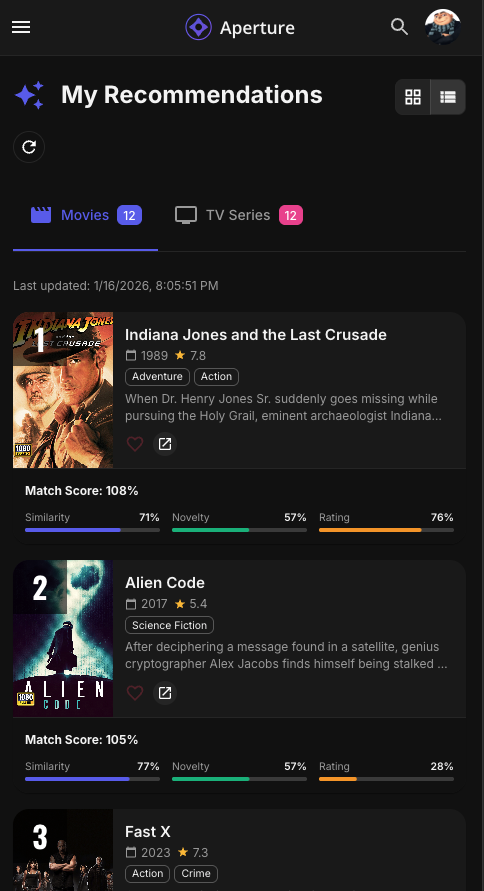
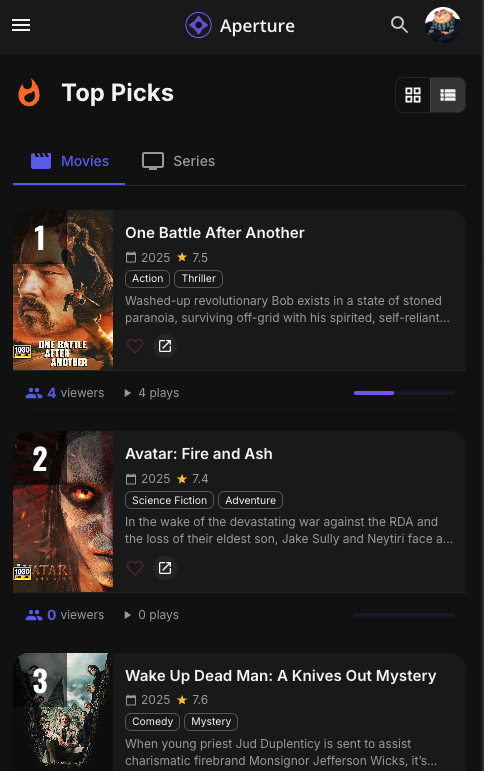
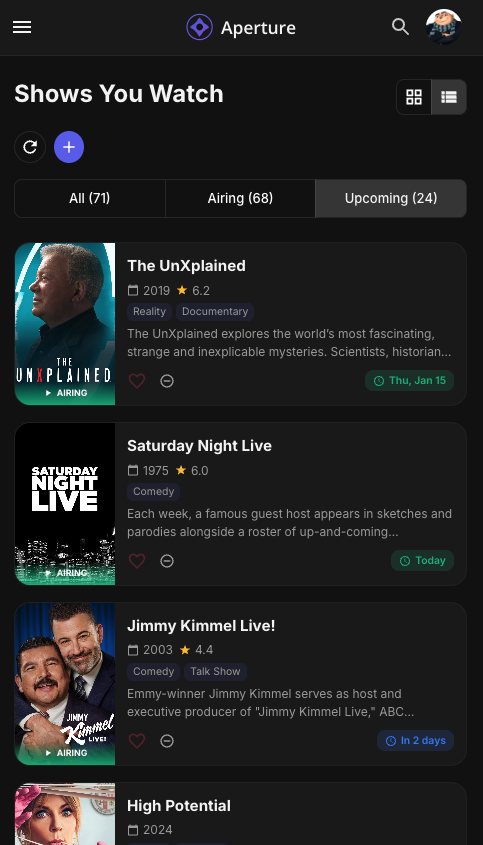
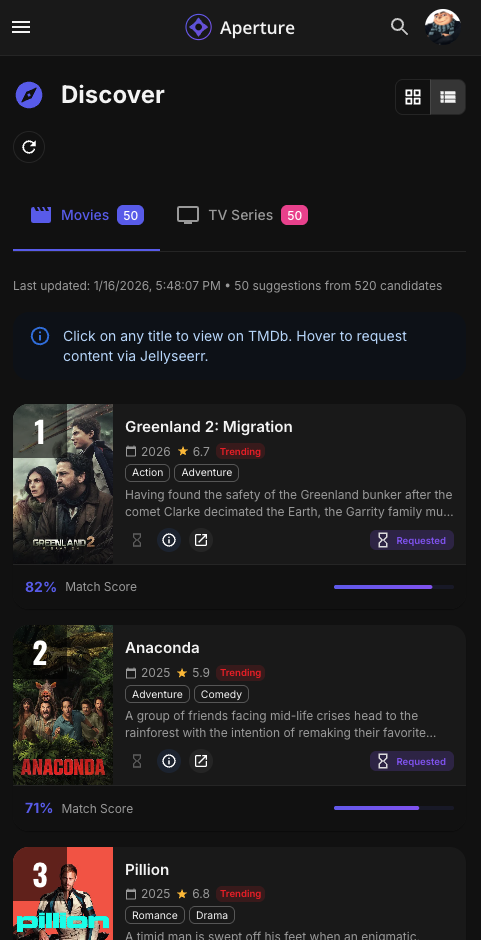
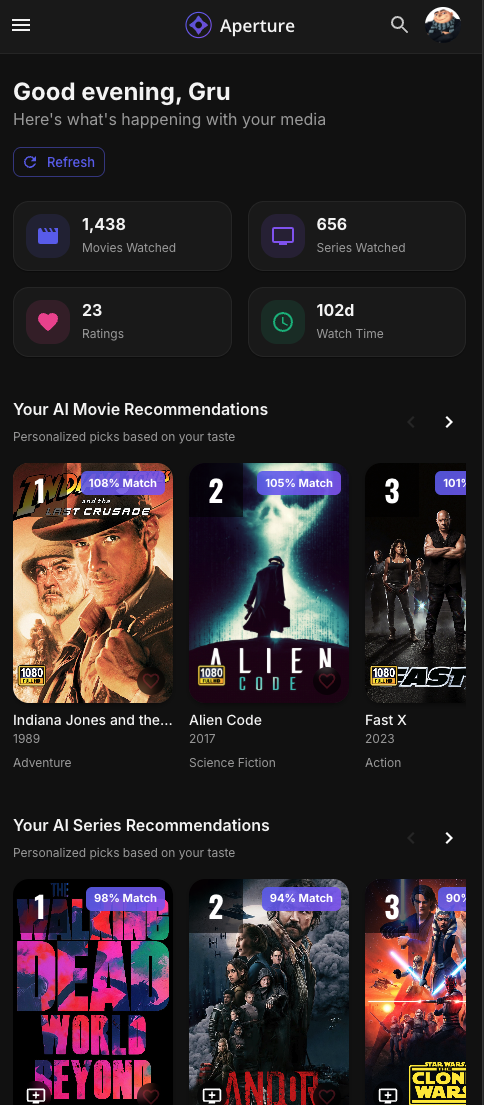 2 points
 -
I've asked before, but it would be nice to have more homescreen options to make it more Netflixy. I've held off buying Premiere as Emby is solid, but not scratching all the itches I have for customization. Jellyfin has a plugin that does EXACTLY what I want and what OP is asking for. If it can be done there, why can't we have something similar? https://github.com/IAmParadox27/jellyfin-plugin-home-sections2 points
-
Emby Server 4.9.3 has been released. Here are the highlights: Update Intel drivers on Linux platforms Add user option to set user's auto remote quality Add library option to use legacy folder scanning method Music transcoding fixes Add landing tab option for book libraries Support volume control with youtube trailer player Update mixed content tabs to combine Movies & Shows Fix maintenance mode blocking some settings screens Fix embedded audio fields not getting rescanned on file changes Fix loss of genre and collection images after deleting a movie View the full article2 points
-
Got it... let me figure that one out.... but for the time being I am in mad scientist mode!!! Testing: Prevent Duplicate "Continue Watching" Entries I've pushed a test build that addresses the duplicate "Continue Watching" problem. Looking for feedback before merging to main. The Problem When you partially watch a movie from your Aperture recommendations library, it can appear twice in your "Continue Watching" row—once for the original and once for the Aperture copy. This happens because both items share the same IMDB/TMDB IDs, and Emby/Jellyfin links them together. The Solution This build adds an optional toggle in Settings → AI Recommendations → Output called "Prevent Duplicate Continue Watching". When enabled: Aperture prefixes provider IDs in NFO files (e.g., tt1234567 → aperture-tt1234567) This breaks the link between Aperture items and originals—no more duplicates A background job runs every 30 minutes to sync watch history back to your original library items Trade-offs Up to 30-minute delay before the original is marked as watched You must rebuild your AI recommendation libraries after enabling/disabling This is a workaround, not a perfect solution How to Test image: ghcr.io/dgruhin-hrizn/aperture:continuewatching After updating: Go to Settings → AI Recommendations → Output Enable "Prevent Duplicate Continue Watching" Rebuild your movie/series recommendation libraries Watch something partially and check your Continue Watching row Feedback Wanted Does it solve the duplicate issue for you? Any unexpected behavior? Is 30 minutes acceptable, or should it be configurable? This will remain experimental until we get broader testing. Thanks!
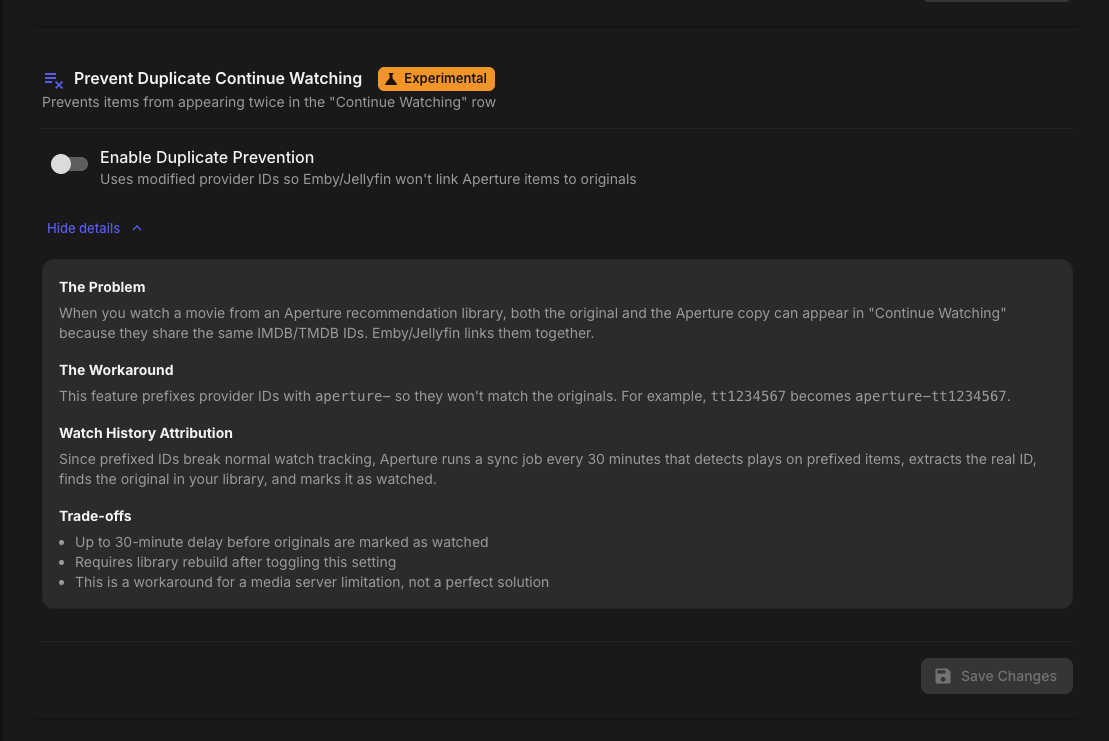 1 point
 -
IMO this is an excellent opportunity for Emby devs to demonstrate that they are 3rd party Dev friendly. We all know this won't be an issue on Jellyfin and it will be yet another reason to switch over to Jellyfin.1 point
-
That worked, sort of, now every new title I add shows the director first.1 point
-
I can certainly look into it. You are right of my fear of people "nuking their servers". The detection is two fold, the ffmpeg image extracting and then the tesseract detection so quite a bit going on. I will make it possible to increase it and maybe, maybe!!, add another possibility for % of CPU. Best would be if the tesseract would be made GPU capable but that is beyond me to do that. Thank you for the suggestions!1 point
-
I ended up using the Docker Compose Manager to get it up and running but might try to make up a template for Aperture and Postgres16. I don't know if the DockerMods version of Postgres will work so it will probably require a separate instance running the specific PG version. Seems pretty good so far. I hope Emby devs are willing to work with your to get everything integrated more seamless without having to use workarounds. Great work!1 point
-
@yockerI really like this plugin! Thanks for all of your work! I have a couple of suggestions to make. The first is that you might want to consider configuring your plugin so that it shows up on the "Manage Server" side menu. The other is to allow for values higher than "10" for number of concurrent threads. If you're concerned about someone potentially nuking their server, you could always check for the number of logical CPUs and give a warning (or block) if the value entered exceeds that threshold.1 point
-
Yea, it's been long enough. Can we get a fix please?1 point
-
Any chance that we'll get an unraid community template? I don't want to use docker compose on my unraid setup.1 point
-
From the idea of this plugin i have played a little around. I made a plugin where sync party work with the Emby apps by using collections. (just a concept) Add a movie to collections in a folder named "WatchParty", when users press the movie they get synced to the master. Maybe you could make something like that so that Emby apps are supported and it doesn't need to be played from a browser.1 point
-
@somyit sounds like your server can't keep up with transcoding, maybe your hardware isn't fast enough or the desired codec is very intense. When the client requests a piece of the video (for example at 00:10) emby transcodes a piece of it (for example 00:10 + 5 seconds). By the time your client reaches the 00:10 mark, the server sent the transcoded piece yet, causing stuttering / lag. This also applies to seeking in media that's being transcoded. What I personally prefer to do, is create different types of media for different devices. h264 with aac stereo for low-end devices (chromecast, etc) and original/4K for high-end devices. Basically any old device supports those and the UHD tvs usually support a whole bunch too. I also re-encode files when they contains DTS audio since none of my hardware supports it.1 point
-
This is not a problem with the plugin, but rather because the image aspect ratio is not suitable. Try using images with a 2:3 aspect ratio; in my case, I use images that are 2000 pixels wide by 3000 pixels high. They can be other dimensions, but they must respect the 2:3 aspect ratio.1 point
-
Well.. The plugin should run as it should.. At least until the next Emby update.1 point
-
Hey, I'm trying some other Ollama models but I can't seem to get the custom models to stick. When I select Custom Model and enter the name, I can run the test successfully, but when I save it reverts the selection to whatever model was previously selected and if I try and run to generate embeddings or recommendations I get the following: 9:41:34 AM Job failed: No embedding model configured or dimensions unknown 9:48:15 AM Failed for user: No embedding model configured or dimensions unknown1 point
-
He's clearly already using it...1 point
-
We talked earlier in the thread about this fix potentially being a Christmas miracle. For Synology users, that has not been the case. Is there any chance we could anticipate a Groundhog Day miracle? Along with a proper increment to the version numbers so Synology Package Manager will allow me to get off the beta? Any sort of feedback would be nice, and would allow me to continue to be patient without resorting to either installing SQL Lite to edit the database, or blowing up my entire environment and reinstalling 4.8 (or quite likely both, in the event the database editing goes bad).1 point
-
Just checking in @Lukeand @softworkz Xbox One S is still not detecting controller or remote input at start.1 point
-
Hi, Nothing, nothing on the error logs as well. As @GrimReaper best to clear the browser cache as well re booting your system.1 point
-
Would it make sense to have an option to limit the refresh metadata function by a depth characteristic (to build on breadth options such as images) I just had cause to refresh all my series metadata. Emby currently insists of refreshing series, seasons and episodes over many hours. Perhaps a limit by depth if that is generically meaningful for all objecttypes 1,2,3,All[default]) or limit by object type toggle Mediatype1 Y/N... mediatypeN (Y/N), MediaTypeAny[default Y]1 point
-
Yes, so it works. Thank you.1 point
-
New PUBLIC TESTING version available 12.4.1: Delta changelog 12.4.0 -> 12.4.1 fix song listitem when loaded from mymusic.db and playcount is available fix playerid for themes improve performance and less cpu load improve sync performance add debug log option into advanced settings fix content remove issue fix date issue themes based on skip intro markers themes based on content playback fix cinema intros when themes and autoplay next is enabled fix trailer remove for edge cases fix multiversion file delete fix addon settings when Kodi holds a lock fix micro stalls on Kodi fix watch together when playback was in progress update chinese language file Comment: debug log is no longer using Kodi settings, you can find it under advanced settings in plugin menu native mode not tested dynamic nodes not tested1 point
-
FWIW, current beta version is working too on a truenas core 13.5 jail Had to change the pkg settings in /etc/pkg to pull latest instead of quarterly to get the 1.2 version of libtheora. But otherwise it seems to be working still. Ended up making a fresh jail, as i broke something going from 4.9.27 straight to 4.9.41. Seems to be a dotnet8 issue, but i'll have to see if I can sort that out later. I have known good snapshots I can mess with, but setting up a new jail and copying over the server dir backups works well enough.1 point
-
You did it you mad lad! Amazing work!1 point
-
Right OK I see what you mean, and yes that does make sense. Thanks.1 point
-
Aperture v0.5.0 Release Notes Hey everyone! This is a major release with significant UI improvements, new features for content discovery, enhanced personalization, and a completely restructured documentation system. New Features Collapsible Sidebar The sidebar can now collapse to an icon-only view: Toggle methods — Click the hamburger icon, click the Aperture logo, or use keyboard shortcut Tooltips — Hover over icons in collapsed mode to see page names Persistence — Your collapsed/expanded preference is saved to your account and syncs across devices Responsive — Mobile drawer also respects your collapsed preference Grid & List Views Everywhere Most content pages now offer both Grid and List views: Page List View Features Browse Full metadata, synopsis, genres, ratings Recommendations Match scores, evidence trail Top Picks Viewer counts, play counts, watch status Discovery Source badges, request status, genres Watch History Last watched, play counts, progress Shows You Watch Next episode, days until, progress View Persistence — Your preferred view mode is saved per page and remembered across sessions. Combined Browse Page Movies and Series are now on a single Browse page with tabs: Tab switching — Toggle between Movies and Series tabs Independent filters — Each tab maintains its own filters and sort Shared UI — Consistent experience across content types Advanced Filters on Browse The Browse page now has a powerful filtering system: Filter Panel (click "Filters" button): Filter Movies Series Year Range ✓ ✓ Runtime ✓ — Seasons — ✓ Community Rating ✓ ✓ Rotten Tomatoes ✓ ✓ Metacritic ✓ ✓ Content Rating ✓ ✓ Resolution ✓ — Status — ✓ Active filter chips appear below the filter bar showing what's applied. Sticky filter bar stays visible as you scroll for easy access. Sort Persistence Your sort preferences on the Browse page are automatically saved: Movies and Series have independent sort settings Sort options include: Title, Year, Release Date, Rating, RT Score, Metacritic, Runtime, Seasons, Date Added Settings sync to your account and persist across sessions Filter Presets Save your favorite filter combinations: Save current filters — Name and save any filter combination Load presets — One-click to apply saved filters Manage presets — Rename or delete from Settings → Preferences Per-content type — Movies and Series presets are stored separately Combined Top Picks Page Top Pick Movies and Top Pick Series are now on a single page with tabs: Unified interface — Same design as Browse List view — Shows viewer counts and play counts Grid view — Poster grid with rank badges Shows You Watch A new page tracking TV series you're actively following: Automatic tracking — Series appear based on your watch activity Upcoming episodes — See next episode title and air date Days until — Countdown to next episode Progress tracking — Episodes watched vs total Grid and List views — Your preference is saved Frontend caching — 1-day TTL for performance Explore Page (AI Semantic Graph) A completely new way to discover content through visual connections: Search to seed — Start with any title AI-powered connections — Finds thematic relationships Breadcrumb navigation — Track your exploration path Hide watched toggle — Focus on new content Primary node highlighting — Clear visual hierarchy Color-coded edges — Blue (cast), Green (crew), Orange (genre), Purple (theme) Create playlists — Save interesting discoveries Enhanced Watcher Identity Your taste profile is now more powerful: Embedding-powered analysis — AI generates abstract taste descriptions Watch history sources — Exclude specific libraries from analysis Franchise weights — Adjust or delete detected franchises Genre weights — Fine-tune genre influence Minimum franchise items — Filter noise from small franchises Reset functionality — Clear all or per-media type Playlist Enhancements Playlists page has been redesigned: Poster collages — Cards show preview of 4 items Clickable cards — View playlist contents in a dialog Redesigned New Playlist dialog — Modern design language Item counts and descriptions — More information at a glance Heart Rating on All List Views The heart rating component is now available everywhere: Consistent placement — Same location on all list view items Inline rating — Rate without opening detail pages Grid view overlay — Hover to reveal (existing behavior preserved) Fixed clickability — Resolved issues with ratings being under overlays Navigation Improvements Home → Dashboard — Renamed for clarity Icon updates — Explore uses hub icon, Discover uses compass Search moved — Now on right side of toolbar as icon button Mobile improvements — Centered logo, hamburger on left Discovery Improvements Skeleton loaders — Shows placeholders during refresh Genre preservation — Fixed missing genre names Caching — Frontend caching for performance List view — Full metadata display Technical Improvements User Sync Job New dedicated job to automatically import users from your media server: Automatic sync — Runs every 30 minutes to detect new Emby/Jellyfin users Manual sync button — Click "Sync Users" on the Admin → Users page for immediate import Admin status sync — Keeps admin permissions in sync with your media server User Email Settings Users can now manage their email in Settings → Profile: Email input — Enter or update your email address Auto-lock — If you manually set your email, it won't be overwritten by media server sync Notification opt-out — Toggle email notifications on/off (placeholder for future features) Notification system is TBD User Algorithm Weights Users can now customize their own recommendation algorithm weights: New Settings Tab — "AI Algorithm" tab in User Settings Override admin defaults — Adjust weights for Movies and Series independently Auto-normalizing — Set any values you want; the backend automatically normalizes to 100% Auto-save — Changes save automatically as you adjust sliders Libraries Excluded from Global Search AI-generated libraries are now excluded from global search in Emby/Jellyfin: AI Movie Recommendations AI Series Recommendations Top Picks libraries Shows You Watch libraries Library Default Sort: Date Added AI recommendation libraries now default to "Date Added" sort (newest first). No Duplicates in Continue Watching Aperture libraries no longer cause duplicate entries in Continue Watching through improved NFO file generation. Bug Fixes Library Options Fix (CollectionType Preservation) Fixed a critical bug where AI-generated libraries were being created with incorrect collection types. Metadata Sync Fix Fixed an issue where posters and metadata wouldn't update for movies/series that already existed. Top Picks Viewer Stats Fixed an issue where Top Picks showed all zeros for viewer data when using MDBList source. Local watch data is now included regardless of popularity source. Rating Timestamps Fixed an issue where all ratings showed today's date after a Trakt sync. AI Explanation Batch Size The recommender now automatically adapts explanation generation based on your AI provider's context window. Watch History Sync Full sync is now the default, ensuring all watched items are captured. Similar Content & Search Fix Fixed database errors that broke similar content lists and semantic search. Genre Names on Discovery Fixed an issue where genre names weren't rendering in Discovery list view. UI Improvements Settings Page Consistency User Settings pages redesigned with: Card-based layout Dynamic accent colors (indigo for movies, pink for series) Debounced auto-save Clean slider labels Renamed Library Build Jobs Old Name New Name Sync Movie Libraries Build Aperture Movie Libraries Sync Series Libraries Build Aperture Series Libraries Two-Column Recently Watched Dashboard's Recently Watched now shows Movies and Series in separate columns. Improved Time Display Recently Watched shows months/years for older items Recent Ratings shows "Rated on Jan 11, 2026" format Documentation The documentation has been completely restructured: New TOC format — user-guide.md is now a table of contents Individual feature docs — 28 separate feature documentation files Workflow-based organization — From setup through advanced features Comprehensive coverage — Every page, setting, and feature documented Update Instructions For Existing Docker Users # Pull the latest image docker compose pull # Restart with new version docker compose up -d For New Docker Users Quick Start 1. Download the docker-compose file for your platform Platform File Download Unraid docker-compose.unraid.yml Download QNAP docker-compose.qnap.yml Download Synology docker-compose.synology.yml Download Linux/Other docker-compose.prod.yml Download 2. Configure the file Edit the docker-compose file and set: APP_BASE_URL — Your server's IP address (e.g., http://192.168.1.100:3456) SESSION_SECRET — A random string (32+ characters) Volume paths — Adjust to match your media folder locations 3. Create required folders See examples in the Docker Compose Files. 4. Start Aperture docker-compose -f docker-compose.[your-platform].yml up -d 5. Complete the Setup Wizard Open http://YOUR_SERVER_IP:3456 and follow the guided setup Post-Update Steps Clear browser cache — Ensures you get the new UI Re-run library jobs — If you want the latest library improvements Check your sidebar — Collapse/expand to set your preference Enjoy the improvements!1 point
-
Fair enough... this is a quality of life issue, it's a 1% issue.1 point
-
Thanks Luke trying now and will see over the next day or so.1 point
-
Thank you !1 point
-
Yes. It has, and I marked the solution. Thank you! Also... Nice forum you have here. I'm a bit new to Emby. So far, I'm very pleased with all of it. Thanks again!1 point
-
And here. Basically, the ATV app is being kept alive, and will only have monior updates. If you join the BETA piogram for it, you will still get updates as and when released. More information here.1 point
-
Plenty of discussion on that topic here:1 point
-
No worries, all good Interesting, thanks. I read the name once or twice but didn't really know that it's a player. To elaborate a bit more on the situation: An essential part of the concept is the interactive filtering, that allows you to shape the content in a transparent and - kind of - WYSIWYG manner. There's a tiny learning curve, but once you've figured it out, it's a convenient and enjoyable way that you don't find elsewhere. Yet - this also gets at limits at some point - not just technically - even when we would make this work with 2 Millions of entries, the UX would not work out anymore, because with that amount of data, you cannot reasonably work with anymore. This would require additional procedures, assisting in finding your ways through all the data without getting lost. There's one feature ID that I had recorded some time ago, which is about a kind of "pre-filter". A rather simple (less sophisticated) method for filtering which gets applied at a much earlier stage, so that the out-filtered data doesn't get into the grid or elsewhere in the first place. But 2.5M, divided by 3 (separated into series, movies and TV) is still way too much...1 point
-
Come on people, it'll get here. Admittedly I've moved expectations from the end of the year (only 5 years ago remember) to the end of next year to the end of the decade, but its a comin'...1 point
-
I don't feel ashamed tbh, but may I ask which other clients you have tried that file with and which are still handling this amount flawlessly?1 point
-
One item typically spans two lines, so when your 83,000 figure was a line count, then it calcs exactly to that: 41,639 * 2 = 83,2781 point
-
Holy ***, I've never come across nor even heard about an m3u having 2.5M items. What you are seeing aligns with our testing: Item counts up to 100k are handled well. To be honest, I've never even spent a thought about cases with multi-million entries. The point is that it's not just the client UI filtering operation which can't handled this, but it applies to everything that is involved from parsing to updating to item updating in the server, metadata retrieval etc. etc. It's not designed to handle such amounts of items and I'm afraid to say that there's no change to be expected in this regard, other than erroring with a clear message instead of failing unexplained like now. Thanks and sorry!1 point
-
@Lalico - How many lines does your m3u file have actually?1 point
-
@Lalico Are you working locally? If not, can you try from the same machine on which Emby Server is installed?1 point
-
@Lalico Hi there, please attach the Emby server log from when the problem occurred: How to Report a Problem Thanks!1 point