Leaderboard




Popular Content
Showing content with the highest reputation on 01/12/26 in all areas
-
Hi! When I’m watching an ongoing TV show—let’s use Fallout as an example—and I’ve watched all available episodes, it disappears from Continue Watching, which is fine. However, if it then takes a year for the next season to start, Fallout ends up far down the list when new episodes are released, making it easy to miss that there are new episodes available. What I’d like is for Fallout to appear first in Continue Watching when a new episode becomes available, provided that I’ve watched the previous one. This doesn’t have to be season-based; it could just as well apply between individual episodes. It doesn’t need to do anything more than that—just move the show to the top of Continue Watching as a mental highlight that says, “Hey, this show you’re following now has a new episode,” instead of being 20–30 titles down the list. Ideally, this could be an optional on/off setting for admins (affecting all users) or as a user setting.2 points
-
@Lukethat's clear but it needs a bit of reverse enginering and understanding of what parts of the configuration I need and can extract from this and how to translate it to synology reverse proxy UI fields. @DonMacaroniThis was my setup exactly, no advanced config whatsoever and it worked for everything except for the Android TV client. Then I've started to poke arround and added those custom headers based on recommendation from some thread. I've read that nginx is the background of synology service but also that it's stripped and that it won't "swallow" the full config file as is so, at my level of current knowledge about this, it seems more straightforward to spin up an nginx container and place a preconfigured file from the other thread. Obviously, no quick solution with what I have in place and already know so will have to wait for some spare time to play around. Thanks everyone for the assistance. BR2 points
-
Yep sorry, I was speaking about the 3 min file. I cannot get the full file to playback with subtitles on. I will make a 20 min test file and see. I'll post the ffmpeg transcodes later today. As for the nginx configuration, it matches the setup in the thread.2 points
-
I think it would be nice to have the Audience Rating (icon) / Audience Score for movies along with the Critic Rating (icon) / Critic Score. It looks like the data is available from the Rotten Tomatoes API via the ratings field. 14 "ratings": { 15 "critics_rating": "Certified Fresh", 16 "critics_score": 99, 17 "audience_rating": "Upright", 18 "audience_score": 911 point
-
This new view really sucks ball. Whoever designed it should be taken out and thrashed. It was bad enough when it was only for single season episodes but I see it now applies to everything. I really really really don't understand how you people intentionally screw up anything that works. Unreal.
 1 point
 -
Right now, the next up list is sorted by last watched. If a new episode gets added, it is sometimes so far down in that list that you don't notice that there is a new episode at all. That is a problem when you are watching a lot different shows and between longer season breaks. Default behaviour should be: the latest added episode that isn't marked as watched, with previous episode marked as watched should be put up front.1 point
-
Good luck with that But as I say better late than not at all1 point
-
I don't know about the OP, but I would rather just have the separate Shows tab and Movies tab. No combined tab.1 point
-
Well, that's the way it was until like last week. There were separate tabs. By that logic there should be no tabs at all, just 1 big Library...... Everything.1 point
-
I agree, I'd like to have the old separate tabs. It was nice to keep movies recorded from Live TV (with commercials) separate from TV shows and from the Movies library (which has ripped movies).1 point
-
No. I'm concerned that if I update adm it will update to 5.0, so not willing to take that risk. Waiting for Emby to fix it.1 point
-
HI, currently we are working on integrating a major update to the video player that we embed (exoplayer). We will reevaluate this after that. Thanks.1 point
-
@sh0rtySorry Missed that all work looks stuuning shame we can't get this on tv would look great1 point
-
Oh yes! Sorry I didn’t know that existed. Thanks1 point
-
1. Emby 2. Infuse 3. jellyfin (swiftin beta) 4. I forgot but is an app similar to infuse 5. Apple TV my point was that all types of apps have a more modern and immersive design1 point
-
1 point
-
1 point
-
@LukeSynology reverse proxy is ngnix but most of the settings are not exposed to UI. @djuka01Synology stores reverse-proxy config in /etc/nginx/sites-enabled/server.ReverseProxy.conf (it is symlink which directs to actual config file, which is guid). I have never tinkered with that config file myself though as I never had to. And AFAIK, these will be regenerated from scratch, each time you change proxy config in UI.1 point
-
OK, I'm still on last stable build (4.8.11.0). I wasn't sure b/c topic says "in progress" and not complete.1 point
-
@GrimReaperor another moderator who sees it1 point
-
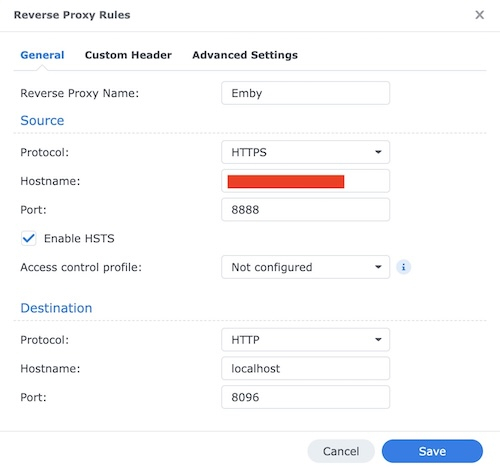
Mine is configured this way: Very simple config, certificates (https) is handled by proxy, no custom headers or any other trickery.
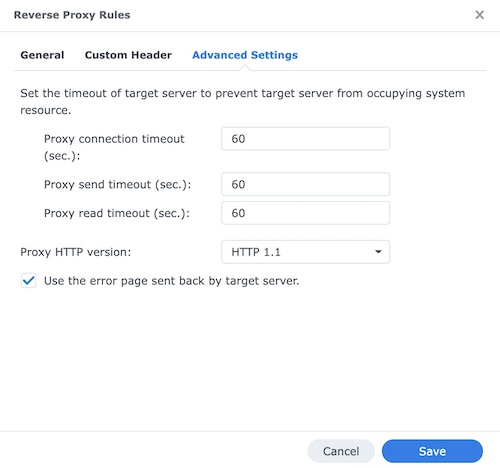 1 point
 -
First, I want to say that from my understanding, the decision to remove clickable headers from TV mode was made in response to feedback regarding navigation issues—specifically the aggravation that some had having to click up and down too many times. I used those clickable headers quite often, and their removal from TV Mode did not make me happy. At this point I would like to apologize again for the way I previously expressed that unhappiness. My tone in past posts was not appropriate, and I regret being a jerk to the Dev Team in the past about this topic. That being said: Back to my request: I prefer to use a remote control, when navigating Emby which works best in TV mode. I know that clickable headers are still usable in desktop and mobile modes, but using a remote in those modes is frustrating. Emby frequently loses focus, and the experience of having to tab endlessly to regain focus is annoying. (If you know, you know) This leaves me stuck between two choices: using desktop/mobile mode for clickable headers with poor remote functionality, or using TV mode with better remote control support but without the clickable headers. For the past year I've using desktop mode with a mouse, and I really miss easy navigation I had with my remote. I respectfully request that clickable headers be reintroduced to TV mode, but with a toggle option in the settings. This way, users who do not want them can disable the feature, and those of us who used them/don't mind the extra clicks can re-enable it. Even if this option is disabled by default and has to be enabled in the menu setting, having the ability to turn clickable headers back on in TV mode would make a huge difference for me and likely for others in a similar position. Please consider reintroducing clickable headers back into TV Mode in some way: Thanks1 point
-
Yeah, I think I am the only person who sadly cares.1 point
-
Yon can join the Android TV beta and get beta updates.1 point
-
No idea. I don’t see why not but you’d have to try.1 point
-
@LukeIgnore previous post metadata was turned off after update. Not sure how that happened.1 point
-
Hi For Emby you should run it on Linux too, lot more efficient and stable Here running on Debian 12 since 3 years without any problems WDD Blue are not done at all for servers (it's drives designed for desktop use so you are probably going to kill them prematurely...)1 point
-
1 point
-
Buenos dias Lucas. Ya pasaron muchos dias y todo sigue igual. Como va el procedimiento se esta demorando mucho. Gracias de antemano1 point
-
Hi Just installed, will keep eye on it. But on last update was still regularly happening, so fingers crossed1 point
-
Based on that recent testing by @cp41, Legacy folder scanning in 4.9.3 appears to behave differently depending on platform. Using the same media layout and the same settings (Mixed Content library, Folder scanning mode = Legacy macOS (ARM64) Single-item folders are collapsed into media items, multi-item folders remain folders (expected / pre-4.9 behavior). Synology NAS (DSM 7.2+) Single-item folders continue to be treated as folders; Legacy scanning appears to have no effect. This was reproduced both on existing libraries (upgraded from 4.9.1.80) and on newly created Movies and Mixed Content libraries with Legacy enabled from the start. Can it be confirmed whether Legacy folder scanning is fully implemented and supported on Synology DSM builds in 4.9.3, or if this is a known platform-specific limitation or bug?1 point
-
Yes as perfectly as it was. Thanks Again1 point
-
Omg. Thank you so much for that. I never would have guessed that shift click had been implemented here without a "set all to unplayed" option. My entire library is now set to unplayed with only a few clicks and no pain.1 point
-
Multi-select, select the first item, scroll to the bottom, then shift-click on the last item to select everything in between. Then mark played/unplayed. A 'select all' button would be really nice to have though.1 point
-
Aperture v0.3.1 Release Date: January 11, 2026 Bug Fixes Embeddings: Studio Data Parsing Fixed a critical bug where studio names in movie and series embeddings were being rendered as [object Object] instead of actual names like "A24" or "Marvel Studios". Background: Migration 0048_studio_jsonb.sql changed the studios column from a text array to JSONB objects (with id and name fields) to support studio image lookups. The embeddings code wasn't updated to handle this new format. Impact: Any embeddings generated after the schema change would have corrupted studio information, potentially degrading recommendation quality for users who rely on studio preferences. Fix: The embeddings generation now properly parses JSONB studio data and extracts the name field. Thanks to @tcx4c70 for this contribution! STRM Files: Playback Compatibility Fixed "No compatible streams available" playback errors in STRM libraries. Problem: STRM files were using streaming URLs that require authentication, but media players opening STRM files don't have access to the session credentials. Solution: STRM files now contain the original file path (e.g., /mnt/Media/Movies/Film.mkv) instead of streaming URLs. This works when the media server has filesystem access to the original media files. Note: This requires your Emby/Jellyfin server to have access to the same storage paths. If running in Docker, ensure the media paths are mounted identically. Upgrade Notes No database migrations required Existing embeddings with corrupted studio data will be regenerated on the next embeddings job run STRM files will be updated automatically on the next sync job Full Changelog fix(embeddings): Studios in embeddings are always object fix(strm): Use original file paths instead of streaming URLs chore: Bump version to 0.3.11 point
-
Hi, please try version 1.2.7 of the TuneIn plugin. I've added some basic rate limiting to space the requests out. Thanks.1 point
-
thank you Luke for this very quick answer and congrats for this Emby app that I used now for years1 point
-
When can we expect M4 Mac Mini Hardware Acceleration?1 point
-
Gear wheel > Programme start _> ‘Start behaviour’ -> ‘Last user setting’ @Luke, if you mean me, unfortunately no, if you: @Supersaugithen please do OT: @LukasI remember that one of the apps does not support manual login. I still don't understand why there are still two apps, or why that is the case.1 point
-
Not sure why this only affected a select few as this setting has been in place for quite some time. As I have not seen any user settings reset.1 point
-
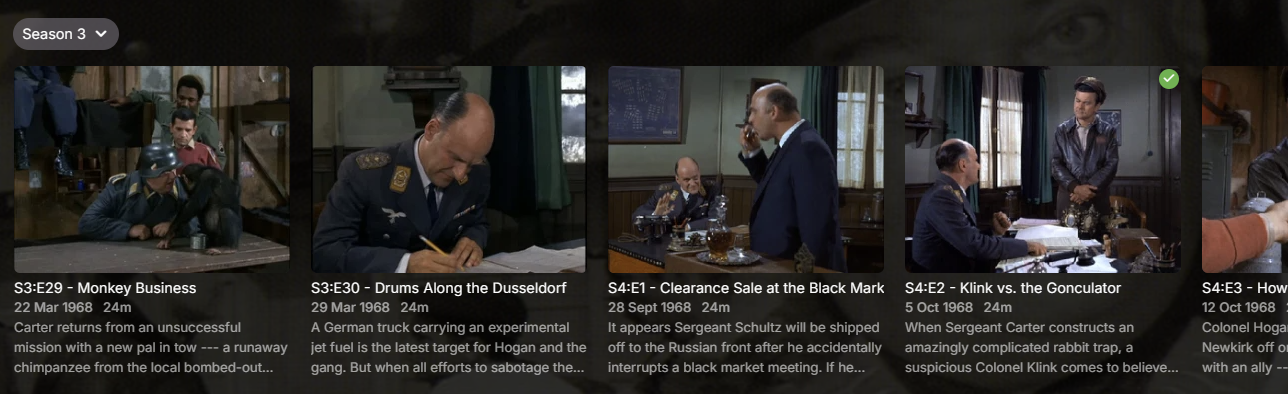
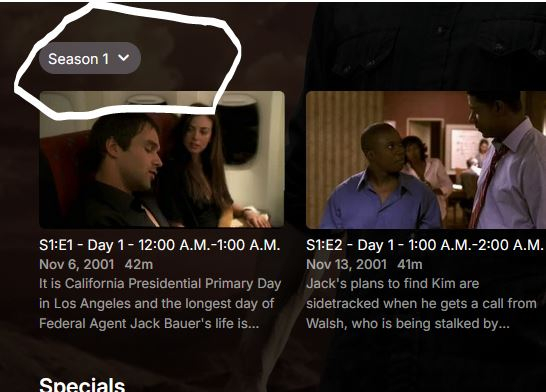
I'm not sure what kind of attitude that is. My streaming ecosystem is Emby and that's essentially all we use, so I couldn't give a rat's about what Netflix does. Clearly this attitude means you intentionally forced this behaviour on users for whatever reason, yet it's clearly missing from the release notes: Nowhere there does it say you've changed this behaviour and nowhere is it made easy to revert for all users, hence this thread. I fail to see how you feel this: is a better experience than this: Especially with that tiny Season 3 drop-down which is so easy to miss and obliterates the pretty season cover art many of us curate. It's worse with a mouse. If I want to look at all episodes in Season 4, in the old view, I click Season 4 then I can scroll with my mouse. I can't scroll with my mouse with this new behaviour and instead must click, click, click all the way to what I want. Considering how you seem to approach most feedback in these forums, I don't expect you to revert this unwelcome behaviour and will have to suck it up. I will, however, request you be more upfront next time and include major forced behavioural changes in the release notes so we're aware of it. Ideally, there should be a way for users (not Luke et al.) to apply our standard configuration to all users as well, without having to sign into each user account individually.
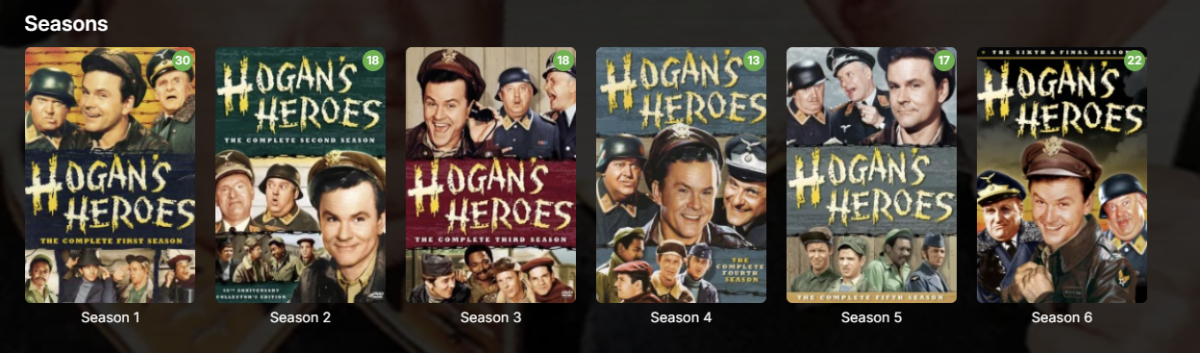
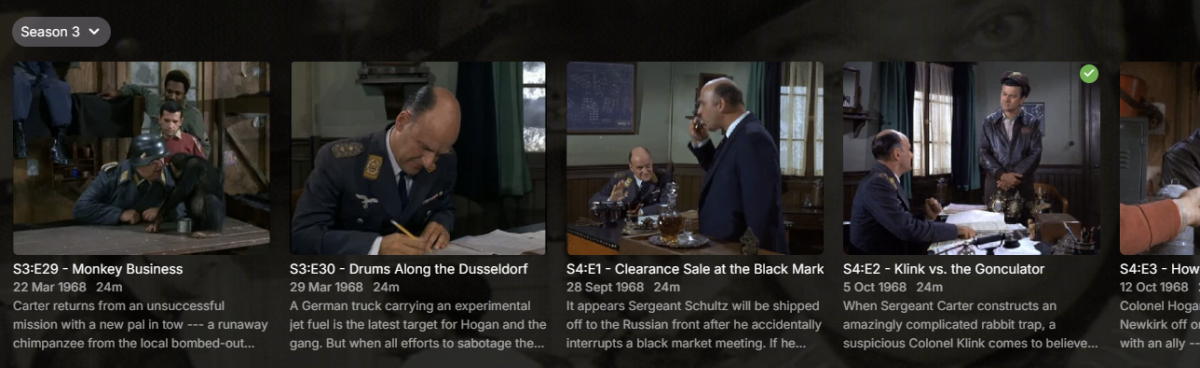 1 point
 -
Thank you. Sorry if my topic sounded mean or rude. Never used it before and even after reading about how to do it was still a little difficult. Not impossible just difficult.1 point
-
I also got hit by this after Emby automatically updated to v4.9.3.0 from v4.9.1.90 overnight. While this may have been added to v4.8, it wasn't forcefully changed like this update has. The v4.9.3.0 update reset my view to Show all episodes of all seasons together when it was never like that previously (Was previously Show all episodes for only single season shows, which is how I like it). I too found this confusing and frustrating until I found this thread as I was also coming to complain. I'm guessing the update either did not properly respect prior preferences or it has now decided this setting is the default and just set it. Either way, it's poor and I also now have to undo it for all of my users, as my other users won't be aware where this option is.1 point
-
Santa, you were late... Can I hope for more this Year??1 point
-
I cannot see this getting re-enabled anytime soon. There are too many laws to follow here in the UK, we have to not only prove you are 18 but have a back trace that tokens and Oath verifications were used and with everything off as default and enabled only by the user. For a free service it just isn't viable, and if i host somewhere outside the jurisdiction, English laws still implement me as the host (so still prosecutable), so its not going to happen soon, besides I don't have the skillset to put this toolchain together even if it were paid. And the paid option even if its only to pay the verification fee of an online age verifier system opens up a whole new can of worms, because then i am reselling other peoples copyrighted data, ie posters and overviews/synopsis (the rest is ok legally).... Its a legal nightmare which regardless of anyone's opinion on here, that i am not willing to risk for myself and my family. Having the data and providing publicly it is two different things. It is a real shame because this worked well for a few years and was probably the best there was for some of that time.1 point
-
Hi, yes this is what I think we should do.1 point
-
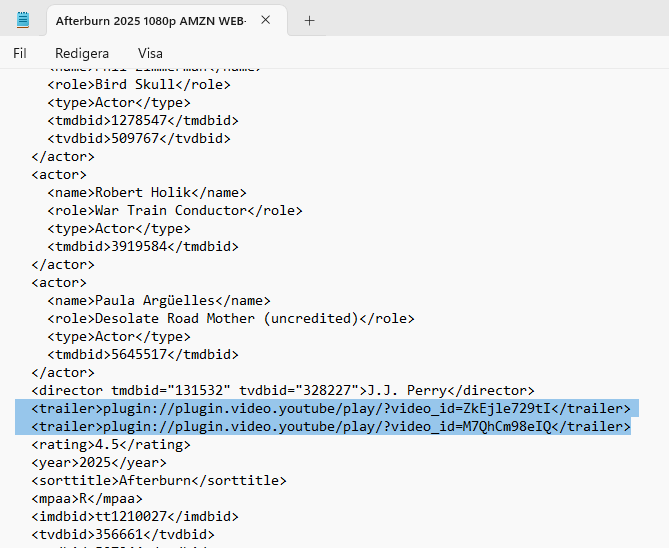
Just my opinion - but I think this problem can be easily solved. If you save .nfo files in your library settings, you can see in them that there is one or more lines for trailers. <trailer>plugin://plugin.video.youtube/play/?video_id=ZkEjle729tI</trailer> <trailer>plugin://plugin.video.youtube/play/?video_id=M7QhCm98eIQ</trailer> It works the same way as example the ID:s from TMDB/TVDB/IMDB: <imdbid>tt1210027</imdbid> <tvdbid>356661</tvdbid> <tmdbid>507244</tmdbid> When it comes to ID:s those can already be modified in the EMBY interface: I believe it would be pretty easy to make a similar options to put Youtube ID numbers for trailers into the interface? Maybe our clever developers can look into it? Myself, I sometimes edit the .nfo files when a trailer is "dead", has a strange language, is not relevant or has a very low quality. Only in very few cases I need to download a file and add it next to the movie file. (Downloading from Youtube with good quality can be very tricky, even if it is possible). Here is how it looks in the .nfo file:
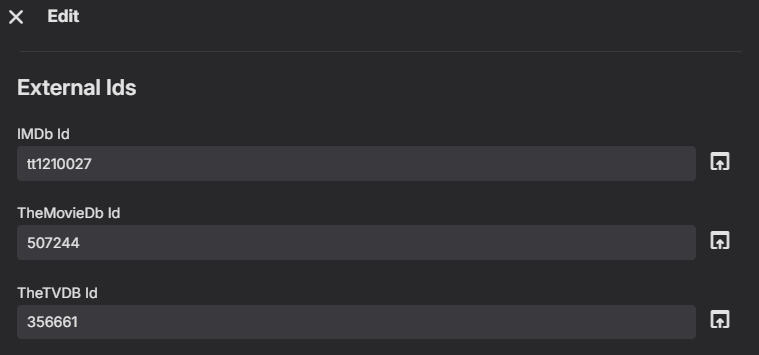
 1 point
 -
Relax. Emby is software. Software can and will have bugs, regressions, etc. and there is no such things as 100% test coverage or 100% bug free software. It is doable but not viable as it would have infinite cost to achieve such thing.1 point
-
TVDB is dumb, and they constantly screw up anime and it makes it extremely frustrating and people think it's an Emby problem, when it's in fact those idiots at TVDB who have screwed things up. Anything that doesn't fit you need to custom name. Emby has gotten better at handling extras like openings endings and music vidoes and the like, but anything that is not listed can get totally screwed up and merged with other files. For openings and endings I usually name them as S00 with the episode being in the hundreds. So for example S01 OP01 would be S00E101, season 2 opening would be S00E201 and so on. Same with any "extras" from the respective seasons. @pwhodges has fought with this a lot and has it down to a science. We've both discussed in different topics in the past how to handle stubborn anime. We have to remember, Emby is only as smart as the metada providers, so anything that doesn't fit their mold we have to fix it so it does and won't pull any data, so we can add our own, yet will still make sense to viewers or ourselves.1 point
-
Hi. Those are unwatched counts.1 point