Leaderboard




Popular Content
Showing content with the highest reputation on 01/10/26 in all areas
-
My request is to be able to chose to add items to the home screen. Specifically in my case, I am thinking of playlists and collections. Here's some reasons I'd like to see this: The home screen is the first piece of the user interface a person will see when they pull up Emby. I often places movies in bulk into my media library. This sometimes means people never see the new movie I've made available. Happens a lot, actually. While all movies are searchable or can be found by sorting, I believe the interface would benefit from having the customization option. I have created a "Justin Recommends" collection and would LOVE to be able to put that on the home screen. By keeping this optional, no one is forced to use it. If you don't have a use-case, then it's just a feature. If you look at things like Netflix, many movies and shows get "featured" and by doing that, a lot of people end up watching that wouldn't otherwise (imagine if The Tiger King was just another buried documentary you had to hunt for, no one would have heard of it). I appreciate your time. If you've considered this before and decided against for reasons other than difficulty implementing the feature, I'd ask you to reconsider. I believe that being able to customize our servers helps us personalize and tailor them to our audience and our needs, and that helps promote a feeling of ownership. I also truly believe that this small change could lead to some powerful results. In my case, I know that it would be of huge benefit to accomplishing what I would like to do with my Emby server. Thank you.3 points
-
New version up (1.4.9.0) on yocksers Github Added: Ability to mass edit season time stamps. Export and import individual seasons so users can share time stamps. Changed: Made it so time stamps can not be set outside video duration. Added duration length display. And other things i might have forgotten (been busy with all sorts). As always: Please report any bugs or ideas you have to me in this thread or in a private message.3 points
-
We think alike. I was in the process of posting what I'd found when you replied. I disabled TheTVDB and did an identify which worked. When I enabled TheTVDB again and did a scan, it left it alone. I'm not satisfied with that solution though. It's too likely that emby will mess it later. I'll look into changing that order. Never done that before. Thanks for the reply.2 points
-
I wrote up a quick Mark Down File. I'm assuming you have already flashed CorElEC on your Ugoos amb6+. This will get you started its alot but i have given you good links to get started.Emby-Kodi-Installation-Guide.md2 points
-
You should also invalidate those keys you shared on a public site, they could very easily be compromised now2 points
-
@Rumzzz You are right, there are still some searches that activates Emby server CPU meltdown command.2 points
-
Changed to the latest train and tried the update again, and it works. Thank you.2 points
-
I updated to 4.9.3.0. I think the multi-word issue seems resolved but there are still a few cases where searching takes minutes long (seems to be smaller word searches) Searches that came back within 10 seconds: Ice Cube, Kanye West, Kid Cudi, Andy Clausen Searches that take minutes to load: The Creator, Leon, War, don, tyler, mark2 points
-
The wait is over! We are excited to announce public availability of the new Emby Linux app beta program. Why a Native Linux App? While Emby’s web app works well across platforms, there are limits to what a browser-based player can achieve, especially when it comes to modern video and audio playback. The Linux app was created to go beyond those limits. At the core of this decision is one simple goal: BEST IN CLASS VIDEO PLAYBACK. Browsers continue to improve, but they inevitably lag behind native applications when it comes to advanced video technologies, hardware acceleration, and reliable fullscreen playback. Emby users expect smooth, high-quality playback — and delivering that consistently requires a native application. Benefits Over the Web Player The new Linux app provides several advantages over watching through a browser: More reliable video playback with fewer browser-related limitations Better performance and lower system overhead Improved full screen behavior across Linux desktop environments Direct integration with native video playback technologies A cleaner, distraction free viewing experience By separating video playback from the browser entirely, the app is able to take full advantage of the system and deliver a smoother experience. Designed for Linux Desktops The Emby Linux app is built to feel at home on Linux. It works across major Linux environments . The result is a modern Emby experience that’s faster, more consistent, and purpose built for Linux users. Available Now The new Emby Linux Beta app is now available and we are waiting for your feedback! Want to get started right away? Head on over to the beta instructions page for more! Please provide feedback in this forum: Linux Beta View the full article2 points
-
The wait is over! We are excited to announce public availability of the new Emby Linux app beta program. Why a Native Linux App? While Emby’s web app works well across platforms, there are limits to what a browser-based player can achieve, especially when it comes to modern video and audio playback. The Linux app was created to go beyond those limits. At the core of this decision is one simple goal: BEST IN CLASS VIDEO PLAYBACK. Browsers continue to improve, but they inevitably lag behind native applications when it comes to advanced video technologies, hardware acceleration, and reliable fullscreen playback. Emby users expect smooth, high-quality playback — and delivering that consistently requires a native application. Benefits Over the Web Player The new Linux app provides several advantages over watching through a browser: More reliable video playback with fewer browser-related limitations Better performance and lower system overhead Improved full screen behavior across Linux desktop environments Direct integration with native video playback technologies A cleaner, distraction free viewing experience By separating video playback from the browser entirely, the app is able to take full advantage of the system and deliver a smoother experience. Designed for Linux Desktops The Emby Linux app is built to feel at home on Linux. It works across major Linux environments . The result is a modern Emby experience that’s faster, more consistent, and purpose built for Linux users. Available Now The new Emby Linux Beta app is now available and we are waiting for your feedback! Want to get started right away? Head on over to the beta instructions page for more! Please provide feedback in this forum: Linux Beta1 point
-
Would be nice to be able to choose a specific Collection to appear on the home screen. My use case: I have many Documentaries that are both TV Shows and Movies. I currently have them in the TV Show or Movie libraries and then create a Collection called "Documentaries" so they are in one place. This is mostly a work-around so I don't use Mixed Content, which has mixed reviews. It would be nice to have this Documentaries Collection appear on my Home Page, as if it was a library.1 point
-
Aperture v0.2.1 Release Notes Hey everyone! I'm excited to release Aperture v0.2.1 with a brand new feature that many of you have been asking for. New Feature: Shows You Watch The headline feature of this release is Shows You Watch — a new way to track the series you're currently following and never miss an episode. How It Works Mark series as "Watching" — From any series page, recommendations list, or search results, you can now toggle a series to your watching list Dedicated Watching Page — A new page shows all your tracked series with upcoming episode information Dashboard Integration — See your upcoming episodes right on the dashboard in a new "Shows You Watch" carousel STRM Library Support — Optionally sync your watching list to a dedicated STRM library in Emby/Jellyfin, separate from your AI recommendations Settings Head to Settings → Shows You Watch to configure: Enable/disable the watching STRM library Set your library name and path Configure sync preferences Bug Fixes Setup Wizard: Fixed library filtering to exclude Aperture-created libraries from selection Setup Wizard: Jobs can now run during initial setup without requiring an active session Libraries: Fixed an issue with libraries that have no collection type set Error Handling: Improved error messages (no more unhelpful 400 errors) UI Improvements Job Cards: Switched to 2-column layout to prevent content truncation on the jobs page Franchises Page: Improved layout and organization MediaCarousel: Simplified and optimized carousel component Removed unused Awards page Upgrade Instructions docker pull ghcr.io/dgruhin-hrizn/aperture:0.2.1 Or use latest: docker pull ghcr.io/dgruhin-hrizn/aperture:latest Database migrations will run automatically on startup. Feedback Let me know what you think of the new Shows You Watch feature! I'd love to hear how you're using it and any suggestions for improvements. Happy streaming!1 point
-
The option he is linking to has nothing to do with library scan performance. How to Report a Problem1 point
-
It varies wildly. Sometimes as quick as two weeks. Other times as long as two months. I think our submission has been in review for a couple weeks now.1 point
-
I t would be helpful for the people who run this site if everyone's PC info was down at the bottom like that , maybe it would not i don't know ,just an idea1 point
-
Hi, thank you for the answer. I uninstalled all of them and tested a couple of minutes Live TV streaming. For now it seems stable and no RAM leaking detected. Stable at 2.5 to 3 GB usage. Will keep an eye on that!1 point
-
Good news! Also, imho, latest beta should be 'emby-devel' in ports tree/packages. Anyway, ready to test.1 point
-
Since you have TVDB as primary meta-provider (and TVDB lists only a single A Christmas Blessing (2023) movie, with associated TMDBId 1142044), you can't identify them as two distinct movies (as TMDBId of the second movie, 1192390, is not present at the TVDB db, so query is made with the title alone). As you've already made progress halfway and have two entries listed, you should: 1. Move TheMovieDB as top-preferred library meta-downloader 2. Re-Identify (right click or three-dot menu>Identify) incorrectly identified movie1 point
-
I am working on an update that will hopefully solve for some initial configuration headaches. Setup is a monster, but once done it just runs.1 point
-
What metadata downloaders are enabled in your library and in what order?1 point
-
Just a follow up that it completed in another day or so. Don't remember exactly when...1 point
-
Hmm are those these movies? A Christmas Blessing — The Movie Database (TMDB) If they are try this folder naming Movie 1 : A Christmas Blessing (2023) {TmdbId-1142044} Movie 2 : A Christmas Blessing (2023) {TmdbId-1192390}1 point
-
Many thanks!1 point
-
It does work on the web, indeed, but not on TV. Also, if I set the Default to Movies, it displays Shows instead. I guess we need to wait for the client apps to catch up.1 point
-
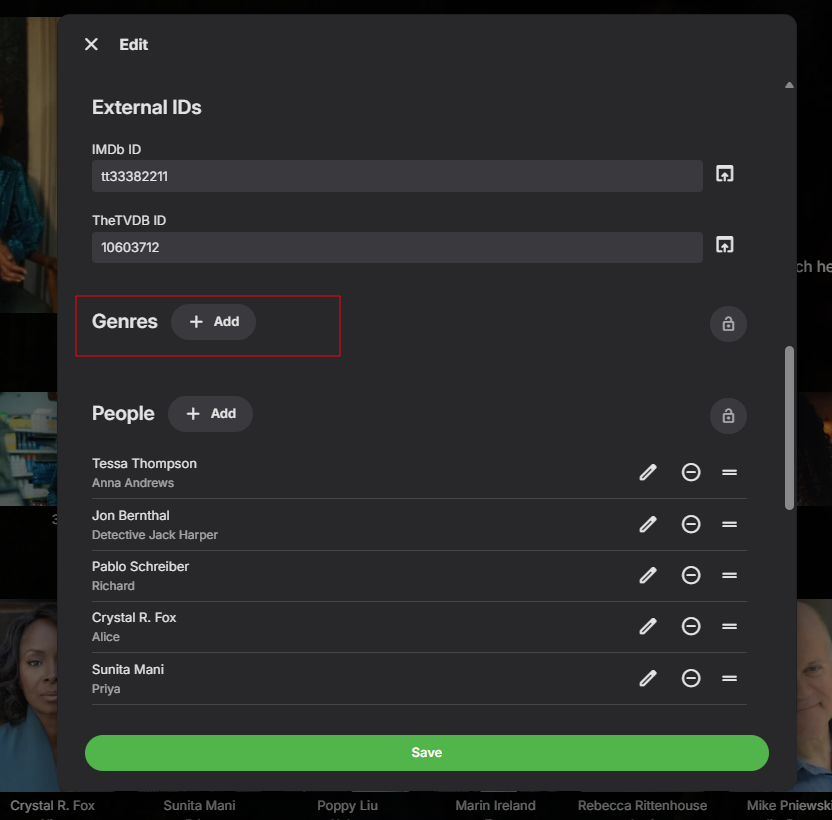
Devs would need to answer that But I went into every episode and removed genres from them. That fixed it for me, I have not seen the issue after. TBH it was a lot of work. Clicking play on genre, to see what episode to edit.
 1 point
 -
@Hispanico957do you see a play button when you mouse over the empty genre? If you do you can see that the playing episode has genre in metadata. I suspect that Emby for some reason has started to import genre's from single episodes.1 point
-
That would be great1 point
-
I will probably work on a full getting started wizard now that I have ironed out the docker issues. I am thinking initial config of your server and open ai key then walk you through setting up which Emby libraries you want to include, and then run you through all the Jobs that need to be triggered in order to sync the libraries, watch history, run the embeddings, create recommendations and create the new AI Recommendation libraries per user in Emby. I realize there is a lot you have to setup to get started, trying to do it all from the start vs as I was building!1 point
-
Aperture Docker Deployment - Setup & Troubleshooting Overview This post documents the Docker deployment process for Aperture and the issues we've encountered and resolved. Quick Start (Unraid / Production) 1. Download the production docker-compose file: curl -O https://raw.githubusercontent.com/dgruhin-hrizn/aperture/main/docker-compose.prod.yml 2. Edit APP_BASE_URL to match your server: APP_BASE_URL: http://192.168.1.8:3456 # Change to your server IP 3. Start the containers: docker compose -f docker-compose.prod.yml up -d 4. Complete the Setup Wizard: Navigate to http://your-server-ip:3456 and the setup wizard will guide you through: Connecting to your Emby/Jellyfin server Configuring your OpenAI API key (optional) 5. Log in with your media server credentials and you're ready to go! Full docker-compose.prod.yml # ============================================================================= # Aperture - Production Docker Compose # ============================================================================= # Use this for deployment on Unraid, servers, or any production environment. # This uses pre-built images from GitHub Container Registry. # # Quick start: # docker-compose -f docker-compose.prod.yml up -d # # Update to latest version: # docker-compose -f docker-compose.prod.yml pull # docker-compose -f docker-compose.prod.yml up -d # ============================================================================= services: db: image: pgvector/pgvector:pg16 container_name: aperture-db environment: POSTGRES_USER: app POSTGRES_PASSWORD: app POSTGRES_DB: aperture volumes: - pgdata:/var/lib/postgresql/data healthcheck: test: ['CMD-SHELL', 'pg_isready -U app -d aperture'] interval: 5s timeout: 5s retries: 5 restart: unless-stopped app: image: ghcr.io/dgruhin-hrizn/aperture:latest container_name: aperture environment: NODE_ENV: production APP_BASE_URL: http://192.168.1.8:3456 # SET THIS TO YOUR SERVER IP AND PORT PORT: 3456 DATABASE_URL: postgres://app:app@db:5432/aperture RUN_MIGRATIONS_ON_START: 'true' TZ: America/New_York ports: - '3456:3456' depends_on: db: condition: service_healthy volumes: - ./data/strm:/strm - ./uploads:/app/uploads restart: unless-stopped volumes: pgdata: Unraid Installation Option 1: Compose Manager (Recommended) Install Compose Manager plugin from Community Applications Create a new stack named "Aperture" Paste the docker-compose.prod.yml content above Important: Change APP_BASE_URL to your Unraid IP (e.g., http://192.168.1.8:3456) Click "Compose Up" Access at http://your-unraid-ip:3456 Option 2: Manual Docker Commands # Create directory mkdir -p /mnt/user/appdata/aperture cd /mnt/user/appdata/aperture # Download compose file curl -O https://raw.githubusercontent.com/dgruhin-hrizn/aperture/main/docker-compose.prod.yml # Edit APP_BASE_URL nano docker-compose.prod.yml # Start docker compose -f docker-compose.prod.yml up -d Configuration All settings are configured via the Setup Wizard and UI — no environment variables needed for most settings! Variable Required Description DATABASE_URL Yes PostgreSQL connection string (set in compose file) APP_BASE_URL Yes Your server's URL (e.g., http://192.168.1.8:3456) PORT No Server port (default: 3456) TZ No Timezone (default: UTC) Configured via UI (Settings pages): Media Server (Emby/Jellyfin) connection OpenAI API key Library settings All other preferences Issues Fixed Issue 1: Setup Wizard Required Problem: First-time users couldn't log in because media server wasn't configured. Solution: Added a setup wizard that guides users through initial configuration before requiring login. Issue 2: Settings Not Persisting After Setup Problem: After completing setup, login failed with "Media server not configured" because settings were read from environment variables instead of the database. Solution: Made all configuration read from database first (with env fallback). Updated 40+ files to use async database queries. Issue 3: EACCES Permission Denied on /app/uploads Problem: Container crashed with EACCES: permission denied when trying to create the uploads directory. Solution: Dockerfile now pre-creates /app/uploads with correct ownership. Issue 4: Database Defaulting to localhost Problem: Application connected to localhost:5432 instead of db:5432. Solution: Added DOCKER_ENV=true to Dockerfile to disable development localhost override. Issue 5: Web UI 404 / "Web dist folder not found" Problem: Static assets not served, resulting in 404 errors. Solution: Fixed path calculation in static file plugin. Issue 6: OpenAI Client Crash on Startup Problem: Container crashed if OpenAI API key wasn't set, even though it's optional. Solution: Refactored OpenAI client to use lazy initialization. Troubleshooting Container won't start? docker logs aperture Database connection issues? Ensure the db container is healthy before app starts Check DATABASE_URL format: postgres://user:pass@host:5432/dbname "Media server not configured" after setup? Make sure you're running the latest image: docker compose -f docker-compose.prod.yml pull Restart: docker compose -f docker-compose.prod.yml up -d Updating to latest version: docker compose -f docker-compose.prod.yml pull docker compose -f docker-compose.prod.yml up -d Version History v0.1.9 (Latest) Setup wizard for first-time configuration All UI-configurable settings now read from database Production docker-compose file (docker-compose.prod.yml) Fixed auth flow to use database-stored media server config Fixed OpenAI lazy initialization Let me know if you encounter any other issues!1 point
-
It's been a bumpy start, but getting there! So here are the issues I faced so far with docker: Issue 1: Media Server Configuration Required for Startup (Documentation/Logic Conflict) The documentation suggests that the Media Server (Emby/Jellyfin) configuration might be optional or configurable later. However, the container fails to initialize properly if the MEDIA_SERVER_BASE_URL and related variables are omitted or incorrect. The application appears to have a strict startup dependency on these values being present immediately. Recommendation: Update documentation to list these variables as required for the initial Docker Compose setup, or handle the missing configuration gracefully during the first run. Issue 2: EACCES: permission denied on /app/uploads (Windows Bind Mounts) When attempting to bind mount the ./uploads directory for persistence on Windows, the Node.js process inside the container crashes with an EACCES error. This occurs because the default user (likely node or UID 1000) does not have write permissions to the Windows-mounted NTFS volume. Logs: Error: EACCES: permission denied, mkdir '/app/uploads' Fix: force the container to run as root to bypass the Windows/Linux permission mismatch (Added user: "0:0" to the app service in docker-compose.yml.) Issue 3: Application Defaults to localhost for Database (Ignoring Environment Variables) The application persistently attempts to connect to the database on localhost (::1:5432 or 127.0.0.1:5432), even when DATABASE_URL, PGHOST, and POSTGRES_HOST are explicitly set in docker-compose.yml. This results in a loop of ECONNREFUSED errors because the database is running in a separate container, not inside the app container. Logs: AggregateError [ECONNREFUSED]: at .../pg-pool/index.js:45:11 ... errors: [ Error: connect ECONNREFUSED ::1:5432, Error: connect ECONNREFUSED 127.0.0.1:5432 ] Fix:I had to explicitly force the container hostname resolution and flood the environment variables to ensure the driver picked up the correct host: Set container_name: aperture-db for the database. Explicitly set POSTGRES_HOST: aperture-db (and PGHOST) in the app service. Use a custom bridge network to ensure DNS resolution works immediately on startup.1 point
-
Just installed the client on Ubuntu 24. Working great so far! So much more enjoyable than using Firefox.1 point
-
Guys , Convert to Custom was the solution for me, and even update to 4.9.3.0 happened automatic. I post this if it can help someone This is my custom config I use if anyone want to modify to his own paths , this is very importand: * btw I don't have nvidia acceleration so you may need to change it. services: emby: cap_add: - CHOWN - DAC_OVERRIDE - FOWNER - KILL - SETGID - SETUID cap_drop: - ALL deploy: resources: limits: cpus: '2' memory: 8192M devices: - /dev/dri:/dev/dri environment: EMBY_VERSION: 4.9.3.0 GID: '3000' GIDLIST: 568,44,107 GROUP_ID: '3000' NVIDIA_VISIBLE_DEVICES: void PGID: '3000' PUID: '3000' TZ: Europe/Athens UID: '3000' UMASK: '002' UMASK_SET: '002' USER_ID: '3000' gidlist: 44,57,3000 group_add: - 44 - 107 - 568 healthcheck: interval: 30s retries: 5 start_interval: 2s start_period: 15s test: - CMD - wget - '--quiet' - '--spider' - http://127.0.0.1:8096/emby/System/Ping timeout: 5s image: emby/embyserver:latest network_mode: host platform: linux/amd64 privileged: False pull_policy: always restart: unless-stopped security_opt: - no-new-privileges=true stdin_open: False tty: False user: '0:0' volumes: - bind: create_host_path: False propagation: rprivate read_only: False source: /mnt/storage/emby target: /backup type: bind - bind: create_host_path: False propagation: rprivate read_only: False source: /mnt/tv/books_library target: /books type: bind - bind: create_host_path: False propagation: rprivate read_only: False source: /mnt/apps/embyserver target: /config type: bind - bind: create_host_path: False propagation: rprivate read_only: False source: /mnt/movies/movies_library target: /movies type: bind - bind: create_host_path: False propagation: rprivate read_only: False source: /mnt/music/music_library target: /music type: bind - bind: create_host_path: False propagation: rprivate read_only: False source: /mnt/tv/tv_recording target: /recording type: bind - bind: create_host_path: False propagation: rprivate read_only: False source: /mnt/tv/tv_library target: /tv type: bind - bind: create_host_path: False propagation: rprivate read_only: False source: /mnt/tv/video_library target: /video type: bind volumes: {} x-notes: > # Emby Server ## Security **Read the following security precautions to ensure that you wish to continue using this application.** --- ### Container: [emby] #### Running user/group(s) - User: root - Group: root - Supplementary Groups: apps #### Passing Host Files, Devices, or Sockets into the Container - DRI Device (/dev/dri) - (Read/Write) --- ## Bug Reports and Feature Requests If you find a bug in this app or have an idea for a new feature, please file an issue at https://github.com/truenas/apps x-portals: []1 point
-
ok, I believe it has been updated already, thanks1 point
-
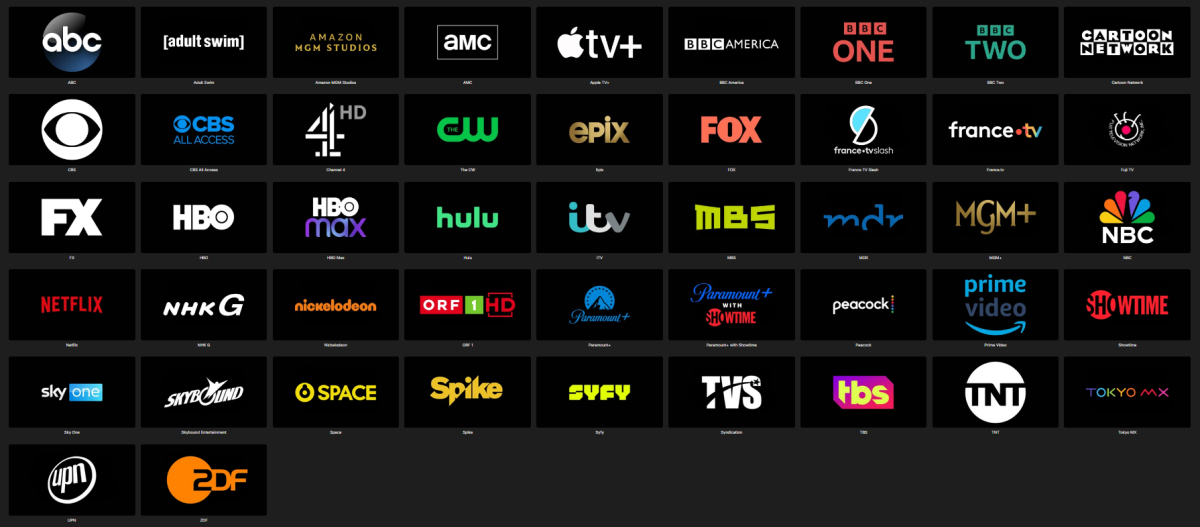
Since some popular channel logos (e.g. adult swim, nbc, showtime, amazon mgm, bbc america, mgm+, nickelodeon) were missing I added them to @Pejamascollection. Emby Black Channel Logos.rar
 1 point
 -
True, there ain't yet, but if you select either Shows or Movies as a Default tab - it'd take you there.1 point
-
Okay, not sure how to use the tool. The output file was generated inside a few seconds... don't know if it really worked... but it sure makes no difference to the emby web app in Firefox.1 point
-
When it comes to audio, the environment is the huge trump card. If you're working with a common living room type environment, there is only so much that can be done and you definitely don't want to be spending a fortune on the speakers. Mediocre speakers in a well-designed room can sound 100 times better than $100k speakers in a bad room. So, that is just to say, realize the limitations with the environment before going to far overboard.1 point
-
thank you guys i was waiting for this one, i use fedora btw.1 point
-
I just checked my IP and indeed i am behind a CGNAT. I will request a static IP address from my provider. Thanks guys!1 point
-
It should yes.1 point
-
It is now exactly 1 year since this was said. I know you never committed to a timeline, but this problem continues to be a major issue - Do you have any updates on where this is in your roadmap?1 point
-
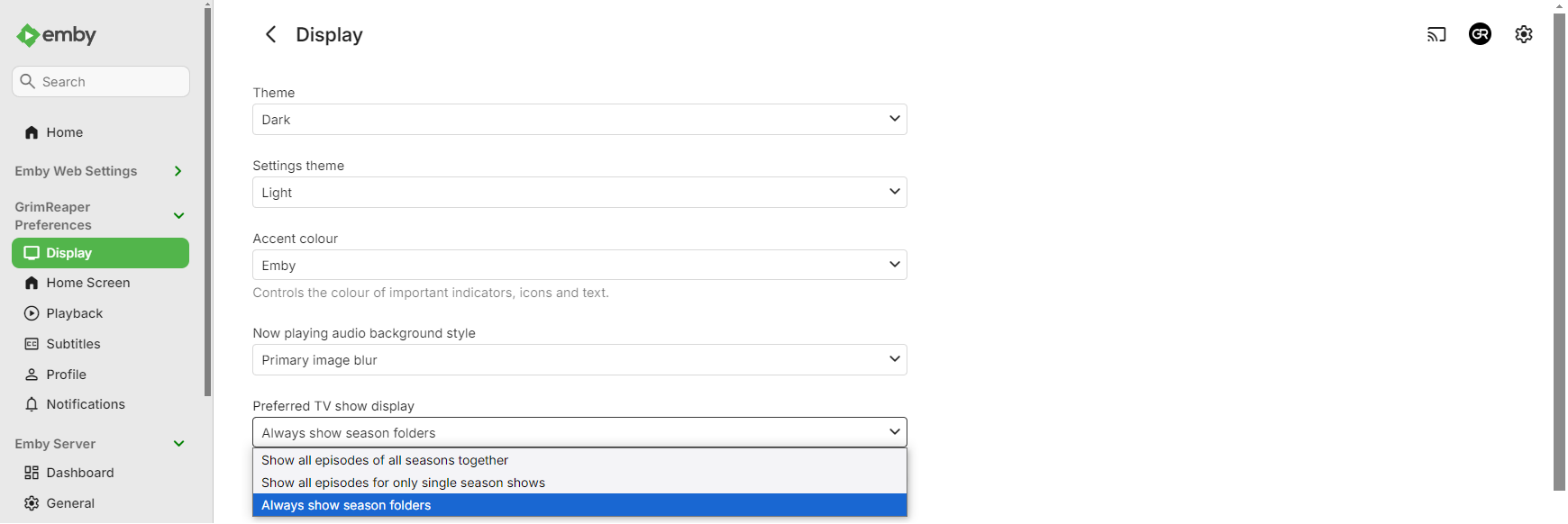
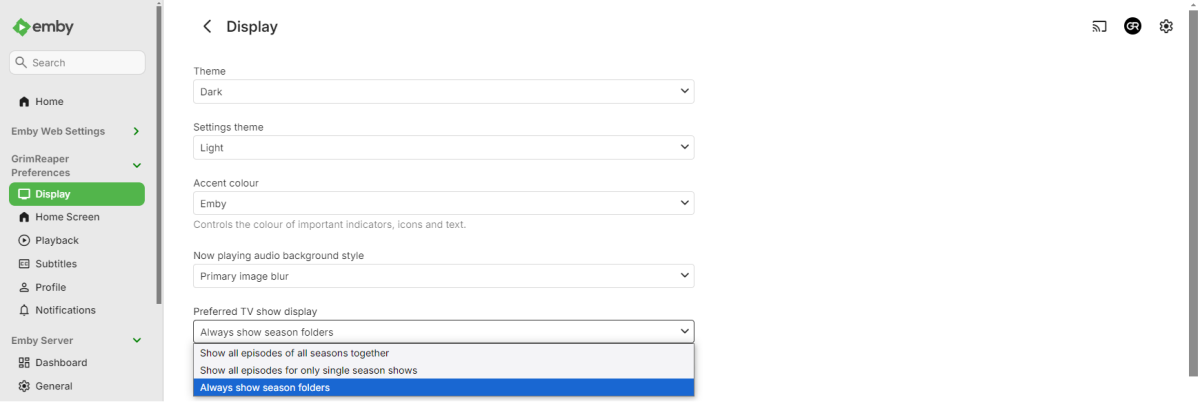
It is an option, set it according your preference under your user's Display preferences.
 1 point
 -
Hi, please try removing these plugins: 2026-01-03 19:35:21.290 Info App: Loading Emby.Plugin.Ard, Version=4.7.0.51, Culture=neutral, PublicKeyToken=null from D:\Emby\programdata\plugins\Emby.Plugin.Ard.dll 2026-01-03 19:35:21.290 Info App: Loading Emby.Plugin.Zdf, Version=4.8.0.20, Culture=neutral, PublicKeyToken=null from D:\Emby\programdata\plugins\Emby.Plugin.Zdf.dll2026-01-03 19:35:21.291 Info App: Loading Restart, Version=1.0.0.0, Culture=neutral, PublicKeyToken=null from D:\Emby\programdata\plugins\Restart.dll 2026-01-03 19:35:21.291 Info App: Loading statistics, Version=3.4.2.0, Culture=neutral, PublicKeyToken=null from D:\Emby\programdata\plugins\Statistics.dll 2026-01-03 19:35:21.291 Info App: Loading VirtualTV, Version=2.1.7.0, Culture=neutral, PublicKeyToken=null from D:\Emby\programdata\plugins\VirtualTV.dll Then restart the server and let us know how things compare. Thanks.1 point
-
Hi. That CVE was filed by us and resides in our repo. https://github.com/EmbySupport/Emby.Security/security/advisories/1 point
-
Did you install your own server, with your own media, on your own hardware ? Your options are (1) install a server. Quick Start (2) ask a friend who runs a server to let you use theirs. (3) access an illegal server (no further instructions here). If someone else's have a talk with them. Emby does not host your server and do not supply media files.1 point
-
I would also make sure that only one of the servers is configured to write the nfo files.1 point
-
@jelum We have a somewhat unfortunate history in breaking plugins by interface changes. The UIBaseClasses kind-of give you the API that we want to provide, while the actual interfaces are done in a way that features can (ideally) be added without breaking interfaces (e.g. via Emby SDK Reference: PluginViewOptions). The base classes stem from our own plugin implementations and there are multiple reasons for using them: When a breakage is unavoidable, the base classes provide an opportunity to adapt more easily You don't need to repeat all the boilerplate code in each plugin view - what you see is just the code that is specific to that view and you don't see the same repeated code in all views You can easily add your own code that should be common and available to all views (PluginViewBase) or all views of a type, like "all dialogs" (PluginDialogView) They are also meant to make the samples easier to understand by pulling focus on the important parts and moving less relevant stuff out of the way. Eventually, these are made to give developers a reliable and proven pattern at hands which might indeed appear unnecessary at first sight, especially when you have a single view only. Anyway though, it's just sample code, you're free to do it in whichever way you like, of course.1 point
-
In the end it will be about all the enabled library options as per that log snippet you are generating Intro Markers extending the scan time until said additional options are completed. So from an initial import standpoint it could take days processing every episode. Then once fully complete should take seconds to minutes for a scan.1 point
-
Guys we really need to see some progress on this. I went on holiday with my family last week and Emby download was a constant source of frustration across all devices (Android and iOS): * There is no way on the mobile app to check the status of a download until it is completed. Even then it can be difficult to understand when something has completed. * It is possible for the user to start download the same content multiple times as I can see on the server dashboard the same content queued up. * Downloads that are "ready to transfer" on the server just never start at all on the clients. The user has tried restarting the app etc. It's just all broken and unworkable. Can we PLEASE get this feature improved?1 point
-
youve been 'looking to improve this' since 2022 and still have not - as it's part of the premier experience that we are paying for then you are in breach of contract. either fix it quickly or make it a flaky free feature. downloads are the only thing i have premier for and it doesn't work reliably!1 point