Leaderboard




Popular Content
Showing content with the highest reputation on 12/22/25 in all areas
-
No way I did miss that... Thank you l. It was the solution2 points
-
I'd really like to have 2 Factor Authentication added to the login screen. It's just this (optional) extra layer of security to help secure the server (which, especially if people use camera uploads) contains pretty private data. There are for every type of programming language quite a few libraries available, so implementation on a server shouldn't be too hard to realise1 point
-
Hello Emby community, I have been reading the forums and I have seen a few posts about this issue. I am using Emby for Android TV on my TCL QM8 Google TV. I noticed my trailers stopped working. You Tube is giving an error 15 when trying to watch any trailer. I downloaded the other Emby Android app and the trailers are working so I am guessing the issue is with the Emby for Android TV app. I wanted to know if there is a fix for this issue?? Thank you for any help1 point
-
Hi Emby team, At the moment, Emby only supports global, anonymous ratings. There is no way to see which user rated what, and my guests usually don’t bother with the rating system. I would love a very simple per-user reaction feature: What I’m looking for: A small reaction button ( or similar) on the movie page or Now Playing screen. The reaction is saved per user, not globally or anonymously. Extremely lightweight: one tap, no text, no star ratings. In the server dashboard: overview showing which users reacted to a movie, optional filtering/sorting by “most liked by my users”. This would make user feedback much more fun and useful, and it solves the current limitation of the anonymous global rating system. Thanks for considering! Freerk Verheul1 point
-
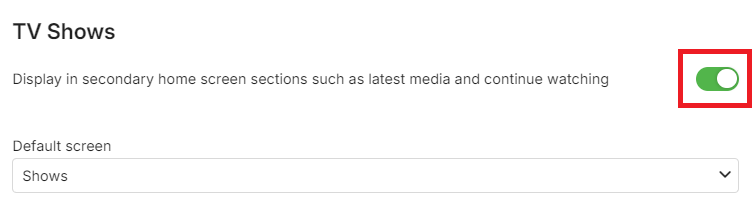
When you scroll further down, is this toggled On for library in question?
 1 point
 -
Would love to see this too. I have advanced smart playlists for both audio and images built on Jriver and would love to be able to play them in Emby. I too am having to play music via my TV's chunky UI to access my JRiver DNLA server.1 point
-
Thanks, will check next time I have a similar problem. For now problem is fixed by removing that integration from my system1 point
-
This is how I’ve been using it since 2020, I just login and connect to whatever server pops up. I don’t know anyone personally who’s given me access to their server. So those servers just don’t work anymore? How do I find new ones?1 point
-
There is an AndroidTV app for those that have AndroidTV and a mainline Android app that people can either sideload or load from official sources. The mainline app is updated regularly as it doesn't need the certifications that the AndroidTV app does, as far as I understand. The apps work perfectly fine, and it all comes down usually to user error, which you've just shown, as you don't understand the difference between the 2. You've included virtually 0 useful information, so no one can help you. Server version, app versions, logs, etc. If you want help, please read the rules before posting your request so that it conforms with what is required. It also sounds like you're setting up a service that is NOT for personal use, which is 100% against the terms of use.1 point
-
Here it is ready for testing. Requirements: hertzg/tesseract-server docker container running (haven't tested with other tesseract servers yet). Remember this is a development build. While it works it might still have unexpected faults and errors making it not work with some setups. Recommend using a test server. All i ask is that you please report any problems or ideas for the plugin. EmbyCredits.dll1 point
-
Currently testing a version together with @Neminemthat might actually be something people want to use. It uses OCR to detect text in end credits and so far shows great promise. It will be able to run automatically when new files have been added to Emby like the Emby intro skip detection and/or with scheduled task.1 point
-
No. I had Emby on my unraid server but deleted everything months ago. I added it back a few days ago and started scanning all my media back in. My collections folder looks like this. I never had this issue before.1 point
-
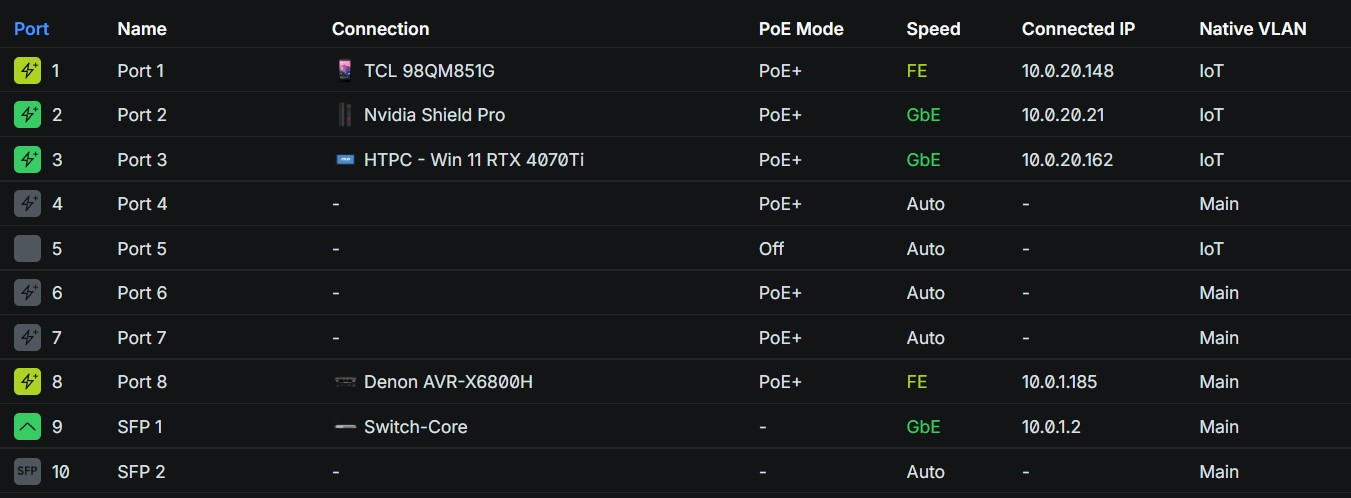
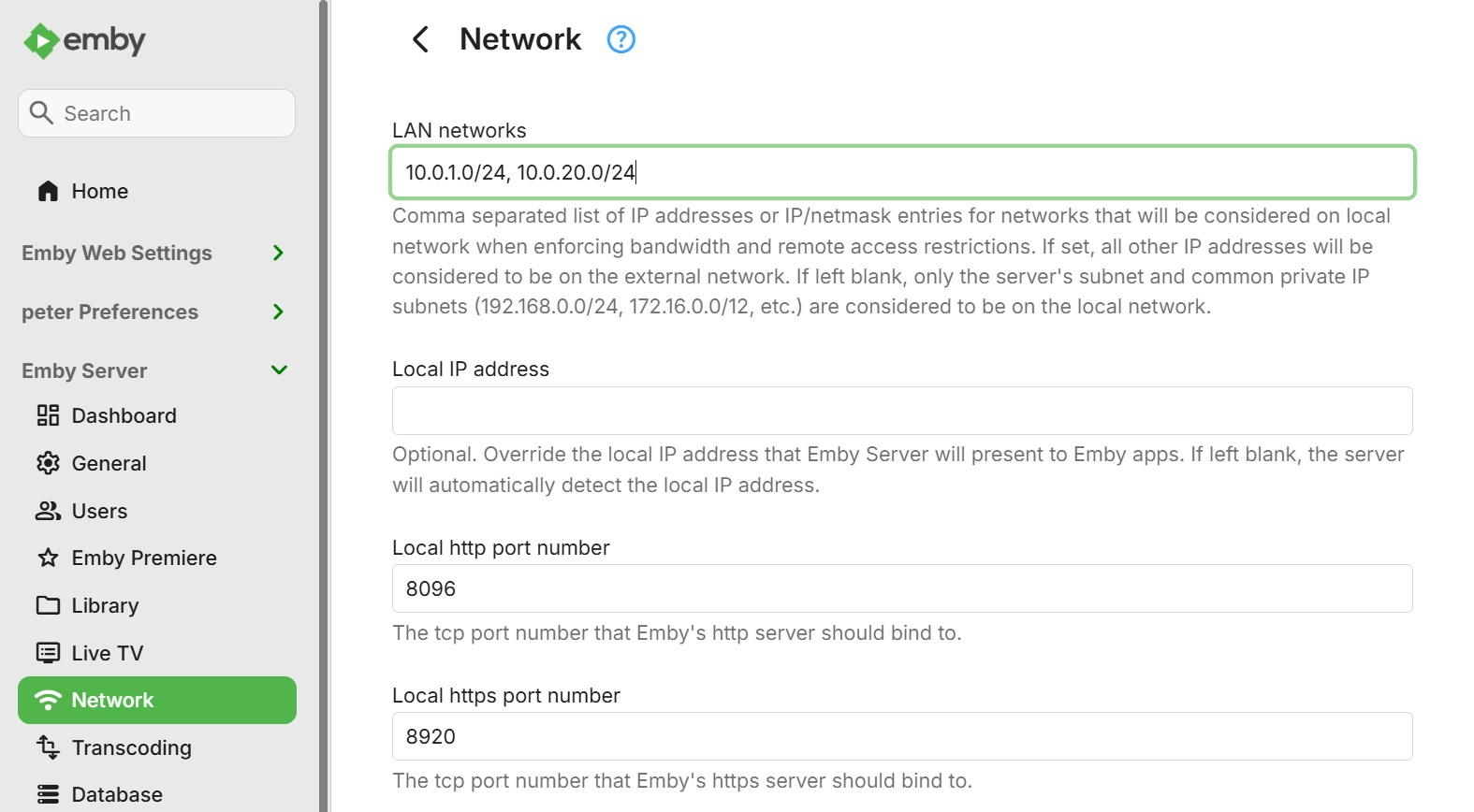
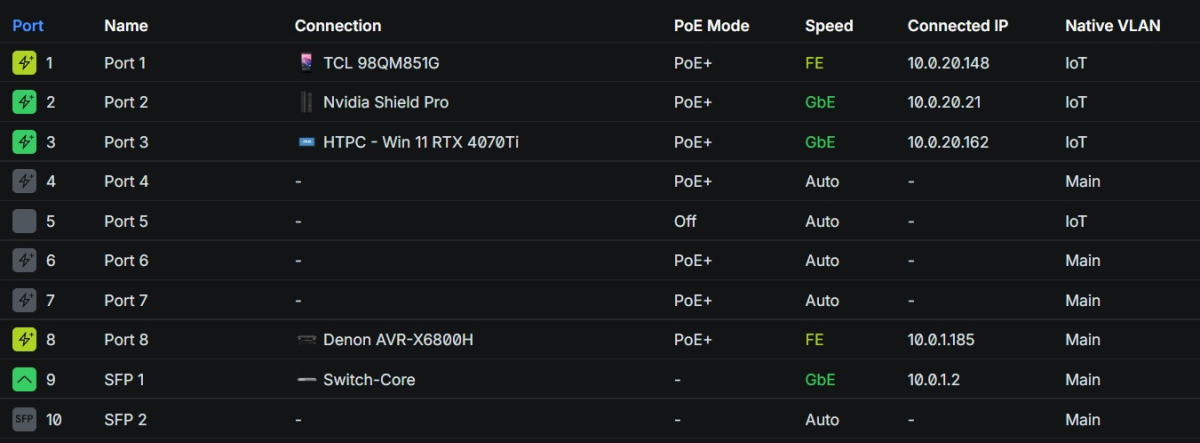
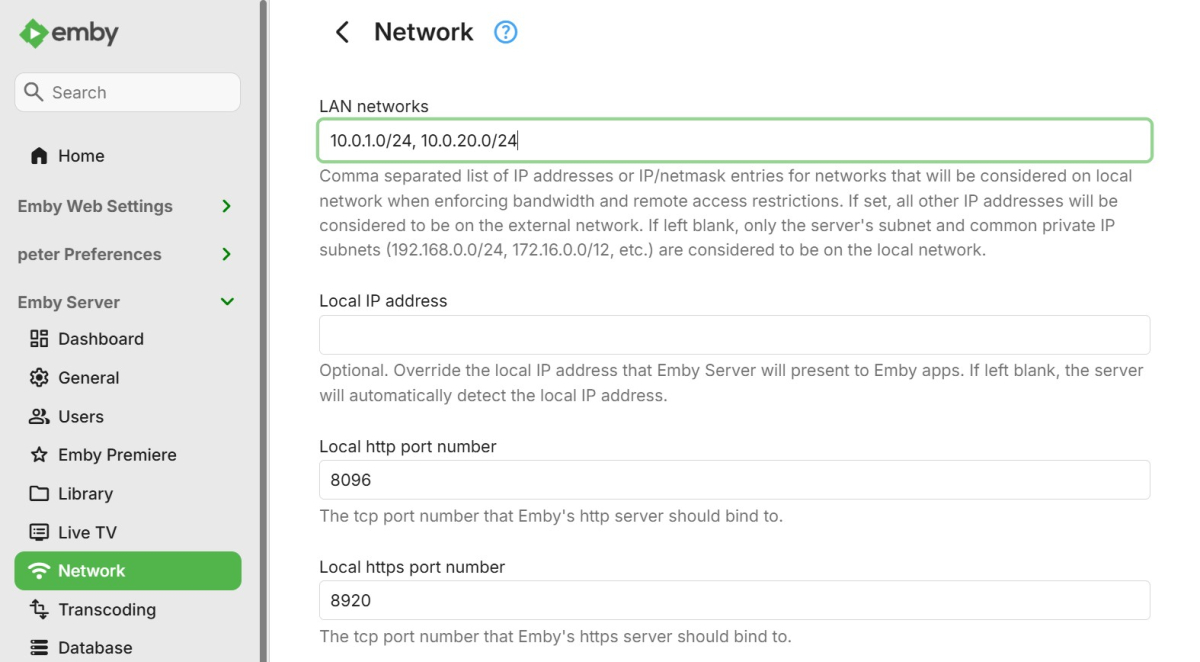
@Neminem Thank you for the detailed response. So my streaming devices in the living room are indeed on a different VLAN than my Emby server: (server is on the Main VLAN) So I tried doing this initially: Restarted Emby server, but still the same issue. I then changed the VLAN that the HTPC is on to Main, and after rebooting the HTPC to pickup a "local" IP Address, everything started working like it should. So just adding my IoT to the list of LAN networks by itself does not seem to be enough to solve the issue it seems? When I get a chance, I'll try populating the "Local IP address" with that of my Emby server to see if that does the trick. Thanks!
 1 point
 -
I for one like having the TV Series library, Movies Library, Movie Series library, etc..., but I would not mind having a way to say under Collections to have the original movie series in one folder, rebooted movies in a separate folder, and both folders in the parent folder. So say Star Trek Series click on it's collection poster and be presented with sub collections for the original series of movies and one for the reboot collection.1 point
-
As far as I know, we now log all requests and responses when debug logging is enabled.1 point
-
You don't think they are low quality compared to fanart ? Technically they will be a higher resolution from TMDB but modern movie to a point will have the same images. Just one place may have images before the other. It should be order of precedence just like all other image types. As there is no on/off per image type. OT: but looks like you may have to add fanart.tv (4K Backgrounds) also as almost all modern backdrop from TMDB already are.1 point
-
Yes. Just making clear that using backdrops isn't really a stopgap - it's a nifty concept (smart out of the box thinking, @cyruspy !), but you can't actually read any liner notes image you load as a backdrop. So the feature request remains as necessary as before.1 point
-
Removing what you had suggested did help, at least for me.1 point
-
Since you're storing the NFO next to the media then you can just rename the NFO to the name of the new file and it will retain all of the information, including the data added. It will still "remove" the item from the DB because it's a new file when a scan runs or RTM picks it up, but it will get added back right away with the info from the NFO from the old file. Actually one more thing, I don't have any 3d content currently but it may write that info to the NFO as well, so you can look for those line(s) in the file and just delete it. Might be a good idea to look at one example first. But that's the concept. EDIT: Also if you store BIFs with the media, you'll probably want to delete those too along with the video file. I do that as part of my scripting if I replace a file.1 point
-
HI, it would be in the episode nfo file. Try going to one of these episodes in the metadata editor and just click save, then check the nfo file for it. That should give you an example to look at.1 point
-
Hi, if you have to do this for your TV then currently there is no avoiding it. But is it available for you in the Samsung app store?1 point
-
@Cr8iveLosr - thanks for the message, no need to be defensive about intentions, of course everybody wants to get "their things" working. After reading I've looked into the subject briefly, mainly because it doesn't make sense to me why an image library would even have such kinds of issues (networking),. That came clear quickly: it's more an "image caching library" than an "image library". The bug appears to be well-known: the library was applying some cleaning on URLs by removing invalid characters (doesn't actually make much sense in the first place: when a URL is invalid, it might become formally valid after removing those chars, but this does in no way mean that it's automatically the right and intended URL). As part of this "cleanup", it also removed square brackets - but these are only invalid in the path part while for v6 IPs it is even mandatory that the address must be enclosed in square brackets. Removing those as part of their cleanup made those URLs invalid - that's the bug (btw. they fixed it three months ago). In a URL with DNS name, there are no square brackets to remove - that's why I suggested that. What you are alluding to, is not right, though. What is never happening is that you would be giving a URL with DNS name to a library (like https://my.com/img.png) and the library would then resolve the DNS name to an IP address in order to replace that in the URL (like https://[::1::2:3:4:5:6]/img.png) and that the bug would hit in then. Such things are done at lower levels where nobody is talking URL. (also, you cannot drop a DNS because that may ne needed for the host-header protocol and most importantly for TLS validation. If the connection to Emby server is made via host name and image loading is still failing, then it can only mean either that the generated image URLs that are given to Glide are still not using the DNS name (but an ipv6 address in the URL instead) (reason would need to be investigated or it's an entirely different bug1 point
-
1. Yes I ran the docker container with the onerahmet/openai-whisper-asr-webservice:latest-gpu flag to pull down the correct container 2. Yes with unraid I used the "--runtime=nvidia" flag within the extra parameters section of the docker container and the nvidia visible devices as well as nvidia capabilities flag as well and a combination of those, and that didn't work either. I did see this topic in the forum, but I had no idea where to make the necessary changes within my setup, so I called it quits. https://github.com/ahmetoner/whisper-asr-webservice/issues/3121 point
-
Hi, there’s no way to do that, although that does seem like a good idea.1 point
-
Speaking for myself, yes. But it's more than just an alternate way of making collections; nested folders allow for nested "collections" (which doesn't currently exist in Emby), which are essential for how I want to organize and present my content. And it's all built automatically, simply by placing the title in the correct folder location, so I don't need to go around adding titles to collections. It also then simplifies the view of the actual "Collection" tab, since rather than having a huge list of Collections that span franchises, studios, etc., I have a comparably simple list of about a dozen or so collections that essentially represent specific holiday-related content that cuts across my entire library. I also consider it a feature that each title lives in one place, so when I'm looking for something to watch, I don't have to pass over the same title showing up in multiple places (like is typical with Genre view). Other users understandably don't prefer this approach, since it requires all users understand the server owner's mental organization model. But my server is only for my immediate family, so this isn't a large concern for us. And as a lot of my content is big science-fiction franchises that span movies and tv, I can keep everything in a single mixed content library and not be fussy about having to make the movies show up as "specials" of the TV shows, or all of the other hoops that is typically necessary to organize these things. I can just have subfolders to separate everything and make it easy to find. Even if nested collections were to be implemented, I'd probably still want to organize things this way just for convenience. For me, the only downside is that the Movies/TV tab is a useless unorganized spew of all of my content. I never use it, and exclusively use Folder View. But ultimately it's less work to maintain Folder View than any other approach, and it's truly the view I prefer to use when doing anything in Emby.1 point
-
Hi @Mahinepua yes we are working on getting the app updated. Thanks1 point
-
Hi, not yet, but it's on our to do list. Thanks.1 point
-
Hi, Emby does not have a feature at this time to pull in content from other dlna servers. It's possible for the future though. It has come up before.1 point
-
No, it is under active design right now.1 point
-
I don't want to promise a "silver bullet" but so much of all of this should be addressed by Smart Playlists - or, actually, what should be Smart Views. I'm sure it will take multiple iterations and it won't all be there at first but let's see how this shakes out once we get that feature started. Thanks.1 point
-
I completely agree with this, if they allowed the content of a collection to show has a row on a home screen, that would be great1 point
-
That's how I understood what you said, which is why I suggested the filter to condense the redundant information. "Composers" isn't shown on ATV, but with the filter approach it could be as well. I'm not sure which one is more commonly used by everyone. In my case, I always just think, "I'd like to listen to Aretha Franklin", so I go to "Album Artists" to select something specific, or just shuffle Aretha... It's not useful to go to "Folders" because it's just a stripped down version of "Album Artists". You can do the same thing, except that it doesn't show any metadata while you browse. I never use it, period. The difference as I see it between "Album Artists" and "Artists" is that "Artists" shows artists that might just appear on a song or album with an "Album Artist". It's a little more detailed, and I see how that might be interesting to browse (and I have), but I barely use it. When I'm looking for Aretha Franklin, she's in either view. And If I go to Aretha in "Album Artists", there's a section showing what she "Appears On" anyhow, which shows other albums/artists she collaborated with... As for "Composers", it is not shown at all. I have a small "Classical Music Collection", but for people who are big into classical music, I can see grouping by composers would be a huge deal, and the filter option would give those people access to something important to them. Without the filter option, I would vote to show "Artists". This would show, for example, Aretha Franklin even if you didn't have an Aretha album but she appeared on a different album you have. I think that is a good balance of detail since it will show you the artists where you might not have an album, but they performed with another artist in your library. It still leaves "Composers" out completely if we're married to the idea of keeping the "Folders" tab, but it's a quick/dirty fix to be able to see/shuffle all your songs. Have a great day...1 point
-
Thanks. I don’t think we ever show composers on ATV. We could drop artists or album artists but I’m not sure which one is most commonly used. I agree, it would be good to keep songs on there1 point
-
In a music library I see "Suggestions", "Albums", "Album Artists", "Artists", "Playlists", "Genres", "Folders". If I don't have any playlists, I see "Suggestions", "Albums", "Album Artists", "Artists", "Genres", "Songs", "Folders". And yes, any ability to customize them would be great. Mine was just a suggestion since it's all very similar data, just additional layers of detail if you look at different categories of artists. Meaning, they are all "artists", but just different types (i.e; groups, composers, people)... Anything to get the key things to be shown in the allowable seven slots would be welcome. Because like this, if you create a single playlist, you lose the ability to shuffle your entire library via the missing "Songs" tab. Thanks for the consideration...1 point
-
Overall the entire Tabs options needed to be revamped to be user configurable as I a lot of users that would disagree with above combining views. But sounds like this is a old issues or a specific client issue as it has been resolved in other clients but still 10 tabs can be extreme but still don't get everything users want by adding more.1 point
-
Thanks, I didn't know that. Knowing that though, it seems that there isn't much logic to what tabs are shown. There are really only a few things we care about in a music library, and one of the most important things would be songs. I would suggest removing the redundant information, and using a filter instead. For example, "Artists", "Album Artists" and "Composers" could simply be one tab... "Artists". Then have a filter option for "Show Album Artists..." and "Show Composers...". We can just decide how much detail we want to see when we look up by artist. What's worse, is the "Folders" tab, which for anything but "Photos" and "Videos" is pretty useless. If you follow Emby's naming guidelines, the "Folders" tab is just going to be "Artist" with "Album" subfolders, which is exactly what you'd get looking at an artist anyway. Emby has four tabs showing the exact same information, three of which are standard on the Apple TV app, which if seven is the limit, seems pretty counterproductive. In my case, I only create playlists on one server, and that is the server which doesn't show "Songs". So essentially, I added a playlist, and the tab that gets bumped is songs. I can find no way to remove the useless "Folders" tab, which would at least solve the issue without implementing the collapsing of redundant information with filters I suggested. Why bump "Songs" in favor of the "Folders" tab in the first place? I think the correct and more elegant solution is the filter encompassing "Artists", "Album Artists" and "Composers", and allowing an option to show/hide the "Folders" tab altogether, as it is generally unwarranted for music libraries, for probably most people...1 point
-
Hi there, is it possible to add a "Open in external player" button next to "PLAY" button? I saw EmbyExternalPlayerLauncher but as i understand is to play with MPC in my computer right? I read the install manual and nothing to add to server so i presume that is only if i need to play some files in my server using web interface but i want to add a button like TiviMate have.1 point
-
Thank you for your support. Just mooved the server do Jellyfin and now everything works well finally! Tnaks!1 point
-
Let's not miss that you can't shuffle all songs because the music section doesn't have a "Songs" tab. You can go to an artist or album and shuffle their content, but not just shuffle all songs in the library...1 point
-
Is it possible to add that the theme is automatically set to the system theme as a theme option instead of selecting a dark/light theme using prefers-color-scheme media query? most likely a duplicate, but i am not the best at using this forum search1 point
-
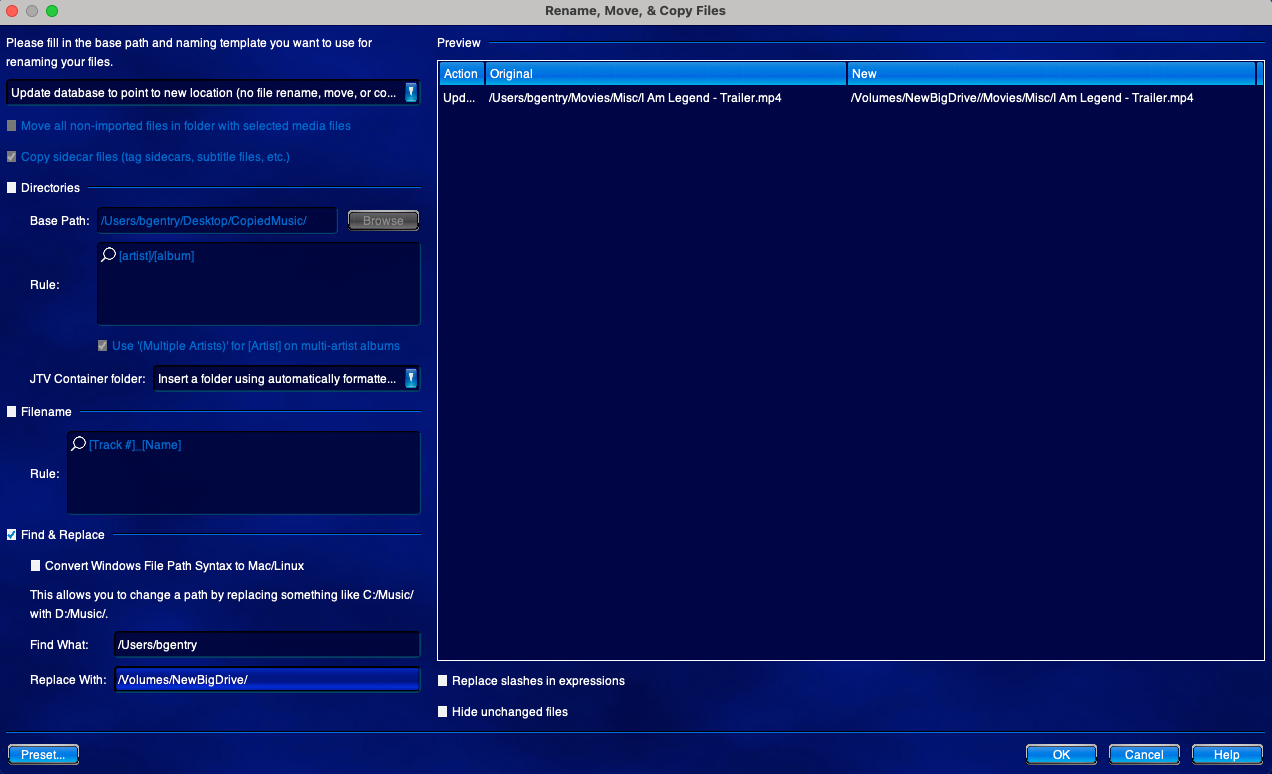
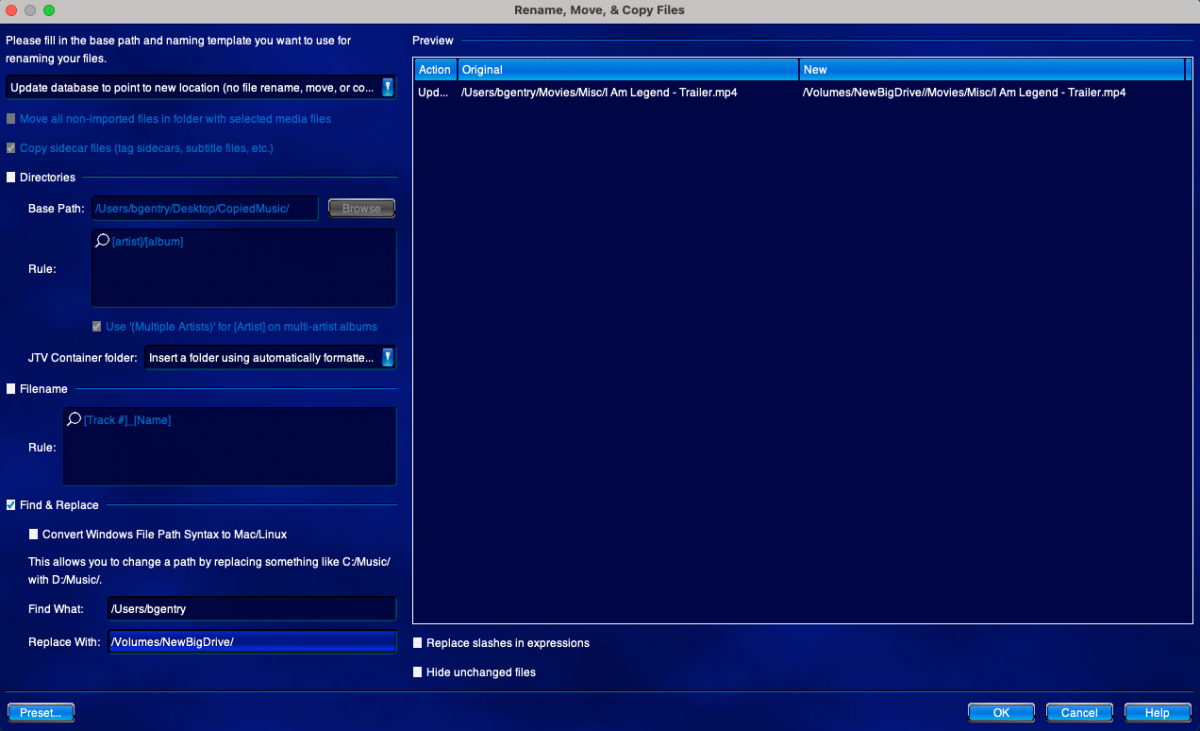
"Good artists copy, great artists steal." You should take a look at the JRiver Rename, Move, and Copy Files tool. It's one of the most powerful features of JRiver MC. It allows you to do Renames, Copies, and Moves of your media. In the screen shot above notice that I am in "update database" mode. This just changes the internal database record for the location of the file. Also note that I am using "Find and Replace" to change part of the path from my User directory to an external drive (/Volumes/NewBigDrive). This works when you have already copied your media to a new place and you just want to tell the program to look for the media in that new location. You can easily use this to change drive letters, leading paths, etc. I have used this capability to move libraries between machines with different drive layouts. I've done this many times and it always works quite well. Of course this is made possible because JRiver MC can make a Database Backup as a ZIP file. I just move the ZIP file to the new computer and do a database restore from that ZIP file. This is a program function; I do not manually unzip or anything. The program does the work. Once I have the database restored to the new machine with different drives, the paths are wrong. So I use the tool pictured above to change the paths to the files. That's all there is to it: My entire collection is migrated. The database backup also contains all user settings and they can be (optionally) restored along with the media data. Emby should have similar features eventually. To really manage the life cycle of a media collection, one has to consider that hardware will change. Servers will be replaced. Drives will be filled and new drives will be added or substituted. Robust tools for doing operations like I have outlined here are essential for a mature media server that you will keep for a decade or more. I hope the Emby team will consider STEALING some of these great ideas and using them. Brian.
 1 point
 -
Ah, ok. I understand that the web app is meant to be its own app. How about this suggestion (last one I promise ): User connects to http://app.emby.media and if local connection works, the user stays at the http version and everything works fine. If local connection fails, the user is redirected to https://app.emby.media which connects to the external https address to access the server with https all around. That would solve all the issues I brought up above. You would have security/privacy when connecting remotely and you wouldn't get the mixed content errors when connecting locally1 point
-
I actually thought we got BaconFeet shut down years ago...0 points
-
Thanks for the help, but I unfortunately my issue, is whisper asr does not like 50 series GPUs. Not without modifications, and I'm not sure how to do it. Via the link previously provided in my last post. Thanks anyway0 points