Leaderboard




Popular Content
Showing content with the highest reputation on 11/30/25 in all areas
-
Yeah it seems my tv region was on some generic region, I skipped first setup and logged in afterwards. I reseted smart hub and and did first setup again and now I see local apps aswell. Now to snatch that cyberweekend deal4 points
-
Hi, just a heads up that the changes for this are not in 4.9.2.7 as a little more time is needed for this .Thanks.3 points
-
As of EMBY server update to version 4.9 the folder view has change to a "windows explorer" like structure in which single item movies are not display as movies anymore but as folders. This is being discuss here: So the official request is to go back, or at least implement a legacy view, so we can have the folder view we've been having since the beguining of time. Thanks2 points
-
Is this you server installed no you own hardware ? And did you install this plugin ? As it will display something like that.2 points
-
Sorry for the late reply. This hasn't happened again - so lets close this ticket for now. I will keep an eye out for this and reach out with a new forum topic if it happens again.2 points
-
Could we bring back that summary at the end of a episode with details on next episode instead of just" keep watching and next episode" Could display summary, rating, and cast maybe all custom infos Could be even full screen with backdrop and we reduce the current playback in a small square like somes tv compagnies does2 points
-
Hi, no it’s not.2 points
-
It's frustrating, I just spent days with MP3Gain doing over 150k tracks to find the emby ignores it, other players are fine. 8 years later, cmon?????????2 points
-
We're currently in the very last round of testing in the private beta and public beta is very very close now!2 points
-
I can understand the frustration, but you'll have to tone it down. Be civil, use appropriate language and restrain from attacks on the Devs team. Consider this a friendly warning. Forum Rules2 points
-
For some reason, HEVC streams ALWAYS seem to transcode to H264 with Emby when forcing native AVKit player. This is a waste of resources and isn't necessary. When I disable server transcoding, it attempts direct play but no video is displayed . Looking at the logs, I see ffmpeg missing "vtag:hvc1" which is an absolute requirement to get AVKit to recognise & play HEVC streams natively. Manually remuxing the exact same files with ffmpeg allows it to play perfectly fine in Emby (even Dolby Atmos and Vision logos show on TV with this setup). It's a rather trivial fix that I hope the devs here include soon as it will allow Emby be become much more performant and efficient and will improve handling of Dolby files on Apple devices.1 point
-
Hello some user started a series recording. now I’m getting more and more records of that sports show. I’m pretty sure that this was an accident, so I’d like to ask the user whether he really really needs these recordings. But how can I see who is responsible?1 point
-
Could the way User Settings are handled be changed so that: 1 - Every setting that is changed via the Admin/Server - Users settings page becomes the new default for that particular user (instead of the Emby supplied default). 2 - Any setting that is changed appropriate for an end user to change from within that particular user account being signed in is saved at the local device level, and would be used instead of Server specified defaults. This wouild: A - Allow us to adjust the default behavior when NO local settings exist. B - Still have local device specific settings override what have been set as Server defaults. (Allowing the same User to have different settings per Device - as it is now.) It doesn't seem like the logic would be that much different than it is now. Assuming if no local settings already exist today, the Server has to pass along what it has them as for a starting point. The change wouild just be allowing us to alter what any of those base default settings are.1 point
-
Try unticking/ticking back all meta-downloaders and image fetchers, refresh an item afterwards and post server log.1 point
-
... and it does!! That is fantastic news. Thank you! Quick question before wrapping this thread: Are you planning to retrofit this fix into the Emby for Android TV app as well? I just tried the beta version (marked Nov 29) and it is not fixed in there. Not a biggie - just asking for completeness.1 point
-
If you installed it in your server then you should know. Did you install Quick Start the server on your own hardware / pc ? Your TV app is only a client, that connects to a your server. Connecting to others servers, you should have a talk to that person.1 point
-
Yep as a server log would show this.1 point
-
@Luke Any update ?1 point
-
With mp4: Dolby Atmos and Vision both work perfectly already with the native player in Emby if the file is mp4 TV brings up DV & DA logos. With mkv: Dolby Atmos works when the server does a remux + direct play Dolby Vision doesn't work (natively) as Emby doesn't currently support HEVC with the native player and transcodes to H264 instead.. I've setup another thread with a suggested fix to get HEVC (and thus Dolby Vision) working with the native player: I'm trying to build support for this fix as it will dramatically improve Emby's HDR support on Apple TV1 point
-
In case it has gotten lost in the voluminous posts made in this subject, I wanted to emphasize that you can possibly preserve all of your data and even temporarily restore your original content configuration if you preserve your 4.8 backup (and then disable the scanning task that whacks the metadata by inserting the new folder layers). Important to get it done fast before you lose it in the backup rotation. Cross-linking to the post with more information.1 point
-
And also follow the testing area in the community.1 point
-
1 point
-
Hi @Lukeis the "People query fixes" in 4.9.2.7-beta related to this issue? If so I'll update and test.1 point
-
Just chiming in to say I ran into this issue this evening. I fired up my old HDHomeRun and got it setup in Emby so my mom could watch the Iron Bowl. On both her Roku (remote) and mine (local), there was the same buffering issue described here. Once we switched to 720/10 everything played smoothly.1 point
-
@Luke Device: Apple TV 4K 3rd gen + tvOS 26.1 Emby player: 2.0.2 (5) Settings: Preferred Video Player = Native File: movie.mkv (video = HEVC & audio = AC3) Server: 4.9.1.90 OS: macOS 12.7.6 Problem: playing mkv results in unnecessary transcode to H264 Attempt to fix: disable video transcode on server -> result: audio only, no video playback Log: see attachment Log analysis: ffmpeg is not tagging the output stream as hvc1 & is outputting ts instead of fMP4 Suggested fix: add -tag:v hvc1 & -hls_segment_type fmp4 to the ffmpeg remux commands (and update device profiles to accommodate the compatibility change) (Experiment Control: same movie.mkv file manually remuxed using ffmpeg -tag:v hvc1 -> HEVC plays correctly -- Same Emby Server & Player) Benefits: ability to use the native player with HEVC media files including Dolby Vision. Improved performance and power efficiency. TV correctly switches to HDR mode. Thanks for your time & attention. Hope this gets added soon as it will massively improve HDR playback on Emby on Apple TV. ffmpeg-directstream-60ae0bbc-dcdf-4f6b-8960-a6a6b531d386_1.txt1 point
-
I also have a 5000+ movie collection - all in folder structure - some by genre - some by decades. I usually sort movies by date added - which for folders which are numbered - I change the 'date added' for the folder via metadata - so that folders will sort by that date (01 - Genre A - date added 17/07/2023, 02 - Genre B - date added 16/07/2023). For Film Noir - I have hundreds of movies - sorted by Date Added - and then use the green tick (watched) - to know which one to next pick. That no longer works. 4.9.1.80 ruined that. The first nightly run of the server after I upgraded to 4.9.1.80 - 8 November 2025 - changed the DATE ADDED to that date. Bottom line - for 5 years I have meticulously curated my movie collection into folders - as instructed - with the .nfo files and artwork. The server upgrade prompt for 4.9.1.80 made no mention or warning that I was about to destroy that 5 years structure. EMBY - I trusted you. I supported you $$. Those of us that use folder structures - deserve better than being ambushed by 4.9.1 point
-
I prefer the pre 4.9 view. I love Emby and was very disappointed to find all the work I did now puts a little folder in the top corner of all my movies. At the very least, can we get an option to remove that icon. It looks very messy now on every movie.1 point
-
Yes thanks. I marked it as the solution.1 point
-
Thank you.1 point
-
edit: also needs -hls_segment_type fmp4 if Emby is not already using fMP4 It's all such a simple change that will yield massive improvements to performance & media compatibility on Apple devices. Here's hoping the dev team sees this and chimes in.1 point
-
TvNextTragicComedy1 point
-
I built a duplicate server but was already using drivepool with a single drive letter. The backup and restore plugin will look for the old file paths, if you keep these identical it should work fine. If your using trying to use drivepool after the fact with a single virtual drive it may try and scan your libraries from scratch. Someone else may be able to comment.1 point
-
Just wanted to say thanks for fixing it!1 point
-
Thanks for the update, bulky did ok, it seemed to missed an ep hear and there, I was thinking about timelord, but I want some control over it, if I could have told it which shows I might have tried it.1 point
-
Awesome that worked! Thank You1 point
-
Thanks for posting this. I am migrating all my home services from a mix of some M$ AD centralized account management with local accounts sprinkled in over to Authentik for centralized SSO and MFA enforcement and had a hell of a time troubleshooting the LDAP integration with Emby server. I recently migrated Emby to Docker and have been runing Emby server behind a reverse proxy (recently moved to Nginx Proxy Manager from Nginx. I am starting to play with Traefik for TLS handoff to some of my other internal services and am looking to move that way eventually). The Authentik instructions for Emby Server integration specifically are not great. Following the Authentik guide for creating the LDAP service (https://docs.goauthentik.io/add-secure-apps/providers/ldap/generic_setup/) was better as it goes over the flow configuration though the screenshots are more than a bit dated. This post helped me diagnose some of the weird behavior that was going on. restart the emby server whenever you make changes to the LDAP plugin. also one thing a friend of mine said he had to do was reset the password to something different after building his LDAP app, provider, outpost, and flows on authentik. I know it was weird but this literally made things work for me after confirming LDAP was accessible to the Docker host and within a separate ubuntu docker container. One thing I was sad about was that I was not able to get MFA integrated into the LDAP authentication process between Emby server and Authentik. It would be nice to get a more modern alternative SSO method like Oauth or something that does allow MFA built out for Emby server.1 point
-
Actually got it running with the original settings menu. Basically a lot of stuff was no longer compatible and outdated. Did the same as before, troubleshooted and told an AI my findings as i couldn't be bothered looking through most of the code. Troubleshooted and corrected the code it gave me. Rinse and repeat what felt like a thousand times. Anyway... Here it is. SmartPlaylist.dll Emby.SmartPlaylist.Plugin-master.rar1 point
-
I switched back to beta and there is no issue and also for no reason my library has a lot more content so I think the latest stable edition has a number of issues that needs looked at. All my movies and tv content is back to normal with beta and the lip sync issue is no longer an issue.1 point
-
I assume you mean this: Well guess what Luke, that is not a solution. Because it is a MASK to the problem. Sure it lets you click THROUGH the USELESS extra layer you added but that is useless because then you can't edit images. All you can do is see the ones there, you can't search anymore because there is still the INVISIBLE and USELESS folder layer there for NO REASON. I am trying to organize my collection but I can't anymore. In order to do so I either need 50 [redacted] libraries or constantly click through an artificial layer that SERVES NO USE [redacted]. Why should we have work arounds to stuff that used to work beautifully that you BROKE for no reason, not a single one. Name me one reason this extra folder [redacted] is of any value or purpose? You can't because it has none. Emby is now [redacted]. It is unusable because you added a feature no on asked for and no one needs because it does nothing but take away and here we are more than six weeks after you dumped this [redacted] on us and you are still acting like you don't have any clue what we are complaining about. [redacted] Luke, you need to realize that just because most of your users probably don't even have 1000 movies I have 15K, physically on disc with another 100 TV series from disc. I cannot throw everything in one giant folder. It isn't possible. I can no longer use or enjoy emby because it is broken. Thanks Luke, you really came through on this one.
 1 point
 -
@LukeWe are coming up to the anniversary of this comment so just was checking to see what the status of a newer version of FFMPEG. I think most people have "Soon™/near future" fatigue. Other topics with comments of updating:1 point
-
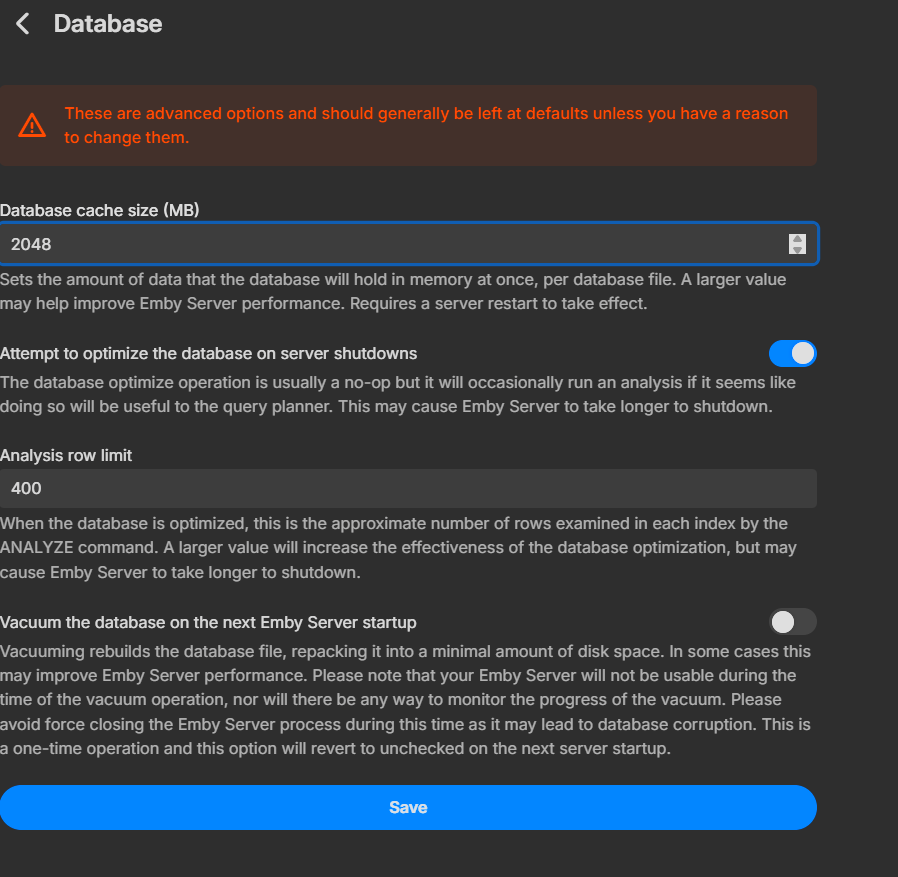
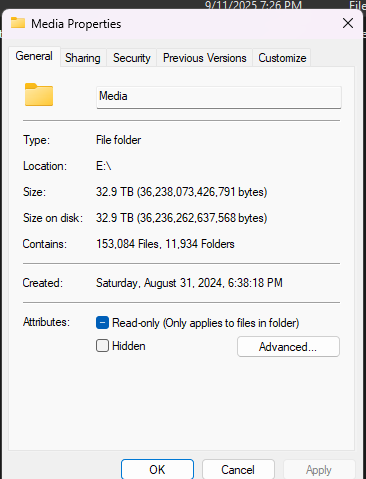
yeah when i do i dont really see any cpu usage at all. also searches are all super fast.
 1 point
 -
Super fast searches with the 4.9.1.90 docker server. Great job team1 point
-
It's strange thas there are devices which claim DD support but have issues with 640kbps. AFAIK most streaming services use either DD+ or DD at 640kbps, so if those devices are outputting surround sound from Nretflix etc, itwould seem like they shouldn't have problem with its playback from emby. Or at very least 448kbps should be universally compatible since this is what most DVD's had. 640kbps mostly started to appear with Blu-Ray, but I might be wrong1 point
-
The Emby for Android TV app looks, runs, and plays better and it should be updated. Even the movie thumbnails look better on Android TV app.. Why? I have no idea but they do.1 point
-
Hi, yes we plan to support more book metadata formats in future updates. Thanks for the feedback.1 point
-
Bonjour à toute l’équipe Emby Je suis un utilisateur régulier d’Emby et j’apprécie énormément sa capacité à gérer les bibliothèques multimédia. J’utilise Emby pour organiser mes livres numériques (EPUB, PDF, etc.) et je souhaiterais pouvoir enrichir leur affichage avec des métadonnées personnalisées. Actuellement, Emby ne semble pas lire les fichiers pour les livres, contrairement aux films et séries. Cela limite la personnalisation des titres, auteurs, résumés, genres, etc., surtout lorsqu’on gère une grande collection. Je propose donc l’ajout d’un support officiel des fichiers pour les bibliothèques de type "Livres", avec une structure XML simple comme : <book> <title>Le Petit Prince</title> <author>Antoine de Saint-Exupéry</author> <year>1943</year> <plot>Un conte poétique et philosophique sur l'amitié, l'amour et la perte.</plot> <genre>Fiction</genre> <rating>9.0</rating> </book> Cela permettrait : • Une meilleure organisation des livres • Une compatibilité avec des outils comme Calibre • Une gestion hors ligne des métadonnées • Une cohérence avec les autres types de médias Merci d’avance pour votre attention et votre travail formidable. J’espère que cette suggestion pourra être prise en compte dans une future mise à jour !1 point
-
Reading though these posts is like going back 5 years in time, where all of the questions have already been asked As most people here know, I am an ardent ATV app user, but even I have to admit that the Universal Android app has come a long way in those 5 years, but it still isn't as good as the ATV app! The ATV app is buttery smooth, as it has been built for a specific platform, whereas the Universal Android app has been shoe-horned into the same space. There are currenrtly 95+ pages discussing the differences between the app in the link above, with many items still outstanding. I can't see how 2 apps developed for the same device/platform are so different in the way they act, seeing as they were developed by the same team of developers. Anyway, until there is no other choice, I will continue to use the ATV app, and try and report all of the issues with the Universal Android app, when I see substantive changes.1 point
-
Hi, please try removing these plugins: 2025-10-26 09:09:41.268 Info App: Loading playback_reporting, Version=2.1.0.7, Culture=neutral, PublicKeyToken=null from /config/plugins/playback_reporting.dll 2025-10-26 09:09:41.268 Info App: Loading statistics, Version=3.4.2.0, Culture=neutral, PublicKeyToken=null from /config/plugins/Statistics.dll Then restart the server and see if it happens again. Thanks.1 point
-
100% Sometimes it's an adventure just to help some family get logged in when I'm not physically there. Let alone the needful tweaking of some of the UI elements and transcode settings to ensure a consistent experience. At least being able to do things like disabling direct play of live tv at a server level... is a sorely needed option.1 point
-
Rename or delete the existing system folder and replace it with new folder.1 point