Leaderboard




Popular Content
Showing content with the highest reputation on 11/25/25 in all areas
-
As of EMBY server update to version 4.9 the folder view has change to a "windows explorer" like structure in which single item movies are not display as movies anymore but as folders. This is being discuss here: So the official request is to go back, or at least implement a legacy view, so we can have the folder view we've been having since the beguining of time. Thanks2 points
-
We're currently in the very last round of testing in the private beta and public beta is very very close now!2 points
-
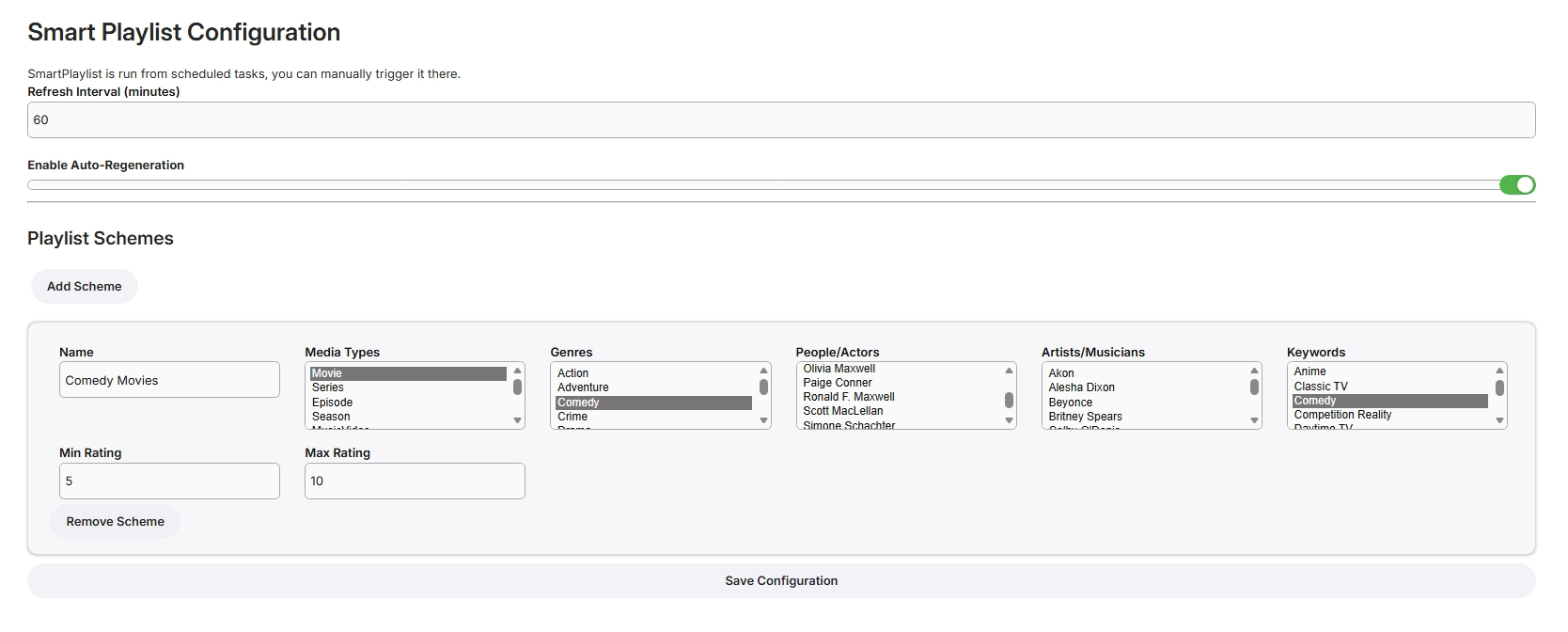
@LongManasked me to look at this plugin. I identified some problems with the settings but couldn't be arsed looking through the whole code to find out how it worked so i explained to an AI what i found. After a lot of tries and some more troubleshooting for what it gave me i might have something working. It did require a whole new settings page and javascript for it so the settings will be a lot different. I havn't tested it much my self but what i have tested works. If nothing else it should be a good starting point for someone else to finish. SmartPlaylist.dll SmartPlugin.rar2 points
-
Why is smartview more important then tvnext?2 points
-
Sa2000, that did it! The "Learn More" linked to a page on Google Play protect. I paused the scan service and it installed. I'd assumed Play Protect wouldn't be a problem since the promt said "Install Anyway". I'll play with the server later, hopefully no more hiccups2 points
-
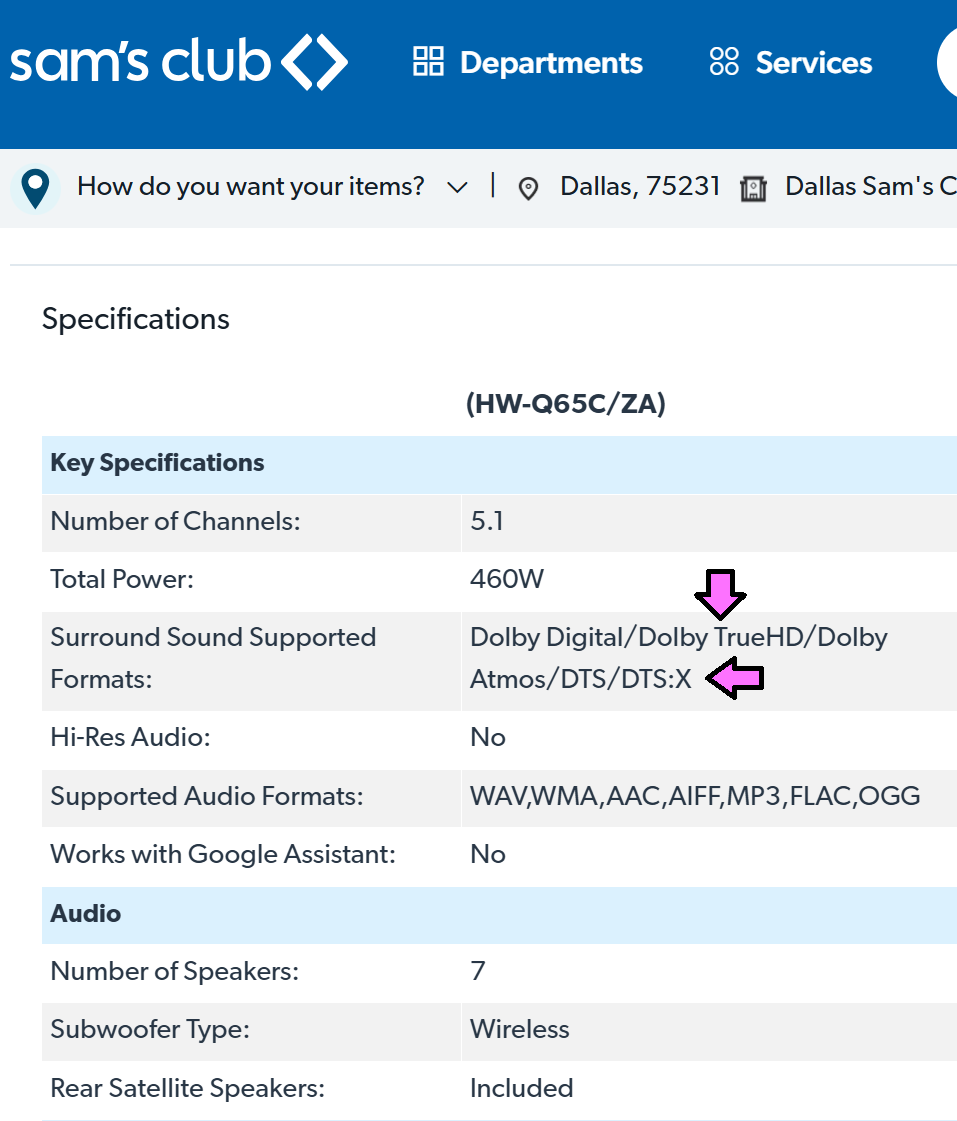
I guess i'm gonna end up buying it.And you know what, as long as it works and plays all the formats.Great if not I'll return it2 points
-
@LukeThe new way that you've developed for playing library items from VirtualTV as a live tv source is really great, but it's missing some features: The playback should auto advance to the next program in every available Emby app. There should be a way to start the current program from its live position instead of from the beginning. Ideally, the decision whether the program playback starts from the live position or from the beginning should not be a "static" channel setting in the plugin. Instead also the program itself should behave like a normal library item. That means that the program info dialog that we get from the EPG before playback and also the context menu should display a "Resume" and "Play From Beginning" button. Where "Resume" would start the program/library item from the live position and "Play From Beginning" from the start of course.1 point
-
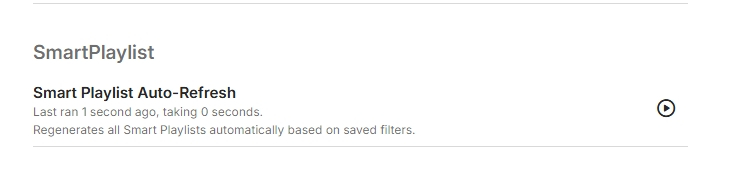
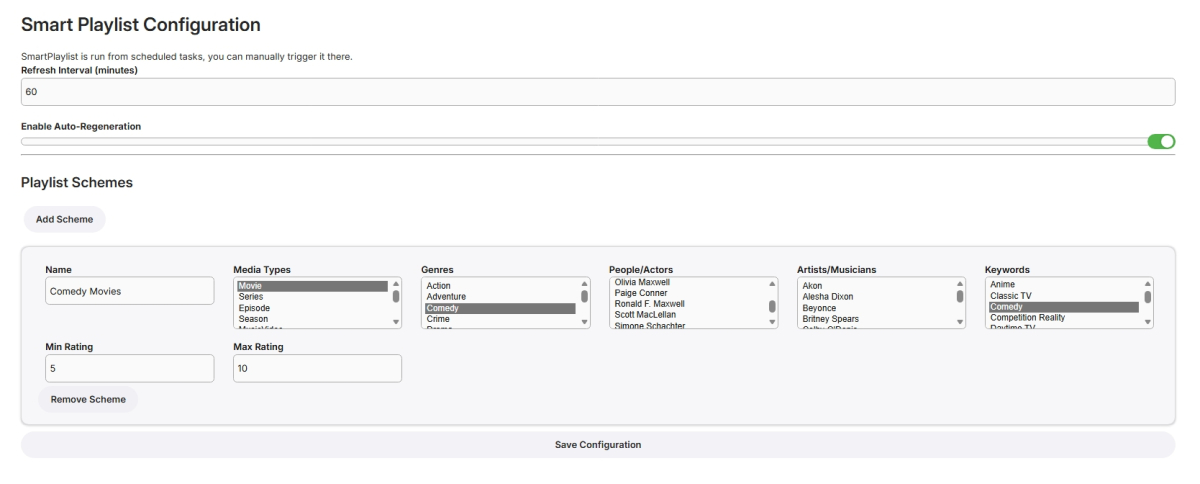
I have never used smart playlists so wasn't exactly sure what to build but here goes... Create Lists Here, add new schemes for more lists From scheduled Tasks Playlists are generated in the playlist library, only minimally tested! SmartPlaylistPlugin.dll
 1 point
 -
Actually got it running with the original settings menu. Basically a lot of stuff was no longer compatible and outdated. Did the same as before, troubleshooted and told an AI my findings as i couldn't be bothered looking through most of the code. Troubleshooted and corrected the code it gave me. Rinse and repeat what felt like a thousand times. Anyway... Here it is. SmartPlaylist.dll Emby.SmartPlaylist.Plugin-master.rar1 point
-
Would love to see an Emby merch store return.1 point
-
No, not yet. I plan to do some maintenance at the holidays.1 point
-
Thanks guys. Huge help. I had the Metadata providers setup for the movies, but not for the collections themselves. Appreciate it.1 point
-
Hm, on second thought, don't think it was ever present at the top-level.1 point
-
https://www.xda-developers.com/never-going-back-to-synology/ In short, Synology is great if you want a turnkey solution and don't care about the price and walled garden solutions.1 point
-
Only playback mode "Native" or "Continous" will result in a real live tv like channel behaviour.1 point
-
I patched my proxy so that I could put a file extension on the URL that is in the .strm file as a workaround and it resolves the type detection issue. This isn't a workable solution though since IPTV providers tend to use APIs to serve up content and restrict access to media. Functionally it seems like ffprobe is able to detect the media attributes properly: ./emby-ffprobe -v trace -show_format -show_streams http://172.31.0.102:8080/u/base64url 2>&1 | grep -i 'score' Probing mov,mp4,m4a,3gp,3g2,mj2 score:100 size:2048 [mov,mp4,m4a,3gp,3g2,mj2 @ 0x103b77c0] Format mov,mp4,m4a,3gp,3g2,mj2 probed with size=2048 and score=100 probe_score=100 And so is ffmpeg: ./emby-ffmpeg -v trace -i http://172.31.0.102:8080/u/base64url -f null 2>&1 | grep -i 'score\|Format ' libavformat 59. 27.100 / 59. 27.100 Probing mov,mp4,m4a,3gp,3g2,mj2 score:100 size:2048 [mov,mp4,m4a,3gp,3g2,mj2 @ 0x150a1100] Format mov,mp4,m4a,3gp,3g2,mj2 probed with size=2048 and score=100 [h264 @ 0x150a5800] Format yuv420p chosen by get_format(). There must be some logic at play internally (which composes the ffmpeg transcoding command) that isn't trusting the media detection output and deciding to fall back to some other default value when the file extension is not present.1 point
-
Just a quick update. After the library completed scraping, everything is back to in order. The only issues I had remaining where 1 movie that was misidentified (due to wrong year in the folder name). And some custom collections. I dont have enough instances to say for sure, but it seemed like movies that belonged to more than one collection now only belong to one. no big deal.1 point
-
it suddenly works well tonight...dunno y and dunno how... embyserver.txt1 point
-
@LukeI've contacted @SamESvia PM and shared my files with them and this case will probably be tested in a couple of days according to them.1 point
-
There is folder level access permissions option so library can be structured in such a way where permissions would be at folder level See Folder Based Access Control support article1 point
-
Not that I know of. The latest betas and stable releases (Not Docker, Snap, or Flatpak) can be found here: https://github.com/MediaBrowser/Emby.Releases/releases. Check often.1 point
-
From that page: If they're lying, send it back!
 1 point
 -
OK.. I think that might have been the issue.. I had rpc.lockd running but not rpc.statd. Now that both are running, movies start right away without delay and I now see the following in /var/log/messages when I mount it Nov 24 17:18:26 virtual kernel: lockd: server 192.168.1.9 not responding, still trying Nov 24 17:18:26 virtual kernel: lockd: server 192.168.1.9 not responding, still trying Nov 24 17:18:26 virtual kernel: lockd: server 192.168.1.9 not responding, still trying Nov 24 17:18:26 virtual kernel: lockd: server 192.168.1.9 not responding, still trying Nov 24 17:18:26 virtual kernel: lockd: server 192.168.1.9 not responding, still trying Nov 24 17:18:26 virtual kernel: lockd: server 192.168.1.9 not responding, still trying Nov 24 17:18:26 virtual kernel: lockd: server 192.168.1.9 not responding, still trying Nov 24 17:18:26 virtual kernel: lockd: server 192.168.1.9 not responding, still trying Nov 24 17:18:26 virtual kernel: lockd: server 192.168.1.9 not responding, still trying Nov 24 17:18:26 virtual kernel: lockd: server 192.168.1.9 not responding, still trying Nov 24 17:18:26 virtual kernel: lockd: server 192.168.1.9 OK Nov 24 17:18:26 virtual kernel: lockd: server 192.168.1.9 OK Nov 24 17:18:26 virtual kernel: lockd: server 192.168.1.9 OK Nov 24 17:18:26 virtual kernel: lockd: server 192.168.1.9 OK Nov 24 17:18:26 virtual kernel: lockd: server 192.168.1.9 OK Nov 24 17:18:26 virtual kernel: lockd: server 192.168.1.9 OK Nov 24 17:18:26 virtual kernel: lockd: server 192.168.1.9 OK Nov 24 17:18:26 virtual kernel: lockd: server 192.168.1.9 OK Nov 24 17:18:26 virtual kernel: lockd: server 192.168.1.9 OK Nov 24 17:18:26 virtual kernel: lockd: server 192.168.1.9 OK Nov 24 17:18:49 virtual nfsrahead[1227644]: setting /mnt/alexandria readahead to 128 Nov 24 17:18:51 virtual kernel: lockd: unexpected unlock status: 9 Nov 24 17:18:52 virtual kernel: lockd: unexpected unlock status: 9 Nov 24 17:18:52 virtual kernel: lockd: unexpected unlock status: 9 Nov 24 17:18:52 virtual kernel: lockd: unexpected unlock status: 9 Nov 24 17:18:52 virtual kernel: lockd: unexpected unlock status: 9 Nov 24 17:18:52 virtual kernel: lockd: unexpected unlock status: 9 Nov 24 17:18:52 virtual kernel: lockd: unexpected unlock status: 9 Nov 24 17:18:52 virtual kernel: lockd: unexpected unlock status: 9 Nov 24 17:18:52 virtual kernel: lockd: unexpected unlock status: 9 Nov 24 17:18:52 virtual kernel: lockd: unexpected unlock status: 9 I also see the following on the FreeBSD server: Nov 24 17:19:43 Alexandria rpc.statd[986]: Invalid hostname to sm_mon: virtual Nov 24 17:19:43 Alexandria kernel: Local NSM refuses to monitor virtual There are no more threads in D state in htop also. No more hangups so far.. I've stopped and started multiple different videos now.. Each one starts right away. No hang ups. I think this is good. I appreciate your help and guidance.1 point
-
Thanks that's really helpful. I agree it hasn't always been like this and the fact that you see the stall in other apps suggests something in the OS has changed. It's really hard to pin down why the scrolling eventually stops. I think it's a timing issue, but also possibly not one that we can easily avoid/work-around. Let's see what the next OS release does for this1 point
-
You mean state = D for these? Looks like the same thing hanging so at least it's consistent. Try remounting the share(s) with the nolock option. 192.168.1.9:/media /mnt/alexandria nfs ro,nolock,_netdev 0 0 Edit to add: If the above makes a difference then you might want to look into why NLM is not responding on your FreeBSD server. You might need to configure and start additional services. The NFSv3 server and client need rpcbind, rpc.lockd and rpc.statd running. NFSv4 doesn't need these.1 point
-
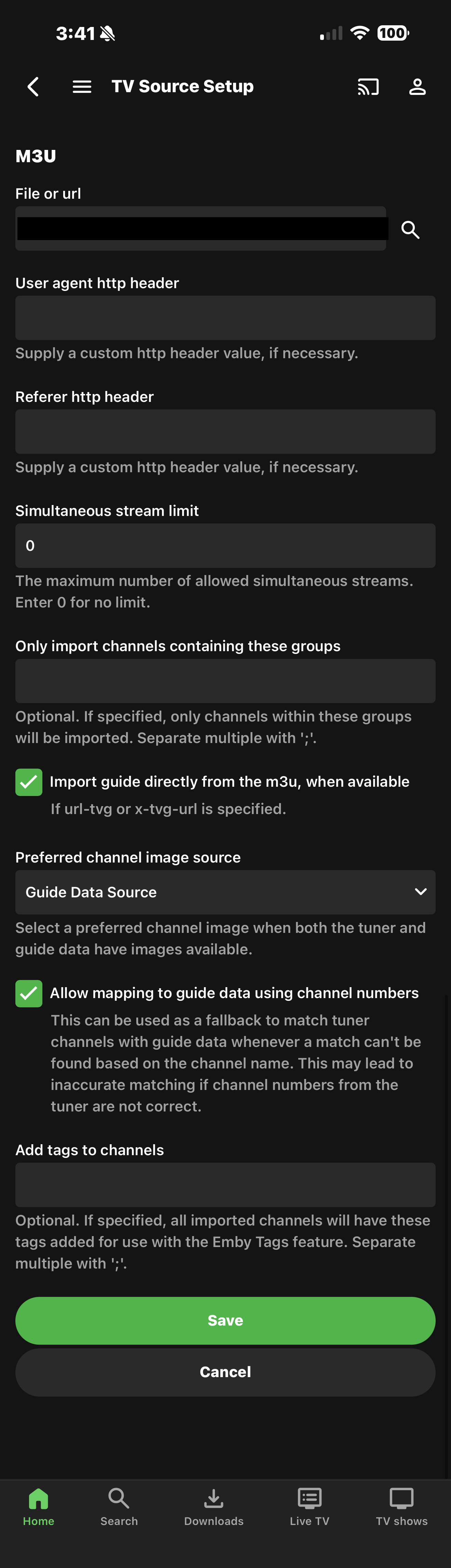
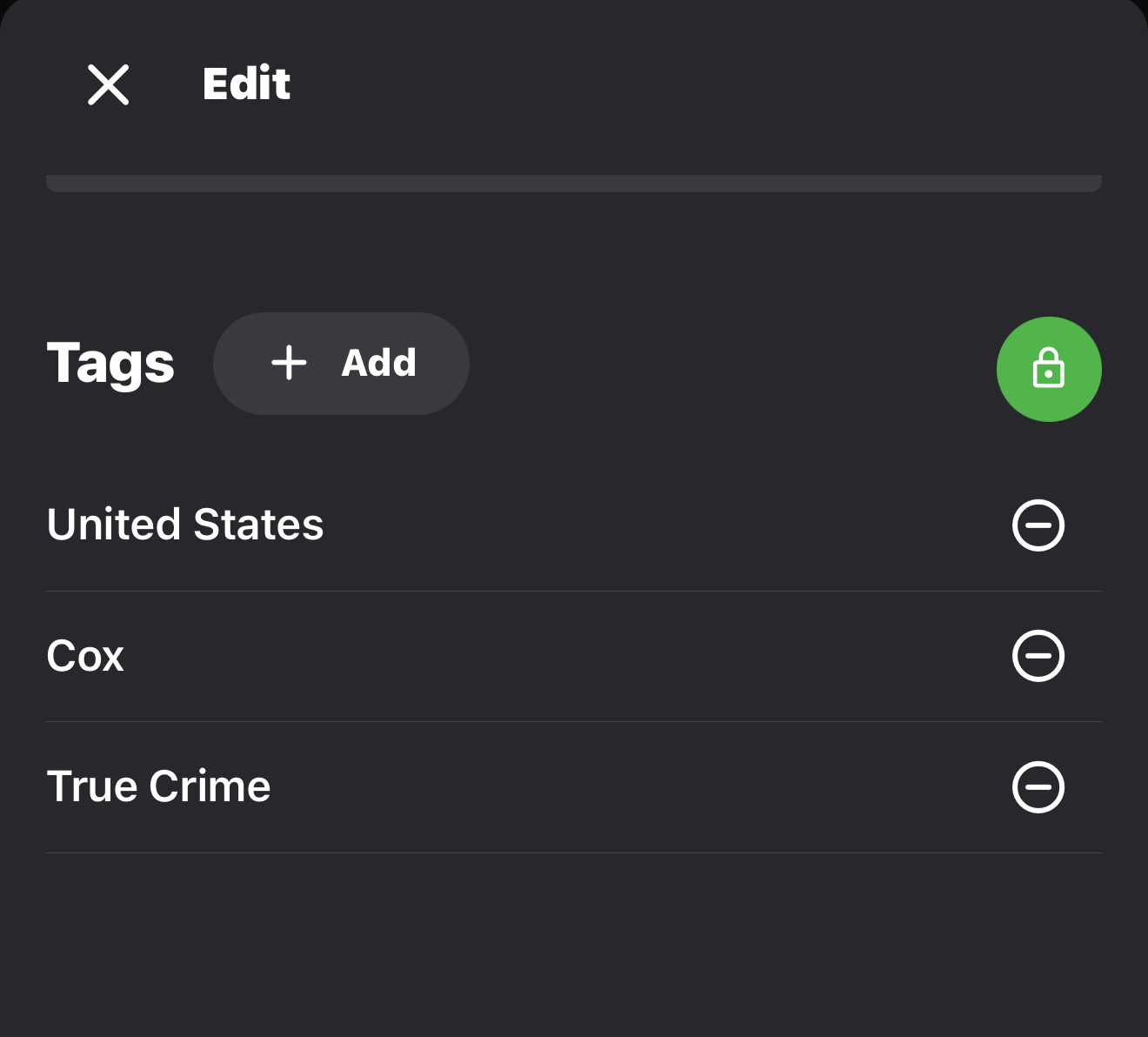
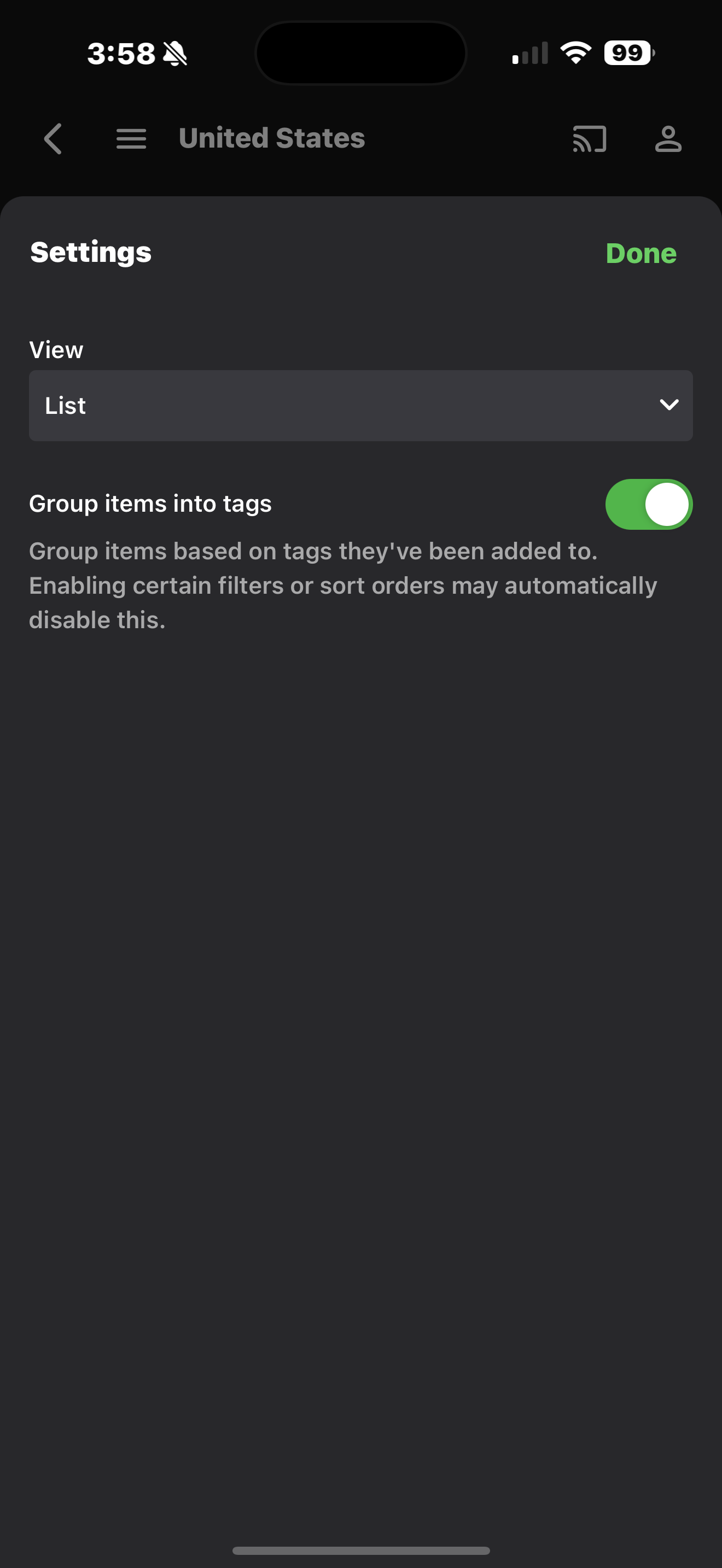
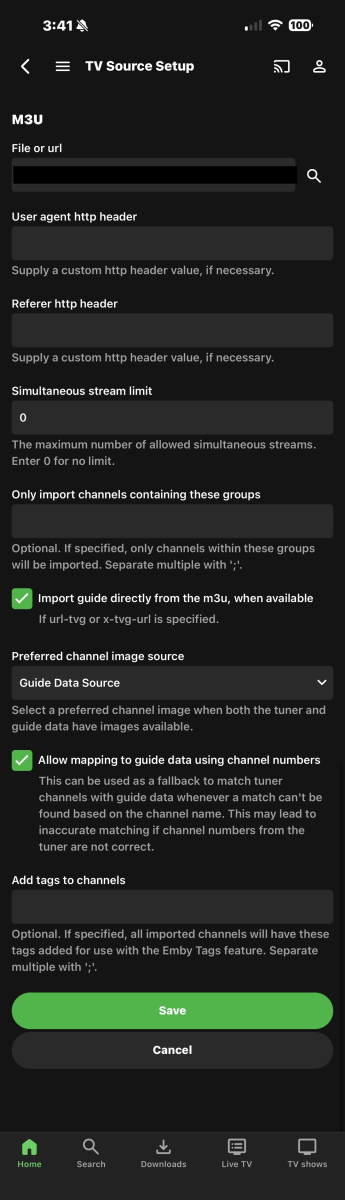
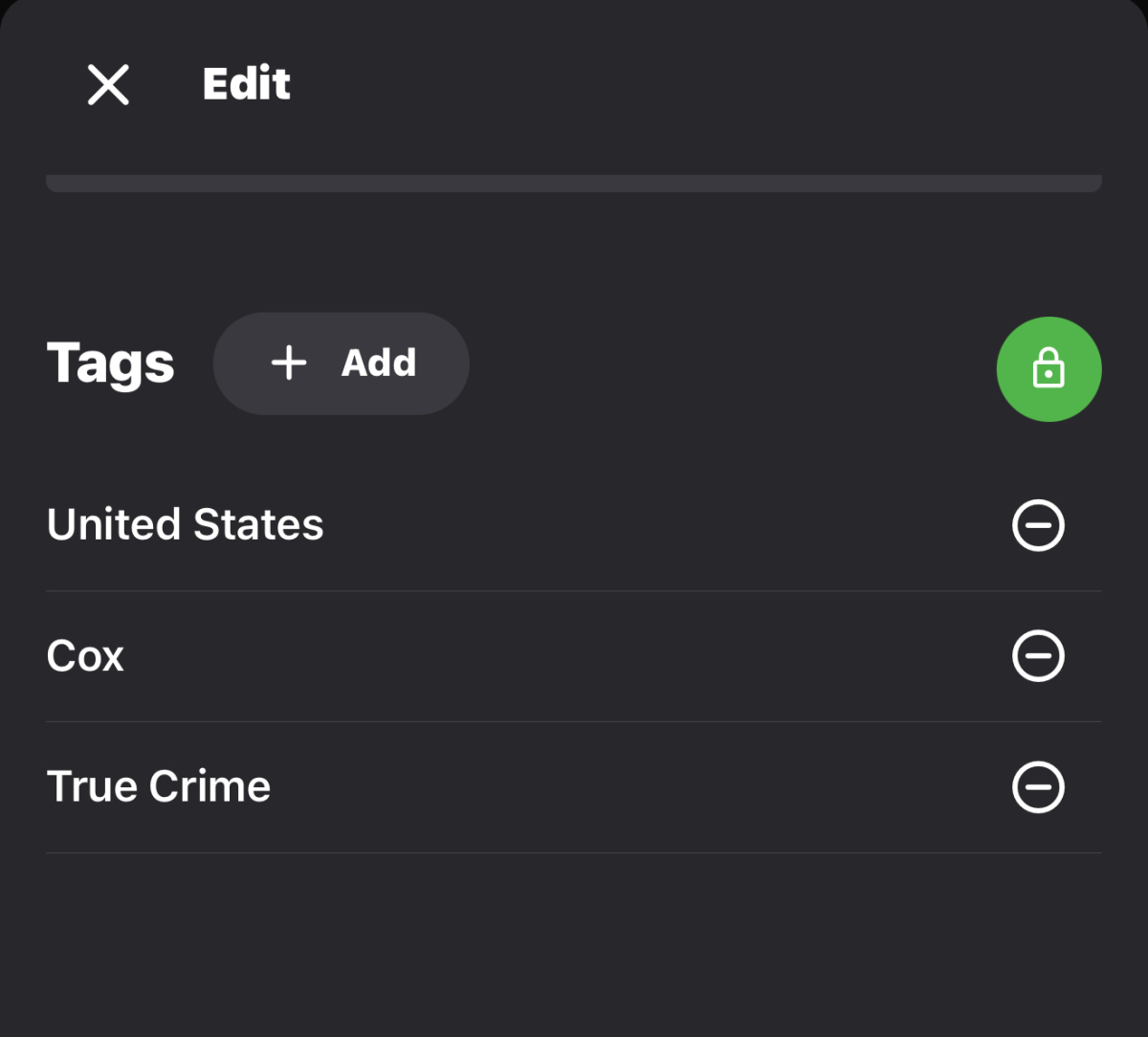
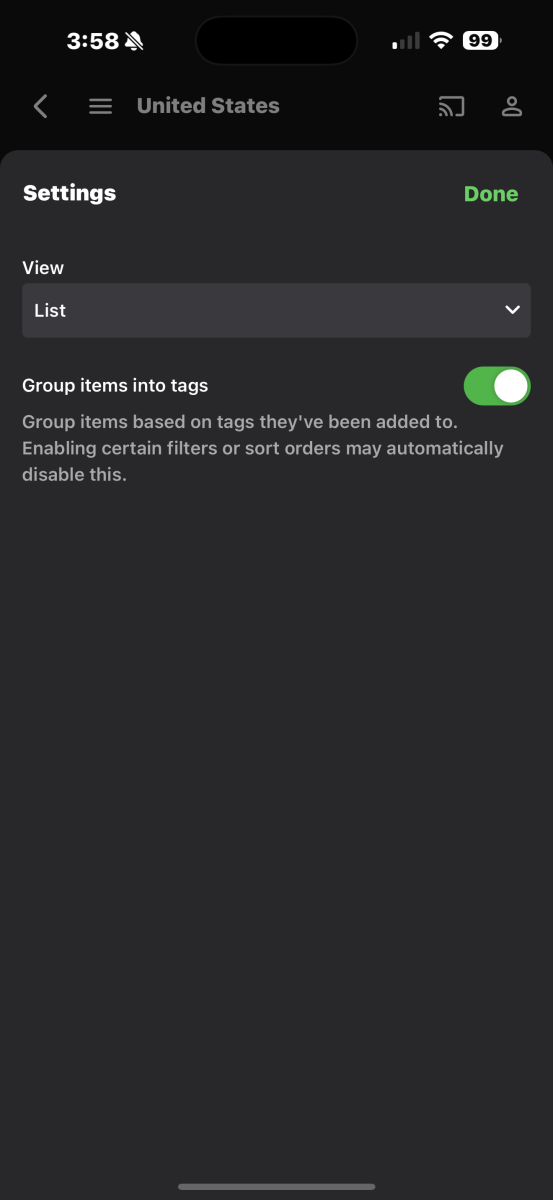
I’m not sure if I was looking where you suggested? My goal was to have multiple layers for easy channel navigation for example: Layer 1: USA Canada United Kingdom Mexico Latin America Europe Asia Africa Middle East Oceania International Layer 2: United States → PROVIDER LEVEL Only the U.S. has this level: USA ├── DirecTV ├── Spectrum ├── COX ├── Xfinity (if detected) ├── Roku ├── Tubi ├── Peacock ├── Amazon Prime Linear ├── Paramount+ ├── MAX ├── Discovery+ ├── ESPN+ ├── Local Now ├── ABC ├── CBS ├── FOX ├── NBC ├── PBS ├── CW ├── MyTV ├── Univision ├── Telemundo └── Others Canada → PROVIDER LEVEL (Simplified) ├── Bell ├── Rogers ├── Shaw ├── Telus ├── Amazon Prime Linear ├── Sportsnet ├── TSN ├── CBC ├── CTV ├── Global └── Others United Kingdom → PROVIDER LEVEL ├── Sky UK ├── BT Sport ├── Now TV ├── Amazon Prime Linear ├── BBC ├── ITV ├── Channel 4 ├── Channel 5 └── Others Mexico → PROVIDER LEVEL ├── Izzi ├── Sky Mexico ├── TotalPlay ├── Amazon Prime Linear ├── Televisa ├── Azteca └── Others CONTINENT MODEL for EVERYONE ELSE (No Providers) Latin America ├── Argentina ├── Brazil ├── Chile ├── Colombia ├── Peru ├── Venezuela └── Others Europe ├── France ├── Germany ├── Italy ├── Spain ├── Portugal ├── Netherlands ├── Belgium ├── Sweden ├── Norway ├── Finland ├── Romania ├── Poland ├── Turkey ├── Russia └── Others Asia ├── Japan ├── South Korea ├── India ├── Indonesia ├── Malaysia ├── Philippines ├── Taiwan ├── Thailand └── Others Africa ├── South Africa ├── Nigeria ├── Kenya ├── Morocco ├── Algeria └── Others Middle East ├── UAE ├── Qatar ├── Saudi Arabia ├── Kuwait ├── Iraq ├── Jordan ├── Israel ├── Palestine └── Others Oceania ├── Australia ├── New Zealand └── Others I have tried to tag on multiple levels in the channels metadata: I also have tried to setup the view group by tag: But every group or tag lands in the root default channel display group which causes a lot of scrolling from the beginning: USA - ABC USA - CBS USA - FOX USA - NBC USA - PBS USA - CW USA - MyTV USA - Peacock USA - Spectrum USA - Local Now … Canada - CBC Canada - CTV … United Kingdom - BBC United Kingdom - ITV United Kingdom - Sky … Europe - France Asia - Japan Latin America - Mexico Etc… I was hoping to make navigating through my channel lineups easier but I don’t know if it’s already been implemented on Emby and I just don’t know what I am doing, or if it’s not an available feature, if it wasn’t was hoping that it would be taken into consideration as a feature request?
 1 point
 -
Actually, the ffmpeg log makes sense. The video and audio are both being copied without transcoding, but the SRT subtitles are being converted to VTT, so the whole stream is being remuxed in an HLS container (not because MKV is no good, but because HLS is what Emby uses). Ffmpeg is invoked for remuxing even when no transcoding is required. So the only issue is the apparently spurious reporting of bitrate reduction, which is clearly not happening. Files whose embedded subs are not SRT will not need this doing, which is most likely why the differences. As SRT is so universal, I don't know why it is being converted to VTT - maybe for some client? Paul1 point
-
It shouldn't matter but I guess I would do the ones listed later.1 point
-
I believe the latency of AirPods is around 100-200ms depending on various stuff1 point
-
As I said, I'm using my Airpods as my PC headset for gaming and it works perfectly fine. And in that case there's no time for trickery, every ms of delay is obvious immediately1 point
-
This right? Emby for Android TV/Fire TV and Emby for Roku Logs These apps have the option to send an app log to us electronically. You enter the settings page and turn on the "Debug Options". Now there will be a new tile on your home page settings row (or menu option on the user menu at the top) labelled "Send Log". Reproduce your problem and then use this button to send the log. Then add the following information to your report in the forum: Exactly what you were doing and what happened. Include the name of whatever you played if it is a playback problem The time you sent the log (in Eastern Time please - UTC -5) The name of the Emby user on the local server that was logged in at the time I’ve sent in the post after, I did solve the problem about the playback more or less, have some little problems with the remote connection. Trying to assign a static Ip on the server at the moment.1 point
-
I know this issue is being covered in a few different posts at this point, but it is disappointing that it has been over a month and there is still no significant engagement from the devs to address the actual problem. @Zelig has helpfully started a new post to consolidate this issue. Please add your support there. I don't know how many people are following this topic, so I will politely mention all of the posters here who have either already stated their support for fixing this problem, or at least are directionally aligned with not breaking things in the software that used to work. Not that I want to put words in anyone's mouth or attribute any particular position. I'm just asking everyone here to please read the new post. Anyone who wants to see this changed back, or just wants the devs to attempt to make a really convincing explanation as to why this is an improvement, please look at the new post and give it a +1 (and perhaps also a comment if you are feeling exceptionally passionate). @Halliphax @xLifu @spard4 @cptlores @yetisquatch1 point
-
Possibly.1 point
-
Hi, Thanks for the suggestions . I have started to impliment some of them before the posts above.from the initial feedbacks, and I will add as many as I can. Just be aware though that I really don't have much time at all, so it will happen when I can allocate time to it. Thanks.1 point
-
I prefer the AndroidTV app over the universal one too - Just saying...1 point
-
Not looking for enhancements, just want working trailers. The universal app is unpleasant to use. The Android TV app is snappy and far better imo.1 point
-
That is my understanding, which is why I am bumping the interest in the topic to complete the start time offset. The start time offset is the critical functionality that allows for this type of simulated TV feature to work. Otherwise, it may as well just be a playlist.1 point
-
The Library is set to Mixed Content because I have both Movies and Shows. There is no option to see them both on the same page, and that's why I was using Folders. When set to Folders, they were being displayed all together as content, not as Folder. Now they are together, but as Folders, and each Movie or Show has the name of the Folder instead of the actual Movie/Show.1 point
-
Two of my Libraries lost their "Date Added" order, but the others are fine? Those who lost their order also lost their customizations, reverting to the default pictures and other settings I had made for them.1 point
-
@LukeChannelUp/ChannelDown on the remote triggers PageUp/PageDown events, not Channel Up/down events. I don't think you can just remap these in a simple way as we still need Page Up/Down for navigating list views. Maybe we can respond to page up/down events as channel buttons during playback. Edit: Forget that, I don't think it's worked that way for while. We just need to respond to PageUp/Down events for channel changes.1 point
-
If y'all inflict auto-preview ala netflix on me I'm bringing a mob with pitchforks1 point