Leaderboard




Popular Content
Showing content with the highest reputation on 11/13/25 in all areas
-
I would assume the OP refers to for items within the collection, Collection view.2 points
-
I would keep the mini you have now, and install windows on it2 points
-
I personally can't even think of a case where I'd want to search multiple terms individually (maybe searching a song title AND artist?) I think it is very much worth defaulting to quoted searches behind the scenes. The speed improvement is massive, often times taking less than a second to return results.2 points
-
There was only one thing I preferred about the android version that the android TV did not do and it seems like they’re taking it away. So if you had the section in the home screen settings, checked that says “use a layout on the home screen that shows a detailed preview of the selected item”. With that you could scroll across my media and above that you would have a random series or movie from that particular section that would show up and it was just a neat little thing when you have a ton of stuff sometimes it was nice to see something random that would catch your eye. But otherwise the android TV version is far superior. It’s smoother the icons load faster. For instance, I am Onn Pro only 4k and I’ve also tried it on a GX1 rocktek rtd1325 chip which has 4 GB of RAM. And from launch it takes the android version about 10 seconds to load the icons that are on the screen and then as you scroll down, it will load the icon on the far left first and then slowly glow across sometimes other times it’ll load icons in the middle, but leave the far left and right icon off until you scroll down and back up. On the android TV version it is almost instant that the icons load up and as I scroll down, it takes two seconds if that for the icons appears they go across the screen. And you never end up with missing icons loading. The voice command works better and you have a regular keyboard if you don’t want to use the voice rather than the weird ABC layout.2 points
-
Yes, thank you. I knew about this function and had enabled it. It still is different from before the move to 4.9.1.80 because even though the extra layer is removed, the movie still gets treated like a folder in the "Folder" view and so the actual folders are now inline sorted with the rest of the movies instead of all presented first like before. I guess I prefer the old way and didn't know if that functionality was going to be restored as well.2 points
-
Following up on the earlier thread Home button only pauses, I figured I'd post this separately since it's a related but distinct issue that still needs attention. When you press the Home button on Android, Emby doesn't actually end or time out the current session and just pauses playback instead. This means that if you later reopen the app (even a day later), you're still logged in. This completely bypasses the intended PIN protection and now gives any other user full access to your protected libraries, plus full access to the server configuration settings. In that previous thread, @Luke mentioned that Emby should automatically time out after 10 minutes, but that's not working as intended. I've confirmed this multiple times on different Android/Google devices. I can press Home and leave the app closed overnight, but when I open Emby again the next day I'm still logged in. Could we please get clarification on whether this behavior is expected, and if not, when a fix might be implemented? This seems like a significant security concern, especially on shared devices, and it's worked like this for well over a year now as far as I know.1 point
-
Seeing this occur as well. Multiple issues with the latest versions of both apps on Google/Android TV. Turned off trailers as they were locking up playback. Now seeing issues with TV shows playing in succession as mentioned here, as well as some movie playback. Had 0 issues before most recent updates. Will try to get logs1 point
-
I had to remove one of the devices. Five devices are allowed and I had 6. I thought I had 5.1 point
-
Ok. I prefer Emby’s collections, etc, but want the uncompressed audio more. Would love to be able to ditch Infuse.1 point
-
Hi, not currently, no.1 point
-
Yes the unused ones should be removed. Thanks.1 point
-
Yes… But not related to this stream. Another person, in this case, was streaming and transcoding. I’ll get a clean log next time it occurs and upload.1 point
-
It will be resolved in Emby for LG 1.0.49+. Thanks.1 point
-
It would be nice to be able to display videos in a Collection as a TABLE. Right now the display style is not selectable for COLLECTIONS.1 point
-
Will lookout for that response from @ebrthen. Thanks @Luke1 point
-
Think you may have solved it. Changed it from mixed to music now it's fine1 point
-
What is the harm in restoring Folder View to give everyone flexibility in folder organization? While I readily admit that my folder organization by my own custom pseudo-genres is slightly redundant, I really like the fact that it offers me two related but distinct ways (Folder View and Genre View) to navigate my library. Other people have pointed to folder structure based on Director names, or Decades, both of which make a lot of sense for organization. And I prefer this view to literally anything else. My mixed library has content that is neither Movies nor TV (random viral kiddie music videos, for example) and @Luke's collapsed Movie/Show tab is going to force me to literally add a collection for every folder in the library. This is just obtuse, given that the titles already exist in a folder, and my kids were all quite happy navigating this content using Folder View. And I'm not going to segregate every single dinky little piece of non-movie/non-tv content out into a separate library. For me, the real underlying issue is my ability to keep related titles located adjacently in my file system. If I wanted to make a backup copy of a particular collection of titles to loan to someone, I want to just be able to pull a single folder (and subfolders) onto a portable hard drive and be done. I don't want to go hunting around for up to two dozen titles scattered around in a flat file structure. Organizing things on my terms allows me to know what I have, know what I might want to add, and I can manage it easily. It seems to me that the power users and decision-makers here are making decisions to cater to those with massive libraries and/or users of Radarr. Maybe this is the majority of users. But I don't understand why both groups can't co-exist. Could someone link to the enhancement post that started this entire thing? Something about the folder icon not being big enough and confusing people? I still don't understand why this change is considered to be a good idea, and I totally agree with @halitayarcithat this change is fixing something that wasn't broken. And it makes things more confusing by treating folders with movies different than folders with tv shows:1 point
-
Having the option would be great.1 point
-
Sorry but you say "it will be more of a real folder view going forward", Is there anything more realistic than letting each user choose how their folders will look, instead of it being forced like in version 3.9?1 point
-
I just hope Luke allows the folder system that has been working for years to continue functioning, because otherwise, for many, Emby may remain stuck on version 3.8.1 point
-
Well, maybe I was the only one, but when I installed the beta version and saw the folder problem, I mentioned it and went back to the stable version 3.8, praying that it wouldn't be included in the stable version 3.9, but sadly it has been.1 point
-
I guess that it was requested by a lot of people. And no one stod up a said it was a bad idea1 point
-
This is not a solution in my opinion because when you have over 1500 films already arranged in early folder formation, the amount of time it will take is huge. Especially when my files in the folder are named like: "01.mp4" for the video and "landscape.jpg", "backdrop.jpg", "poster.jpg", "01.nfo" under "12 Angry Men (1957)" folder. I have to change the names to "12 Angry Men (1957).mp4", "12 Angry Men (1957)-landscape.jpg", "12 Angry Men (1957).nfo" etc. Now try to multiply this process by 1500... I will never understand why they tried to fix something which was not broken...1 point
-
Yes… Actively watching the show… “Are you still watching” is turned off. My original comment was in the response to But it looks like my thread got moved to its own topic.1 point
-
Was thinking maybe the all language switch to show them but that could be a mess also. Not sure on quality as they will be 720/1080, but really will only apply to something older anyways. Newer ones will/can end up being the same image as fanart.1 point
-
Is opp using Sonarr? That might delete files on reimport. Sonarr does this when updating or upgrading media files, all image, sub and the like are deletet. As is would see those as new.1 point
-
Thanks Luke - hopefully a fix for the LG and Firestick will come along soon. I too have an LG tv (OLED 65CX6LA) using firmware 04.63.25 and did the whole uninstall , unplug and then reinstall using the app from the LG store - Emby for LG 1.0.47. I'll try the firestick using the dedicate android emby app as the "standard" one comes back with youtube error #15.1 point
-
@FordGT90Conceptstart you stopwatch and stop it. Then start your stopwatch when clicking app icon and click the hide button and stop after app load. What do you see ?1 point
-
I believe the long animation is simply to cover the slow loading of the underlying libraries, and is not itself the cause of any delay. Paul1 point
-
I think you got it fixed. Non-beta still crashes and beta does not. Unrelated note: the intro animation on this app is way too long.1 point
-
Yes the delete dialog did appear and I confirmed the deletion. But... from a user point of view, when you are deleting a few songs and albums, after a while you tend not to read the deletion dialogs and I accept there may have been a chance I could of deleted a wrong album. But I would never have thought there would be a chance to delete my entire music collection. I just dont think EMBY should have the ability to delete your entire music collection. Just one click of the button and its all gone. Can I request you add a piece of code that checks for this: ---------------------------- If "the deletion folder" = "Library folder" display message "unable to delete this file" otherwise Delete folder ----------------------------- In my case the code would look like this and would follow the green highted code and therefore safeguard my entire music collection If "/Shared Musc/Music" = "/Shared Musc/Music" Display message "unable to delete this file" end of process otherwise Delete folder ----------------------------- Hope this all makes sense FYI - I'm thrilled to be able to use EMBY, its the best Media server out there by far, beautiful screens and a powerful server. I truely appreciate all the teams hard work that goes into it.1 point
-
One possible workaround is to use something like mergerfs (https://trapexit.github.io/mergerfs/latest/) and merge your multiple library roots into a single mount-point and add that to Emby. mergerfs can deal with disappearing and reappearing branches just fine (https://trapexit.github.io/mergerfs/latest/error_handling_and_logging/#branches-disappearing-reappearing), just note that Emby will be continuously deleting and adding items from that branch when it disappears and reappears respectively.1 point
-
@Luke having to view purely just movies or TV shows defeats the object of having a mixed folder in the first place. I’ve mentioned before that a default view of both would resolve this issue for me, but the question was simply why don’t movies show metadata in the folder view when the TV shows do.1 point
-
I just upgraded to 4.9.1.80. Following the upgrade there was a change to the folder structure for my Mixed Content Library. Before, when I would choose Folder View, all of the Folders that were actually Folders and contained multiple items would be display first, followed by all of the Movies. Now, all movies are being treated like folders that contain subitems. So I click on a movie folder to review the lone item in the folder and then click on the movie to move into the play screen. I wasn't sure if that was by design or if there is some new setting I need to configure. It was nice to have all the actual folders grouped together first, followed by ungrouped Movies. Now everything is being treated the same.1 point
-
Hi, but don't you want a personal media server and not one that puts all of your information into the cloud to sell to the highest bidder. That sounds a bit invasive, no?1 point
-
Thanks for following up.1 point
-
I can attach a smaller file generated from a shorter youtube video for testing.1 point
-
Thank you very much @hatharryWorks great !!! Appreciate it1 point
-
I wasn’t sure if you were asking for that screenshot. At any rate the Emby for android version is working great (solved the trailer playback issue) and I have uninstalled the TV version1 point
-
Ok I fixed it. I was logged in with the wrong account. I haven't had to log into it for ages. I guess I forgot which account I was using. I can now see all the admin options etc again. All good thanks!1 point
-
Hey, so I have upgraded my server to 4.9.1.90 and using the latest windows 11 release of emby desktop I have started downloading some torture test of things that used to cause issues: large show, but only 10 are unwatched (90 episodes in the total show though) then while that was running: download 3 movies, 2 are in a collection then download another show, with 10 unwatched + click the "autodowload" option, as well as new only. I have just watched it complete them all, including converting some, perfectly. It does seem that it waits until the last show (which is correct) is completed i.e. the first one was already downloading, rather than keep adding new things.. it waited, then once that was done the queue filled back up. So yes, I don't know what you changed (as glanced at the changelog and didn't see anything), but it is most certainly - at least on my device - fixed Thank you1 point
-
I'm so dumb. Thank you very much it was a browser issue. I don't know why the videos played for a short few seconds.1 point
-
I had a chance to update and test 4.9.1.90 again. I think this has something to do with the quoted searches change. Things like (Kanye West, Kid Cudi, Ice Cube, Teyana Taylor, Andy Clausen) all take 3-5 minutes to return results, but something like (Jay-z, common, Rihanna, Ludacris, C418) comes back super fast. HOWEVER, putting any of the multi-word searches within quotes like "Kid Cudi" returned results super fast. I am running Windows 11 on an NVME drive with 10GB of ram allocated to my embyserver process. Library of about 2 million songs, database vacuum on every boot. @Luke I am staying on 4.9.1.90 since I have the quote workaround. Let me know if there's something specific you'd like me to test.1 point
-
Hi, yes it makes sense. Thanks.1 point
-
I'll take a look at it in case something has changed recently to cause this1 point
-
I appreciate your honest assessment. But I also still want it fixed and supported going forward, so I am posting yet again. Until then, I'm also planning to revert back to 4.8 and stay there indefinitely. As I am unwilling to blow up my folder structure, the only workaround I have for my use case would be the long-awaited nested collection upgrade, along with a couple of new enhancements to customize precisely what titles and collections are allowed to appear on any given navigation tab (i.e. to control the designation of "Movies" vs "TV" vs anything else I want to enumerate within a library). However, even if all of those enhancements were implemented, it is painful to consider how much time it would take me to create a collection for every folder in my library, just to get them to group together and display the way they used to. And having to create so many collections simply to replace folders would honestly make the "Collections" tab worthless to me, also, without having more customization options there, too. Just to reiterate two points I have made previously: this issue is significant enough that I, along with a handful of other users, literally created forum accounts to report what we thought was a bug. Assuming that not everyone in this slightly more "old-school" cohort is not an early adopter, there will be more users stacking up over time who are unhappy with this change. Certainly the fact that none of us are beta testers would suggest that you're going to have more people upgrading late than early. this issue is relatively easy to fix, in that the only thing that needs to revert is a flag in the metadata settings. The 4.9 UI still works the way I want it to with a 4.8 database. So literally nothing has changed in terms of the UI coding--all that needs to be changed is within the metadata engine. It's not necessarily simple to deploy to the wild--there are going to be ramifications and some form of database rebuilding for certain users depending on whether they upgraded to 4.9 and clobbered the database, and so on. But providing a fix sooner rather than later could potentially help mitigate that impact and also give all of us a path forward. And there are lots of ways in which this could be fixed. A per-library toggle would be sufficient, with the risk that users might not understand it and could whack things from time to time (and it would slightly complicate release testing by adding yet another configuration option to verify). Less drastic would be to simply restore "Folder View" and instead create a separate "Filesystem View" for whatever users Luke was trying to accommodate with this change--he could even implement the new "folder" icons he had mentioned in a previous post. And then literally everyone would have the view that they want.1 point
-
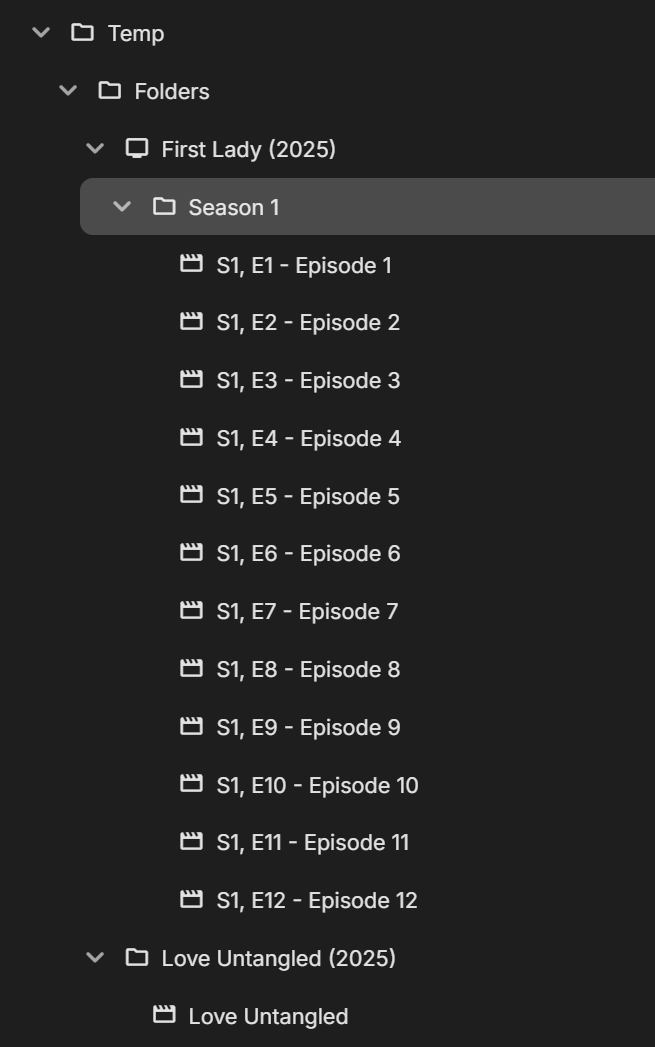
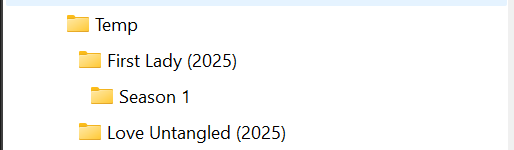
hello - so i am back to this after 6 years! recently i upgraded my server and did a backup/restore, no big issues. however, i noticed that this embedded folder is back. i don't know how i resolved it last time. i checked the <CollapseVideoFolders> flag, it was false since i did an emby fresh install, but even after changing it, scanning folders, rebooting server, the issue is still present. i keep a TEMP folder where i put stuff that i am not sure about whether to permanently add to my collection. the library is setup as MIXED CONTENT. i keep the library in FOLDER view because i like to see everything together and don't want to navigate to SHOWS and MOVIES views in order to see everything in TEMP. i have TV shows in there and movies. when i select a movie, i have to go through an extra layer before i get to the details page. is there any way to stop this behavior?
 1 point
 -
Unless its something built-in, I dont run extensions/ad blockers on my web browsers. I'll check if it works on Brave... Thanks for confirming its a "not just me" problem.1 point
-
HI, running a library scan will do it. Thanks.1 point
-
I suspect I took my screenshot in Emby Theater on Windows and yours is possibly taken in the web browser? Mine look as blurry in Chrome, I think it's just Emby scaling the picture. Nice work BTW!1 point